Magento 2 Experten — Hyvä Theme, Tailwind CSS & SEO aus einer Hand ›

Magento ERP Integration: The Central Nervous System of Your E-Commerce Success

DEEP DIVE Magento ERP Integration

Magento ERP Integration: Your Store as Part of the Value Chain

A store that doesn't communicate seamlessly with your internal processes becomes an isolated island. ERP integration connects the "face" of your business with the "brain" of your operations.

1x
Single source of truth
Real-time
Webhooks for stock & orders
0
Lost orders during ERP downtime
REST/GraphQL/SOAP
The right path for every ERP

Anyone running an online store on Magento quickly realizes: the software is a powerhouse for selling. But as order volume and complexity grow, the store alone becomes an isolated island if it doesn't communicate seamlessly with your company's internal processes. Magento ERP integration is the most critical technical interface in your entire IT landscape. It connects the "face" of your business (the store) with the "brain" of your operations (the enterprise resource planning system).

As a specialized Magento developer at Mironsoft, I see every day how a poorly implemented interface can be the biggest growth blocker – while an excellent integration multiplies your efficiency. In this guide we dive deep into the world of automated data flows and explain how we turn your store into an integral part of your value chain.

The connected business – mironsoft
AI generated
Chapter 01

Why ERP Integration Isn't Optional for Growing Stores – It's Mandatory

Imagine a customer orders a product shown as "in stock" in your store, but it's already sold out in the warehouse because a large customer placed an order through inside sales at the same time. Or imagine your employees having to manually retype hundreds of orders from Magento into your accounting system every morning. That's not just error-prone – it burns valuable work hours you should be investing in marketing and strategy instead.

A professional ERP integration solves these problems radically. It creates a "single source of truth". Information about stock, prices, and customers only needs to be maintained in one place and syncs automatically everywhere else. For you, that means:

  • Data consistency: Never again conflicting stock levels or incorrect prices.
  • Scalability: Whether you process 10 or 10,000 orders a day – the technology scales without additional staffing effort.
  • Customer satisfaction: Your customers get instant shipping confirmations and tracking numbers as soon as the warehouse scans the package.
  • Better controlling: You have real-time insight into your margins and revenue at all times.
Chapter 02

Finding the "Master System": Who's in Charge?

One of the most important strategic questions in Magento ERP integration is defining data ownership. In a professional architecture, the ERP is almost always the leading system (master) for master data like product information, base prices, and stock. Magento, on the other hand, is the leading system for user experience and the actual transaction moment.

At mironsoft, we work with you to build a clear data model:

  • Products: Created in the ERP or PIM and transferred to Magento.
  • Stock: The warehouse reports stock changes to the ERP, which immediately pushes them to Magento.
  • Prices: Base prices come from the ERP; complex discount rules or voucher campaigns are often managed in Magento.
  • Orders: Generated in Magento and immediately sent to the ERP for fulfillment.
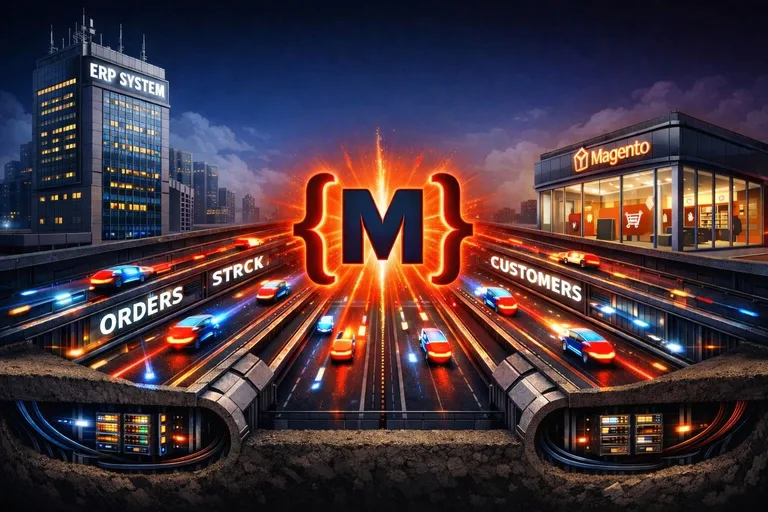
The data highway between store and ERP – mironsoft
AI generated
Chapter 03

The Technical Paths of Integration: REST, SOAP, or GraphQL?

How do Magento and your ERP communicate with each other? There are several technological approaches, and we choose based on your system landscape.

A. REST API: The Modern Standard

Most modern ERP systems (like weclapp, Xentral, or Microsoft Dynamics 365) communicate via RESTful APIs. Magento 2 offers an extremely powerful interface for this. We use JSON as the data format, which keeps transfers lightweight and fast. REST is our preferred choice for most integrations.

B. GraphQL: High Speed for the Frontend

Especially when we deploy PWAs or Hyvä Themes, we use GraphQL. It lets us query exactly the data fields we need at that moment. That reduces server load and noticeably speeds up communication between systems.

C. SOAP: The Enterprise World's Legacy

Older SAP installations or specialized industry software often still use SOAP. Magento supports this, but the overhead is greater. If your ERP only speaks SOAP, we build robust wrappers that translate this data for Magento.

Chapter 04

The Challenge: Real-Time Sync vs. Batch Processing

A common mistake is trying to sync everything in real time. That can slow down your store if the ERP system responds slowly under heavy load. At mironsoft we rely on a hybrid model:

  • Real-time (webhooks): Critical data like orders or stock falling below threshold is transferred immediately.
  • Scheduled (cron jobs): Master data updates, like new product descriptions or image refreshes, are sent at intervals (e.g., every 15 minutes) to smooth out system load.
  • Message queues: We use RabbitMQ to buffer data packets. If your ERP system is ever offline for maintenance, no orders are lost. They're held in the queue and automatically transferred once the connection is back.
Chapter 05

Connecting the "Big Players": SAP, Microsoft Dynamics & Co.

Every ERP system has its own quirks. I have experience with the leading market players:

SAP Business One & S/4HANA

Connecting to SAP is the ultimate discipline. It often involves complex pricing logic (customer-specific prices) and huge data volumes. Here we use specialized middleware or build custom connectors that talk directly to SAP's OData interfaces.

Microsoft Dynamics 365 / Navision (NAV)

Dynamics is extremely flexible, which often leads to highly customized database schemas. We make sure the field mappings in Magento align exactly with your Navision structure, so special fields (like batch numbers or expiration dates) are transferred correctly.

Mid-Market Solutions: weclapp, Xentral, JTL

These systems are often "cloud-native" and offer very good APIs. The focus here is on fast implementation and a high degree of automation for shipping processes directly out of the ERP.

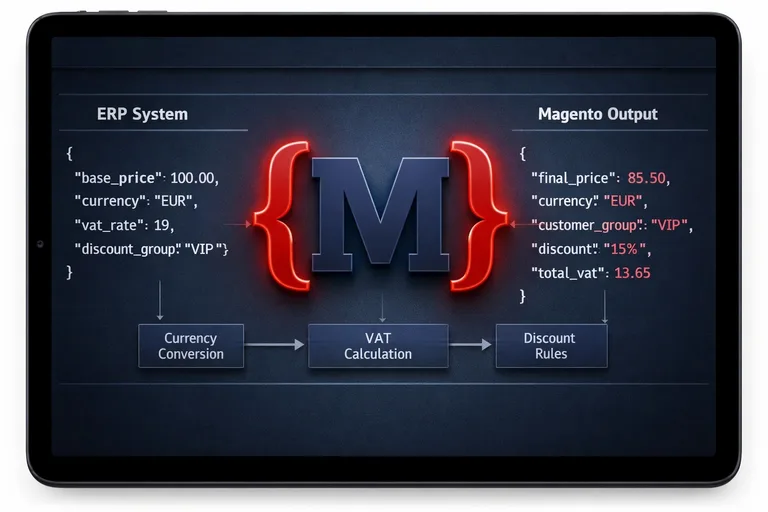
Perfect price mapping – mironsoft
AI generated
Chapter 06

B2B Special Case: Custom Prices and Quotas

In B2B, ERP integration gets even more complex. Often, each customer has their own price list calculated in the ERP. Making a store visitor wait while Magento asks the ERP for the price on every page load would ruin performance.

We solve this with price-indexing strategies. We import the pricing logic or pre-calculate the prices and cache them in a high-performance Redis database inside Magento. That way B2B customers instantly see their individual price, while the computational load stays in the background.

Chapter 07

Why mironsoft Is the Right Architect for Your Interfaces

Building an interface is one thing – running it stably for years is another. As your technical partner, I go beyond pure coding:

  • Error management: I implement detailed logging systems. If a sync fails, we get an immediate notification with the exact cause of the error.
  • Data validation: We check data before import. A single bad character in the ERP must never break your entire Magento catalog.
  • Performance focus: We make sure API calls run asynchronously, so your customers' checkout is never blocked by slow third-party systems.
  • Experience: I know the pitfalls of data format transformation and ensure a clean "translation" between the two worlds.
Chapter 08 · Conclusion

Automation as a Competitive Advantage

In a market where margins are shrinking and customer expectations keep rising, manual data maintenance is your biggest enemy. A professional Magento ERP integration is the foundation you can scale your business on. It frees your team from monotonous tasks and minimizes sources of error. At mironsoft you don't get standard plugins that only sort of work – you get a tailor-made integration architecture that turns your store into a highly efficient sales machine.

Is your store ready for the next level of automation? Let's analyze together how to connect your ERP system perfectly with Magento.

Get a Free ERP Integration Analysis

Frequently Asked Questions (FAQ) About Magento ERP Integration

Which ERP system is best suited for Magento?

There's no single "perfect" system, since the choice depends on your company size and industry. Magento's open API structure makes it extremely flexible, letting it connect to almost any modern ERP. What matters is that your ERP system offers a capable REST or SOAP interface to enable bidirectional data exchange at a reasonable speed.

What's the difference between a direct connection and middleware?

With a direct connection, Magento communicates with the ERP's API without any detours, which reduces complexity and saves cost. Middleware, on the other hand, acts as a translator between systems and makes sense when data needs heavy transformation before transfer, or when multiple channels (e.g., eBay, Amazon, and your store) need to be served simultaneously. We advise you individually on which architecture is the most stable and cost-effective for your specific use case.

How long does implementing an ERP interface take?

Project duration depends heavily on the quality of the ERP's documentation and the complexity of your data. Simple, standard connections can be implemented within 4 to 6 weeks, while complex enterprise integrations (e.g., SAP with customer-specific prices) can take several months. Much of that time goes into precise field mapping and the subsequent thorough testing phase, to rule out errors once live.

Can stock levels be synced in real time?

Yes, that's one of the main goals of a good integration. We use webhooks that immediately send a signal to Magento on every stock change in the warehouse, updating the product in the store. If your ERP doesn't support webhooks, we implement high-frequency "delta syncs" that only query changed stock levels, so your store's performance isn't affected.

What happens if the interface fails or the server goes offline?

We build our interfaces on a "fail-safe" principle. By using message queues (like RabbitMQ), all data packets get buffered if a system is temporarily unreachable. As soon as the connection is restored, data is automatically reprocessed in the correct order, so no orders are lost and your data stays consistent.

Can customer-specific B2B prices also be pulled from the ERP?

Yes, that's a standard requirement in B2B e-commerce. Since calculating these prices in the ERP can be highly complex, we develop strategies to either pre-calculate the prices and cache them in Magento, or – for smaller customer groups – look them up via a real-time API call in the cart. This ensures every customer sees their contractually agreed terms, without risking catalog performance.

How secure is the data exchange between Magento and the ERP?

Security is our top priority. We only use encrypted connections (HTTPS/TLS) and secure API endpoints with modern authentication methods like OAuth2 or dedicated API keys. We also implement IP whitelisting, so only your ERP server is allowed to communicate with your Magento store, effectively preventing unauthorized outside access.

Are images and PDF documents synced too?

Yes, transferring media data like product images, technical data sheets, or assembly instructions is part of a complete integration. We make sure these files are automatically optimized (compressed) for the web on import, so your store's load time doesn't suffer despite extensive documentation. Invoice PDFs can also be automatically uploaded to the customer account in Magento once generated in the ERP.

Can I keep selling while switching to a new ERP integration?

Absolutely. We develop and test the new interface on a separate staging system while your live store keeps running completely undisturbed. Only once all tests are successfully completed and data validation works perfectly do we switch the new integration live. This process is planned meticulously to reduce downtime or manual rework to an absolute minimum.

How do I handle different tax rates across different countries?

Tax logic is a complex topic that we usually centralize in the ERP. We configure the interface so Magento supplies the ERP with the necessary information (customer's country, tax ID), and the ERP returns or validates the correctly calculated tax amount. This is especially essential for cross-border trade (the OSS procedure) to ensure legally compliant accounting.

Does the interface also support partial deliveries and returns?

Yes, a bidirectional interface mirrors the entire lifecycle of an order. If the ERP reports that only two of three items were shipped, Magento automatically updates the order status for the customer and shows the partial delivery in their account. Return processes can also be automated so that a credit note in the ERP directly triggers a status change in Magento once the goods are received.

What happens if I change my ERP system in the future?

By using service contracts and a modular interface architecture in Magento, we keep dependencies as low as possible. If you switch ERP systems, we only need to adapt the connector portion of the interface, while the underlying logic in Magento stays intact. That protects your investment and keeps you technologically flexible for future business decisions.

Can different currencies be synced as well?

Yes, Magento is multi-currency capable, and we can configure the interface to pull daily exchange rates from your ERP or import fixed prices for different currencies. This ensures your international customers always see the correct price, and your ERP accounting shows no currency discrepancies when reconciling.

Are tracking numbers automatically sent to the customer?

Yes, that's an essential part of shipping automation. As soon as your logistics system or ERP creates the shipping label and generates the tracking number, it's transferred to Magento via the interface. Magento then automatically triggers the shipping confirmation email to the customer, containing a direct link to package tracking, which significantly reduces support workload.

How do I get my ERP integration project started with mironsoft?

It starts with a technical analysis call, where we take a close look at your ERP software and current processes. We check the available API interfaces and put together a detailed data mapping concept. Just send us a message or give us a call – we're happy to show you how we can merge your store and your ERP into an unbeatable unit.