Magento Performance Optimization: The Ultimate Guide for High-Speed Online Shops
DEEP DIVE
Magento speed optimization
Magento performance: every millisecond counts
In e-commerce, milliseconds decide between success and failure. An online shop that loads slowly is like a storefront with a jammed door — most customers turn around before they've even seen the product range. For Magento (Adobe Commerce), the undisputed heavyweight among enterprise shop systems, performance optimization isn't optional — it's a survival strategy.
All the numbers at a glance
Business case
-7%
Conversion rate: a delay of just 100 milliseconds can lower the conversion rate by up to 7% — for a shop with €1M in yearly revenue, that's €70,000 every year.
800→50ms
response time thanks to Varnish
-90%
JS weight with Hyvä
5x I/O
NVMe vs. classic SSD
↓ CPC
Ad-spend efficiency: a fast shop lowers your cost per click (CPC) in Google Ads, since your landing page's Quality Score rises significantly. Performance optimization is the investment with the highest ROI in all of digital marketing.
As a specialized Magento developer at Mironsoft, I don't treat speed as an isolated technical feature but as the single most important UX element there is. In this comprehensive guide we dive deep into the architecture of speed — from the server stack all the way to rendering in the browser.
Deep Dive
01
Why Magento speed isn't a luxury but hard math
Before we dive into the technical details of Varnish caches and database indexes, we need to understand why we go to this effort in the first place. Web performance is measurable revenue. With the introduction of the Core Web Vitals, Google made it unmistakably clear: if you're slow, you lose visibility. But it's about more than just SEO.
Studies show that a delay of just 100 milliseconds can lower the conversion rate by up to 7%. For a shop with a yearly revenue of one million euros, that's 70,000 euros — every single year. Performance optimization is therefore the investment with the highest ROI (return on investment) in all of digital marketing. A fast shop also lowers your cost per click (CPC) in Google Ads, since your landing page's Quality Score rises significantly.
02
The full-stack approach: performance starts on the server
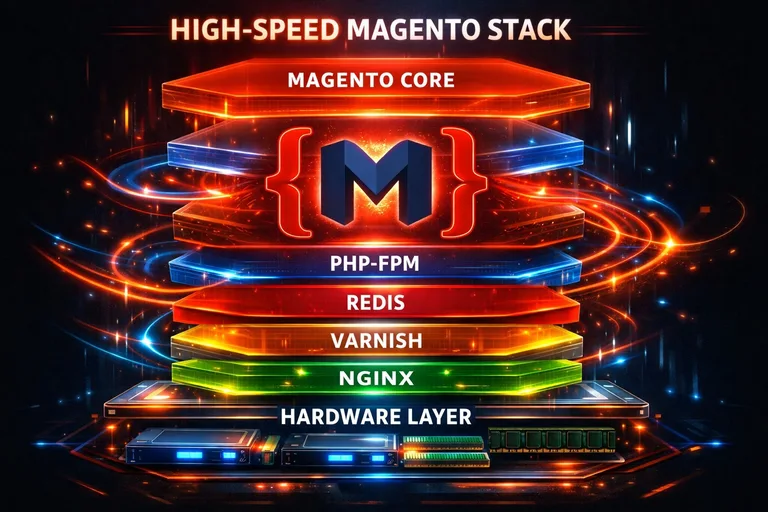
Many agencies try to solve Magento performance with a handful of frontend plugins. That's like bolting a race-car body kit onto a tractor. Real speed starts in the engine room — the server stack.
A. PHP 8.x and OPcache
Magento is a PHP-based application. Every millisecond the PHP interpreter needs to process the code adds to the Time to First Byte (TTFB). We consistently rely on the latest PHP versions, since each new release brings significant performance gains. Through fine-grained tuning of the PHP OPcache, we make sure precompiled code sits ready in memory instead of being regenerated on every request.
B. Redis for session and cache management
The database is often the bottleneck. To relieve it, we use Redis — an in-memory database. We offload both the Magento cache and user sessions to Redis. Since access to RAM is orders of magnitude faster than access to an SSD, this drastically reduces Magento's internal latency. A misconfigured Redis server, however, can achieve the opposite — the right memory management and eviction policies are key here.
03
Varnish Cache: the invisible turbo
Varnish is an HTTP accelerator and absolutely essential for Magento shops past a certain size. It acts as a "reverse proxy" in front of the web server. When a user requests a page that's already in the Varnish cache, it's served directly from RAM, without Magento or PHP ever having to spin up. Response times here often drop from 800ms to under 50ms.
The challenge with Varnish in Magento is so-called "cache invalidation." When you change a price, the cache needs to know instantly that the old version is stale. I configure your VCL (Varnish Configuration Language) precisely enough that your customers always see current data without ever giving up the speed advantage.
04
Database optimization: relieving the core
Magento uses a complex EAV database structure (Entity-Attribute-Value). That enables enormous flexibility, but with thousands of products it leads to gigantic tables and complex joins. A slow database is the silent killer of your performance.
- Index management: we make sure all Magento indexes are correctly configured and update automatically.
- Query analysis: using tools like the MySQL slow query log, we identify queries that take too long and optimize them through targeted indexing or code changes.
- Database cleanup: over the years, Magento databases accumulate millions of log entries, abandoned carts and unused attributes. A regular "spring clean" can work wonders.
05
Frontend optimization: when the browser becomes the bottleneck
Even if your server delivers data at the speed of light, rendering in the customer's browser can still ruin the experience. This is where the Core Web Vitals come in.
A. The JavaScript dilemma
Standard Magento loads hundreds of small JavaScript files. That blocks rendering. We use advanced techniques such as bundling, minification and lazy loading for scripts. An even more radical fix is switching to Hyvä Themes, which removes about 90% of the JavaScript weight. If a switch to Hyvä isn't currently possible, we use "Magepack" for smart JS bundling instead.
B. Image optimization 2.0
Images are often responsible for 70% of a page's total weight. We implement modern formats like WebP or AVIF, which are significantly smaller than JPEG at the same quality. We also use responsive images (srcset), so a smartphone user doesn't have to download the huge 4K banner meant for a desktop monitor.

06
Core Web Vitals deep dive: LCP, CLS and INP
Since 2024, INP (Interaction to Next Paint) is the new gold standard for interactivity. It measures how quickly the page responds to a click. In a Magento shop with a lot of JavaScript, that's often a problem. We optimize the browser's main thread by pushing non-critical tasks to the background (web workers) or eliminating them entirely. For LCP (Largest Contentful Paint), we make sure the main image (hero image) is loaded with priority (preload headers), while CLS (Cumulative Layout Shift) is eliminated through fixed size attributes on images and ad banners. Nothing annoys customers more than a button that slides away right as they click it.
07
Infrastructure: why NVMe and CDN make the difference
Software optimization has its limits if the hardware holds it back. We advise you on choosing hosting partners that specialize in e-commerce. NVMe drives offer up to 5x higher I/O performance compared to conventional SSDs — a blessing for the many small file accesses in Magento. For globally operating shops we implement a CDN (Content Delivery Network) such as Cloudflare or Fastly. This serves static content (images, CSS, JS) from servers geographically close to the customer — whether in New York, Tokyo or Berlin.
08
The mironsoft workflow: how we make your shop fast
Performance optimization isn't guesswork with us. We follow a structured process:
01
Audit
We measure the current state with tools like New Relic, Blackfire.io and PageSpeed Insights.
02
Staging optimization
Every change is first tested on a copy of your shop.
03
Implementation
We roll out the optimizations layer by layer — from the server all the way to CSS.
04
Monitoring
After go-live, we monitor metrics in real time to make sure speed stays stable even under load.
Speed is an investment, not a cost factor
A fast Magento shop is the foundation for everything: better SEO, happier customers, higher revenue and lower advertising costs. In a market where the competition is just one click away, you can't afford to be slow. As your technical partner, I bring the experience of hundreds of optimization projects to catapult your shop into the absolute top league of e-commerce performance.
Ready to see your competition in the rearview mirror? Let's speed up your Magento shop together.
Request a free performance analysisFrequently asked questions about Magento speed optimization
What's a good load time for a Magento shop?
A target for Time to First Byte (TTFB) should be under 200ms. For Largest Contentful Paint (LCP) — when the main content becomes visible — we aim for under 1.5 to 2 seconds. Anything under 2.5 seconds for the full page build is considered "good" by Google (the green zone), but in the high-end segment we target values under 1 second.
Does a faster server alone fix Magento sluggishness?
Only to a degree. An extremely powerful server can mask bad code up to a point, but it doesn't solve the problem of inefficient database queries or bloated JavaScript in the customer's browser. Real performance always comes from the symbiosis of optimized hardware, a perfectly configured stack (Varnish/Redis) and lean frontend code.
What's the difference between Full Page Cache (FPC) and Varnish?
Magento's internal FPC stores pages on disk or in Redis, but still has to invoke PHP to serve them. Varnish, on the other hand, sits as a standalone service in front of the web server and serves pages directly from RAM. That's far faster and massively relieves the server, since PHP never has to start at all for cached pages.
Why does my Magento shop keep getting slower over time?
Often this comes from a database overloaded with log entries, report data or abandoned carts. "Cache sprawl" or inefficient indexes can also be the cause. Without regular maintenance and technical monitoring, small performance killers accumulate and, together, noticeably slow the system down. We therefore recommend a monthly maintenance check.
What impact do installed extensions have on speed?
Every extension adds new code and often additional database queries. Especially poorly coded third-party modules can slow down the entire shop, for example by bypassing caching mechanisms. In every audit, we critically review which extensions are actually necessary and optimize or replace "performance hogs" with leaner custom builds.
Is a PWA the only solution for a fast frontend?
No, PWAs are often extremely complex and expensive to maintain. A more modern and efficient solution for most shops is Hyvä Themes. It delivers PWA-level speed while being built on Magento's classic structure, which halves development cost and greatly improves compatibility with existing modules. Hyvä is currently our gold standard for fast frontends.
How important is image optimization for Magento?
Images are the most common cause of poor LCP scores. With modern formats like WebP, we can often reduce file size by 80% at identical quality. Combined with lazy loading and correctly sized thumbnails, we make sure the browser only loads what the user is actually looking at, which massively improves perceived load time.
Does the number of products affect shop speed?
Magento is built to handle millions of products, but database queries grow more complex as catalog size increases. Category filters (layered navigation) in particular can get slow with large assortments. We solve this by using Elasticsearch or OpenSearch, so search queries and filtering no longer burden the SQL database but come blazingly fast from a specialized search index instead.
Can a CDN (Content Delivery Network) help?
Yes, absolutely — especially if you have customers across different countries or continents. A CDN like Cloudflare mirrors your images, CSS and JS files on servers around the world. A customer from the US then loads that data from a server in New York instead of a data center in Germany. This reduces physical latency and takes load off your main server.
What is "Time to First Byte" (TTFB) and how do I optimize it?
TTFB measures the time from sending the request to receiving the first byte from the server. A high TTFB points to server issues or slow PHP processing. We optimize TTFB through fast hosting (NVMe), PHP tuning, Redis caching, and above all a perfectly configured Varnish cache that bypasses PHP entirely.
Can Magento performance be improved without a developer?
Small things like compressing images before upload or disabling unused modules through the backend can be done by any administrator. Real enterprise-grade performance, the kind that hits Google PageSpeed scores of 90+, requires deep changes to server configuration and code, though. That's where the expertise of a specialized developer is essential, to avoid mistakes that could take the shop offline.
Does disabling flat catalogs help in Magento 2?
Yes, in modern Magento 2 versions Adobe recommends disabling flat catalogs, since the indexer has become so efficient that flat tables often create more overhead than benefit. We check your specific version and configuration and make sure you're using the latest best practices instead of holding on to outdated tuning methods.
What is "JavaScript bundling" and should I use it?
Magento's default JS bundling is often counterproductive, since it creates huge files that block the browser. We instead rely on smarter solutions like "Magepack," which only bundles the scripts actually needed for each page. Even better is skipping Magento's heavy default JS altogether by switching to a Hyvä frontend.
How does HTTP/2 or HTTP/3 affect Magento?
These protocols let the browser load many files simultaneously over a single connection instead of one after another. For Magento's file-heavy default frontend in particular, that's a huge win. We make sure your server supports HTTP/2 or even modern HTTP/3 (QUIC), to minimize network latency for your customers.
How do I start performance optimization with mironsoft?
Just send us your shop URL. We'll run an initial free analysis and show you in black and white where your bottlenecks are. Afterwards we'll set up a call to build a step-by-step plan for your high-speed online shop — transparent, honest, and focused on your measurable results.
Cookie-Details
| Name | Anbieter | Laufzeit | Zweck |
|---|---|---|---|
Cookie-Details
| Name | Anbieter | Laufzeit | Zweck |
|---|---|---|---|
Cookie-Details
| Name | Anbieter | Laufzeit | Zweck |
|---|---|---|---|
Cookie-Details
| Name | Anbieter | Laufzeit | Zweck |
|---|---|---|---|