Magento Update & Upgrade Service: Maximum security and technical advantage
DEEP DIVE
Magento Update & Upgrade Service
Magento update & upgrade: your best insurance against lost revenue
In the fast-moving world of e-commerce, standing still is the same as a security risk. A Magento update or a larger upgrade isn't a simple click in the admin area — it's open-heart surgery on your online shop.
Days
Response time for security patches
6–12 mo.
Recommended minor update cycle
5–15 days
Duration of an upgrade
0
Downtime thanks to staging-first
In the fast-moving world of e-commerce, standing still is the same as a security risk. Magento (Adobe Commerce) is a highly complex ecosystem that's continuously developed further to counter new threats, boost performance, and deliver innovative features. But a Magento update or a larger upgrade isn't a simple click in the admin area. It's open-heart surgery on your online shop.
As a specialized Magento developer at Mironsoft, I make sure your system always stays current — without data loss, without long downtime, and with the highest technical precision. In this comprehensive guide, you'll learn why regular updates are your best insurance against lost revenue, and what a professional upgrade process actually looks like.
01
Why Magento updates matter more today than ever
The threat landscape for online shops has intensified massively in recent years. Automated bots scan the web around the clock for outdated Magento instances. A single unpatched security vulnerability can lead to stolen credit card data or your entire shop getting encrypted by ransomware. Besides security, though, there are other decisive reasons for regular upgrades:
- Technological compatibility: newer Magento versions support the latest PHP versions (like PHP 8.2 or 8.3), faster MySQL derivatives, and modern Elasticsearch interfaces. Falling behind here means you'll soon no longer be able to host your shop on modern hardware.
- Performance gains: Adobe optimizes the core code with almost every release. More efficient database handling and leaner checkout processes deliver measurably faster load times.
- New features: whether improvements to Page Builder, new interfaces for Adobe Sensei (AI), or optimized B2B features — an upgrade unlocks valuable tools for your marketing.
- Bug fixes: even an enterprise system like Magento isn't bug-free. Updates fix known issues in the standard code that often make daily backend work harder.
02
The fine distinction: minor updates vs. major upgrades vs. security patches
In the Magento world, it's important to understand the different types of updates, since they carry different amounts of effort and risk.
A. Security patches (e.g. from 2.4.6-p1 to 2.4.6-p3)
These are critical security updates. They contain no new features — they exclusively close documented security vulnerabilities. These patches should be applied within days of release. My service makes sure your shop stays immune to known exploits.
B. Minor updates (e.g. from 2.4.5 to 2.4.6)
Here Adobe introduces new features and updates the requirements for the system environment. These updates often require adjustments to third-party modules and a thorough testing phase, since core logic can change.
C. Major upgrades (e.g. from Magento 1 to Magento 2)
This is actually a complete migration (replatforming). The architecture changes fundamentally. This is a standalone major project, which we cover in detail in a separate section.
”
A Magento update is no small thing — it's open-heart surgery on your online shop.
03
The risk: why "do-it-yourself" updates often end in chaos
Magento uses the package manager Composer. A simple command like composer update can have devastating consequences on a Magento instance if dependencies aren't resolved correctly. The most common problems with improper updates are:
- Incompatible third-party modules: many marketplace extensions aren't yet cleared for the new version at the time of a Magento release. That leads to crashes in the frontend or backend.
- Overwritten core code: if changes were sloppily made directly to the Magento core in the past (so-called core hacks), those changes get lost during the update.
-
Database corruption: during the
setup:upgradeprocess, table structures get changed. If this process is interrupted, the database can be left in an inconsistent state. - CSS/JS errors: changes to the static content deployment process often cause the design to look "broken" after the update.
04
The mironsoft process: safety through structure
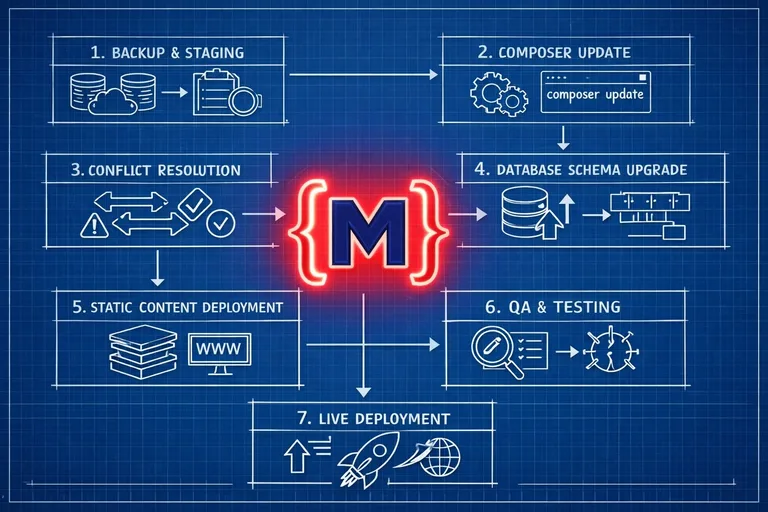
I follow a strict staging-first approach. No update ever runs directly on the live system. My workflow guarantees you a zero-risk experience:
Step 1: Auditing the environment
I check whether your server meets the requirements of the new Magento version. Do PHP, MariaDB, or Elasticsearch need updating? We only start once the foundation is solid.
Step 2: Building the sandbox (staging)
We create an exact copy of your live shop, including all data. Here we run the update on a trial basis. Your live shop keeps selling normally in the meantime.
Step 3: Composer management & conflict resolution
I update dependencies step by step. If modules cause conflicts, I resolve them at the code level or find compatible patches from the vendors.
Step 4: Database schema & data migration
Using the command bin/magento setup:upgrade, I transform the database structure. I closely monitor this process to intervene immediately if table constraints are violated.

05
Quality assurance: more than just a quick glance
Once the update has technically run through on the staging system, the real work begins: testing. We systematically check all business-critical processes:
- 1 The "happy path": can a customer search for a product, add it to the cart, and pay with every payment method?
- 2 Integration check: are orders transferred correctly to your ERP system (e.g. SAP or Microsoft Dynamics)?
- 3 Responsive check: does the design still work perfectly on all mobile devices?
- 4 Performance comparison: has the shop become faster or slower after the update? We measure Core Web Vitals before and after the process.
06
Go-live: precision on the big day
Only once you've signed off on the staging system do we plan the transfer to the live system. This usually happens during off-peak hours with low traffic. Using prepared scripts, we minimize the maintenance window to an absolute minimum. We run a smoke test immediately after go-live to make sure everything is fully functional.
”
One-time updates are good, but ongoing maintenance is better.
07
Maintenance contracts: look to the future with peace of mind
One-time updates are good, but ongoing maintenance is better. At mironsoft we offer monthly maintenance packages. That means for you:
- Proactive patching: we often learn about security vulnerabilities before they become public, and prepare the patch in advance.
- Regular backups: we make sure your data can be restored at any time.
- Technical support: you have a direct line to your developer for any question about your Magento shop.

08
Why mironsoft is the right partner for your Magento upgrade
As a freelancer, I offer a depth of technical understanding you often can't find at large agencies. I don't delegate your update to a junior developer. I do it myself. That means for you:
- Honest advice: if an update currently carries more risk than benefit (e.g. because of a very specific module constellation), I'll tell you so directly.
- Deep core understanding: I understand the internal changes to the Magento architecture from version to version.
- Fixed prices: after a first look at your shop, I give you a price that holds. No hidden costs from "unforeseen complications."
Your shop deserves the best care
An outdated Magento shop is a burden on your marketing, your security, and your customers. A modern, up-to-date system, on the other hand, is the foundation for growth and trust. Don't leave your business-critical infrastructure to chance. Invest in professional Magento updates and upgrades to stay technically one step ahead of your competitors.
Bring your shop up to date now. Contact me for a no-obligation analysis of your current Magento version.
Request a no-obligation analysisFrequently asked questions about the Magento update service
How often should I have my Magento shop updated?
As a rule, security patches should be applied as quickly as possible, ideally within a few days of release by Adobe. For functional minor updates, we recommend a cycle of 6 to 12 months to benefit from new features and performance improvements. Waiting too long widens the technical gap and makes later upgrades significantly more expensive and risky.
What happens if I ignore security updates?
Ignoring security updates is an extreme risk to your business. Hackers exploit known vulnerabilities in outdated Magento versions to inject malicious code, steal customer data, or manipulate your checkout. Beyond the immediate financial damage, you also risk legal consequences under GDPR and a massive loss of customer trust.
How long does a typical Magento upgrade take?
A pure security patch can often be handled within a single business day. A larger functional upgrade (e.g. from 2.4.4 to 2.4.7) usually takes between 5 and 15 business days, including preparation, resolving module conflicts, and thorough quality assurance on a staging system. The complexity of your custom modifications and the number of third-party extensions are the deciding factors here.
Can my custom modifications get lost during the update?
If your shop was built according to official Magento development standards (best practices), all your customizations stay intact. Customizations should always be implemented through your own modules, plugins, or themes. It only becomes a problem when changes were made directly in the Magento core (so-called core hacks). As part of my upfront audit, I check your shop for such improper modifications and correct them before the upgrade.
Do I need a new server for a Magento update?
In most cases, your existing server is enough, as long as it meets the hardware requirements. However, newer Magento versions often need more current software stacks, such as PHP 8.2/8.3, MariaDB 10.6, or OpenSearch/Elasticsearch 7.17+. As part of the upgrade, I check your hosting setup and support you or your host with the necessary server software updates.
What happens if a third-party module is no longer compatible?
This is a common scenario during upgrades. I check in advance whether newer versions are available for your installed extensions. If a vendor doesn't deliver a timely update, I analyze the faulty code and build a custom patch to restore functionality. In some cases it also makes sense to replace an outdated module with a more modern alternative.
Does my shop need to go offline during the upgrade?
Your live shop stays fully functional throughout the entire development and testing phase on the staging system. Only during the final go-live on the live server is a brief maintenance window needed to run database updates and clear the cache. We keep this window as short as possible and schedule it during low-traffic times (e.g. at night) to minimize any revenue impact.
Can a failed update be rolled back?
Yes, as long as you follow a professional backup strategy. I create full backups of files and the database before every critical step. We also use version control systems (Git) so code changes can be reverted at any time. Since we primarily work on staging systems, though, a failure case on the live system practically never happens with us.
What does a Magento upgrade cost at mironsoft?
Costs depend heavily on the gap between your current and target version, as well as the complexity of your shop. A small security patch is significantly cheaper than an upgrade spanning several major versions. After an initial technical review of your shop, I put together a transparent fixed-price offer that covers all risks and effort.
Does mironsoft also help with Adobe Commerce (Enterprise) upgrades?
Yes, we support both Magento Open Source and Adobe Commerce clients with their upgrades. For Adobe Commerce, we additionally account for specific enterprise features like staging, segmentation, and the integration of the Adobe Cloud Tools. We make sure your valuable enterprise features keep performing smoothly after the upgrade.
Will I lose my Google ranking because of the update?
Normally, a technical update has no negative impact on your ranking, since the URL structure doesn't change. Quite the opposite: thanks to the often-improved performance and security, Google tends to rate your shop even better after an upgrade. Throughout the process we pay meticulous attention to keeping all SEO-relevant metadata and structures untouched.
What's the difference between an update and a migration?
An update happens within the same major version (e.g. from Magento 2.4.5 to 2.4.7) and refreshes existing files. A migration (like from Magento 1 to Magento 2) is a switch to a completely new technical platform. Here, data has to be exported and imported into the new system, and the design and modules have to be built entirely from scratch.
How do I find out about new Magento updates?
As your maintenance partner, we proactively monitor the official Adobe Security Bulletins and Magento release notes for you. As soon as a critical update or a new version is released, we analyze its relevance for your shop and inform you of the necessary steps. That means you don't have to dig through technical documentation yourself.
Can I have new features built in during the upgrade?
Theoretically yes, but we recommend keeping the upgrade and new feature development slightly separate in time. A "clean" upgrade focuses on stably lifting the existing state to the new version. Once the new version runs stably, we have the perfect foundation to implement new features efficiently and safely.
How do I start my Magento update process with mironsoft?
Just send us a short message with your current Magento version and your shop URL. We'll do an initial review of your installation and discuss the next steps in a call. We clarify all technical questions upfront and put together a roadmap for a safe, stress-free upgrade of your online shop.
Cookie-Details
| Name | Anbieter | Laufzeit | Zweck |
|---|---|---|---|
Cookie-Details
| Name | Anbieter | Laufzeit | Zweck |
|---|---|---|---|
Cookie-Details
| Name | Anbieter | Laufzeit | Zweck |
|---|---|---|---|
Cookie-Details
| Name | Anbieter | Laufzeit | Zweck |
|---|---|---|---|