Magento Microsoft Dynamics Integration: The Perfect Symbiosis for Your Digital Growth
DEEP DIVE
Magento Microsoft Dynamics Integration
Magento Microsoft Dynamics Integration: Two Systems, One High-Performance Engine
Dynamics runs your processes, Magento wins your customers. The real opportunity lies in the bridge between both worlds – no data silos, no manual errors.
BC · NAV · F&O
Every Dynamics version can be connected
100%
Data quality instead of typos
3-6
Months, typical project timeline
100%
Storefront uptime via queues
In the modern business world, efficiency is no longer just a buzzword – it's the fundamental requirement for staying competitive. If you use Microsoft Dynamics as your ERP system, you've already chosen one of the most powerful solutions for managing your business processes. If you also use Magento (Adobe Commerce) for e-commerce, you have the most flexible shop system on the market. The real challenge – and the biggest opportunity – lies in the Magento Microsoft Dynamics integration.
Without a stable bridge between these two worlds, valuable data stays trapped in silos, manual processes slow your team down, and errors in stock levels or prices put your customers' trust at risk. As a specialized Magento developer at Mironsoft, I help you tear down these barriers. We build an interface that doesn't just shovel data around – it automates your entire value chain. In this in-depth guide, you'll learn everything about the technical implementation, the strategic benefits, and how we turn your store into your company's high-performance engine.
01
The Dynamics Universe: From NAV to Business Central
Before we plan the technical interface, we need to understand which version of Microsoft Dynamics you're running. Microsoft has heavily evolved its ERP portfolio over the years, and each version offers different technological possibilities for integration.
A. Microsoft Dynamics 365 Business Central (BC)
The modern, cloud-based successor to Navision. Business Central is now the standard for the mid-market. Technically, BC is a dream for integration, since it comes with a very modern OData and REST API out of the box. Here we leverage the power of the Microsoft Cloud to sync data with Magento in near real time.
B. Microsoft Dynamics NAV (Navision)
Many companies still run on-premise installations of NAV (e.g., NAV 2017 or 2018). Here we often work with SOAP web services or XML-based data exchange formats. The challenge is usually building a secure bridge from your local network into Magento's web world without compromising your internal IT security.
C. Microsoft Dynamics 365 Finance & Operations (F&O)
The enterprise solution for global corporations. Here, data volumes and process complexity are exponentially higher. Integration requires a deep understanding of Azure Data Lakes, dual-write technologies, and high-performance API endpoints.
”
Manual data maintenance between store and ERP isn't just expensive – it's a massive risk.
02
Strategic Advantages: Why This Investment Pays Off Immediately
Manual data maintenance between store and ERP isn't just expensive – it's a massive risk. An automated Magento Microsoft Dynamics integration gives you measurable benefits:
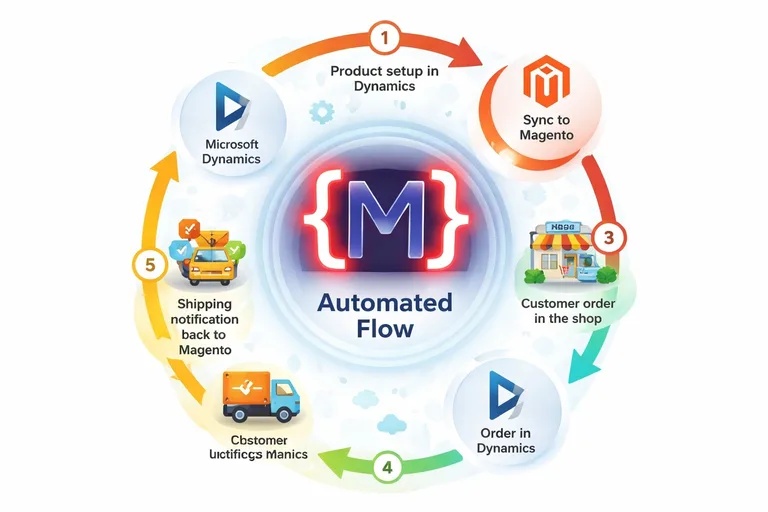
- Real-time stock levels: Never sell products that are already out of stock in the warehouse again. Magento learns instantly about every stock movement in the Dynamics system.
- Automated order processing: As soon as a customer clicks "buy" in the store, the order is created as a sales order in Dynamics. Your warehouse can start pick & pack immediately.
- Reduced error rate: Manual typos in addresses or item numbers are a thing of the past. Data quality rises to 100%.
- Customer self-service: Customers can view their entire order history in their Magento account, download invoices, and track shipping status – data delivered straight from Dynamics.
03
Technical Implementation: Paths to a Stable Interface
At mironsoft, we don't take a "one-size-fits-all" approach. We choose the technology that fits your infrastructure.
A. Direct API Communication (Point-to-Point)
For modern Business Central installations, we connect Magento directly to Dynamics' OData endpoints. I build custom provider classes in Magento that fetch, transform, and write the data into the Magento database. This is the fastest and most cost-effective path.
B. Middleware Solutions (Integration Platforms)
If your system landscape is more complex (e.g., additional connections to marketplaces like Amazon or eBay), using middleware like Celigo, Dell Boomi, or specialized Microsoft connectors makes sense. Middleware acts as an intelligent translator and buffer between the two worlds.
C. Asynchronous Sync with RabbitMQ
To protect your store's performance, we rely on asynchronous processes. If Dynamics is briefly slow, that must never block your checkout. We use message queues to buffer data packets and process them in the background. This guarantees 100% uptime for your storefront.
04
Data Mapping: What Gets Synced, and How?
The heart of every Magento Microsoft Dynamics integration is the mapping. We define exactly which field in Dynamics corresponds to which field in Magento.
- Item master data: SKU, name, descriptions, weights, and dimensions flow from Dynamics to Magento.
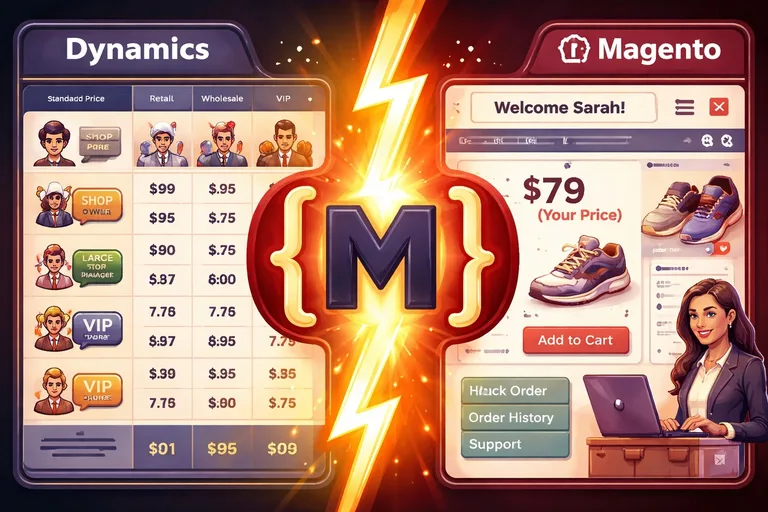
- Prices & discounts: We support complex pricing logic from Dynamics, including customer-specific discounts for B2B customers.
- Customer accounts: Debtor data is synced. New registrations in the store automatically create a prospect or debtor record in Dynamics.
- Orders & status: Orders, payment status, and shipping information (tracking IDs) are reconciled bidirectionally.
05
The B2B Challenge: Mastering Custom Logic
It's exactly in the B2B sector that an interface's true quality shows. We build features that go beyond the standard:
- Credit limit check: Magento queries Dynamics to check whether the customer's credit limit still allows for a purchase on account.
- Real-time availability per warehouse location: If you have multiple locations, we show the customer availability at their nearest warehouse.
- Order history across all channels: Customers also see, in the store, orders they placed by phone or email directly with inside sales – real added value for customer retention.
”
Your ERP data is your most valuable asset.
06
Security and Authentication: Protecting Your Enterprise Data
Your ERP data is your most valuable asset. That's why the integration follows the highest security standards. We use OAuth2 authentication via Microsoft Entra ID (formerly Azure AD). Every communication is protected by TLS encryption. We also implement IP filtering, so only your Magento server is allowed to communicate with your Dynamics instance. We make sure your data wall stays airtight.
07
Monitoring & Error Handling: When Something Goes Wrong
Technology is never 100% error-free. An internet connection can drop, or a data format in Dynamics might change unexpectedly. That's why we build proactive monitoring into your interface. At mironsoft you get a dashboard showing the status of every synchronization. If an error occurs, our system (and your team, if you want) is notified immediately – with clear instructions on what to do. That way, we fix problems before the customer ever notices them.
08
Why mironsoft Is Your Partner in the Microsoft Dynamics World
As a freelancer, I offer you an agility and technical depth of knowledge that's often missing at large agencies. I'm not just an implementer – I'm your strategic advisor.
- Deep understanding of both worlds: I know the quirks of the Microsoft API landscape and Magento's architecture inside and out.
- Performance focus: I make sure your interface never slows your store down. We use modern caching strategies for API data.
- Future-proofing: We build so modularly that you stay flexible even through a future update of Magento or Dynamics.
Conclusion: End the Era of Data Silos
A Magento Microsoft Dynamics integration is the upgrade that turns your e-commerce business from an "online catalog" into a fully integrated sales system. You cut costs, reduce risk, and boost customer satisfaction through precision and speed. At mironsoft you get technically excellent implementation, delivered as a true partner. Let's release the handbrake and connect your systems perfectly.
Ready for maximum automation? Let's find out in an initial consultation how to best connect your Microsoft Dynamics system with Magento.
Book a Dynamics Integration ConsultationFrequently Asked Questions (FAQ) About Magento Microsoft Dynamics Integration
Which versions of Microsoft Dynamics can be connected to Magento?
We can connect almost any version of Microsoft Dynamics to Magento. That includes the modern, cloud-based Dynamics 365 Business Central, the classic on-premise solutions Dynamics NAV (Navision) from version 2013 onward, as well as the enterprise solution Dynamics 365 Finance & Operations. Depending on the version, we use different technologies like OData, REST APIs, or SOAP web services to guarantee stable data exchange.
How often is data synced between the systems?
We tailor the sync frequency individually to your needs and the type of data. Critical information like orders and stock levels can be synced in real time or at very short intervals (e.g., every 1-5 minutes). Master data like product descriptions is usually reconciled at longer intervals (e.g., hourly or daily) to distribute server load optimally on both sides and avoid impacting store performance.
Does the integration affect my Magento store's load time?
With a professional implementation by mironsoft, your store stays lightning fast. We use asynchronous sync processes and intelligent caching (e.g., via Redis), so customers browsing the store never have to wait directly on a response from the Dynamics system. Only for special B2B queries, like a real-time credit-limit check at checkout, are there short API calls, which we optimize so they never disrupt the user experience.
Can customer-specific prices from Dynamics also be shown in the store?
Yes, that's one of our specialties in B2B. We map the pricing logic from Dynamics (tiered prices, customer-group discounts, special terms) into Magento. Since calculating these prices in the ERP can be very complex, we use strategies like pre-computing price indexes or real-time API calls in the cart, to show every customer exactly their contractually agreed terms without risking catalog speed.
What happens if the connection between Magento and Dynamics is interrupted?
We build our interfaces on a "resilience" principle. By using message queues (like RabbitMQ), all data packets (e.g., new orders) are buffered if Dynamics is temporarily unreachable. As soon as the connection is stable again, the data is automatically reprocessed in the correct order. Your store can keep taking orders, and no valuable information is ever lost.
Is expensive middleware required for the integration?
Not necessarily. For many mid-market projects, we build direct connectors ("point-to-point"), which saves additional monthly licensing costs for third-party software. Middleware makes sense, though, if you have a very complex system landscape or need to transform data for many channels simultaneously. We give you honest, vendor-neutral advice on which architecture makes the most sense for your budget and growth plans.
How secure is data exchange with my ERP system?
Security is our top priority. We only use encrypted HTTPS connections (TLS 1.2+) and rely on modern authentication methods like OAuth2 via Microsoft Entra ID (Azure AD). For on-premise systems, we work with secure VPN tunnels or reverse-proxy configurations, to ensure only your authorized Magento server can access the defined API endpoints of your ERP.
Can the integration also support variant products and configurators?
Yes, we precisely map the complex product structures from Dynamics (e.g., item variants or bills of materials) onto configurable products in Magento. Custom product configurators can also be connected so that the selected options are passed to the sales order in Dynamics as detailed line-item data. That ensures your production or warehouse knows exactly what the customer configured in the store.
Is shipping tracking information also transferred automatically?
Yes, that's a core part of process automation. As soon as Dynamics creates the shipping label and generates the tracking number, this information is reported back to Magento. Magento then automatically triggers the shipping confirmation email to the customer, containing a direct link to package tracking. This massively reduces support inquiries and ensures transparent delivery processes.
Can multiple Magento instances be connected to one Dynamics system?
Yes, we support complex multistore setups. You can run different Magento stores for different brands or countries, all communicating centrally with one Dynamics instance. We configure the mapping so orders from different stores are assigned to the correct entity, company code, or warehouse in Dynamics. This allows highly efficient management of all your online presences.
How long does a typical integration project take?
Project duration depends heavily on the quality of the existing Dynamics documentation and the complexity of your business processes. As a general rule, you should plan between 3 and 6 months for a comprehensive integration. Much of that time goes into a detailed process-definition workshop, precise data mapping, and very extensive testing phases, to guarantee an absolutely smooth live operation.
Can returns and credit notes also be automated?
Yes, we cover the entire lifecycle of an order. When a customer registers a return in the store, this information is transferred to Dynamics to create a return document. Once the goods are received and inspected in the warehouse, Dynamics reports the status back to Magento, which can automatically trigger a refund via the chosen payment provider or a credit note in the customer account. That results in highly efficient after-sales processes.
What happens during an update to Magento or Dynamics?
We build our connectors on the principle of "loose coupling" and use official APIs and service contracts. That means the interface generally stays stable through standard updates. Still, we run compatibility tests on your staging environment before every major system update. If adjustments to the API endpoints are needed, we can implement them precisely in the connector without touching the entire store logic.
Are different VAT rates calculated correctly too?
Yes, tax logic is generally maintained centrally in Dynamics and passed to Magento via the interface. We account for country-specific tax rates and special rules (e.g., tax exemption with a valid VAT ID for intra-community trade). This ensures your invoices are always legally sound and accounting in Dynamics can proceed without manual corrections.
How do we start planning my Dynamics integration with mironsoft?
The first step is a technical analysis call, where we take a look at your current Dynamics configuration and your store goals. We identify the necessary data flows and put together a rough mapping concept. Just send us a message or give us a call – we're looking forward to merging your systems into a highly efficient unit and taking your e-commerce to the next level.
Cookie-Details
| Name | Anbieter | Laufzeit | Zweck |
|---|---|---|---|
Cookie-Details
| Name | Anbieter | Laufzeit | Zweck |
|---|---|---|---|
Cookie-Details
| Name | Anbieter | Laufzeit | Zweck |
|---|---|---|---|
Cookie-Details
| Name | Anbieter | Laufzeit | Zweck |
|---|---|---|---|