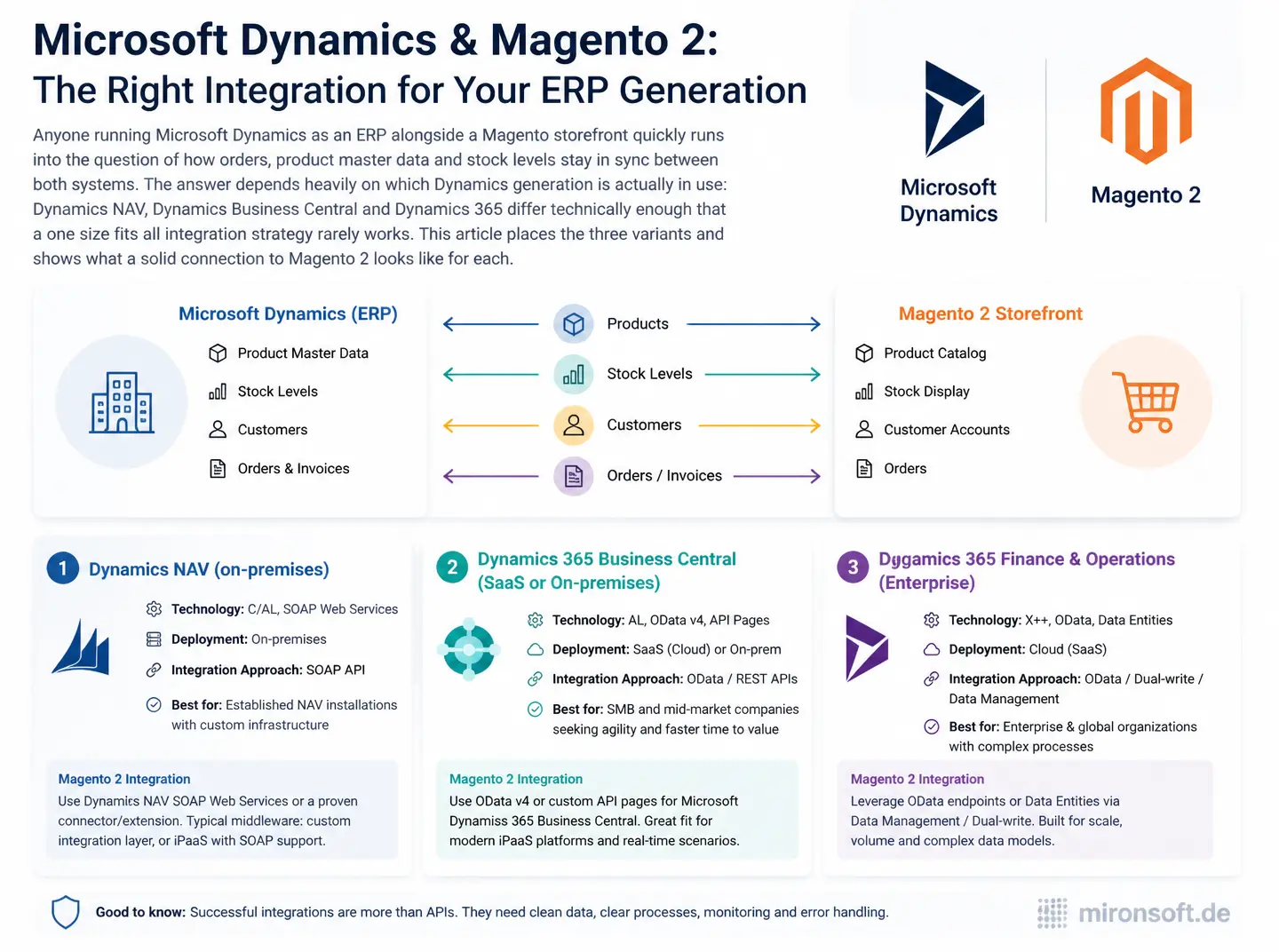
How Dynamics NAV, Dynamics Business Central and Dynamics 365 each connect to Magento 2 differently, and which path fits which variant
Anyone running Microsoft Dynamics as an ERP alongside a Magento storefront quickly runs into the question of how orders, product master data and stock levels stay in sync between both systems. The answer depends heavily on which Dynamics generation is actually in use: Dynamics NAV, Dynamics Business Central and Dynamics 365 differ technically enough that a one size fits all integration strategy rarely works. This article places the three variants and shows what a solid connection to Magento 2 looks like for each.
Table of Contents
- 1. Why syncing Dynamics and Magento actually matters
- 2. Placing the three Dynamics generations: NAV, Business Central, Dynamics 365
- 3. Integration architecture: direct API connection or middleware
- 4. Connecting Dynamics Business Central: OData v4 and webhooks for order sync
- 5. Connecting Dynamics NAV: the Service Tier and the limits of the SOAP stack
- 6. Syncing master data: items, price lists, and customer records
- 7. Syncing stock levels in near real time
- 8. Error handling and conflict resolution for bidirectional sync
- 9. Dynamics integration paths at a glance
- 10. Summary
- 11. FAQ
1. Why syncing Dynamics and Magento actually matters
Once a company enters orders both through internal sales in the ERP and through a Magento storefront, a data reconciliation problem becomes unavoidable: stock levels updated in only one system lead to overselling, and orders transferred manually between systems are error prone and tie up staff who could otherwise focus on higher value work.
An automated connection to Microsoft Dynamics solves exactly that problem, but it demands an architecture that fits the specific Dynamics generation in use. An integration approach built for Dynamics Business Central cannot simply be carried over to an older Dynamics NAV installation, because the underlying interface technologies differ fundamentally.
2. Placing the three Dynamics generations: NAV, Business Central, Dynamics 365
Dynamics NAV is the older generation, usually run on premise, still in use at many midsize companies for years, exposing classic SOAP or OData v3 web services through the NAV Service Tier. Dynamics Business Central is its direct successor, deployable in the cloud or on premise, and ships out of the box with a modern OData v4 API and an open API surface that is considerably easier to work with than the older NAV web service stack.
Dynamics 365, particularly its Finance and Supply Chain Management variants, targets larger organizations and brings its own, more extensive REST API alongside a Data Management Framework built for high data volumes and complex integration scenarios. Anyone searching for Microsoft Dynamics on a storefront usually means one of these three technically quite different variants, which is why the first question for any connection is always which generation is actually running.
3. Integration architecture: direct API connection or middleware
A direct connection has a Magento module talk to the Dynamics API straight away, which is fine for simple, tightly scoped scenarios with few data objects and keeps operating overhead minimal. Once multiple target systems, complex transformation rules, or a later expansion into further sales channels become likely, a middleware layer that mediates between Magento, Dynamics, and other systems pays off.
Middleware also decouples the availability of both systems from each other: if Dynamics goes down briefly, the middleware can queue orders and transmit them later instead of the Magento checkout depending directly on Dynamics being reachable. For most midsize projects a lean, self hosted middleware with a queue is the pragmatic middle ground between a pure direct connection and a full blown integration platform.
4. Connecting Dynamics Business Central: OData v4 and webhooks for order sync
Dynamics Business Central exposes its standard and custom entities through an OData v4 API that can be called with plain HTTP requests and OAuth 2.0 authentication. For orders, the integration typically creates a sales order in Business Central as soon as an order completes in Magento, passing customer, line items, quantities, and shipping address in the structure the API expects.
For inbound changes, such as updated stock levels or price lists, Business Central offers native webhooks that send a notification to a registered callback URL whenever data changes, instead of Magento having to poll the API at fixed intervals. This event driven connection significantly reduces the latency between a change in Dynamics and its visibility in the storefront compared to a purely cron based reconciliation.
<?php
declare(strict_types=1);

namespace Mironsoft\DynamicsSync\Model\Client;

/**
 * Creates a sales order in Dynamics Business Central via the OData v4 API.
 */
final class BusinessCentralOrderClient
{
    public function __construct(
        private readonly OAuthTokenProvider $tokenProvider,
        private readonly \GuzzleHttp\ClientInterface $httpClient,
    ) {
    }

    /**
     * Creates a sales order for a completed Magento order.
     *
     * @param array $orderPayload
     * @return array
     */
    public function createSalesOrder(array $orderPayload): array
    {
        $response = $this->httpClient->request('POST', 'salesOrders', [
            'headers' => [
                'Authorization' => 'Bearer ' . $this->tokenProvider->getToken(),
                'Content-Type' => 'application/json',
            ],
            'json' => $orderPayload,
        ]);

        return json_decode((string) $response->getBody(), true);
    }
}
5. Connecting Dynamics NAV: the Service Tier and the limits of the SOAP stack
A Dynamics NAV Service Tier classically publishes codeunits and pages through SOAP, or, on newer NAV versions from 2016 onward, through a limited OData v3 interface. Which endpoints are actually available depends heavily on which objects were explicitly published for web service export in the NAV system, so the first step of any NAV connection is an inventory of the codeunits already published.
If a required endpoint is missing, a custom codeunit has to be created in the NAV development client and published as a web service, which in practice usually requires a NAV partner with development access to the system. Because SOAP creates noticeably more overhead than modern REST calls and troubleshooting is more involved, generous timeout handling and detailed logging of every SOAP response are worth building in from the start for NAV connections.
6. Syncing master data: items, price lists, and customer records
Item master data should generally flow from Dynamics as the leading system into Magento, since item number, description, and tax code are maintained there anyway and duplicate maintenance in Magento leads to inconsistencies. Price lists, especially customer specific tiered pricing, require careful mapping between Dynamics price list codes and Magento customer groups, since both systems use different concepts for price differentiation.
For customer records the opposite direction often makes more sense: new customers register in the storefront, are captured there with the required mandatory fields, and are then created as a debtor in Dynamics, so invoicing and dunning in the ERP keep working from complete master data. Bidirectional synchronization without a clear leading direction per data type almost always produces conflicting records in practice.
7. Syncing stock levels in near real time
Current stock is one of the most important factors for a purchase decision in the storefront, which is why a purely nightly batch reconciliation is rarely justifiable. Business Central and Dynamics 365 support event based notifications on stock changes, so an update in the storefront can happen within minutes of a stock movement in the ERP.
For Dynamics NAV without modern webhook support, a frequent cron reconciliation, for instance every five to ten minutes, combined with a delta query that only transfers actually changed items instead of reading the full item master every time, is usually the only option. That delta logic significantly reduces load on the NAV Service Tier and is practically indispensable for larger item catalogs.
8. Error handling and conflict resolution for bidirectional sync
Once orders can originate both from Magento and directly in the ERP, conflicts become unavoidable, for instance when an item gets manually blocked in Dynamics while an order for it is already in transit from the storefront. Every integration therefore needs a defined process for such cases, with a queue for failed syncs and a clear notification to the responsible staff member instead of a silent data loss.
A proven pattern is a retry queue with exponential backoff for temporary failures such as network timeouts, combined with immediate manual escalation for business errors such as an invalid item code. That separation prevents a simple network hiccup from escalating unnecessarily, while a genuine data problem does not get lost in an endless automatic retry loop.
9. Dynamics integration paths at a glance
The table below summarizes the three Dynamics generations with their typical API and the recommended integration approach.
| Dynamics Variant | Typical API | Integration Effort | Recommended Approach |
|---|---|---|---|
| Dynamics NAV | SOAP web service or OData v3 | High, often needs custom codeunits | Direct connection with generous timeout handling |
| Dynamics Business Central | OData v4 REST API, webhooks | Medium, well documented standard API | Direct connection or lean middleware |
| Dynamics 365 Finance/SCM | REST API, Data Management Framework | High, complex data models | Middleware layer recommended |
| Multiple ERP systems in parallel | System dependent | Very high | Central middleware essentially mandatory |
Mironsoft
Magento development, module consulting, and system architecture
A Magento project that needs a second opinion or experienced execution?
We build custom Magento modules, advise on architecture decisions, and take on complex implementations, from service contract planning to production-ready deployment.
Architecture Consulting
Have module and system architecture thought through properly before you build.
Custom Module Development
Build custom Magento modules cleanly, following best practices.
Code Review & Audit
Have existing modules reviewed for performance, security, and maintainability.
10. Summary
Dynamics Integration: The Essentials at a Glance
Core idea
The right integration strategy depends heavily on which Dynamics generation is actually running.
Key distinction
Business Central and Dynamics 365 offer modern REST APIs, Dynamics NAV usually only an older SOAP stack.
Biggest risk
Bidirectional sync without a clear leading direction per data type produces conflicting records.
Success criterion
Stock levels and orders stay in sync within minutes without any manual data transfer.