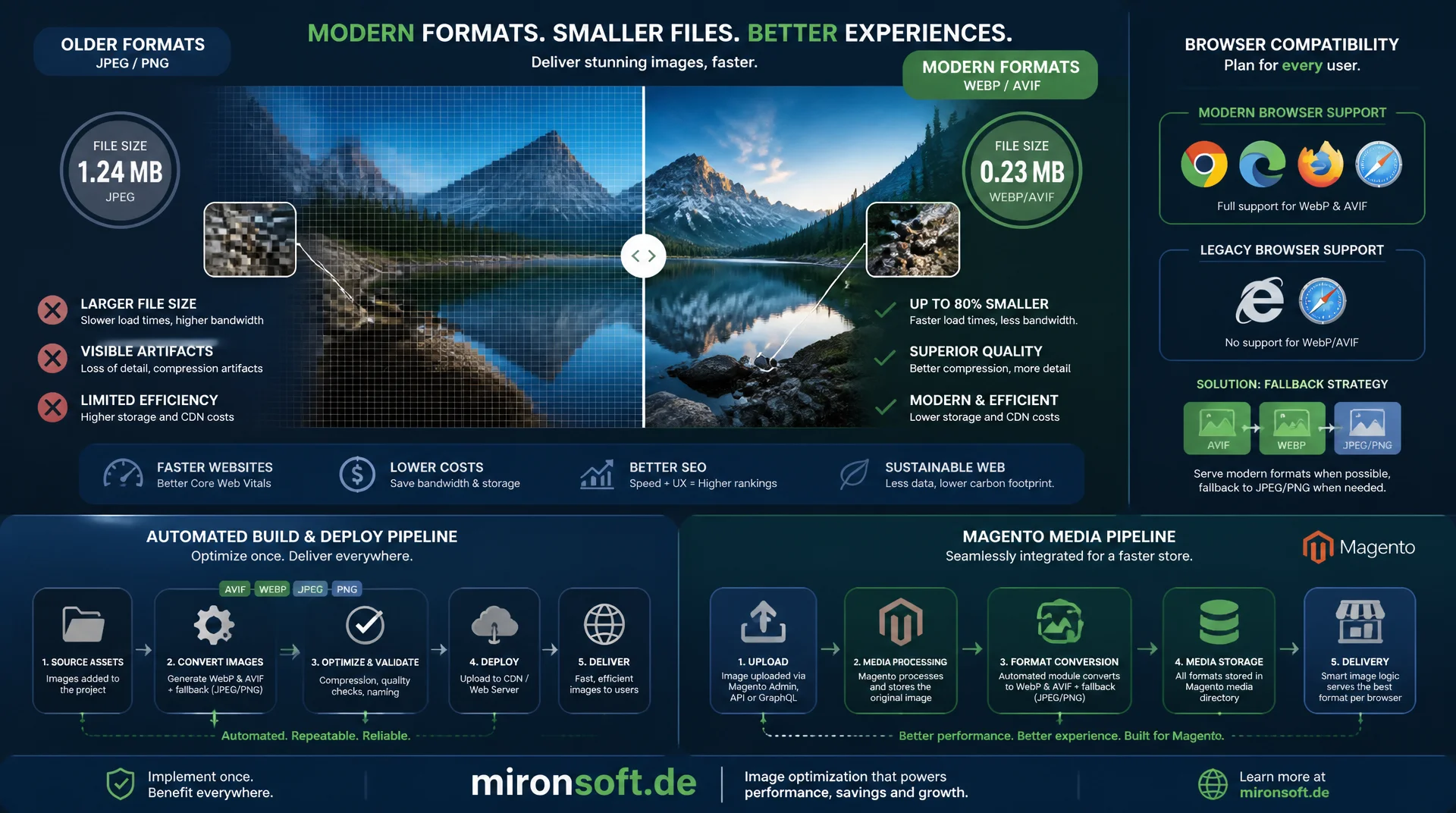
Compression, fallback strategy and automation across the Magento stack
Modern image formats like WebP and AVIF cut file size compared to classic JPEG or PNG by roughly half without visible quality loss. This article explains how the compression algorithms work, what fallback strategy older browsers need, and how format conversion integrates reliably into an automated build and deploy pipeline as well as the Magento media pipeline.
Table of Contents
- 1. Compression efficiency compared: JPEG/PNG vs. WebP vs. AVIF
- 2. Lossy vs. lossless: modes and their trade-offs
- 3. Browser support and fallback strategy with picture
- 4. Automating format conversion in the build and deploy pipeline
- 5. Quality settings: finding the right trade-off
- 6. Integrating conversion into the Magento media pipeline
- 7. Responsive variants combined with modern formats
- 8. Caching and CDN strategy for converted assets
- 9. Image formats compared: a decision guide
- 10. Summary
- 11. FAQ
1. Compression efficiency compared: JPEG/PNG vs. WebP vs. AVIF
JPEG relies on block-based DCT compression (discrete cosine transform) and produces visible blocking artifacts at low quality settings, because pixel data is split into 8x8 blocks and frequency components are quantized lossily. PNG is lossless and combines filtering with Deflate compression, which works well for graphics with flat color areas, text or transparency, but produces unnecessarily large files for photographs. WebP uses the intra-frame prediction from VP8 together with more efficient entropy coding than JPEG, typically achieving 25 to 35 percent smaller files at comparable perceived quality. AVIF, derived from the intra frames of the AV1 codec, goes further still: larger transform blocks, better prediction modes and adaptive quantization make 40 to 50 percent savings over JPEG realistic, especially at low bitrates.
In practice, a typical full-HD hero image illustrates this well: a JPEG at quality 82 lands around 250 KB, the same shot as WebP around 160 KB, and as AVIF around 110 KB, at comparable SSIM. Encoding effort increases significantly in that same order, which becomes important later for pipeline automation. For batch conversion in a build process, the command-line encoders cwebp and avifenc are a good fit, since both drop into any shell script or CI stage without extra dependencies.
#!/usr/bin/env bash
# batch-convert-images.sh - Convert all JPEG/PNG assets to WebP and AVIF
set -euo pipefail

SOURCE_DIR="pub/media/catalog/product"
QUALITY_WEBP=80
QUALITY_AVIF=32   # AVIF uses a CRF-like scale, lower is better quality

find "$SOURCE_DIR" -type f \( -iname "*.jpg" -o -iname "*.jpeg" -o -iname "*.png" \) -print0 |
while IFS= read -r -d '' src; do
  base="${src%.*}"

  # Skip if already converted and source has not changed (mtime check)
  if [[ -f "${base}.webp" && "${base}.webp" -nt "$src" ]]; then
    continue
  fi

  cwebp -q "$QUALITY_WEBP" -m 6 "$src" -o "${base}.webp"
  avifenc --min 20 --max 40 --cq-level "$QUALITY_AVIF" --speed 6 "$src" "${base}.avif"

  echo "[OK] $src -> ${base}.webp, ${base}.avif"
done
2. Lossy vs. lossless: modes and their trade-offs
Both WebP and AVIF offer a genuine lossless mode alongside the lossy path, and it is not simply the lossy encoder with the quality slider maxed out. WebP lossless relies on prediction transforms and an LZ77-style backward reference scheme, which produces noticeably smaller files than PNG for icons, screenshots, illustrations with flat color areas and text-heavy images, often 20 to 30 percent smaller. For photographs with natural noise, lossless mode is almost always the wrong choice, because there is little redundancy left to exploit and the resulting file typically ends up larger than a well-tuned lossy version.
An often overlooked middle ground is WebP's near-lossless mode, which applies a very light, barely perceptible quantization step before the actual lossless compression and produces noticeably smaller files without tipping into visible artifacts. For AVIF, chroma subsampling plays an additional role: 4:2:0 halves color resolution relative to luminance and is usually unnoticeable for photos, while graphics with colored text or sharp color edges benefit from 4:4:4, at the cost of file size. Choosing between mode, subsampling and target format therefore always depends on the actual image content, not a blanket setting applied across the whole catalog.
3. Browser support and fallback strategy with picture
WebP is now supported by essentially every current browser, including Safari since version 14. AVIF is younger: Chrome and Firefox have shipped full support since 2020/2021, Safari only from version 16 onward, and some older Android WebViews as well as certain enterprise browser environments still offer no or only partial support. Switching hard to AVIF without a fallback would leave those users with broken images. The robust solution is the <picture> element with multiple <source> elements listed in descending preference order: the browser automatically selects the first source whose type attribute it recognizes, falling back to the <img> element as the last resort.
An alternative would be server-side content negotiation via the Accept request header, where the server delivers the matching file based on the formats the browser reports as supported. In practice, this is risky for CDN-backed shops, because every response then depends on Accept and requires a Vary: Accept header, which fragments the cache into many small variants per client and reduces the hit ratio at the edge. The static <picture> approach with fixed per-format filenames is far more CDN-friendly, since every URL maps to exactly one response and can be cached without restriction.
<!-- picture element: browser picks the first supported source, in order -->
<picture>
  <source type="image/avif" srcset="/media/catalog/product/hero.avif">
  <source type="image/webp" srcset="/media/catalog/product/hero.webp">
  <img
      src="/media/catalog/product/hero.jpg"
      width="1200"
      height="600"
      fetchpriority="high"
      loading="eager"
      alt="Product hero image"
      class="w-full h-auto object-cover"
  >
</picture>
4. Automating format conversion in the build and deploy pipeline
Image conversion belongs at build time, not request time. Generating AVIF or WebP variants on the fly for every request produces unpredictable CPU spikes and risks a slow response for the first visitor after every cache flush. Instead, conversion runs as a dedicated pipeline step, usually with the Sharp library on Node.js, which builds on libvips and internally uses the same encoders as cwebp and libaom, but with significantly less per-image process overhead than repeatedly invoking individual CLI tools.
What matters most for production readiness is idempotency: a deploy script that re-encodes every image on every run slows the pipeline down more and more as the catalog grows. A content hash or a simple mtime comparison between the source file and an already generated target file avoids unnecessary recomputation and turns a full conversion into an incremental step that only touches changed or new images. In CI environments, this step can additionally be cached by persisting the output directory between pipeline runs.
# .gitlab-ci.yml (excerpt) - dedicated image conversion stage before deploy
stages:
  - build
  - convert-images
  - deploy

convert-images:
  stage: convert-images
  image: node:20-slim
  cache:
    key: image-variants-cache
    paths:
      - pub/media/catalog/product/**/*.webp
      - pub/media/catalog/product/**/*.avif
  before_script:
    - npm ci --omit=dev
  script:
    - node scripts/generate-image-variants.js --input pub/media/catalog/product
  artifacts:
    paths:
      - pub/media/catalog/product/**/*.webp
      - pub/media/catalog/product/**/*.avif
    expire_in: 1 day
  only:
    - main
5. Quality settings: finding the right trade-off
The quality scales of the three formats are not directly comparable. For WebP, a value between 75 and 82 is usually the sweet spot between file size and perceived quality in practice. AVIF uses an internal CRF-like scale via cq-level, where lower values mean better quality, and a range of 28 to 35 delivers a very good ratio for most product photography. File size alone is not enough as a decision criterion: two encoder runs that hit an identical target size can produce very different perceived quality, so quality decisions should be validated with perceptual metrics like SSIM or Butteraugli, not by kilobytes alone.
A quality strategy per image category tends to work better than a single global value across the entire catalog. Product photos with natural noise tolerate more aggressive compression without customers noticing the difference. Banners with fine typography or gradient graphics need higher quality levels instead, because compression artifacts on sharp edges and in lettering are far more visible than in photographs. An automated regression check that validates new image variants against a perceptual threshold prevents an overly aggressive encoder setting from silently shipping visible quality loss to production.
6. Integrating conversion into the Magento media pipeline
Magento generates product image variants (thumbnail, small image, base image, swatch) through Magento\Catalog\Model\View\Asset\Image and stores them under pub/media/catalog/product/cache as soon as a frontend request first asks for a given size, or when catalog:images:resize runs. The cleanest integration point for format conversion is an observer on the event fired after resizing, or a plugin around the resize command itself, which generates WebP and AVIF siblings for every JPEG variant it produces. This keeps the conversion logic at the same point as size generation and prevents image variants and format variants from drifting apart.
For CI-driven deploys where pub/media is synced separately rather than living on the admin system, the catalog:images:resize run and the subsequent format conversion should happen as an explicit pipeline step after deployment, so a freshly provisioned container does not generate every image variant synchronously on the first real visitor request. In the phtml template, a simple check for whether the WebP or AVIF sibling exists next to the original is then enough to wire it into the <picture> markup.
<?php
declare(strict_types=1);

namespace Mironsoft\ImagePipeline\Plugin;

use Magento\Catalog\Model\Product\Image\ParamsBuilder;
use Magento\Framework\Image\Factory as ImageFactory;

/**
 * Generates WebP and AVIF siblings whenever Magento resizes a product image.
 */
class GenerateModernFormatsPlugin
{
    /**
     * @param ImageFactory $imageFactory Factory used to instantiate encoder adapters.
     */
    public function __construct(
        private readonly ImageFactory $imageFactory,
    ) {
    }

    /**
     * Runs after the base image resize and writes WebP/AVIF variants next to the JPEG.
     *
     * @param \Magento\Catalog\Model\Product\Image $subject The resized image model.
     * @param \Magento\Catalog\Model\Product\Image $result The original return value.
     * @return \Magento\Catalog\Model\Product\Image
     */
    public function afterResize(
        \Magento\Catalog\Model\Product\Image $subject,
        \Magento\Catalog\Model\Product\Image $result,
    ): \Magento\Catalog\Model\Product\Image {
        $destination = $subject->getNewFile();

        if ($destination === '' || !str_ends_with($destination, '.jpg')) {
            return $result;
        }

        $image = $this->imageFactory->create($destination);
        $image->quality(80);
        $image->save(str_replace('.jpg', '.webp', $destination));
        $image->save(str_replace('.jpg', '.avif', $destination));

        return $result;
    }
}
7. Responsive variants combined with modern formats
Responsive images and modern formats solve different problems, yet the two are frequently conflated. srcset with multiple width descriptors solves the problem of varying viewport sizes, while WebP and AVIF solve the problem of compression efficiency per image pixel. Combine both and you get a matrix of widths times formats: a single product image can easily generate six or more files, for example 400w, 800w and 1200w each in JPEG, WebP and AVIF. That multiplication is intentional and necessary, but it drives up the number of files that need to be managed in the media directory considerably.
In markup, the structure still stays manageable: each <source> element inside <picture> gets, besides its type attribute, its own srcset with the width variants for that format, so the browser decides in two steps, first the supported format, then the matching width. Generating this matrix is most efficient in a single Sharp pass per source image that chains all target widths and target formats together in one pipeline, instead of re-reading the source image from disk for every combination.
// generate-image-variants.js - Build a width x format matrix with sharp
const sharp = require('sharp');
const { globSync } = require('glob');
const path = require('node:path');

const WIDTHS = [400, 800, 1200];
const FORMATS = [
  { ext: 'avif', options: { quality: 55, effort: 6 } },
  { ext: 'webp', options: { quality: 80, effort: 5 } },
];

async function processImage(sourcePath) {
  const dir = path.dirname(sourcePath);
  const name = path.basename(sourcePath, path.extname(sourcePath));

  // Read the source once, then fan out into width x format variants
  const pipeline = sharp(sourcePath).rotate();

  for (const width of WIDTHS) {
    for (const format of FORMATS) {
      const outPath = path.join(dir, `${name}-${width}w.${format.ext}`);
      await pipeline
        .clone()
        .resize({ width, withoutEnlargement: true })
        [format.ext](format.options)
        .toFile(outPath);
    }
  }
}

const sources = globSync('pub/media/catalog/product/**/*.{jpg,jpeg,png}');
Promise.all(sources.map(processImage)).then(() => {
  console.log(`Generated variants for ${sources.length} source images`);
});
8. Caching and CDN strategy for converted assets
Converted image variants should be treated like any other versioned static asset: long Cache-Control headers with immutable and a one-year validity, because the content behind a given URL does not change after deployment. Invalidation does not happen through a short TTL but through a new file, for example via a content hash in the filename or a new cache generation in the path whenever a product image is swapped. It matters that every format variant gets its own stable URL, rather than controlling format and size through query parameters, since many CDN configurations strip query strings from the cache key by default and can end up serving the wrong variant.
After a deploy that produces freshly generated image variants, targeted cache warming for the most-visited category and product pages is worth the effort, so the first real visitor does not trigger the origin request for every new image variant. Storage requirements grow noticeably from the combination of multiple formats and multiple widths, in practice to roughly two to three times the size of a pure JPEG catalog, which should be accounted for from the start when sizing object storage and CDN origin capacity.
9. Image formats compared: a decision guide
The table below summarizes the key differences between the three formats and shows where the limits of each technology sit. It serves as a quick decision aid when choosing a format strategy for a new pipeline.
| Criterion | JPEG / PNG | WebP | AVIF |
|---|---|---|---|
| Compression ratio vs. JPEG | Baseline | 25-35% smaller | 40-50% smaller |
| Encode time (relative) | Fast | Medium | High, 5-10x slower |
| Browser support (global) | ~100% | > 97% | ~93%, Safari only from 16 |
| Alpha channel (transparency) | PNG only, JPEG: no | Yes | Yes |
| Animation | No | Yes | Yes (limited tooling) |
| Lossless mode | PNG only | Yes | Yes |
In practice, the decision is rarely binary. A resilient strategy serves AVIF as the preferred format for supporting browsers, WebP as a broadly compatible second tier, and JPEG or PNG as the universal fallback, all controlled through the <picture> element. For build pipelines with a tight time budget, it can make sense to generate AVIF first only for the largest, most-viewed images such as hero banners and roll out the rest of the catalog incrementally, rather than forcing the entire conversion into a single, potentially very long deploy.
Mironsoft
Image pipelines, build automation and Magento performance engineering
Ready to integrate WebP and AVIF cleanly into your pipeline?
We analyze your current image workflow, build an automated conversion pipeline with Sharp and CI integration, and set up the right fallback strategy for your Magento or Hyva shop.
Pipeline setup
Sharp-based conversion with idempotent, incremental CI stages
Magento integration
Plugin/observer for the media pipeline, picture markup in Hyva templates
CDN & caching
Cache headers, invalidation strategy and cache warming after deploy
10. Summary
Modern image formats solve a very concrete performance problem: images make up the largest share of page weight in most shops, and WebP and AVIF reduce that share measurably without customers perceiving any quality loss. AVIF delivers the strongest compression but demands significantly more encoding time and does not yet quite match WebP's reach, which is why a tiered fallback through the <picture> element is currently the most robust approach. Automated conversion as a dedicated, idempotent pipeline step avoids both manual busywork and unpredictable runtime CPU load.
For Magento shops, the key lever is anchoring format conversion at the same point as the existing image resize pipeline, through a plugin or an observer on the resize process, instead of maintaining a separate, parallel logic path. Combined with a well thought out cache and CDN strategy for the additional format variants, this achieves a noticeable reduction in transferred image data without uncontrollably slowing down the build pipeline or inflating storage needs unnecessarily.
Modern Image Formats in the Production Pipeline - The Essentials at a Glance
Compression
WebP saves 25-35% over JPEG, AVIF saves 40-50%, both at comparable perceived quality.
Fallback strategy
<picture> with AVIF, WebP and JPEG fallback instead of risky content negotiation via the Accept header.
Pipeline automation
Sharp-based, idempotent conversion as its own CI stage, never generated synchronously at runtime.
Magento integration
Plugin/observer on the existing resize pipeline, long cache headers, stable format URLs.