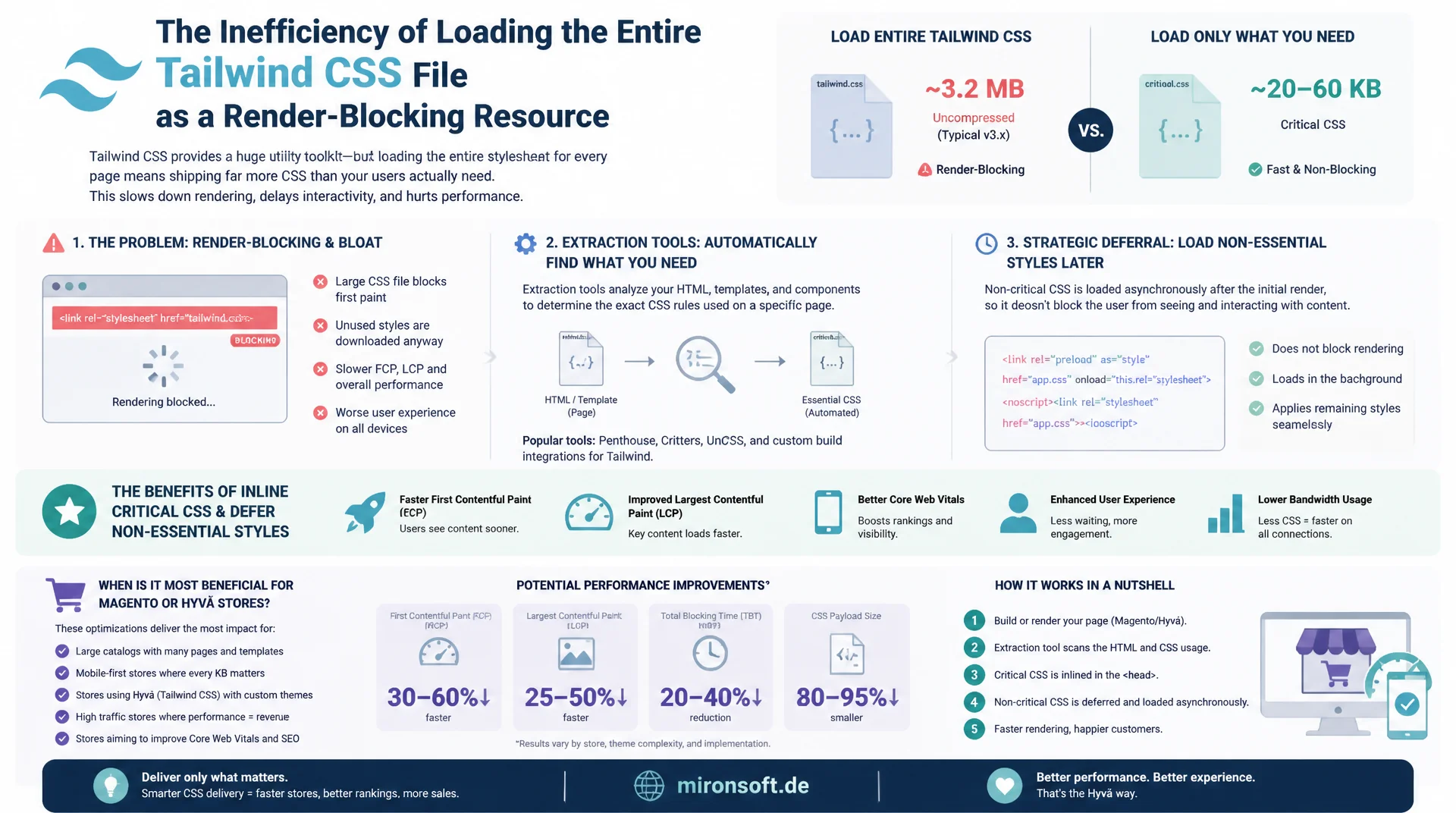
Above-the-fold styles for a faster first paint
Loading the entire Tailwind CSS file as a render blocking resource wastes valuable milliseconds before the first visible pixel. This article shows how extraction tools automatically capture the rule set a page actually needs, how inlined critical CSS and deliberately deferred loading of the rest work together, and when the effort truly pays off for a Magento or Hyva store.
Table of Contents
- 1. What is critical CSS? Above-the-fold styles for the first render
- 2. Why render blocking CSS delays first paint
- 3. Extraction tools: headless rendering and viewport capture
- 4. Inline vs. external: the tradeoff in delivering critical CSS
- 5. Deliberately deferring non-critical CSS: the media=print trick
- 6. rel=preload as an alternative to the deferral trick
- 7. Integrating critical CSS into Magento and Hyva
- 8. Tailwind's utility approach: one large, highly cacheable file instead of many small ones
- 9. When true critical CSS extraction pays off, and when it doesn't
- 10. Summary
- 11. FAQ
1. What is critical CSS? Above-the-fold styles for the first render
Critical CSS is the minimal subset of all CSS rules the browser needs to render a page's visible area before the first scroll, that is, the above-the-fold region for the given viewport. A browser can only render a page (first paint) once it has built the complete CSSOM, and that requires every linked stylesheet to be fully downloaded, parsed, and evaluated, regardless of whether the rules it contains are even relevant to the visible area.
In a typical Magento store with Tailwind-generated CSS, the full stylesheet often runs several hundred kilobytes of utility classes, of which only a fraction is actually used within the visible area of a single category page or product detail page. Critical CSS extracts exactly that fraction, usually between 5 and 15 kilobytes, and makes it available instantly with no extra network round trip, while the rest of the file loads in the background.
2. Why render blocking CSS delays first paint
<link rel="stylesheet"> is render blocking by default: the browser halts construction of the render tree until the referenced CSS file has fully arrived, even if the HTML and images are already sitting ready. With a single large CSS file, as Tailwind's build process produces, the first paint of the entire page hinges on exactly that one network request, including DNS resolution, connection setup, and, depending on cache state, a full download.
On a mobile connection with high latency, this blocking step alone can cost several hundred milliseconds before a single pixel gets painted. Server-side measures only compensate so much: even a perfectly configured Full Page Cache with a time to first byte under 50 milliseconds does not help if the browser then has to wait on a 300 KB CSS bundle before it is allowed to paint any visible content.
3. Extraction tools: headless rendering and viewport capture
Manually sorting out relevant CSS rules is practically impossible with a utility-first framework like Tailwind, since every component references dozens of generated classes. Automated extraction tools such as critical or penthouse solve this by rendering the target page headlessly in a real browser, usually via Puppeteer or Playwright, at a defined viewport size, and logging which CSS rules are actually applied to visible DOM nodes.
The result is a minimal, but fully functional CSS fragment for exactly that one viewport size and exactly that one URL. For responsive stores, this means multiple viewport breakpoints (mobile, tablet, desktop) should be captured in parallel and merged into a combined critical rule set, otherwise styles that only arrive after the rest of the stylesheet loads will be missing at other screen sizes.
# Extract critical CSS for the homepage, viewport by viewport
npx critical https://shop.example.com/ \
  --base dist/ \
  --css dist/css/styles.css \
  --width 1300 --height 900 \
  --target critical-home-desktop.css \
  --inline false

# Repeat for a mobile viewport, then merge the two results
npx critical https://shop.example.com/ \
  --base dist/ \
  --css dist/css/styles.css \
  --width 375 --height 667 \
  --target critical-home-mobile.css \
  --inline false
4. Inline vs. external: the tradeoff in delivering critical CSS
Critical CSS only delivers its benefit when it is shipped directly as a <style> block inline in the <head>, with no additional network request. An external <link> pointing to a separate critical.css file brings no speed advantage, because the browser still has to open a connection and wait for a response before it can continue building the render tree, exactly the problem this was supposed to solve.
The downside of inlining: the HTML response grows larger and can no longer be cached independently of the CSS, since every page, or every page type, carries its own critical rule set. With Magento's Full Page Cache, this means the critical block becomes part of the cached HTML fragment and has to be regenerated, with the cache invalidated, every time the theme's layout changes, an extra maintenance step that the purely external stylesheet approach avoids.
<!-- Inlined critical CSS for above-the-fold rendering -->
<head>
  <style>
    body { margin: 0; font-family: Inter, sans-serif; background: #ffffff; }
    .header { display: flex; align-items: center; justify-content: space-between; padding: 1rem 1.5rem; }
    .hero { position: relative; min-height: 420px; background: #0f172a; }
    .hero__title { font-size: 2.25rem; font-weight: 700; color: #ffffff; line-height: 1.2; }
    .btn-primary { background: #dc2626; color: #ffffff; padding: 0.75rem 1.5rem; border-radius: 0.5rem; }
  </style>
</head>
5. Deliberately deferring non-critical CSS: the media=print trick
To keep the full stylesheet from loading as a render blocking resource anyway, a well established browser trick has taken hold: the <link> tag gets media="print", which makes the browser download the file but not treat it as render blocking for the current screen output. Via onload="this.media='all'", the media attribute switches to "all" only after the download completes, so the styles take effect without blocking the initial render path.
For users without JavaScript enabled, a <noscript> fallback with a regular <link rel="stylesheet"> is mandatory, otherwise the page stays completely unstyled. This pattern is by now so well established that it was standardized as "loadCSS" by the Filament Group, and can be implemented in about three lines of inline code without any extra JavaScript library.
<!-- Defer the full stylesheet without blocking the first paint -->
<link rel="stylesheet" href="/static/frontend/Mironsoft/default/en_US/css/styles.css"
      media="print" onload="this.media='all'; this.onload=null;">

<!-- Fallback for users without JavaScript -->
<noscript>
  <link rel="stylesheet" href="/static/frontend/Mironsoft/default/en_US/css/styles.css">
</noscript>
6. rel=preload as an alternative to the deferral trick
<link rel="preload" as="style"> tells the browser to download a resource at high priority without applying it right away. Combined with the same onload handler used in the media=print trick, it achieves a comparable effect, with the difference that the preload loader explicitly signals to the browser what the resource is, which in some browsers leads to cleaner prioritization in the network waterfall than the media=print workaround.
In practice, the two approaches barely differ in measured load time, though media=print reliably works in a somewhat wider range of older browsers without a polyfill. What matters with both: the <noscript> fallback must not be forgotten, and preload should be used exclusively for the one, genuinely complete stylesheet, not for additional chunks, otherwise it competes for bandwidth with truly critical resources like the LCP image.
<!-- Preload the full stylesheet with high priority, apply once loaded -->
<link rel="preload" as="style" href="/static/frontend/Mironsoft/default/en_US/css/styles.css"
      onload="this.onload=null; this.rel='stylesheet';">

<noscript>
  <link rel="stylesheet" href="/static/frontend/Mironsoft/default/en_US/css/styles.css">
</noscript>
7. Integrating critical CSS into Magento and Hyva
In a Hyva theme, the critical CSS block can be cleanly injected via layout XML into its own phtml template, rendered in the <head> before every other stylesheet reference. The generated critical rule set is best stored as a static file in the theme and read into the template via $block->getViewFileUrl(), rather than recomputed on every request, which would cost both processing time and cache complexity in Magento.
The actual extraction run belongs in the build pipeline: after every bin/npm run build, the critical CSS extractor should additionally run against a list of representative URLs (homepage, category page, product detail page, cart), and the results get versioned as theme assets. There is nothing to register via $hyvaCsp->registerInlineScript() here, since this is pure CSS, but the Content Security Policy header must allow unsafe-inline for style-src or use a nonce, otherwise the browser blocks the inline block.
<!-- Layout XML: inject the inline critical CSS block before all other stylesheets -->
<page xmlns:xsi="http://www.w3.org/2001/XMLSchema-instance"
      xsi:noNamespaceSchemaLocation="urn:magento:framework:View/Layout/etc/page_configuration.xsd">
    <head>
        <block class="Magento\Framework\View\Element\Template"
               name="critical.css.inline"
               template="Magento_Theme::page/js/critical-css.phtml"
               before="-"/>
    </head>
</page>

<!-- Magento_Theme::page/js/critical-css.phtml -->
<?php /** @var \Magento\Framework\View\Element\Template $block */ ?>
<style><?= /* @noEscape */ file_get_contents($block->getViewFileUrl('css/critical-home.css')) ?></style>
8. Tailwind's utility approach: one large, highly cacheable file instead of many small ones
Tailwind's CSS-first approach deliberately generates a single, global CSS file shared by every page in the store. The big advantage: after the first page load, that file sits in the browser cache and does not need to be downloaded again for any further navigation within the store, even though category pages, product pages, and checkout use completely different utility classes. This directly conflicts with true route-specific critical CSS extraction, whose entire point is to deliver a smaller, dedicated rule set for each route.
If a dedicated critical block is inlined per route, the returning visitor loses exactly the cache benefit of that one large stylesheet, because the inline block sits fresh in the HTML on every page type and is not cacheable by the browser. The net effect depends heavily on the traffic pattern: with lots of direct traffic to landing pages, the first paint gain dominates; with lots of repeat traffic and many page views per session, the cache loss often dominates instead.
| Dimension | External stylesheet only | Critical CSS inline + deferred |
|---|---|---|
| First paint | Waits for the full CSS download | Available instantly, no blocking |
| Cacheability | One file, cached store-wide | Inline block is not browser-cacheable |
| Build complexity | A single build step | Extraction needed per route and viewport |
| Repeat traffic | Benefits strongly from the cache | Repeated inline overhead per page |
| First visit / landing page | No first paint advantage | Noticeably faster first paint |
9. When true critical CSS extraction pays off, and when it doesn't
True, route-specific critical CSS extraction pays off above all for stores with a high share of first-time visits from paid traffic or search engines, where LCP and First Contentful Paint directly affect bounce rate and therefore advertising ROI, and for landing pages with a small number of clearly defined page types, for which a manageable number of critical rule sets can be maintained without making the build pipeline unmanageable.
For a typical Magento or Hyva catalog with hundreds of structurally similar product pages and lots of repeat traffic, the effort usually isn't justified: the maintenance burden of keeping an up-to-date critical rule set for every page type and regenerating it on every theme change often outweighs the measurable first paint gain, when Tailwind's one CSS file is already sitting efficiently cached in the browser. A pragmatic middle ground: use true critical extraction only for the homepage and the highest-revenue category pages, and rely on the combined deferred-loading strategy of preload and media=print for the rest of the catalog.
Mironsoft
Rendering performance and critical CSS setup for Magento and Hyva stores
Ready to noticeably speed up your store's first paint?
We analyze which page types benefit from true critical CSS extraction, set up the build pipeline for automated extraction, and cleanly integrate the inline-and-deferred pattern into your Hyva theme.
Critical CSS audit
Rendering analysis per page type, prioritized by first paint impact
Hyva integration
Inline block wired via layout XML, CSP-compliant and cacheable
Build pipeline setup
Automated extraction for every relevant route on each deploy
10. Summary
Critical CSS solves a concrete rendering problem: as long as the browser waits on a full, render blocking stylesheet, the screen stays blank, no matter how fast the server responds. Automated extraction tools like critical or penthouse capture headlessly which rules the visible viewport genuinely needs, and that rule set gets shipped as a <style> block inline in the head, while the rest of the file loads without blocking via the media=print trick or rel="preload".
The decisive point for Magento and Hyva stores is the Tailwind-specific tradeoff: one single, store-wide cached CSS file is more efficient for repeat traffic than many small, non-cacheable inline blocks per route. True critical CSS extraction therefore pays off specifically where first paint directly drives revenue, such as landing pages and the homepage, but not blanket-applied across the entire product catalog.
Critical CSS for Magento and Hyva stores, the essentials at a glance
Automate extraction
Run headless tools like critical or penthouse per viewport against representative URLs.
Only inline helps
An external <link> to critical.css brings no speedup, only the inline <style> block counts.
Defer the rest deliberately
media=print with an onload switch, or rel="preload", always with a <noscript> fallback.
Weigh the Tailwind tradeoff
Balance the cache benefit of the one large file against the per-route first paint gain, don't apply it blanket.