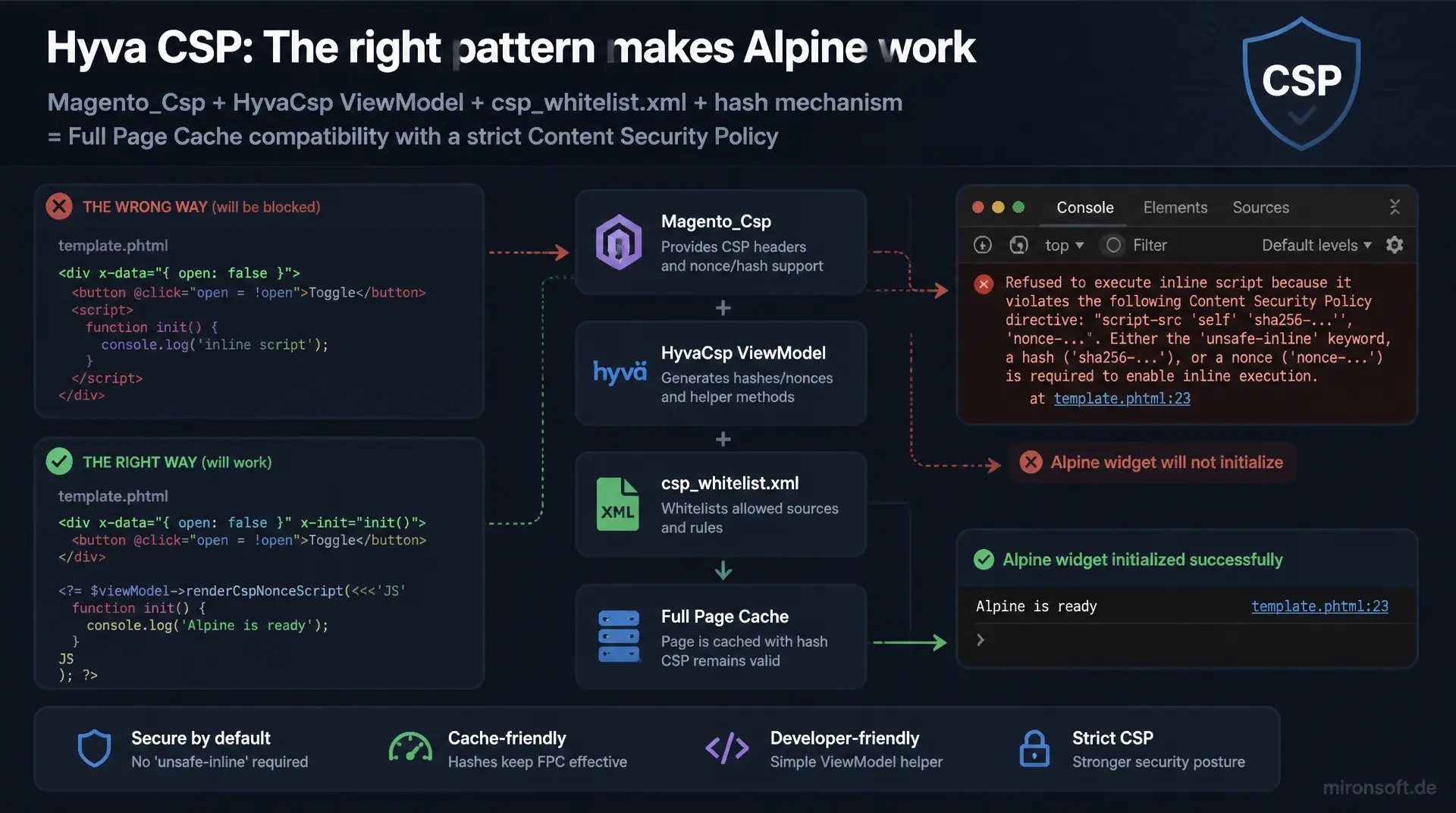
setting up CSP in Hyva properly instead of forcing unsafe-inline
Anyone who adds an inline script to a Hyva template without the right pattern will eventually see a blocked execution in the browser console instead of a working Alpine widget. CSP in Hyva rests on a clear interplay between Magento_Csp, the HyvaCsp ViewModel, csp_whitelist.xml and a hash mechanism that makes full page cache and a strict Content Security Policy possible at the same time. This article walks through every building block with real code from Magento 2.4.8 and PHP 8.4.
Table of Contents
- 1. Why Hyva relies on a strict Content Security Policy from the ground up
- 2. How Magento_Csp works: policies, csp_whitelist.xml and Report-Only mode
- 3. The registerInlineScript() pattern in detail: the HyvaCsp ViewModel and the nonce mechanism
- 4. Registering your own inline scripts correctly: a step-by-step code example
- 5. Allowing external domains and scripts via csp_whitelist.xml
- 6. Alpine.js and CSP: inline expressions, x-data and the unsafe-eval problem
- 7. Debugging CSP violations: browser console, Report-Only mode and csp_report_uri
- 8. Embedding third-party scripts (tracking, payment providers) CSP-compliantly
- 9. Deployment checklist: testing CSP consistently between staging and production
- 10. Summary
- 11. FAQ
1. Why Hyva relies on a strict Content Security Policy from the ground up
CSP in Hyva is not an optional add-on, it is a deliberate architectural decision. Hyva Themes drop jQuery, Knockout.js and Magento's UI components entirely, working instead with lean phtml templates and Alpine.js directly in the markup. Exactly this pattern, many small inline scripts instead of a few large bundles, collides without a countermeasure with a strict Content Security Policy, which by definition blocks any script execution that has not been explicitly allowed. Anyone who thinks about CSP in Hyva from the start avoids exactly this conflict instead of discovering it in production.
The second reason is the real attack surface of Magento stores. Checkout forms, customer accounts and payment data make Magento installations a worthwhile target for cross-site scripting, and a Content Security Policy is precisely the most effective browser-side line of defense against this class of attack. A Content Security Policy in Hyva that permits unsafe-inline across the board to save development effort effectively undoes this protection and reduces the CSP to a fig leaf with no real effect.
The third reason is technical and directly concerns Magento's caching architecture. Classic nonce-based CSP approaches generate a fresh random value per request, which collides with the full page cache as soon as identical HTML is served to multiple visitors. CSP in Hyva solves this problem with a hash-based mechanism for inline scripts, explained in detail in the following sections, which makes cache compatibility and a strict policy possible at the same time.
2. How Magento_Csp works: policies, csp_whitelist.xml and Report-Only mode
The core module Magento_Csp has been a fixed part of Magento core since version 2.3.5 and provides the entire infrastructure that CSP in Hyva builds on. It gathers a list of allowed sources per directive (script-src, style-src, img-src and others) from various sources, configuration, events and declarative XML files, and renders the resulting Content-Security-Policy header for every response. Storefront and admin area are configured completely separately, under Stores > Configuration > Security > Content Security Policy, so a stricter policy in checkout does not automatically affect the admin area and vice versa.
Two operating modes are decisive for every rollout of CSP in Hyva: enforce mode, which actively blocks violations and is delivered via the Content-Security-Policy header, and Report-Only mode, delivered via Content-Security-Policy-Report-Only, which only logs violations without blocking anything. For any production rollout of Content Security Policy in Hyva, it is advisable to run Report-Only mode over several days of real traffic first, before switching to enforce, because this surfaces overlooked sources without customers actually experiencing blocked scripts at checkout.
The actual approval of additional sources runs through csp_whitelist.xml, a declarative XML file that defines its own policy additions per module or theme without overwriting existing configuration. During bootstrap, Magento merges every csp_whitelist.xml file found into a single effective policy per area. That keeps CSP in Hyva modular: every module that needs an external resource ships its own approval instead of a central configuration file being maintained manually.
3. The registerInlineScript() pattern in detail: the HyvaCsp ViewModel and the nonce mechanism
At the core of CSP in Hyva is the HyvaCsp ViewModel that Hyva Themes ship specifically for this problem: how do you allow a single, static inline script without opening the entire script-src directive to unsafe-inline for any script whatsoever? The answer is a hash-based approach. While rendering a template, the ViewModel computes a SHA-256 hash over the exact content between the <script> tags for every registered script block and adds this hash as an additional allowed source to the response's script-src directive.
This hash mechanism is the crucial difference from the classic nonce approach that Magento_Csp also supports for dynamically rendered scripts in the core framework. A nonce is a randomly generated value newly created per request, which must appear both in the response header and in the script tag's nonce attribute. That works reliably for unversioned, dynamically rendered pages, but it collides with the full page cache: two visitors served the same cached category page would expect different nonce values in the header but see identical HTML with the first request's baked-in nonce. For CSP in Hyva, that would be a direct contradiction of the theme's central performance advantage.
The hash of an identical script content, by contrast, stays stable across any number of requests, because it depends solely on the text content between the tags, not on the timing of the request. That is exactly why registerInlineScript() is cache-compatible: the full page cache serves the same HTML with the same embedded script, and the corresponding hash in the policy remains valid for every delivery. The ViewModel itself is typically wired into a template via constructor property promotion and the Hyva ViewModel registry.
<?php

declare(strict_types=1);

namespace Mironsoft\Csp\ViewModel;

use Hyva\Theme\ViewModel\HyvaCsp;
use Magento\Framework\View\Element\Block\ArgumentInterface;

/**
 * ViewModel that exposes the HyvaCsp helper to a custom block/template pair
 * so inline scripts can be registered against the active CSP policy.
 */
final class NewsletterPopup implements ArgumentInterface
{
    /**
     * @param HyvaCsp $hyvaCsp Hyva ViewModel handling inline script and style hash registration
     */
    public function __construct(
        private readonly HyvaCsp $hyvaCsp
    ) {
    }

    /**
     * Returns the HyvaCsp instance for direct use inside the phtml template.
     *
     * @return HyvaCsp
     */
    public function getHyvaCsp(): HyvaCsp
    {
        return $this->hyvaCsp;
    }
}
4. Registering your own inline scripts correctly: a step-by-step code example
In practice, the HyvaCsp ViewModel is rarely injected manually as shown above, usually the standard route via the Hyva ViewModel registry directly in the template is enough: $hyvaCsp = $viewModels->require(Hyva\Theme\ViewModel\HyvaCsp::class);. After that, the instance is available throughout the template, and the fixed project rule at mironsoft.de states: every <script> block is immediately followed by a call to $hyvaCsp->registerInlineScript(). This convention is not a matter of style, it is necessary so the call's output, an invisible HTML comment carrying the computed hash, lands in exactly the right spot in the rendered markup and Magento_Csp can assign the correct hash.
The order matters here: the PHP call must see the exact, already finally rendered script content, which is why it always sits after the closing </script> tag, never before it. If even a single whitespace character in the script content is changed afterward, the SHA-256 hash changes, and the old approval becomes invalid, which shows up immediately in development as a CSP violation in the console. That is intentional: CSP in Hyva deliberately relies on this fragility, because it guarantees that nobody can silently swap the content of an approved script without the policy noticing.
The following example shows the complete pattern in a Hyva template, exactly as it must appear in any mironsoft.de codebase whenever an inline script is needed, for example to initialize an Alpine store that consumes data from PHP.
<?php
/** @var \Magento\Framework\View\Element\Template $block */
/** @var \Hyva\Theme\ViewModel\HyvaCsp $hyvaCsp */
/** @var \Hyva\Theme\Model\ViewModelRegistry $viewModels */
$hyvaCsp = $viewModels->require(\Hyva\Theme\ViewModel\HyvaCsp::class);
$stockThreshold = (int) $block->getData('low_stock_threshold') ?: 5;
?>
<div x-data="lowStockBanner()" x-show="isLowStock" class="rounded-lg bg-orange-50 p-3 text-sm">
  <span x-text="message"></span>
</div>

<script>
  // Alpine.js component reading a PHP-provided threshold, registered for CSP in Hyva
  function lowStockBanner() {
    return {
      isLowStock: false,
      message: '',
      threshold: <?= (int) $stockThreshold ?>,
      init() {
        this.isLowStock = window.productQty <= this.threshold;
        this.message = this.isLowStock ? 'Only a few items left in stock' : '';
      }
    };
  }
</script>
<?= /* @noEscape */ $hyvaCsp->registerInlineScript() ?>
If this call is missing at the end, the script stays visible in the source code but, under a strict Content Security Policy in Hyva, is silently not executed by the browser, without producing any obvious PHP error. That exact class of bug is the hardest to catch in code review and therefore belongs on every checklist before merging a new template.
5. Allowing external domains and scripts via csp_whitelist.xml
Not every script is inline code from your own theme. Payment providers, tracking services and external widgets almost always deliver their code via a <script src="https://..."> tag from a foreign domain. In that case, the hash mechanism of registerInlineScript() does not apply, because the script's content is not even known at build time. Instead, the source domain itself must be added to the script-src directive via csp_whitelist.xml, so that CSP in Hyva allows the load in the first place.
The file usually lives under etc/frontend/csp_whitelist.xml in the relevant module or theme and is read in during cache generation. Each <policy> references a CSP directive via its id, and each <value> entry beneath it defines an allowed source with a type attribute, usually host for a domain or hash for static content. A clean approval for a payment provider like the example below belongs in every module that connects a payment method with an external JavaScript SDK.
<!-- app/code/Mironsoft/PaymentGateway/etc/frontend/csp_whitelist.xml -->
<csp_whitelist xmlns:xsi="http://www.w3.org/2001/XMLSchema-instance"
               xsi:noNamespaceSchemaLocation="urn:magento:module:Magento_Csp:etc/csp_whitelist.xsd">
    <policies>
        <!-- Allow the payment provider SDK to be loaded and executed -->
        <policy id="script-src">
            <values>
                <value id="payment-sdk-host" type="host">https://js.payment-provider.example</value>
            </values>
        </policy>
        <!-- The provider's checkout iframe needs frame-src as well -->
        <policy id="frame-src">
            <values>
                <value id="payment-sdk-frame" type="host">https://checkout.payment-provider.example</value>
            </values>
        </policy>
        <!-- Requests triggered by the SDK (status polling) need connect-src -->
        <policy id="connect-src">
            <values>
                <value id="payment-sdk-api" type="host">https://api.payment-provider.example</value>
            </values>
        </policy>
    </policies>
</csp_whitelist>
A common mistake with CSP in Hyva: developers only approve script-src and then wonder why the payment widget still does not load, because the embedded checkout iframe additionally needs frame-src and the SDK's internal Ajax calls need connect-src. A complete approval therefore always covers every directive the third-party script actually touches, not just the obvious script-src directive.
6. Alpine.js and CSP: inline expressions, x-data and the unsafe-eval problem
Alpine.js, the central JavaScript framework in Hyva, evaluates expressions like x-data="{ open: false }" or x-show="open" at runtime directly from the HTML attribute. Technically, this happens via an internal new Function(...) call that interprets the expression as JavaScript code. A particularly strict Content Security Policy in Hyva that removes unsafe-eval entirely from the script-src directive can therefore potentially block every Alpine directive across the entire theme, not just individual inline scripts.
In Hyva Themes' default configuration, unsafe-eval is therefore deliberately part of the approved script-src directive, because Alpine simply does not work without this permission. Anyone aiming for an even stricter policy can fall back on the official CSP-compatible Alpine build, which evaluates expressions through a restricted, eval-free parser instead of new Function(...). The switch, however, requires avoiding more complex JavaScript expressions in x-data attributes and moving them into named Alpine components instead.
For most mironsoft.de projects, the pragmatic path is to allow unsafe-eval specifically for script-src while keeping every other directive as strict as possible. That keeps CSP in Hyva practical without having to rewrite every Alpine component in the theme, while attack vectors such as loading unauthorized external scripts are still reliably blocked.
7. Debugging CSP violations: browser console, Report-Only mode and csp_report_uri
The fastest entry point when debugging CSP in Hyva is the browser console: every blocked call shows up there as its own error message with the exact directive that was violated and the blocked script or resource. These messages are the first place to look as soon as an Alpine widget suddenly stops responding after a deployment even though the source code looks unchanged.
For systematic debugging beyond individual browser sessions, Magento_Csp provides its own report endpoint, configured via Report-Only mode. Instead of merely blocking, the browser automatically sends a JSON report to the configured csp_report_uri on every violation, including the blocked URI and the violated directive. These reports can be collected and analyzed centrally instead of waiting for individual customer support tickets reporting a broken form.
{
  "csp-report": {
    "document-uri": "https://www.mironsoft-shop.example/checkout/",
    "referrer": "",
    "violated-directive": "script-src-elem",
    "effective-directive": "script-src-elem",
    "original-policy": "default-src 'self'; script-src 'self' 'unsafe-eval' 'sha256-abc123...'; report-uri /csp/reports/store",
    "disposition": "report",
    "blocked-uri": "https://widgets.some-tracking-vendor.example/tag.js",
    "line-number": 42,
    "source-file": "https://www.mironsoft-shop.example/checkout/",
    "status-code": 200,
    "script-sample": ""
  }
}
This example report immediately shows what to do: the blocked-uri points to an external tracking domain not yet allowed in csp_whitelist.xml. For CSP in Hyva, Report-Only mode is therefore not just a local development debugging tool, it belongs in staging environments as a permanent safety-net option before a new approval is carried over into enforce mode.
8. Embedding third-party scripts (tracking, payment providers) CSP-compliantly
Tracking scripts such as analytics tags or conversion pixels are one of the most common sources of CSP violations in production stores, because they are often added later via a tag manager or the marketing team without informing the developer. For a reliable Content Security Policy in Hyva, every new third-party service must therefore go through the same process as an internal module: identify the domains actually needed, add them to csp_whitelist.xml, and verify them in Report-Only mode before the service goes live.
Payment providers add an extra difficulty: many SDKs dynamically load further sub-domains at runtime, for example for fraud detection or A/B testing within the payment flow, that are not yet documented at integration time. For CSP in Hyva, it is advisable to start generously with Report-Only mode, collect all domains that actually occur over several days of real checkout traffic, and only then move a minimal but complete approval list into enforce mode.
As a general rule: a wildcard entry like https://*.example might fix every violation in the short term, but it undermines the actual purpose of the policy, because it potentially allows any subdomain of the provider, including compromised ones or ones repurposed later. For CSP in Hyva, every third-party domain therefore belongs individually named in the whitelist, even if that means more maintenance effort than a blanket approval.
9. Deployment checklist: testing CSP consistently between staging and production
A typical pattern in grown Magento projects: staging runs a more permissive policy or Report-Only mode, production runs a strict enforce policy, and nobody has recently tested the two environments in sync. That is exactly when CSP violations only surface after go-live, when a customer reports a blocked payment widget in the real checkout. For reliable CSP in Hyva, a header comparison between both environments therefore belongs on every deployment checklist.
A simple curl call against both environments immediately shows whether the effective policy is identical. After every change to csp_whitelist.xml, an explicit cache flush is additionally required, because the merged policy is part of the configuration cache and otherwise the old, merged version keeps being served even though the XML file has already been updated.
# Compare the effective CSP header between staging and production
curl -sI https://staging.mironsoft-shop.example/ | grep -i content-security-policy
curl -sI https://www.mironsoft-shop.example/ | grep -i content-security-policy

# After editing csp_whitelist.xml, always flush config and full page cache
bin/magento cache:flush config
bin/magento cache:flush full_page

# Verify Report-Only mode is disabled before going live with an enforced policy
bin/magento config:show csp/mode/storefront_mode
Before every go-live of a new third-party integration, a manual checkout run with the browser console open additionally belongs on the checklist, because automated tests can easily miss CSP violations from dynamically loaded scripts. Only once staging and production deliver identical headers and a real checkout run stays free of console errors does a change to CSP in Hyva count as deploy-ready.
The most important situations side by side: The following overview shows how typical pitfalls with Content Security Policy in Hyva differ from the recommended solution.
| Situation | Wrong | Recommended | Effect |
|---|---|---|---|
| Own inline script | <script> without registerInlineScript() | registerInlineScript() right after it | Script is silently blocked under a strict policy |
| External script | Hardcoded <script src> tag without approval | Domain added to csp_whitelist.xml | Script loads reliably instead of throwing a CSP error |
| Alpine.js expressions | unsafe-eval removed from script-src entirely | Allow unsafe-eval specifically or use the CSP build | Alpine directives keep working theme-wide |
| Broad approvals | Wildcard domain like https://*.example | Whitelist individual subdomains explicitly | Attack surface stays tightly scoped |
| Introducing CSP in testing | Disable CSP entirely because something is blocked | Use Report-Only mode with csp_report_uri | Violations become visible without affecting customers |
Mironsoft
Hyva development, security audits and Magento 2 operations
CSP errors in checkout instead of a clean policy?
We set up CSP in Hyva for your store properly: from csp_whitelist.xml through registerInlineScript() to a Report-Only rollout, so payment widgets, tracking and Alpine.js run reliably without needing unsafe-inline.
CSP audit
Full analysis of every policy violation, including third-party scripts
Implementation
csp_whitelist.xml, registerInlineScript() and a nonce/hash strategy in the theme
Rollout
Report-Only phase, monitoring and a safe switch to enforce mode
10. Summary
A clean implementation of CSP in Hyva is not a single configuration switch, it is the interplay of several building blocks: Magento_Csp provides the infrastructure for policies, Report-Only mode and the report endpoint, the HyvaCsp ViewModel handles hash-based, cache-compatible approval of your own inline scripts via registerInlineScript(), and csp_whitelist.xml declaratively controls which external domains are allowed to load at all. Anyone who keeps these three building blocks cleanly separated, instead of bypassing them with a blanket unsafe-inline approval, ends up with a policy that actually protects instead of merely existing on paper.
The second decisive point is process: Content Security Policy in Hyva belongs as a fixed part of every deployment checklist, with a Report-Only phase before every enforce rollout, a header comparison between staging and production, and a clear rule for new third-party scripts. Without this process, CSP in Hyva remains a one-off setup that breaks again with the next carelessly added tracking pixel or payment widget.
CSP in Hyva, The Essentials at a Glance
registerInlineScript()
Always directly after the <script> block, otherwise the script is silently blocked under a strict policy.
csp_whitelist.xml
Approve every external domain individually, including script-src, frame-src and connect-src as needed.
Hash instead of nonce
A SHA-256 hash per inline script stays stable across requests and is thus full page cache compatible.
Debugging & rollout
Report-Only mode with csp_report_uri before every enforce rollout, header comparison between staging and production.