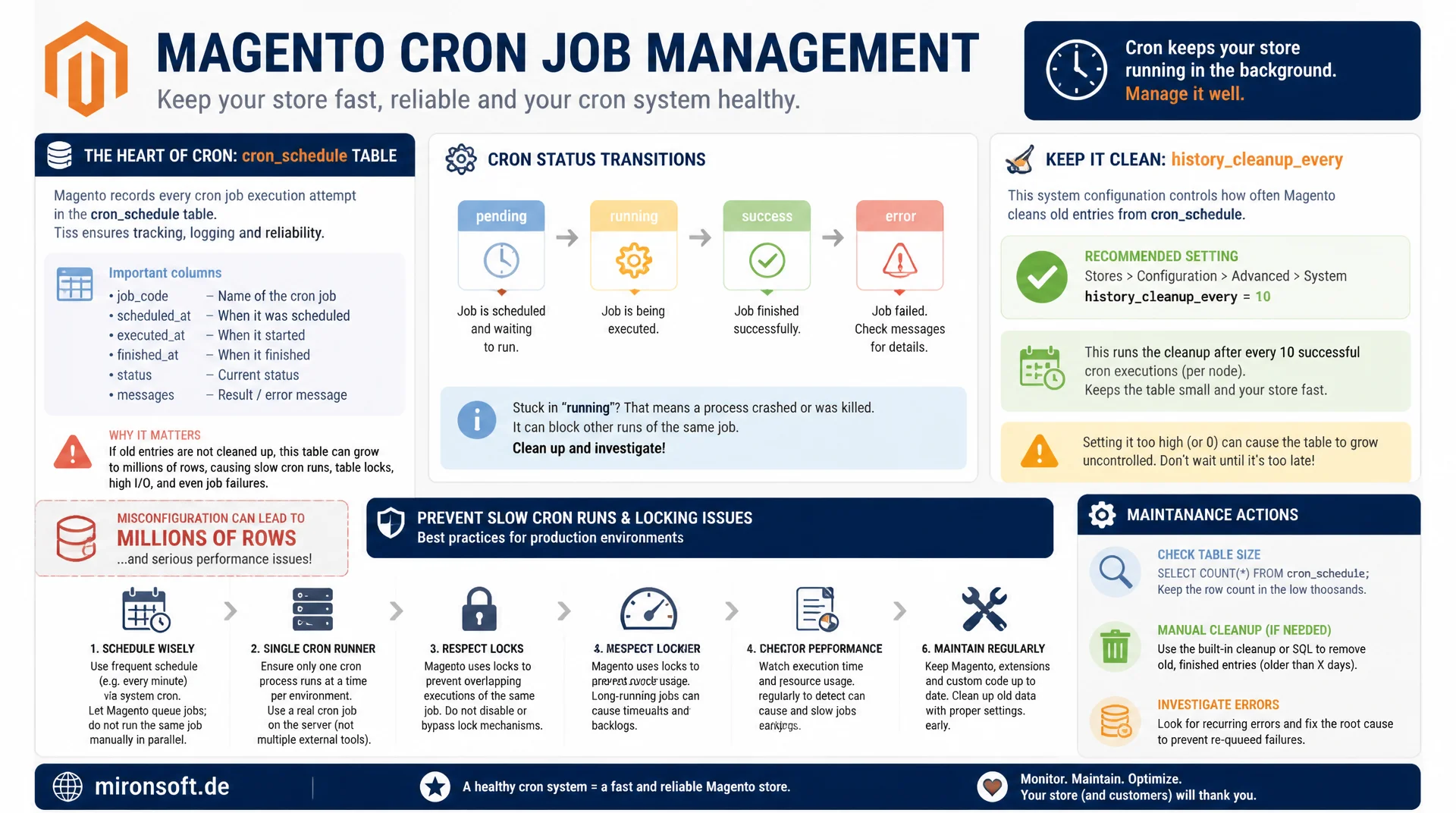
from history_cleanup_every to manual cleanup
cron_schedule logs every scheduled and executed cron job in Magento and can accumulate millions of rows within a few weeks if misconfigured. Once you understand the table's status transitions, set history_cleanup_every correctly, and step in manually when needed, you prevent slow cron runs and locking problems in production.
Table of Contents
- 1. How cron_schedule works
- 2. Why the table bloats
- 3. history_cleanup_every and related configuration
- 4. Manual cleanup queries for old entries
- 5. Symptoms of a bloated table
- 6. Analysis: which jobs create the most entries
- 7. Best practice configuration per cron group
- 8. Monitoring script and alerting
- 9. Prevention: indexes and maintenance windows
- 10. Summary
- 11. FAQ
1. How cron_schedule works
The cron_schedule table is the heart of Magento's cron processing. For every configured cron job, Magento creates rows in advance with the status pending, each with job_code, scheduled_at, and an initially empty executed_at. As soon as the cron runner (bin/magento cron:run) finds a due job, the status changes to running, then on completion to success or, on error, to error or missed if the time window was missed.
These status transitions are deliberately designed so that cron_schedule serves as both a queue and an execution log at the same time. The advantage is traceability, every job run can be evaluated afterward via scheduled_at, executed_at, and finished_at. The downside is that without active cleanup, every single one of these rows stays in the table permanently, even after the job has finished successfully.
On a typical Magento store with several dozen registered cron jobs scheduled on a per minute cadence, the creation of new pending rows alone produces several thousand new entries in cron_schedule per day. Without cleanup, growth to several million rows within a few months is not the exception, it is the rule.
DESCRIBE cron_schedule;
-- +--------------+------------------+------+-----+---------+----------------+
-- | Field        | Type             | Null | Key | Default | Extra          |
-- +--------------+------------------+------+-----+---------+----------------+
-- | schedule_id  | int(10) unsigned | NO   | PRI | NULL    | auto_increment |
-- | job_code     | varchar(255)     | NO   | MUL | NULL    |                |
-- | status       | varchar(7)       | NO   | MUL | pending |                |
-- | messages     | text             | YES  |     | NULL    |                |
-- | created_at   | timestamp        | NO   |     | CURRENT |                |
-- | scheduled_at | varchar(30)      | NO   | MUL | NULL    |                |
-- | executed_at  | varchar(30)      | YES  |     | NULL    |                |
-- | finished_at  | varchar(30)      | YES  |     | NULL    |                |
-- +--------------+------------------+------+-----+---------+----------------+

-- Current status distribution
SELECT status, COUNT(*) AS count FROM cron_schedule GROUP BY status;
2. Why the table bloats
The main reason for bloat in cron_schedule is simple: Magento continuously creates new rows, but the default configuration only deletes old rows with a certain delay, and only if the cleanup job itself runs reliably. If the cron runner fails for an extended period, for example because a server maintenance window disabled cron or a PHP error crashes the process, pending entries accumulate uncontrolled without any cleanup ever taking place.
A second, often overlooked reason is an overly aggressive schedule_ahead_for configuration or cron jobs that run at very short intervals (every minute or more often). Each of these jobs creates its own rows in cron_schedule, and with custom modules registering their own very frequent cron jobs, row count can grow faster than the default cleanup can keep up with. A third reason is a misconfigured or disabled history_cleanup_every setting, which means completed jobs get the status success but are never actually deleted.
3. history_cleanup_every and related configuration
Magento controls the cleanup of cron_schedule through several parameters in the crontab.xml group configuration or the admin setting under System > Cron. Central to this are history_cleanup_every (how often cleanup runs, in minutes), history_success_lifetime (how long successful jobs are kept, in minutes), and history_failure_lifetime (how long failed jobs are kept). The default value for history_success_lifetime is 2880 minutes (2 days), which is sufficient for most stores but can be too tight for very high job frequency.
These values can be adjusted individually per cron group (default, index, consumers) in app/etc/env.php under the cron_configuration key, or directly through the admin area, checked for example with bin/magento config:show cron_schedule/default/schedule_ahead_for. A common misconfiguration is that developers set history_cleanup_every to a very high value while debugging, to inspect job history for longer, and forget to reset the value afterward. The result is a cron_schedule table that grows silently and unnoticed over weeks.
-- Verify how far back finished job history actually reaches
SELECT job_code, MIN(scheduled_at) AS oldest, MAX(scheduled_at) AS newest, COUNT(*) AS total
FROM cron_schedule
WHERE status = 'success'
GROUP BY job_code
ORDER BY total DESC
LIMIT 10;
4. Manual cleanup queries for old entries
Once cron_schedule has already reached several million rows, simply resetting the configuration is not enough, because the regular cleanup job itself only processes limited batches per run and would take weeks to work through the backlog on a heavily bloated table. In this case, a manual, one time cleanup via SQL is the pragmatic path, it matters to delete in controlled batches to avoid long locks on a production table.
Before any manual cleanup, the cron process should be briefly paused (bin/magento cron:run must not write concurrently during the deletion), and it is advisable to first remove only a few thousand rows per DELETE statement and observe the effect on system load before larger batches follow.
-- Manual batched cleanup of old finished cron_schedule entries
-- Run repeatedly until affected rows reach 0, in small batches to avoid long locks
DELETE FROM cron_schedule
WHERE status IN ('success', 'missed')
  AND scheduled_at < DATE_SUB(NOW(), INTERVAL 30 DAY)
LIMIT 5000;

-- Separately clean up long-stuck error entries
DELETE FROM cron_schedule
WHERE status = 'error'
  AND scheduled_at < DATE_SUB(NOW(), INTERVAL 60 DAY)
LIMIT 5000;

-- Reclaim disk space after a large cleanup (run during a maintenance window)
OPTIMIZE TABLE cron_schedule;
5. Symptoms of a bloated table
A bloated cron_schedule table first shows up indirectly: cron runs take noticeably longer, because bin/magento cron:run executes a query over all pending rows on every call to identify due jobs. If the table is not properly indexed or contains millions of historical rows, this query slows down measurably, which in aggregate leads to missed job executions, because the next cron cycle already starts before the previous one has completed.
A second symptom is locking under concurrent access: when several cron groups write against the same heavily grown cron_schedule table simultaneously, the probability of lock wait times and, in extreme cases, deadlocks increases. In practice, this often shows up as seemingly random errors in var/log/cron.log that at first glance have nothing to do with table size, but on closer analysis trace back to lock timeouts.
6. Analysis: which jobs create the most entries
Before blanket cleaning cron_schedule, a short analysis of which job_code values account for the largest share of table size pays off. Often it is not the standard Magento jobs but custom modules or third party extensions with very short intervals that produce a disproportionate number of rows. This analysis often reveals the actual cause, not just a symptom that gets papered over with deletion.
Once a single job is identified as the main contributor, it is worth checking whether the configured interval is actually necessary. A synchronization job that runs every 60 seconds even though the underlying data source only changes every 15 minutes creates unnecessary overhead in cron_schedule and should be stretched to a realistic interval, instead of fighting the symptoms with ever more aggressive deletion.
-- Identify the top job_code contributors to cron_schedule row count
SELECT job_code, COUNT(*) AS row_count,
       ROUND(COUNT(*) * 100.0 / (SELECT COUNT(*) FROM cron_schedule), 1) AS pct_of_total
FROM cron_schedule
GROUP BY job_code
ORDER BY row_count DESC
LIMIT 15;
7. Best practice configuration per cron group
Magento separates cron jobs by default into several groups: default for general maintenance jobs, index for reindex runs, and consumers for message queue consumers. Each group can have its own history_cleanup_every, history_success_lifetime, and history_failure_lifetime configuration, which allows targeted tuning: the index group, with potentially very many short lived jobs, can tolerate a shorter retention time than the default group, which holds order status transitions or email sending jobs whose history stays useful for support requests longer.
A proven starting configuration reduces history_success_lifetime to 1440 minutes (24 hours) for high frequency groups and leaves it at 2880 minutes (48 hours) for the default group, combined with a history_cleanup_every of 10 minutes instead of the default setting, to prevent backlogs from forming in the first place. These values are starting points, not a universal solution, the actual job frequency of each store should determine the final configuration.
8. Monitoring script and alerting
A simple monitoring script that runs daily via cron checks the total row count of cron_schedule as well as the number of pending entries older than an expected time span. If the total row count exceeds a defined threshold, or if there are an unusually high number of pending entries that should have long since been executed, that indicates a stuck or inactive cron runner that needs immediate attention.
In addition, an evaluation of error and missed statuses over time provides valuable clues about structural problems, for example when a particular job systematically fails. Such monitoring can easily be integrated into existing alerting systems by having the script send an email or a message to a monitoring channel when thresholds are exceeded.
#!/usr/bin/env bash
# cron-schedule-monitor.sh: alert on cron_schedule bloat or stuck runner
set -euo pipefail

THRESHOLD_ROWS=200000
THRESHOLD_STALE_PENDING=500

TOTAL_ROWS=$(mysql -N magento -e "SELECT COUNT(*) FROM cron_schedule")
STALE_PENDING=$(mysql -N magento -e "
  SELECT COUNT(*) FROM cron_schedule
  WHERE status = 'pending' AND scheduled_at < DATE_SUB(NOW(), INTERVAL 30 MINUTE)
")

if (( TOTAL_ROWS > THRESHOLD_ROWS )); then
  echo "[ALERT] cron_schedule has ${TOTAL_ROWS} rows, exceeds threshold" >&2
fi

if (( STALE_PENDING > THRESHOLD_STALE_PENDING )); then
  echo "[ALERT] ${STALE_PENDING} stale pending jobs, cron runner may be stuck" >&2
fi
9. Prevention: indexes and maintenance windows
Magento sets up default indexes on cron_schedule for job_code, status, and scheduled_at, which are sufficient for the usual queries as long as the table does not spiral out of control through bloat. Under very high job frequency, an additional composite index on status and scheduled_at can improve the performance of the query the cron runner uses to look for due jobs, because MySQL can then scan directly over both filter criteria instead of just one.
As a preventive measure, a fixed maintenance window that regularly checks whether history_cleanup_every is still active and correctly configured also helps, especially after larger deployments or module updates that could register new cron jobs. A store that establishes this check as a fixed part of its deployment process prevents cron_schedule from ever reaching a critical state in the first place.
Comparison: cleanup strategies for cron_schedule
| Strategy | Use case | Risk | Effect |
|---|---|---|---|
| history_cleanup_every | Ongoing regular operation | Low | Continuous, prevents bloat |
| Manual batch DELETE | Already heavily bloated table | Medium with wrong batch size | Immediate relief |
| Reduce job interval | Single job as main contributor | Low | Fixes cause, not symptom |
| OPTIMIZE TABLE | After a large cleanup | Locks table during run | Reclaims disk space |
Mironsoft
Magento cron configuration and database maintenance
cron_schedule spinning out of control?
We analyze your cron jobs, identify the main contributors, set up a clean history_cleanup_every configuration, and build monitoring against stuck cron runners.
Cron audit
Identify job frequency and the main contributors to table size
Cleanup setup
Configure history_cleanup_every cleanly per cron group
Monitoring
Alerting against stuck or disabled cron runners
10. Summary
The cron_schedule table serves as both a queue and an execution log for all Magento cron jobs, which leads to uncontrolled growth without active cleanup. The default configuration via history_cleanup_every, history_success_lifetime, and history_failure_lifetime is sufficient for most stores, but should be adapted per cron group to actual job frequency, especially for high frequency custom jobs.
If the table is already heavily bloated, only a manual, batched cleanup via SQL helps, followed by OPTIMIZE TABLE to reclaim disk space. Symptoms like slow cron runs, missed jobs, and deadlocks can be traced back to their actual cause with an analysis of the job_code distribution, instead of just fighting the symptom with ever more aggressive deletion. A simple monitoring script that checks table size and stale pending entries prevents the problem from repeating unnoticed.
Cleaning up cron_schedule: The Essentials at a Glance
Configuration
Check history_cleanup_every, history_success_lifetime, and history_failure_lifetime per cron group.
Manual cleanup
Batched DELETE with LIMIT, followed by OPTIMIZE TABLE to reclaim disk space.
Root cause analysis
Check the job_code distribution, often a custom job with too short an interval is the real cause.
Monitoring
Set up a daily script against table growth and stale pending entries.