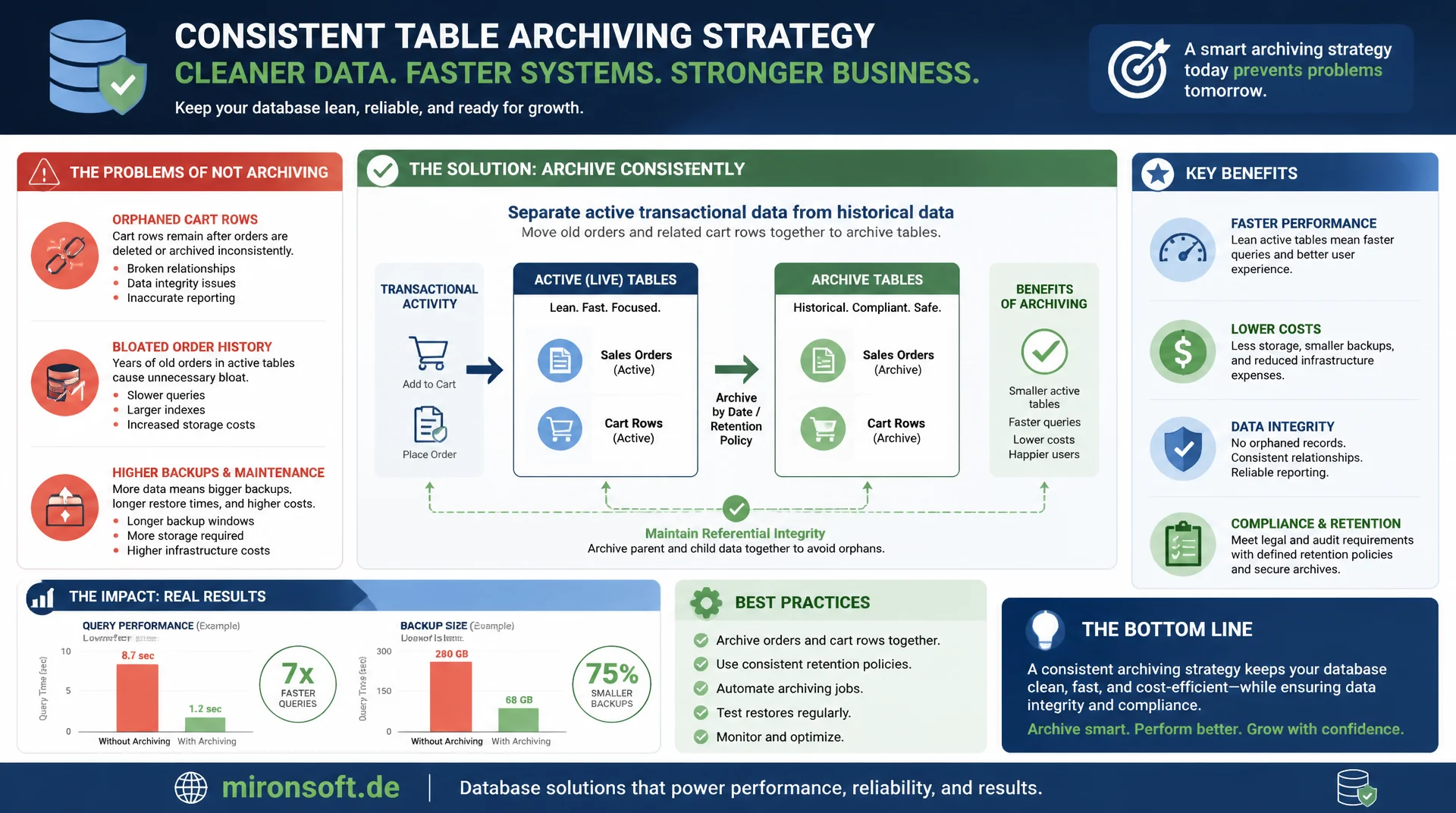
lean OLTP tables for large Magento stores
Without consistent table archiving, quote and sales_order accumulate millions of orphaned cart rows and years of order history that slow down every query and inflate backups. A well designed archiving strategy separates active transactional data from historical data without endangering referential integrity or compliance requirements.
Table of Contents
- 1. Why quote and sales_order grow without limit
- 2. Abandoned cart cleanup: deleting quote rows safely
- 3. bin/magento cron:run and the built-in quote cleanup function
- 4. sales_order archiving: moving cold data out safely
- 5. Partitioning as an alternative to table archiving
- 6. Foreign keys and referential integrity when deleting
- 7. Batch deletes without replication lag or lock escalation
- 8. Backup and compliance requirements for order data
- 9. Monitoring: table size, fragmentation, OPTIMIZE TABLE
- 10. Summary
- 11. FAQ
1. Why quote and sales_order grow without limit
Every visitor who adds an item to their cart without completing the order leaves behind a row in quote and related rows in quote_item and quote_address. Without active table archiving, these orphaned records stay in the database forever, since Magento itself does not ship an aggressive automatic deletion process. On a store with a high checkout abandonment rate, this quickly adds up to several million unused rows per year.
In parallel, sales_order keeps growing with every completed order, and unlike quotes, deleting it is usually not straightforward due to legal retention obligations. This is exactly what makes table archiving a different task for sales data than for quote data: where carts may be deleted, order data typically only needs to move from the active OLTP table into an archive, without losing the information itself.
The performance impact is genuinely measurable: a sales_order table with fifty million rows, of which only two percent come from the last ninety days, forces every index scan to read far more data pages than necessary. The InnoDB buffer pool cannot efficiently cache historical, rarely read data when it is physically interspersed among active rows. Targeted table archiving reduces this exact effect by keeping the active working set small and cache friendly.
2. Abandoned cart cleanup: deleting quote rows safely
Before deleting a quote row, it must be clearly defined what counts as "abandoned". A common criterion: quotes without an associated order whose updated_at is older than ninety days and that do not belong to a logged-in customer with an active wishlist reference. These criteria should be tuned per project before the first table archiving runs in production, because overly aggressive deletion can wipe out active carts of returning customers.
-- Identify candidates for abandoned cart cleanup
SELECT q.entity_id, q.customer_email, q.updated_at, q.items_count
FROM quote q
LEFT JOIN sales_order so ON so.quote_id = q.entity_id
WHERE so.entity_id IS NULL
  AND q.is_active = 1
  AND q.updated_at < DATE_SUB(NOW(), INTERVAL 90 DAY)
  AND q.customer_is_guest = 1
LIMIT 5000;

-- Remove dependent quote_item and quote_address rows before the main delete
DELETE qi FROM quote_item qi
INNER JOIN quote q ON q.entity_id = qi.quote_id
LEFT JOIN sales_order so ON so.quote_id = q.entity_id
WHERE so.entity_id IS NULL
  AND q.updated_at < DATE_SUB(NOW(), INTERVAL 90 DAY)
  AND q.customer_is_guest = 1
LIMIT 5000;
A common mistake with the first table archiving run for quotes: forgetting that quote_item_option and quote_payment also hold foreign keys against the quote table. Cleaning up only the main table leaves orphaned rows in the side tables, which themselves later become a growth problem again. A complete cleanup has to walk through every dependent table in the right order, from leaf tables to the main table.
3. bin/magento cron:run and the built-in quote cleanup function
Magento ships a built-in cron job called sales_clean_quotes, controlled through the configuration under Sales > Sales > Quotes in the backend, which automatically deletes quotes after a configurable number of days. In practice, this default mechanism is often sufficient for small to mid-sized stores, but it hits limits with very large data volumes, because the cron job runs without explicit batching and produces long transactions when several million rows need to be deleted.
For robust table archiving on large stores, it is worth disabling the default cron job and implementing a dedicated, batch-based cleanup script instead, one that goes beyond bin/magento cron:run --group="clean_quote" and gives explicit control over chunk size and pauses between batches. That prevents a single cron run from blocking the database for several minutes with one enormous transaction.
# Check the configurable retention period for the built-in quote cleanup
bin/magento config:show sales/orders/delete_quote_after

# Test the default quote cleanup cron group in isolation
bin/magento cron:run --group="clean_quote"

# Schedule a dedicated batch-based cleanup script instead of the default job
# (crontab entry calling a PHP script with explicit chunk control)
*/30 * * * * /usr/bin/php /var/www/magento/bin/quote-cleanup.php --chunk-size=1000 --sleep=2
4. sales_order archiving: moving cold data out safely
Unlike quotes, the goal for sales_order is rarely final deletion, it is controlled relocation into a separate archive table or archive database. The established approach: a table sales_order_archive with an identical structure is created, orders older than, say, three years are copied there in batches, and only removed from the active table after successful verification.
-- Create an archive table with identical structure
CREATE TABLE sales_order_archive LIKE sales_order;
CREATE TABLE sales_order_item_archive LIKE sales_order_item;

-- Batch copy old orders into the archive (example batch)
INSERT INTO sales_order_archive
SELECT * FROM sales_order
WHERE created_at < DATE_SUB(NOW(), INTERVAL 3 YEAR)
  AND status IN ('complete', 'closed', 'canceled')
ORDER BY entity_id
LIMIT 2000;

-- Verification: check row count in archive against source before deleting
SELECT
    (SELECT COUNT(*) FROM sales_order WHERE created_at < DATE_SUB(NOW(), INTERVAL 3 YEAR)) AS source_count,
    (SELECT COUNT(*) FROM sales_order_archive) AS archive_count;
To access archived orders in the customer account or the backend, you need either a dedicated read-only view across both tables via UNION, or an explicit switch of the reporting time range that informs users that older orders are retrieved separately. This table archiving preserves the full history but noticeably relieves the production sales_order table, because indexes shrink and more of them fit into the buffer pool.
5. Partitioning as an alternative to table archiving
Instead of physically moving data into another table, sales_order can be split into several logical partitions using MySQL range partitioning by created_at, while the table still appears as a single unit for queries. The advantage over classic table archiving: no additional ETL process needed, Magento itself does not need to be adjusted, because partitioning stays transparent to the application layer.
The downside: partitioning alone reduces neither total data volume nor backup size, it primarily improves the performance of queries that can be scoped to a specific partition, such as "all orders from the last thirty days". For stores that mainly want to optimize query performance on current data without removing old data from direct access, partitioning is often the more pragmatic complement to actual table archiving, not a replacement for it.
6. Foreign keys and referential integrity when deleting
sales_order is the target of numerous foreign keys from tables like sales_order_item, sales_order_payment, sales_order_address, sales_invoice, sales_shipment, and sales_creditmemo. Every table archiving process has to fully map this dependency chain, otherwise either orphaned rows appear in child tables or foreign key violations abort the entire deletion process.
A proven pattern: before every production delete or move run, a dry run query first lists every affected child table and counts its rows for the order IDs to be archived. Only once those numbers match expectations does the actual archiving run start. The order to follow is always: from the most distant leaf tables toward the main sales_order table, never the other way around.
7. Batch deletes without replication lag or lock escalation
A single DELETE without LIMIT on several million rows potentially locks a very large number of rows at once in InnoDB and creates substantial replication lag on replicas, because the change must be replayed there serially. The established solution for any large-scale table archiving is a batch loop with small chunks and short pauses between batches, giving the replication process time to catch up.
-- Batch delete loop pattern (as pseudocode comment, actually driven by PHP or Bash)
-- Run repeatedly until affected_rows = 0
DELETE FROM quote
WHERE is_active = 1
  AND updated_at < DATE_SUB(NOW(), INTERVAL 90 DAY)
  AND entity_id IN (
    SELECT entity_id FROM (
      SELECT entity_id FROM quote
      WHERE is_active = 1
        AND updated_at < DATE_SUB(NOW(), INTERVAL 90 DAY)
      LIMIT 1000
    ) AS batch
  );

-- Between batches: check replication lag before starting the next batch
SHOW REPLICA STATUS\G
-- If Seconds_Behind_Source > 5: pause the batch loop briefly
A chunk size of one thousand rows is a proven starting point for safe table archiving, but should be fine tuned based on observed lock wait times and replication lag. An additional safety mechanism is checking Threads_running before every batch: if this value exceeds a defined threshold, the batch process should pause automatically, similar to the throttling logic of online schema change tools.
8. Backup and compliance requirements for order data
In many countries, order data is subject to legal retention obligations of six to ten years, which usually rules out physical deletion in the strict sense. Every table archiving process for sales_order must therefore make sure archived data remains fully intact and recoverable, even after it has been removed from the active OLTP table.
A separate backup regime for archive tables makes sense: while the active sales_order table is fully backed up daily, a rarely changing archive table only needs a monthly full backup cycle with incremental backups in between. That noticeably reduces backup windows and storage needs without endangering the recoverability of historical data. A documented restore test of the archive data should also be performed before every production table archiving run, to get a realistic estimate of recovery time in a worst case scenario.
9. Monitoring: table size, fragmentation, OPTIMIZE TABLE
After every larger table archiving run, physical storage remains behind in the form of fragmentation, because InnoDB does not automatically return deleted pages to the operating system. Free space inside the table is reused for new rows, but the file itself does not shrink on its own.
-- Check fragmentation after a large table archiving run
SELECT
    table_name,
    ROUND(data_length / 1024 / 1024, 1) AS data_mb,
    ROUND(data_free / 1024 / 1024, 1) AS free_mb,
    ROUND(data_free / NULLIF(data_length, 0) * 100, 1) AS fragmentation_pct
FROM information_schema.tables
WHERE table_schema = 'magento_prod'
  AND table_name IN ('quote', 'sales_order', 'sales_order_item')
ORDER BY fragmentation_pct DESC;

-- Defragment the table after a large archiving run (online DDL, but I/O heavy)
OPTIMIZE TABLE sales_order;
OPTIMIZE TABLE rebuilds the table internally and returns free space to the operating system, but it is itself an I/O heavy operation that should be treated like an online schema change tool on large tables, ideally run outside peak hours. After every larger table archiving run, fragmentation checks belong in the regular maintenance schedule, not just as a one-off reaction to noticeable performance problems.
| Data category | Deletion allowed? | Recommended strategy |
|---|---|---|
| Abandoned quote (guest, >90 days) | Yes | Batch delete via cron or dedicated script |
| Active quote (logged in) | No | Exclude, retain longer |
| sales_order (> 3 years) | Only with archiving | Move to archive table |
| sales_order (< legal period) | No | Active table or partitioning |
| sales_order_grid (display cache) | Yes, regenerable | Archive in sync with sales_order |
10. Summary
Effective table archiving clearly distinguishes between deletable data such as orphaned quotes and retention-bound data such as completed orders. Abandoned cart cleanup can be done aggressively via batch delete once clear criteria are defined. For sales_order, moving into an archive table instead of deleting is the right strategy, complemented by partitioning for better query performance on current data.
Technically, the deciding factors are batch sizes that avoid lock escalation, careful handling of the foreign key chain in the right order, and regular OPTIMIZE TABLE runs after large archiving actions. Combining these building blocks keeps production OLTP tables lean without violating referential integrity or legal retention obligations.
Quote and Sales Table Archiving, the essentials at a glance
Quote cleanup
Define clear criteria for abandoned carts, clean up all dependent tables in the right order.
Archive sales_order instead of deleting
Move cold order data into archive tables, legal retention obligations remain satisfied.
Batch instead of big bang
Small chunks with pauses avoid replication lag and lock escalation in every table archiving run.
Optimize after archiving
OPTIMIZE TABLE frees storage and reduces fragmentation after large delete or move runs.