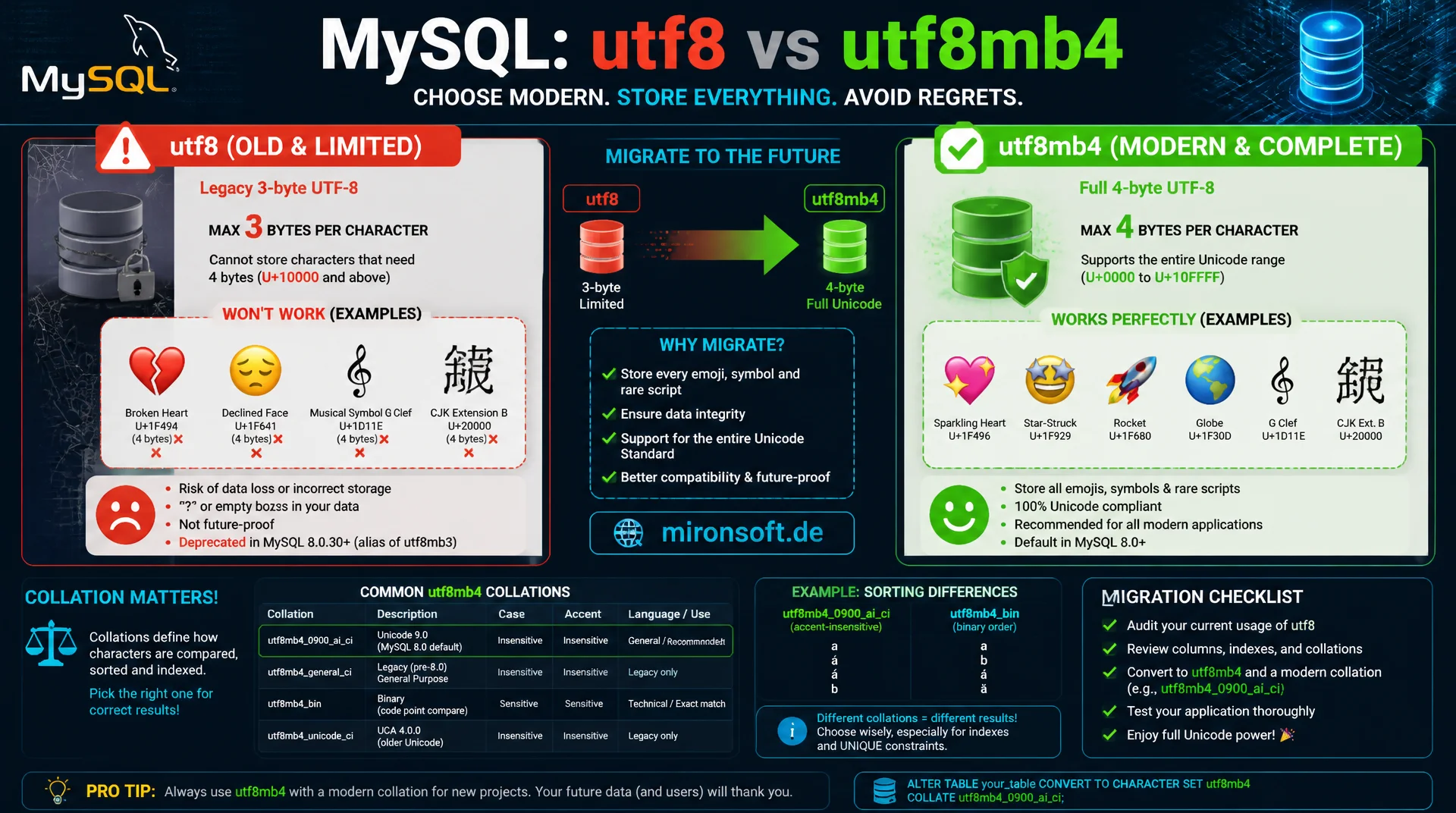
why utf8 in MySQL is not real Unicode
The character set utf8 in MySQL is a historical trap that allows at most three bytes per character, silently dropping or rejecting emoji and many rare scripts. utf8mb4 stores full Unicode completely but requires the right collation choice and a carefully planned migration so index lengths and sort orders do not break.
Table of Contents
- 1. The utf8 legacy trap in MySQL
- 2. utf8mb4: what changes technically
- 3. Collation basics: comparison and sorting
- 4. unicode_ci vs. 0900_ai_ci: making the right choice
- 5. Index length and the classic key-too-long error
- 6. Keeping server, connection and application charset in sync
- 7. Migrating from utf8 to utf8mb4 in practice
- 8. Common pitfalls after migration
- 9. Character sets and collations compared
- 10. Summary
- 11. FAQ
1. The utf8 legacy trap in MySQL
The charset called utf8 in MySQL, despite its name, is not full Unicode. It was introduced before the official Unicode 3-byte boundary and encodes at most three bytes per character, while the full Unicode standard needs up to four bytes per code point. Characters outside the Basic Multilingual Plane, including practically all emoji, many rare Chinese characters, and historic alphabets, simply cannot be represented with this charset.
In practice this leads to two symptoms: either MySQL throws an error like Incorrect string value when inserting an emoji, or, under laxer SQL modes, the character is silently replaced by a question mark or an empty character. The latter is especially dangerous because the data loss stays unnoticed until someone manually checks the affected records. Especially with user-generated content such as comments, product names or chat messages, practically every application runs into this problem sooner or later.
MySQL fixed this historical legacy with the charset utf8mb4, which should be understood as the actual, full Unicode charset. Since MySQL 8.0, utf8mb4 is even the default charset for new databases, which shows how clearly the recommendation has taken hold by now. Anyone still using utf8 today does so either out of ignorance or because of an old, unmigrated installation.
2. utf8mb4: what changes technically
utf8mb4 uses up to four bytes per character and thus covers the entire Unicode code point range, including all emoji, supplementary plane characters and rare writing systems. The switch affects not only the charset of a table but also the maximum byte count MySQL internally reserves for VARCHAR and CHAR columns, which has direct consequences for index lengths, covered in more detail in the index length section.
The move from utf8 to utf8mb4 is backward compatible in the sense that every character stored with utf8 also displays correctly in utf8mb4. The migration therefore always runs in one direction; a downgrade from utf8mb4 back to utf8 would destroy data as soon as 4-byte characters are present. Every new table should therefore be created with utf8mb4 from the start, even if there is currently no need for emoji support.
-- Wrong: legacy charset, cannot store most emoji
CREATE TABLE product_review_old (
  id INT UNSIGNED NOT NULL AUTO_INCREMENT,
  comment VARCHAR(500),
  PRIMARY KEY (id)
) ENGINE=InnoDB DEFAULT CHARSET=utf8;

-- Right: full Unicode support including emoji
CREATE TABLE product_review (
  id INT UNSIGNED NOT NULL AUTO_INCREMENT,
  comment VARCHAR(500),
  PRIMARY KEY (id)
) ENGINE=InnoDB DEFAULT CHARSET=utf8mb4 COLLATE=utf8mb4_0900_ai_ci;

-- Verify actual byte width in use
SELECT CHAR_LENGTH('????'), LENGTH('????');
-- CHAR_LENGTH = 1 (one character), LENGTH = 4 (four bytes in utf8mb4)
3. Collation basics: comparison and sorting
A collation defines how MySQL compares and sorts characters, independent of the charset in which they are stored. Every charset has several possible collations that differ in case sensitivity, accent sensitivity and the sort order of language-specific characters. The suffix _ci means case-insensitive, _cs means case-sensitive, and _bin means a pure byte-by-byte comparison without linguistic rules.
Choosing the wrong collation leads to subtle bugs that often surface late: a login by email address works regardless of upper or lower case with a case-insensitive collation, which is usually what you want for email comparisons, but not with a case-sensitive collation. Conversely, an unintentionally case-insensitive collation on product codes can cause ABC-123 and abc-123 to be treated as identical, even though that is functionally wrong.
4. unicode_ci vs. 0900_ai_ci: making the right choice
For utf8mb4 several standard collations are available, but in practice two are especially relevant: utf8mb4_unicode_ci, based on the older Unicode Collation Algorithm UCA 4.0.0, and utf8mb4_0900_ai_ci, which since MySQL 8.0 builds on UCA 9.0.0 and handles modern language rules considerably more accurately. The 0900 refers to the UCA version, ai stands for accent-insensitive, ci for case-insensitive.
For new MySQL 8 installations, utf8mb4_0900_ai_ci is generally the right default choice, because it brings more precise sorting rules for many languages and also works measurably faster than the older unicode_ci variant. An important special case concerns binary comparisons: anyone needing sorting and comparison exactly by Unicode code point without linguistic rules, for example for technical identifiers or hashes, should use utf8mb4_bin, because there no characters are treated as equivalent.
-- Check available utf8mb4 collations
SHOW COLLATION WHERE Charset = 'utf8mb4';

-- Case-insensitive, accent-insensitive: good default for user-facing text
ALTER TABLE customer
  MODIFY email VARCHAR(255)
  CHARACTER SET utf8mb4 COLLATE utf8mb4_0900_ai_ci;

-- Case-sensitive, exact match: good for technical identifiers
ALTER TABLE api_token
  MODIFY token_hash VARCHAR(64)
  CHARACTER SET utf8mb4 COLLATE utf8mb4_bin;

-- Comparison example: same word, different collation behavior
SELECT 'café' = 'cafe' COLLATE utf8mb4_0900_as_ci;   -- accent-sensitive: 0
SELECT 'café' = 'cafe' COLLATE utf8mb4_0900_ai_ci;   -- accent-insensitive: 1
5. Index length and the classic key-too-long error
The switch from utf8 to utf8mb4 raises the maximum required byte count per character from three to four, which has direct consequences for indexes. InnoDB limits index keys by default to 767 bytes for the older Antelope file format, or 3072 bytes for Barracuda with innodb_large_prefix enabled, which has been the default since MySQL 5.7. A VARCHAR(255) field with utf8 results in a maximum of 765 bytes, which just fits under the old limit. With utf8mb4 it would be 1020 bytes, which triggers the classic error Specified key was too long if the old limit is still active.
In modern MySQL 8 installations with the default file format, the 3072-byte limit is already active, meaning this problem usually no longer occurs. When migrating older installations or importing dumps from older MySQL versions, it is still worth taking a targeted look at indexes on long VARCHAR columns, especially composite indexes, whose cumulative byte count can quickly exceed the limit.
-- Find indexes at risk after switching to utf8mb4
-- (varchar length * 4 bytes must stay under the innodb key length limit)
SELECT table_name, column_name, character_maximum_length,
       character_maximum_length * 4 AS max_bytes_utf8mb4
FROM information_schema.columns
WHERE table_schema = 'shop'
  AND data_type IN ('varchar', 'char')
  AND character_maximum_length * 4 > 767
ORDER BY max_bytes_utf8mb4 DESC;

-- Confirm the active row format and large prefix support
SHOW VARIABLES LIKE 'innodb_file_format';
SHOW VARIABLES LIKE 'innodb_large_prefix';
6. Keeping server, connection and application charset in sync
A common mistake during migration does not concern the tables themselves but the connection layer. Even if all tables correctly use utf8mb4, a PHP or Node client that still initializes the connection with utf8 sends data in an inconsistent charset, causing mojibake, meaning incorrectly rendered characters. The connection must be established explicitly with utf8mb4, either via the connection string, via SET NAMES utf8mb4 right after connecting, or via the corresponding client library configuration.
The server-side my.cnf configuration should also consistently use utf8mb4, so that newly created databases and tables automatically get the right charset without explicit specification. Without this configuration, every CREATE TABLE statement relies on developers not forgetting the charset, which in practice is guaranteed to happen eventually.
# my.cnf: consistent utf8mb4 across server, client and connection
[mysqld]
character-set-server = utf8mb4
collation-server = utf8mb4_0900_ai_ci
skip-character-set-client-handshake

[client]
default-character-set = utf8mb4

[mysql]
default-character-set = utf8mb4
7. Migrating from utf8 to utf8mb4 in practice
A clean migration from utf8 to utf8mb4 runs in several controlled steps. First, the server configuration is adjusted so new objects are created correctly. Then existing databases, tables and columns are converted step by step via ALTER TABLE ... CONVERT TO CHARACTER SET utf8mb4. Important: CONVERT TO CHARACTER SET changes both the charset of the table and of all its columns in one step, which for most migrations is the correct, most efficient path.
Before the migration, a complete backup should always exist, because the conversion of very large tables can take a long time and, in case of failure, lead to inconsistent intermediate states. For production environments with high traffic, it is also recommended to perform the conversion table by table during a maintenance window, instead of switching the entire database in a single, long, lock-causing operation.
-- Step 1: convert the database default
ALTER DATABASE shop CHARACTER SET utf8mb4 COLLATE utf8mb4_0900_ai_ci;

-- Step 2: convert each table (data and columns in one operation)
ALTER TABLE shop.customer
  CONVERT TO CHARACTER SET utf8mb4 COLLATE utf8mb4_0900_ai_ci;

ALTER TABLE shop.product_review
  CONVERT TO CHARACTER SET utf8mb4 COLLATE utf8mb4_0900_ai_ci;

-- Step 3: verify no column is still on the legacy charset
SELECT table_name, column_name, character_set_name, collation_name
FROM information_schema.columns
WHERE table_schema = 'shop'
  AND character_set_name IS NOT NULL
  AND character_set_name != 'utf8mb4';
8. Common pitfalls after migration
After a seemingly complete migration, intermediate objects with the old charset often surface: views, stored procedures and triggers inherit the charset at the time of their creation and are not automatically converted by ALTER TABLE. They must be explicitly recreated. Temporary tables that an application creates at runtime are also often overlooked when the underlying code hardcodes the charset.
A second pitfall concerns foreign key relationships: two columns with different charset or different collation cannot form a valid foreign key relationship in MySQL, even if the data types are otherwise identical. During migration this often creates temporarily inconsistent states between referencing and referenced tables, causing an error on the next ALTER TABLE if not all involved tables are handled within the same migration round.
9. Character sets and collations compared
The following overview shows the most important differences between the outdated utf8, the recommended utf8mb4 in its common collation variants, and pure binary comparison.
| Variant | Max bytes/char | Emoji capable | Recommendation |
|---|---|---|---|
| utf8 (legacy) | 3 | No | Migrate |
| utf8mb4_unicode_ci | 4 | Yes | For MySQL 5.7 legacy compatibility |
| utf8mb4_0900_ai_ci | 4 | Yes | Default for MySQL 8.0+ |
| utf8mb4_bin | 4 | Yes | For exact technical comparisons |
For new projects the decision is thus clear: utf8mb4 with utf8mb4_0900_ai_ci as the default collation for user-facing text fields, utf8mb4_bin specifically for technical identifiers requiring exact matches. utf8 no longer has a justification in a new installation.
10. Summary
The charset utf8 in MySQL is a historical compromise that was never full Unicode and today is no longer a valid choice for new projects. utf8mb4 closes this gap but requires attention to index lengths, to the collation choice, and to consistent configuration across server, connection and application. Anyone setting utf8mb4_0900_ai_ci as the default and deliberately marking technical identifiers with utf8mb4_bin avoids the most common sorting and comparison errors.
Migrating from utf8 to utf8mb4 is not a trivial update, but a project that needs backups, maintenance windows and an orderly sequence across views, procedures and foreign key relationships. The effort pays off, because every further delay increases the risk of silent data loss with user-generated content.
Charset and Collation: Using utf8mb4 Correctly: The Essentials at a Glance
Avoid utf8
The MySQL charset utf8 encodes at most 3 bytes and cannot represent full Unicode, especially not emoji.
utf8mb4 as default
4 bytes per character, default charset since MySQL 8.0, fully covers the entire Unicode range.
Choose collation deliberately
utf8mb4_0900_ai_ci for user text, utf8mb4_bin for exact technical comparisons like hashes and tokens.
Check index length
4-byte characters raise the index key length, modern InnoDB formats with a 3072-byte limit usually solve this automatically.