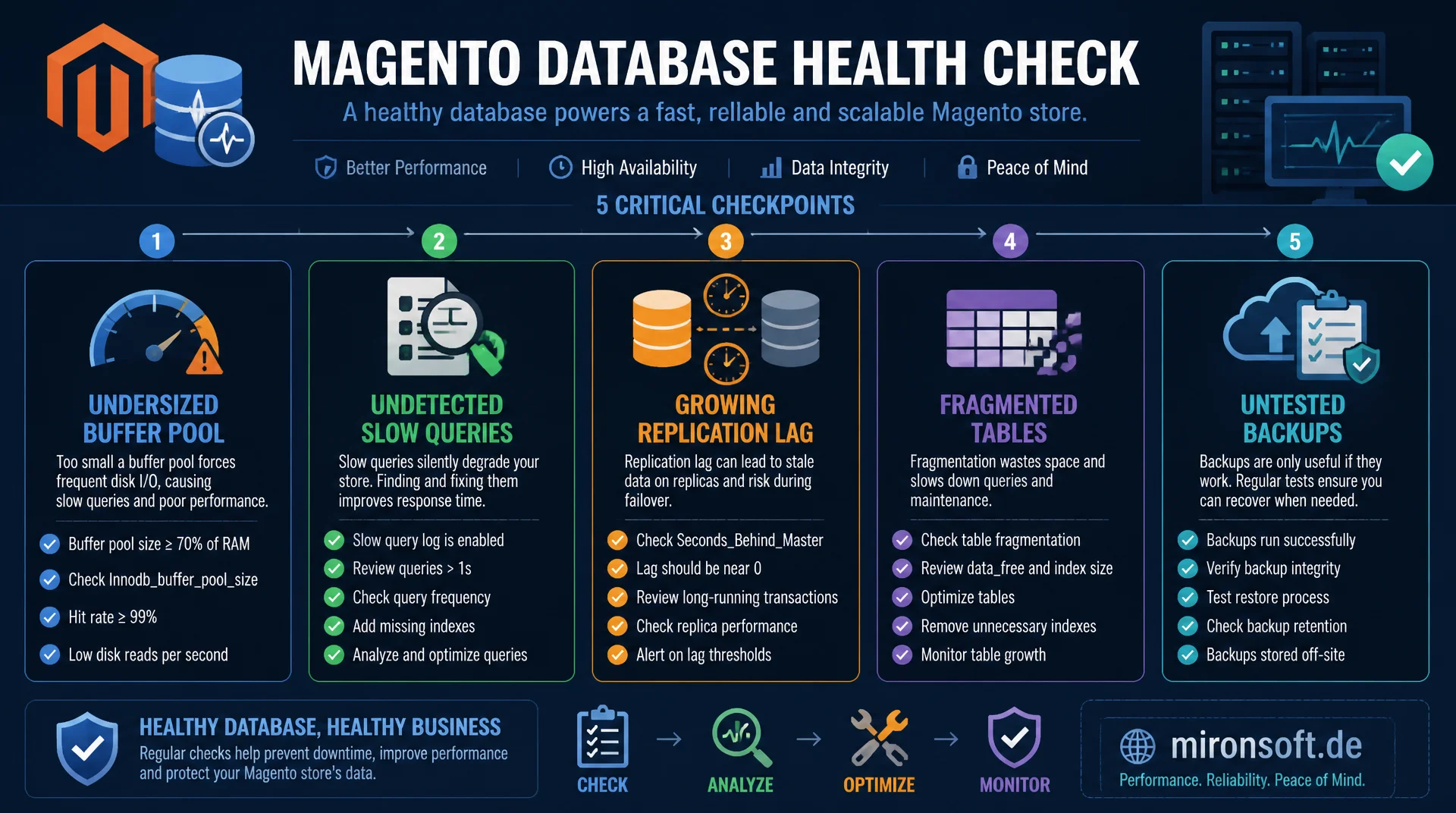
the complete checklist for your maintenance window
A regular database healthcheck catches problems before they turn into checkout outages: an undersized buffer pool, undetected slow queries, growing replication lag, fragmented tables, and untested backups are the most common silent risks in Magento databases. This checklist bundles every relevant check point into one repeatable workflow.
Table of Contents
- 1. Why a regular database healthcheck matters
- 2. InnoDB buffer pool: sizing and interpreting hit rate correctly
- 3. Slow query log and pt-query-digest in the healthcheck workflow
- 4. Catching replication lag before it affects the store
- 5. Table bloat and fragmentation: when OPTIMIZE TABLE helps
- 6. Backup verification: restore tests instead of blind trust
- 7. Indexes and statistics: ANALYZE TABLE and unused indexes
- 8. Configuration review: my.cnf parameters for Magento
- 9. The complete healthcheck checklist for the maintenance window
- 10. Summary
- 11. FAQ
1. Why a regular database healthcheck matters
Most database problems in Magento stores do not appear suddenly, they creep in: the buffer pool becomes too small relative to growing data volume, a new feature introduces an insufficiently indexed query, replication lag slowly builds up under load spikes. A structured database healthcheck run at regular intervals makes exactly these creeping degradations visible before they turn into a visible incident.
The difference between reactive and proactive database operations almost always comes down to how regularly this check runs. A team that only looks at the database once noticeable latency appears is fundamentally reacting too late, because many of the underlying problems, such as table bloat or missing indexes, built up over weeks or months. A monthly or quarterly database healthcheck with a fixed checklist turns this reactive pattern into a plannable maintenance process.
This checklist covers five core areas that should appear in practically every database healthcheck for Magento stores: memory sizing, query performance, replication health, physical table quality, and verification that backups actually work in a real incident. Each of these areas is backed below with concrete SQL queries and target values.
2. InnoDB buffer pool: sizing and interpreting hit rate correctly
The InnoDB buffer pool caches table and index data in memory and is the single most important lever for read speed in a Magento database. A central check point in every database healthcheck is the buffer pool hit rate: it shows how often a request is served from memory instead of disk.
-- Calculate buffer pool hit rate, target value in normal operation above 99 percent
SELECT
    (1 - (
        (SELECT VARIABLE_VALUE FROM performance_schema.global_status WHERE VARIABLE_NAME = 'Innodb_buffer_pool_reads')
        /
        (SELECT VARIABLE_VALUE FROM performance_schema.global_status WHERE VARIABLE_NAME = 'Innodb_buffer_pool_read_requests')
    )) * 100 AS buffer_pool_hit_rate_pct;

-- Check current buffer pool size and utilization
SHOW VARIABLES LIKE 'innodb_buffer_pool_size';
SELECT
    ROUND(SUM(data_length + index_length) / 1024 / 1024 / 1024, 2) AS total_innodb_data_gb
FROM information_schema.tables
WHERE engine = 'InnoDB';
A hit rate below 99 percent during normal daily operation, that is, outside of a freshly started server with a cold cache, almost always points to an undersized buffer pool. A common rule of thumb for dedicated database servers: innodb_buffer_pool_size should be roughly seventy to eighty percent of available memory, leaving enough headroom for connections, sort buffers, and the operating system itself. A database healthcheck should always view this metric in relation to total data size from information_schema.tables, because a buffer pool smaller than the active working set can never structurally reach a high hit rate.
3. Slow query log and pt-query-digest in the healthcheck workflow
Every thorough database healthcheck needs a current slow query analysis, because query patterns can shift with every release, every new extension, and every change to the product catalog. A query that was fast six months ago can become a bottleneck today at ten times the data volume, without any change to the code itself.
-- Enable slow query logging for the healthcheck window
SET GLOBAL slow_query_log = 'ON';
SET GLOBAL long_query_time = 1;

-- After the collection window: the ten most expensive query patterns by total time
-- (analysis is done separately with pt-query-digest against the log file)

-- Check currently running, potentially hung queries directly
SELECT id, user, host, db, time, state, LEFT(info, 100) AS query_preview
FROM information_schema.processlist
WHERE command != 'Sleep'
ORDER BY time DESC
LIMIT 20;
Within a database healthcheck, it is usually enough to enable the slow query log for one to two hours during a typical load window and then analyze it with pt-query-digest from the Percona Toolkit. The goal is not to analyze every single query, but to detect structural shifts: do new query patterns show up in the top ten that were not relevant at the last healthcheck? That is often the earliest indicator of a growing performance problem.
4. Catching replication lag before it affects the store
For Magento stores running read replicas for storefront or reporting, checking replication lag is one of the most critical points in every database healthcheck. A lag of several seconds means customers on the replica can see stale prices, stock levels, or order status, which directly translates into support tickets and lost trust.
-- Check replication status and lag on the replica (MySQL 8.0)
SHOW REPLICA STATUS\G
-- Target: Seconds_Behind_Source should be 0 to 1 during normal operation

-- Review historical lag through performance_schema
SELECT
    CHANNEL_NAME,
    SERVICE_STATE,
    COUNT_TRANSACTIONS_IN_QUEUE,
    LAST_QUEUED_TRANSACTION
FROM performance_schema.replication_applier_status_by_worker;
A single brief lag spike during a large batch job or a reindex run is usually not critical, as long as the value returns to zero afterward. It becomes critical when the database healthcheck shows a constantly elevated lag over longer periods, because that points to a structural overload on the replica, for example underpowered hardware relative to the primary's write load, or competing read operations that generate too much I/O on their own.
5. Table bloat and fragmentation: when OPTIMIZE TABLE helps
Table bloat is caused by deleted or updated rows that InnoDB does not physically compact right away. A database healthcheck should regularly check how large the share of free but still allocated storage is within the most important Magento tables.
-- Check fragmentation of the most important Magento tables
SELECT
    table_name,
    ROUND(data_length / 1024 / 1024, 1) AS data_mb,
    ROUND(data_free / 1024 / 1024, 1) AS free_mb,
    ROUND(data_free / NULLIF(data_length, 0) * 100, 1) AS fragmentation_pct
FROM information_schema.tables
WHERE table_schema = 'magento_prod'
  AND data_length > 100 * 1024 * 1024
ORDER BY fragmentation_pct DESC
LIMIT 15;
Fragmentation above ten to fifteen percent on large tables is a good threshold for adding OPTIMIZE TABLE to the next maintenance plan. Since OPTIMIZE TABLE is itself I/O heavy and effectively rebuilds the table under InnoDB, this step should only be documented as a recommendation within the database healthcheck and executed separately outside peak hours, not as an automatic part of the check itself.
6. Backup verification: restore tests instead of blind trust
A backup whose recoverability has never been tested is pure risk in a real incident, not a safety net. The point most often skipped in every database healthcheck is therefore the documented restore test: actually restoring a current backup into an isolated test environment and verifying that Magento starts on it and returns consistent data.
A complete backup verification cycle as part of the database healthcheck covers at least three steps: first, confirming that the automated backup script actually completes without errors and produces the expected file size, which can be handled through simple monitoring of the last successful backup timestamp. Second, a monthly restore test into an isolated environment with a subsequent spot check of critical tables like sales_order and catalog_product_entity. Third, measuring the actual restore time, so there is a realistic expectation of recovery duration in a real incident, instead of discovering it for the first time during an actual outage.
7. Indexes and statistics: ANALYZE TABLE and unused indexes
Outdated table statistics cause the MySQL query optimizer to choose suboptimal execution plans, even when the right index theoretically exists. A database healthcheck should therefore check how current the statistics of the most frequently queried tables are, and trigger an ANALYZE TABLE when needed.
-- Refresh statistics for the query optimizer
ANALYZE TABLE catalog_product_entity, sales_order, quote;

-- Identify unused indexes that only add write overhead
SELECT
    object_schema,
    object_name,
    index_name
FROM performance_schema.table_io_waits_summary_by_index_usage
WHERE index_name IS NOT NULL
  AND count_star = 0
  AND object_schema = 'magento_prod'
ORDER BY object_name;
Unused indexes are an often overlooked point in a database healthcheck: they add extra write time to every INSERT and UPDATE and consume storage without ever speeding up a read. The query above against performance_schema.table_io_waits_summary_by_index_usage shows indexes that have never been used for a read operation since the last server restart, and is a good starting point for targeted cleanup, but should always be confirmed with a longer observation window before actually being dropped.
8. Configuration review: my.cnf parameters for Magento
Besides the buffer pool, there are other MySQL parameters that should be regularly checked against current load figures as part of a database healthcheck. innodb_log_file_size influences how often InnoDB has to write checkpoints, and a value that is too small can cause noticeable latency spikes under heavy checkout write load. max_connections should match the actual number of concurrent PHP-FPM workers and cron processes, neither too tight nor unnecessarily oversized.
table_open_cache and table_definition_cache are often configured too low given Magento's many hundred tables, especially the EAV value tables, leading to repeated opening and closing of table descriptors. A database healthcheck should look at the Opened_tables status relative to server uptime: a continuously rising value points to a table_open_cache that is too small and is an easy to fix but easily overlooked performance problem.
9. The complete healthcheck checklist for the maintenance window
For practical use, it is worth turning all the check points discussed so far into a fixed, reusable checklist that is walked through in the same order at every database healthcheck. This consistency matters more than the order itself, because it establishes comparability between consecutive checks and makes creeping trends visible that a single snapshot would not show.
The checklist should document, for every point, a target value, the most recently measured value, and the trend since the previous healthcheck. Only this historical comparability turns a single database healthcheck into a genuine early warning system, one that can show, for example, that buffer pool hit rate has been slightly declining for three consecutive checks, long before it drops below the critical threshold.
| Healthcheck area | Metric | Target | Tool |
|---|---|---|---|
| Buffer pool | Hit rate | > 99 % | performance_schema |
| Slow queries | Top-10 query time | No new top offenders | pt-query-digest |
| Replication | Seconds_Behind_Source | 0-1 seconds | SHOW REPLICA STATUS |
| Table bloat | Fragmentation | < 10-15 % | information_schema.tables |
| Backup | Restore test successful | Verified monthly | Restore script / checklist |
10. Summary
An effective database healthcheck for Magento stores combines five core areas: buffer pool sizing against actual data volume, systematic slow query analysis with pt-query-digest, continuous monitoring of replication lag, regular fragmentation checks with targeted OPTIMIZE TABLE, and documented restore tests instead of blind trust in automated backups.
The real value does not come from a single check, it comes from consistently repeating the same checklist at fixed intervals. Only historical comparability turns individual measurements into an early warning system that catches creeping degradation before it becomes a noticeable checkout outage. A monthly or quarterly database healthcheck is therefore one of the most effective and, at the same time, most affordable measures in operating a growing Magento store.
Database Healthcheck for Magento Stores, the essentials at a glance
Check the buffer pool
Hit rate above 99 percent in normal operation, evaluate size relative to total data volume.
Check slow queries systematically
pt-query-digest over a collection window, treat new top offenders as an early warning.
Replication and bloat
Keep lag consistently near zero, address fragmentation above 10-15 percent with targeted OPTIMIZE TABLE.
Actually test backups
Monthly restore test in an isolated environment instead of blind trust in a backup script.