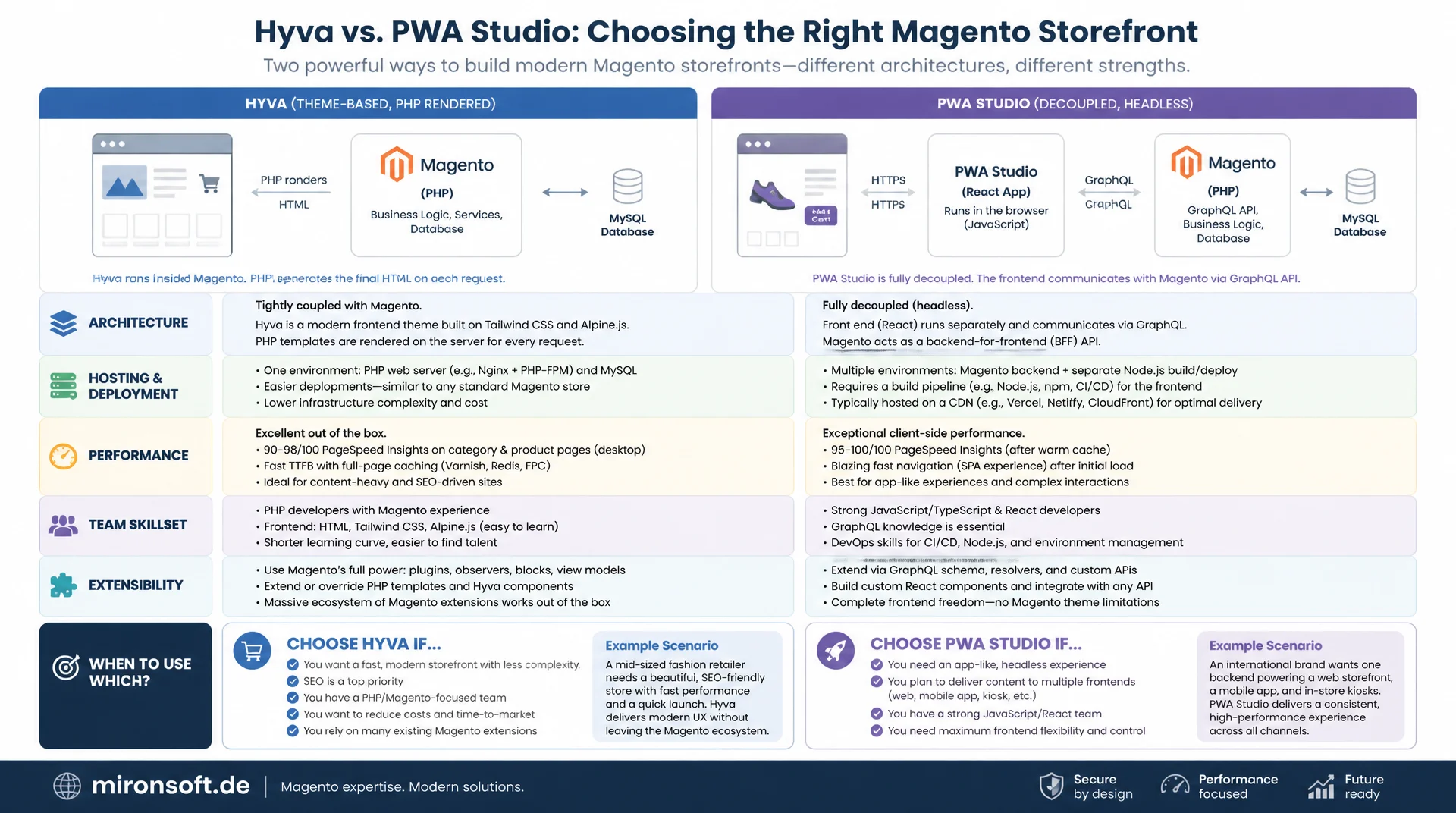
Two architectures for Magento, compared directly
Anyone planning a new Magento storefront eventually faces the same fundamental question: Hyva or PWA Studio. One approach renders PHP directly inside the Magento monolith, the other fully decouples frontend and backend and communicates exclusively through GraphQL. This article compares architecture, hosting effort, performance, team skillset and extensibility concretely, and shows when each approach actually makes sense.
Table of Contents
- 1. Two architecture philosophies
- 2. Rendering: server-side PHP vs. React hydration
- 3. Hosting and infrastructure effort
- 4. Development team and skillset
- 5. Extensibility and module compatibility
- 6. Performance and Core Web Vitals
- 7. Caching strategies compared
- 8. SEO and time-to-market
- 9. Decision criteria: which fits when
- 10. Summary
- 11. FAQ
1. Two architecture philosophies
Before measuring Hyva vs. PWA Studio against individual metrics, it is worth looking at the core idea behind each approach. Hyva is a server-side rendered theme that lives entirely inside the Magento monolith: phtml templates, ViewModels and blocks run in the same PHP process as catalog, checkout and admin. There is no second application, no second build process, no second runtime. The storefront is a rendering layer of Magento, not something sitting next to it.
PWA Studio takes the opposite approach: a fully decoupled storefront built from React, GraphQL and Node.js that talks to Magento exclusively through the GraphQL API. Backend and frontend are developed, built and deployed separately. This choice between a monolith and a decoupled frontend is the core of every Hyva PWA Studio comparison discussion, because it already predetermines almost every downstream question about hosting, team skillset and performance. With PWA Studio you explicitly buy more flexibility for omnichannel scenarios, but you pay for it with added complexity at every single layer of the architecture.
2. Rendering: server-side PHP vs. React hydration
With Hyva, a ViewModel produces the data, the phtml template renders complete HTML directly from it, and that HTML leaves the server already finished. Alpine.js only enters the picture afterward, and only for the interactivity of individual islands such as accordions, the mini cart or mobile navigation. There is no virtual DOM, no reconciliation, no hydration in the strict sense - the browser receives markup it can display immediately, and Alpine.js enriches it minimally.
PWA Studio, on the other hand, builds the entire UI as a React component tree. Data arrives through GraphQL queries that the Peregrine layer fires against Magento's GraphQL endpoint, and the browser has to load, parse, execute and hydrate React, the Apollo client and the whole component tree before the page is actually interactive. This exact difference in the rendering model is one of the most underestimated points in any Hyva vs. PWA Studio comparison: Hyva delivers finished HTML, PWA Studio delivers the blueprint for HTML that only comes into existence inside the browser.
A concrete example makes the difference tangible. For a product hero section, PWA Studio would typically fire the following GraphQL query against the Magento endpoint:
# PWA Studio: GraphQL query fired by the Peregrine data layer
# to fetch hero data for a single product page
query ProductHero($urlKey: String!) {
  products(filter: { url_key: { eq: $urlKey } }) {
    items {
      uid
      name
      sku
      price_range {
        minimum_price {
          final_price { value currency }
          regular_price { value currency }
        }
      }
      small_image { url label }
      stock_status
    }
  }
}
The result of this query lands in the Apollo cache, React re-renders the affected components, and only then does the user see price and image. This chain of query, network round trip, cache update and re-render simply does not exist with server-side rendering - Hyva already has the result before the response leaves the server.
3. Hosting and infrastructure effort
Hyva needs no additional infrastructure. The theme runs in the same PHP-FPM process as the rest of Magento, is shipped through the normal setup:static-content:deploy workflow, and beyond a Tailwind build step during development needs no separate runtime environment in production. One server, one deployment, one set of monitoring dashboards.
PWA Studio, in contrast, requires its own Node.js hosting layer for rendering the storefront, a separate webpack build pipeline with its own dependencies, and frequently a service worker for offline and caching functionality. That means a second deployment path alongside the Magento backend, a second environment that must be monitored, scaled and patched, and a build process that can easily take several minutes on larger storefronts. The build complexity already shows in a typical package.json:
{
  "name": "venia-storefront",
  "scripts": {
    "build": "webpack --config webpack.config.js --mode production",
    "watch": "webpack --config webpack.config.js --mode development --watch",
    "storybook": "start-storybook -p 6006"
  },
  "dependencies": {
    "@apollo/client": "^3.8.0",
    "@magento/peregrine": "^15.0.0",
    "@magento/venia-ui": "^11.0.0",
    "react": "^17.0.2",
    "react-dom": "^17.0.2",
    "react-router-dom": "^5.3.0"
  },
  "devDependencies": {
    "webpack": "^5.88.0",
    "webpack-cli": "^5.1.0",
    "workbox-webpack-plugin": "^7.0.0",
    "babel-loader": "^9.1.0"
  }
}
This second codebase with its own build, its own Node runtime and its own release cycle is the main reason the total cost of ownership stays permanently higher with PWA Studio than with Hyva. Anyone judging Hyva or PWA Studio purely on initial development cost regularly overlooks that the Node layer needs its own ops staff and its own security updates over time, while Hyva simply runs inside the existing Magento operation.
4. Development team and skillset
A Hyva team needs PHP 8.x, Tailwind CSS and a basic understanding of Alpine.js. These are skills already present in practically every Magento agency, because they overlap heavily with the backend skillset. A backend developer who already knows blocks, plugins and layout XML becomes productive in the frontend after a short ramp-up, because phtml is ultimately PHP with embedded HTML.
PWA Studio demands a completely different profile: React, GraphQL resolvers, Redux or rather the Peregrine Talon hooks, Node.js and webpack configuration. That is a specialized frontend team, harder to find on the job market and typically more expensive than a PHP team. On top of that, coordination overhead arises between two separate teams, because every new backend feature must first be modeled as a GraphQL schema extension before the frontend team can even consume it. This coordination overhead between two teams with different toolchains is a factor that superficial Hyva PWA Studio comparison articles often miss, yet in practice it noticeably extends project timelines.
5. Extensibility and module compatibility
Hyva keeps reusing the business logic of existing Magento PHP modules directly. An extension vendor ships blocks, repositories and layout XML - Hyva accesses exactly that layer through ViewModels, without any additional API layer sitting in between. The vast majority of community and marketplace extensions work after a thin compatibility layer, without any rewrite of the business logic.
PWA Studio looks different: every extension that should be visible in the storefront needs its own GraphQL resolver on the backend side and its own RootComponent plus Talon hook on the frontend side. Even a mature extension that has been battle-tested for years may need to be rebuilt entirely as a headless-capable module for PWA Studio. That explains why many Magento extension vendors offer PWA Studio compatibility separately, and often at extra cost, while Hyva compatibility usually comes automatically through generic fallback templates.
Using the product hero data from section 2 as an example, the difference becomes concrete. Instead of a GraphQL query with a resolver and a RootComponent, Hyva builds a ViewModel that works directly against the product repository:
<?php

declare(strict_types=1);

namespace Mironsoft\ProductHero\ViewModel;

use Magento\Catalog\Api\ProductRepositoryInterface;
use Magento\Framework\View\Element\Block\ArgumentInterface;
use Magento\Framework\Registry;

/**
 * Provides hero data for the current product detail page,
 * reading directly from the catalog repository (no GraphQL layer needed).
 */
final class ProductHero implements ArgumentInterface
{
    /**
     * @param ProductRepositoryInterface $productRepository Catalog product repository.
     * @param Registry $registry Current product registry.
     */
    public function __construct(
        private readonly ProductRepositoryInterface $productRepository,
        private readonly Registry $registry,
    ) {
    }

    /**
     * Returns the final price of the currently viewed product.
     *
     * @return float
     */
    public function getFinalPrice(): float
    {
        $product = $this->registry->registry('current_product');

        return (float) $product->getFinalPrice();
    }

    /**
     * Returns the stock status label for display.
     *
     * @return string
     */
    public function getStockStatus(): string
    {
        $product = $this->registry->registry('current_product');

        return $product->isSalable() ? 'IN_STOCK' : 'OUT_OF_STOCK';
    }
}
In the template, this ViewModel class is injected directly and rendered without a network round trip, while Alpine.js only takes over client-side behavior, for example switching gallery images:
<?php
/** @var \Mironsoft\ProductHero\ViewModel\ProductHero $productHero */
$productHero = $viewModels->require(\Mironsoft\ProductHero\ViewModel\ProductHero::class);
?>
<div x-data="{ activeImage: 0 }" class="product-hero">
  <p class="price" x-text="'$ ' + '<?= (float) $productHero->getFinalPrice() ?>'"></p>
  <span class="stock" x-text="'<?= $productHero->getStockStatus() ?>'"></span>
  <button x-on:click="activeImage = (activeImage + 1) % 3" type="button">
    Next image
  </button>
</div>
6. Performance and Core Web Vitals
Time to First Byte behaves fundamentally differently between the two approaches. With Hyva, cached Varnish responses typically arrive in 20 to 80 milliseconds, uncached PHP-FPM responses usually sit between 150 and 400 milliseconds depending on page complexity. With PWA Studio, TTFB additionally depends on how the Node rendering layer is configured and how fast the GraphQL server responds - with client-heavy rendering, an extra network hop to the GraphQL endpoint often gets added before any visible content exists at all.
The difference shows even more clearly in Core Web Vitals. Largest Contentful Paint with Hyva is primarily determined by image size and network latency, because the text and layout content is already present in the HTML. With PWA Studio, LCP additionally depends on how long the browser needs to download, parse, execute and hydrate the React bundle before the visible content is actually finally rendered. Interaction to Next Paint suffers further in React from re-render costs of larger component trees, while Alpine.js, thanks to its targeted, scoped reactivity, generally produces noticeably less main-thread work per interaction.
Cumulative Layout Shift is manageable with both approaches as long as image dimensions and placeholders are reserved correctly. With PWA Studio, however, an additional risk shows up: if the initial server response is not fully pre-rendered, hydration can cause a visible jump as soon as React replaces the initial placeholder with the final content - an effect that structurally does not exist with Hyva's direct PHP rendering.
7. Caching strategies compared
Hyva relies entirely on Magento's native Varnish Full Page Cache. The complete HTML response is cached per URL and customer group, and cache tags ensure that saving a product or category only invalidates the affected pages. This mechanism has been proven for years, is well documented, and works without any extra configuration beyond the Magento infrastructure that is already there.
PWA Studio cannot cache a complete HTML response the same way, because the content is largely assembled client-side from GraphQL responses. Instead, persisted queries are used, where pre-registered query IDs are transmitted instead of the full query string to reduce payload size, along with service worker caching through Workbox for static assets and recurring API responses. Both mechanisms require considerably more manual maintenance for invalidation whenever catalog data changes, because there is no central cache-tag instance comparable to Varnish.
# Varnish VCL snippet used by Hyva-based Magento storefronts
# Full page cache with tag-based invalidation on catalog changes
sub vcl_recv {
    if (req.method == "PURGE") {
        return (hash);
    }
    unset req.http.Cookie;
    return (hash);
}

sub vcl_hash {
    hash_data(req.http.X-Magento-Vary);
    return (lookup);
}

sub vcl_backend_response {
    if (beresp.http.X-Magento-Tags) {
        set beresp.ttl = 86400s;
        set beresp.http.Cache-Control = "public, max-age=86400";
    }
}
The practical difference: a Hyva storefront invalidates affected pages immediately and centrally through a single cache layer, while PWA Studio has to keep several loosely coupled cache layers in sync - the Apollo client cache, the service worker and, in some setups, an additional GraphQL cache server.
8. SEO and time-to-market
For search engines, Hyva's fully server-rendered HTML is straightforward: Googlebot sees the same content a user without JavaScript would see, without consuming any rendering budget. With PWA Studio, it has to be ensured that the initial response already contains sufficient content, so crawlers do not depend on full JavaScript execution - a point that has repeatedly caused SEO problems for React-based decoupled storefronts in the past.
On time-to-market, Hyva also leads, because a single codebase with the familiar Magento deployment process is sufficient, and existing extensions generally keep working without extra effort. PWA Studio extends project timelines, because every custom requirement needs both a GraphQL schema update and a matching React component before anything is even visible. On tight launch deadlines, this is a decisive factor in the Hyva vs. PWA Studio tradeoff.
9. Decision criteria: which fits when
For most classic B2C and B2B shops with an existing Magento PHP team, a moderate budget and a primary web sales channel, Hyva is the obvious choice. The lower total cost of ownership, the shorter time-to-market and the direct reuse of existing extensions almost always outweigh the theoretical flexibility of PWA Studio in this scenario.
PWA Studio justifies its extra effort mainly when genuine omnichannel requirements exist: a mobile app, a kiosk system and the web storefront should share the same GraphQL API, or an already existing, specialized React team should evolve the storefront independently, decoupled from Magento's release cycle. Anyone who instead primarily prioritizes organic search traffic and fast load times should critically question the additional hydration layer that PWA Studio adds.
| Dimension | Hyva | PWA Studio | Practical impact |
|---|---|---|---|
| Hosting infrastructure | Inside Magento, no extra server | Separate Node.js layer required | One deployment vs. two separate pipelines |
| Rendering model | Server-side PHP, finished HTML | React hydration in the browser | Instantly visible content vs. hydration wait |
| Team skillset | PHP, Tailwind, Alpine.js | React, GraphQL, Node, webpack | Overlap with backend team vs. specialist team |
| TTFB (typical) | 20-400 ms depending on cache state | Higher due to GraphQL round trip | Direct effect on LCP and Core Web Vitals |
| Extensibility | Existing PHP modules reusable directly | Resolver + RootComponent per extension | Significantly lower integration effort with Hyva |
| Deployment pipeline | One build, one release cycle | Two codebases, two release cycles | Higher coordination and operations cost |
Mironsoft
Hyva development, architecture consulting and migration from Luma or PWA Studio
Not sure whether Hyva or PWA Studio fits your project?
We analyze your project against team skillset, SEO requirements, budget and omnichannel needs, and give you a clear, defensible architecture recommendation instead of selling a default solution.
Architecture audit
A well-founded decision basis for Hyva or PWA Studio based on your concrete requirements
Hyva implementation
Full theme development with ViewModels, Tailwind and Alpine.js
Performance check
Core Web Vitals measurement and caching concept for your existing storefront
10. Summary
The Hyva vs. PWA Studio comparison keeps coming back to the same basic question: does the project need the decoupling that PWA Studio offers, or do the advantages of a single, server-rendered codebase outweigh it? Hyva delivers finished HTML directly from PHP, needs no additional Node infrastructure, keeps reusing existing Magento extensions without extra effort, and typically achieves lower TTFB values and better Core Web Vitals because no hydration layer sits in between.
PWA Studio plays out its strengths where several frontends need to share the same GraphQL API, or where a dedicated React team must work independently of Magento's release cycle. For most classic Magento shops with a primary web channel, however, the additional hosting, team and maintenance effort of PWA Studio is hard to justify when Hyva covers the same business requirements with significantly less complexity.
Hyva vs. PWA Studio - the key points at a glance
Architecture
Hyva renders PHP directly inside the Magento monolith. PWA Studio fully decouples frontend and backend and communicates only through GraphQL.
Hosting & infrastructure
Hyva needs no extra infrastructure. PWA Studio requires its own Node.js layer, webpack build and service worker operations.
Team & skillset
Hyva uses PHP, Tailwind and Alpine.js, overlapping with the backend team. PWA Studio needs a specialized React/GraphQL/Node team.
Performance & SEO
Hyva delivers instantly visible HTML with lower TTFB. PWA Studio needs hydration, which additionally burdens LCP and INP.