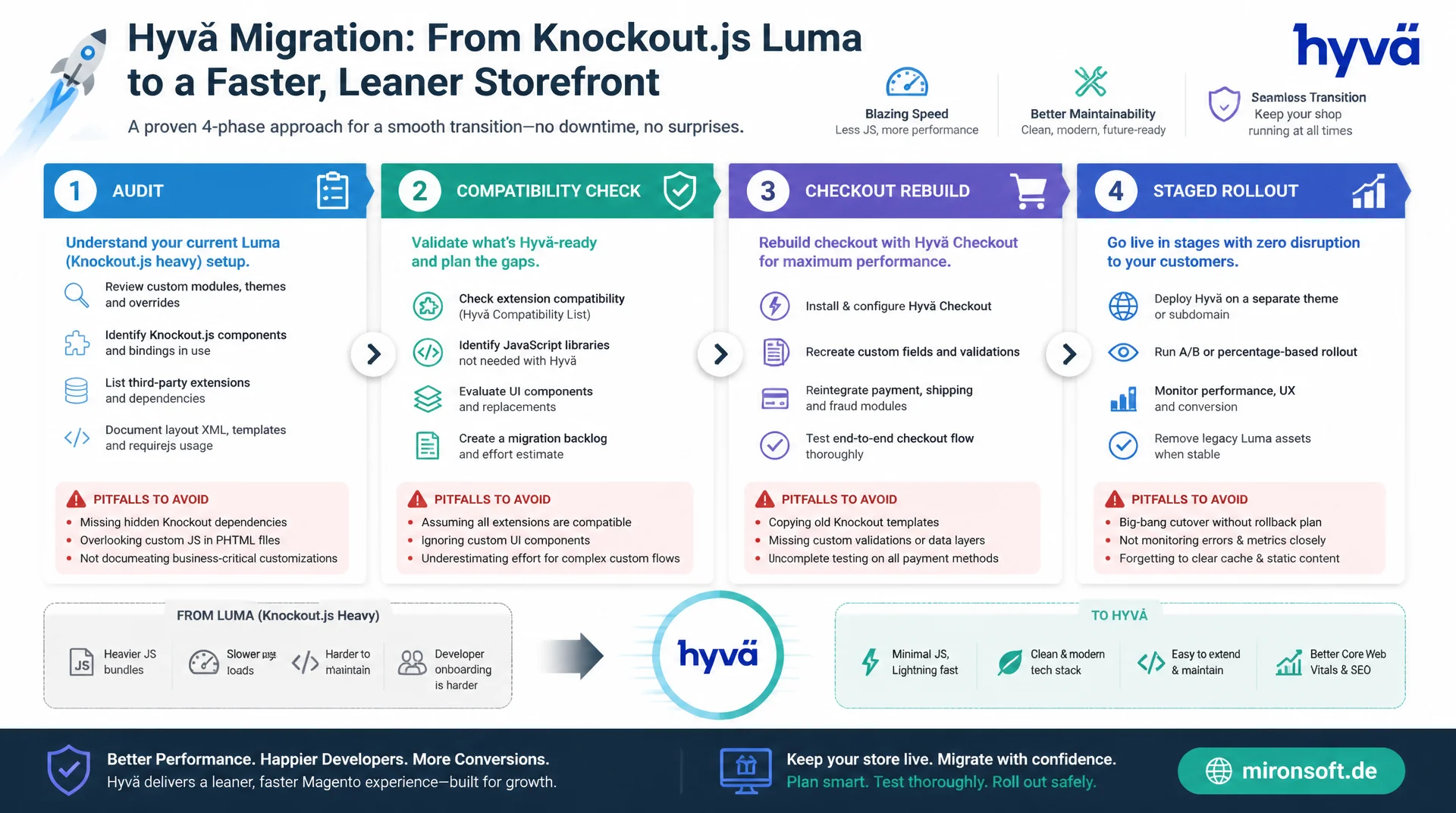
Audit, Effort and Pitfalls at a Glance
A Hyvä migration is not a simple theme update, it is a structured project with an audit, a compatibility check, a checkout rebuild and a staged rollout. Anyone who knows the four phases and plans for the typical pitfalls early gets from a Knockout.js heavy Luma theme to a noticeably faster, more maintainable Hyvä frontend, without putting live shop operations at risk during the switch.
Table of Contents
- 1. Why Shops Move From Luma to Hyvä
- 2. Phase 1: Auditing the Existing Luma Theme
- 3. Phase 2: Identifying Hyvä Compatibility Modules
- 4. Phase 3: Theme Scaffolding and Tailwind Design System
- 5. Effort Estimation: Project Sizes and Cost Drivers
- 6. Pitfall 1: Custom Checkout Steps Built on Knockout
- 7. Pitfall 2: jQuery Widget Dependencies
- 8. Pitfall 3: CSP Compliance for Inline Scripts
- 9. Rollout Strategy: Staging, A/B Testing and Stages
- 10. Summary
- 11. FAQ
1. Why Shops Move From Luma to Hyvä
For most Magento operators, one reason pushes the Hyvä migration to the top of the roadmap: performance. A classic Luma theme loads RequireJS bundles, initializes Knockout.js components and hydrates data bindings before a page actually becomes interactive. This hydration phase is especially noticeable on mobile devices with weaker CPUs and shows up directly in Time to Interactive, a core metric for Core Web Vitals and therefore also for search engine visibility. A Hyvä theme drops Knockout.js and RequireJS bundle overhead entirely and instead delivers server-rendered HTML that only becomes interactive where Alpine.js components genuinely need it.
The second driver behind every Hyvä migration is maintainability. Luma themes are built on LESS and a deeply nested UI component structure, where a small checkout adjustment quickly touches several XML files, a JS module and a Knockout template at once. Tailwind CSS v4 replaces this structure with utility classes right inside the template, so styling and markup stay visible in the same place and new developers can find their way around without learning the LESS cascade first. Combined with Alpine.js as the only JS layer, the number of abstraction layers drops noticeably, which translates into shorter development time for every new feature.
| Area | Luma (before) | Hyvä (after migration) | Effect |
|---|---|---|---|
| Rendering | Knockout.js hydration after page load | Server rendering, minimal Alpine.js | Shorter Time to Interactive |
| JavaScript volume | RequireJS bundle, often several hundred KB | No global jQuery, Alpine.js ~15 KB | Less blocking JavaScript |
| Styling | LESS cascade, UI component templates | Tailwind CSS v4 utility classes | Fewer abstraction layers |
| Checkout extension | Knockout component via step-navigator | Alpine.js component directly in phtml | No RequireJS module mapping |
| Static deploy | Compiling Knockout and UI component templates | setup:static-content:deploy + Tailwind build | Shorter deploy times in CI/CD |
2. Phase 1: Auditing the Existing Luma Theme
Every serious Hyvä migration starts with a full audit of the existing Luma theme, not with setting up a new theme folder. In the first step, every installed extension is checked for whether it registers its own UI components, loads Knockout widgets via requirejs-config.js, or overrides layout XML handles that apply to the checkout or the category page. A simple but effective approach is to search for ui_component declarations under view/frontend/ui_component as well as for .js files that import ko.observable or uiComponent, across every app/code and vendor directory.
In the second step of the audit, every checkout customization is documented, since in the Hyvä migration these customizations tend to be the single largest cost item. That includes additional checkout steps, custom payment method renderers, custom address validation and every place that references Magento_Checkout/js/model/step-navigator. It is also worth reviewing etc/frontend/di.xml and view/frontend/layout for each extension, because that shows which blocks are actually rendered in the frontend and which are just inactive legacy code. The result of this audit is a prioritized list of every component needed later for the effort estimation and phase planning of the Hyvä migration.
3. Phase 2: Identifying Hyvä Compatibility Modules
Once the audit is complete, the next step is matching it against available Hyvä compatibility modules. For many widely used third-party extensions, ready-made hyva-themes/magento2-*-compat packages already exist that replace Knockout-based frontend parts with Alpine.js equivalents, without touching the extension's own business logic. These packages are installed through Composer like any regular dependency and use module sequencing to specifically override the original extension's frontend templates. Before every Hyvä migration, it always pays to research Packagist and the official Hyvä compatibility module directory first, before custom development is scheduled.
If no compatibility module exists for a business-critical extension, the only option left is building a lightweight compatibility module of your own, following the same pattern: override the target extension's templates via view/frontend/layout and replace Knockout bindings with Alpine.js components. This decision, using a compatibility module versus building one, is the single biggest lever for the project timeline of a Hyvä migration, because custom development brings testing effort for every affected extension.
{
  "require": {
    "hyva-themes/magento2-default-theme-csp": "^1.3",
    "hyva-themes/magento2-amasty-shopby-compat": "^2.0",
    "hyva-themes/magento2-mageplaza-compat": "^1.2",
    "hyva-themes/magento2-mirasvit-compat": "^1.0"
  },
  "extra": {
    "magento-force": "override"
  }
}
4. Phase 3: Theme Scaffolding and Tailwind Design System
The theme scaffolding of the Hyvä migration is created as a child theme of hyva-themes/magento2-default-theme-csp, placed under app/design/frontend/Vendor/default with its own registration.php and theme.xml. Instead of starting from zero, the existing corporate design is extracted from the Luma theme: color values from the LESS variables, font sizes from the typography configuration and spacing scales from the existing grid definitions are carried over into tailwind.config.js, or into Tailwind v4's CSS-first configuration. That way, the visual appearance stays close to identical for customers, while the entire rendering technology is swapped out underneath.
A frequently underestimated part of this phase is consolidating design tokens that were scattered across several LESS files in Luma, such as primary color, error color and border radii, into a single central Tailwind theme object. This consolidation pays off repeatedly later, because every further adjustment only needs to happen in one place. For components that should stay visually identical but get rebuilt technically, such as product cards, the mini cart or facet filters, this phase of the Hyvä migration produces an Alpine.js scaffold that is later filled with real data from GraphQL or block sources in phase four.
5. Effort Estimation: Project Sizes and Cost Drivers
The effort of a Hyvä migration depends almost entirely on three variables: the number of third-party extensions without a ready-made compatibility module, the scope of custom checkout adjustments, and the amount of custom UI components in the existing Luma theme. A standard shop with a standard checkout and a handful of well-supported extensions can be migrated in a manageable timeframe, because the theme scaffolding, category page and product page can largely be taken over from the Hyvä default theme, with only corporate design adjustments added on top.
A Hyvä migration gets considerably more involved once a custom checkout with its own steps, its own payment method logic or complex address validation is in place, since here practically every Knockout component has to be rebuilt individually as an Alpine.js component and tested against real orders. The effort grows the most, however, for shops with many third-party extensions that have no official compatibility module, such as specialized B2B price list modules or custom configurator widgets, because each extension needs an individual decision on whether to build a compatibility module or rebuild the function in the new architecture. In practice, it is always worth running the full audit from phase one first, before a reliable quote is produced for the Hyvä migration.
6. Pitfall 1: Custom Checkout Steps Built on Knockout
The most common technical pitfall of a Hyvä migration is custom checkout steps that reach deep into the Knockout.js component structure of Magento_Checkout. A step registered via stepNavigator.registerStep that keeps its own observables for form fields has no direct equivalent in Hyvä, since neither uiComponent nor ko.observable is available in the Hyvä checkout. These steps have to be rebuilt completely as Alpine.js components, including their own state management and their own communication with the checkout REST API or a GraphQL mutation.
The comparison below shows how a simple additional step for delivery notes changes from the Knockout version in Luma to the Alpine.js version in Hyvä. In Luma, the step is registered through a JS module and binds form values to an observable via data-bind, while in Hyvä the same function is expressed directly in the phtml template using x-data and a plain fetch call against the checkout REST API.
// BEFORE (Luma): Vendor_DeliveryNotes/view/frontend/web/js/view/delivery-notes.js
define([
  'uiComponent',
  'Magento_Checkout/js/model/step-navigator',
  'ko'
], function (Component, stepNavigator, ko) {
  'use strict';
  return Component.extend({
    defaults: {
      template: 'Vendor_DeliveryNotes/delivery-notes'
    },
    deliveryNote: ko.observable(''),

    initialize: function () {
      this._super();
      stepNavigator.registerStep(
        'delivery-notes',
        null,
        $t('Delivery Notes'),
        this.isVisible,
        this.navigate
      );
      return this;
    },

    saveNote: function () {
      return fetch('/rest/V1/carts/mine/delivery-note', {
        method: 'PUT',
        body: JSON.stringify({ note: this.deliveryNote() })
      });
    }
  });
});
<!-- AFTER (Hyvä): view/frontend/templates/checkout/delivery-notes.phtml -->
<div x-data="deliveryNotes()" class="mb-6 border border-gray-200 rounded-lg p-4">
    <label class="block text-sm font-medium text-gray-700 mb-2">Delivery Notes</label>
    <textarea
        x-model="note"
        @input.debounce.400ms="persist()"
        class="w-full rounded-lg border-gray-300 text-sm"
        rows="3"
    ></textarea>
    <p class="text-xs text-gray-500 mt-1" x-show="saved">Saved</p>
</div>

<script>
    function deliveryNotes() {
        return {
            note: '',
            saved: false,
            persist() {
                fetch('/rest/V1/carts/mine/delivery-note', {
                    method: 'PUT',
                    headers: { 'Content-Type': 'application/json' },
                    body: JSON.stringify({ note: this.note })
                }).then(() => { this.saved = true; });
            }
        };
    }
</script>
7. Pitfall 2: jQuery Widget Dependencies
The second typical pitfall of a Hyvä migration concerns third-party modules that internally rely on jQuery widgets, such as $.widget-based date pickers, sliders or tab components. Hyvä deliberately does not load jQuery globally, since that exact bundle overhead was one of the main reasons for the poor Time to Interactive in Luma. A module that accesses jquery/ui through a RequireJS shim either fails to load at all in Hyvä or throws a $ is not defined error in the browser console as soon as its script runs.
There are three viable ways to handle this in a Hyvä migration. First, look for a matching compatibility module that has already replaced the jQuery dependency with Alpine.js. Second, build a lightweight Alpine.js component yourself that replicates the same UI behavior without jQuery, which is usually low effort for simple widgets like tabs or accordions. Third, as a last resort and only for business-critical cases with no alternative, selectively load jQuery on just the affected page through a dedicated RequireJS module with a CSP-compliant nonce. This third option should remain the exception in every Hyvä migration, since it undoes part of the original performance gain.
8. Pitfall 3: CSP Compliance for Inline Scripts
The third common pitfall concerns the Content Security Policy. Hyvä ships a strict CSP module by default that blocks inline scripts without a valid nonce. Anyone writing Alpine.js components during a Hyvä migration who simply copies a <script> tag into a phtml template without further handling will see the function not execute in the frontend, and gets a CSP violation in the browser console instead. The fix is the Hyva\Theme\ViewModel\HyvaCsp view model, which must be called after every inline script block and injects the correct nonce for the current request into the script.
This rule applies without exception to every migrated inline block, whether it originated in a Luma template or was written entirely new for the Hyvä migration. If the call to registerInlineScript() is missing, the component often still works in a local development environment with CSP disabled, but breaks immediately as soon as the CSP configuration is switched on in staging or production. This exact difference between local and production CSP configuration is the most common cause of bugs discovered late, after go-live.
<?php
/** @var \Hyva\Theme\ViewModel\HyvaCsp $hyvaCsp */
$hyvaCsp = $viewModels->require(\Hyva\Theme\ViewModel\HyvaCsp::class);
?>
<div x-data="stockNotification()" class="mt-4">
    <button
        @click="subscribe()"
        class="rounded-lg bg-orange-600 text-white text-sm font-semibold px-4 py-2"
        x-text="subscribed ? 'Subscribed' : 'Notify me'"
    ></button>
</div>

<script>
    function stockNotification() {
        return {
            subscribed: false,
            subscribe() {
                fetch('/rest/V1/stock-notifications', { method: 'POST' })
                    .then(() => { this.subscribed = true; });
            }
        };
    }
</script>
<?= $hyvaCsp->registerInlineScript() ?>
9. Rollout Strategy: Staging, A/B Testing and Stages
Switching from Luma to Hyvä in a single big bang weekend is rarely the right choice for high-revenue shops. A staged Hyvä migration has proven more reliable instead, where less critical page types such as CMS pages and category pages go live first, while the checkout stays on the well-tested Luma theme until last. Before every rollout step, a full comparison runs on a staging environment, where core functions like the cart, coupon code redemption and payment processing are checked against the existing Luma theme.
For lower-risk shops, an additional A/B test through a second store view works well, where a portion of traffic is served the new Hyvä theme on a trial basis, while conversion rate, bounce rate and Time to Interactive are measured live against the Luma control group. Only once these metrics stay reliably positive over several weeks does the full switch, including checkout, follow. This caution pays off in every Hyvä migration, because it significantly reduces revenue risk from undiscovered compatibility issues.
{
  "rollout_plan": {
    "phase_1_cms_and_category": {
      "page_types": ["cms_page", "catalog_category_view"],
      "store_views": ["default"],
      "traffic_percentage": 100,
      "rollback_trigger": "error_rate > 1%"
    },
    "phase_2_product_page": {
      "page_types": ["catalog_product_view"],
      "store_views": ["default"],
      "traffic_percentage": 50,
      "rollback_trigger": "add_to_cart_rate drop > 5%"
    },
    "phase_3_cart_and_checkout": {
      "page_types": ["checkout_cart_index", "checkout_index_index"],
      "store_views": ["default"],
      "traffic_percentage": 10,
      "rollback_trigger": "checkout_completion_rate drop > 2%"
    },
    "phase_4_full_rollout": {
      "page_types": ["all"],
      "store_views": ["default", "b2b", "eu"],
      "traffic_percentage": 100,
      "rollback_trigger": "none, monitoring only"
    }
  }
}
10. Summary
A successful Hyvä migration follows a clear four-phase model: auditing the existing Luma theme, matching it against available compatibility modules, building the theme scaffolding with a carried-over Tailwind design system, and finally a staged rollout with staging comparison and an optional A/B test. The performance gain comes from removing Knockout.js hydration and RequireJS bundle overhead, the maintainability gain from Tailwind CSS v4 replacing the LESS cascade and the UI component structure.
The three most common pitfalls, custom checkout steps built on Knockout, jQuery widget dependencies from third-party modules, and missing CSP compliance in migrated inline scripts, can be identified and planned for early using the approach in this overview, instead of being discovered right before go-live. Anyone who estimates the effort realistically and consistently follows the rollout stages reduces the risk of a Hyvä migration to a level that ongoing shop operations can absorb.
Hyvä Migration From Luma, The Essentials at a Glance
Audit first
Check every extension for Knockout widgets and checkout customizations before quoting a Hyvä migration.
Check compatibility modules
Always search for ready-made hyva-themes/magento2-*-compat packages before scheduling custom development.
Checkout is the biggest item
Custom checkout steps have to be rebuilt completely as Alpine.js components, no 1:1 porting is possible.
Staged rollout
CMS and category pages first, checkout last, with staging comparison and rollback criteria per phase.
11. FAQ: Hyvä Migration From Luma
1What exactly is a Hyvä migration?
2How long does a typical Hyvä migration take?
3Can I keep my Luma design?
4What are Hyvä compatibility modules?
5What happens to custom checkout steps?
6Why do jQuery widgets stop working?
7Why is my inline script blocked?
8Big bang or staged migration?
9Is an A/B test worthwhile?
10What does a Hyvä migration cost?
Mironsoft
Hyvä migration, checkout rebuilding and performance audits for Magento 2
Ready for your Luma shop's Hyvä migration?
We audit your existing Luma theme, identify matching compatibility modules and support the complete Hyvä migration from effort estimation through to a staged rollout, including custom checkout and CSP-compliant implementation.
Luma audit
Full analysis of every extension, checkout customization and custom UI component
Compatibility check
Matching against available Hyvä compatibility modules before any custom development
Rollout support
Staging comparison, A/B testing and staged go-live without revenue risk