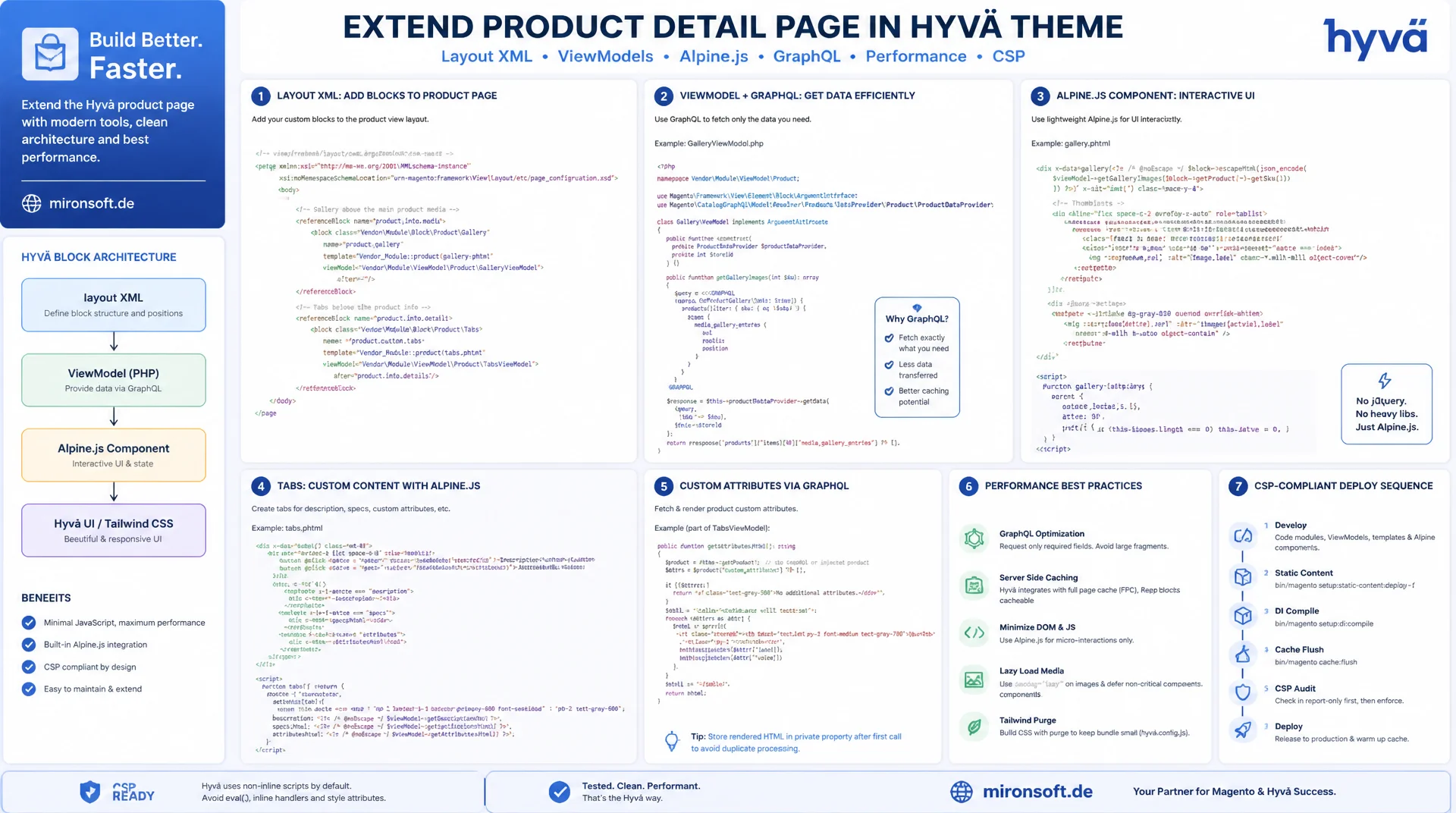
Layout XML instead of block overrides, ViewModels instead of jQuery plugins
Anyone extending the product detail page in the Hyvä theme should reach for layout XML, ViewModels, and Alpine.js components, not Fotorama plugins or Knockout templates. This guide uses concrete code examples to show how gallery, tabs, and custom attributes fit cleanly into the existing Hyvä block system, including GraphQL integration, performance optimization, and a CSP-compliant deploy sequence.
Table of Contents
- 1. Why PDP Customization Works Differently in Hyvä Than in Luma
- 2. Product Page Architecture: Layout XML Hierarchy and Containers
- 3. Extending the Gallery: Alpine.js Instead of Fotorama
- 4. Customizing Tabs and Adding a Custom Tab
- 5. Displaying Custom Attributes: EAV, ViewModel, and Escaping
- 6. GraphQL Customization: A Custom Attribute in the products Query
- 7. Performance: Lazy Loading and Avoiding Layout Shifts
- 8. Accessibility: ARIA Labels and Keyboard Navigation
- 9. Deployment and Testing: CSP-Compliant Scripts, Deploy Sequence
- 10. Summary
- 11. FAQ
1. Why PDP Customization Works Differently in Hyvä Than in Luma
In Luma, customizing the product detail page usually meant overriding a block class (a preference in di.xml) and duplicating a KnockoutJS template full of data-bind directives. Every small change to the gallery or the tabs dragged along a bundle of jQuery widgets, RequireJS modules, and UI component configuration. The Hyvä product page dispenses with this construct entirely: there is no fotorama.js, no Knockout binding, and no ui_component XML mediating between frontend and backend. Instead, plain layout XML controls which blocks get loaded, and phtml templates render finished HTML on the server, which Alpine.js then makes interactive in the browser.
The central difference in product page customization lies in where responsibility for PHP classes sits. Where Luma blocks often mix business logic, rendering helpers, and state management, Hyvä consistently relies on ViewModels that implement \Magento\Framework\View\Element\Block\ArgumentInterface. A ViewModel supplies only data and calculation logic to the template, without being part of the block hierarchy itself. That makes ViewModels easy to test, reusable across several templates, and independent of the heavyweight block lifecycle. For the Hyvä product page, this means a new attribute, a new calculation, or a new data access point almost always lands in a ViewModel first, not in a new block class.
A third point concerns the missing UI-component and KnockoutJS overhead. Where Luma needs a dedicated RequireJS module plus configuration in requirejs-config.js for every small interaction (switching tabs, zooming an image, selecting a quantity), Alpine.js handles this directly in the template via x-data, x-show, and x-on in Hyvä. The JavaScript payload of a Hyvä PDP stays minimal as a result, there is no bundle-splitting problem and no race conditions between RequireJS modules. Anyone coming from the Luma world therefore needs to do more than learn new tools for product page customization, they need to think fundamentally in terms of layout XML and templates instead of block classes and Knockout bindings.
2. Product Page Architecture: Layout XML Hierarchy and Containers
The entry point for any customization of the Hyvä product page is the layout handle catalog_product_view.xml, extended with type-specific handles such as catalog_product_view_type_simple or catalog_product_view_type_configurable. Within this hierarchy sits the container product.info.main, which bundles the core blocks of the product view: title, price, gallery reference, and form. A second important container is product.info.details, which holds the tab structure (Description, Additional Information, custom tabs). Anyone extending the Hyvä product page references these containers with referenceContainer or referenceBlock, instead of copying existing templates and replacing them globally.
Template overrides live in your own theme under app/design/frontend/Mironsoft/default/Magento_Catalog/templates/product/view/. An override copies only the file that actually needs to change, for example gallery.phtml or additional.phtml, and leaves every other template inheriting unchanged from the parent theme hyva-themes/magento2-default-theme-csp. This selective overriding is one of the biggest advantages over Luma: a theme update in the parent does not automatically break every custom change, because only the files that were actually modified sit in your own theme folder.
For new blocks, say an additional tab or a custom info section, a block element with name, template, and optionally a viewModel argument gets added inside referenceBlock in your own catalog_product_view.xml. The ViewModel binding happens through an argument of type \Magento\Framework\View\Element\Block\ArgumentInterface, which is available inside the template via $block->getViewModel(). This trio of layout XML, phtml template, and ViewModel is the consistent pattern for every extension of the Hyvä product page, whether it involves the gallery, tabs, or attributes.
<!-- app/design/frontend/Mironsoft/default/Magento_Catalog/layout/catalog_product_view.xml -->
<!-- English comment: extend the product info details container with a custom tab block -->
<page xmlns:xsi="http://www.w3.org/2001/XMLSchema-instance" xsi:noNamespaceSchemaLocation="urn:magento:framework:View/Layout/etc/page_configuration.xsd">
    <body>
        <referenceContainer name="product.info.details">
            <block class="Magento\Framework\View\Element\Template"
                   name="product.info.warranty"
                   template="Mironsoft_ProductPage::product/view/warranty.phtml"
                   before="-">
                <arguments>
                    <argument name="viewModel" xsi:type="object">Mironsoft\ProductPage\ViewModel\WarrantyInfo</argument>
                </arguments>
            </block>
        </referenceContainer>
    </body>
</page>
3. Extending the Gallery: Alpine.js Instead of Fotorama
Hyvä replaces Fotorama entirely with a lean Alpine.js component that lives under gallery.phtml in the default theme. For an extended Hyvä product page with thumbnails, zoom, and video support, you override this template in your own theme and extend the x-data function with additional state: an index for the active image, a flag for zoom mode, and a field for the currently playing video URL. The image data itself still comes from the standard ViewModel Magento\Catalog\ViewModel\Product\Gallery\GalleryImages, which already delivers fully prepared image arrays including video metadata.
Zoom is typically implemented via x-on:mousemove on the main image, which maps the cursor position onto an enlarged background image through background-position. For video support, the component checks each gallery item for a videoUrl field and renders an iframe or a native video element instead of an img tag when one is present. What matters for the Hyvä product page: all of the state logic stays inside the Alpine scope of the template, there is no additional global JavaScript store and no dependency on an external lightbox library.
Hooking up custom data, say an additional 360-degree image set, happens through a dedicated ViewModel that supplements the standard gallery data with the extra entries, rather than overriding the core ViewModel. This combination of composition and Alpine state extension lets you extend the gallery of the Hyvä product page step by step without duplicating the parent theme's base templates.
// app/design/frontend/Mironsoft/default/Magento_Catalog/web/js/product-gallery.js
// English comment: Alpine.js gallery component with thumbnails, zoom and video support
export default function productGallery(images) {
  return {
    images: images,
    activeIndex: 0,
    zoomActive: false,
    zoomStyle: '',

    get activeImage() {
      return this.images[this.activeIndex];
    },

    selectImage(index) {
      this.activeIndex = index;
      this.zoomActive = false;
    },

    onZoomMove(event) {
      const rect = event.currentTarget.getBoundingClientRect();
      const x = ((event.clientX - rect.left) / rect.width) * 100;
      const y = ((event.clientY - rect.top) / rect.height) * 100;
      this.zoomStyle = `background-position: ${x}% ${y}%;`;
      this.zoomActive = true;
    },

    isVideo(item) {
      return Boolean(item.videoUrl);
    }
  };
}
4. Customizing Tabs and Adding a Custom Tab
The default tabs of the Hyvä product page, Description and Additional Information, are rendered through the product.info.details container and share a common Alpine component that holds the active tab via x-data="{ activeTab: 'description' }" on the enclosing wrapper. Each tab button sets activeTab via x-on:click, and each tab panel checks with x-show="activeTab === 'description'" whether it should be visible. This pattern scales directly to additional tabs, since new panels only need another comparison value inside the same x-show expression.
A completely new tab, say for warranty information or technical data sheets, gets hooked into the product.info.details container via addBlock, or a new block element in layout XML. The corresponding phtml template renders only the button and panel markup, without starting its own isolated Alpine instance. What matters is that the new tab button and the new panel sit in the same parent scope as the existing tabs, so they share the same activeTab variable. If the new block is rendered in a separate template with its own x-data, its state decouples from the rest of the tab bar, and clicking the new tab no longer correctly closes the other panels.
For accessibility, every new tab button should get a role="tab", an aria-selected binding to activeTab, and a unique id that the associated panel references via aria-labelledby. This ARIA structure is covered in detail in section 8, but it's worth thinking about right from the moment you create the new tab, because adding ARIA attributes retroactively to templates already running in production is easy to forget.
<!-- app/design/frontend/Mironsoft/default/Magento_Catalog/templates/product/view/warranty.phtml -->
<!-- English comment: additional tab that shares the parent activeTab state -->
<?php /** @var \Magento\Framework\Escaper $escaper */ ?>
<?php $viewModel = $block->getViewModel(); ?>
<div class="border-b border-slate-200" x-show="activeTab === 'warranty'" role="tabpanel" id="panel-warranty" aria-labelledby="tab-warranty">
    <div class="py-6 text-sm text-gray-700">
        <?= $escaper->escapeHtml($viewModel->getWarrantyText()) ?>
    </div>
</div>
5. Displaying Custom Attributes: EAV, ViewModel, and Escaping
A custom attribute for the Hyvä product page starts with a declarative setup patch that uses \Magento\Eav\Setup\EavSetup to create the attribute on the product entity. It's important to set used_in_product_listing and a sensible frontend_input, so the attribute can be fetched performantly both in the product listing and in the catalog. After creation, the attribute isn't read directly in the template via $product->getData('attribute_code'), it gets encapsulated behind a dedicated method on the ViewModel.
This encapsulation in the ViewModel has a concrete reason: fallback logic, formatting, and null checks belong in PHP code that can be tested in isolation, not in the template. The ViewModel method takes the current product, reads the attribute value, applies a source model resolution where needed (for select or multiselect attributes), and returns a fully prepared string. The phtml template calls only this method and consistently escapes the output with $escaper->escapeHtml(), even when the value comes from a supposedly trustworthy backend field.
The same rule applies to the Hyvä product page as to every other Hyvä template: never output raw PHP without an escaper call, not even for numeric or seemingly safe values, because attribute values are freely editable through the admin area and must therefore be treated as potentially unsafe input. For HTML attributes where some formatting is allowed, escapeHtml() with an explicit tag allowlist is used instead, never an unchecked echo.
<?php
declare(strict_types=1);

namespace Mironsoft\ProductPage\ViewModel;

use Magento\Catalog\Model\Product;
use Magento\Framework\View\Element\Block\ArgumentInterface;

/**
 * ViewModel that exposes the custom warranty attribute to product page templates.
 */
final class WarrantyInfo implements ArgumentInterface
{
    private const ATTRIBUTE_CODE = 'warranty_period';

    /**
     * @param Product $product Current product model injected from the block scope.
     */
    public function __construct(
        private readonly Product $product
    ) {
    }

    /**
     * Return a formatted warranty period for the current product, or an empty string.
     *
     * @return string
     */
    public function getWarrantyText(): string
    {
        $value = $this->product->getData(self::ATTRIBUTE_CODE);

        if ($value === null || $value === '') {
            return '';
        }

        return sprintf('%d-month manufacturer warranty', (int) $value);
    }
}
6. GraphQL Customization: A Custom Attribute in the products Query
For the new attribute to also be available in a headless or PWA context, it must be explicitly exposed in the GraphQL schema. Magento extends schemas additively through schema.graphqls files using the extend type ProductInterface keyword. A purely declarative extend is enough when the field resolves directly from an EAV attribute of the same name, but in many cases the Hyvä product page needs additional formatting in the GraphQL context too, for example the same text preparation used in the ViewModel.
For formatted output, you implement \Magento\Framework\GraphQl\Query\ResolverInterface in a dedicated resolver class and bind it to the new field via the @resolver directive in the schema. The resolver receives the resolved product model through $value['model'] inside the resolve() call and can use the same formatting logic that also runs in the PHP ViewModel for the server-rendered Hyvä product page, ideally through a shared formatter rather than duplicated code.
One point that's often overlooked in practice: GraphQL caching works with its own cache tags, independent of the block HTML cache. If the new attribute changes in the admin, you must make sure the corresponding product cache tag is also invalidated for GraphQL responses, otherwise the REST or block version of the Hyvä product page shows a different attribute value than the GraphQL-backed variant.
# app/code/Mironsoft/ProductPage/etc/schema.graphqls
# English comment: expose the custom warranty attribute on ProductInterface
extend type ProductInterface {
    warranty_text: String @resolver(class: "Mironsoft\\ProductPage\\Model\\Resolver\\WarrantyText")
        @doc(description: "Formatted warranty period text for the product page")
}
7. Performance: Lazy Loading and Avoiding Layout Shifts
On the Hyvä product page, the gallery is usually the biggest performance risk, because several high-resolution images can be requested at once. Only the active main image should load eagerly (loading="eager" plus fetchpriority="high"), while all thumbnails and gallery images that aren't visible get loading="lazy". Equally decisive for Core Web Vitals: give every img tag explicit width and height attributes or a CSS aspect ratio, so the browser reserves the required space before the image actually loads and no cumulative layout shift occurs when the image fades in afterwards.
For new templates, say the additional warranty tab or an extended gallery component, the Tailwind v4 configuration needs to know that utility classes are used in these files. Since Tailwind v4 works CSS-first, that happens through the @source directive in the main CSS entry point, which includes extra template paths outside the default scan. If this entry is missing, utility classes still get output in the new template's HTML but never make it into the final CSS bundle, which results in unstyled but functionally correct markup, a failure pattern that's often mistakenly diagnosed as a PHP bug during review.
A third performance lever concerns Alpine initialization itself: initializing the gallery component with large, already fully resolved image arrays creates a noticeable parsing overhead on first render. For products with a lot of images (configuration examples or 360-degree sets, for instance), it pays off to pass only the first few images inline and fetch further images on demand, instead of writing the complete gallery into the DOM during initial page load.
8. Accessibility: ARIA Labels and Keyboard Navigation
The tab structure of the Hyvä product page follows the WAI-ARIA Authoring Practices pattern: the enclosing container of the tab buttons gets role="tablist", each button gets role="tab" with aria-selected bound to the Alpine state, and each panel gets role="tabpanel" with aria-labelledby pointing at the corresponding tab button ID. Without these roles, a screen reader announces the tabs as arbitrary buttons, without communicating the relationship between button and panel, which makes navigation considerably harder for assistive technologies.
Keyboard navigation adds real usability without a mouse on top of the ARIA roles. Left and right arrow keys should switch between tabs without focus leaving the element, while Enter and Space activate the focused tab. In Alpine.js you can implement this directly on the tab button via x-on:keydown.right and x-on:keydown.left, combined with x-ref to programmatically move focus to the next button. The same applies to the gallery: thumbnails must be reachable via the Tab key, and the active main image shouldn't steal focus when the image changes, so keyboard users don't jump back to the top of the page on every click.
Alt text for gallery images deserves particular attention on the Hyvä product page, because the standard ViewModel often supplies only the generic product name as alt text. For better accessibility, it pays to maintain image-specific alt text on the product image attribute and prefer it over the generic fallback in the ViewModel, so screen reader users can actually tell which image is currently active.
9. Deployment and Testing: CSP-Compliant Scripts, Deploy Sequence
Hyvä runs with a strict Content Security Policy by default, which blocks inline scripts without explicit registration. Every inline <script> block in a Hyvä product page template, for instance to pass Alpine initial data as JSON, must therefore be registered immediately afterward with $hyvaCsp->registerInlineScript(). Without this registration, the browser silently blocks the script in production, while it works unremarkably in a local development environment with CSP disabled, a classic mistake that only becomes visible after deployment to a staging or live environment.
After any change to templates, ViewModels, or the Tailwind configuration, the deploy sequence must be followed strictly. First the CSS for the affected theme gets rebuilt, then the preprocessed view files and static assets are deleted completely before setup:static-content:deploy runs again. Skipping this deletion step can mix old and new Tailwind classes into the shipped CSS, leading to inconsistent styling that's hard to reproduce.
{
  "attribute_code": "warranty_period",
  "frontend_input": "text",
  "value": "24",
  "resolved_label": "24-month manufacturer warranty"
}
For actually testing the new features, a combination of manual click testing with CSP enabled on staging and automated tests for the ViewModel itself is recommended, for instance a simple PHPUnit test that verifies getWarrantyText() returns an empty string instead of an error when the attribute value is missing. This combination of manual UI verification and automated unit testing for the PHP logic covers the two classes of bugs that come up most often when extending the Hyvä product page: CSP violations on the frontend and null-pointer-like errors on the backend.
Comparison: Naive Approach vs. Recommended Hyvä Pattern
| Task | Naive / Luma-style Approach | Recommended Hyvä Pattern | Benefit |
|---|---|---|---|
| Extend gallery | Patch the Fotorama plugin | Alpine.js x-data component | No jQuery, minimal JS payload |
| Add a new tab | Override a block class | referenceContainer + ViewModel | Update-safe, testable |
| Output an attribute | echo $product->getData(...) |
$escaper->escapeHtml($viewModel->...) |
No XSS risk |
| Override a template | Copy the whole theme | Selective template overrides | Parent theme updates stay usable |
| Use an inline script | Unregistered <script> | $hyvaCsp->registerInlineScript() |
Works with strict CSP |
Mironsoft
Hyvä theme development and Magento 2 agency
Want your Hyvä product page to do more?
We extend galleries, tabs, and attributes in the Hyvä theme cleanly through layout XML and ViewModels, including GraphQL integration, performance optimization, and CSP-compliant Alpine.js components.
PDP Audit
Analysis of existing product page templates for performance and accessibility
Gallery & Tabs
Custom Alpine.js components for zoom, video, and additional tabs
GraphQL Resolvers
Expose custom attributes in the products query for headless frontends
10. Summary
Extending the Hyvä product page always follows the same basic pattern: layout XML determines which blocks appear where, ViewModels supply data and logic, and phtml templates render server-side HTML that Alpine.js then makes interactive in the browser. The gallery replaces Fotorama with a lean x-data component, new tabs share the activeTab state with the default tabs, and custom attributes get output through EAV setup, ViewModel encapsulation, and consistent escaping.
For headless scenarios, customization doesn't stop at PHP templates: GraphQL schema extensions and resolvers make sure the same data is also available outside server-side rendering. Performance and accessibility aren't downstream optimization steps here, they are part of the base architecture, lazy loading, ARIA roles, and CSP-compliant inline scripts belong in the template from the start, not as a later fix. Anyone who consistently follows the deploy sequence of rebuild, cache clearing, and static content deploy avoids the most common inconsistencies between local testing and the live state.
Extending the Hyvä Product Page: The Essentials at a Glance
Architecture
Layout XML with referenceContainer and referenceBlock instead of block class overrides, ViewModels via ArgumentInterface.
Gallery & Tabs
Alpine.js x-data instead of Fotorama, shared activeTab state for new and existing tabs.
Attributes & GraphQL
EAV setup, ViewModel encapsulation with $escaper, GraphQL extension via extend type ProductInterface.
Deployment
$hyvaCsp->registerInlineScript() after every inline script, strict deploy sequence with rebuild and cache flush.