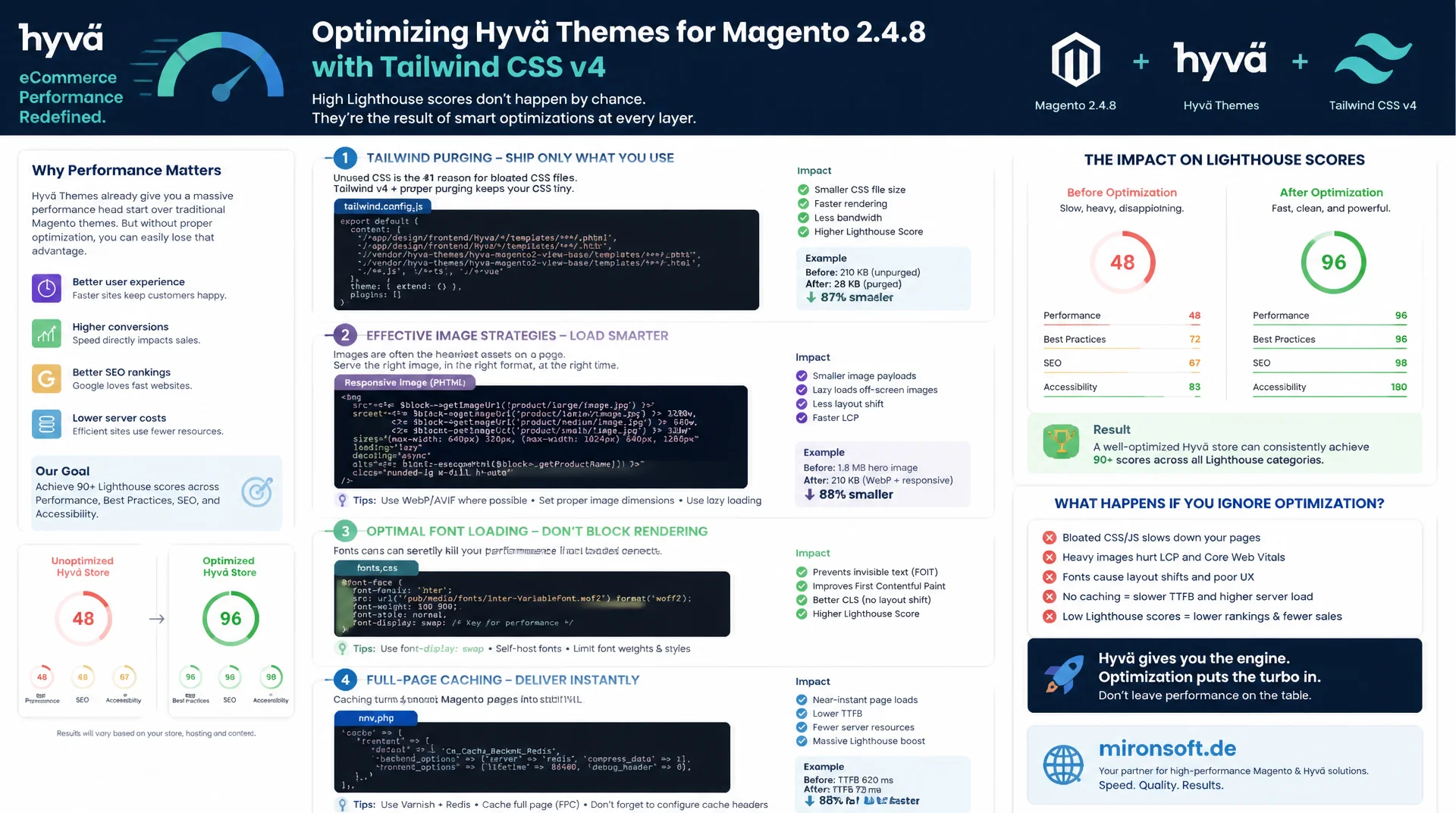
concrete levers instead of vague tips
A Hyvä theme is lean by design, but a high Lighthouse score does not appear automatically. If you do not deliberately align Tailwind purging, image strategy, font loading and full page cache, you give away exactly the advantage Hyvä was built for. This Hyva performance optimization walks through the concrete levers with real code examples from Magento 2.4.8 and Tailwind CSS v4.
Table of Contents
- 1. Why Lighthouse scores matter for Hyvä stores at all
- 2. Critical rendering path: Tailwind purging and critical CSS
- 3. Reducing JavaScript payload: Alpine.js instead of extra bundles
- 4. Image strategy for the Largest Contentful Paint
- 5. Fonts: system fonts instead of custom fonts
- 6. Server-side: full page cache and TTFB
- 7. Script execution: defer, async and third-party reduction
- 8. Hyvä-specific levers in layout XML and ViewModels
- 9. Measure instead of guess: Lighthouse CI and field data
- 10. Summary
- 11. FAQ
1. Why Lighthouse scores matter for Hyvä stores at all
A Hyva performance optimization is not an end in itself, it has a direct effect on conversion rate and visibility. Google uses Core Web Vitals as a ranking factor, and a mobile Lighthouse score below 50 regularly correlates in practice with noticeably higher bounce rates on category and product pages. Hyvä was originally built precisely because the Luma theme, with its heavy jQuery and Knockout.js stack, could barely reach these values. Anyone who has switched to Hyvä but keeps the same old habits gives away most of that advantage.
The most common mistake that stands in the way of a clean Hyva performance optimization: assuming the theme itself already takes care of everything. Hyvä is indeed a lean foundation without unnecessary bloat, but every additional extension, every unchecked third-party script and every misconfigured image can tank the Lighthouse score just as much as in any other theme. The following sections systematically walk through the most important levers, from the critical rendering path through images and fonts to full page cache and measurement itself.
2. Critical rendering path: Tailwind purging and critical CSS
The biggest lever for the First Contentful Paint almost always lies in CSS delivery. Tailwind CSS v4 works CSS-first and generates only the utility classes actually used in the template code during the build process. A sloppy @source configuration that includes too many directories or reads in generated files unnecessarily bloats the delivered CSS file. For an effective Hyva performance optimization, content detection must be scoped exactly to the phtml files and ViewModels actually in use, not to the entire repository.
Beyond pure purging, it is worth looking at the order in which CSS is delivered. Hyvä loads a single compiled CSS file via styles.css, which is already a big step forward compared to Luma with its many individual LESS compilations. Still, every synchronously loaded stylesheet blocks rendering until it has been fully downloaded and parsed. Delivering additional critical styles for the visible area inline in the <head> and loading the rest asynchronously measurably reduces time to first visible content.
/* app/design/frontend/Mironsoft/default/web/tailwind/tailwind.config.js source list */
/* Precise @source scanning keeps the generated CSS lean */
@source "../../../**/*.phtml";
@source "../../../../Magento_Theme/templates/**/*.phtml";
@source "../../../../**/view/frontend/templates/**/*.phtml";

/* Exclude generated and vendor assets from the purge scan */
@source not "../../../../../../pub/**";
@source not "../../../../../../vendor/**";

/* Keep a minimal safelist only for classes assembled dynamically in PHP */
@source inline("{bg,text}-{red,green,orange}-{100,600,700}");
A common mistake in practice: developers assemble Tailwind classes from JavaScript strings, for example `bg-${color}-600`. The Tailwind scanner does not recognize such dynamically composed class names because it statically scans the source for complete string literals. The result: the class is missing from the production build and the layout breaks without any build error appearing. For a reliable Hyva performance optimization, an @source inline(...) safelist entry is therefore mandatory as soon as class names are composed dynamically.
3. Reducing JavaScript payload: Alpine.js instead of extra bundles
The second biggest lever lies in the amount of JavaScript the browser must parse and execute. Hyvä deliberately relies on Alpine.js instead of an additional framework such as Vue or React, because Alpine gets by with roughly 15 kilobytes gzipped and works declaratively directly in the markup. Every additional JavaScript bundle a module developer sneaks in adds to Time to Interactive and can noticeably worsen Total Blocking Time in the Lighthouse report. A consistent Hyva performance optimization therefore also means critically questioning every new dependency before it is added to the theme build.
A concrete example: instead of pulling in an external slider library with its own bundle, a product image carousel can be built entirely with Alpine.js and native CSS scroll-snap properties. That reduces not only JavaScript execution time but also the number of HTTP requests. For forms with conditional visibility, x-show and x-if are sufficient in most cases, without loading an additional state management package.
<!-- Alpine.js carousel without an external slider library -->
<div x-data="{ activeIndex: 0, images: 5 }" class="relative overflow-hidden">
  <div class="flex snap-x snap-mandatory overflow-x-auto scroll-smooth"
       x-ref="track">
    <template x-for="i in images" :key="i">
      <img class="snap-center w-full flex-shrink-0"
           :src="`/media/catalog/product/gallery-${i}.webp`"
           loading="lazy" decoding="async" alt="Product view">
    </template>
  </div>
  <div class="flex justify-center gap-2 mt-3">
    <template x-for="i in images" :key="i">
      <button class="w-2 h-2 rounded-full"
              :class="activeIndex === i ? 'bg-orange-600' : 'bg-slate-300'"
              @click="activeIndex = i"></button>
    </template>
  </div>
</div>
4. Image strategy for the Largest Contentful Paint
In almost every Magento store, the Largest Contentful Paint is the product or category image above the fold, and that is exactly where a large part of the Lighthouse score is decided. For an effective Hyva performance optimization, the basic rule applies: the LCP image is never delivered with loading="lazy". Lazy loading delays exactly the image the browser should request immediately, directly worsening the most important Lighthouse metric. Instead, the first visible product image should carry fetchpriority="high".
In addition, width and height attributes must be set on every image so the browser can reserve the required space before the image file is loaded. Without these attributes, the layout shifts after loading, which worsens Cumulative Layout Shift. WebP or AVIF instead of JPEG reduces file size by 25 to 50 percent at the same perceived quality, which directly affects load time.
<!-- LCP image: eager loading, explicit dimensions, high priority -->
<img src="/media/catalog/product/cache/hero_800x800.webp"
     width="800" height="800"
     fetchpriority="high"
     decoding="async"
     alt="<?= $block->escapeHtmlAttr($product->getName()) ?>">

<!-- Below-the-fold gallery thumbnails: lazy loading is correct here -->
<img src="/media/catalog/product/cache/thumb_200x200.webp"
     width="200" height="200"
     loading="lazy" decoding="async"
     alt="Product thumbnail">
5. Fonts: system fonts instead of custom fonts
Custom fonts are one of the underrated blockers for good Lighthouse scores. An external webfont file creates an additional network request, can block text rendering in the worst case, and causes a visible Flash of Invisible Text with incorrect font-display configuration. On mironsoft.de projects, the fixed rule is therefore to never add custom fonts and instead consistently rely on the system font stack that Tailwind ships by default.
Tailwind's system font stack falls back to the operating system's native font, for example San Francisco on macOS, Segoe UI on Windows, or Roboto on Android. These fonts already exist on the device, so no additional file needs to be downloaded and no layout shift occurs from a font loading in later. For a consistent Hyva performance optimization, this is one of the simplest levers of all, because it saves several kilobytes and a render-blocking request instantly, with zero code effort.
6. Server-side: full page cache and Time to First Byte
A good Lighthouse score begins before the first byte. Time to First Byte flows directly into the Speed Index and First Contentful Paint, and no frontend optimization can compensate for a slow server response. Magento's full page cache, ideally with Varnish as an upstream cache layer, reduces TTFB for cached category and CMS pages from several hundred milliseconds to a few milliseconds. For a holistic Hyva performance optimization, correctly configured cache tags in block and layout XML are therefore just as important as any frontend measure.
A common mistake: blocks with dynamic, personalized content, such as the cart counter in the header, get accidentally included in the full page cache, either serving stale data or making developers disable the cache entirely out of fear. The correct path is Hyvä's Ajax-based reload sections for exactly these personalized fragments, while the rest of the page is served entirely from the full page cache.
7. Script execution: defer, async and third-party reduction
Not every piece of JavaScript needs to run synchronously and immediately. Scripts only needed after the initial render, such as tracking pixels, chat widgets or review snippets, should be loaded with defer so they do not block HTML document parsing. For a lean Hyva performance optimization, every third-party script belongs on the review list: is it really needed above the fold, or can it be deferred until the user scrolls or interacts?
In Hyvä themes, the CSP convention additionally requires that every inline script block be registered via $hyvaCsp->registerInlineScript(). Besides its security function, this has a performance side effect: consistently following this convention keeps every single inline block visible, making it easier to spot which scripts are actually necessary and which have become superfluous over time but were never removed.
8. Hyvä-specific levers in layout XML and ViewModels
One advantage of Hyvä over Luma is fine-grained control via layout XML. Blocks not needed in the theme, such as leftover blocks from the standard Magento layout, can be cleanly removed with remove="true" instead of merely being hidden. Every removed block saves rendering time on the backend and reduces the amount of HTML the browser must parse. For a thorough Hyva performance optimization, it is worth taking a layout inventory with bin/magento dev:template-hints:disable and inspecting the generated HTML output to identify dead markup.
ViewModels instead of block classes are also a performance factor, albeit an indirect one: since ViewModels are injected via the ArgumentInterface and do not require their own object manager instance with session dependencies, expensive calculations are easier to cache and can be run specifically only where they are actually needed. A ViewModel method that prepares image data for the LCP area can, for example, centrally control the fetchpriority attribute instead of hardcoding it in every single template.
<!-- app/design/frontend/Mironsoft/default/Magento_Catalog/layout/catalog_product_view.xml -->
<page xmlns:xsi="http://www.w3.org/2001/XMLSchema-instance"
      xsi:noNamespaceSchemaLocation="urn:magento:framework:View/Layout/etc/page_configuration.xsd">
    <body>
        <!-- Remove unused upsell block markup rendered by core Magento_Catalog -->
        <referenceBlock name="product.info.upsell" remove="true"/>

        <referenceContainer name="content">
            <block class="Mironsoft\Performance\ViewModel\ProductGallery"
                   name="product.gallery.viewmodel"
                   template="Magento_Catalog::product/view/gallery.phtml">
                <arguments>
                    <argument name="view_model" xsi:type="object">
                        Mironsoft\Performance\ViewModel\ProductGallery
                    </argument>
                </arguments>
            </block>
        </referenceContainer>
    </body>
</page>
9. Measure instead of guess: Lighthouse CI and field data
A Hyva performance optimization without continuous measurement quickly degrades into a one-off action whose effect evaporates with the next deployment. Lighthouse CI can be integrated into the existing deployment pipeline and automatically raises an alarm as soon as a performance budget is undershot, for example when a newly added module pushes Total Blocking Time past a defined threshold. Lab data from Lighthouse alone is not enough, though, because it is measured under ideal conditions.
In addition, the Chrome User Experience Report supplies real field data from actual users with different devices, network connections and geographic locations. Google Search Console displays this CrUX data directly for your own domain and reveals whether improvements measured in the lab actually reach real visitors. Only the combination of Lighthouse CI in the deployment process and CrUX field data in live operation gives a complete picture of actual performance.
{
  "ci": {
    "collect": {
      "url": ["https://staging.mironsoft.de/", "https://staging.mironsoft.de/catalog/product/view/id/42"],
      "numberOfRuns": 3
    },
    "assert": {
      "assertions": {
        "categories:performance": ["error", { "minScore": 0.90 }],
        "largest-contentful-paint": ["error", { "maxNumericValue": 2500 }],
        "cumulative-layout-shift": ["error", { "maxNumericValue": 0.10 }],
        "total-blocking-time": ["warn", { "maxNumericValue": 200 }]
      }
    },
    "upload": { "target": "temporary-public-storage" }
  }
}
Such a performance budget in CI prevents gradual regressions that hardly stand out individually but add up to a noticeable decline over several sprints. One new marketing script here, one extra tracking pixel there, without automated thresholds this effect stays hidden for a long time, until the Lighthouse score is suddenly much worse than three months ago.
Levers compared directly: The following overview summarizes the most important levers of a Hyva performance optimization and shows which Lighthouse metric benefits most from each.
| Area | Problem | Recommended fix | Affected metric |
|---|---|---|---|
| LCP image | loading="lazy" on the hero image |
fetchpriority="high", eager |
Largest Contentful Paint |
| Fonts | External custom fonts | System font stack | First Contentful Paint |
| CSS purging | Too broad @source paths |
Exact content detection | Speed Index |
| JavaScript | Additional frontend bundles | Alpine.js in the markup | Total Blocking Time |
| Server response | Missing cache tags | Full page cache + Varnish | Time to First Byte |
Mironsoft
Hyvä development, performance audits and Magento 2 operations
Lighthouse score stuck in the red?
We analyze your Hyvä store at the image, font, CSS and cache level and implement a complete Hyva performance optimization that stays measurable under real user conditions too.
Lighthouse audit
Detailed analysis of all Core Web Vitals with a prioritized action list
Implementation
Image strategy, critical CSS and cache configuration in live operation
Monitoring
Lighthouse CI and performance budgets built firmly into your pipeline
10. Summary
An effective Hyva performance optimization is not a single trick but the consistent combination of several smaller measures: exact Tailwind purging instead of broad @source paths, Alpine.js instead of extra JavaScript bundles, a cleanly prioritized LCP image without lazy loading, system fonts instead of custom fonts, and a correctly configured full page cache. Each of these measures on its own brings a measurable but limited effect. Together they make the difference between a mediocre and a consistently green Lighthouse score.
The second crucial building block is continuity: without Lighthouse CI in the deployment process and without a look at real CrUX field data, any one-off Hyva performance optimization evaporates at the latest with the next feature that brings an extra script or an unchecked third-party snippet. Performance budgets in the CI pipeline make regressions visible before they reach the customer.
Hyva Performance Optimization - The Essentials at a Glance
LCP image
No loading="lazy", instead fetchpriority="high" and fixed width/height attributes.
CSS & fonts
Exact Tailwind purging via @source, system font stack instead of custom fonts.
JavaScript
Alpine.js in the markup instead of extra bundles, third-party scripts consistently with defer.
Caching & monitoring
Full page cache with correct tags, Lighthouse CI and CrUX field data as regression protection.