DEFLATE, dictionaries, and getting the config right
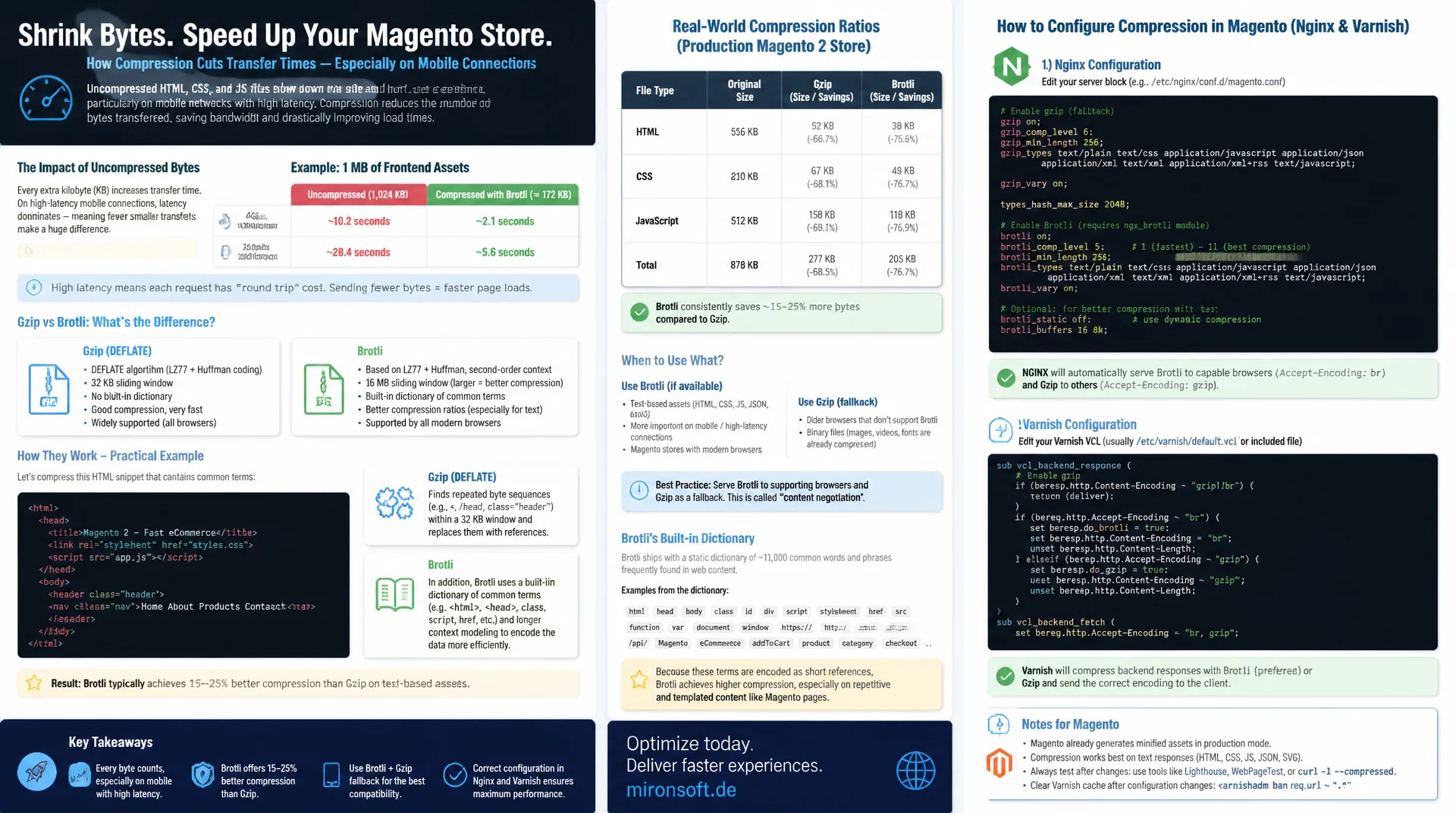
Every uncompressed byte of HTML, CSS, or JS costs transfer time, especially on mobile connections with high latency. Gzip is the reliable standard, but Brotli compresses web text noticeably smaller thanks to a built-in dictionary of common terms. This article shows how both algorithms actually work, where the real compression ratios land, and how to configure them correctly in Nginx and Varnish for Magento.
Table of Contents
- 1. Why text compression matters for HTML, CSS, and JS
- 2. Gzip and DEFLATE: LZ77 and Huffman coding
- 3. Brotli: a bigger window and a built-in dictionary
- 4. Compression ratios in practice
- 5. CPU cost: choosing the right quality level
- 6. Content negotiation: Accept-Encoding and Content-Encoding
- 7. Build-time pre-compression vs. on-the-fly for Magento
- 8. Configuring Nginx and Varnish for Magento
- 9. Gzip vs. Brotli compared side by side
- 10. Summary
- 11. FAQ
1. Why text compression matters for HTML, CSS, and JS
HTML, CSS, JavaScript, and SVG are plain text, and therefore highly redundant: repeated tag names, nested class lists, similar CSS declarations, and recurring function names create enormous redundancy in the byte stream. A typical Tailwind CSS bundle with thousands of utility classes, or a Hyvä JS bundle with repeated Alpine.js directives, is often several hundred kilobytes in its raw state, even though the actual information density is much lower. Without text compression, the server transmits exactly that redundancy byte for byte over the network instead of eliminating it.
The effect is most noticeable on mobile connections with high latency and limited bandwidth, but every saved kilobyte matters on fiber too, since TCP slow start caps effective bandwidth during the first round trips regardless. An uncompressed 150 KB HTML document can cost several extra TCP segments and therefore measurable milliseconds of transfer time before the browser can even begin rendering. Compression here doesn't touch server response time, it acts specifically on the download phase, which feeds directly into Largest Contentful Paint and Time to Interactive.
2. Gzip and DEFLATE: LZ77 and Huffman coding
Gzip is a container format around the DEFLATE algorithm, which combines two techniques. First, LZ77 scans the input with a 32 KB sliding window for byte sequences it has already seen. When the encoder finds a repeat, it replaces it with a compact distance-length pair pointing back to the earlier occurrence instead of transmitting the bytes again. For highly repetitive text like CSS selectors or recurring HTML attributes, this step kicks in very often and already reduces the data volume substantially before the second stage even begins.
In the second step, DEFLATE applies Huffman coding to the output of LZ77: frequently occurring bytes and backreferences get assigned shorter bit patterns, rare ones get longer patterns. This is pure entropy coding with no contextual knowledge of the content. Gzip's decisive limitation lies in LZ77's 32 KB window: repeats that are further apart than 32 KB, for example similar blocks at the start and end of a long JS file, simply can't be referenced anymore and have to be fully re-encoded.
3. Brotli: a bigger window and a built-in dictionary
Brotli addresses exactly this weakness: its sliding window can be as large as 16 MB, 512 times bigger than Gzip's. This lets the encoder find repeats across very long files too, which makes a real difference for large bundled JS vendor chunks or extensive CSS files. Brotli also applies finer context modeling during entropy coding than plain Huffman, so bit allocation tracks the actual local probability distribution of the data more closely.
The real advantage for web content, though, is Brotli's static dictionary: it embeds roughly 13,000 strings and phrases extracted from a large corpus of real web content, things like HTML tags such as <div class=", CSS properties like background-color or display: flex, and common JS keywords like function or document.getElementById. Because this knowledge already exists before compression even starts, Brotli can compress small, short files with little internal repetition effectively too, by referencing hits in the dictionary instead of the file content itself. Gzip has no comparable prior-knowledge component and has to derive every bit of redundancy from the file alone.
4. Compression ratios in practice
In benchmarks against real web assets, Brotli is typically 15 to 25% smaller than Gzip at a comparable compression level, when both are applied to HTML, CSS, or JavaScript. A 200 KB CSS bundle that shrinks to roughly 35 KB with Gzip -9 often lands at 26 to 29 KB with Brotli -q 11. For generated, highly repetitive CSS like Tailwind utility classes, the gap is often larger, because both the bigger sliding window and the dictionary kick in; for hand-written application code with less redundancy, the gap is smaller.
These figures are ballpark numbers, not a guarantee. The actual gain depends heavily on the specific content: heavily compressed or already-binary formats like JPEG or WOFF2 barely benefit from additional text compression, while generic boilerplate code shrinks especially hard. Anyone who wants a reliable estimate of the effect should compress real assets from their own build with both algorithms and compare the actual file sizes, rather than relying on a blanket percentage.
5. CPU cost: choosing the right quality level
Both algorithms offer adjustable compression levels that directly represent a tradeoff between compression ratio and computation time. Gzip has levels 1 through 9, with level 6 the most commonly used compromise in practice. Brotli has quality levels 0 through 11, and this is where the decisive difference lies: Brotli quality 11 delivers the best compression, but is many times more expensive in computation time than lower levels, on large files sometimes ten to a hundred times slower than Gzip -9, for an additional gain that's often only a few percentage points over Brotli quality 9 or 10.
This cost curve directly determines where each level belongs: quality 11 belongs exclusively in the build process, where computation time is plentiful and only incurred once per deployment. For dynamic, runtime-compressed responses, a much cheaper level must be chosen, for example Gzip level 4 to 6 or Brotli quality 4 to 5, because otherwise the compression itself becomes the bottleneck for every single PHP-FPM or Nginx worker process.
# Compare wall-clock time and output size across compression levels
# on a realistic 180 KB JS bundle

time gzip -9 -c app.bundle.js > app.bundle.js.gz
# real  0m0.041s   size: 47 KB

time brotli -q 5 -c app.bundle.js > app.bundle.js.br.q5
# real  0m0.038s   size: 44 KB

time brotli -q 11 -c app.bundle.js > app.bundle.js.br.q11
# real  0m2.914s   size: 36 KB

# Quality 11 is ~75x slower than quality 5 for roughly 18% extra savings.
# Fine for a one-time build step, unacceptable per HTTP request.
6. Content negotiation: Accept-Encoding and Content-Encoding
Which compression algorithm actually gets used is negotiated between browser and server on every request through content negotiation. The client sends the request header Accept-Encoding listing the algorithms it supports, optionally weighted with q-values, for example Accept-Encoding: br, gzip, deflate. The server picks the best algorithm it supports from that list, compresses the response accordingly, and marks the result with the response header Content-Encoding so the browser knows how to decompress it before processing.
One frequently overlooked detail: the server also has to set Vary: Accept-Encoding whenever a response can be served compressed. Without this header, upstream caches, a CDN, a reverse proxy, or even the browser's own cache, might accidentally serve a response compressed for a Brotli-capable client to a client without Brotli support, resulting in unreadable binary garbage on the page. Vary: Accept-Encoding ensures the cache keeps a separate entry per encoding variant.
# Client negotiates compression via Accept-Encoding
curl -s -D - -H "Accept-Encoding: br, gzip" \
  https://shop.example.com/static/frontend/Mironsoft/default/de_DE/css/styles.css \
  -o /dev/null

# Relevant response headers:
# HTTP/2 200
# content-encoding: br
# vary: Accept-Encoding
# content-length: 28114

# Without Brotli support, the same request falls back to gzip:
curl -s -D - -H "Accept-Encoding: gzip" \
  https://shop.example.com/static/frontend/Mironsoft/default/de_DE/css/styles.css \
  -o /dev/null
# content-encoding: gzip
# content-length: 35892
7. Build-time pre-compression vs. on-the-fly for Magento
For static, immutable assets, pre-compression is the right strategy: during the build step, ready-made .br and .gz variants are generated alongside every original file, usually via a Webpack or Vite plugin or a dedicated build script. At runtime, the web server only has to serve the matching variant based on the Accept-Encoding header, without compressing anything itself. This moves the expensive Brotli quality-11 computation entirely out of the request path and into a point in time where CPU time is essentially free to spend.
For dynamically generated HTML that differs by user, cart contents, or A/B test, pre-compression doesn't work, because the content doesn't even exist at build time. Here, only on-the-fly compression at runtime is possible, though with a significantly cheaper quality level than at build time. This tradeoff between pre-compression for static content and on-the-fly compression for dynamic content is the central design decision for any compression strategy.
// vite.config.js - precompress build output to .br and .gz
// alongside every static asset, at maximum quality since
// this only runs once per deployment, not per request
import { defineConfig } from 'vite';
import viteCompression from 'vite-plugin-compression';

export default defineConfig({
  plugins: [
    viteCompression({
      algorithm: 'brotliCompress',
      ext: '.br',
      threshold: 1024,       // skip tiny files, overhead outweighs gain
      compressionOptions: { level: 11 },
      deleteOriginFile: false,
    }),
    viteCompression({
      algorithm: 'gzip',
      ext: '.gz',
      threshold: 1024,
      compressionOptions: { level: 9 },
      deleteOriginFile: false,
    }),
  ],
});
8. Configuring Nginx and Varnish for Magento
In Nginx, the ngx_brotli module handles Brotli support, and it isn't compiled in by default; it needs to be added either as a dynamic module or via a custom build. The directive brotli_static on tells Nginx to first look for a pre-generated .br file next to the requested asset and serve it directly without compressing anything itself, exactly the pre-compression output from the build step. gzip_static on works analogously as a fallback for clients without Brotli support. For cases where no precompressed file exists, brotli_comp_level and gzip_comp_level respectively define the level for on-the-fly compression, deliberately kept low here, as covered in section 5.
Varnish has historically been a problem case for compression: the default configuration in many VCL templates normalizes the Accept-Encoding header down to a single variant, usually gzip, to keep the number of cache variants per URL small, since Varnish itself has no native Brotli support. In a Magento stack, Nginx in front of or behind Varnish usually handles the Brotli negotiation, while Varnish only caches the gzip-compressed or uncompressed variant. It's important to normalize the Accept-Encoding header before the cache lookup, so that not every conceivable combination of client encodings creates its own cache variant.
# nginx.conf - serve precompressed assets, fall back to on-the-fly
# at a deliberately cheap level for cache-miss/dynamic responses

brotli on;
brotli_static on;              # serve prebuilt .br files directly
brotli_comp_level 5;           # cheap fallback level, not 11
brotli_types text/html text/css application/javascript
             application/json image/svg+xml;

gzip on;
gzip_static on;                # serve prebuilt .gz files directly
gzip_comp_level 5;              # cheap fallback level, not 9
gzip_types text/html text/css application/javascript
           application/json image/svg+xml;
gzip_vary on;                   # emits Vary: Accept-Encoding
# Varnish VCL - normalize Accept-Encoding before the cache lookup so
# Varnish stores one gzip variant per URL instead of many combinations.
# Brotli negotiation is handled by Nginx in front of Varnish.

sub vcl_recv {
    if (req.http.Accept-Encoding) {
        if (req.http.Accept-Encoding ~ "gzip") {
            set req.http.Accept-Encoding = "gzip";
        } else {
            unset req.http.Accept-Encoding;
        }
    }
}

sub vcl_backend_response {
    # Ensure downstream caches respect the encoding variant
    if (beresp.http.Content-Encoding) {
        set beresp.http.Vary = "Accept-Encoding";
    }
}
9. Gzip vs. Brotli compared side by side
Both algorithms have clearly different strengths. The table below summarizes when each one is the better choice.
| Dimension | Gzip | Brotli | Practical relevance |
|---|---|---|---|
| Algorithm basis | DEFLATE: LZ77 (32 KB window) + Huffman | LZ77 variant (16 MB window) + context modeling + dictionary | Bigger window finds more repeats |
| Compression ratio (text) | Baseline | Typically 15-25% smaller | Effect bigger on repetitive boilerplate |
| CPU cost at max level | Level 9: moderate | Quality 11: very high | Brotli 11 fits build time only |
| Best use case | Dynamic on-the-fly responses | Static build artifacts, precompressed | Combining both is common |
| Server/browser support | Universal, standard for decades | Wide support, but needs gzip fallback | Always serve both variants |
In practice the two algorithms aren't mutually exclusive, they complement each other: Brotli for precompressed static assets, Gzip as a guaranteed-compatible fallback and as the cheaper option for dynamic responses where every millisecond of computation time counts. Serving only one of the two gives up either compatibility or compression ratio.
Mironsoft
Compression setup, Nginx tuning, and caching architecture for Magento stores
Getting Brotli and Gzip delivered right?
We audit your Magento stack's compression configuration, set up pre-compression in the build process, and configure Nginx and Varnish so every response ships with the optimal encoding variant.
Build pipeline audit
Set up .br and .gz pre-compression in Vite or Webpack
Nginx configuration
brotli_static, gzip_static, and sane comp levels for live traffic
Varnish tuning
Accept-Encoding normalization and clean cache variant separation
10. Summary
Compressing HTML, CSS, and JS solves a concrete networking problem: redundant text costs unnecessary transfer time. Gzip compresses via LZ77 with a 32 KB window and Huffman coding, and is universally supported, the reliable standard. Brotli goes further with a 16 MB window, finer context modeling, and a built-in dictionary of roughly 13,000 web-typical strings, typically achieving 15 to 25% smaller output on text assets. The price is CPU time: Brotli quality 11 belongs exclusively in the build process, never in the live request path.
The right architecture consistently separates the two use cases: static, versioned assets are precompressed at maximum quality during the build and served directly via brotli_static/gzip_static, while dynamic Magento HTML is compressed at runtime with a deliberately cheaper level. Varnish normalizes Accept-Encoding before the cache lookup so not every client combination spawns its own cache variant, while Nginx handles the actual Brotli negotiation.
Brotli vs. Gzip - The Essentials at a Glance
Algorithm
Gzip: LZ77 (32 KB window) + Huffman. Brotli: 16 MB window + context modeling + 13,000-word dictionary.
Compression ratio
Brotli typically 15-25% smaller than Gzip on HTML, CSS, and JS assets.
CPU cost
Brotli quality 11 for the build process only. Use cheap levels like quality 4-5 at runtime.
Server configuration
brotli_static + gzip_static in Nginx. Varnish normalizes Accept-Encoding before the cache lookup.