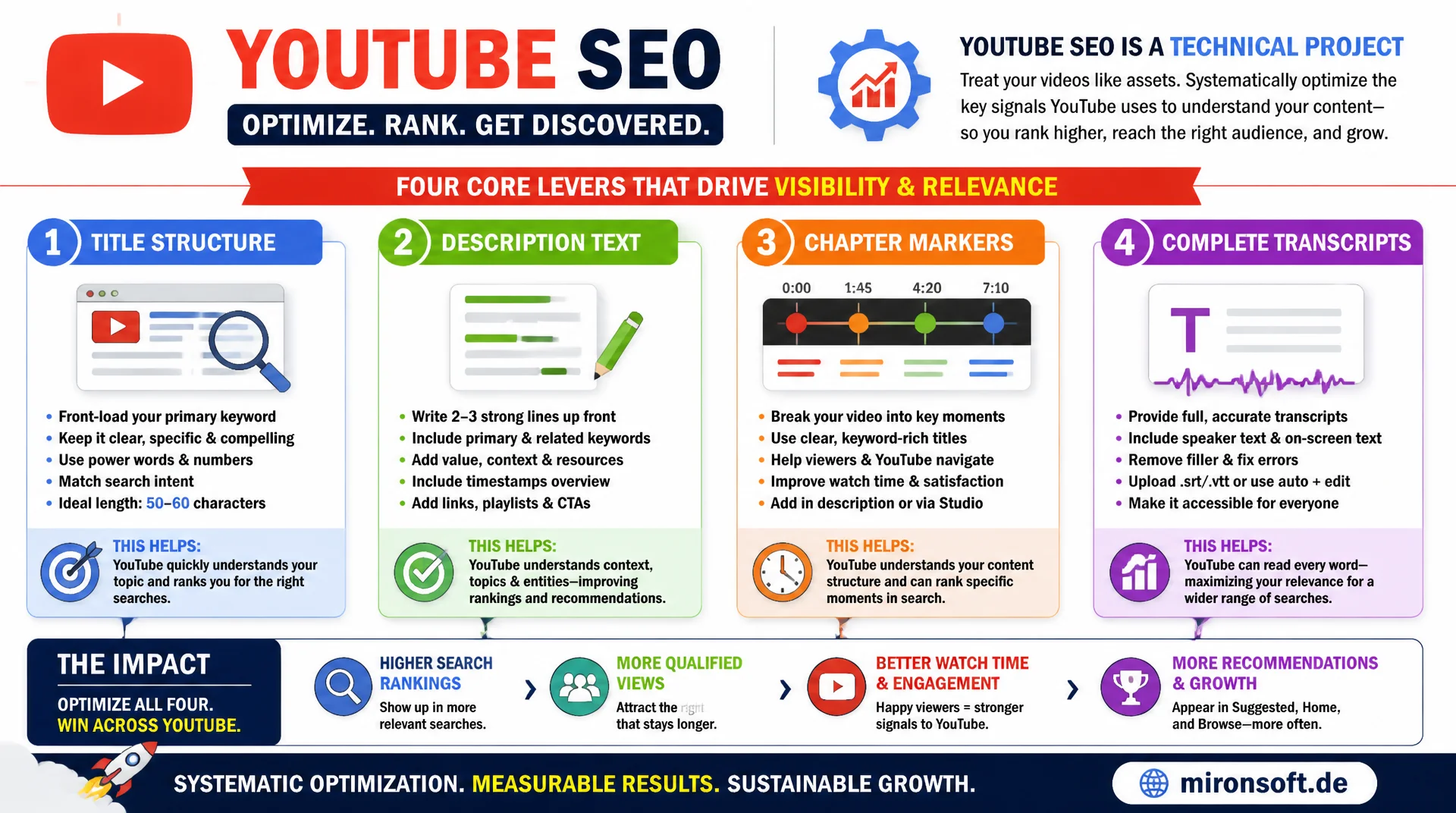
optimized systematically for the world's second largest search engine
YouTube processes billions of searches every day, and it works according to its own ranking rules, different from classic web search, but that can be optimized just as systematically. Title structure, description text, chapter markers, and complete transcripts are the four levers that YouTube actually uses to evaluate relevance. Treating YouTube SEO as a technical optimization project instead of pure content marketing earns plannable, lasting visibility.
Table of Contents
- 1. YouTube as the world's second largest search engine
- 2. How the YouTube algorithm evaluates relevance
- 3. Title structure: keyword placement without clickbait
- 4. Description text: the underrated text source
- 5. Chapter markers: structure for users and the algorithm
- 6. Transcripts: accessibility and a text base for search
- 7. VideoObject schema for website embedding
- 8. Hyvä/Magento integration of YouTube video content
- 9. Watch time, retention, and their impact on ranking
- 10. Summary
- 11. FAQ
1. YouTube as the world's second largest search engine
YouTube SEO is often underestimated, even though YouTube is the second largest search engine in the world by search volume, right behind Google itself and ahead of Bing or Yahoo. Users type targeted search queries into YouTube, with a clear intent to solve a problem, understand a product, or find a tutorial, much like a classic Google search. This search intent clearly distinguishes YouTube traffic from random scrolling in social feeds and makes YouTube SEO an independent optimization field with measurable, systematic levers.
The second reason YouTube SEO is strategically relevant: YouTube videos regularly rank in classic Google search too, often prominently in video carousels or as a featured snippet with timestamp jump links straight to a relevant video section. A well-optimized video thus reaches two search engines at once, YouTube itself and Google, which makes the effort of clean YouTube SEO especially worthwhile relative to the achievable reach, particularly for topics with a clear tutorial or explainer character.
2. How the YouTube algorithm evaluates relevance
The YouTube algorithm combines text signals with behavioral signals to evaluate relevance. On the text side, YouTube reads title, description, tags, chapter markers, and, if available, the full transcript text to understand what a video is about, much like Google analyzes a web page's text content. These text signals primarily determine which search terms a video is even eligible to be relevant for, before behavioral signals like click-through rate and watch duration decide the specific position within the results.
Behavioral signals such as click-through rate from search results, average watch duration, and audience retention throughout the video length weigh especially heavily in the YouTube algorithm, since they directly measure whether a video delivers on what the title and thumbnail promise. A video with a perfectly optimized title but weak audience retention quickly loses ranking ground again, because YouTube infers from drop-off behavior that the content does not sufficiently satisfy the search intent. Text optimization opens the door to visibility, content quality keeps it open.
3. Title structure: keyword placement without clickbait
The YouTube title is the single most important text field for YouTube SEO, with a character limit of 100 characters, of which often only the first 40 to 50 are visible in the mobile search results list. The main keyword should therefore sit as close to the front of the title as possible, without feeling unnatural or like keyword stuffing. A title like "Clear Magento 2 Cache: 5 Ways That Actually Work" places the core keyword first while remaining readable and concrete, unlike sensationalist phrasing with no content relevance, which may generate short-term clicks but damages audience retention and thus ranking over time.
One aspect missing from many guides: the title should match the actual search intent, which can be researched via Google's search suggestions and YouTube's own autocomplete feature. Typing the beginning of a topic into the YouTube search bar shows the actually popular search variants, often with surprising phrasing that differs from your own expectations. This research before writing the title is the most important, and most frequently skipped, step in practical YouTube SEO work.
<!-- YouTube title field reference (character budget) -->
Title (max 100 chars, first ~50 visible in mobile search):
"Clear Magento 2 Cache: 5 Ways That Actually Work"
 |------------------- 50 chars -------------------|
 keyword at position 0-13, benefit-driven suffix after colon
4. Description text: the underrated text source
The video description allows up to 5,000 characters and is the most text-rich source from which YouTube derives a video's thematic context, yet in practice it is often reduced to two sentences. The first 125 to 150 characters are especially important, since they are visible in the search results list before the "show more" click, similar to a meta description on Google. These first lines should naturally include the main keyword and summarize the video's concrete benefit, so users understand before clicking whether the video satisfies their search intent.
Below the visible first lines, it is worth writing an extensive, structured description with thematically related terms, timestamps for chapters, relevant links, and a short summary of the content in your own words, not just a repetition of the title. YouTube uses this full text to recognize related search terms and topic clusters, similar to how Google uses longer text content for semantic understanding. A description consisting only of hashtags and a promotional link gives the algorithm practically no usable information, wasting one of the strongest available YouTube SEO levers.
<!-- First 150 characters: visible before the "show more" click -->
Five reliable methods to fully and precisely clear the
Magento 2 cache, including CLI, Redis, and Varnish. With a
troubleshooting checklist for stuck caches in production.

<!-- Extended description below the fold -->
In this video we show step by step how to reliably clear the
Magento 2 cache when changes are not showing up. Topics
covered: bin/magento cache:flush, targeted flushing by tags,
Redis cache via redis-cli, Varnish invalidation, and
automated cache warming.
5. Chapter markers: structure for users and the algorithm
Chapter markers, technically simple timestamps in the format 00:00 Title within the description, serve a dual purpose: they make it easier for users to navigate within a longer video, and at the same time provide YouTube with an explicit, structured outline of the content, comparable to subheadings in a blog post. This structure allows YouTube to link directly to a relevant video section when a search query matches only a subtopic of the video, which noticeably increases the chance of ranking for additional, more specific search terms.
Implementation follows a fixed technical rule: the first chapter must start at 00:00, at least three chapters are required for automatic recognition by YouTube, and each chapter should be at least ten seconds long. Chapter titles should, similar to H2 headings in a blog post, be descriptive and keyword-oriented rather than vague terms like "Part 2" or "Continuing on," since these titles can appear directly in YouTube search as their own clickable jump links.
<!-- Chapter markers block, placed at the start of the description -->
00:00 Intro: Why the Magento cache is often cleared incorrectly
01:24 Method 1: bin/magento cache:flush via the CLI
03:10 Method 2: Clearing the cache by tag
05:45 Method 3: Clearing the Redis cache via redis-cli
08:02 Method 4: Invalidating the Varnish cache separately
10:15 Method 5: Automating cache warming after clearing
13:40 Summary and troubleshooting checklist
6. Transcripts: accessibility and a text base for search
YouTube automatically generates captions via speech recognition, but these automatic transcripts regularly contain errors, especially for technical terms, product names, or accents that speech recognition misinterprets. A manually uploaded or corrected transcript gives YouTube a noticeably more precise text basis for the video's content classification, while also improving accessibility for deaf and hard-of-hearing users and for anyone watching videos without sound in a loud environment, which accounts for a meaningful share of mobile playback.
Beyond pure error correction, a precise transcript offers a strategic advantage: since YouTube uses the transcript text similarly to the description for topical classification, correctly written technical terms and product names in the transcript act as additional keyword signals naturally embedded in context, without needing to artificially repeat these terms in the title or description. For heavily technical content, such as tutorials with many technical terms and command lines, manual transcript correction pays off disproportionately compared to general, colloquial content.
Mironsoft
Video SEO strategy and VideoObject integration for content and shops
Not yet using YouTube systematically as a search engine?
We develop a YouTube SEO strategy with keyword research, title and description optimization, chapter structure, and technical VideoObject integration on your website, so your videos rank on two search engines at once.
Video keyword research
Actual YouTube search queries instead of guesswork
Metadata optimization
Systematically build out title, description, chapters, and transcripts
VideoObject schema
Video rich results in Google search via structured data
7. VideoObject schema for website embedding
If a YouTube video is additionally embedded on your own website, for example in a blog post or on a product page, it is worth marking it up with VideoObject schema per Schema.org, so Google can display the video as an independent rich result with a preview image directly in classic search results. Required fields are name, description, thumbnailUrl, and uploadDate, supplemented by duration in ISO 8601 format and, if available, embedUrl for the embedded version as well as contentUrl for the direct video file.
Especially valuable for visibility are clip markers within the VideoObject schema, which mirror the same chapter structure as the YouTube description and allow Google to display timestamp jump links directly in the search result. This schema extension is essentially the technical translation of YouTube chapter markers for classic Google search, and ensures the same content structure is used equally on both search engines, instead of maintaining it only for YouTube itself.
{
  "@context": "https://schema.org",
  "@type": "VideoObject",
  "name": "Clear Magento 2 Cache: 5 Ways That Actually Work",
  "description": "Five reliable methods to fully and precisely clear the Magento 2 cache, including Redis and Varnish.",
  "thumbnailUrl": [
    "https://mironsoft.de/media/video/magento-cache-thumb-1280x720.jpg"
  ],
  "uploadDate": "2026-07-23T08:00:00+02:00",
  "duration": "PT14M52S",
  "embedUrl": "https://www.youtube.com/embed/dQw4w9WgXcQ",
  "contentUrl": "https://www.youtube.com/watch?v=dQw4w9WgXcQ",
  "publisher": {
    "@type": "Organization",
    "name": "Mironsoft",
    "logo": { "@type": "ImageObject", "url": "https://mironsoft.de/media/logo.png" }
  },
  "hasPart": [
    {
      "@type": "Clip",
      "name": "Method 1: bin/magento cache:flush via the CLI",
      "startOffset": 84,
      "endOffset": 190,
      "url": "https://www.youtube.com/watch?v=dQw4w9WgXcQ&t=84s"
    }
  ]
}
8. Hyvä/Magento integration of YouTube video content
In Hyvä themes, VideoObject schema is best modeled through a dedicated ViewModel that outputs the appropriate structured data for blog and CMS pages with embedded videos, analogous to the existing product schema for product pages. It is important to load the video only after user interaction or via lazy loading, since an embedded YouTube iframe without optimization has a significant impact on Core Web Vitals and load time, which in turn burdens the page's classic SEO performance, independent of the actual YouTube SEO optimization.
For product pages with tutorial or explainer videos, it is recommended to load the video thumbnail as a clickable preview image with a play button overlay and only load the actual iframe on click, a technique that both spares the page's load time and gives the VideoObject schema a performant, standalone preview image. Combined with a consistent chapter and transcript approach between YouTube and your own website, this creates a coherent video SEO system that works on both platforms at once, instead of investing effort on only one platform.
<!-- Lazy-loaded YouTube embed: thumbnail first, iframe only on click -->
<div class="video-embed" x-data="{ loaded: false }">
  <template x-if="!loaded">
    <button type="button" @click="loaded = true" aria-label="Play video">
      <img src="https://mironsoft.de/media/video/magento-cache-thumb-1280x720.jpg"
           alt="Clear Magento 2 Cache: 5 Ways That Actually Work"
           loading="lazy" width="1280" height="720">
    </button>
  </template>
  <template x-if="loaded">
    <iframe src="https://www.youtube.com/embed/dQw4w9WgXcQ?autoplay=1"
            width="1280" height="720" allow="autoplay; encrypted-media"
            allowfullscreen></iframe>
  </template>
</div>
9. Watch time, retention, and their impact on ranking
Watch time, the cumulative playback duration across all viewers of a video, is alongside the audience retention curve the most important behavioral signal in the YouTube algorithm, because it directly reflects how strongly a video holds viewer interest. A video that loses half its viewers within the first 30 seconds signals to the algorithm that the title and thumbnail make a promise the content does not immediately deliver on, regardless of how well the title and description are optimized textually.
In practice, this means: the first 15 to 30 seconds of a video should immediately address the topic promised in the title and give a clear reason to keep watching, rather than opening with a long channel intro or sponsor ad. YouTube Studio's Analytics section provides detailed per-video retention curves that show exactly at which point viewers drop off, a data-driven starting point for improving future videos specifically at the points where the largest historical drop-offs occur, instead of limiting optimization to text signals alone.
| Optimization lever | Signal type | Main effect | Practical tip |
|---|---|---|---|
| Title | Text | Determines which search terms a video is eligible for | Keyword within the first 50 characters |
| Description | Text | Provides context for related search terms | First 150 characters with keyword and benefit |
| Chapter markers | Text + structure | Ranking for subtopics, better navigation | At least 3 chapters, first at 00:00 |
| Watch time / retention | Behavior | Determines the specific ranking position | Deliver on the title's promise within the first 30s |
YouTube SEO: The Key Points at a Glance
YouTube as a search engine
Second largest search engine in the world, videos often also rank directly in Google search.
Text signals
Title, description, chapter markers, and transcript determine what a video ranks for at all.
Behavioral signals
Watch time and retention determine the specific position, not just text optimization.
VideoObject schema
For videos embedded on your own website, including clip markers for jump links.
10. Summary
YouTube SEO follows a clear, two-part logic: text signals such as title, description, chapter markers, and transcript determine which search terms a video is eligible for at all, while behavioral signals such as watch time and audience retention determine the actual ranking position. Both layers have to work together, a perfectly optimized title without compelling content loses ranking just as quickly as a great video with neglected metadata stays invisible in search.
For businesses with their own website, it is also worth building the technical bridge via VideoObject schema, which makes the same chapter structure maintained for YouTube usable for rich results in classic Google search as well. Treating title research, description text, chapter structure, and transcript maintenance as a systematic process rather than an afterthought unlocks, with YouTube SEO, one of the most plannable and long-lasting visibility channels in all of content marketing.