Improving LCP, INP, and CLS in practice
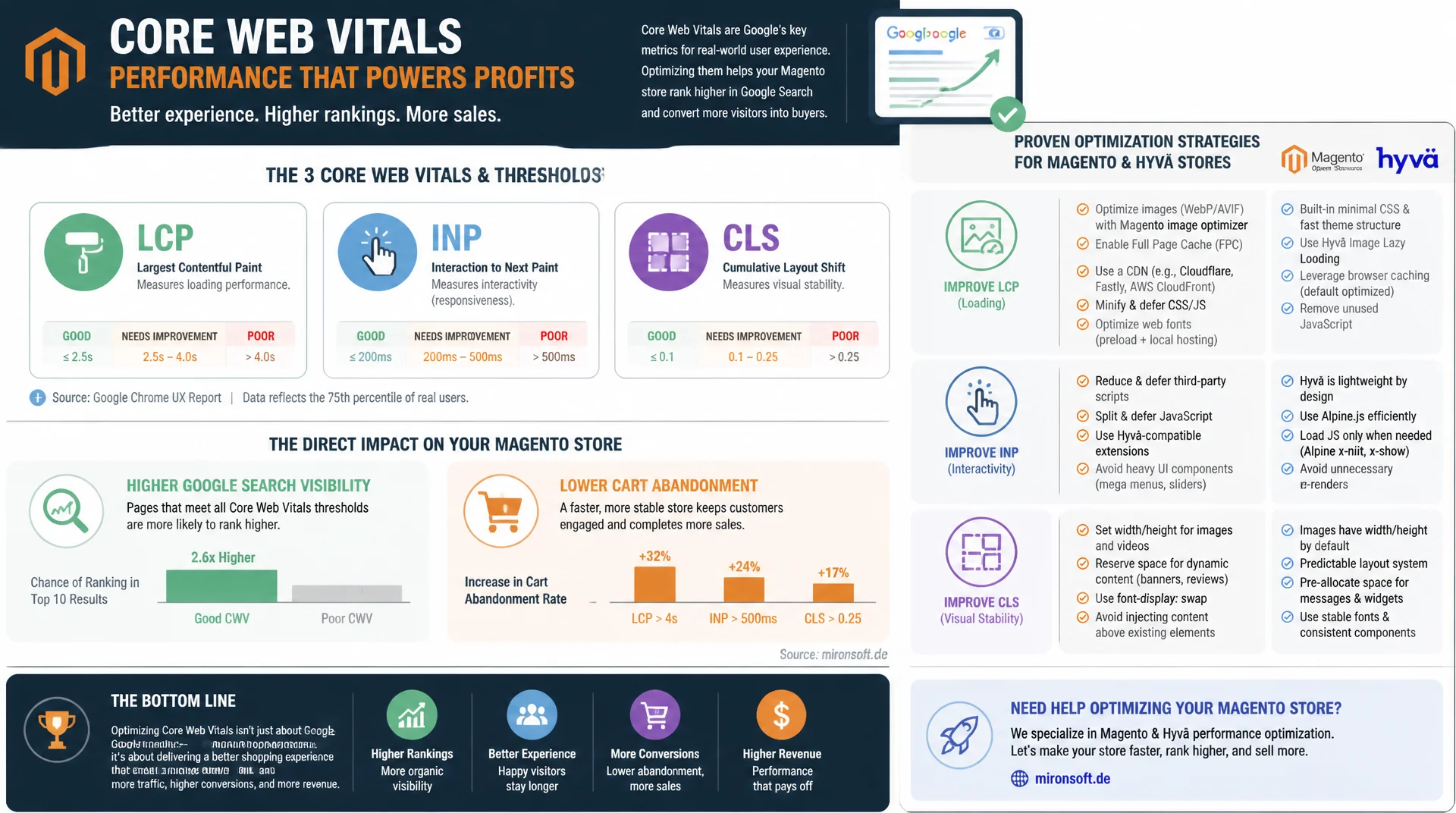
Running a Magento store without focusing on Core Web Vitals costs you visibility in Google Search and revenue through cart abandonment. LCP, INP, and CLS have been direct ranking factors since the Page Experience update - with clear thresholds, measurable causes, and concrete optimizations for Magento and Hyvä stores that stay stable under load.
Table of Contents
- 1. Why Core Web Vitals determine visibility and revenue
- 2. The three Core Web Vitals in detail: LCP, INP, CLS
- 3. Optimizing LCP: hero images, fonts, and server response time
- 4. Optimizing INP: avoiding JavaScript blocking
- 5. Optimizing CLS: preventing layout shifts
- 6. Measure, don't guess: Lighthouse, PageSpeed Insights, CrUX
- 7. Magento- and Hyvä-specific optimizations
- 8. Structured data as an SEO amplifier for rich snippets
- 9. Core Web Vitals compared side by side
- 10. Summary
- 11. FAQ
1. Why Core Web Vitals determine visibility and revenue
The Core Web Vitals have been an official Google ranking factor since the Page Experience update - on top of their direct effect on conversion rate and cart abandonment. For Magento stores with thousands of product pages, every millisecond of load time adds up: Google research shows that bounce probability rises sharply once load time crosses two seconds. Ignoring Core Web Vitals means losing not just ranking positions, but real revenue from impatient users.
The crucial difference from classic performance metrics like raw load time: Core Web Vitals measure the actually perceived user experience - how fast the most important content becomes visible, how quickly the page responds to interactions, and whether elements unexpectedly shift during loading. These three dimensions cover the most common sources of frustration in Magento stores: heavy hero images, blocking JavaScript, and late-loading ad banners or cookie notices that shift the buy button.
2. The three Core Web Vitals in detail: LCP, INP, CLS
Largest Contentful Paint (LCP) measures how long it takes for the largest visible element in the viewport to render - usually a hero image or product photo. A good value is under 2.5 seconds. Interaction to Next Paint (INP) measures the page's response time to user interactions such as clicks, taps, or keyboard input across the entire session, and officially replaced the old First Input Delay (FID) in March 2024. A good INP value is under 200 milliseconds.
Cumulative Layout Shift (CLS) quantifies unexpected layout shifts across the entire page lifecycle, not just during initial load. A value under 0.1 is considered good. Google evaluates all three Core Web Vitals using real user data from the Chrome User Experience Report (CrUX) - lab data from Lighthouse is an approximation, but not identical to the values that actually feed into ranking.
3. Optimizing LCP: hero images, fonts, and server response time
The most common LCP mistake in Magento stores: the largest element in the viewport - usually the hero banner or first product image - gets lazy-loaded even though it's visible immediately. Lazy loading only makes sense for below-the-fold content; for the LCP element the opposite applies: fetchpriority="high" and a <link rel="preload"> in the head specifically accelerate exactly that one image. The image should also use a modern format like WebP or AVIF and be delivered at the right resolution via srcset, instead of downscaling an oversized original.
Beyond the image itself, server response time (TTFB) directly affects LCP, since the clock only starts after the first byte arrives. Magento's Full Page Cache reduces TTFB to a few milliseconds for cached pages - provided Varnish or the built-in cache is configured correctly and isn't unnecessarily invalidated by dynamic blocks like the cart counter. Web fonts are another LCP bottleneck: font-display: swap and preloading critical font files prevent text from staying invisible until the font has loaded.
<!-- Hyvä phtml: prioritize the LCP image instead of lazy-loading it -->
<link rel="preload" as="image" href="{{$block->getHeroImageUrl()}}" fetchpriority="high">

<img
    src="{{$block->getHeroImageUrl()}}"
    srcset="{{$block->getHeroImageUrl()}} 1x, {{$block->getHeroImageUrl('2x')}} 2x"
    width="1200"
    height="600"
    fetchpriority="high"
    loading="eager"
    alt="{{$block->escapeHtmlAttr($block->getHeroImageAlt())}}"
    class="w-full h-auto object-cover"
>

<!-- Preload the critical font, no FOIT -->
<link rel="preload" as="font" type="font/woff2"
      href="{{$block->getViewFileUrl('fonts/inter-var.woff2')}}" crossorigin>
4. Optimizing INP: avoiding JavaScript blocking
INP suffers mainly from long JavaScript tasks that block the main thread and delay processing of user input. In classic Magento themes with jQuery and Knockout.js, many small event handlers add up to noticeable delays. Hyvä stores with Alpine.js have a structural advantage here, since Alpine skips virtual-DOM diffing and ships significantly smaller JavaScript bundles - but even there, expensive computations inside x-on handlers can still block the main thread.
The key pattern for improving INP: split long tasks into smaller chunks and move non-critical work out of the critical interaction path via requestIdleCallback or setTimeout(fn, 0). Analytics scripts, chat widgets, and tracking pixels should always be loaded with defer or async, never synchronously in the head. The Chrome DevTools Performance panel's INP overlay shows exactly which interaction takes how long and which task type - input delay, processing time, or presentation delay - dominates.
// Split a long task into smaller chunks to improve INP
function processLargeProductList(items) {
  const chunkSize = 50;
  let index = 0;

  function processChunk() {
    const end = Math.min(index + chunkSize, items.length);
    for (; index < end; index++) {
      renderProductCard(items[index]);
    }
    if (index < items.length) {
      // Yield the main thread between chunks instead of blocking it
      requestIdleCallback(processChunk, { timeout: 100 });
    }
  }

  processChunk();
}

// Never load non-critical scripts synchronously
document.addEventListener('DOMContentLoaded', () => {
  const script = document.createElement('script');
  script.src = '/js/chat-widget.js';
  script.defer = true;
  document.body.appendChild(script);
});
5. Optimizing CLS: preventing layout shifts
Layout shifts almost always come from the same root cause: an element loads without reserved space and pushes already-visible content around. Classic culprits in Magento stores are images without width/height attributes, cookie banners that appear after load, dynamically injected ad slots, and web fonts with a different character width than the fallback font. Each of these has the same fix: reserve the space before the content loads.
CSS aspect-ratio reserves the correct space for images and videos before the file has even started downloading - even without known pixel dimensions. For cookie banners and sticky elements, a container with a fixed minimum height helps, rather than inserting the element into the DOM via JavaScript after the fact. For web fonts, size-adjust in an @font-face declaration noticeably reduces the jump between fallback and target font, since both fonts then have a similar advance width.
/* Reserve space for product images before they load */
.product-image-container {
  aspect-ratio: 4 / 3;
  width: 100%;
  overflow: hidden;
}

.product-image-container img {
  width: 100%;
  height: 100%;
  object-fit: cover;
}

/* Match fallback font metrics to the target font to reduce CLS */
@font-face {
  font-family: "Inter";
  src: url("/fonts/inter-var.woff2") format("woff2");
  font-display: swap;
  size-adjust: 107%;
  ascent-override: 90%;
}

/* Reserved space for late-loading elements like a cookie banner */
.cookie-banner-slot {
  min-height: 64px;
  contain: layout;
}
6. Measure, don't guess: Lighthouse, PageSpeed Insights, CrUX
Lighthouse and PageSpeed Insights provide lab data from a single simulated measurement under controlled network conditions - ideal for debugging individual pages, but not identical to the values Google actually uses for ranking. Those come from the Chrome User Experience Report (CrUX), an aggregated dataset of real Chrome users over 28 days, accessible via Google Search Console under "Core Web Vitals" or directly through the CrUX API. A store can score excellently in Lighthouse and still rate poorly in CrUX if real users access it on slower devices or networks.
For continuous monitoring, Real User Monitoring (RUM) via Google's web-vitals JavaScript library is recommended, capturing measurements directly from real visitors and sending them to an analytics backend. This surfaces regressions before they become visible in the monthly CrUX update - a decisive time advantage, especially right after deployments or theme changes.
7. Magento- and Hyvä-specific optimizations
Classic Magento themes with Luma, jQuery, Knockout.js, and UI Components carry substantial baseline JavaScript weight that systematically hurts INP and LCP - often several hundred kilobytes before any custom code even runs. Hyvä Theme replaces this stack with Tailwind CSS and Alpine.js and typically cuts JavaScript bundle size by 80-90%, which translates directly into better INP and LCP scores. That said, it's not automatic: even a Hyvä store can produce poor Core Web Vitals through too many third-party scripts, unoptimized images, or a poorly configured Full Page Cache.
Magento's Varnish Full Page Cache is the most effective lever for the TTFB share of LCP - a correctly configured cache serves HTML in under 50 milliseconds. It's important to consistently offload dynamic blocks like the mini cart or login status via AJAX or ESI (Edge Side Includes) from the cached HTML, rather than disabling the entire page cache for personalized content. bin/magento setup:static-content:deploy with a properly configured CDN and long cache headers for static assets additionally reduces repeat load times for returning visitors.
<!-- Layout XML: increase the cache TTL for a specific page -->
<page xmlns:xsi="http://www.w3.org/2001/XMLSchema-instance"
      xsi:noNamespaceSchemaLocation="urn:magento:framework:View/Layout/etc/page_configuration.xsd">
    <body>
        <referenceBlock name="product.info.main">
            <arguments>
                <!-- Mark the block as cacheable, control TTL via Varnish VCL -->
                <argument name="cache_lifetime" xsi:type="number">86400</argument>
            </arguments>
        </referenceBlock>

        <!-- Remove a render-blocking third-party script from the head -->
        <remove src="ThirdParty_Module::js/heavy-tracking.js"/>
    </body>
</page>
8. Structured data as an SEO amplifier for rich snippets
Core Web Vitals decide ranking and user experience, but structured data decides how a result looks in search. Product schema with price, availability, and review stars noticeably increases click-through rate, because the search result gets more visual space and more trust signals than a plain text snippet. For Magento stores, Product, BreadcrumbList, and FAQPage are the schema types with the biggest SEO leverage.
It's essential that structured data actually reflects the page's visible content - Google consistently revokes rich-snippet eligibility when schema and visible content diverge. The Google Rich Results Test and the "Enhancements" section in Google Search Console reliably show whether structured data parses correctly and which rich-snippet types are active for a page.
{
  "@context": "https://schema.org",
  "@type": "Product",
  "name": "Sample Product",
  "image": "https://mironsoft.de/media/catalog/product/sample.jpg",
  "description": "Short, user-visible product description.",
  "sku": "MS-1234",
  "brand": { "@type": "Brand", "name": "Mironsoft" },
  "aggregateRating": {
    "@type": "AggregateRating",
    "ratingValue": "4.7",
    "reviewCount": "128"
  },
  "offers": {
    "@type": "Offer",
    "url": "https://mironsoft.de/sample-product",
    "priceCurrency": "USD",
    "price": "49.90",
    "availability": "https://schema.org/InStock"
  }
}
9. Core Web Vitals compared side by side
Each of the three Core Web Vitals metrics has its own thresholds, typical root causes, and a clear optimization lever. The table below summarizes exactly what matters for each metric.
| Metric | Good threshold | Typical mistake | Recommended optimization |
|---|---|---|---|
| LCP | < 2.5 s | Hero image is lazy-loaded | fetchpriority="high" + preload |
| INP | < 200 ms | Long, blocking JS tasks | Split tasks, requestIdleCallback |
| CLS | < 0.1 | Images without width/height | aspect-ratio, reserved space |
| TTFB | < 0.8 s | No or invalidated FPC | Configure Varnish/FPC correctly |
| Web fonts | Avoid FOIT | Font blocks text rendering | font-display: swap + preload |
In practice, the three Core Web Vitals are often interconnected: an oversized hero image not only worsens LCP, but its late loading frequently delays layout too, hurting CLS as well. Applying the optimizations from the table consistently and continuously monitoring via Search Console and RUM improves all three metrics together instead of in isolation.
Mironsoft
SEO performance, Core Web Vitals, and Hyvä optimization for Magento stores
Ready to improve your Core Web Vitals?
We analyze your Magento store's LCP, INP, and CLS, identify the concrete root causes, and implement targeted optimizations - from Hyvä theme adjustments to Full Page Cache configuration.
Core Web Vitals audit
CrUX and RUM analysis, prioritized by business impact
Hyvä optimization
Streamlining image loading, JS bundles, and Alpine.js interactions
Monitoring setup
web-vitals tracking and regression alerts in the CI/CD pipeline
10. Summary
Core Web Vitals for Magento stores address one core problem: visibility and revenue depend directly on perceived loading speed. LCP under 2.5 seconds is achieved through prioritized hero images, modern image formats, and a working Full Page Cache. INP under 200 milliseconds requires smaller JavaScript tasks and avoiding synchronously loaded third-party scripts - an area where Hyvä stores with Alpine.js have a structural advantage over classic jQuery themes. CLS under 0.1 is prevented by reserving space for images, cookie banners, and web fonts before they load at all.
The decisive difference between good and bad scores rarely comes from a single big change, but from consistently applying many small optimizations across every page type. Continuous monitoring via Search Console and Real User Monitoring ensures that new features or deployments don't quietly introduce regressions that only become visible weeks later in the CrUX data.
Core Web Vitals for Magento Stores - The Essentials at a Glance
LCP under 2.5 s
Speed up the hero image with fetchpriority="high" and preload instead of lazy-loading it. Full Page Cache for fast TTFB.
INP under 200 ms
Split long JavaScript tasks, load third-party scripts with defer/async. Hyvä/Alpine.js has the advantage.
CLS under 0.1
aspect-ratio for images, reserved space for cookie banners, size-adjust for web fonts.
Measurement & monitoring
CrUX/Search Console for ranking-relevant values, RUM with web-vitals for continuous tracking.