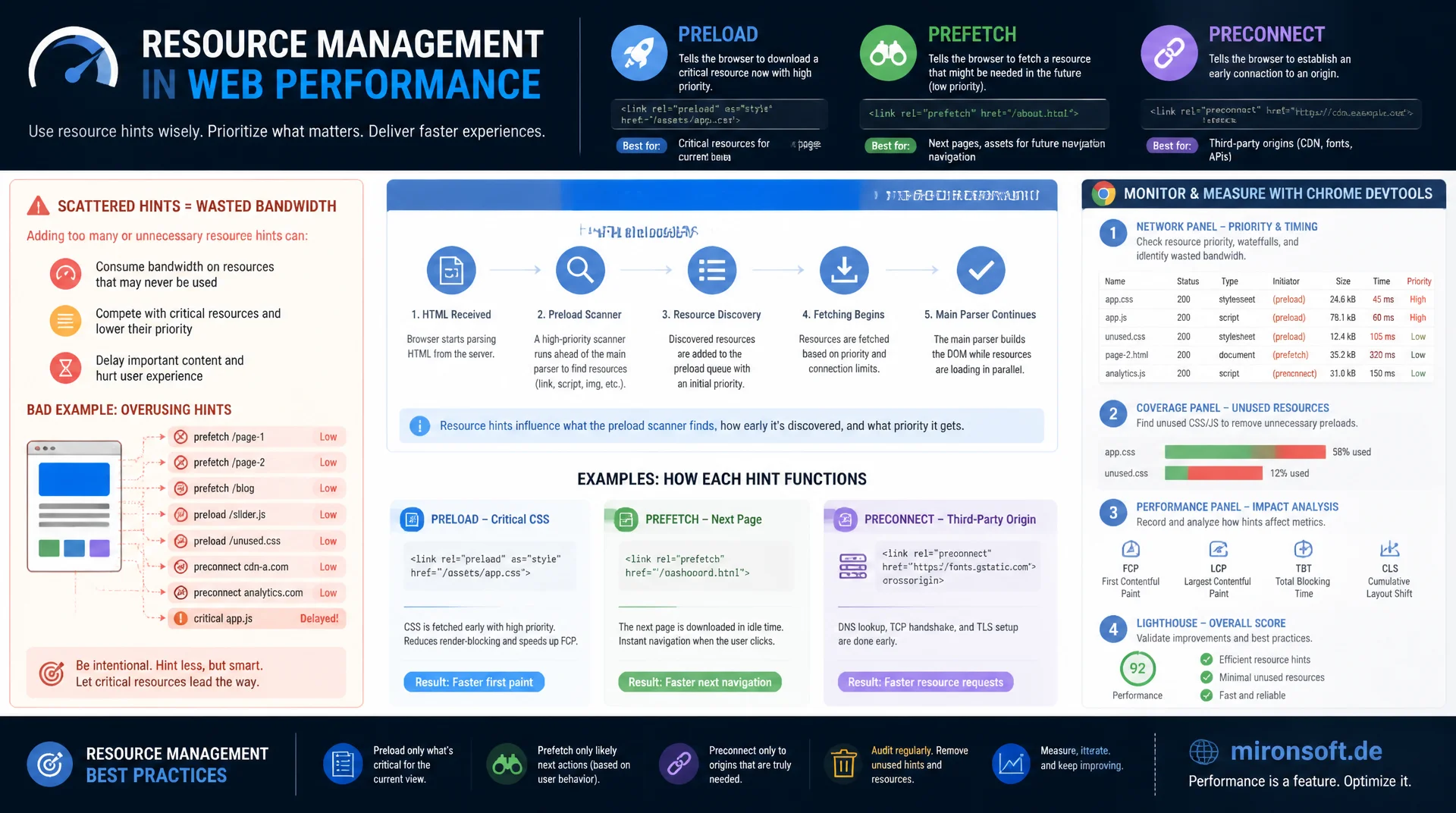
preload, prefetch, and preconnect without bandwidth competition
Scattering preload, prefetch, and preconnect across the head without a plan wastes exactly the bandwidth and priority class the truly critical resource needs. This article explains how the browser's preload scanner works, when each resource hint actually helps, and how to reliably detect, measure, and avoid overuse with Chrome DevTools.
Table of Contents
- 1. What resource hints are and how the preload scanner works
- 2. link rel="preload" for critical resources on the current page
- 3. link rel="prefetch" for the next navigation
- 4. link rel="preconnect" and dns-prefetch for third-party origins
- 5. The overuse trap: too many hints competing for bandwidth
- 6. fetchpriority as a complement to resource hints
- 7. Practical example: preloading the hero image and font in Hyvä
- 8. Preconnect on checkout and hover-triggered prefetch on category pages
- 9. Validating resource hints: DevTools, priority column, warnings
- 10. Summary
- 11. FAQ
1. What resource hints are and how the preload scanner works
Resource hints are declarative <link rel="..."> instructions in the <head> that tell the browser which resources will be needed soon, before the normal rendering path would even discover them. Unlike a regular <script> or <img> tag, they don't trigger processing themselves, they only reserve network priority and connection capacity ahead of time. Four hint types cover practical use: preload for the current page, prefetch for the likely next navigation, preconnect for early connection setup, and dns-prefetch as a minimal, cheaper precursor to it.
Chrome, Firefox, and Safari all use what's called a preload scanner, which runs in parallel with the main HTML parser and scans the raw markup response for referenced resources before CSS is evaluated or JavaScript is executed. It picks up src, srcset, and href attributes and starts downloads speculatively while the main parser is still busy building the Document Object Model. Resource hints therefore only work reliably when they appear in the initial HTML document. Hints inserted via JavaScript after the first render are no longer caught by the scanner and effectively arrive too late to speed up the critical loading phase.
2. link rel="preload" for critical resources on the current page
<link rel="preload"> is meant for resources the browser would load on this page anyway, but discovers late because they're referenced inside CSS, JavaScript, or far down in the DOM. Typical candidates are the critical web font, the LCP hero image, and a render-blocking CSS or JS chunk. The as attribute is mandatory, not optional: the browser uses it to set the correct priority class, check the matching Content-Security-Policy directive, and determine the resource's cache key. If as is missing or doesn't match the actual consumption, the browser frequently downloads the file a second time because it can't reuse the cache entry.
A particularly common pitfall involves fonts: preloading web fonts always requires the crossorigin attribute, even for same-origin resources, because the font-loading specification fetches font files via an anonymous CORS request by design. Without crossorigin, the preloaded file ends up in a different cache entry than the fetch later triggered by CSS, and the font effectively gets downloaded twice, with no error message pointing to the cause. Adding a type attribute like font/woff2 lets the browser check the format without a network round trip and skip the request entirely if it isn't supported.
<!-- Critical font: preload with correct "as", "type" and "crossorigin" -->
<link rel="preload" as="font" type="font/woff2"
      href="/static/frontend/Mironsoft/default/de_DE/fonts/inter-var.woff2"
      crossorigin>

<!-- LCP hero image: preload matches the actual <img> src/srcset exactly -->
<link rel="preload" as="image"
      href="/media/wysiwyg/hero/summer-sale.webp"
      imagesrcset="/media/wysiwyg/hero/summer-sale-480.webp 480w,
                   /media/wysiwyg/hero/summer-sale-1200.webp 1200w"
      imagesizes="100vw"
      fetchpriority="high">

<!-- Critical inline CSS chunk extracted for above-the-fold rendering -->
<link rel="preload" as="style" href="/static/frontend/Mironsoft/default/css/critical.css">
<link rel="stylesheet" href="/static/frontend/Mironsoft/default/css/critical.css">

<!-- WRONG: missing "as" forces a guess and often triggers a duplicate download -->
<!-- <link rel="preload" href="/fonts/inter-var.woff2"> -->
3. link rel="prefetch" for the next navigation
<link rel="prefetch"> differs from preload in one decisive way: it doesn't load for the current page, it speculatively loads for a likely future navigation, at the lowest available network priority. The browser only fetches the resource once the current page's genuinely critical resources are already served, then stores it in the HTTP cache. Typical use cases in a Magento store: prefetching the product detail page (PDP) from a category page, since clicking on a product is the most obvious next action, or prefetching the checkout page from the cart once at least one item is in it.
The effect is noticeable because the actual page transition needs no fresh DNS lookup, no TCP handshake, and ideally no fresh download at all. The user experiences a navigation that feels effectively instant. It's important to only use prefetch for targets with a genuinely high probability of being visited. Prefetching every single product on a category page with fifty items wastes bandwidth and server capacity on forty-nine pages the user never visits.
<!-- Category page: prefetch the likely next PDP document during idle time -->
<link rel="prefetch" href="/catalog/product/view/id/1234" as="document">

<!-- Cart page: prefetch checkout shell so the next navigation is warm -->
<link rel="prefetch" href="/checkout" as="document">

<!-- Prefetch a script bundle that checkout will need, low priority -->
<link rel="prefetch" href="/static/frontend/Mironsoft/default/js/checkout-bundle.js" as="script">
4. link rel="preconnect" and dns-prefetch for third-party origins
<link rel="preconnect"> performs DNS resolution, the TCP handshake, and, for HTTPS, the TLS handshake ahead of time, so the actual request later starts without that delay. This only pays off for origins outside your own domain that are highly likely to actually be used: the CDN serving product images and static assets, the payment provider's domain on the checkout page, an external font host, or the analytics endpoint. For your own origin, preconnect does nothing useful, since that connection gets established immediately anyway.
dns-prefetch is the stripped-down variant: it only resolves the DNS name, without a TCP or TLS handshake, which costs fewer resources and suits origins that are probably, but not certainly, going to be used. Both hints share a hard limit: the browser keeps an open, unused connection alive for only a few seconds, usually around ten, before closing it again. A preconnect set too early, whose resource isn't needed until minutes later, fizzles out without any effect. As a rule of thumb, limit yourself to four to six genuinely critical third-party origins per page.
<!-- CDN serving product images and static assets -->
<link rel="preconnect" href="https://cdn.mironsoft.de" crossorigin>

<!-- Payment gateway iframe/API host, only present on checkout pages -->
<link rel="preconnect" href="https://secure.payment-provider.com" crossorigin>

<!-- Web font origin, cheap dns-prefetch as a fallback for older browsers -->
<link rel="preconnect" href="https://fonts.example.com" crossorigin>
<link rel="dns-prefetch" href="https://fonts.example.com">

<!-- Analytics endpoint: dns-prefetch only, connection is not certain to be needed -->
<link rel="dns-prefetch" href="https://analytics.mironsoft.de">
5. The overuse trap: too many hints competing for bandwidth
Resource hints aren't a free bonus, they consume real resources: bandwidth, open socket connections, and CPU time for DNS and TLS handshakes. Every additional preload competes with the other requests for the TCP connection's limited congestion window, especially during the already-slow slow-start phase right after the connection opens. Preloading ten resources spreads the available bandwidth across ten requests of equally high priority, instead of concentrating it on the one resource that's genuinely critical. The result is paradoxical: more preloads frequently slow down exactly the resource that's needed most urgently.
Chrome DevTools surfaces this through a console warning: "The resource ... was preloaded using link preload but not used within a few seconds". It appears when a preloaded resource isn't actually used for rendering within a short window, usually because of a wrong as value, a missing crossorigin, or simply because the resource isn't needed on every page. The workable rule: limit preload to one or two genuinely LCP-relevant resources per page, limit preconnect to four to six origins, and validate every hint against real DevTools measurements regularly instead of setting it once and forgetting about it.
6. fetchpriority as a complement to resource hints
The fetchpriority attribute, with the values high, low, and auto, complements resource hints without replacing them. It lets you correct the browser's internal priority heuristic directly, without needing an additional preload instruction. An <img fetchpriority="high"> on the LCP image is often enough on its own to load it ahead of other images appearing later in the DOM, because browsers by default treat images as lower priority than render-blocking CSS. Conversely, fetchpriority="low" can deliberately deprioritize a below-the-fold image carousel so it doesn't compete with the hero image for bandwidth.
The practical difference from preload: fetchpriority only reorders resources the browser has already discovered, it doesn't discover new ones. An image that only appears in the DOM after a JavaScript render doesn't benefit from fetchpriority, because the preload scanner can't see it at that point at all. The fetch() API has also recently gained a priority option that behaves analogously and suits dynamically loaded data, such as live product-search suggestions.
7. Practical example: preloading the hero image and font in Hyvä
In a Hyvä theme, resource hints can't be hardcoded into a base default_head_blocks.xml, because the hero image and critical font differ by page type. The clean approach is a dedicated block, referenced through layout XML only where it's actually needed, for example on the CMS homepage or on category pages with a hero banner. The block reads the actual image URL and resolution from the current content, instead of hardcoding a fixed URL, so the preload hint always matches exactly the <img> tag rendered later.
Order in the head matters: resource hints belong as high up as possible, ideally before Google Tag Manager or other third-party snippets, so the preload scanner catches them on its first pass through the raw HTML. In Hyvä, the head.additional block is a good fit, since it deliberately renders early in the document and can be scoped precisely per layout handle, so the checkout page gets different hints than the category page.
<?xml version="1.0"?>
<page xmlns:xsi="http://www.w3.org/2001/XMLSchema-instance"
      xsi:noNamespaceSchemaLocation="urn:magento:framework:View/Layout/etc/page_configuration.xsd">
    <body>
        <referenceBlock name="head.additional">
            <!-- Renders <link rel="preload"> for the hero image and critical font -->
            <block class="Mironsoft\Performance\Block\ResourceHints"
                   name="performance.resource.hints"
                   template="Mironsoft_Performance::head/resource-hints.phtml"/>
        </referenceBlock>
    </body>
</page>
8. Preconnect on checkout and hover-triggered prefetch on category pages
A preconnect to the payment provider's domain belongs exclusively on the checkout page, scoped via the checkout_index_index layout handle, never globally in a base layout. On every other page it would be a wasted, unused connection, since the browser closes it again after a few seconds anyway. On category pages, a hover- or focus-triggered prefetch pays off instead: as soon as a user hovers a product card with the mouse or focuses it via keyboard, the probability of a click is noticeably higher than average, and a dynamically injected <link rel="prefetch"> for exactly that PDP is worth it.
The injection should run through requestIdleCallback so it never competes with the user's actual interaction, and it should fire only once per link to avoid duplicate hints. In Hyvä themes this is cleanly implemented as a small Alpine.js component bound to each product card, setting the hint on the first mouseenter or focus event, without needing extra libraries or synchronous JavaScript on the critical path.
// Hyvä Alpine.js component: prefetch PDP resources on hover/focus, not on every render
function categoryProductLink() {
  return {
    prefetched: false,
    schedulePrefetch(url) {
      if (this.prefetched) return;
      this.prefetched = true;

      // Idle-time injection so it never competes with the current page's critical path
      const inject = () => {
        const link = document.createElement('link');
        link.rel = 'prefetch';
        link.as = 'document';
        link.href = url;
        document.head.appendChild(link);
      };

      if ('requestIdleCallback' in window) {
        requestIdleCallback(inject, { timeout: 2000 });
      } else {
        setTimeout(inject, 200);
      }
    }
  };
}

// Register the component with Alpine, bound via x-data on each product card
document.addEventListener('alpine:init', () => {
  Alpine.data('categoryProductLink', categoryProductLink);
});
9. Validating resource hints: DevTools, priority column, warnings
The most reliable way to verify resource hints runs through the Network tab in Chrome DevTools. The Priority column shows the actually assigned network priority for each request, from Highest to Lowest. An image preloaded via preload should show High or Highest there, while a document loaded via prefetch should appear as Lowest. If the displayed priority diverges from expectations, that usually points to a wrong or missing as attribute. The Initiator column also shows whether a resource was actually requested by the preload scanner or only later by the renderer.
The console adds runtime warnings on top of that: unused preloads get flagged explicitly, as do font preloads missing crossorigin. The Lighthouse audit "Preload key requests" lists resources discovered late that would benefit from a hint, while "Avoid chaining critical requests" shows where a chain of dependent requests unnecessarily extends the time to first meaningful paint. Both reports belong in every performance review before new resource hints ship to production, and should be rechecked after every major theme or layout update.
The table below summarizes when each resource hint type makes sense and what overuse risk it carries.
| Hint type | When to use | Priority impact | Browser support | Overuse risk |
|---|---|---|---|---|
| preload | Critical resource on the current page (font, hero image, CSS) | High, immediate | All modern browsers | High with wrong "as" or too many hints |
| prefetch | Likely next navigation (PDP, checkout) | Lowest, during idle time | All modern browsers | Medium with poor prediction |
| preconnect | Third-party origin certain to be used (CDN, payment) | Connection setup only, no data | All modern browsers | High with more than 6 origins |
| dns-prefetch | Likely, but uncertain, third-party origin | DNS only, minimal cost | Even older browsers | Low, cheap fallback |
| fetchpriority | Fine-tuning priority of already-known resources | Direct, without a new request | Current Chromium/Firefox versions | Low, no extra download |
In practice, the five mechanisms complement each other: preload and fetchpriority speed up what's already going to load, prefetch and preconnect prepare what's likely needed next. Applying all five indiscriminately on every page, instead of targeting them per page type, produces exactly the bandwidth competition resource hints are supposed to prevent.
Mironsoft
Network performance, resource hints, and Hyvä optimization for Magento stores
Ready to use resource hints with intent instead of guesswork?
We analyze which resources on your Magento pages are genuinely critical, set preload, prefetch, and preconnect precisely per page type, and validate every hint against real DevTools measurements instead of gut feeling.
Resource hints audit
DevTools analysis of every preload, prefetch, and preconnect tag per page type
Hyvä implementation
Layout XML blocks for hero image, font, and checkout-specific preconnect
Monitoring setup
Integrating Lighthouse audits and priority-column checks into the CI/CD pipeline
10. Summary
Resource hints solve a very specific problem: the browser sometimes discovers critical resources late in the rendering process because they're hidden inside CSS, JavaScript, or deep in the DOM. preload fetches exactly that one LCP-relevant resource earlier, with the correct as attribute and, for fonts, the mandatory crossorigin attribute. prefetch prepares the likely next navigation during idle time, without slowing down the current page. preconnect and dns-prefetch front-load the connection cost to third-party origins, but only for targets that are genuinely going to be used. fetchpriority adjusts the order of resources the browser already knows about, without creating an extra request.
The critical mistake in thinking about resource hints is assuming more is automatically better. Every hint costs bandwidth, connection slots, or CPU time, and those costs compete directly with the one resource that genuinely needs to finish first. Limiting preload to one or two LCP-critical resources and preconnect to four to six origins, regularly checking the priority column in Chrome DevTools, and taking unused-preload warnings seriously turns resource hints into a measurable advantage instead of an unchecked default habit.
Resource Hints: preload, prefetch, preconnect - The Essentials at a Glance
Preload scanner
Only catches hints in the initial HTML. preload tags inserted via JavaScript arrive too late for the critical loading phase.
preload vs. prefetch
preload for the current page at high priority, prefetch for the next navigation at lowest priority during idle time.
Overuse limit
One or two preload resources per page, four to six preconnect origins. More competes for bandwidth.
Validation
Check the Priority column in Chrome DevTools and the "preloaded but not used" console warning after every deployment.