deferring iframes, components, and routes the right way
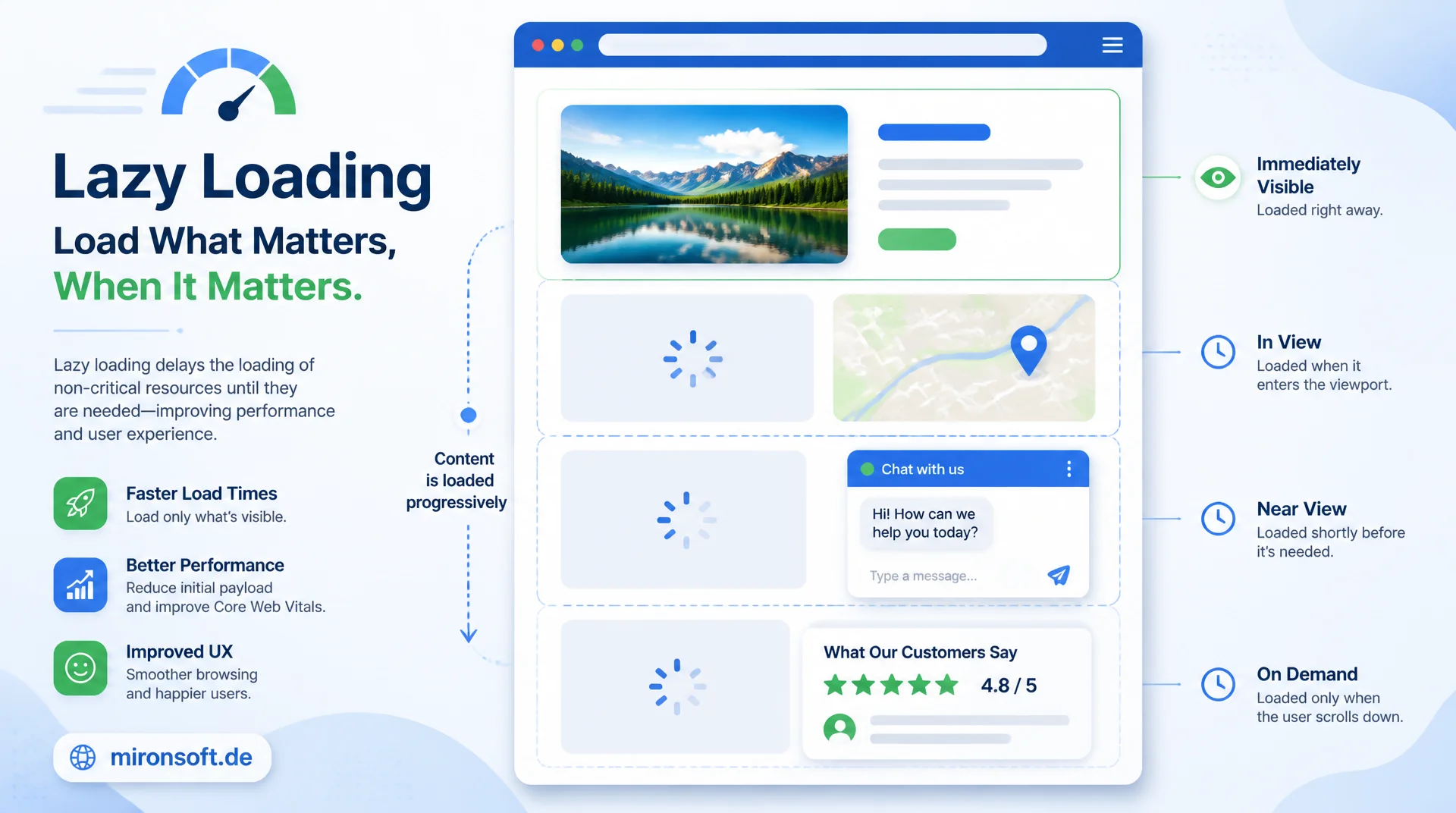
Lazy loading does not stop at images. Maps, chat widgets, review sections, and entire application routes can be deferred deliberately to relieve load time and main thread pressure, without introducing new layout shifts or wasted network requests. This article covers loading lazy for iframes, IntersectionObserver patterns, and route splitting with concrete code.
Table of Contents
- 1. Why lazy loading is more than images
- 2. loading=lazy for iframes: support and fallback
- 3. IntersectionObserver: the foundation for custom lazy loading
- 4. Deferring heavy third-party widgets
- 5. Reviews and UGC sections below the fold
- 6. Route-based lazy loading in Magento/Hyva
- 7. What is worth lazy-loading: the cost-benefit tradeoff
- 8. Skeleton strategies against layout shifts
- 9. Testing and monitoring lazy-load behavior
- 10. Summary
- 11. FAQ
1. Why lazy loading is more than images
Most guides reduce lazy loading to the loading="lazy" attribute on <img> tags. That falls short: a product page with an embedded map, a chat widget, a video embed, and a review section often loads more weight through those components than through all its images combined. A Google Maps embed easily pulls in 1 to 2 MB of JavaScript, and a live chat widget brings its own WebSocket connections and tracking scripts along. If all of that loads during the initial page build, it blocks bandwidth and main thread time that should go to the visible above-the-fold content instead.
The core conflict in every lazy-loading decision is the tradeoff between request overhead and render cost. An element that loads too late delays the perceived completeness of the page and can stall interactions if the user scrolls faster than the network can deliver. An element that loads too early wastes bandwidth on content that may never be seen. The skill lies in deciding per component, not in blanket-deferring everything below the fold or blanket-loading everything up front.
This article covers three concrete mechanisms: the native loading="lazy" for iframes, the IntersectionObserver for hand-built lazy-loading logic around complex widgets, and route-based code splitting for multi-page or SPA-like sections of a Magento/Hyva storefront. All three solve the same underlying problem at different layers of the application.
2. loading=lazy for iframes: support and fallback
Since 2020, every relevant browser has supported the loading="lazy" attribute not just for <img> but also for <iframe>. The browser defers loading the iframe content until the element approaches a defined distance from the viewport, typically a few hundred pixels early so the content is already in place by the time it becomes visible. For embedded maps, YouTube videos, or review widgets delivered via iframe, this is the simplest lever available: a single HTML attribute, no JavaScript logic, no extra code.
Support is consistent across Chrome, Firefox, Edge, and Safari (from version 16.4 onward), which makes loading="lazy" for iframes one of the few performance features you can ship without fallback concerns. Browsers that do not recognize the attribute simply ignore it and load the iframe immediately, so no error state occurs. It is still important to give the iframe fixed width and height attributes so the browser reserves space before the content loads and no layout shift occurs once the iframe content finally arrives.
One edge case: iframes that sit outside the visible area but are hidden programmatically with display: none, for example inside tabs or accordions, are not automatically caught by loading="lazy", because the browser computes its visibility heuristic from the element's position in the document, not from CSS visibility. For those cases you additionally need JavaScript logic that only sets src once the tab actually opens, rather than relying on the native attribute alone.
<!-- Native lazy loading for an embedded map iframe -->
<!-- Reserve width/height to avoid layout shift once it loads -->
<iframe
    src="https://www.openstreetmap.org/export/embed.html?bbox=..."
    loading="lazy"
    width="640"
    height="360"
    title="Store location map"
    referrerpolicy="no-referrer-when-downgrade"
    class="w-full aspect-video rounded-lg border border-slate-200"
></iframe>

<!-- Tabs/accordions: loading=lazy does not detect display:none -->
<!-- Set src only when the tab actually opens -->
<div x-data="{ open: false }">
  <button x-on:click="open = true">Show reviews widget</button>
  <template x-if="open">
    <iframe
        x-bind:src="open ? 'https://reviews.example.com/embed/123' : ''"
        loading="lazy"
        width="100%"
        height="480"
        title="Customer reviews"
    ></iframe>
  </template>
</div>
3. IntersectionObserver: the foundation for custom lazy loading
For anything more complex than an iframe, the IntersectionObserver is the foundation. The API asynchronously watches whether a DOM element crosses the visible area of the viewport (or a defined root element), without requiring expensive scroll event listeners with manual getBoundingClientRect() calculations. The latter run synchronously on the main thread on every scroll event and force layout reflows, which noticeably stutters on weaker devices. The IntersectionObserver, by contrast, runs inside the browser's internal rendering process and only fires when the visibility state actually changes.
The core configuration consists of three parameters: root (the container relative to which visibility is measured, the viewport by default), rootMargin (a safety margin that moves loading earlier, before the element is actually visible), and threshold (the fraction of the element that must be visible for the callback to fire). A rootMargin of "200px 0px" loads content once it is still 200 pixels away from the viewport, guaranteeing timely loading without visible popping during fast scrolling.
In Hyva themes, this pattern encapsulates cleanly as a reusable Alpine.js component. The component registers an observer on init(), sets a visible flag once intersecting, and immediately disconnects the observer afterward, since a widget that has already loaded needs no further observation. The once: true behavior saves CPU cycles compared to a permanently active observer.
// Reusable Alpine.js lazy-mount component using IntersectionObserver
// Register globally so any placeholder can opt in via x-data="lazyMount()"
document.addEventListener('alpine:init', () => {
  window.Alpine.data('lazyMount', () => ({
    visible: false,
    init() {
      const observer = new IntersectionObserver(
        (entries) => {
          entries.forEach((entry) => {
            if (entry.isIntersecting) {
              this.visible = true;
              // Stop observing once loaded, no need to keep watching
              observer.unobserve(entry.target);
            }
          });
        },
        {
          root: null,          // viewport
          rootMargin: '200px 0px',  // start loading 200px before visible
          threshold: 0.01,
        }
      );
      observer.observe(this.$el);
    },
  }));
});
4. Deferring heavy third-party widgets
Maps and live chat widgets rank among the most expensive third-party embeds on storefront pages. A Google Maps JavaScript embed loads its own CSS, several script chunks, and issues further requests for tile images as soon as the map initializes. A chat widget like Intercom or Zendesk often opens a persistent WebSocket connection immediately and loads configuration data, regardless of whether a user ever scrolls down the page or opens the chat. Both typically run below the visible area or are only relevant during active use in the first place.
The pattern combines a placeholder container with the IntersectionObserver approach from section 3: instead of loading the map or chat script in the page head, only a lightweight placeholder is rendered first, often a static preview image for maps or a simple button for chat widgets. Only once the container enters the visible area (or the user actively clicks) does the actual script get loaded via document.createElement('script') and initialized.
For chat widgets, a click-trigger variant is especially useful: instead of relying on visibility alone, the widget only fully loads on the first click of a visible "Start chat" button. This prevents a widget from loading just because a user happened to scroll to the bottom of the page, without ever wanting to chat. This combination of visibility and interaction noticeably reduces the number of unnecessary third-party requests, especially for shops with a high bounce rate.
// Lazy-mount a heavy chat widget: load only on visibility AND user intent
function lazyMountChatWidget(containerEl) {
  let scriptLoaded = false;

  const loadWidgetScript = () => {
    if (scriptLoaded) return;
    scriptLoaded = true;

    const script = document.createElement('script');
    script.src = 'https://widget.chat-provider.example/embed.js';
    script.async = true;
    script.onload = () => window.ChatProvider?.init({ containerEl });
    document.body.appendChild(script);
  };

  // Trigger 1: container becomes visible (user scrolled near it)
  const observer = new IntersectionObserver((entries) => {
    entries.forEach((entry) => {
      if (entry.isIntersecting) {
        loadWidgetScript();
        observer.unobserve(entry.target);
      }
    });
  }, { rootMargin: '150px 0px' });
  observer.observe(containerEl);

  // Trigger 2: explicit click on the lightweight placeholder button
  containerEl.querySelector('[data-chat-trigger]')
    ?.addEventListener('click', loadWidgetScript, { once: true });
}
5. Reviews and UGC sections below the fold
Review sections and user-generated content (UGC) almost always sit below the fold on product pages, but they often pull in their own data sources: paginated review lists, images from customer uploads, star-rating widgets from third parties such as Trustpilot or Yotpo. This content is irrelevant to the initial interaction but contributes significantly to the overall request count when loaded eagerly. The effect is especially noticeable on category pages with many product cards, when each card fetches its own review snippets.
The pragmatic approach: the star rating and review count (aggregate values) are rendered server-side and become part of the initial HTML, because they are small and contribute to conversion. The full review list with text, images, and pagination, on the other hand, is loaded via IntersectionObserver once the user actually scrolls into that section. This cleanly separates the trust signal (must be present immediately) from the detail content (can wait).
In Magento/Hyva setups with server-rendered blocks, this can be realized through an initially empty container with an Alpine component handler that fires a fetch request to a dedicated controller once visible, instead of including the complete review block in the initial page HTML. This additionally reduces the initial HTML size, which matters especially on category pages with many products.
<!-- Hyva phtml: rating summary is server-rendered, full review list is lazy -->
<div class="product-reviews-summary">
    <span class="text-yellow-500">★★★★☆</span>
    <span class="text-sm text-slate-600">4.2 ({{$block->getReviewsCount()}} reviews)</span>
</div>

<div
    x-data="lazyMount()"
    x-intersect.once="visible = true"
    data-review-endpoint="{{$block->getReviewsAjaxUrl()}}"
>
    <template x-if="!visible">
        <div class="animate-pulse space-y-3 py-6">
            <div class="h-4 bg-slate-200 rounded w-1/3"></div>
            <div class="h-4 bg-slate-200 rounded w-2/3"></div>
            <div class="h-4 bg-slate-200 rounded w-1/2"></div>
        </div>
    </template>
    <template x-if="visible">
        <div x-init="fetch($el.closest('[data-review-endpoint]').dataset.reviewEndpoint)
            .then(r => r.text()).then(html => $el.innerHTML = html)"></div>
    </template>
</div>
6. Route-based lazy loading in Magento/Hyva
Route-based lazy loading in a classic Magento context is usually not a matter of JavaScript routers but of server-side rendering per page, where every URL gets its own minimal JavaScript bundle. Still, an increasing number of SPA-like areas exist within a Hyva storefront: checkout steps, account dashboards with multiple tabs, or product configurators with several states. For those areas, the same principle applies as in classic code splitting for single-page apps: not every code path needs to load on the first page view.
The native tool for this is the dynamic import() expression, which every modern bundler (Vite, Webpack, Rollup) automatically splits into separate chunks. Instead of shipping a complete checkout module with payment integrations, address validation, and coupon logic in the initial bundle, each step only loads once the user actually reaches it. This significantly reduces the amount of JavaScript that must be parsed and executed on the first page load, especially on mobile devices with slower CPUs.
Getting this right requires a balancing act: splitting too granularly creates many small requests with HTTP overhead, while splitting too coarsely defeats the purpose entirely. A proven rule of thumb is to split along natural user boundaries, such as per checkout step or per account tab, rather than per individual component. It also pays off to preload the likely next chunk, for example the payment step, as soon as the user completes the shipping step, so the transition happens without visible load time.
// Dynamic import()-based route/step splitting for a multi-step checkout
// Each step's module is only fetched when the user actually navigates there
const stepLoaders = {
  shipping: () => import('./checkout-steps/shipping.js'),
  payment: () => import('./checkout-steps/payment.js'),
  review: () => import('./checkout-steps/review.js'),
};

async function loadCheckoutStep(stepName) {
  const loader = stepLoaders[stepName];
  if (!loader) throw new Error(`Unknown checkout step: ${stepName}`);

  const module = await loader();
  return module.default;
}

// Preload the likely next step while the user is still on the current one,
// so the transition feels instant without loading everything upfront
function preloadNextStep(currentStep) {
  const order = ['shipping', 'payment', 'review'];
  const next = order[order.indexOf(currentStep) + 1];
  if (next) stepLoaders[next]();
}

document.addEventListener('checkout:step-entered', (event) => {
  preloadNextStep(event.detail.step);
});
7. What is worth lazy-loading: the cost-benefit tradeoff
Not every component benefits from lazy loading. Every deferred load creates an additional request round trip, which adds noticeable latency on slow connections, particularly when the user scrolls faster than the connection can deliver. Small, lightweight elements, such as a single icon or a short text block, rarely justify the overhead of an observer setup: the additional JavaScript needed to manage the lazy loading can end up weighing more than the content it saves in such cases.
The decision should hinge on three criteria. First, the absolute size of the resource: maps and chat widgets in the megabyte range are almost always worth it, small JSON snippets rarely are. Second, the positional probability, meaning how many users actually get to see a component in the first place; scroll-tracking data helps concretely here rather than gut feeling. Third, the risk of layout shifts: a poorly planned lazy-loading setup can worsen CLS if no space is reserved, erasing the time gained from a faster initial load elsewhere.
A good heuristic in practice: anything exceeding roughly 50 KB in transfer size that is likely positioned below the first viewport is a good candidate. Anything below that threshold, or with a high chance of being above the fold, should stay eager. This rule of thumb does not replace measurement, but it does provide a quick first pass for prioritization before investing in performance profiling.
8. Skeleton strategies against layout shifts
Lazy loading and Cumulative Layout Shift (CLS) exist in direct tension: an element that enters the DOM later inevitably shifts subsequent content if no space was reserved beforehand. The solution is always the same: the placeholder must occupy exactly the final size of the later content before the actual data has loaded. For images and iframes, CSS aspect-ratio or fixed width/height attributes suffice. For more complex widgets with variable height, a skeleton screen is needed, a roughly animated stand-in for the final structure.
A good skeleton screen mimics the rough shape of the incoming content, for example lines for text blocks or circles for avatars, and uses a subtle pulse or shimmer animation to signal to the user that loading is still in progress, without feeling intrusive. It matters that the skeleton's minimum height realistically matches the actual final height, ideally measured against typical content rather than guessed arbitrarily. A skeleton set too low still causes a shift once the real content needs more space than allotted.
CSS contain: layout on the placeholder container additionally prevents layout calculations from spilling outside the container and affecting the rest of the page, which noticeably improves rendering performance when many widgets are lazy-loaded simultaneously on a page, for example multiple product cards with review skeletons.
/* Skeleton placeholder that reserves the real widget's final height */
.widget-skeleton {
  min-height: 320px;         /* measured against typical widget content */
  contain: layout;           /* isolate layout recalculation to this box */
  border-radius: 0.75rem;
  background: linear-gradient(
    90deg,
    #e2e8f0 25%,
    #f1f5f9 37%,
    #e2e8f0 63%
  );
  background-size: 400% 100%;
  animation: shimmer 1.4s ease infinite;
}

@keyframes shimmer {
  0% { background-position: 100% 50%; }
  100% { background-position: 0% 50%; }
}

/* Reserve exact space for a lazy-loaded map iframe */
.map-embed-slot {
  aspect-ratio: 16 / 9;
  width: 100%;
  background-color: #f1f5f9;
}

@media (prefers-reduced-motion: reduce) {
  .widget-skeleton { animation: none; }
}
9. Testing and monitoring lazy-load behavior
Lazy loading cannot be verified through code review alone, because the actual behavior only emerges at runtime in interplay with scroll position and network speed. Lighthouse does warn when above-the-fold content is incorrectly lazy-loaded ("Largest Contentful Paint element was lazily loaded"), but it does not automatically detect whether below-the-fold widgets are actually deferred. A manual check via the Chrome DevTools Network tab with a throttled connection, observing exactly when which requests fire, remains indispensable.
For automated testing, Playwright or Puppeteer are well suited to verify that a specific request (for example, the chat widget script) only fires after scrolling to the relevant container, not during the initial page.goto(). This prevents regressions when a developer accidentally removes a lazy-loading condition or restructures a component without carrying the observer logic along.
In production, Real User Monitoring (RUM) delivers the most important data: how many users actually reach a given lazy-loaded widget before leaving the page? What CLS contribution does that widget measure in the wild? Tools such as Google's web-vitals library, combined with a custom event for "widget X became visible," provide the data basis to make lazy-loading decisions based on real usage data instead of assumptions.
The table below compares typical widget types between naive eager loading and the lazy-loading patterns described in this article.
| Widget Type | Naive Eager Loading | Recommended Lazy Pattern | Effect |
|---|---|---|---|
| Map embed (Maps) | Loaded immediately in head, 1-2 MB JS | IntersectionObserver + placeholder image | Initial bundle significantly smaller |
| Chat widget | WebSocket opened immediately on page load | Visibility + click trigger | Fewer unnecessary connections |
| Review list | Full list in initial HTML | Aggregate immediately, details on scroll | Smaller initial HTML |
| iframe embed (video) | No loading attribute set | loading="lazy" + fixed dimensions | One attribute, no CLS |
| Below-the-fold images | All images loaded eagerly | loading="lazy" + aspect-ratio | Faster initial page build |
Mironsoft
Web performance, lazy loading, and Hyva optimization for Magento stores
Want widgets and routes deferred the right way?
We analyze which components of your Magento/Hyva store carry real lazy-loading potential, implement IntersectionObserver patterns without layout shifts, and build route splitting for checkout and account areas.
Lazy-loading audit
Analysis of all third-party widgets and their request cost
IntersectionObserver patterns
Alpine.js components for maps, chat, and reviews without CLS
Route splitting
Dynamic imports for checkout steps and account areas
10. Summary
Lazy loading beyond images reduces load time and main thread pressure in places where classic image optimization no longer reaches: iframes, heavy third-party widgets, and entire application routes. loading="lazy" on iframes is the simplest lever, with consistent browser support and no fallback effort. The IntersectionObserver is the foundation for anything more complex, from maps to chat widgets to review lists, replacing expensive scroll listeners with efficient, asynchronous visibility tracking. Dynamic import() calls split checkout and account areas into chunks that only load on actual use.
None of these techniques are an end in themselves. Every lazy-loading decision must be weighed against request overhead and layout-shift risk, with skeleton screens that reserve exactly the final size. Combining Lighthouse warnings, DevTools network analysis, and Real User Monitoring reliably reveals whether a lazy-loading implementation actually saves bandwidth or just adds complexity without measurable benefit.
Lazy Loading Beyond Images: the essentials at a glance
iframes
loading="lazy" plus fixed width/height. Consistent browser support, no fallback needed.
IntersectionObserver
The foundation for maps, chat widgets, and reviews. More efficient than manual scroll listeners.
Route splitting
Dynamic import() per checkout step or account tab, with preloading of the next likely step.
Skeletons & monitoring
Full-size placeholders against CLS. Lighthouse, DevTools, and RUM for ongoing verification.