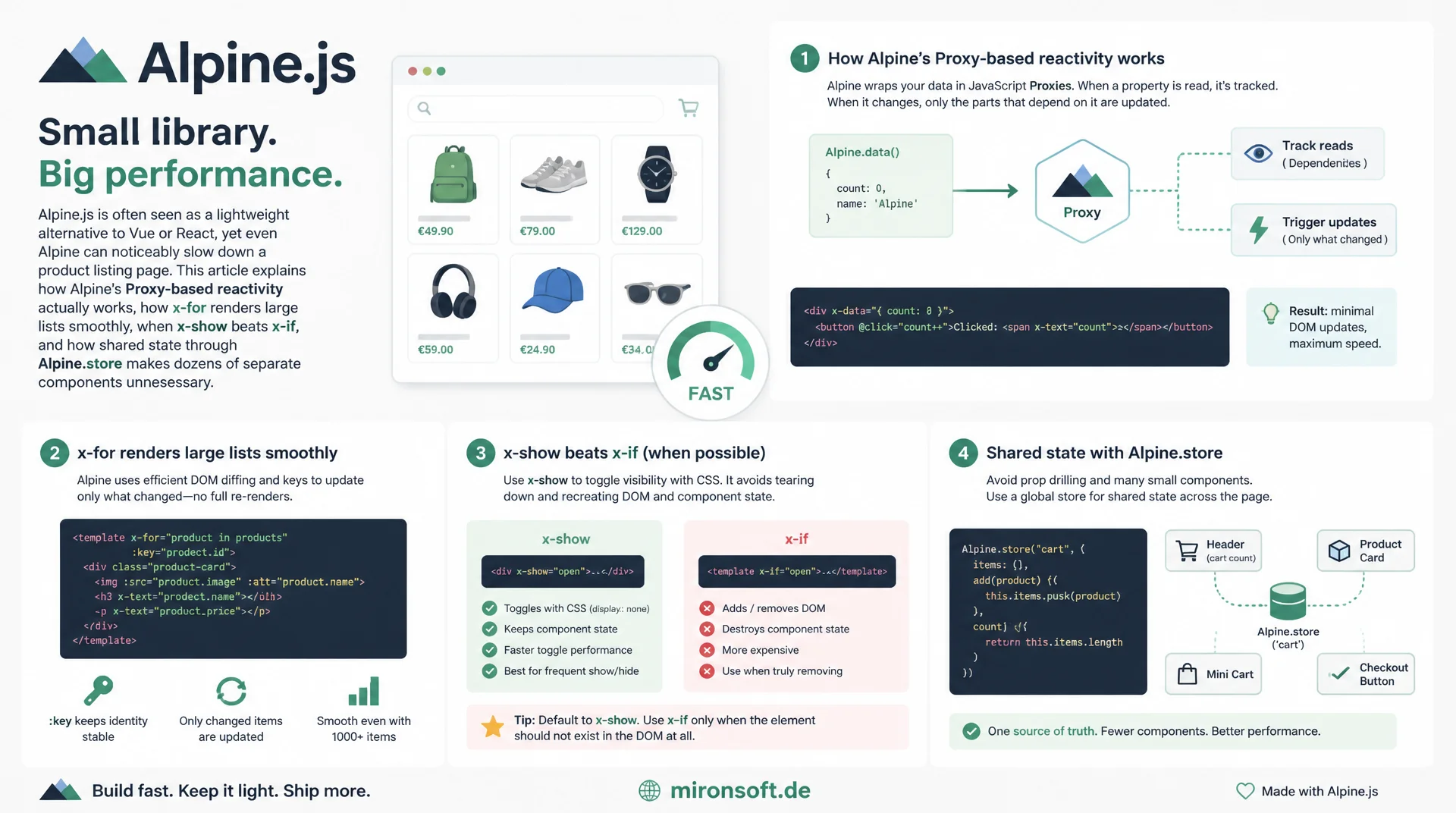
Reactivity, large lists, and components under control
Alpine.js is often seen as a lightweight alternative to Vue or React, yet even Alpine can noticeably slow down a product listing page. This article explains how Alpine's Proxy-based reactivity actually works, how x-for renders large lists smoothly, when x-show beats x-if, and how shared state through Alpine.store makes dozens of separate components unnecessary.
Table of Contents
- 1. Why Alpine.js performance is its own discipline in Hyvä stores
- 2. Alpine's reactivity model: Proxy instead of virtual DOM
- 3. x-for with large lists: using the :key binding correctly
- 4. When a list needs virtualization instead of plain rendering
- 5. Avoiding expensive computations in x-data getters
- 6. x-cloak, x-show, and x-if compared
- 7. Reducing component count on JS-heavy pages
- 8. Event delegation instead of many individual x-on listeners
- 9. Shared state via Alpine.store instead of duplication
- 10. Summary
- 11. FAQ
1. Why Alpine.js performance is its own discipline in Hyvä stores
Hyvä stores are rightly considered fast because they replace classic jQuery, Knockout.js, and UI Components with Tailwind CSS and Alpine.js. That premise easily leads to a false conclusion though: a small JavaScript framework is not automatically performant when used carelessly. A product listing page with facet filters, sorting, wishlist, quick view, and add-to-cart buttons quickly combines dozens of separate x-data components, all initialized at once and all needing to react to user input.
This article dives into the specific spots where Alpine-based Hyvä stores tend to slow down in practice: the reactivity model itself, large product lists with x-for, expensive computations inside getters, the choice between x-cloak, x-show, and x-if, and the sheer number of Alpine components on JS-heavy pages such as a product listing page. Each section offers concrete, immediately applicable patterns rather than generic advice.
2. Alpine's reactivity model: Proxy instead of virtual DOM
Since version 3, Alpine.js internally uses a reactivity engine built on native JavaScript Proxy objects, conceptually related to Vue's reactivity. Every property in x-data is tracked on access through the proxy, and every change triggers exactly the DOM effects that depend on it. There is deliberately no virtual DOM and no diffing of two tree states like in React or Vue: Alpine binds every expression directive (x-text, x-bind, x-show, x-for) directly to the affected DOM node and patches it immediately on change.
This fine-grained model is cheaper per individual change than a virtual-DOM diff, since no tree comparison happens at all. The cost instead shifts to the number of active effects: every directive creates its own reactive effect, registered on initial render and re-run on every dependency change. On a page with hundreds of small Alpine components, one per product card for instance, these effects add up, and Alpine's internal initialization (Alpine.start()) has to walk and bind correspondingly more DOM nodes on first load before the page is actually interactive.
3. x-for with large lists: using the :key binding correctly
Without :key, x-for tracks list items implicitly by their index. When products are filtered, sorted, or reloaded, Alpine then maps the existing DOM nodes to the new data purely by position, regardless of whether it's still the same product. This not only causes visual glitches like swapped images or a wishlist state bound to the wrong card, it also forces Alpine to re-evaluate and rebind virtually every attribute in every card instead of simply reusing unchanged nodes.
A stable :key binding, such as product.id or product.sku, instead allows Alpine to diff surgically: only nodes that were actually added, removed, or moved get changed, everything else stays untouched, including open dropdowns or focus state. On a facet-filtered listing page with 48 cards, that's the difference between a sort interaction that visibly stutters and one that feels smooth. Important: never use the array index as a key, and never a randomly generated value that changes on every render, both defeat the purpose of :key entirely.
<!-- Anti-pattern: no key, Alpine tracks by index only -->
<template x-for="product in products">
    <div class="product-card" x-text="product.name"></div>
</template>

<!-- Recommended: stable key based on the product ID -->
<template x-for="product in products" :key="product.id">
    <div class="product-card">
        <img :src="product.image" :alt="product.name" width="300" height="300" loading="lazy">
        <p x-text="product.name"></p>
        <p x-text="product.price"></p>
    </div>
</template>
4. When a list needs virtualization instead of plain rendering
Even with a correct :key, one problem remains that has nothing to do with reactivity: every rendered DOM node costs layout, paint, and memory, regardless of how efficiently Alpine updates it. Unlike some Vue or React libraries, Alpine ships no built-in windowing. As a rule of thumb: up to roughly 100 to 150 elements, rendering everything is unproblematic, and typical product listing pages with 24 to 60 products per page fall clearly within that range.
For lists that grow into the hundreds or thousands, large CSV-imported comparison lists, cross-session "recently viewed" histories, or admin-style data tables, raw node count itself becomes the bottleneck. More practical for most Hyvä pages than a full virtual-list library is server-side pagination or slicing a data array in Alpine, combined with simple manual windowing via IntersectionObserver: only elements near the visible viewport get rendered, while ones further away are removed from the DOM or never created in the first place.
5. Avoiding expensive computations in x-data getters
A common anti-pattern: an expensive computation, filtering and sorting a 200-item array or currency formatting with a regex, gets defined as a getter inside x-data and referenced directly in the template, for example via x-text="filteredProducts". Alpine getters are simply native JavaScript property accessors and re-run on every access, every time Alpine re-evaluates the surrounding directive, not only when the actually relevant data changed. On every keystroke in a filter field or every reactivity tick, the expensive logic runs through completely again.
The fix: explicitly cache the result and recompute only via a targeted $watch on the actual dependency, instead of doing it implicitly on every access. That way the expensive computation only runs when the filter value, sort order, or data source genuinely changes, regardless of how often the template itself gets re-evaluated.
// Anti-pattern: getter re-sorts on every single access
Alpine.data('productList', () => ({
  products: [], // 200+ items
  filterTerm: '',
  get filteredProducts() {
    // Runs on every reactivity tick, even without a relevant change
    return this.products
      .filter(p => p.name.toLowerCase().includes(this.filterTerm.toLowerCase()))
      .sort((a, b) => a.price - b.price);
  }
}));

// Fix: cache the result, recompute only on a genuine change
Alpine.data('productList', () => ({
  products: [],
  filterTerm: '',
  filteredProducts: [],
  init() {
    this.recompute();
    this.$watch('filterTerm', () => this.recompute());
  },
  recompute() {
    this.filteredProducts = this.products
      .filter(p => p.name.toLowerCase().includes(this.filterTerm.toLowerCase()))
      .sort((a, b) => a.price - b.price);
  }
}));
6. x-cloak, x-show, and x-if compared
x-cloak solves exactly one problem, the flash of uninitialized content: a CSS attribute selector hides the element until Alpine's initialization completes, after which Alpine removes the attribute and the selector no longer applies. Once hydration is done, there is no ongoing cost at all. x-show, by contrast, permanently toggles between display: none and the original display value, the element, including any nested Alpine components, watchers, and DOM nodes, stays in the DOM the entire time. That makes toggling itself very cheap, a single style mutation, but nested reactivity keeps running continuously even while hidden.
x-if fully removes and recreates the element and all its children via a <template> tag; hiding it tears down all nested state and effects completely. The tradeoff: x-if saves reactivity overhead for content that stays hidden for long stretches, a rarely opened modal or a filter panel collapsed by default on desktop, but pays the full rebuild cost including init() every time it toggles back on. Rule of thumb: x-show for frequently toggled UI like accordions or tabs, x-if for rarely visible but content-heavy sections.
<!-- x-cloak: only prevents flash of uninitialized content, no ongoing cost -->
<div x-cloak x-data="{ open: false }">...</div>
<!-- requires this once in CSS: [x-cloak] { display: none !important; } -->

<!-- x-show: stays in the DOM, reactivity keeps running, cheap toggling -->
<div x-data="{ open: false }">
    <button @click="open = !open">Filter</button>
    <div x-show="open" x-transition>
        <!-- frequently used filter panel -->
    </div>
</div>

<!-- x-if: fully torn down and rebuilt on every toggle -->
<template x-if="open">
    <div>
        <!-- rarely opened, stateful modal -->
    </div>
</template>
7. Reducing component count on JS-heavy pages
On a product listing page with 48 product cards, giving each card its own x-data for wishlist, quick view, and swatch hover creates 48 separate Alpine instances, each with its own init(), its own reactive proxy, and, if each card has multiple x-on bindings, a correspondingly large number of individually registered DOM event listeners. The overhead of a single Alpine component is small but not zero: mutation observer setup, effect registration, and the initial DOM walk add up across dozens or hundreds of cards, measurably lengthening the time until the page is actually interactive after load.
Practical countermeasures: state that's identical or shared across all cards, the currently selected swatch color in the grid, the list of wishlist IDs, or the comparison list, belongs in a single Alpine.store instead of being duplicated inside every individual x-data. In addition, the entire product card grid can be wrapped in one parent x-data component that exposes per-card local state through an object indexed by product ID, so only a single Alpine instance mounts for the whole grid instead of one per card.
8. Event delegation instead of many individual x-on listeners
Instead of binding x-on:click on every single button inside a product card, wishlist icon, add-to-cart button, quick view, which directly multiplies the number of native DOM event listeners Alpine registers by the number of cards, the click can be delegated to a single listener on the shared grid container. Using event.target.closest() together with a data-product-id attribute on each card reliably determines which product and which action was actually triggered, exactly the classic event delegation pattern from vanilla JavaScript, just applied to Alpine.
The number of DOM listeners stays constant regardless of list size, instead of growing linearly with the card count. Combined with the approach from section 7, a single parent component for the whole grid, both component count and listener count collapse from O(n) to O(1) for the entire product listing page, an effect that becomes especially noticeable on pages with a hundred or more cards.
// Delegated click handler on the grid instead of x-on per card
Alpine.data('productGrid', () => ({
  handleGridClick(event) {
    const card = event.target.closest('[data-product-id]');
    if (!card) return;

    const productId = card.dataset.productId;
    const action = event.target.closest('[data-action]')?.dataset.action;

    if (action === 'wishlist') {
      Alpine.store('wishlist').toggle(productId);
    } else if (action === 'add-to-cart') {
      this.addToCart(productId);
    }
  },
  addToCart(productId) {
    // shared logic instead of duplication per card
  }
}));
9. Shared state via Alpine.store instead of duplication
Alpine.store() provides a global reactive singleton object, ideal for state shared across many otherwise independent components, wishlist IDs, mini-cart quantity, or the currently active filter selection, without prop drilling and without every card holding its own copy of the data or triggering its own requests. Since the store is a single reactive object, Alpine's reactivity only needs to track effects for the specific store properties actually referenced in each card's template, instead of managing redundant copies of the same data.
When a card's wishlist status is read via $store.wishlist.ids.includes(product.id), toggling it automatically and efficiently updates the icon on every other card referencing the same product, in a "recently viewed" carousel for example, without that card reloading or duplicating its own logic. Important for Hyvä: the store is registered once via document.addEventListener('alpine:init', ...), and per theme convention every inline <script> block must be followed by a call to $hyvaCsp->registerInlineScript() so the Content Security Policy allows the script.
// Global store instead of wishlist state inside every product card
document.addEventListener('alpine:init', () => {
  Alpine.store('wishlist', {
    ids: JSON.parse(localStorage.getItem('wishlistIds') || '[]'),
    toggle(productId) {
      const index = this.ids.indexOf(productId);
      if (index === -1) {
        this.ids.push(productId);
      } else {
        this.ids.splice(index, 1);
      }
      localStorage.setItem('wishlistIds', JSON.stringify(this.ids));
    }
  });
});

// Referenced inside every product card, without its own copy of the state
// x-bind:class="$store.wishlist.ids.includes(product.id) ? 'text-red-600' : 'text-slate-300'"
The table below compares the five most common Alpine.js anti-patterns seen in Hyvä stores against the recommended pattern for each.
| Area | Anti-pattern | Impact | Recommended pattern |
|---|---|---|---|
| x-for lists | No :key, tracking by index | DOM rebuilt on every change | :key with a stable product ID |
| Large lists | All items get rendered | Hundreds of DOM nodes, long tasks | Pagination or windowing past ~150 items |
| x-data getters | Expensive computation on every access | Re-runs on every reactivity tick | Cache the result, recompute via $watch |
| Visibility | x-if for frequently changing UI | Constant DOM teardown and rebuild | x-show for frequent toggles |
| Product card grid | One x-data per card | Hundreds of instances, many listeners | Event delegation + Alpine.store |
Mironsoft
Alpine.js performance and Hyvä optimization for Magento stores
Ready to fix stuttering interactions in your Hyvä store?
We analyze your Alpine.js components, find expensive getters, missing :key bindings, and unnecessary components, and implement targeted optimizations for noticeably smoother product listing and category pages.
Alpine.js audit
Systematically analyzing component count, reactivity, and getters
List optimization
x-for, :key bindings, and windowing for large product lists
Store architecture
Shared state via Alpine.store instead of component duplication
10. Summary
Alpine.js performance patterns for Hyvä stores address a recurring misconception: a small framework without a virtual DOM is not automatically performant when reactivity, lists, and component count are used without thought. Alpine's Proxy-based reactivity makes individual changes cheap, but shifts the cost to the number of active effects, which is why :key on x-for, cached getters, and a deliberate choice between x-show and x-if all directly affect perceived speed.
On JS-heavy pages like a product listing page, sheer component count matters just as much: one Alpine component per product card unnecessarily multiplies initialization and listener overhead. Event delegation on a shared grid container and shared state via Alpine.store reduce that overhead from linear to constant, making them the most effective levers for pages with many cards.
Alpine.js Performance Patterns for Hyvä Stores - The Essentials at a Glance
Proxy instead of virtual DOM
Cost scales with the number of active effects, not with tree diffing.
:key on x-for
Stable product ID instead of index, prevents unnecessary DOM rebuilding.
x-show vs. x-if
x-show for frequent toggles, x-if for rarely visible, heavy sections.
Fewer components
Event delegation and Alpine.store instead of one component per card.