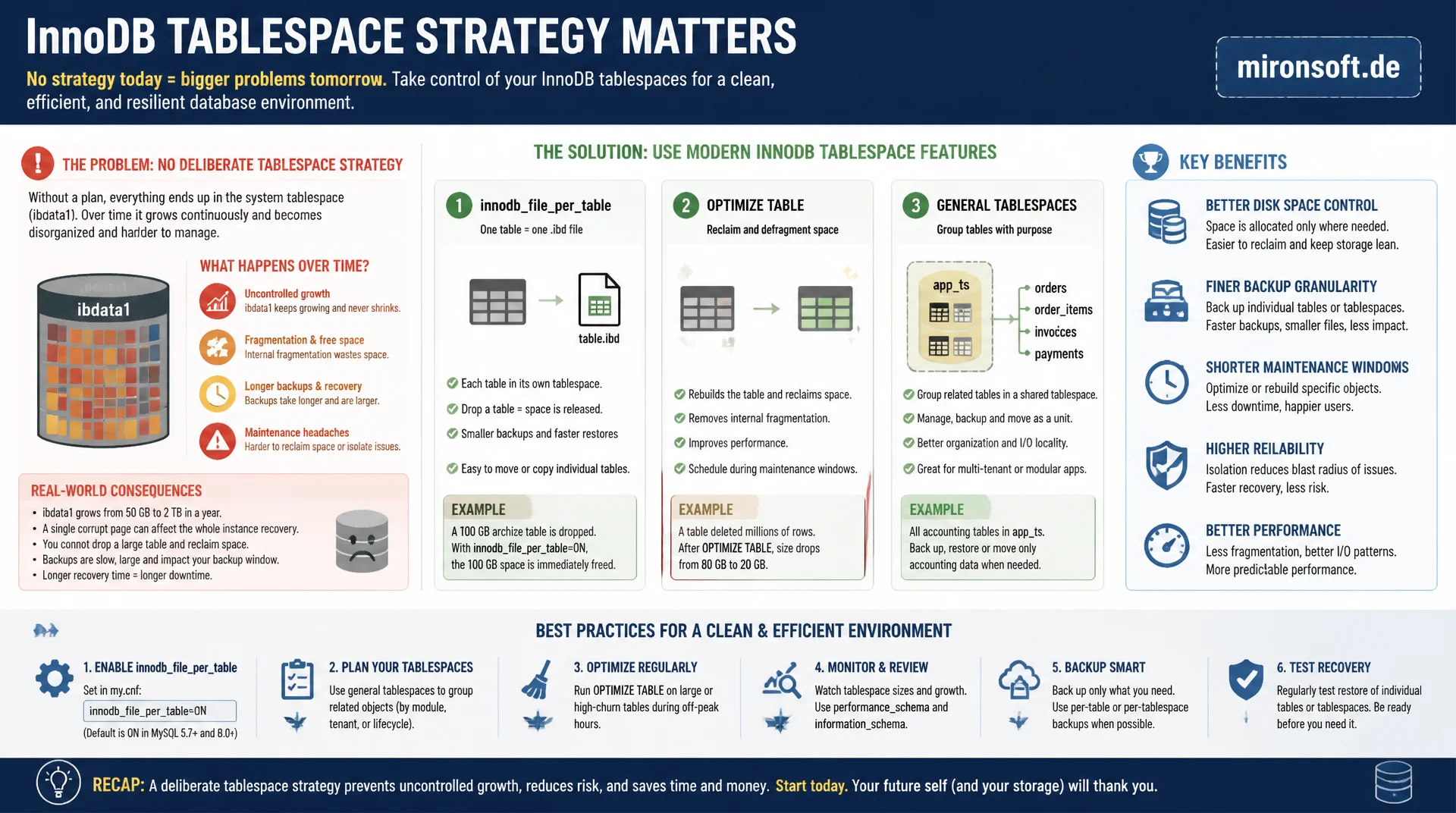
why ibdata1 keeps growing and how to control it
Anyone running InnoDB without a deliberate tablespace strategy accumulates an untidy system tablespace over the years that never shrinks again. innodb_file_per_table, OPTIMIZE TABLE and general tablespaces hand back the control over disk space, backup granularity and maintenance windows that gets lost otherwise in standard operation.
Table of Contents
- 1. What a tablespace in InnoDB really is
- 2. innodb_file_per_table: one .ibd file per table
- 3. System tablespace vs. file-per-table in detail
- 4. Reclaiming disk space with OPTIMIZE TABLE
- 5. General tablespaces: shared files for multiple tables
- 6. Monitoring tablespace sizes
- 7. Migrating from system tablespace to file-per-table
- 8. Practical pitfalls in backup and maintenance
- 9. Tablespace types compared
- 10. Summary
- 11. FAQ
1. What a tablespace in InnoDB really is
A tablespace is the physical storage structure in which InnoDB places table data, indexes and, in part, undo information. Internally, every tablespace consists of extents and pages, 16 KB by default, grouped into logical segments for data, indexes and rollback areas. Anyone running InnoDB always works with at least one tablespace, even though this rarely becomes visible in everyday work because MySQL automates the management by default.
Historically, InnoDB only knew a single system tablespace, usually the file ibdata1 in the data directory. In the past, all table data, the data dictionary, the doublewrite buffer and the undo logs lived there together. This model works technically but has one decisive drawback: a tablespace that has grown once practically never returns the occupied disk space, even if data is deleted afterward. This is exactly the problem MySQL addressed with innodb_file_per_table.
Since MySQL 5.6, a dedicated tablespace per table has been the default, which fundamentally changed the management model. Anyone administering a server that still runs with a monolithic system tablespace today has either inherited a very old installation or deliberately disabled the setting. Both cases deserve a close look, because the consequences for disk space and maintenance differ considerably.
2. innodb_file_per_table: one .ibd file per table
With innodb_file_per_table enabled, InnoDB creates its own .ibd file for every table in the corresponding schema directory. This file holds the table data and all associated indexes as an independent tablespace. The system tablespace ibdata1 is then essentially limited to the doublewrite buffer, change buffer data and, depending on the version, parts of the undo logs, unless separate undo tablespaces are configured.
The practical benefit of a dedicated tablespace per table shows immediately on deletion: DROP TABLE or TRUNCATE TABLE returns the occupied disk space to the file system right away with file-per-table, because the .ibd file is simply removed. With a monolithic tablespace, on the other hand, that space stays inside ibdata1 as an internally free but, from the operating system's view, invisible area. Checking the current setting and creating a table with its own tablespace looks like this in practice:
-- Check current tablespace mode
SHOW VARIABLES LIKE 'innodb_file_per_table';
-- +-----------------------+-------+
-- | Variable_name         | Value |
-- +-----------------------+-------+
-- | innodb_file_per_table | ON    |
-- +-----------------------+-------+

-- New tables automatically get their own tablespace file
CREATE TABLE order_log (
  id BIGINT UNSIGNED NOT NULL AUTO_INCREMENT,
  order_id BIGINT UNSIGNED NOT NULL,
  status VARCHAR(32) NOT NULL,
  created_at DATETIME NOT NULL DEFAULT CURRENT_TIMESTAMP,
  PRIMARY KEY (id),
  KEY idx_order_id (order_id)
) ENGINE=InnoDB DEFAULT CHARSET=utf8mb4;

-- Resulting file on disk: /var/lib/mysql/shop/order_log.ibd
A second, often overlooked benefit concerns backups: tools like Percona XtraBackup can copy individual tablespace files with file-per-table and restore single tables specifically with ALTER TABLE ... IMPORT TABLESPACE. With a single large system tablespace this is not possible, because all table data physically lives in the same file and cannot be extracted in isolation.
3. System tablespace vs. file-per-table in detail
The system tablespace remains relevant even with innodb_file_per_table enabled, because certain internal structures stay there. These include the doublewrite buffer, which makes corrupted pages detectable after a crash, and, unless dedicated undo tablespaces have been set up, the rollback segments for transactions. In modern MySQL 8 installations, undo tablespaces are already externalized by default, which additionally relieves ibdata1.
An important difference between the two models concerns I/O characteristics. With a single system tablespace, all tables compete for the same file descriptor and the same file on the file system, which in theory can lead to contention under very high concurrency. With file-per-table, I/O is spread across many individual files, which on most modern file systems and with SSD storage no longer represents a relevant drawback, but it does increase the number of open file descriptors, which needs to be accounted for in innodb_open_files.
In practice this means: a single tablespace per table is the right default setting today for practically every installation, except in very specific scenarios with extremely many small tables, where the file system overhead cost per .ibd file could become noticeable. For a typical Magento or shop system running with a few hundred tables, this case is practically irrelevant.
4. Reclaiming disk space with OPTIMIZE TABLE
Even with file-per-table enabled, the .ibd file of a single table grows over time through frequent UPDATE and DELETE operations, without the internally freed space being automatically returned to the file system. InnoDB marks freed pages internally as reusable but does not release them to the operating system. This is exactly where OPTIMIZE TABLE comes in, which for InnoDB tables runs an ALTER TABLE ... ENGINE=InnoDB in the background.
This process rebuilds the table as a fresh, compact tablespace, copies all still-valid rows into it, and then swaps the old file for the new one. The old, fragmented tablespace is deleted, which actually frees the disk space. The downside: during the copy, temporarily extra disk space equal to the table size is needed, and for very large tables the process can take hours depending on the hardware.
-- Check current and free space per table
SELECT table_name,
       ROUND(data_length / 1024 / 1024, 1)  AS data_mb,
       ROUND(index_length / 1024 / 1024, 1) AS index_mb,
       ROUND(data_free / 1024 / 1024, 1)    AS free_mb
FROM information_schema.tables
WHERE table_schema = 'shop'
ORDER BY data_free DESC
LIMIT 10;

-- Reclaim disk space for a heavily updated table
-- (rebuilds the tablespace, needs roughly table-size extra disk space)
OPTIMIZE TABLE shop.order_log;

-- Equivalent explicit rebuild, same effect for InnoDB
ALTER TABLE shop.order_log ENGINE=InnoDB;
In production environments, OPTIMIZE TABLE should never run uncoordinated. Since MySQL 5.6 with ALGORITHM=INPLACE for many online DDL operations, the table stays readable and mostly writable, but the extra I/O and CPU load can cause replication lag and should happen during maintenance windows with reduced traffic. For very large tables, a tool like Percona's pt-online-schema-change is often the safer choice, because it controls the load more granularly and allows a controlled abort.
5. General tablespaces: shared files for multiple tables
Besides the system tablespace and file-per-table, InnoDB has known so-called general tablespaces since MySQL 5.7. A general tablespace is an explicitly created, shared file in which multiple tables can be stored together, similar to the old system tablespace but under full administrative control. This is useful for groups of small, thematically related tables where the file system overhead of many individual .ibd files should be avoided.
A general tablespace is created explicitly, and tables are assigned to this tablespace on definition. Important to know: tables in a general tablespace no longer support file-per-table behavior, meaning TRUNCATE TABLE does not automatically return disk space, because the file is shared by multiple tables. This trade-off needs to be accepted consciously.
-- Create a general tablespace as a shared file
CREATE TABLESPACE ts_reporting
  ADD DATAFILE 'ts_reporting.ibd'
  ENGINE=InnoDB;

-- Assign small, related tables to the shared tablespace
CREATE TABLE report_cache (
  id BIGINT UNSIGNED NOT NULL AUTO_INCREMENT,
  report_key VARCHAR(64) NOT NULL,
  payload JSON NOT NULL,
  generated_at DATETIME NOT NULL,
  PRIMARY KEY (id)
) ENGINE=InnoDB TABLESPACE=ts_reporting;

CREATE TABLE report_meta (
  id BIGINT UNSIGNED NOT NULL AUTO_INCREMENT,
  report_key VARCHAR(64) NOT NULL,
  label VARCHAR(128) NOT NULL,
  PRIMARY KEY (id)
) ENGINE=InnoDB TABLESPACE=ts_reporting;
For most use cases, especially in the shop and Magento space, file-per-table remains the more pragmatic choice, because backup tools, partitioning and operational tooling work with it best. General tablespaces pay off mainly when a very large number of small tables, for example in multi-tenant systems with hundreds of schemas, noticeably drives up the number of open file descriptors.
6. Monitoring tablespace sizes
To keep a tablespace from growing uncontrolled, monitoring belongs to the routine of every MySQL instance. The view information_schema.INNODB_TABLESPACES shows all registered tablespaces including file name, state and type. In addition, information_schema.TABLES provides size figures per table, which is decisive for prioritizing OPTIMIZE TABLE runs, because it lets you specifically find the tables with the largest ratio of free to occupied space.
For the system tablespace itself, a regular look at the actual file size of ibdata1 on disk is advisable, because this tablespace does not automatically shrink no matter how much internal space is free. If ibdata1 grows uncontrolled over years, often only a complete dump-and-reload of the instance remains to reach a compact baseline size again. This is exactly why enabling file-per-table early is so important, because it prevents this problem from the start.
7. Migrating from system tablespace to file-per-table
If innodb_file_per_table is enabled on an instance that previously ran without this option, it initially only affects newly created tables. Existing tables stay in the system tablespace until explicitly migrated. The most reliable way is an ALTER TABLE ... ENGINE=InnoDB per table, which rewrites the table into a fresh, dedicated tablespace, or alternatively a full export and reimport via mysqldump.
For many tables in production, a sequential migration run during a maintenance window makes sense, with the largest tables handled first and with enough time buffer, because they burden the system tablespace the most. After completing all migrations, ibdata1 stays at its current size, because here too: the system tablespace itself does not shrink retroactively just because it becomes internally emptier.
#!/usr/bin/env bash
# migrate-to-file-per-table.sh: rebuild all InnoDB tables in a schema
set -euo pipefail

SCHEMA="shop"

tables=$(mysql -N -B -e \
  "SELECT table_name FROM information_schema.tables \
   WHERE table_schema='${SCHEMA}' AND engine='InnoDB'")

for t in $tables; do
  echo "Rebuilding tablespace for ${SCHEMA}.${t}"
  mysql -e "ALTER TABLE \`${SCHEMA}\`.\`${t}\` ENGINE=InnoDB;"
done

echo "Done. ibdata1 itself will not shrink; only new tablespaces do."
Anyone wanting to reset the system tablespace afterward to its minimal size cannot avoid a complete dump, deleting all InnoDB files including ibdata1, and a clean reimport. This is an invasive operation that requires full downtime and therefore needs to be well planned, but it is the only method in the long run that actually reclaims years of accumulated, unused disk space in the system tablespace.
8. Practical pitfalls in backup and maintenance
A common mistake in practice: teams enable innodb_file_per_table but forget that backup scripts, which previously only backed up ibdata1, now also need to include all .ibd files. Physical backup tools like Percona XtraBackup handle this correctly automatically, but self-built copy scripts that only capture certain files in the data directory can produce incomplete backups after the switch, something that often only becomes apparent at restore time, when it is too late.
Another pitfall concerns innodb_open_files: with many thousands of tables and file-per-table enabled, the number of simultaneously open file descriptors rises noticeably. If this value is configured too low, MySQL constantly opens and closes tablespace files, which measurably costs performance. For instances with many tables, this parameter should be explicitly checked and raised together with the operating system limit for open files (ulimit -n).
9. Tablespace types compared
The choice between system tablespace, file-per-table and general tablespace depends on the concrete use case. The following overview summarizes the most important differences relevant to daily administration.
| Property | System Tablespace | file-per-table | General Tablespace |
|---|---|---|---|
| Disk space after DROP | stays internally reserved | returned to disk immediately | only via DROP TABLESPACE |
| Back up single table | not possible | yes, via .ibd file | not possible in isolation |
| File descriptors | a single one | one per table | one per tablespace |
| Default since | MySQL 5.5 and older | MySQL 5.6+ | MySQL 5.7+ (optional) |
| Recommendation | avoid | default choice | for many small tables |
For nearly every new installation, file-per-table is the right base setting. General tablespaces remain a tool for special cases, while the classic, monolithic system tablespace today is only relevant as legacy baggage in grown installations that should be migrated consistently in the medium term.
10. Summary
Tablespace management in InnoDB is not an exotic detail, it directly decides whether disk space stays under control or grows uncontrolled over years. The monolithic system tablespace ibdata1 practically never releases once-occupied space again. innodb_file_per_table solves this problem by giving every table its own, independent tablespace that disappears completely on DROP TABLE.
Even with file-per-table, fragmentation remains a topic that needs to be addressed with regular, well-planned OPTIMIZE TABLE. General tablespaces are a tool for special cases with very many small tables. For most installations the rule is: enable file-per-table, monitor size growth, and migrate existing legacy tables in the system tablespace deliberately, instead of postponing the problem indefinitely.
Tablespace Management and file-per-table: The Essentials at a Glance
Enable the default
innodb_file_per_table=1 has been the default since MySQL 5.6 and should be active on every instance.
Reclaim disk space
OPTIMIZE TABLE rebuilds a table's tablespace and returns free space, but needs temporary extra storage.
Watch the system tablespace
ibdata1 never shrinks automatically, only a complete dump-and-reload resets its size.
Use general tablespaces deliberately
Useful for very many small tables, but costs the ability to reclaim disk space per table immediately.