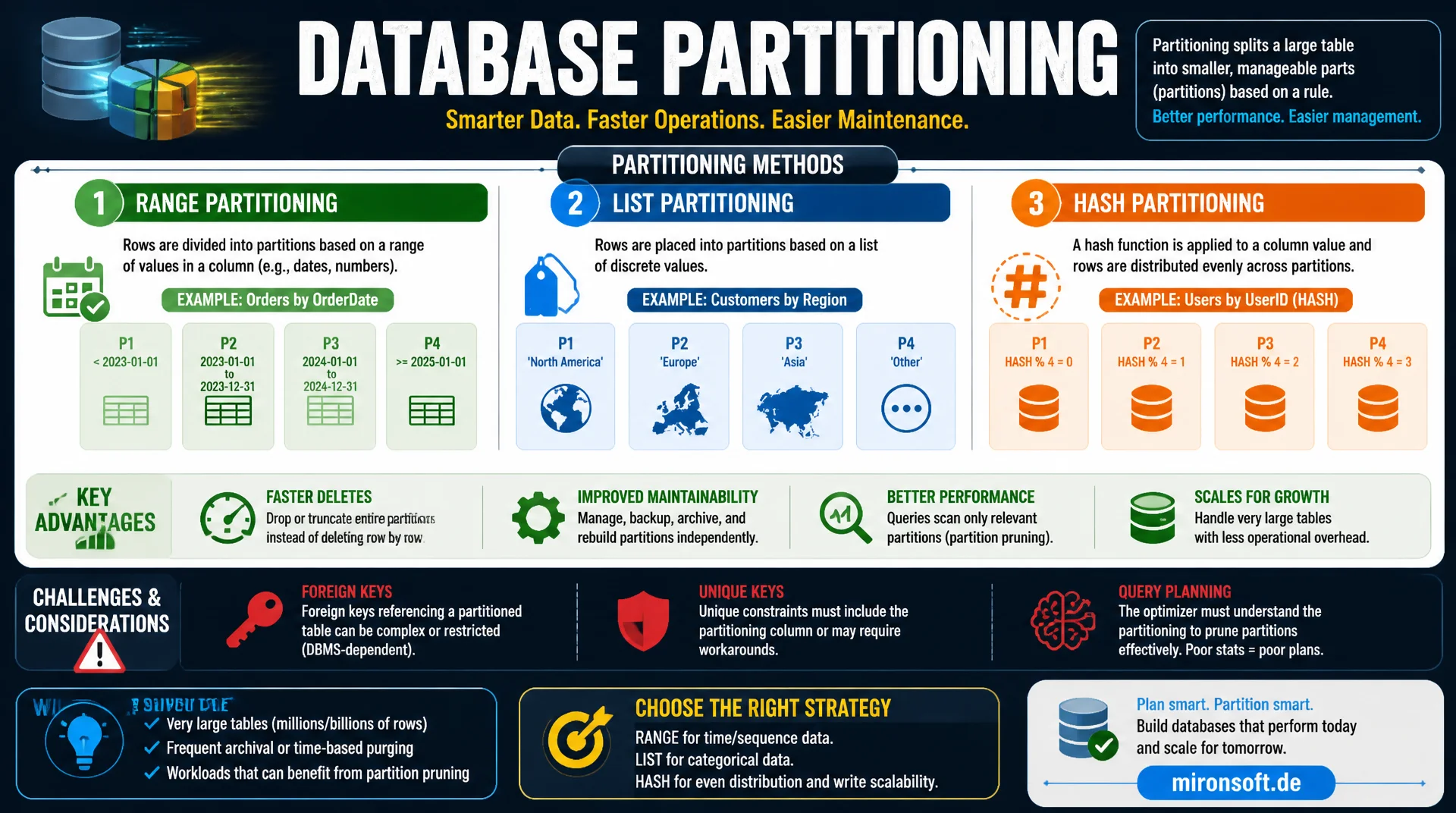
RANGE, LIST and HASH compared in practice
Partitioning promises faster deletes and better maintainability for very large tables, but it is not a universal performance tool. RANGE, LIST and HASH partitioning solve different problems and bring their own restrictions around foreign keys, unique keys and query planning that need to be understood before adoption.
Table of Contents
- 1. What partitioning in MySQL does
- 2. RANGE partitioning: time-based data splitting
- 3. LIST and HASH partitioning compared
- 4. Partition pruning: how the optimizer benefits
- 5. When partitioning really helps
- 6. When partitioning does not help or hurts
- 7. Limits: foreign keys and unique keys
- 8. Maintenance: creating, exchanging and dropping partitions
- 9. Partitioning strategies compared
- 10. Summary
- 11. FAQ
1. What partitioning in MySQL does
With partitioning, MySQL splits a logically single table into several physically separate storage units, each holding a subset of rows according to a defined rule. From the outside, the table remains a single entity for applications and queries, but internally the server manages each partition like an independent table with its own tablespace. This fundamentally distinguishes partitioning from sharding, where data is spread across multiple database instances.
The central benefit lies in two areas: maintenance operations such as deleting old data can happen at the partition level instead of the row level, which for billions of rows means the difference between seconds and hours. And queries that reference a bounded subset of the partitioning rule can skip entire partitions, called partition pruning, explained in more detail in the fourth section.
MySQL supports several partitioning types: RANGE, LIST, HASH and KEY, plus combinations of these as subpartitioning. Each type suits different data distributions and access patterns, and choosing the wrong type can mean partitioning brings no measurable benefit or even worsens performance, because the optimizer has to scan across all partitions.
2. RANGE partitioning: time-based data splitting
RANGE partitioning is the most common form in practice and splits rows based on value ranges of a column, typically a date or ID column. A classic example is a log or order table partitioned by year or month. Each partition then contains exactly the rows for a specific time period, which considerably speeds up both deleting old data and time-range queries.
The big practical advantage shows up in data retention: instead of running DELETE FROM orders WHERE created_at < '2023-01-01', which takes minutes to hours for millions of rows and causes massive undo log growth, an entire partition can be removed in milliseconds with ALTER TABLE ... DROP PARTITION. This is by far the most important reason many teams adopt RANGE partitioning for archiving and retention strategies.
-- Range partitioning by year, based on order date
CREATE TABLE order_history (
  id BIGINT UNSIGNED NOT NULL AUTO_INCREMENT,
  customer_id BIGINT UNSIGNED NOT NULL,
  total_amount DECIMAL(10,2) NOT NULL,
  created_at DATE NOT NULL,
  PRIMARY KEY (id, created_at)
) ENGINE=InnoDB
PARTITION BY RANGE (YEAR(created_at)) (
  PARTITION p2023 VALUES LESS THAN (2024),
  PARTITION p2024 VALUES LESS THAN (2025),
  PARTITION p2025 VALUES LESS THAN (2026),
  PARTITION p2026 VALUES LESS THAN (2027),
  PARTITION p_future VALUES LESS THAN MAXVALUE
);

-- Instant retention cleanup: milliseconds instead of a long DELETE
ALTER TABLE order_history DROP PARTITION p2023;
An important detail with RANGE partitioning: the partitioning column must be part of every unique key, including the primary key. That is why created_at is part of the primary key in the example above, even though this would not otherwise be strictly necessary from a business logic standpoint. This restriction regularly sparks discussion in schema design and is covered in more detail in the section on partitioning limits.
3. LIST and HASH partitioning compared
LIST partitioning resembles RANGE but works with explicit values instead of value ranges. This suits columns with a limited number of discrete categories, for example a region or tenant column in a multi-tenant system. Each partition is assigned a fixed list of values, allowing a clear, business-meaningful data split, for instance one partition per country or sales region.
HASH and KEY partitioning pursue a different goal: instead of grouping data meaningfully by business logic, they distribute rows as evenly as possible across a fixed number of partitions, based on a hash of the partitioning column. This reduces hotspots on very write-heavy tables and spreads I/O more evenly, but brings no benefit for time-range or category-based queries, because the optimizer cannot predict the hash without the exact key value.
-- List partitioning by tenant region
CREATE TABLE tenant_events (
  id BIGINT UNSIGNED NOT NULL AUTO_INCREMENT,
  region_code VARCHAR(2) NOT NULL,
  event_type VARCHAR(64) NOT NULL,
  occurred_at DATETIME NOT NULL,
  PRIMARY KEY (id, region_code)
) ENGINE=InnoDB
PARTITION BY LIST COLUMNS (region_code) (
  PARTITION p_eu VALUES IN ('DE', 'AT', 'CH', 'FR'),
  PARTITION p_na VALUES IN ('US', 'CA'),
  PARTITION p_other VALUES IN ('GB', 'AU', 'JP')
);

-- Hash partitioning to spread write load evenly
CREATE TABLE session_log (
  id BIGINT UNSIGNED NOT NULL AUTO_INCREMENT,
  session_id BIGINT UNSIGNED NOT NULL,
  logged_at DATETIME NOT NULL,
  PRIMARY KEY (id, session_id)
) ENGINE=InnoDB
PARTITION BY HASH (session_id)
PARTITIONS 8;
4. Partition pruning: how the optimizer benefits
Partition pruning is the mechanism by which the MySQL optimizer recognizes during query planning that certain partitions are irrelevant for a query and skips them entirely. This only works if the WHERE condition references the partitioning column directly, for example WHERE created_at >= '2026-01-01' on a table partitioned by year. The optimizer then checks which partitions could even contain this value range, and scans only those.
With EXPLAIN PARTITIONS you can directly observe whether pruning actually takes effect. If the partitioning column is missing from the WHERE condition, or is wrapped in a function the optimizer cannot resolve, for example WHERE DATE_FORMAT(created_at, '%Y') = '2026' instead of WHERE created_at >= '2026-01-01', pruning does not kick in and the query must search all partitions, completely negating the assumed performance benefit.
-- EXPLAIN shows which partitions are actually scanned
EXPLAIN PARTITIONS
SELECT * FROM order_history
WHERE created_at >= '2026-01-01' AND created_at < '2026-07-01';
-- partitions: p2026 (only one partition touched, pruning works)

-- Anti-pattern: function on the partition column disables pruning
EXPLAIN PARTITIONS
SELECT * FROM order_history
WHERE YEAR(created_at) = 2026;
-- partitions: p2023,p2024,p2025,p2026,p_future (all scanned, pruning fails)
5. When partitioning really helps
Partitioning clearly pays off when two conditions are met simultaneously: the table is very large, typically tens of gigabytes to terabytes, and there is a clear partitioning column consistently used in queries, usually a date. Retention deletes via DROP PARTITION instead of DELETE, as shown in the RANGE section, are by far the most common successful use case in practice.
Reporting or analytics workloads that consistently filter by time period, such as monthly reports or year-over-year comparisons, also see noticeable benefits from partitioning through pruning. Another use case is spreading I/O for very write-heavy tables via HASH partitioning, when a single tablespace becomes the bottleneck, although this is less often the actual bottleneck than many teams initially assume.
6. When partitioning does not help or hurts
A widespread misconception is that partitioning automatically speeds up queries with no relation to the partitioning column. If filtering or sorting frequently happens on other columns, partitioning brings no benefit and can even make things slightly slower than a single, well-indexed table due to the added management overhead. A secondary index across all partitions is also not a global index, it is maintained separately per partition, which increases overhead with very many small partitions.
For small to medium tables that fit comfortably in the buffer pool, partitioning also usually brings no measurable benefit, because the actual bottleneck is not disk I/O anyway. In such cases, a good, selective index is almost always the simpler and lower-maintenance solution. Partitioning is a tool for very large tables with clear access patterns, not a general performance upgrade.
7. Limits: foreign keys and unique keys
The most important practical restriction: InnoDB does not support foreign keys to or from partitioned tables. Neither may a partitioned table reference another table via a foreign key, nor may another table set a foreign key on a partitioned table. In systems with consistent referential integrity via foreign keys, this means either forgoing partitioning for that table or moving the integrity check into the application logic.
The second central restriction concerns unique keys: every unique key and the primary key must contain the entire partitioning column. This forces an adjustment of the primary key in many schemas, as shown in the RANGE example, where created_at had to become part of the primary key in addition to the actual ID. For tables with several, business-independent unique keys, this rule can make partitioning practically impossible without fundamentally changing the data model.
8. Maintenance: creating, exchanging and dropping partitions
Operating partitioned tables day-to-day requires a strategy for creating new partitions in time, before data falls into the catch-all MAXVALUE partition. A common pattern is an automated, monthly or yearly job that uses ALTER TABLE ... REORGANIZE PARTITION to split the MAXVALUE partition and create a new, concrete partition for the upcoming period before it is actually needed.
ALTER TABLE ... EXCHANGE PARTITION is another useful tool: it swaps the contents of a partition with a standalone, non-partitioned table of identical structure, practically instantly, because only metadata is changed. This is excellent for archiving large amounts of data out of a partitioned table without running a long, lock-causing copy operation.
-- Split the catch-all MAXVALUE partition ahead of time
ALTER TABLE order_history REORGANIZE PARTITION p_future INTO (
  PARTITION p2027 VALUES LESS THAN (2028),
  PARTITION p_future VALUES LESS THAN MAXVALUE
);

-- Archive a partition instantly by swapping it with a standalone table
CREATE TABLE order_history_archive_2023 LIKE order_history;
ALTER TABLE order_history_archive_2023 REMOVE PARTITIONING;

ALTER TABLE order_history
  EXCHANGE PARTITION p2023 WITH TABLE order_history_archive_2023;
9. Partitioning strategies compared
The following overview summarizes which partitioning type suits which use case and what to watch out for in each.
| Type | Ideal use case | Pruning on time-range query | Most important limit |
|---|---|---|---|
| RANGE | Time-based retention, archiving | Very good | Partition column in every unique key |
| LIST | Region or tenant separation | Good with category filters | Fixed, known value list needed |
| HASH | I/O distribution under high write load | No benefit | No business-level filterability |
| No partitioning | Small to medium, well-indexed tables | Not relevant | No restrictions on keys |
The table makes it clear: RANGE partitioning is the clear standard for time-based retention, LIST for categorical separation, HASH exclusively for I/O distribution without a business filter benefit. For all other cases, a well-indexed, non-partitioned table usually remains the more robust and lower-maintenance choice.
10. Summary
Partitioning of large tables in MySQL is a precise tool for two core problems: fast deletion of old data via DROP PARTITION and partition pruning for consistently time-range-based queries. RANGE partitioning by date is by far the most common and reliable use case. LIST suits clear categories, HASH is strictly for I/O distribution without a query benefit.
The limits matter just as much as the benefits: no foreign keys to or from partitioned tables, and every unique key must contain the partitioning column. Anyone aware of these restrictions before schema design avoids costly rebuilds later. For tables without a clear, consistently used partitioning column, a good index remains almost always the better choice over partitioning.
Partitioning Large Tables: The Essentials at a Glance
Best use case
RANGE partitioning by date for fast retention deletes via DROP PARTITION instead of DELETE.
Use pruning
WHERE conditions must reference the partitioning column directly, otherwise partition pruning does not apply.
Watch foreign keys
InnoDB does not support foreign keys to or from partitioned tables, never forget this.
Check unique keys
Every unique key and the primary key must fully contain the partitioning column.