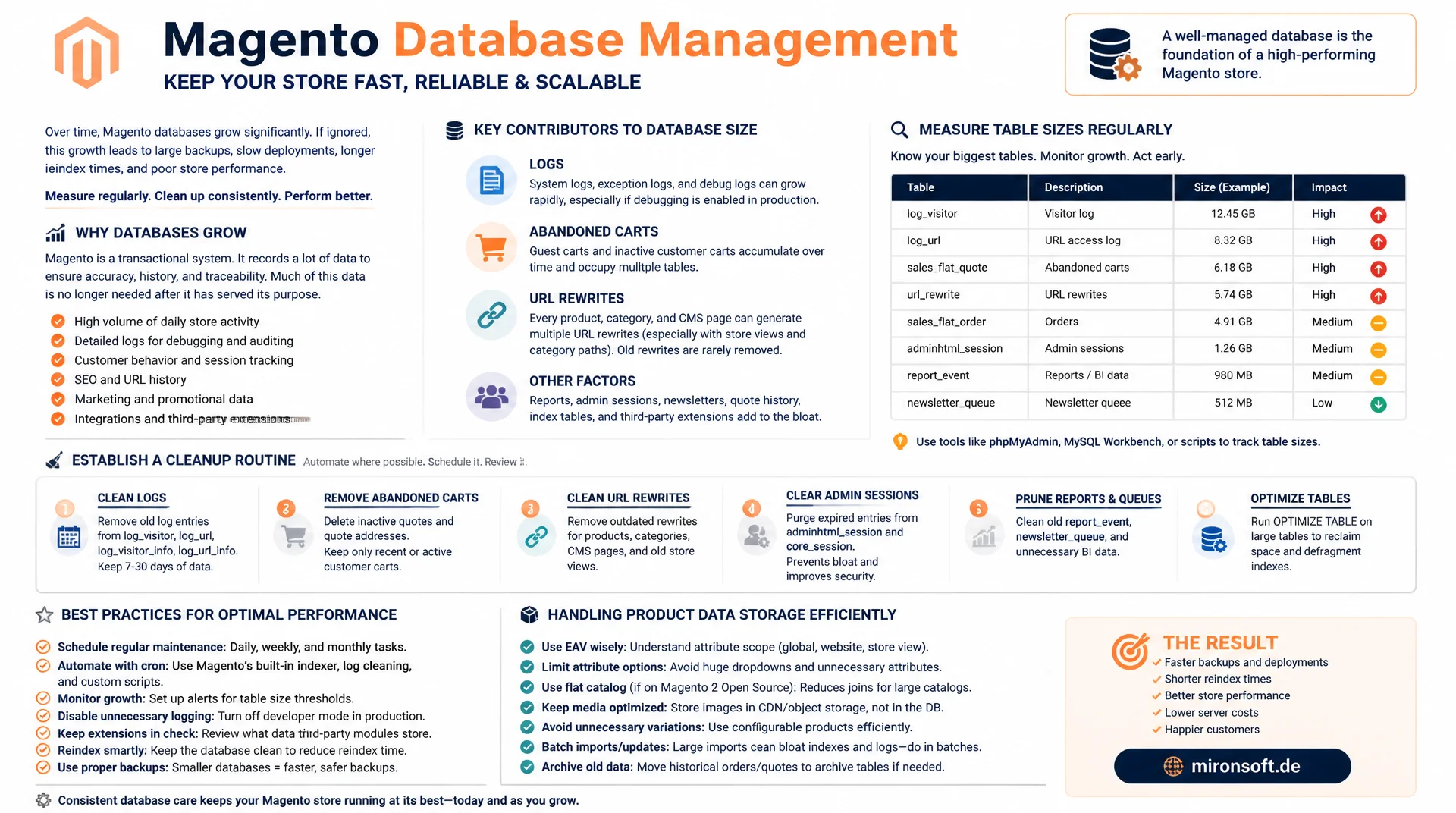
from abandoned carts to a growth control routine
Magento databases rarely grow because of product data, they grow because of logs, abandoned carts, and URL rewrites that nobody actively deletes. Once you know the usual suspects, measure table sizes regularly, and establish a repeatable cleanup routine, you prevent backups, deployments, and reindex runs from suffering under database growth.
Table of Contents
- 1. Why Magento databases grow unbounded
- 2. The usual suspects: logs, quotes, URL rewrites
- 3. quote and quote_item: abandoned carts
- 4. url_rewrite growth from category and product combinations
- 5. Monitoring routine with information_schema
- 6. Logging the growth trend over time
- 7. Automated cleanup routine via cron
- 8. Partitioning and archiving for large stores
- 9. Capacity planning: DB size, backup, and performance
- 10. Summary
- 11. FAQ
1. Why Magento databases grow unbounded
Database growth in a Magento store rarely follows the product catalog. A store with 10,000 products can still have a 40 gigabyte database, because transactional and logging tables keep accumulating new rows without any active intervention. Every cart, every visitor session, every generated URL, and every completed cron job leaves a trace in the database, and Magento only partially removes those traces automatically by default.
The problem with database growth is rarely technical, it is an operational oversight: the built-in cleanup mechanisms exist but are often not enabled or misconfigured. A store that has been in operation for five years and never had a cleanup routine accumulates millions of rows in tables that are irrelevant to actual business operations. Database growth does not just affect storage space, it slows down backups, reindex runs, and even simple admin queries, because MySQL has to search larger indexes on every query.
The first step against uncontrolled database growth is identifying the tables that structurally tend to grow, and distinguishing them from tables that grow proportionally to real business volume. Only the former are candidates for active cleanup, the latter (such as sales_order) should be preserved for legal and business reasons.
2. The usual suspects: logs, quotes, URL rewrites
Four table groups are responsible for most of the unplanned database growth in Magento stores. First, log and report tables like report_event, report_viewed_product_index, and customer_visitor, which write new rows on every page view or customer interaction, without a standard cleanup kicking in automatically unless explicitly enabled. Second, the quote tables (quote, quote_item, quote_address), which create rows for every cart, including every guest cart that never converts, and are never automatically deleted by default.
Third, url_rewrite, which needs a separate entry for every combination of product, category, and store view, and grows multiplicatively when SEO features like category based product URLs are enabled. Fourth, cron and session related tables like cron_schedule and, in older setups, database based session storage, which can produce millions of rows in a short time under high traffic. All four groups share the trait that their database growth is proportional to traffic, not to the product catalog, which is why a growing store with a stable assortment still shows accelerated growth in exactly these tables.
-- Quick overview: the usual suspects for uncontrolled database growth
SELECT table_name,
       table_rows,
       ROUND((data_length + index_length) / 1024 / 1024, 1) AS size_mb
FROM information_schema.TABLES
WHERE table_schema = 'magento'
  AND table_name IN (
    'report_event', 'report_viewed_product_index', 'customer_visitor',
    'quote', 'quote_item', 'url_rewrite', 'cron_schedule',
    'catalog_compare_item', 'sales_order_status_history'
  )
ORDER BY size_mb DESC;
3. quote and quote_item: abandoned carts
Every visit to an online store where a product gets added to the cart creates a row in quote with related rows in quote_item and quote_address. If the visitor abandons the purchase process, which is the vast majority of cases for guests, that cart remains as an orphaned row in the database. Magento does not delete expired quotes automatically by default, unless the quote cleanup cron job is explicitly configured and active.
On a store with high traffic and a low conversion rate, which is typical for most e-commerce stores, the quote table can reach several million rows within a few months, while only a fraction of them ever result in an order. This database growth is particularly insidious because quote_item_option and quote_address create additional rows for every single quote, so a cart with five items and configuration options can easily generate twenty or more rows across several tables.
-- Find abandoned quotes older than 90 days that never converted to an order
SELECT COUNT(*) AS abandoned_quotes
FROM quote
WHERE is_active = 0
  AND updated_at < DATE_SUB(NOW(), INTERVAL 90 DAY)
  AND entity_id NOT IN (SELECT quote_id FROM sales_order);

-- Estimate the row multiplier: quote_item + quote_address per quote
SELECT
  (SELECT COUNT(*) FROM quote) AS quotes,
  (SELECT COUNT(*) FROM quote_item) AS quote_items,
  (SELECT COUNT(*) FROM quote_address) AS quote_addresses;
4. url_rewrite growth from category and product combinations
The url_rewrite table does not grow linearly with the product count, it grows multiplicatively with the number of categories a product is visible in, combined with the number of store views. If "Use Categories Path for Product URLs" is enabled, Magento generates a separate URL for every product in every assigned category, which leads to significantly disproportionate database growth in url_rewrite for products with multiple category assignments.
On top of that, old, no longer active redirects (redirect_type not equal to 0) remain in the table on every URL change of a product or category, in order to preserve SEO value. Over the years, this accumulates thousands of redirect entries, many of which are never accessed again. A store with 50,000 products, three store views, and an average of two category assignments per product can accumulate 300,000 base entries plus an unknown share of historical redirects in url_rewrite from this alone.
-- Breakdown of url_rewrite by entity type and store, to see where growth concentrates
SELECT entity_type, store_id, COUNT(*) AS rows_count
FROM url_rewrite
GROUP BY entity_type, store_id
ORDER BY rows_count DESC;

-- Count stale redirects that are no longer referenced by any current entity URL
SELECT COUNT(*) AS old_redirects
FROM url_rewrite
WHERE redirect_type <> 0
  AND is_autogenerated = 0;
5. Monitoring routine with information_schema
Without regular measurement, database growth stays invisible until it becomes an acute problem, usually when a backup fails or a deployment window no longer suffices. The information_schema.TABLES table provides data_length, index_length, and an estimated row count via table_rows for every table, which is entirely sufficient for monthly monitoring. It matters to look not just at absolute size but at the growth rate between two measurement points, because a large but stable table is less critical than a small table with exponential growth.
A simple but effective monitoring routine runs weekly via cron, writes the ten largest tables into a dedicated log table, and alerts if a table grows beyond a defined threshold within a week. This identifies outliers, such as a misconfigured import that unintentionally writes millions of rows into catalog_product_entity_varchar, far earlier than a purely reactive look at the next backup problem. For total database size, a single sum query over data_length and index_length is enough and works well as a metric for capacity planning.
6. Logging the growth trend over time
A single snapshot of table sizes shows only the status quo, not the dynamics of database growth. A better approach is a dedicated, small log table into which a weekly cron job writes the current sizes of the most important tables. Over a period of several months, this produces a real growth curve that shows whether growth is linear, seasonal, or exponential, and which table contributes the largest share of total growth.
This historical view is especially valuable when evaluating whether a cleanup measure actually works. After enabling a quote cleanup cron job, the growth rate of quote should visibly decrease, which can only be demonstrated with historical measurements. Without this logging, any statement about the effectiveness of a cleanup measure remains pure assumption.
-- Own tracking table for growth history, populated weekly via cron
CREATE TABLE db_growth_log (
  log_id INT UNSIGNED NOT NULL AUTO_INCREMENT,
  table_name VARCHAR(64) NOT NULL,
  table_rows BIGINT UNSIGNED NOT NULL,
  size_mb DECIMAL(12,2) NOT NULL,
  measured_at DATE NOT NULL,
  PRIMARY KEY (log_id),
  KEY IDX_TABLE_DATE (table_name, measured_at)
) ENGINE=InnoDB;

-- Weekly insert job (called from a cron wrapper)
INSERT INTO db_growth_log (table_name, table_rows, size_mb, measured_at)
SELECT table_name, table_rows,
       ROUND((data_length + index_length) / 1024 / 1024, 2), CURDATE()
FROM information_schema.TABLES
WHERE table_schema = 'magento';
7. Automated cleanup routine via cron
Manual cleanup does not scale, which is why every insight about database growth needs to be turned into an automated routine. A practical structure is a dedicated maintenance script that runs regularly via crontab.xml or system cron and works in clearly separated steps: delete expired quotes, clean up old report events, remove orphaned URL rewrites, and update the growth log table.
It matters to run every delete operation in manageable batches (for example 5,000 rows per pass with a short pause in between), instead of running a single DELETE statement across millions of rows, which creates long locks and noticeably slows down the production database during execution. A maintenance window outside peak hours further reduces the risk of the cleanup routine colliding with regular store operations.
#!/usr/bin/env bash
# db-growth-cleanup.sh: batched cleanup routine, called from cron
set -euo pipefail

MAGENTO_ROOT="/var/www/html"
BATCH_SIZE=5000

cd "$MAGENTO_ROOT"

# Remove abandoned quotes older than 90 days that never became an order
bin/magento maintenance:allow-ips 127.0.0.1 >/dev/null 2>&1 || true

mysql magento -e "
  DELETE FROM quote
  WHERE is_active = 0
    AND updated_at < DATE_SUB(NOW(), INTERVAL 90 DAY)
    AND entity_id NOT IN (SELECT quote_id FROM sales_order)
  LIMIT ${BATCH_SIZE};
"

echo "[OK] cleanup batch of up to ${BATCH_SIZE} rows completed"
8. Partitioning and archiving for large stores
On very large stores with millions of orders, simply deleting old data is often not an option, because legal retention obligations forbid deleting order data. This is where controlling database growth without losing data helps: date based partitioning for tables like sales_order_status_history or report_event reduces the effective working set MySQL has to scan on queries, because the optimizer can skip old partitions entirely on time bounded queries.
For tables without legal retention obligations but with historical value for reporting, archiving into a separate database or a separate data warehouse system makes more sense than plain deletion. A monthly job moves rows older than a defined threshold from the production table into an archive table, keeping the production database small and performant while historical reporting remains possible.
9. Capacity planning: DB size, backup, and performance
Uncontrolled database growth has a direct relationship with backup times: a mysqldump over a 60 gigabyte database takes considerably longer than over a cleaned up 15 gigabyte database, and the same difference applies to restore time in an emergency. Growing backup windows eventually collide with maintenance windows or deployment schedules, which turns capacity planning into an operational, not just a technical, concern.
The InnoDB buffer pool sizing also depends directly on database size: once the active working set no longer fits into the buffer pool, disk I/O load increases noticeably, which shows up as slower admin queries and reindex runs. Regular capacity planning that matches database growth against available RAM, backup windows, and storage costs prevents these issues from becoming visible only during an acute outage.
Comparison: table types by growth behavior
| Table group | Growth driver | Cleanup strategy | Retention obligation |
|---|---|---|---|
| quote, quote_item | Abandoned carts | Batched DELETE after 90 days | None |
| report_event | Page views, interactions | Built-in log cleaning | None |
| url_rewrite | Category x product x store | Check and remove old redirects | SEO consideration needed |
| sales_order | Real orders | Do not delete, archive if needed | Legally required |
| cron_schedule | Completed cron jobs | history_cleanup_every | None |
Mironsoft
Magento database maintenance and capacity planning
Database growth getting out of control?
We build monitoring for your table sizes, set up automated cleanup routines, and plan capacity so backups and deployments reliably stay within their windows.
Growth audit
Identify the largest tables and growth drivers
Cleanup automation
Batched cleanup cron jobs without lock risk
Capacity planning
Plan backup windows, buffer pool, and storage ahead of time
10. Summary
Database growth in Magento stores rarely follows the product catalog, it is driven by transactional and logging tables like quote, report_event, and url_rewrite. Abandoned carts, unbounded event logging, and the multiplicative nature of URL rewrites with category paths enabled are the most common reasons databases end up considerably larger than actual business operations would require.
An effective countermeasure against uncontrolled database growth consists of three building blocks: regular monitoring via information_schema.TABLES with historical logging, batched cleanup routines via cron instead of one time manual interventions, and capacity planning that proactively matches backup times and buffer pool sizing to actual database size. Where legal retention obligations forbid deletion, partitioning and archiving replace plain deletion as the strategy against further growth.
Database Growth in Magento Stores: The Essentials at a Glance
Most common drivers
quote, report_event, customer_visitor, and url_rewrite grow proportionally to traffic, not to the catalog.
Monitoring
Write information_schema.TABLES weekly into a dedicated log table to spot trends.
Cleanup
Batched DELETE operations via cron, never a single deletion across millions of rows.
Legal limits
Archive sales_order and related tables instead of deleting them when retention rules apply.