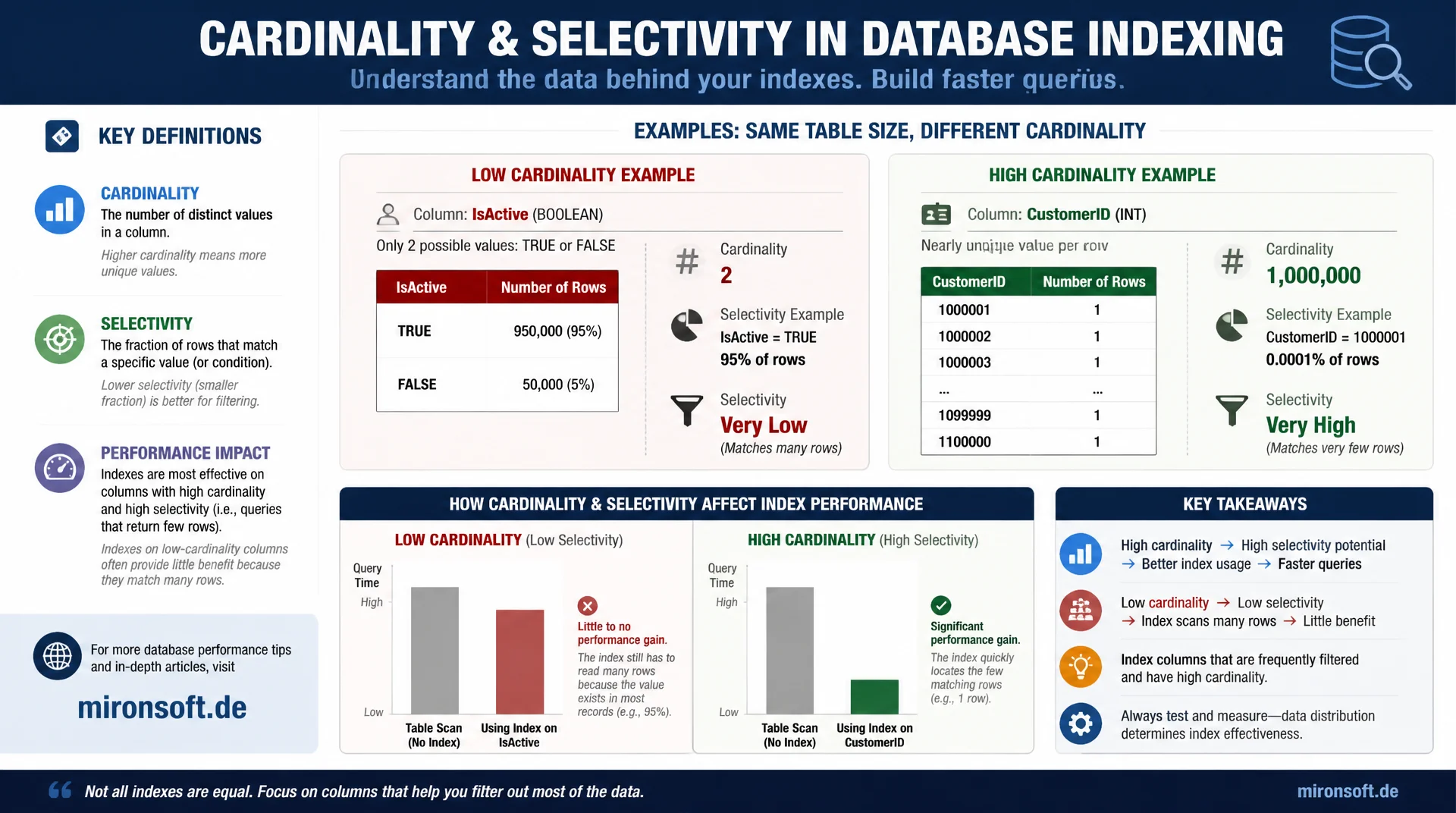
why some indexes are simply useless
An index on a column with only two possible values almost never delivers a noticeable speedup, no matter how large the table. Cardinality describes the number of distinct values in a column, selectivity its ratio to the row count, and together with the optimizer both figures decide whether an index gets used at all.
Table of contents
- 1. Cardinality and selectivity defined
- 2. How the optimizer uses cardinality statistics
- 3. The boolean column trap
- 4. Reading cardinality with SHOW INDEX
- 5. ANALYZE TABLE: refreshing statistics
- 6. How InnoDB estimates cardinality: sampling, not full counts
- 7. Correctly assessing selectivity in composite indexes
- 8. Persistent statistics and automatic refresh
- 9. Selectivity of different column types compared
- 10. Summary
- 11. FAQ
1. Cardinality and selectivity defined
Cardinality refers to the number of distinct values in a column or index. An email column in a customer table with a hundred thousand rows typically has a cardinality close to a hundred thousand, because almost every value is unique. A status column with only five possible states, on the other hand, has a cardinality of five, regardless of how many millions of rows the table contains.
Selectivity puts cardinality in relation to the total row count: cardinality divided by row count. A selectivity close to one means almost every value is unique, a selectivity close to zero means many rows share the same value. This metric matters because it directly predicts how many rows an index access returns on average when filtering by a specific value.
The relationship between both metrics and index usefulness is simple but regularly ignored in practice: an index is only effective when it meaningfully narrows the result set. An index on a low-selectivity column barely narrows anything, yet still incurs full maintenance overhead on every write. This exact misjudgment leads to indexes that exist but practically never deliver a noticeable performance gain.
2. How the optimizer uses cardinality statistics
The MySQL optimizer decides for every query, based on cost estimates, whether to use an index or whether a full table scan is cheaper. This cost estimate is heavily based on the estimated cardinality of the involved indexes, visible in information_schema.statistics as the CARDINALITY column. High cardinality signals to the optimizer that an index access returns only a few rows on average, which lowers the estimated cost and increases the likelihood the index gets chosen.
With low cardinality, the optimizer estimates that an index access returns many rows per value, often so many that the extra cost of the index access plus the subsequent table lookups becomes more expensive than a direct full table scan. This exactly explains why MySQL sometimes ignores an obviously present index: it is not a wrong decision but a correct cost calculation based on low selectivity.
SELECT
  index_name,
  column_name,
  cardinality
FROM information_schema.statistics
WHERE table_schema = 'shop' AND table_name = 'orders'
ORDER BY index_name, seq_in_index;

-- index_name          column_name    cardinality
-- PRIMARY              id             1048576
-- idx_status            status              5
-- idx_customer_id        customer_id    98211
3. The boolean column trap
The classic case of a useless index is an index on a boolean or flag column like is_active, is_deleted, or gender. With only two possible values, cardinality is at best two, and even with an uneven distribution, say ninety percent true and ten percent false, a query for the rarer value still returns ten percent of all rows. With a million rows, that is a hundred thousand hits, for which the optimizer can rightly prefer a full table scan over the index.
This does not mean an index on a boolean column is inherently pointless. As the leading column in a composite index, such a column can be quite useful when the distribution is strongly asymmetric and the rarer value is frequently queried, for example is_deleted = 1 in a predominantly active table. What always matters is the actual data distribution, not the theoretical number of possible values. A column with two values and a ninety-to-ten split can offer usable selectivity for the rarer rows, while a perfect fifty-to-fifty split remains practically useless for both values.
4. Reading cardinality with SHOW INDEX
The fastest way to check the current cardinality estimate of an index is SHOW INDEX FROM table. The Cardinality column shows the estimate used by the optimizer per index column. For a composite index, the cumulative cardinality typically rises with each additional column, because more columns together produce more distinct combinations, unless the additional columns correlate strongly with the preceding ones.
A practical test for whether a planned index makes sense: divide cardinality by the total row count of the table to get the average selectivity. Values below roughly five percent, meaning a selectivity smaller than 0.05, are a warning sign that the index returns too many rows per value on average to consistently beat a full table scan. This rule of thumb does not replace an EXPLAIN analysis of the concrete query, but it gives a quick first assessment.
SHOW INDEX FROM orders WHERE Key_name IN ('idx_status', 'idx_customer_id');

-- Key_name        Column_name    Cardinality
-- idx_status       status                  5
-- idx_customer_id  customer_id         98211

-- Table has 1,048,576 rows total
-- Selectivity of idx_status:      5 / 1048576 = 0.0000048 -- essentially useless
-- Selectivity of idx_customer_id: 98211 / 1048576 = 0.0937 -- reasonably useful
5. ANALYZE TABLE: refreshing statistics
The cardinality values in information_schema.statistics are not a live calculation but based on samples MySQL creates at certain points in time. After large data changes, such as a bulk import, a large-scale delete, or a migration, these values can become stale and no longer reflect the actual data distribution. The command ANALYZE TABLE table forces a recalculation of the statistics and should be run after every significant structural or volume change.
ANALYZE TABLE is a relatively lightweight operation that requires a brief metadata lock but does not rewrite the table in a blocking way. For very large tables, the read for the sample can still generate noticeable I/O, which is why running it outside peak load times is advisable. In automated deployment pipelines, an ANALYZE TABLE step right after larger data migrations is worthwhile to make sure the optimizer works with current numbers from the first production query onward.
6. How InnoDB estimates cardinality: sampling, not full counts
InnoDB does not calculate cardinality by counting all rows but through statistical samples from randomly selected index pages, controlled via the system variable innodb_stats_persistent_sample_pages, twenty pages by default. This sampling method is fast but imprecise, especially with strongly uneven data distributions or tables with few but very wide value clusters. A higher number of sample pages delivers more accurate estimates at the cost of longer ANALYZE TABLE runtimes.
For tables where optimizer decisions are repeatedly wrong despite statistics appearing current, increasing innodb_stats_persistent_sample_pages to a hundred or more can noticeably improve accuracy. This parameter can be set individually per table via STATS_SAMPLE_PAGES as a table option instead of applying globally to the whole server.
-- Increase sampling accuracy for a specific table with skewed data
ALTER TABLE orders STATS_SAMPLE_PAGES = 100;
ANALYZE TABLE orders;

-- Check the effective sample size in use
SELECT @@innodb_stats_persistent_sample_pages;

-- Verify improved cardinality estimate afterwards
SHOW INDEX FROM orders WHERE Key_name = 'idx_customer_id';
7. Correctly assessing selectivity in composite indexes
For composite indexes, the relevant selectivity is not that of the individual column but the cumulative selectivity of the used prefix. A composite index on (status, customer_id) has low selectivity for the first column alone, but the combination of status and customer_id together can reach very high selectivity, because combining both values narrows the result set significantly.
That means low selectivity of the leading column alone does not automatically disqualify a composite index, as long as subsequent columns significantly tighten the constraint. What still matters is that the leftmost prefix rule continues to apply: even an excellent cumulative selectivity is useless if the query does not filter on the leading column of the composite index at all.
-- status alone has low cardinality, but combined with customer_id
-- the composite index becomes highly selective
CREATE INDEX idx_status_customer ON orders (status, customer_id);

SELECT COUNT(DISTINCT status) AS status_cardinality,
       COUNT(DISTINCT CONCAT(status, '-', customer_id)) AS combined_cardinality,
       COUNT(*) AS total_rows
FROM orders;

-- status_cardinality: 5
-- combined_cardinality: 187402   -- cumulative prefix selectivity is high
-- total_rows: 1048576
8. Persistent statistics and automatic refresh
Since MySQL 5.6, persistent optimizer statistics are the default, controlled via innodb_stats_persistent. Unlike the earlier transient statistics, which were recalculated on every server restart, persistent statistics survive restarts and are only refreshed on explicit events like ANALYZE TABLE or larger automatic threshold changes. This produces more consistent query plans but requires deliberate maintenance of statistics after large data changes.
MySQL automatically refreshes statistics when more than ten percent of a table's rows have changed since the last analysis, controlled via innodb_stats_auto_recalc. For tables with very high write frequency, this automatic mechanism can, however, trigger too rarely or at inconvenient times, which is why explicit ANALYZE TABLE calls after critical batch operations remain advisable.
-- Check whether persistent statistics and auto-recalc are enabled
SHOW VARIABLES LIKE 'innodb_stats_persistent%';
SHOW VARIABLES LIKE 'innodb_stats_auto_recalc';

-- Inspect the last statistics update timestamp per table
SELECT table_name, stat_name, stat_value, last_update
FROM mysql.innodb_table_stats
WHERE database_name = 'shop' AND table_name = 'orders';
9. Selectivity of different column types compared
The overview below shows typical selectivity values for common column types and assesses whether an index on them makes sense.
| Column type | Typical cardinality | Selectivity | Index worthwhile |
|---|---|---|---|
| Email address | Nearly the row count | Very high | Yes, almost always |
| Order status (5 values) | 5 | Low | Rarely alone, often yes in a composite |
| Boolean flag, 50/50 split | 2 | Very low | Almost never |
| Boolean flag, 95/5 split | 2 | Conditionally high for the rare value | Yes for the rarer value |
| Foreign key (customer_id) | Tens of thousands | High | Yes, almost always |
This table does not replace a concrete measurement with SHOW INDEX for your own database, but it shows the fundamental pattern: the more evenly distributed the data across few values, the lower the selectivity, and the less likely a standalone index on exactly that column delivers a noticeable benefit.
Mironsoft
Index audits, statistics maintenance, and MySQL performance consulting
Indexes nobody needs anymore, but every write still maintains?
We check the cardinality and selectivity of your existing indexes, identify ineffective indexes on boolean and low-cardinality columns, and set up a reliable ANALYZE TABLE routine.
Selectivity audit
Check every index for cardinality and actual usefulness
Statistics routine
Automate ANALYZE TABLE after migrations and batch jobs
Index cleanup
Remove ineffective indexes and reduce write load
10. Summary
Cardinality describes the number of distinct values in a column, selectivity its ratio to the row count. Both metrics together determine how the optimizer evaluates the cost of an index access compared to a full table scan. Low selectivity, typical of boolean columns or status fields with few values, frequently makes a standalone index ineffective, even with millions of rows in the table.
SHOW INDEX shows the current cardinality estimate, ANALYZE TABLE refreshes stale statistics after larger data changes. For composite indexes, the cumulative selectivity of the used prefix counts, not the selectivity of a single column alone. Anyone who regularly checks these metrics avoids both useless indexes with unnecessary write load and missing indexes where high selectivity would actually make a difference.
Cardinality and selectivity: the essentials
Definitions
Cardinality counts distinct values, selectivity relates them to the row count.
Boolean trap
Indexes on evenly distributed two-value columns almost never provide a measurable benefit.
Maintain statistics
Run ANALYZE TABLE after large data changes to correct stale cardinality values.
Composite indexes
The cumulative selectivity of the used prefix counts, not the single leading column alone.