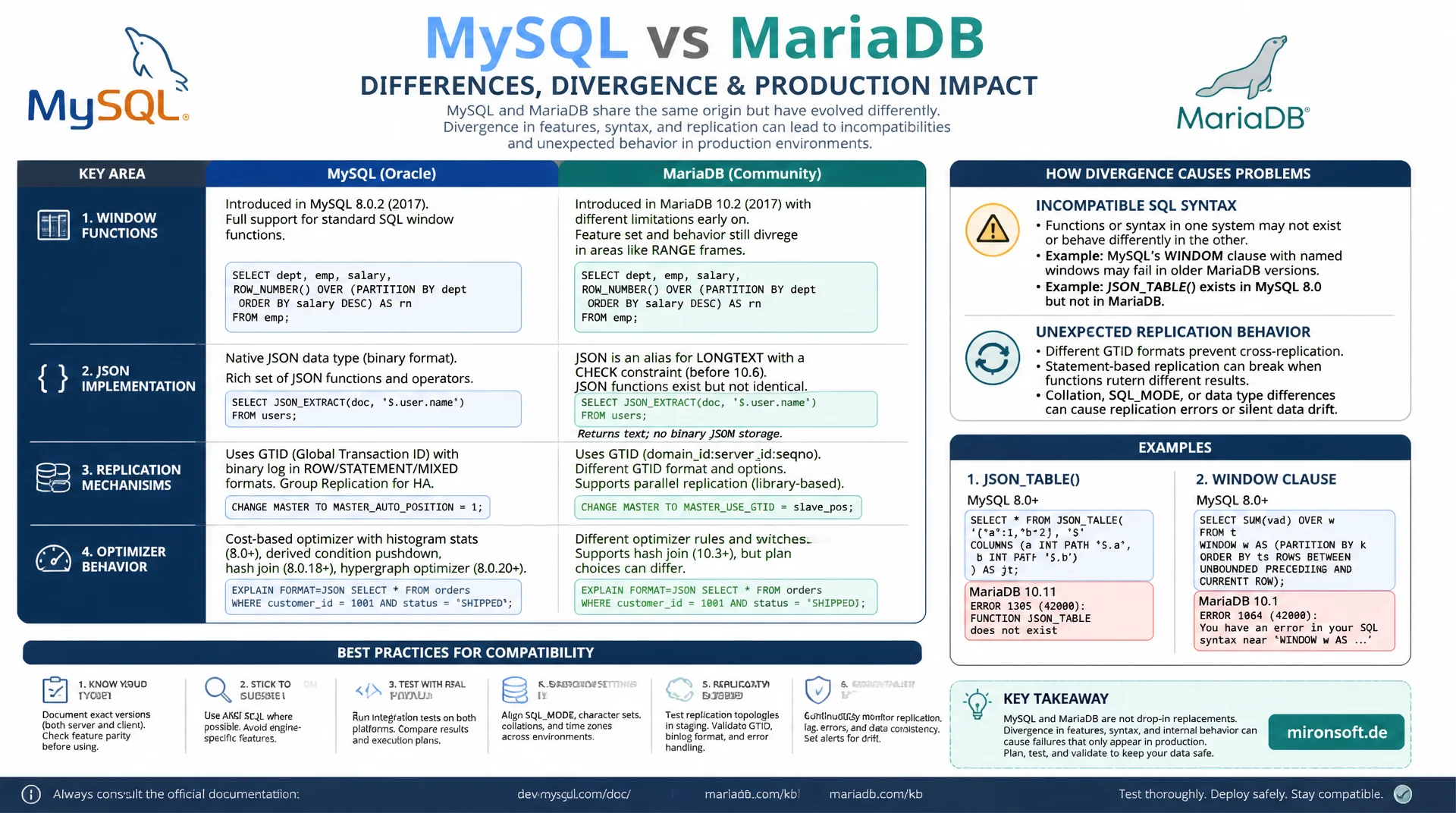
two forks, two roadmaps, one decision
MySQL and MariaDB are often treated as interchangeable because MariaDB started as a fork of MySQL. For years now, window functions, the JSON implementation, replication mechanisms and optimizer behavior have been visibly drifting apart, and anyone who makes the wrong assumptions during deployment ends up facing incompatible SQL syntax or unexpected replication behavior in production.
Table of Contents
- 1. The fork history: why MariaDB exists at all
- 2. Window functions and optimizer differences
- 3. JSON: native type vs. alias solution
- 4. Replication: GTID, parallelism and failover
- 5. Storage engines: InnoDB, Aria and the MariaDB extras
- 6. Everyday SQL compatibility traps
- 7. Drivers, tools and ecosystem compatibility
- 8. Which database for a new Magento project
- 9. MySQL 8 and MariaDB compared
- 10. Summary
- 11. FAQ
1. The fork history: why MariaDB exists at all
MariaDB emerged in 2009 as a fork of MySQL, initiated by Michael Widenius, one of the original MySQL founders, shortly after Sun Microsystems acquired MySQL AB. The trigger was concern that a large corporate owner, by then foreseeably Oracle, might restrict the open development of MySQL. MariaDB was meant to remain a fully open source, community-driven alternative, independent of a single commercial owner.
In its early years, MariaDB was practically a drop-in replacement for MySQL, with an identical data format and nearly identical SQL syntax. That tight coupling has loosened considerably since then. Both projects now develop their own features on their own roadmap, and what was once trivial interchangeability has given way to a situation where migrations in either direction require careful review rather than being a pure binary swap.
For operators this means: the choice between MySQL and MariaDB is today a genuine architecture decision with long-term consequences, no longer purely a licensing or distribution question. Anyone setting up a new project should know the actual technical differences rather than relying on the historical compatibility from the early years.
2. Window functions and optimizer differences
Window functions like ROW_NUMBER(), RANK() and LAG()/LEAD() were introduced in MySQL with version 8.0, in MariaDB already with version 10.2, so earlier. Syntactically, both implementations are now largely compatible with the SQL standard, so most window function queries run unchanged on both systems. Differences show up more in edge cases and in optimizer handling of complex window functions with multiple partitions.
The optimizers themselves diverge more clearly: MariaDB, with its optimizer trace and its own histogram implementations, brings different heuristics for execution plans than MySQL 8, whose cost-based optimizer was fundamentally overhauled starting with version 8.0. In practice, this means identical SQL code can produce different execution plans and thus different performance characteristics on both systems, especially with complex JOINs across multiple tables and subqueries.
-- Window functions: syntax works on both MySQL 8 and MariaDB 10.2+
SELECT
  customer_id,
  order_date,
  total_amount,
  ROW_NUMBER() OVER (PARTITION BY customer_id ORDER BY order_date DESC) AS rn,
  SUM(total_amount) OVER (PARTITION BY customer_id) AS customer_total
FROM orders;

-- Compare execution plans between engines with EXPLAIN
-- MySQL 8: cost-based optimizer with histogram statistics
EXPLAIN FORMAT=JSON
SELECT * FROM orders o JOIN customer c ON o.customer_id = c.id
WHERE c.region = 'DE';

-- MariaDB: optimizer trace for deeper plan analysis
SET optimizer_trace = 'enabled=on';
SELECT * FROM orders o JOIN customer c ON o.customer_id = c.id
WHERE c.region = 'DE';
SELECT * FROM information_schema.OPTIMIZER_TRACE;
3. JSON: native type vs. alias solution
This is one of the biggest practical differences between the two systems. MySQL 8 has a real, native JSON data type with binary storage, syntax validation on write, and dedicated functions like JSON_TABLE. MariaDB, on the other hand, implements JSON for licensing reasons only as an alias for LONGTEXT with a CHECK constraint that validates the JSON syntax, but offers no binary storage or special indexing support.
This has direct consequences: functions like JSON_EXTRACT work syntactically similarly in MariaDB, but without the performance benefits of the binary format from MySQL. JSON_TABLE, a central tool for relational queries over JSON arrays, was completely missing in MariaDB until version 10.6 and was only added later with a limited feature set. Anyone planning an application with heavy JSON usage, for example for product attributes or event payloads, should definitely take this difference into account before choosing a database.
-- MySQL 8: native binary JSON type
CREATE TABLE product_attribute_mysql (
  id BIGINT UNSIGNED NOT NULL AUTO_INCREMENT,
  attributes JSON NOT NULL,
  PRIMARY KEY (id)
) ENGINE=InnoDB;

-- MariaDB: JSON is a LONGTEXT alias with a validating CHECK constraint
CREATE TABLE product_attribute_mariadb (
  id BIGINT UNSIGNED NOT NULL AUTO_INCREMENT,
  attributes LONGTEXT CHECK (JSON_VALID(attributes)),
  PRIMARY KEY (id)
) ENGINE=InnoDB;

-- JSON_EXTRACT works on both, but MariaDB re-parses text on every access
SELECT id, JSON_EXTRACT(attributes, '$.color') FROM product_attribute_mariadb;
4. Replication: GTID, parallelism and failover
Both systems support Global Transaction Identifiers for replication, but the implementations are mutually incompatible. MySQL GTIDs and MariaDB GTIDs follow different internal formats, meaning a direct, mixed replication setup between a MySQL and a MariaDB instance does not work out of the box. Migrations between the two systems therefore usually require a logical export and reimport instead of a native replication connection.
With parallel replication, meaning the simultaneous application of multiple transactions on a replica server, both projects pursue different strategies. MariaDB offers optimistic parallel replication since version 10.0, a mechanism that parallelizes transactions more aggressively and detects conflicts after the fact, while MySQL 8 uses a more conservative, write-set-based approach. In practice this can lead to noticeably different replication lag under very write-heavy workloads, which should be factored into capacity planning for replica servers.
5. Storage engines: InnoDB, Aria and the MariaDB extras
InnoDB is the default engine in both systems but is developed independently, with MariaDB usually starting from an older InnoDB codebase and merging its own patches. MariaDB also brings its own storage engines that do not exist in MySQL: Aria as a transaction-safe alternative to MyISAM for system tables, ColumnStore for analytical workloads, and connectors like Spider for distributed tables across multiple servers.
These additional engines are a real advantage for specialized use cases, but they play no relevant role for a typical Magento or shop operation, which relies almost exclusively on InnoDB. Anyone without an explicit use case for Aria, ColumnStore or Spider should not weigh this difference as a primary criterion for database choice, since it barely comes into play day to day.
6. Everyday SQL compatibility traps
Beyond the major architectural differences, there is a range of smaller but tricky SQL incompatibilities. MySQL 8 introduced utf8mb4_0900_ai_ci as a new default collation, which does not exist in MariaDB; MariaDB stays with utf8mb4_general_ci or utf8mb4_unicode_ci as common defaults. A dump from MySQL 8 with this collation cannot be imported into MariaDB without adjustment, which regularly causes errors in migrations when these details are overlooked.
There are also detail differences around CHECK constraints, common table expressions and the handling of INFORMATION_SCHEMA metadata, which are rarely documented but relevant in practice. Another example: MySQL 8 introduced roles as an independent privilege concept, MariaDB also supports roles but with differing syntax for assignment and inheritance. Anyone maintaining scripts or migration tools for both systems in parallel needs to explicitly test these details rather than relying on surface-level SQL compatibility.
-- MySQL 8 default collation, not available in MariaDB
CREATE DATABASE shop_mysql
  CHARACTER SET utf8mb4 COLLATE utf8mb4_0900_ai_ci;

-- MariaDB equivalent default
CREATE DATABASE shop_mariadb
  CHARACTER SET utf8mb4 COLLATE utf8mb4_general_ci;

-- Roles: similar concept, different syntax details
-- MySQL 8
CREATE ROLE app_readonly;
GRANT SELECT ON shop.* TO app_readonly;
GRANT app_readonly TO 'app_user'@'%';

-- MariaDB (syntax largely compatible, but privilege inheritance
-- and default role activation behave differently)
CREATE ROLE app_readonly;
GRANT SELECT ON shop.* TO app_readonly;
GRANT app_readonly TO app_user;
SET DEFAULT ROLE app_readonly FOR app_user;
7. Drivers, tools and ecosystem compatibility
Most common database drivers, including PDO_MySQL for PHP, work with both systems largely without issue, because they build on the shared MySQL protocol. Differences show up more in administrative tools: Percona tools like pt-online-schema-change support both systems, but with somewhat different maturity, while MariaDB's own tools like mariabackup are not meant for MySQL, and Percona XtraBackup, conversely, is primarily optimized for MySQL, even though it generally supports MariaDB as well.
Managed database offerings from major cloud providers also differ in their support: some offer both systems in parallel, others only one, which can affect a later migration into a cloud environment. Before making a long-term decision, it is therefore worth looking at the concretely planned hosting and backup infrastructure, not just the raw database engine.
8. Which database for a new Magento project
Magento officially supports both MySQL 8 and certain MariaDB versions, which at first glance looks like a free choice. In practice, however, MySQL 8 is usually the lower-risk choice for new Magento projects, because Magento itself is tested intensively against MySQL, the vast majority of production installations worldwide run on MySQL, and community support resources predominantly address MySQL-specific issues.
Another practical point: Magento uses JSON columns in several places for configuration data and EAV-related structures. The missing JSON_TABLE support and the alias nature of JSON in older MariaDB versions can lead to subtle performance differences here. For existing installations already running stably on MariaDB, a switch is not mandatory, but for a completely new project without an existing MariaDB dependency, MySQL 8 is the more pragmatic default choice.
9. MySQL 8 and MariaDB compared
The following overview summarizes the most important differences relevant to the operational decision.
| Criterion | MySQL 8 | MariaDB |
|---|---|---|
| JSON type | Native, binary, JSON_TABLE | LONGTEXT alias, limited |
| Default collation | utf8mb4_0900_ai_ci | utf8mb4_general_ci |
| Extra storage engines | No | Aria, ColumnStore, Spider |
| Magento test coverage | Primary test target | Only certain versions officially |
| License | GPL, Oracle-led | GPL, community-led |
No system is clearly superior across every row, the table mainly shows that the choice depends on your concrete priorities: JSON-heavy applications and maximum Magento compatibility favor MySQL 8, specialized storage engine needs and a preference for community-led licensing favor MariaDB.
10. Summary
MySQL and MariaDB started out as nearly identical systems, but have since diverged in several technically relevant points: the JSON data type, the optimizer architecture, replication behavior, and individual SQL details like collations and role syntax. The once trivial interchangeability no longer exists today; migrations between the two systems require genuine review rather than a pure binary swap.
For a new Magento project, MySQL 8 is generally the lower-risk choice, due to broader test coverage, the native JSON type, and wider adoption in production. Existing, stably running MariaDB installations do not necessarily need to be migrated, but new projects should make the decision deliberately, rather than treating it as a pure availability question of the hosting environment.
MySQL 8 vs. MariaDB: The Essentials at a Glance
Know the JSON difference
MySQL 8 has a real JSON type with JSON_TABLE, MariaDB uses a LONGTEXT alias with a CHECK constraint.
No mixed replication
GTID formats are incompatible, migrations need a logical export instead of a native replication link.
Check collation
utf8mb4_0900_ai_ci only exists in MySQL 8, dumps must be adjusted for migration.
For Magento: MySQL 8
Broader test coverage and native JSON support make MySQL 8 the pragmatic default for new projects.