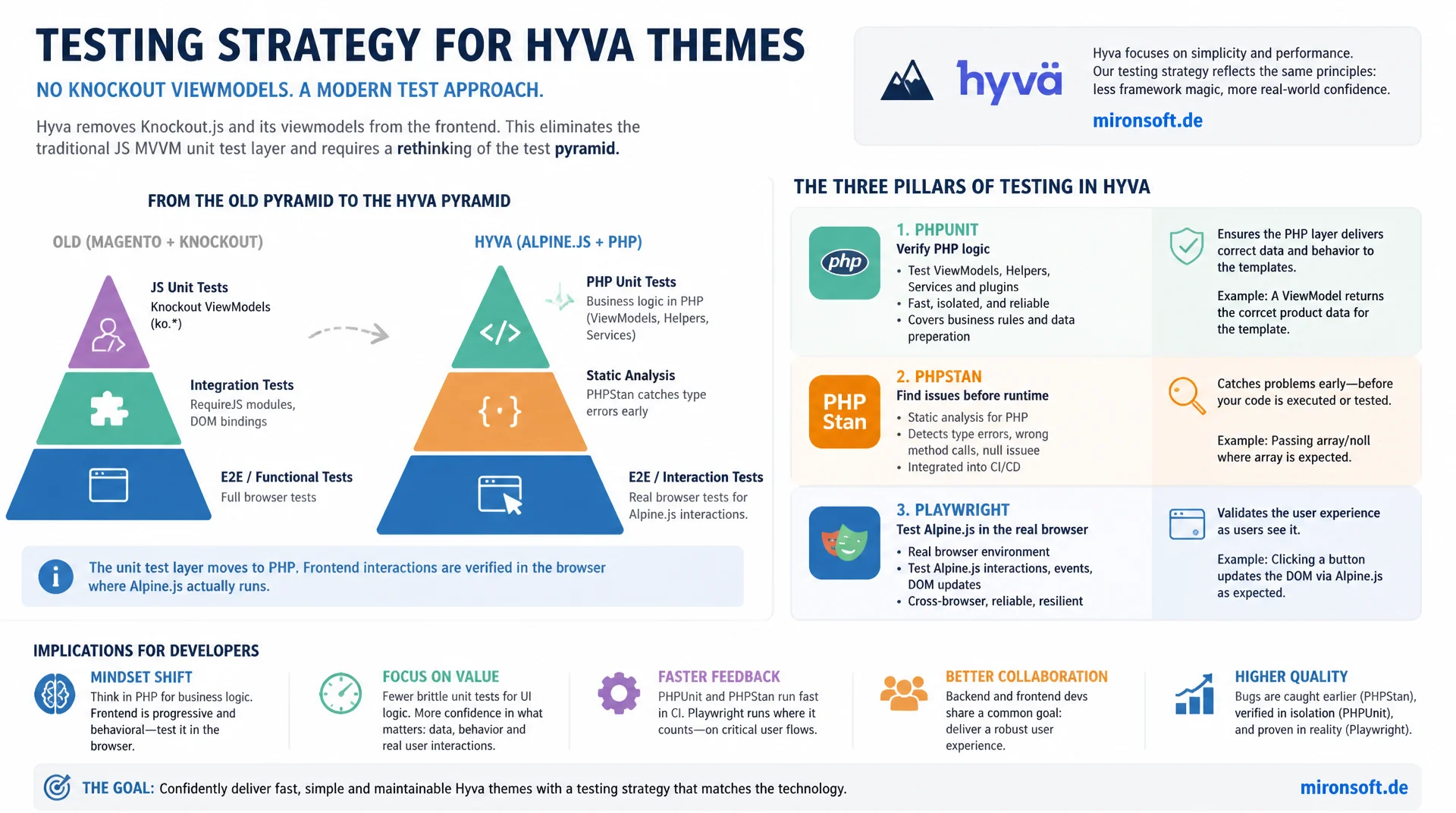
from PHPUnit to Playwright E2E
Hyva has no Knockout viewmodels and therefore no classic JavaScript unit test layer the way Luma themes had it. Building a testing strategy for Hyva themes means rethinking the test pyramid itself: PHPUnit checks the PHP logic behind the ViewModels, PHPStan catches type errors before a single test even runs, and Playwright covers exactly the Alpine.js interaction in a real browser for which Hyva simply has no meaningful unit test layer.
Table of Contents
- 1. The Test Pyramid in the Hyva Context
- 2. PHPUnit for ViewModels
- 3. PHPStan as the Fast First Gate
- 4. E2E Testing with Playwright for Alpine.js Flows
- 5. Visual Regression Testing for Tailwind
- 6. CSP Regression Testing
- 7. Checking Accessibility with axe-core
- 8. CI Pipeline Structure
- 9. Cost vs. Benefit: What to Test When
- 10. Summary
- 11. FAQ
1. The Test Pyramid in the Hyva Context
The classic test pyramid rests on a wide base of fast unit tests, a narrower layer of integration tests, and a thin tip of slow end-to-end tests. In a Luma theme built on Knockout.js, that base would also include a JavaScript unit test layer for viewmodels, whose observable chains and subscriptions could be tested in isolation. Exactly that layer is missing from a testing strategy for Hyva themes, because Hyva deliberately drops Knockout viewmodels in favor of server-side PHP ViewModels that hand fully computed values straight to the phtml template and, from there, into lean Alpine.js components.
That shifts the entire pyramid. The actual computation logic, price formatting, visibility flags, badge text, discount logic, lives in PHP classes and can be fully unit-tested with PHPUnit, without a browser and without a DOM. Anyone doing Hyva theme testing should treat this PHP layer as the real unit test base, not the thin Alpine.js snippets in the template, which rarely contain logic of their own. In Hyva, Alpine almost exclusively manages UI state: opening a dropdown, toggling a class, reading a value off the DOM. Testing these interactions in isolation makes little sense, because their entire value only emerges together with real HTML, real CSS, and a real browser event loop.
The consequence for every Hyva theme test pyramid: PHPStan and PHPUnit form a wide, fast base on the PHP side, while end-to-end tests with Playwright take up a noticeably larger share of the pyramid than is common in frameworks with their own JS unit test culture. On top of that sit two specialized layers, visual regression for Tailwind layouts and CSP regression testing for Hyva's strict content security policy, neither of which can be meaningfully implemented without a real browser.
2. PHPUnit for ViewModels
Anyone building a testing strategy for Hyva themes should point PHPUnit consistently at the ViewModels that deliver data to phtml templates via ArgumentInterface. These are exactly the classes that decide whether a discount badge is shown, how a price is formatted, or whether a shipping hint appears, all values that flow directly into conditions and output in the template. A bug in such a calculation is often hard to spot in the frontend, while a PHPUnit test surfaces it in milliseconds, long before a Playwright run even starts.
Constructor property promotion in PHP 8.4 keeps ViewModels and their tests equally compact: dependencies like a PricingHelper or a StoreManagerInterface are injected as readonly properties, swapped for mock objects in the test, and wired up once in setUp(). The important part is testing every public method of the ViewModel with several data points, not just the happy path: an empty cart, the free-shipping edge value, negative discounts, missing translations. Anyone doing Hyva theme testing without covering these edge cases effectively moves the debugging into production.
<?php

declare(strict_types=1);

namespace Mironsoft\Testing\ViewModel;

use Magento\Framework\Pricing\Helper\Data as PricingHelper;
use Magento\Framework\View\Element\Block\ArgumentInterface;

/**
 * Computes the free-shipping hint and formatted subtotal for the mini-cart template.
 */
final class MiniCartSummary implements ArgumentInterface
{
    private const FREE_SHIPPING_THRESHOLD = 49.0;

    /**
     * @param PricingHelper $pricingHelper Formats amounts using the store currency
     */
    public function __construct(
        private readonly PricingHelper $pricingHelper
    ) {
    }

    /**
     * Decides whether the free-shipping hint should be rendered.
     *
     * @param float $subtotal Cart subtotal excluding shipping
     * @return bool True if the subtotal is below the free-shipping threshold
     */
    public function shouldShowFreeShippingHint(float $subtotal): bool
    {
        return $subtotal > 0.0 && $subtotal < self::FREE_SHIPPING_THRESHOLD;
    }

    /**
     * Formats the missing amount until free shipping is reached.
     *
     * @param float $subtotal Cart subtotal excluding shipping
     * @return string Formatted currency amount, empty string if threshold already reached
     */
    public function formatMissingAmount(float $subtotal): string
    {
        $missing = self::FREE_SHIPPING_THRESHOLD - $subtotal;

        return $missing > 0.0 ? $this->pricingHelper->currency($missing, true, false) : '';
    }
}
<?php

declare(strict_types=1);

namespace Mironsoft\Testing\Test\Unit\ViewModel;

use Magento\Framework\Pricing\Helper\Data as PricingHelper;
use Mironsoft\Testing\ViewModel\MiniCartSummary;
use PHPUnit\Framework\MockObject\MockObject;
use PHPUnit\Framework\TestCase;

/**
 * Unit tests for MiniCartSummary, covers the computed values consumed by minicart.phtml.
 */
final class MiniCartSummaryTest extends TestCase
{
    private PricingHelper&MockObject $pricingHelper;
    private MiniCartSummary $viewModel;

    /**
     * Builds the ViewModel fixture with a mocked pricing dependency.
     *
     * @return void
     */
    protected function setUp(): void
    {
        $this->pricingHelper = $this->createMock(PricingHelper::class);
        $this->viewModel = new MiniCartSummary($this->pricingHelper);
    }

    /**
     * @dataProvider subtotalProvider
     */
    public function testShouldShowFreeShippingHint(float $subtotal, bool $expected): void
    {
        self::assertSame($expected, $this->viewModel->shouldShowFreeShippingHint($subtotal));
    }

    /**
     * Provides edge cases for the free-shipping threshold at 49.00.
     *
     * @return array<string, array{0: float, 1: bool}>
     */
    public static function subtotalProvider(): array
    {
        return [
            'empty cart' => [0.0, false],
            'just below threshold' => [48.99, true],
            'exactly at threshold' => [49.0, false],
            'above threshold' => [65.0, false],
        ];
    }

    public function testFormatMissingAmountReturnsEmptyStringAboveThreshold(): void
    {
        $this->pricingHelper->expects(self::never())->method('currency');

        self::assertSame('', $this->viewModel->formatMissingAmount(60.0));
    }
}
3. PHPStan as the Fast First Gate
Before a single PHPUnit test runs, every testing strategy for Hyva themes should have a PHPStan pass at level 5 or higher in front of it. Static analysis catches an entire class of errors that PHPUnit would only reveal through actual test cases: wrongly typed parameters, calls to methods that do not even exist on the interface, or a ViewModel that returns an array where the template expects an object. The run takes seconds instead of minutes, making it by far the cheapest gate in the whole pipeline.
ViewModels benefit from this especially, because they are consumed directly in phtml templates without the interface enforcing type checks, exactly the place where PHP no longer enforces strict typing. A call like $viewModel->getPrice() in a template always compiles, even after the method has long since been renamed, the bug then only shows up as empty output in the browser. Running bin/analyse app/code/Mironsoft/Testing --level=5 catches exactly that at commit time. Known Magento interface gaps, such as StoreManagerInterface::getStores() with incorrect stubs, are resolved project-wide with typed @var annotations instead of assert(), and genuine interface gaps such as PageInterface::getData() get a documented @phpstan-ignore-next-line.
4. E2E Testing with Playwright for Alpine.js Flows
Alpine.js directives such as x-data, x-show, x-model and x-transition only unfold their real behavior inside the DOM of an actual browser, with CSS transitions, event bubbling, and multiple components interacting on the same page. An isolated JavaScript unit test outside the browser can, at best, check the raw store logic, not whether clicking "Add to Cart" actually updates the mini-cart icon, triggers an animation, and sets focus correctly. That is exactly why Playwright is the central building block of any testing strategy for Hyva themes: it renders the page in a real Chromium, Firefox, or WebKit context and interacts with it like a user would.
The relevant flows for a Hyva theme are manageable in number but critical: cart interactions in the mini-cart, the full checkout funnel across multiple steps, live search with autocomplete suggestions, and layered navigation on category pages including URL synchronization. For stable selectors, the project convention is to mark every interactive element in the phtml template with a data-testid attribute, independent of CSS classes that can change with every Tailwind refactor.
<?php
/** @var \Hyva\Theme\Model\ViewModelRegistry $viewModels */
/** @var \Hyva\Theme\ViewModel\HyvaCsp $hyvaCsp */
$hyvaCsp = $viewModels->require(\Hyva\Theme\ViewModel\HyvaCsp::class);
?>
<!-- File: templates/minicart/minicart.phtml -->
<div x-data="miniCart()" class="relative" data-testid="minicart-root">
    <button
        type="button"
        x-on:click="toggle()"
        class="relative p-2"
        data-testid="minicart-toggle"
    >
        <span class="sr-only">Open cart</span>
        <span
            x-show="itemCount > 0"
            x-text="itemCount"
            class="absolute -top-1 -right-1 bg-orange-600 text-white text-xs rounded-full px-1.5"
            data-testid="minicart-count"
        ></span>
    </button>

    <div
        x-show="open"
        x-transition
        x-cloak
        class="absolute right-0 mt-2 w-80 bg-white rounded-xl shadow-xl"
        data-testid="minicart-drawer"
    >
        <template x-for="item in items" x-bind:key="item.sku">
            <div class="flex justify-between p-3" data-testid="minicart-line-item">
                <span x-text="item.name"></span>
                <span x-text="item.qty"></span>
            </div>
        </template>
    </div>
</div>

<script>
    // Registers the Alpine component factory for the mini-cart drawer
    function miniCart() {
        return {
            open: false,
            itemCount: 0,
            items: [],
            toggle() { this.open = !this.open; },
        };
    }
</script>
<?php /* Mandatory after every inline script block in a Hyva theme */ ?>
<?= $hyvaCsp->registerInlineScript() ?>
// File: tests/e2e/minicart.spec.ts
import { test, expect } from '@playwright/test';

test.describe('Mini-cart Alpine.js flow', () => {
  test('adds a product to the mini-cart and updates the badge count', async ({ page }) => {
    await page.goto('/catalog/product/view/id/42');

    // Trigger the add-to-cart action rendered by the Hyva product template
    await page.getByTestId('add-to-cart').click();

    // Alpine reactivity should reflect the new state without a page reload
    await expect(page.getByTestId('minicart-count')).toHaveText('1');

    // Open the drawer and verify the line item rendered from the store
    await page.getByTestId('minicart-toggle').click();
    await expect(page.getByTestId('minicart-drawer')).toBeVisible();
    await expect(page.getByTestId('minicart-line-item')).toContainText('Product Name');
  });

  test('removes the last item and hides the badge again', async ({ page }) => {
    await page.goto('/checkout/cart');

    await page.getByTestId('cart-remove-item').first().click();

    await expect(page.getByTestId('minicart-count')).toBeHidden();
  });
});
5. Visual Regression Testing for Tailwind
Tailwind CSS assembles layout from many small, combined utility classes instead of a handful of semantic stylesheet rules. That is exactly what makes Tailwind productive, but it also makes it fragile against silent failures: a wrongly applied class, an accidentally removed flex container, or a changed purge configuration throws no error, no exception, no failing test, the layout just breaks quietly. Without visual regression tests, that kind of issue is often only noticed once a customer sends a screenshot of a shifted product tile.
Playwright's built-in screenshot assertions, or a specialized service like Percy, solve this by storing baseline screenshots across multiple breakpoints for critical pages, product detail page, category page, cart drawer, checkout steps, and comparing them pixel by pixel on every pull request. For a solid Hyva theme test pyramid, this layer belongs right above the functional Playwright tests, using the same test data and fixtures but a different kind of assertion: not "is the text visible", but "does the page still look exactly like it did before".
6. CSP Regression Testing
Hyva's content security policy blocks every inline script without a valid nonce and every request to a domain that has not been explicitly allowed. The project rule of calling $hyvaCsp->registerInlineScript() after every <script> block is easy to follow, but just as easy to forget, especially when a developer is under time pressure and drops a new Alpine snippet into an existing template. The tricky part: in development mode with CSP running in report-only mode, a missing call often goes unnoticed, because the browser executes the script anyway and only logs the violation to the console. In production with an enforced CSP, the same spot then fails silently.
A testing strategy for Hyva themes therefore has to actively look for CSP violations rather than rely on someone noticing by chance. Playwright lets you capture every console message during a full test run via page.on('console', ...) and assert at the end that no message contains the string "Content Security Policy" or "Refused to execute inline script". A second check inspects the rendered HTML for valid nonce attributes on every inline script tag, a missing nonce is a reliable signal that registerInlineScript() was forgotten at that spot, long before a customer reports a broken cookie consent feature.
7. Checking Accessibility with axe-core
Every change to a Hyva theme inevitably touches markup and semantics, a new Alpine attribute, a restructured div, a missing aria-label on an icon button. Accessibility is therefore not a separate audit at the end of a project, it belongs as an automated check directly inside the existing Playwright suite. axe-core scans the rendered page for WCAG violations, missing contrast, missing form labels, incorrect heading hierarchies, and can be hooked directly into any existing E2E test via @axe-core/playwright, without needing a separate tool or a second test run.
For a consistent Hyva theme testing practice, it is worth running the axe-core check not only on static pages but specifically after Alpine interactions, for example after a modal has opened or the mini-cart drawer has become visible. Dynamically revealed content in particular tends to forget role and aria-* attributes, precisely because it was invisible in the original markup and simply got overlooked in the initial manual review.
// File: tests/e2e/accessibility.spec.ts
import { test, expect } from '@playwright/test';
import AxeBuilder from '@axe-core/playwright';

test.describe('Accessibility regression via axe-core', () => {
  test('category page has no WCAG violations after applying a filter', async ({ page }) => {
    await page.goto('/catalog/category/view/id/12');

    // Trigger the Alpine-driven layered navigation flow before scanning
    await page.getByTestId('filter-toggle').click();
    await page.getByTestId('filter-option-color-blue').click();
    await page.waitForLoadState('networkidle');

    const results = await new AxeBuilder({ page })
      .withTags(['wcag2a', 'wcag2aa'])
      .analyze();

    expect(results.violations).toEqual([]);
  });
});
8. CI Pipeline Structure
The order of stages in the CI pipeline determines the feedback speed of a testing strategy for Hyva themes. The principle: the cheapest check runs first and blocks every following stage on failure, so that expensive resources are not reserved for a commit that was already going to fail on a trivial type error. PHPStan runs first, takes seconds, and needs no database. After that comes PHPUnit against the ViewModel and service layer, still without a browser, but with somewhat more runtime due to fixtures and mocks.
Only after that comes the build step, Tailwind compilation and static content deploy, followed by the Playwright E2E suite against a fully deployed instance, and finally visual regression, which runs against the same rendered pages the E2E tests already produced. This order, PHPStan, PHPUnit, build, Playwright, visual regression, ensures a developer gets feedback on a simple type error in under a minute instead of waiting ten minutes for a full browser test run.
# File: .github/workflows/hyva-theme-tests.yml
name: Hyva Theme Test Pipeline

on:
  pull_request:
    branches: [main]

jobs:
  static-analysis:
    name: PHPStan (level 5)
    runs-on: ubuntu-latest
    steps:
      - uses: actions/checkout@v4
      - name: Run PHPStan against ViewModels and Services
        run: bin/analyse app/code/Mironsoft/Testing --level=5

  unit-tests:
    name: PHPUnit
    needs: static-analysis
    runs-on: ubuntu-latest
    steps:
      - uses: actions/checkout@v4
      - name: Run PHPUnit unit test suite
        run: bin/phpunit --testsuite unit

  build:
    name: Tailwind build and static content deploy
    needs: unit-tests
    runs-on: ubuntu-latest
    steps:
      - uses: actions/checkout@v4
      - name: Build Tailwind CSS for the theme
        run: bin/npm --prefix app/design/frontend/Mironsoft/default/web/tailwind run build
      - name: Deploy static content
        run: bin/magento setup:static-content:deploy en_US -t Mironsoft/default -f

  e2e-playwright:
    name: Playwright E2E and accessibility
    needs: build
    runs-on: ubuntu-latest
    steps:
      - uses: actions/checkout@v4
      - name: Run Playwright suite including axe-core checks
        run: npx playwright test tests/e2e

  visual-regression:
    name: Visual regression screenshots
    needs: e2e-playwright
    if: github.event_name == 'pull_request'
    runs-on: ubuntu-latest
    steps:
      - uses: actions/checkout@v4
      - name: Compare screenshots against baseline
        run: npx playwright test tests/visual --update-snapshots=false
9. Cost vs. Benefit: What to Test When
Not every test layer needs to run on every single pull request. A realistic testing strategy for Hyva themes distinguishes between checks that run in seconds and should therefore always be active, and checks that need several minutes of compute and a real browser cluster, but deliver deeper assurance in return. The table below sets out what unit tests and what E2E tests should each cover in a Hyva theme, looking at scope, speed, tooling, and the failure signal each one provides.
| Dimension | Unit Tests (PHPUnit) | E2E Tests (Playwright) |
|---|---|---|
| Scope | ViewModel methods, calculations, formatting, visibility flags | Cart, checkout, search, layered navigation as a full flow |
| Speed | Seconds, no database, no browser | Minutes, real browser, real deployment |
| Tooling | PHPUnit, mock objects, PHPStan as a pre-stage | Playwright, axe-core, screenshot comparison |
| Failure signal | Exact method and line, immediately reproducible | Broken user flow, layout break, CSP violation in the real DOM |
In practice, this means PHPStan and PHPUnit run on every single pull request, because they deliver results in under a minute at negligible cost. The full Playwright suite including visual regression and axe-core checks is only worth running against the affected area on every pull request, scoped to the templates that actually changed, while the complete suite run across every flow and breakpoint runs overnight or ahead of a release. This staggering keeps the developer feedback loop short without giving up the deeper assurance of the full testing strategy for Hyva themes.
10. Summary
A sound testing strategy for Hyva themes combines several layers of the testing pyramid: PHPUnit for view model logic as the fast foundation, PHPStan as an even faster first gate before every commit, Playwright for complete E2E flows across Alpine.js-driven interactions, visual regression tests for Tailwind layouts, dedicated CSP regression tests, and axe-core for accessibility. None of these layers replaces another, each covers classes of bugs the others miss.
The key to running this in production lies in staggering: fast, cheap checks such as PHPStan and PHPUnit run on every pull request, more expensive Playwright runs with visual regression and axe-core checks stay scoped to the changed area per pull request, while the complete suite run across every flow happens overnight or ahead of a release. This keeps the developer feedback loop short without losing the deeper assurance.
Testing strategy for Hyva themes, the essentials at a glance
Fast foundation
PHPUnit for view models and PHPStan as the first gate run on every pull request in seconds.
E2E with Playwright
Complete flows across Alpine.js interactions, scoped to the areas that actually changed.
Visual & CSP
Visual regression for Tailwind layouts, dedicated tests against CSP violations.
Accessibility
axe-core checks in the CI pipeline surface WCAG violations early.
11. FAQ: Testing Strategy for Hyva Themes
1Where does Hyva testing sit in the pyramid?
2Why is PHPUnit suited to view models?
3Why isn't PHPStan enough alone?
4What does Playwright add?
5How do I test visual regressions?
6What is a CSP regression test?
7How much does axe-core cover?
8Which tests run on every pull request?
9When does the full suite run?
10Reusable for other theme areas?
Mironsoft
Hyva development, test automation and CI/CD pipelines
Does your Hyva theme need a solid testing strategy?
We build the right testing strategy for your Hyva theme: PHPUnit for ViewModels, PHPStan as a gate, Playwright E2E for Alpine.js flows, visual regression and CSP checks, cleanly integrated into your CI pipeline.
Test audit
Review your existing testing strategy and identify gaps in the pyramid and CI
Playwright suite
E2E tests for cart, checkout, search and layered navigation including axe-core
CI integration
Wire PHPStan, PHPUnit, Playwright and visual regression into your pipeline