without Knockout.js, without RequireJS, without UI components
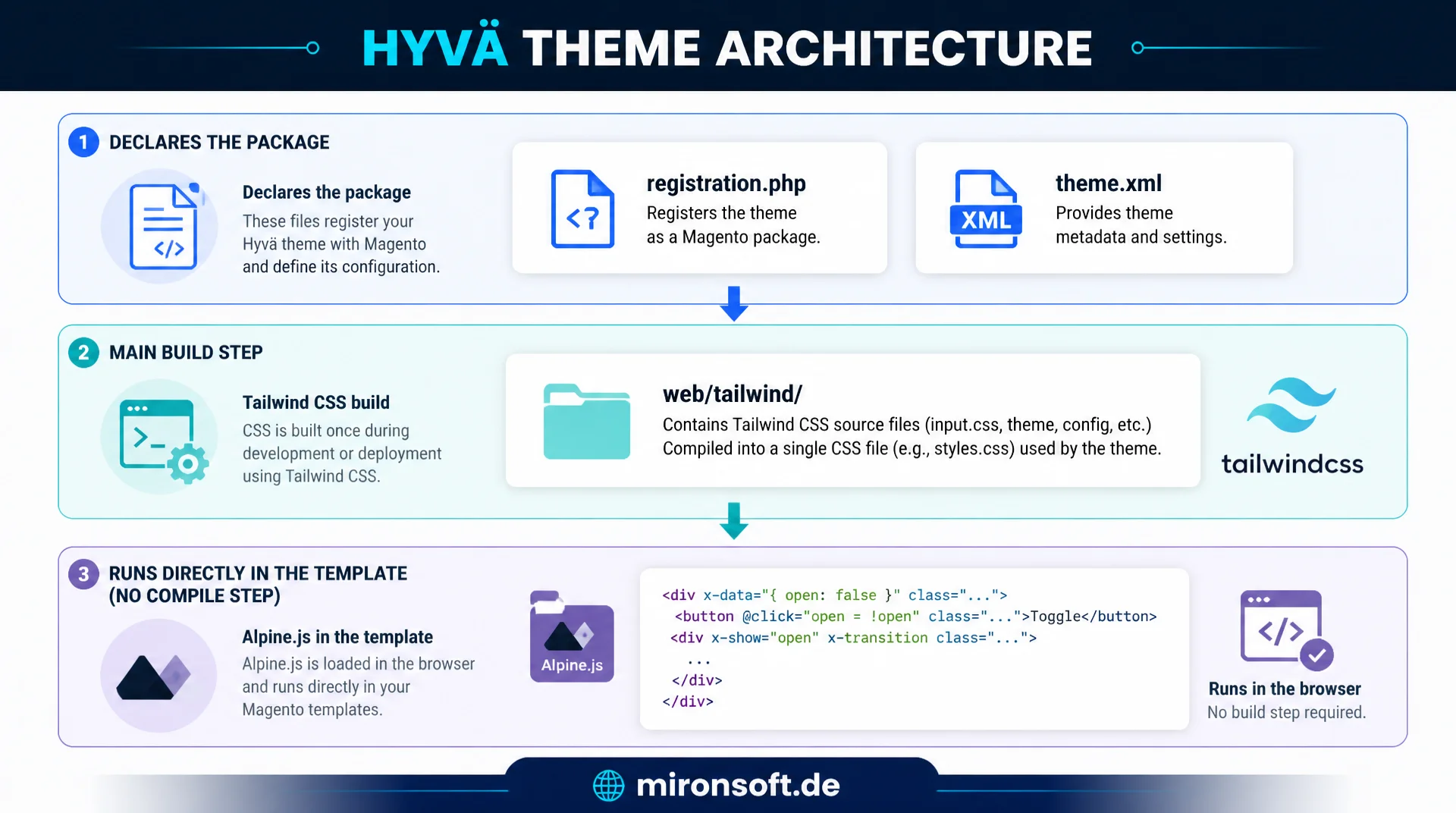
A Hyvä theme follows its own directory structure and build approach: registration.php and theme.xml declare the package, web/tailwind/ carries the single real build step, and Alpine.js runs directly in the template with no compile step. Once you understand Hyvä theme architecture, you can find your way around any Hyvä project immediately.
Table of Contents
- 1. What a Hyvä theme structurally is
- 2. The directory structure in detail
- 3. No build requirement: Tailwind instead of Webpack
- 4. Composer dependency on the parent theme
- 5. registration.php and theme.xml in practice
- 6. web/tailwind/tailwind.config.js in detail
- 7. etc/view.xml and image processing
- 8. Alpine.js integration without a build step
- 9. Typical beginner mistakes
- 10. Summary
- 11. FAQ
1. What a Hyvä theme structurally is
Hyvä theme architecture differs fundamentally from a classic Luma theme, even though both build on the same Magento 2 theme system with inheritance, layout XML and area separation. The decisive difference is not the folder structure itself, but which frontend technologies are actually used inside that structure. A Luma theme ships Knockout.js bindings, RequireJS modules and a UI component framework that assembles every small interaction across several abstraction layers made of JSON configuration, JS widgets and mixins.json. A Hyvä theme architecture deliberately does without all of that.
Instead, a Hyvä theme architecture relies on server-rendered phtml templates styled with Tailwind utility classes, with interactivity added selectively through Alpine.js. There is no RequireJS module graph that has to be resolved on page load, and no separate Knockout template layer re-rendering on the client. The phtml template is already the finished HTML, enriched with small Alpine.js directives right in the markup. This reduction to server rendering plus minimal client-side interactivity is the actual core of every Hyvä theme architecture, not the directory names, which stay largely identical to Luma.
| Aspect | Luma (classic) | Hyvä Theme Architecture | Benefit |
|---|---|---|---|
| JS framework | Knockout.js + RequireJS | Alpine.js, no bundler | No module graph, smaller payload |
| CSS stack | LESS + custom grid system | Tailwind CSS v4, utility-first | No unused CSS in the bundle |
| Template layer | phtml + Knockout templates (.html) | phtml only | One rendering layer instead of two |
| Build requirement | grunt/webpack for JS and CSS | Only npm run build for Tailwind | No JS compile step |
| Interactivity | UI component widgets, data-mage-init | x-data directly in the template | Readable without a configuration layer |
The table shows why switching from Luma to Hyvä is not a mere facelift, but an architectural decision. Anyone setting up a new theme who copies UI component layout XML from a Luma module unknowingly reintroduces exactly the dependencies a Hyvä theme architecture is meant to avoid. The following sections show how this architectural difference translates concretely into files, folders and Composer dependencies.
2. The directory structure in detail
Anyone creating a new theme under app/design/frontend/Vendor/theme-name/ sees a familiar Magento structure at first glance. Even so, Hyvä theme architecture has a few directories that either don't exist in a classic theme or play a different role. At the top sits registration.php, which registers the theme with Magento as a component. Right next to it is theme.xml, which declares the theme name, the parent theme and optionally a preview image.
Below that comes composer.json, which turns the theme folder into an installable Composer package with an explicit dependency on the Hyvä parent theme. The web/tailwind/ directory is the most distinctive feature of a Hyvä theme architecture: this is where tailwind.config.js, tailwind-source.css and the node_modules dependencies for the CSS build live. Templates are organized by module as usual: Magento_Theme/templates for header, footer and the root template, Magento_Catalog/templates for product listing and product detail pages, Magento_Checkout/templates for checkout, and so on, every module override follows the exact namespace of the core module.
In addition, etc/view.xml holds the image size configuration, etc/di.xml holds theme-specific dependency injection adjustments, and Magento_Theme/layout/default.xml holds the basic page structure with blocks for header, footer and breadcrumbs. A typical minimal Hyvä theme architecture needs nothing more than registration.php, theme.xml, composer.json and the web/tailwind/ folder to be functional, everything else consists of overrides of existing templates from the Hyvä default theme.
3. No build requirement: Tailwind instead of Webpack
The biggest practical difference between Luma and a Hyvä theme architecture shows up in day-to-day development: with Luma, RequireJS with its module configuration and the optional grunt or webpack build forces an extra compile step whenever JavaScript modules change. A Hyvä theme architecture knows no such requirement for JavaScript. Alpine.js is included as a single, unminified script and interpreted directly in the browser, with no transpiling, no bundling, no Babel step.
The only real build step in a Hyvä theme architecture concerns CSS: Tailwind CSS must generate an optimized stylesheet from the utility classes used in the template code. This happens via npm run build inside the web/tailwind/ directory, which internally invokes the Tailwind CLI compiler. This step scans all configured template paths for class names in use and produces a single, production-ready CSS file containing only the utility classes that are actually used.
For daily development this means: anyone only changing JavaScript behavior with Alpine.js needs to build nothing at all, a plain browser reload is enough. Anyone using new Tailwind classes in a template needs to keep the Tailwind watcher running or run npm run build manually so the new classes end up in the generated CSS. This split between "no build needed" for JavaScript and "one CSS build needed" for Tailwind is one of the most frequently misunderstood aspects of Hyvä theme architecture, especially for developers coming from Luma with its RequireJS bundling.
4. Composer dependency on the parent theme
Every Hyvä theme architecture builds on a parent theme, in the vast majority of projects that is hyva-themes/magento2-default-theme-csp. This parent theme supplies all base templates, the basic Tailwind setup and the CSP-compliant Alpine.js integration. A custom theme declares this dependency twice: once in theme.xml via the parent element, and once in composer.json as a regular Composer requirement.
The Composer dependency ensures that the parent theme is managed as a standalone package through Composer, with a fixed version constraint instead of a manually downloaded folder. When the parent theme updates, running composer update hyva-themes/magento2-default-theme-csp is enough to pull in the new version without touching the custom theme code. Exactly how Magento then decides, at render time, which file wins between child and parent theme is a mechanism of its own and the topic of a separate article on template fallback.
{
  "name": "mironsoft/theme-frontend-default",
  "description": "Mironsoft custom Hyva theme based on the Hyva default theme",
  "type": "magento2-theme",
  "version": "1.0.0",
  "license": "OSL-3.0",
  "require": {
    "php": "~8.4.0",
    "hyva-themes/magento2-default-theme-csp": "^1.3",
    "hyva-themes/magento2-theme-fallback": "^1.1"
  },
  "autoload": {
    "files": [
      "registration.php"
    ]
  }
}
5. registration.php and theme.xml in practice
registration.php is the shortest, yet most essential file in every Hyvä theme architecture. It registers the theme with Magento via ComponentRegistrar::register(), using the type THEME and a unique identifier in the format Area/Vendor/theme-name. Without this registration the theme won't appear in the admin theme list and can't be assigned to any store.
<?php
/**
 * Hyva child theme registration.
 */

declare(strict_types=1);

use Magento\Framework\Component\ComponentRegistrar;

ComponentRegistrar::register(
    ComponentRegistrar::THEME,
    'frontend/Mironsoft/default',
    __DIR__
);
theme.xml adds metadata to the plain registration: the display title shown in the admin area, and above all the parent element, which establishes the inheritance chain to the Hyvä base theme. If this element is missing or points to the wrong parent theme, template fallback doesn't behave as expected and many base templates from the Hyvä default theme simply aren't found. For a solid Hyvä theme architecture, a correctly set parent in theme.xml is therefore one of the first things to check right after creating a new theme.
<?xml version="1.0" encoding="UTF-8"?>
<theme xmlns:xsi="http://www.w3.org/2001/XMLSchema-instance" xsi:noNamespaceSchemaLocation="urn:magento:framework:Config/etc/theme.xsd">
    <title>Mironsoft Default (Hyva)</title>
    <parent>Hyva/default</parent>
    <media>
        <preview_image>media/preview.jpg</preview_image>
    </media>
</theme>
Both files together, registration.php and theme.xml, form the absolute minimum Magento needs to recognize a directory as a theme at all. Everything else in Hyvä theme architecture, from the Tailwind configuration to template overrides, builds on this foundation.
6. web/tailwind/tailwind.config.js in detail
The heart of the CSS build step in every Hyvä theme architecture is web/tailwind/tailwind.config.js. This file uses the content array to define which files Tailwind scans for class names in use. Unlike a classic JavaScript framework with a component tree, Tailwind here scans the .phtml files directly across the entire theme directory tree, including all parent themes and all active modules whose templates could be overridden in the theme.
This direct analysis of phtml files is possible because a Hyvä theme architecture uses no JSX components or template strings inside JavaScript files, only plain server-side HTML with interspersed PHP expressions. Tailwind therefore never has to parse a JavaScript AST to extract class names, a simple text scan across the phtml files is enough. Even though Tailwind CSS v4 generally follows a CSS-first approach with automatic content detection, a Hyvä theme architecture keeps the explicit content configuration, because templates from multiple parent theme layers and vendor modules need to be scanned, something automatic detection doesn't reliably cover. If a path is missing from the content array, say because a new module directory wasn't added, its classes are silently not recognized during the build.
/** @type {import('tailwindcss').Config} */
module.exports = {
  content: [
    '../../../../**/Magento_*/templates/**/*.phtml',
    '../../../../**/*/templates/**/*.phtml',
    './**/*.phtml',
    '../Magento_Theme/templates/**/*.phtml',
    '../../../vendor/hyva-themes/**/templates/**/*.phtml'
  ],
  theme: {
    extend: {
      colors: {
        primary: {
          DEFAULT: '#5c1a2e',
          light: '#b3294f'
        }
      }
    }
  },
  plugins: [
    require('@tailwindcss/forms'),
    require('@tailwindcss/typography')
  ]
}
Besides the content array, the configuration usually defines theme extensions such as custom colors, font sizes or breakpoints under theme.extend, along with Tailwind plugins like @tailwindcss/forms or @tailwindcss/typography, which are needed for the prose classes in blog and CMS content. The accompanying tailwind-source.css imports the Tailwind layers and pulls in additional base styles or custom utilities before the build process generates the final styles.css from them.
7. etc/view.xml and image processing
etc/view.xml in a Hyvä theme architecture is still responsible for image processing, exactly as in a classic Luma theme. Here, for each image type, say category_page_grid or product_page_image_large, fixed widths and heights along with scaling behavior are defined. Magento automatically generates the matching cached image variants on first request, inside the pub/media/catalog/product/cache/ directory.
The difference from Luma lies less in the structure of view.xml itself than in how consistently a Hyvä theme architecture relies on native, deferred image loading: templates from the Hyvä default theme consistently use loading="lazy" and specify width and height explicitly to avoid cumulative layout shift, with no extra JavaScript lazy-loading polyfill of the kind common in older Luma setups. Responsive image sizes are also solved through multiple variants declared in view.xml and the srcset attribute in the template, not through a server-side image-resizing module at runtime.
Important for practice: changes to view.xml only take effect after bin/magento catalog:images:resize, or after regenerating the image caches. Anyone introducing new image types in a Hyvä theme architecture, say for a new product tile variant, should build this step firmly into the deployment routine, otherwise old image sizes remain in the cache and appear visibly scaled wrong on the frontend.
8. Alpine.js integration without a build step
Arguably the most visible property of a Hyvä theme architecture in the template code is the direct use of Alpine.js directives like x-data, x-show and @click right inside the phtml file, with no separate JavaScript file and no build step. The state of a component, say whether a dropdown is open, is declared as a plain JavaScript object directly in the x-data attribute and is therefore immediately visible next to the markup it controls.
This colocation of state and markup is a deliberate architectural choice: instead of extracting a component into a separate .js file and referencing it by module name in the template, the way RequireJS-based UI components do in Luma, a Hyvä theme architecture keeps everything readable in one place. For more complex, reusable components, Alpine data functions can still be extracted into Magento_Theme/web/js/ and registered via Alpine.data(), and that too runs without a compile step, since Alpine.js itself is interpreted unminified in the browser.
<?php /** @var \Magento\Framework\View\Element\Template $block */ ?>
<div x-data="{ open: false }" class="relative inline-block">
    <button
        type="button"
        @click="open = !open"
        class="flex items-center gap-2 px-4 py-2 text-sm font-semibold text-gray-700"
    >
        <span>Sort</span>
        <svg class="w-4 h-4" :class="{ 'rotate-180': open }" fill="none" stroke="currentColor" viewBox="0 0 24 24">
            <path stroke-linecap="round" stroke-linejoin="round" stroke-width="2" d="M19 9l-7 7-7-7"/>
        </svg>
    </button>
    <ul
        x-show="open"
        x-cloak
        @click.outside="open = false"
        class="absolute right-0 mt-2 w-48 bg-white border border-gray-200 rounded-lg shadow-lg z-10"
    >
        <li><a class="block px-4 py-2 text-sm hover:bg-gray-50" href="?product_list_order=price">Price ascending</a></li>
        <li><a class="block px-4 py-2 text-sm hover:bg-gray-50" href="?product_list_order=name">Name A-Z</a></li>
    </ul>
</div>
Important in the CSP context: every inline <script> block must be registered through the $hyvaCsp view model with registerInlineScript(), otherwise the CSP theme's Content-Security-Policy blocks the script in the browser. Plain x-data attributes in the markup don't need this, since Alpine reads these attributes without executing an additional inline script that isn't already covered by the central Alpine.js file.
9. Typical beginner mistakes when setting up a new Hyvä theme
The most common mistake when setting up a new Hyvä theme architecture is a missing or incorrect parent theme declaration in theme.xml. Without a correct parent element, the custom theme inherits none of the base templates from hyva-themes/magento2-default-theme-csp, and Magento then throws a "template not found" error for seemingly trivial templates such as the header, even though the custom code itself is correct.
The second typical mistake concerns the content path in tailwind.config.js: if the path only points to the custom theme directory but not to the inherited templates from the parent theme or to custom modules under app/code/, exactly the Tailwind classes used there are missing from the generated CSS. The symptom is usually a layout that works at the base structure level, but where individual components appear unstyled or misplaced, with no error message pointing to the cause.
The third common mistake in a freshly set up Hyvä theme architecture is CSP violations caused by inline scripts that weren't registered via $hyvaCsp->registerInlineScript(). The CSP theme blocks every inline script whose hash isn't listed in the Content-Security-Policy, which shows up as a silent CSP error in the browser console and is easy to miss unless someone actively checks the console. Anyone setting up a new theme should work through these three points, parent theme, Tailwind content paths and CSP registration, as a first checklist before digging deeper into troubleshooting.
10. Summary
Hyvä theme architecture replaces the multi-layered structure of Knockout.js, RequireJS and UI components with server-rendered phtml templates, Tailwind utility classes and selective Alpine.js interactivity. registration.php and theme.xml form the structural minimum, composer.json wires in the Hyvä parent theme as a versioned package, and web/tailwind/ contains the only real build step of the entire theme.
Anyone setting up a new Hyvä theme architecture benefits from JavaScript running without a compile step, Tailwind shipping only the classes actually used, and etc/view.xml handling image processing independently of the rest of the frontend stack. The typical beginner mistakes, a missing parent theme, a wrong Tailwind content path and unsecured inline scripts, can be avoided with the right checklist before they become visible in production.
Hyvä theme architecture, the essentials at a glance
No JS build requirement
Alpine.js runs without a compile step directly in the browser. Only Tailwind CSS needs a real build via npm run build.
Minimal skeleton
registration.php and theme.xml are enough to register a theme and make it inheritable.
Composer parent theme
hyva-themes/magento2-default-theme-csp as a versioned dependency in composer.json and theme.xml.
Most common mistakes
Missing parent in theme.xml, incomplete Tailwind content path, missing hyvaCsp registration of inline scripts.
11. FAQ: Hyvä Theme Architecture
1What distinguishes Hyvä theme architecture from Luma?
2Which files are minimally required?
3Does Alpine.js need a build step?
4Why does Tailwind still need a build?
5Where do I declare the parent theme?
6What does composer.json do in the theme?
7What is etc/view.xml responsible for?
8Most common mistake in the Tailwind content path?
9Why does the CSP block my inline script?
10Can I override Magento_Catalog/templates?
Mironsoft
Hyvä theme development, Tailwind CSS and Alpine.js for Magento 2
Need a solid Hyvä theme architecture for your Magento 2 store?
We build new Hyvä themes from scratch, migrate existing Luma stores, and set up Tailwind builds along with CSP-compliant Alpine.js integration cleanly, following best practices.
Theme setup
Set up a new Hyvä theme architecture cleanly with registration.php, theme.xml and a Composer parent theme
Tailwind & Alpine.js
Set up content paths, the build pipeline and Alpine components without CSP violations
Theme audit
Review existing Hyvä themes for beginner mistakes, performance and maintainability