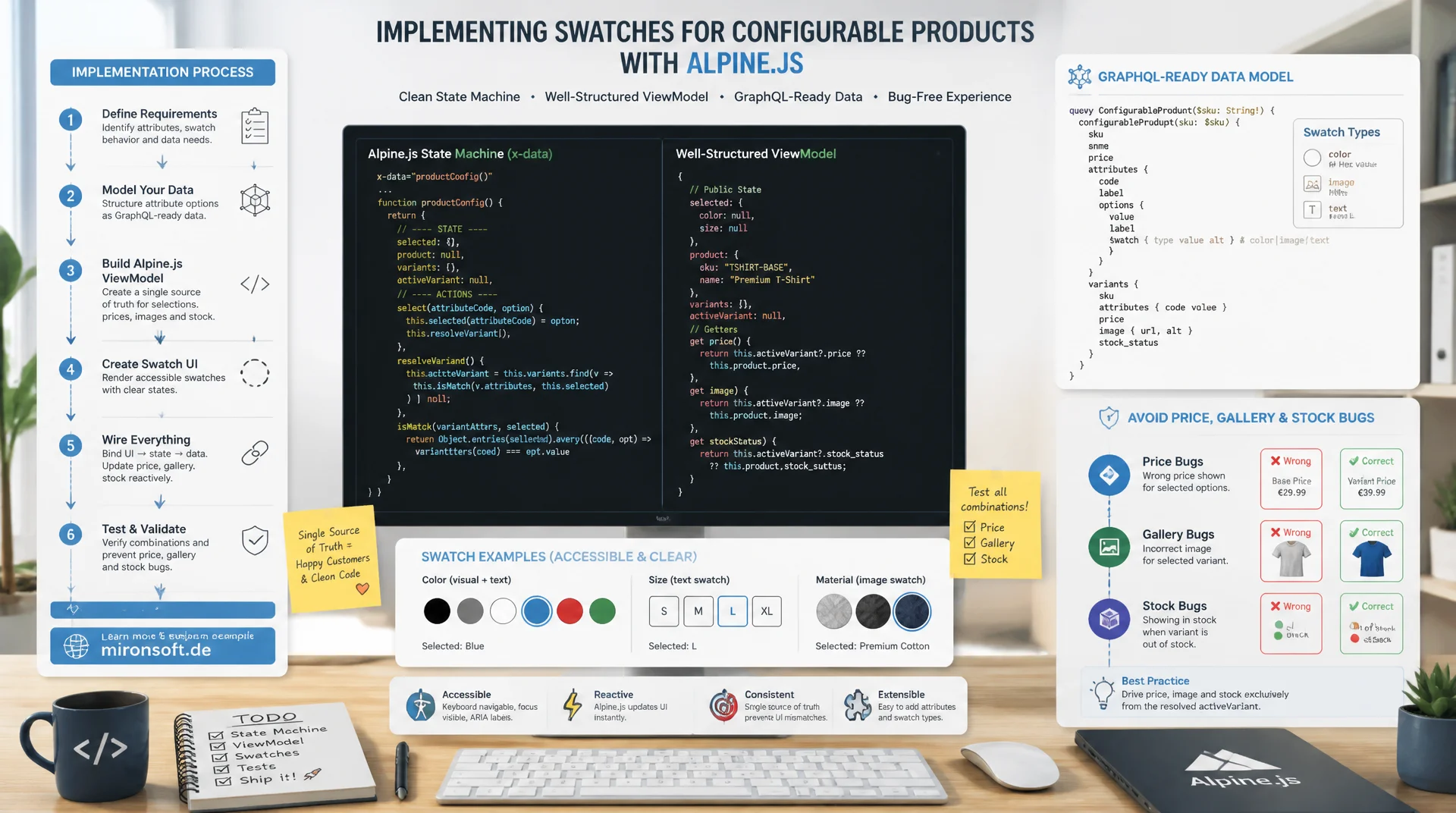
from the EAV attribute to the Alpine state machine
Anyone who implements swatches for configurable products as mere color boxes without a well thought out state model ends up with price, gallery, and stock bugs on the product detail page. A clean Alpine.js state machine, a proper ViewModel, and a GraphQL-ready data model make Hyvä swatches robust, accessible, and cache friendly at the same time.
Table of Contents
- 1. How Swatches Work Technically in Hyvä
- 2. Data Model: Swatch Attributes and EAV Setup
- 3. Swatch Rendering on the Product Detail Page
- 4. An Alpine.js State Machine for Option Selection
- 5. GraphQL Integration for Configurable Options
- 6. Swatches in the Category Grid
- 7. Fallbacks and Accessibility
- 8. Caching Pitfalls with Swatch Changes
- 9. Building Custom Swatch Types
- 10. Summary
- 11. FAQ
1. How Swatches Work Technically in Hyvä
Swatches for configurable products still rest, at their core, on the Magento core module Magento_Swatches, which manages attribute data, swatch types, and the mapping to configurable options. What changes fundamentally in Hyvä is the rendering layer: instead of the Knockout.js-based Magento_Swatches/js/swatch-renderer with its jQuery widget factory, a lean combination of a PHP ViewModel and an Alpine.js component takes over. The backend data storage stays identical, only the client-side rendering and interaction layer gets replaced entirely.
The basic principle behind Hyvä swatches is deliberately server-anchored: all available options, their swatch values (hex color, image URL, or text), and the lookup table mapping an option combination to a child SKU get embedded as JSON into the page during page build. Alpine.js then handles only the interaction logic in the browser, without requiring another server round trip just for display. This drastically reduces the amount of JavaScript compared to the Knockout variant and keeps the behavior of the option selection easy to follow, because the entire state lives visibly in a single x-data object.
What matters for any implementation of swatches for configurable products is that the option selection works without jQuery and without UI Components. The Hyvä compatibility layer skips widget initialization via data-mage-init and replaces it with declarative x-data attributes right in the phtml template. That also removes the asynchronous widget bootstrapping phase that regularly causes swatch buttons to flicker on first render in Luma themes.
2. Data Model: Swatch Attributes and EAV Setup
Magento distinguishes between two attribute frontend inputs for swatches for configurable products: swatch_visual for color and image swatches, and swatch_text for plain text swatches. Both are stored in the EAV attribute table as regular select or multiselect attributes, but are additionally linked in eav_attribute_option_swatch with the actual swatch value: a hex code or an image path for visual swatches, the visible label text itself for text swatches. This distinction is decisive because it later determines which rendering branch the ViewModel takes.
A new swatch attribute gets created via a declarative setup script or a Setup/Patch/Data class, not through old-style InstallData scripts. The configuration must set swatch_input_type to visual or text, and it must also flag the attribute as used_in_product_listing so it is available in the category grid without an expensive extra join. Without that flag, the product collection loader will not load the attribute into the listing collection, and swatches in the grid would need to be fetched per product individually, which noticeably slows down the category page.
<?php

declare(strict_types=1);

namespace Mironsoft\Swatches\Setup\Patch\Data;

use Magento\Eav\Setup\EavSetup;
use Magento\Eav\Setup\EavSetupFactory;
use Magento\Framework\Setup\ModuleDataSetupInterface;
use Magento\Framework\Setup\Patch\DataPatchInterface;
use Magento\Catalog\Model\Product;

/**
 * Creates the "material" visual swatch attribute for configurable products.
 */
final class CreateMaterialSwatchAttribute implements DataPatchInterface
{
    /**
     * Injects the module data setup and the EAV setup factory.
     *
     * @param ModuleDataSetupInterface $moduleDataSetup Core setup connection.
     * @param EavSetupFactory $eavSetupFactory Factory for EAV setup helper.
     */
    public function __construct(
        private readonly ModuleDataSetupInterface $moduleDataSetup,
        private readonly EavSetupFactory $eavSetupFactory,
    ) {
    }

    /**
     * Runs the data patch and creates the swatch attribute.
     *
     * @return void
     */
    public function apply(): void
    {
        /** @var EavSetup $eavSetup */
        $eavSetup = $this->eavSetupFactory->create(['setup' => $this->moduleDataSetup]);

        $eavSetup->addAttribute(
            Product::ENTITY,
            'material',
            [
                'type' => 'int',
                'label' => 'Material',
                'input' => 'select',
                'source' => \Magento\Eav\Model\Entity\Attribute\Source\Table::class,
                'swatch_input_type' => 'visual',
                'frontend_input_renderer' => \Magento\Swatches\Model\Product\Attribute\Frontend\Renderer::class,
                'global' => \Magento\Catalog\Model\ResourceModel\Eav\Attribute::SCOPE_GLOBAL,
                'visible' => true,
                'required' => false,
                'user_defined' => true,
                'searchable' => false,
                'filterable' => true,
                'comparable' => false,
                'visible_on_front' => true,
                'used_in_product_listing' => true,
                'unique' => false,
                'apply_to' => Product\Type::TYPE_SIMPLE,
                'is_configurable' => true,
            ]
        );
    }

    /**
     * Declares patch dependencies.
     *
     * @return array<int, string>
     */
    public static function getDependencies(): array
    {
        return [];
    }

    /**
     * Declares aliases for this patch.
     *
     * @return array<int, string>
     */
    public function getAliases(): array
    {
        return [];
    }
}
At the configurable product level, every swatch attribute additionally gets registered as a configurable_option in catalog_product_super_attribute. That table forms the bridge between the parent product and the child products: for every attribute combination there is an entry in catalog_product_super_link pointing to the matching child SKU. This exact lookup table later gets serialized as a JSON payload for the Alpine state machine, so that the right child SKU for a chosen option combination can be found in the browser without any further server access.
3. Swatch Rendering on the Product Detail Page
For rendering swatches for configurable products on the PDP, a dedicated ViewModel is the right choice over a classic block class, because it plugs cleanly into the layout XML via ArgumentInterface and does not force an inheritance chain with the core Configurable block. The ViewModel reads the configurable attributes of the current product, determines the swatch type for each attribute, and hands a cleanly typed array over to the template instead of hiding rendering logic inside PHP helper methods.
Inside the phtml template itself, color swatches render as square buttons with a background-color taken from the hex value, image swatches as a <button> with a background image, and text swatches as labeled pills. Correct escaping is essential here: hex values and image paths come from the database and must never be written into style attributes unchecked. The standard Hyvä approach uses $escaper->escapeHtmlAttr() for the style value and $escaper->escapeUrl() for image paths, so that no style injection is possible even with tampered attribute values.
<?php
/** @var \Magento\Framework\View\Element\Template $block */
/** @var \Magento\Framework\Escaper $escaper */
/** @var \Mironsoft\Swatches\ViewModel\ConfigurableSwatches $swatchesViewModel */
$swatchesViewModel = $block->getData('swatchesViewModel');
$options = $swatchesViewModel->getSwatchOptions($product);
?>
<div
    x-data="configurableSwatches({
        options: <?= /* @noEscape */ $swatchesViewModel->getOptionsJson($product) ?>,
        indexedSkus: <?= /* @noEscape */ $swatchesViewModel->getIndexedSkusJson($product) ?>,
        productId: <?= (int) $product->getId() ?>
    })"
    class="not-prose"
>
    <?php foreach ($options as $option): ?>
        <fieldset class="mb-6">
            <legend class="text-sm font-semibold text-slate-700 mb-2">
                <?= $escaper->escapeHtml($option['label']) ?>
            </legend>
            <div class="flex flex-wrap gap-2">
                <?php foreach ($option['values'] as $value): ?>
                    <?php if ($value['swatch_type'] === 'color'): ?>
                        <button
                            type="button"
                            class="w-9 h-9 rounded-full border-2 transition-all"
                            style="background-color: <?= $escaper->escapeHtmlAttr($value['swatch_data']) ?>;"
                            :class="isSelected(<?= (int) $option['attribute_id'] ?>, <?= (int) $value['value_index'] ?>) ? 'border-orange-600 scale-110' : 'border-slate-200'"
                            :aria-pressed="isSelected(<?= (int) $option['attribute_id'] ?>, <?= (int) $value['value_index'] ?>).toString()"
                            aria-label="<?= $escaper->escapeHtmlAttr($value['label']) ?>"
                            @click="selectOption(<?= (int) $option['attribute_id'] ?>, <?= (int) $value['value_index'] ?>)"
                        ></button>
                    <?php elseif ($value['swatch_type'] === 'image'): ?>
                        <button
                            type="button"
                            class="w-12 h-12 rounded-lg border-2 bg-cover bg-center"
                            style="background-image: url('<?= $escaper->escapeUrl($value['swatch_data']) ?>');"
                            :class="isSelected(<?= (int) $option['attribute_id'] ?>, <?= (int) $value['value_index'] ?>) ? 'border-orange-600' : 'border-slate-200'"
                            aria-label="<?= $escaper->escapeHtmlAttr($value['label']) ?>"
                            @click="selectOption(<?= (int) $option['attribute_id'] ?>, <?= (int) $value['value_index'] ?>)"
                        ></button>
                    <?php else: ?>
                        <button
                            type="button"
                            class="px-3 py-2 rounded-lg border text-sm font-medium"
                            :class="isSelected(<?= (int) $option['attribute_id'] ?>, <?= (int) $value['value_index'] ?>) ? 'border-orange-600 text-orange-700 bg-orange-50' : 'border-slate-200 text-slate-700'"
                            @click="selectOption(<?= (int) $option['attribute_id'] ?>, <?= (int) $value['value_index'] ?>)"
                        >
                            <?= $escaper->escapeHtml($value['label']) ?>
                        </button>
                    <?php endif; ?>
                <?php endforeach; ?>
            </div>
        </fieldset>
    <?php endforeach; ?>
</div>
A detail that gets overlooked often with swatches for configurable products: the order of option groups in the ViewModel must follow the order of catalog_product_super_attribute.position, otherwise the display of color and size swaps unpredictably from product to product. The ViewModel should apply this ordering explicitly rather than relying on the arbitrary order of the EAV collection.
4. An Alpine.js State Machine for Option Selection
The centerpiece of any Hyvä implementation of swatches for configurable products is the Alpine component configurableSwatches. Its x-data object holds selectedOptions as a map from attribute ID to chosen option index, plus the currently resolved currentProduct with price, stock, and gallery images. A $watch on selectedOptions triggers a recalculation on every change: first it checks whether all required options are selected, then it uses the lookup table embedded in the JSON to determine the matching child SKU, with no server round trip at all in the normal case.
The embedded lookup table is usually enough for price, gallery, and stock data, because it already contains all the child product data at page build time. A fetch against the configurable endpoint is only needed when live stock data or tier-price-dependent special pricing must not be baked in statically, for example with highly volatile stock levels. In that case the state machine calls /graphql with a lean query that only refetches the price and stock of the resolved child SKU instead of reloading the entire product page.
The price and gallery update happens purely reactively through Alpine bindings: x-text="formattedPrice" for the price display, and x-show combined with an index-based image list for the gallery. It is important to never use a literal mustache like double curly braces, but to consistently use x-text instead, since Alpine does not evaluate mustache templating in the DOM, and such text would otherwise remain visible unchanged in the browser.
// Alpine.js component for configurable product swatches
// Registered globally so the phtml template can reference it directly
document.addEventListener('alpine:init', () => {
  Alpine.data('configurableSwatches', (config) => ({
    options: config.options,
    indexedSkus: config.indexedSkus,
    productId: config.productId,
    selectedOptions: {},
    currentProduct: null,
    isLoadingStock: false,

    init() {
      // Watch for changes and resolve the matching child SKU
      this.$watch('selectedOptions', () => {
        this.resolveCurrentProduct();
      });
    },

    selectOption(attributeId, valueIndex) {
      this.selectedOptions = { ...this.selectedOptions, [attributeId]: valueIndex };
    },

    isSelected(attributeId, valueIndex) {
      return this.selectedOptions[attributeId] === valueIndex;
    },

    allOptionsSelected() {
      return this.options.every((option) => this.selectedOptions[option.attribute_id] !== undefined);
    },

    // Build the lookup key the same way the backend built indexedSkus
    buildLookupKey() {
      return this.options
        .map((option) => this.selectedOptions[option.attribute_id])
        .join(',');
    },

    resolveCurrentProduct() {
      if (!this.allOptionsSelected()) {
        this.currentProduct = null;
        return;
      }
      const key = this.buildLookupKey();
      const match = this.indexedSkus[key];
      if (!match) {
        this.currentProduct = null;
        return;
      }
      this.currentProduct = match;
      this.maybeRefreshLiveStock(match.sku);
    },

    get formattedPrice() {
      if (!this.currentProduct) {
        return '';
      }
      return new Intl.NumberFormat('en-US', { style: 'currency', currency: 'EUR' }).format(this.currentProduct.price);
    },

    get galleryImages() {
      return this.currentProduct ? this.currentProduct.images : [];
    },

    get inStock() {
      return this.currentProduct ? this.currentProduct.stock_status === 'IN_STOCK' : false;
    },

    // Only used when live stock data must not be baked into the page cache
    async maybeRefreshLiveStock(sku) {
      if (!this.currentProduct || !this.currentProduct.requires_live_stock) {
        return;
      }
      this.isLoadingStock = true;
      try {
        const response = await fetch('/graphql', {
          method: 'POST',
          headers: { 'Content-Type': 'application/json' },
          body: JSON.stringify({
            query: 'query($sku: String!) { products(filter: { sku: { eq: $sku } }) { items { stock_status only_x_left_in_stock } } }',
            variables: { sku },
          }),
        });
        const payload = await response.json();
        const item = payload.data.products.items[0];
        this.currentProduct.stock_status = item.stock_status;
        this.currentProduct.only_x_left = item.only_x_left_in_stock;
      } finally {
        this.isLoadingStock = false;
      }
    },
  }));
});
5. GraphQL Integration for Configurable Options
For headless frontends, or for cases where the server-embedded lookup table is not enough, Magento's configurableProductOptions branch on the products query returns every attribute value along with its swatch data. The query returns, for each configurable attribute, the values with value_index, label, and the matching swatch type, so that swatches for configurable products can be rendered even in a PWA or headless context without an extra REST call.
The second important building block is configurableProductOptionsSelection: this query takes the currently chosen value_index values and returns which combinations are still available and which child SKU matches the complete selection. A custom resolver can cache this logic server-side, because the mapping from an option combination to a SKU only changes when the product model itself changes, not on every page request.
query ConfigurableSwatchOptions($sku: String!) {
  products(filter: { sku: { eq: $sku } }) {
    items {
      sku
      name
      ... on ConfigurableProduct {
        configurable_options {
          attribute_code
          label
          position
          values {
            value_index
            label
            swatch_data {
              ... on ImageSwatchData {
                thumbnail
              }
              ... on ColorSwatchData {
                value
              }
              ... on TextSwatchData {
                value
              }
            }
          }
        }
        variants {
          product {
            sku
            price_range {
              minimum_price {
                final_price {
                  value
                  currency
                }
              }
            }
            stock_status
            only_x_left_in_stock
            media_gallery {
              url
            }
          }
          attributes {
            code
            value_index
          }
        }
      }
    }
  }
}
A common misunderstanding: variants does not automatically return only available combinations. The resolver must explicitly evaluate the stock_status of every variant product to mark sold-out combinations as disabled in the frontend, instead of leaving them clickable with no indication. A small custom GraphQL resolver that pre-aggregates the available SKU combinations per option selection saves the frontend from computing a client-side cross product over every attribute combination.
6. Swatches in the Category Grid
Swatches for configurable products do not stop at the PDP in practice. In the category grid, a mini swatch list below the product image shows the available color options, usually limited to four or five visible dots plus a counter for additional options. This requires the swatch attribute to be flagged as used_in_product_listing, as described in section 2, so that the category page's product collection delivers the swatch values without an extra join per product.
A hover-preview pattern, where the product card's main image switches to the matching variant image when a color swatch is hovered, noticeably improves conversion because customers can see the color options without leaving the card. Technically this only takes a card-level x-data with an activeImage set via @mouseenter on the swatch button, combined with a small mapping of swatch value to image URL prepared by the grid loader.
Lazy loading is a double concern for Hyvä swatches in the grid: on one hand, the preview images for each swatch option should not all load during the initial page build, but rather only get fetched on @mouseenter or the first touch tap, to keep the initial payload of the category page small. On the other hand, the native loading="lazy" attribute on the standard product images must stay in place, so that swatch preview images below the visible area do not degrade the category page's load time.
| Task | Naive Approach | Recommended Hyvä Pattern | Benefit |
|---|---|---|---|
| Option selection on the PDP | Classic <select> dropdown | Visual swatch buttons with Alpine state | Better conversion, direct visual feedback |
| Price/gallery update | Full page reload after an option change | Alpine state machine with a local lookup | Instant update with no server load |
| Missing swatch image | Empty or broken button | Text swatch fallback with label | Always usable option, no dead buttons |
| Price/stock caching | Static price baked into the Full Page Cache | Private content section for variable values | Correct prices despite FPC |
| Extra swatch attribute | Hardcoded if block in the template | Extensible ViewModel with swatch type mapping | New swatch types without forking the template |
7. Fallbacks and Accessibility
A solid fallback concept belongs in every implementation of swatches for configurable products: if an image swatch is missing its stored image path, for example because an editor forgot it while creating the option, the ViewModel must automatically fall back to the text-swatch display with the option's label instead of showing an empty or broken button. This fallback logic belongs in the ViewModel, not in the template, so it can be tested centrally and kept identical across both vendor variants.
For color swatches, a contrast check is worthwhile: very light color values like white or cream need a visible border, or the button visually disappears against a light background. A simple luminance check in the ViewModel that automatically adds an extra border class once the computed brightness crosses a threshold prevents invisible swatch buttons without manual upkeep for every color option.
For screen reader users, aria-pressed and aria-label on every swatch button are mandatory, as shown in the code example in section 3. aria-pressed must be bound dynamically to the Alpine state so a screen reader correctly announces the currently chosen color or image swatch as selected. The aria-label should always contain the full, human-readable option name rather than an internal value index, since a plain color name like "petrol blue" is the only information a screen reader user gets about the chosen option.
8. Caching Pitfalls with Swatch Changes
Magento's Full Page Cache stores the rendered PDP including the initially selected swatch state. For swatches for configurable products, this means: the price, stock, and gallery images of the first displayed child product must never be written directly into the cached HTML block if they can change by customer segment or stock level. Otherwise every visitor sees the same frozen price, regardless of actual availability or customer-specific special pricing.
The correct path runs through private content sections, or through client-side data fetched outside the FPC cache key. Since the Alpine state machine from section 4 already carries the lookup table as embedded JSON anyway, the FPC entry stays identically cacheable for every option combination, while the actual price and stock display gets computed purely on the client side from that JSON. Only when live stock data must be fetched from an external system does the fetch against the GraphQL endpoint shown in section 4 come into play, and its response itself must not end up in the FPC either.
A classic mistake in existing Hyvä projects: a developer binds the initially selected swatch state server-side based on a query parameter or the session, and unintentionally breaks the FPC cacheability of the entire page, because Varnish or Magento's own FPC would then need a separate cache entry per combination. The safe rule is: the initial HTML state always shows the default option combination, and every deviating selection gets resolved exclusively on the client through Alpine.js.
9. Building Custom Swatch Types
Beyond the standard color, image, and text types, custom swatch representations can be added for swatches for configurable products, for example a pattern swatch for textiles or a material swatch combining a texture with a label. The foundation for this is an additional EAV attribute as in section 2, whose swatch_input_type still stays visual, but whose frontend display gets extended through a custom rendering branch in the ViewModel.
The extension happens through a swatch type map in the ViewModel that maps the internal type key to a template partial. Instead of a growing if/elseif block in the phtml template, new swatch types get registered declaratively via di.xml as an additional entry in a virtual type for the swatch type map, so third-party modules can add their own swatch representations without overriding the core template.
{
  "sku": "SHIRT-BLUE-M",
  "configurable_options": [
    {
      "attribute_code": "material",
      "label": "Material",
      "position": 1,
      "values": [
        {
          "value_index": 12,
          "label": "Cotton",
          "swatch_type": "material",
          "swatch_data": {
            "texture_url": "/media/swatches/cotton.png",
            "pattern": "plain-weave"
          }
        },
        {
          "value_index": 13,
          "label": "Linen",
          "swatch_type": "material",
          "swatch_data": {
            "texture_url": "/media/swatches/linen.png",
            "pattern": "basket-weave"
          }
        }
      ]
    },
    {
      "attribute_code": "color",
      "label": "Color",
      "position": 2,
      "values": [
        {
          "value_index": 24,
          "label": "Petrol Blue",
          "swatch_type": "color",
          "swatch_data": "#0e4f56"
        }
      ]
    }
  ],
  "indexed_skus": {
    "12,24": { "sku": "SHIRT-BLUE-M-COTTON", "price": 39.9, "stock_status": "IN_STOCK" },
    "13,24": { "sku": "SHIRT-BLUE-M-LINEN", "price": 44.9, "stock_status": "OUT_OF_STOCK" }
  }
}
For the material swatch in the example, the ViewModel renders a button with a background texture instead of a flat color and additionally displays the label visibly under the swatch, since plain textures without a caption are often hard to tell apart. This combination of visual appeal and a text label is almost always worthwhile for material and pattern swatches, while it usually stays optional for simple color swatches.
Mironsoft
Hyvä frontend development for Magento 2
Swatches for configurable products, done right?
We build Hyvä swatches with a clean ViewModel, a robust Alpine state machine, and a cache-friendly data model, including GraphQL integration and accessibility to WCAG standards.
Swatch Design
EAV setup, ViewModel architecture, and custom swatch type extensions
Alpine State Machine
Price, gallery, and stock updates with no reload and no jQuery
Caching & GraphQL
FPC-safe architecture and resolvers for configurable options
10. Summary
Swatches for configurable products in Hyvä consist of three layers working together: the unchanged Magento data model from Magento_Swatches and EAV attributes, a ViewModel that cleanly separates the swatch types and escapes correctly, and an Alpine.js state machine that updates price, gallery, and stock with no server round trip. This combination fully replaces the Knockout-based swatch renderer while substantially reducing the amount of JavaScript on the page.
Accessibility through aria-pressed and aria-label, a text-swatch fallback for missing images, and an FPC-safe architecture without server-embedded variable prices belong in every production-ready implementation of Hyvä swatches. Anyone who prepares the GraphQL integration for headless scenarios and builds the ViewModel from the start to be extensible for custom swatch types saves themselves later template forks when new requirements like material or pattern swatches come up.
Swatches for Configurable Products in Hyvä: The Essentials at a Glance
Data Model
swatch_visual and swatch_text as EAV attributes, linked via eav_attribute_option_swatch. used_in_product_listing for a performant grid render.
Rendering
ViewModel instead of a block class, correct escaping of hex values and image paths, cleanly separated swatch type branches in the template.
Alpine State Machine
selectedOptions map with $watch, a local lookup against embedded JSON, an optional fetch for live stock data.
Caching & Accessibility
No variable prices in the FPC cache key. aria-pressed/aria-label and a text-swatch fallback for every button.