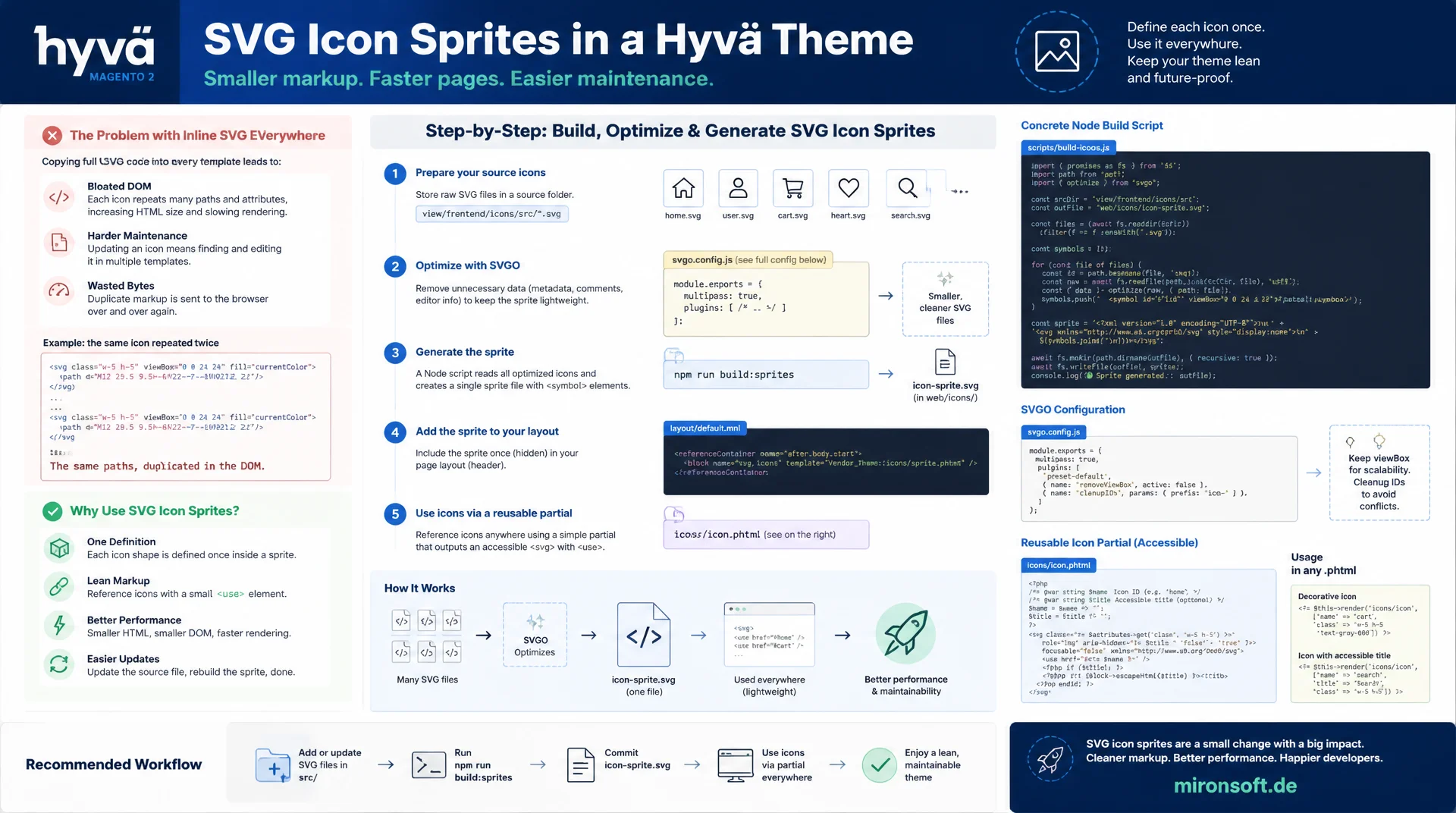
from xlink:href to automated sprite generation
Anyone who copies every icon as a full inline SVG into each phtml template in a Hyvä theme bloats the DOM unnecessarily and makes later changes to the icon set harder. SVG icon sprites solve this problem by defining every icon shape only once and reusing it across as many places in the theme as needed through a simple reference. This article shows how to build, optimize, generate and accessibly wire up SVG icon sprites in a Hyvä theme, including a concrete Node build script, an SVGO configuration and a reusable icon partial.
Table of contents
- 1. Why SVG icon sprites are the right choice in the Hyvä theme
- 2. use xlink:href instead of inline SVG in every phtml
- 3. Understanding and extending Hyvä core icon partials
- 4. Sprite generation with a Node/npm build step
- 5. SVGO optimization before sprite generation
- 6. Accessibility: aria-hidden, title and role=img
- 7. Building a reusable icon phtml partial
- 8. Cache busting and versioning the sprite file
- 9. SVG icon sprites compared to icon fonts from the Luma world
- 10. Summary
- 11. FAQ
1. Why SVG icon sprites are the right choice in the Hyvä theme
In most Hyvä projects, the number of phtml templates grows quickly, and with it the number of places where a single icon is repeated as a full inline SVG. A product listing with 24 items, each showing a cart icon and a heart icon, writes the same path code into the DOM almost 50 times, only with different CSS classes attached. SVG icon sprites solve exactly this problem: the actual shape definition exists only once in a central sprite file, and every place that uses it references it by an id. This measurably reduces the HTML response size, especially on category pages and product listings with many recurring icons.
For a Hyvä theme, SVG icon sprites are also the logical next step of the existing philosophy: no jQuery, no extra JavaScript, no runtime build dependency. An icon sprite is a static SVG file that the browser understands natively, with no polyfill and no runtime overhead. That makes the sprite pattern a better fit for Hyvä than an icon font, which brings extra requests, FOUC risk and licensing questions along with it. The following sections show how to cleanly build, generate and maintain SVG icon sprites in an existing Hyvä theme.
2. use xlink:href instead of inline SVG in every phtml
The technical foundation of SVG icon sprites is the <use> element with an xlink:href reference to a symbol id. Instead of repeating the full <path> markup in every phtml template, the template only references <svg><use xlink:href="#icon-cart"></use></svg>. The browser resolves the reference against the <symbol> definition loaded either in the document or via an external sprite, and renders the icon exactly as if the full path sat right there. For the same icon at a different size, a different CSS class on the outer <svg> element is enough.
How the sprite itself is loaded matters: either the sprite file is injected inline into the page once, for example through a layout handle in the header, or it is referenced as an external file with a full path. Older Safari versions and some security policies require a full path rather than a bare fragment identifier when the sprite is external. In a Hyvä theme with a strict CSP, the inline variant is usually the more robust choice, because it creates no extra network request and works with the existing CSP configuration without special rules.
<!-- BAD: full inline SVG repeated in every phtml partial that shows this icon -->
<svg class="w-5 h-5" fill="none" stroke="currentColor" viewBox="0 0 24 24">
  <path stroke-linecap="round" stroke-linejoin="round" stroke-width="2"
        d="M3 3h2l.4 2M7 13h10l4-8H5.4M7 13L5.4 5M7 13l-2.293 2.293c-.63.63-.184 1.707.707 1.707H17" />
</svg>

<!-- GOOD: reference by id, the shape itself lives only once in the sprite -->
<svg class="w-5 h-5" aria-hidden="true">
  <use xlink:href="#icon-cart"></use>
</svg>
3. Understanding and extending Hyvä core icon partials
The Hyvä core does not ship icons as a sprite by default. Instead it provides them through view models such as Hyva\Theme\ViewModel\HeroiconsOutline and HeroiconsSolid, whose methods emit the complete SVG markup inline on every single call. That is essentially the same problem SVG icon sprites are meant to solve: if a template calls $heroicons->cartOutline() twenty times on one page, the full path code appears twenty times in the rendered HTML. For a single, rarely repeated icon that is harmless, but for frequently recurring UI elements such as star ratings, quantity plus/minus icons or cart symbols in listings, it adds up quickly.
Custom icons can be added without touching the core view models: a dedicated module or the theme itself keeps additional SVG sources in its own folder, for example design/icons/source, and feeds them into a separate sprite through the build step described below. The core icons can keep being used in parallel, while new or project-specific icons get a second, lean sprite that is loaded only where it is actually needed. It matters to use the same icon id naming convention across both systems, so developers do not have to switch between two mental models.
4. Sprite generation with a Node/npm build step
Maintaining the sprite file by hand becomes error-prone as soon as a project has more than a handful of icons. A small Node script built on top of the svg-sprite npm package handles this reliably: it reads every optimized SVG file from a source folder, assigns each file an icon id based on its filename, and writes a single sprite.svg with one <symbol> element per icon. The build step can be registered as an npm script in package.json and slotted into the existing deploy pipeline next to the Tailwind build, without any extra infrastructure.
For Hyvä projects it makes sense to place the generated sprite directly in the theme folder under web/icons/, so that Magento's static content deploy ships the file automatically. The Node build runs outside the Magento process, typically as its own npm command before setup:static-content:deploy. The example below shows a complete build script including automatic versioning through a timestamp in the filename, which is picked up again in the cache busting section further down.
{
  "scripts": {
    "icons:optimize": "svgo -f design/icons/source -o design/icons/optimized",
    "icons:sprite": "node bin/build-icon-sprite.js",
    "icons:build": "npm run icons:optimize && npm run icons:sprite"
  },
  "devDependencies": {
    "svgo": "^3.2.0",
    "svg-sprite": "^2.0.4"
  }
}
// bin/build-icon-sprite.js
// Merges optimized SVG source files into one Hyva-compatible sprite file
const path = require('path');
const fs = require('fs');
const SVGSpriter = require('svg-sprite');

const spriter = new SVGSpriter({
  mode: {
    symbol: {
      dest: '.',
      sprite: 'sprite.svg',
    },
  },
  shape: {
    id: {
      generator: (name) => `icon-${path.basename(name, '.svg')}`,
    },
  },
});

const sourceDir = path.resolve(__dirname, '../design/icons/optimized');
fs.readdirSync(sourceDir)
  .filter((file) => file.endsWith('.svg'))
  .forEach((file) => {
    const filePath = path.join(sourceDir, file);
    spriter.add(filePath, null, fs.readFileSync(filePath, 'utf-8'));
  });

spriter.compile((error, result) => {
  if (error) {
    throw error;
  }

  const spriteSvg = result.symbol.sprite.contents;
  const version = Date.now();
  const outDir = path.resolve(
    __dirname,
    '../app/design/frontend/Mironsoft/default/Magento_Theme/web/icons'
  );

  fs.mkdirSync(outDir, { recursive: true });
  fs.writeFileSync(path.join(outDir, `sprite.${version}.svg`), spriteSvg);
  fs.writeFileSync(
    path.join(outDir, 'sprite-version.json'),
    JSON.stringify({ version })
  );

  console.log(`Sprite built: sprite.${version}.svg`);
});
5. SVGO optimization before sprite generation
Before individual SVG files move into a sprite, they should be optimized with SVGO. Design export tools such as Figma or Illustrator regularly write superfluous metadata, editor-specific namespaces, duplicate groups and fixed width/height attributes into the file, all of which are just dead weight in a sprite context. SVGO removes these elements automatically and normalizes the viewBox attribute, so every icon scales correctly once referenced through <use>, regardless of its original export size.
For SVG icons in the Hyvä theme, it is especially important to replace fixed fill values with currentColor, so icons inherit the text color of their surrounding element and can be colored through a Tailwind class instead of dragging a fixed color along from the export. A central svgo.config.js in the project defines which plugins are active and prevents every developer from submitting individually optimized files with diverging results. The optimization step always runs before sprite generation, never after, because SVGO works on individual files and cannot cleanly process the combined sprite file.
# Optimize every source icon before the sprite build runs
npx svgo \
  --folder design/icons/source \
  --output design/icons/optimized \
  --config svgo.config.js

# svgo.config.js enables these plugins:
# - removeDimensions   (drop width/height, keep viewBox)
# - removeMetadata     (strip editor-generated metadata)
# - removeComments     (strip source comments)
# - convertColors      (currentColor for fill/stroke where safe)
6. Accessibility: aria-hidden, title and role=img
SVG icon sprites do not bring accessibility along for free, they require a deliberate decision at every place they are used. Purely decorative icons, for example an arrow symbol next to an already labeled link, should get aria-hidden="true", so screen readers skip them and do not produce a duplicate or confusing announcement. If the icon instead carries the only piece of information, for example a bare icon button with no visible text, it needs role="img" together with a <title> element that describes its purpose in words.
For interactive icons such as a close button or a wishlist icon inside a <button> element, an aria-label on the button itself is often enough, while the SVG inside still gets aria-hidden="true", since the label already exists at the parent level. Focus management mainly concerns icons in standalone interactive elements: an <svg> without tabindex is not focusable by itself, which is correct as long as it sits inside a focusable parent element such as a button or link. If the SVG is accidentally made directly interactive, duplicate tab stops appear that confuse screen reader users.
7. Building a reusable icon phtml partial
So developers on the team do not have to reconsider aria-hidden, size and sprite path for every single icon, a central icon partial that accepts name, size and an optional title as parameters pays off. The partial encapsulates the complete accessibility logic: if a title is set, role="img" and a <title> element are generated automatically, and if it is missing, aria-hidden="true" takes over. Other templates then call the partial through $block->getLayout()->createBlock(...)->setData(...)->toHtml(), or more directly through a view model method.
A partial like this reduces redundancy at the template level considerably and keeps icon sizes consistent across the whole theme, because size values come from a limited set of allowed values instead of freely typed Tailwind classes. Changes to the accessibility logic, for example a new requirement for aria-describedby, then only need to be maintained in one place instead of being hunted down across dozens of individual phtml files.
<?php
/** @var \Magento\Framework\View\Element\Template $block */
$iconName = $block->getData('icon_name') ?: 'cart';
$size = $block->getData('icon_size') ?: '5';
$title = $block->getData('icon_title');
?>
<svg class="w-<?= $block->escapeHtmlAttr($size) ?> h-<?= $block->escapeHtmlAttr($size) ?>"
     <?= $title ? 'role="img"' : 'aria-hidden="true"' ?>>
  <?php if ($title): ?>
    <title><?= $block->escapeHtml($title) ?></title>
  <?php endif; ?>
  <use xlink:href="#icon-<?= $block->escapeHtmlAttr($iconName) ?>"></use>
</svg>
8. Cache busting and versioning the sprite file
A central sprite file referenced by every page benefits maximally from browser caching, but it also carries a risk: if an icon changes or a new one is added, the browser must not keep serving the old, already cached version. The Node build step from section four solves this by writing a timestamp into the filename on every run, for example sprite.1721732400.svg. Templates that reference it read the current filename from a small metadata file or a configuration variable instead of hardcoding it.
For Magento deployments, it makes sense to store the current sprite filename in a JSON file in the theme, which a view model reads at runtime and inserts into the path whenever the sprite is included as an external file. If the sprite is instead injected inline into the page header, the cache busting problem for the sprite file itself disappears completely, because it becomes part of the HTML document and is delivered under its own caching strategy. This variant is usually the more pragmatic solution for SVG icon sprites in the theme for small to medium icon sets.
9. SVG icon sprites compared to icon fonts from the Luma world
Luma themes traditionally solved icons through icon fonts: a single font file with icons as glyphs, loaded via @font-face and addressed through CSS pseudo-elements such as ::before. This pattern brings several structural drawbacks that are unnecessary in a modern Hyvä theme. A font file must load completely before even one icon becomes visible, which on slow connections causes a brief flash of unstyled content, where icons first appear as boxes or not at all.
SVG icon sprites avoid this problem entirely, because they need no separate font format and ship as regular markup directly with the page. On top of that, individual icon colors, sizes and even animations can be controlled per icon, which icon fonts only allow to a limited degree through color and size, and never through actual shape changes. The following table puts the three approaches side by side.
| Criterion | Inline SVG per phtml | Icon font (Luma) | SVG icon sprite |
|---|---|---|---|
| HTTP requests | None | At least 1 font request | 1 request, then cached |
| File size on repetition | Grows with every use | Constant, but unused glyphs | Constant, only used icons |
| Cacheability | Part of the HTML, no own cache | Long cache lifetime | Long cache lifetime |
| FOUC risk | None | Yes, until font loads | None |
| Maintainability / accessibility | Redundant code at every spot | Screen readers often blind to glyphs | Centralized, with real SVG semantics |
In practice, the difference shows up most on pages with many repeated icons: a sprite loads once and is referenced from cache for every further use, while inline SVG per phtml inflates the response size again with every repetition, and an icon font, even for just three needed icons, often drags along several dozen unused glyphs. For new Hyvä projects there is barely a reason left to skip the sprite pattern.
10. Summary
SVG icon sprites solve a problem that grows unnoticed in many Hyvä themes: repeated inline SVG markup that unnecessarily increases page size and makes changes to the icon set harder. The <use xlink:href> pattern replaces redundant path code with a simple reference to a central sprite file. A Node build step using svg-sprite, combined with SVGO optimization beforehand, reliably automates the maintenance of this sprite file without manual effort for every new icon.
Accessibility with SVG icon sprites is not a side effect, it is a deliberate decision per icon: aria-hidden="true" for decorative elements, role="img" with <title> for icons that carry meaning. A reusable icon partial encapsulates this logic in one place, and cache busting through versioned filenames ensures that changes reliably reach the user. Compared to icon fonts from the Luma world, the sprite pattern saves requests, avoids FOUC and fits into the existing Hyvä architecture without any extra JavaScript.
SVG Icon Sprites in the Hyvä Theme: The Essentials at a Glance
xlink:href instead of inline SVG
Every icon shape only once in the sprite, referenced everywhere via <use xlink:href>. Cuts duplication in the DOM significantly.
SVGO before the sprite build
Strip metadata, normalize the viewBox, set fill to currentColor, all before svg-sprite runs.
Accessibility per icon
aria-hidden="true" for decorative icons, role="img" plus <title> for icons that carry meaning.
Cache busting via versioning
A timestamp in the filename on every build ensures browsers reliably load updated sprites.
11. FAQ: SVG Icon Sprites in the Hyvä Theme
1What is an SVG icon sprite?
2Why avoid inline SVG in every phtml?
3Extend Hyvä core icons with custom SVG icons?
4Which npm package for sprite generation?
5Why SVGO before the sprite build?
6aria-hidden or role=img?
7Building a reusable icon partial?
8Cache busting for the sprite file?
9Sprite faster than an icon font?
10Extra JavaScript needed?
Mironsoft
Hyvä theme development, frontend performance and accessibility
Icons in your Hyvä theme that load fast and stay accessible?
We build SVG icon sprites for your Hyvä theme, set up the Node build step with SVGO, and make sure accessibility is handled correctly for every single icon.
Sprite setup
SVGO configuration and a Node build script for your icon sprite
Accessibility
aria-hidden, role=img and focus management for every icon
Cache busting
Versioned sprite files integrated into your deploy pipeline