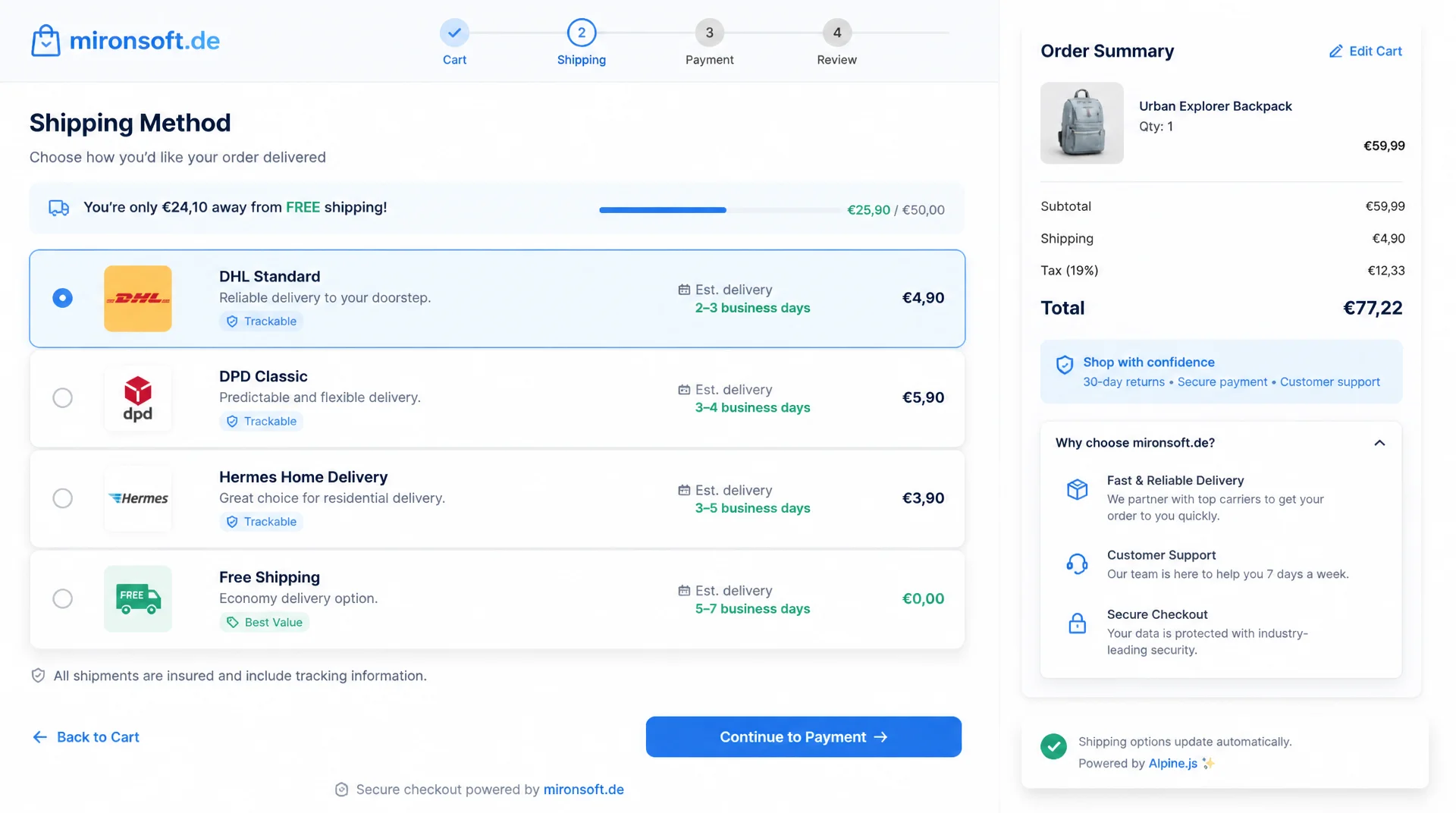
Display, grouping and custom carrier models
How shipping methods in checkout are presented often decides between an abandoned cart and a completed order. In the Hyvä checkout, a lean Alpine.js component that loads its data through a GraphQL availableShippingMethods query replaces the Knockout shipping-rates component. Anyone customizing shipping methods in the Hyvä checkout works with shipping-methods.phtml, ViewModels and custom carrier models instead of uiComponents, observables and RequireJS modules, and gets card layouts, delivery estimates, free shipping thresholds and click and collect as reactive, maintainable building blocks in return.
Table of contents
- 1. How shipping methods are rendered in the Hyvä checkout
- 2. Custom presentation of shipping methods
- 3. Grouping and sorting shipping methods by carrier
- 4. Displaying a custom shipping method correctly in checkout
- 5. Dynamic display: delivery estimate and express shipping
- 6. Shipping cost display and free shipping thresholds
- 7. Mapping click and collect/pickup in checkout
- 8. Error handling for unavailable shipping methods
- 9. Performance: caching and debounce on address input
- 10. Summary
- 11. FAQ
1. How shipping methods are rendered in the Hyvä checkout
The presentation of shipping methods in the Hyvä checkout lives in a single template file: app/design/frontend/Mironsoft/default/Magento_Checkout/templates/checkout/shipping-methods.phtml, which overrides the parent theme hyva-themes/magento2-default-theme-csp. The container carries x-data="initShippingMethods()", an Alpine factory function that holds the entire state: loaded methods, the selected method_code, loading state and error text. There is no uiComponent registry, no shipping-rates.js and no Knockout templates with data-bind attributes left rendering the shipping options the way the Luma checkout does.
The data no longer comes from the server-side checkout data model, but from a GraphQL availableShippingMethods query run against the shipping_addresses field of the cart query. As soon as the customer enters or changes an address, the Alpine component fires the setShippingAddressesOnCart mutation and then reads available_shipping_methods with carrier_code, method_code, carrier_title, method_title and amount from the response. This separation of address mutation and method query is the central difference from the Knockout shipping-rates component, which held address and shipping options in a single, hard to decouple observable tree.
For the presentation of shipping methods in checkout, the Hyvä block mechanism remains fully intact: $block->getChildNames() is still iterated so that additional blocks such as a store locator or a free shipping banner can hook in at defined points. Alpine only takes over the client-side reactivity around the method selection, not Magento's server-side block and layout system. Anyone who respects this separation can extend the component without giving up layout XML control of the checkout.
# GraphQL query used by the Alpine shipping methods component
# Triggered after setShippingAddressesOnCart succeeds

query CheckoutShippingMethods($cartId: String!) {
  cart(cart_id: $cartId) {
    shipping_addresses {
      available_shipping_methods {
        carrier_code
        carrier_title
        method_code
        method_title
        amount {
          value
          currency
        }
        price_excl_tax {
          value
        }
        price_incl_tax {
          value
        }
        available
        error_message
      }
      selected_shipping_method {
        carrier_code
        method_code
      }
    }
  }
}

# Mutation fired when the customer selects a shipping method card
mutation SetShippingMethod($cartId: String!, $carrierCode: String!, $methodCode: String!) {
  setShippingMethodsOnCart(
    input: {
      cart_id: $cartId
      shipping_methods: [{ carrier_code: $carrierCode, method_code: $methodCode }]
    }
  ) {
    cart {
      shipping_addresses {
        selected_shipping_method {
          carrier_code
          method_code
        }
      }
    }
  }
}
2. Custom presentation of shipping methods: from radio list to Tailwind card view
The default checkout renders shipping methods as a plain radio list, which quickly becomes cluttered once more than two or three options are active. A common customization of shipping methods in the Hyvä checkout is turning this list into a Tailwind card view: each method gets its own <label> card with carrier icon, title, price and delivery estimate, while the actual <input type="radio"> is visually hidden but stays accessible for keyboard and screen readers (class="sr-only peer"). The selected state is controlled purely through Tailwind peer classes: peer-checked:border-orange-500 peer-checked:ring-2 peer-checked:ring-orange-200.
Icons per carrier are, as required throughout the theme, embedded as inline <svg>, never as an icon font. Every carrier code (dhlpaket, dpd, ups, flatrate for the in-house pickup option) is mapped to an SVG fragment resolved through a small PHP mapping in the ViewModel, instead of hard-wiring the icon into the template. That keeps the presentation of this component extensible whenever a new carrier is added, without touching the core template.
The delivery estimate is shown as an extra line in the card, for example "Delivery: Thu, Jul 24" instead of a vague "3 to 5 business days". This value either comes directly from a custom GraphQL field on the carrier or, as described in section 5, is calculated client-side from cutoff time and stock level. It is important that cards with available: false are grayed out but not hidden, with a short reason such as "Not available for this address" instead of silently disappearing from the list.
<!-- app/design/frontend/Mironsoft/default/Magento_Checkout/templates/checkout/shipping-methods.phtml -->
<?php
/** @var \Magento\Checkout\Block\Checkout\LayoutProcessorInterface $block */
/** @var \Hyva\Theme\ViewModel\HyvaCsp $hyvaCsp */
$hyvaCsp = $viewModels->require(\Hyva\Theme\ViewModel\HyvaCsp::class);
?>
<div x-data="initShippingMethods()" x-init="fetchMethods()" class="space-y-3">
<template x-if="loading">
<div class="text-sm text-slate-500 p-4">Loading shipping methods …</div>
</template>
<template x-if="!loading && methods.length === 0">
<div class="rounded-xl border border-amber-200 bg-amber-50 p-4 text-sm text-amber-800">
No shipping method is currently available for this address.
</div>
</template>
<template x-for="method in sortedMethods" :key="method.carrier_code + method.method_code">
<label
class="flex items-center gap-4 p-4 rounded-2xl border border-slate-200 cursor-pointer transition-colors hover:border-orange-300"
:class="{ 'opacity-50 cursor-not-allowed': !method.available }"
>
<input
type="radio"
name="shipping-method"
class="sr-only peer"
:value="method.carrier_code + '_' + method.method_code"
:disabled="!method.available"
x-model="selected"
@change="selectMethod(method)"
>
<span class="w-10 h-10 flex-shrink-0 rounded-lg bg-slate-50 flex items-center justify-center peer-checked:bg-orange-50">
<!-- Carrier icon resolved via ViewModel, inline SVG, no icon font -->
<?= /* @noEscape */ '' ?>
</span>
<span class="flex-1">
<span class="block text-sm font-semibold text-slate-800" x-text="method.method_title"></span>
<span class="block text-xs text-slate-500" x-text="method.deliveryEstimate"></span>
<template x-if="!method.available">
<span class="block text-xs text-red-600 mt-1" x-text="method.error_message"></span>
</template>
</span>
<span class="text-sm font-bold text-slate-900" x-text="formatPrice(method.amount.value)"></span>
</label>
</template>
</div>
<?php $hyvaCsp->registerInlineScript(); ?>
3. Grouping and sorting shipping methods by carrier
As soon as several carriers are active at the same time, for example DHL for standard shipping and a custom express carrier, the order of shipping methods in checkout becomes a genuine business decision: which method should appear first, which one should be visually emphasized? This sorting logic does not belong in the template, and certainly not in an inline comparator inside an Alpine x-for directive, but in a PHP ViewModel that exposes a priority per carrier code as a configurable value.
A ShippingMethodSortOrder ViewModel reads a configuration table from system.xml that assigns a sort position to every carrier_code and passes this order to the Alpine component as a JSON array. The component then sorts the methods delivered by the GraphQL query purely client-side using this array, pushing preferred shipping options like express or click and collect to the top and demoting slow or expensive options to the bottom of the list. This separation keeps the template readable and makes prioritization configurable from the admin, without a deployment.
For grouping by carrier, for example when a carrier offers multiple methods (standard, express, same-day), a simple reduce() operation in the Alpine state is enough to turn the flat list from available_shipping_methods into an object grouped by carrier_code. The card view then shows a header with logo per carrier, with the associated methods listed as sub-cards underneath, which noticeably improves clarity once many shipping options are active at once.
4. Displaying a custom shipping method (carrier model) correctly in checkout
A custom carrier for shipping methods in checkout, for example for express shipping or click and collect, is implemented as a PHP class that extends Magento\Shipping\Model\Carrier\AbstractCarrier and implements Magento\Shipping\Model\Carrier\CarrierInterface. The central method collectRates(RateRequest $request) returns a Magento\Shipping\Model\Rate\Result object with one or more Method instances, each with its own method_code, method_title and price. These exact values later show up unchanged in the GraphQL response under available_shipping_methods, which is why the titles should already be phrased here the way they are meant to appear in the frontend.
The carrier's configuration runs classically through etc/config.xml with default values under carriers/<code>/active, carriers/<code>/title and carriers/<code>/name, complemented by a system.xml that makes these values editable in the admin under Stores > Configuration > Sales > Shipping Methods. Important for correct mapping in checkout: getAllowedMethods() must return exactly the method_code values that collectRates() also produces, otherwise the methods show up inconsistently or not at all in checkout because the GraphQL resolver cannot match the method to the configuration.
<?php
declare(strict_types=1);

namespace Mironsoft\ShippingExtend\Model\Carrier;

use Magento\Quote\Model\Quote\Address\RateRequest;
use Magento\Shipping\Model\Carrier\AbstractCarrier;
use Magento\Shipping\Model\Carrier\CarrierInterface;
use Magento\Shipping\Model\Rate\Result;
use Magento\Shipping\Model\Rate\ResultFactory;
use Magento\Quote\Model\Quote\Address\RateResult\MethodFactory;

/**
 * Custom express shipping carrier surfaced in the Hyva checkout shipping methods list.
 */
final class ExpressCarrier extends AbstractCarrier implements CarrierInterface
{
    /**
     * @var string Carrier code referenced in config.xml and the GraphQL resolver.
     */
    protected $_code = 'mironsoft_express';

    /**
     * @param ResultFactory $rateResultFactory Builds the shipping rate result.
     * @param MethodFactory $rateMethodFactory Builds individual shipping methods.
     * @param array $data Additional carrier data.
     */
    public function __construct(
        private readonly ResultFactory $rateResultFactory,
        private readonly MethodFactory $rateMethodFactory,
        array $data = [],
    ) {
        parent::__construct($data);
    }

    /**
     * Collects the express shipping rate, title matches what the Hyva checkout card renders.
     *
     * @param RateRequest $request The rate request with destination and cart data.
     * @return Result|bool
     */
    public function collectRates(RateRequest $request): Result|bool
    {
        if (!$this->getConfigFlag('active')) {
            return false;
        }

        /** @var Result $result */
        $result = $this->rateResultFactory->create();

        $method = $this->rateMethodFactory->create();
        $method->setCarrier($this->_code);
        $method->setCarrierTitle($this->getConfigData('title'));
        $method->setMethod('express');
        $method->setMethodTitle('Express Shipping (delivery tomorrow)');
        $method->setPrice((float) $this->getConfigData('price'));
        $method->setCost((float) $this->getConfigData('price'));

        $result->append($method);

        return $result;
    }

    /**
     * Must match the method codes produced by collectRates() exactly.
     *
     * @return string[]
     */
    public function getAllowedMethods(): array
    {
        return ['express' => $this->getConfigData('name')];
    }
}
<!-- app/code/Mironsoft/ShippingExtend/etc/config.xml -->
<?xml version="1.0"?>
<config xmlns:xsi="http://www.w3.org/2001/XMLSchema-instance" xsi:noNamespaceSchemaLocation="urn:magento:module:Magento_Config:etc/config.xsd">
    <default>
        <carriers>
            <mironsoft_express>
                <active>1</active>
                <title>Mironsoft Express</title>
                <name>Express Shipping</name>
                <price>9.90</price>
                <cutoff_time>14:00</cutoff_time>
                <sallowspecific>0</sallowspecific>
                <model>Mironsoft\ShippingExtend\Model\Carrier\ExpressCarrier</model>
            </mironsoft_express>
        </carriers>
    </default>
</config>

<!-- app/code/Mironsoft/ShippingExtend/etc/adminhtml/system.xml (excerpt) -->
<system>
    <section id="carriers">
        <group id="mironsoft_express" translate="label" type="text" sortOrder="15" showInDefault="1">
            <label>Mironsoft Express</label>
            <field id="active" translate="label" type="select" sortOrder="1" showInDefault="1">
                <label>Enabled</label>
                <source_model>Magento\Config\Model\Config\Source\Yesno</source_model>
            </field>
            <field id="price" translate="label" type="text" sortOrder="3" showInDefault="1">
                <label>Price</label>
            </field>
            <field id="cutoff_time" translate="label" type="text" sortOrder="4" showInDefault="1">
                <label>Order cutoff time for next-day delivery</label>
            </field>
        </group>
    </section>
</system>
5. Dynamic display: delivery estimate calculation and express shipping hint
A delivery estimate like "Delivery: Thu, Jul 24" is more tangible for customers than "3 to 5 business days" and is one of the most effective customizations of shipping methods in checkout. The calculation considers three factors: the carrier's configured cutoff_time value from section 4, the current stock level of the items in the cart, and the transit time of the shipping option itself (one day for express, two to four business days for standard). This logic belongs in a PHP ViewModel that passes a simple date as an ISO string to Alpine, rather than rebuilding it in JavaScript and duplicating time zone or holiday logic there.
For items that need to be backordered, the delivery estimate shifts accordingly, which is mapped client-side through an additional GraphQL value per cart line item, instead of recalculating the entire estimate server-side for the whole cart and reloading it on every change. The express shipping hint itself is purely reactive Alpine state: if the current time is before the cutoff, a green banner shows "Order within the next 2 hours 14 minutes for delivery tomorrow"; past the cutoff, the message automatically shifts to the next business day after that.
So this hint does not need to be recalculated on every render cycle, the time difference runs through a single setInterval in the component's x-init hook that updates the remaining time every minute, instead of recomputing on every Alpine tick. This combination of a server-calculated base date and a client-side ticking countdown is the most robust solution for dynamic delivery estimates in the Hyvä checkout.
6. Shipping cost display and free shipping threshold hints
The hint "24.50 EUR left until free shipping" is one of the most conversion-boosting elements in the presentation of shipping methods in checkout, because it directly motivates increasing the cart value. The calculation is based on the difference between the configured threshold (freeshipping/free_shipping_subtotal) and the current grand_total from the cart query, output as a reactive Alpine expression: x-text="formatPrice(threshold - cart.prices.grand_total.value) + ' left until free shipping'". Once the threshold is reached, the display automatically switches to a confirmation such as "Free shipping is now active" with a green checkmark icon.
Correct price formatting is not a minor detail for shipping methods in checkout, it is a common source of bugs: the amount.value delivered by the GraphQL query is a plain number without currency formatting, which is why a shared formatPrice() helper function in Alpine uses Intl.NumberFormat('en-US', { style: 'currency', currency: 'EUR' }). Whether the price is shown including or excluding VAT depends on the store configuration value tax/display/shipping, so the component switches between price_incl_tax and price_excl_tax from the GraphQL response depending on configuration, instead of hard-wiring one of the two values.
The progress bar toward the free shipping threshold uses the same reactive mechanism as in the minicart: x-bind:style="{ width: Math.min(100, (cart.prices.grand_total.value / threshold) * 100) + '%' }". Because the bar is bound directly to cart.prices.grand_total.value, it updates automatically whenever the cart value shifts due to a quantity change in checkout, without the method list needing to reload.
// app/design/frontend/Mironsoft/default/Magento_Checkout/web/js/shipping-methods.js
function initShippingMethods() {
  return {
    loading: true,
    methods: [],
    selected: null,
    freeShippingThreshold: 0,
    grandTotal: 0,

    get sortedMethods() {
      // Priority list injected server-side via ShippingMethodSortOrder ViewModel
      const priority = window.mironsoftShippingPriority || [];
      return [...this.methods].sort((a, b) => {
        const posA = priority.indexOf(a.carrier_code);
        const posB = priority.indexOf(b.carrier_code);
        return (posA === -1 ? 999 : posA) - (posB === -1 ? 999 : posB);
      });
    },

    get remainingForFreeShipping() {
      const remaining = this.freeShippingThreshold - this.grandTotal;
      return remaining > 0 ? remaining : 0;
    },

    async fetchMethods() {
      this.loading = true;
      const response = await this.graphqlQuery(SHIPPING_METHODS_QUERY, { cartId: this.getCartId() });
      const address = response.data.cart.shipping_addresses[0];
      this.methods = address.available_shipping_methods.map((method) => ({
        ...method,
        deliveryEstimate: this.calculateDeliveryEstimate(method),
      }));
      this.grandTotal = response.data.cart.prices.grand_total.value;
      this.loading = false;
    },

    calculateDeliveryEstimate(method) {
      const now = new Date();
      const cutoff = method.carrier_code === 'mironsoft_express' ? 14 : 23;
      const daysToAdd = now.getHours() < cutoff ? 1 : 2;
      const eta = new Date(now);
      eta.setDate(eta.getDate() + daysToAdd);
      return 'Delivery: ' + eta.toLocaleDateString('en-US', { weekday: 'short', day: '2-digit', month: 'long' });
    },

    formatPrice(value) {
      return new Intl.NumberFormat('en-US', { style: 'currency', currency: 'EUR' }).format(value);
    },

    async selectMethod(method) {
      await this.graphqlMutation(SET_SHIPPING_METHOD_MUTATION, {
        cartId: this.getCartId(),
        carrierCode: method.carrier_code,
        methodCode: method.method_code,
      });
      window.dispatchEvent(new CustomEvent('shipping-method-selected', { detail: { method } }));
    },
  };
}
7. Mapping click and collect/pickup in checkout
Click and collect is technically mapped as a perfectly normal shipping method in checkout: a custom carrier (mironsoft_pickup) with a price of 0.00 that appears in the card view alongside DHL and express, but instead of a price shows the hint "Free pickup". As soon as the customer selects this card, Alpine reveals an additional store selection UI (x-show="selectedCarrier === 'mironsoft_pickup'") that lists available stores with address, opening hours and current stock level per item.
The store list itself comes from a dedicated GraphQL query that resolves a storeLocations field against a second, product-related module and checks for every store whether all items in the current cart are available there. This check runs server-side in the resolver, not in the frontend, because it needs access to the real stock table (cataloginventory_stock_item, or MSI sources in the case of Multi Source Inventory) that the frontend cannot and should not query directly. Stores with incomplete availability are grayed out with a hint such as "2 of 3 items available" instead of disappearing from the list entirely.
Selecting a store is written to the cart as an additional custom_attribute, via the setShippingMethodsOnCart mutation with a supplementary shipping_addresses field for the store ID. Only once a valid store with full availability has been selected does the "Continue" button in checkout activate, controlled through the same Alpine state that also validates the other options in checkout.
8. Error handling for unavailable shipping methods
If the delivery address is outside the configured delivery area, the GraphQL query returns an empty available_shipping_methods list, without any technical error at all. The most common beginner mistake with shipping methods in checkout is simply ignoring this case in the template, leaving the customer facing an empty area with no idea why they cannot proceed. The Alpine component must explicitly catch this state (methods.length === 0) and show an understandable, actionable message, such as "Delivery is currently not possible to your address, please contact our customer service" instead of an empty area or a generic loading spinner that never disappears.
A second error case concerns individual, temporarily unavailable shipping methods, for example when a carrier does not return a rate due to maintenance work. Here Magento returns the method with available: false and an error_message field that should be displayed directly in the card, instead of hiding the method completely. That gives the customer context on why a familiar option is missing, rather than creating the impression that checkout is broken.
Network errors in the GraphQL request itself, for example a timeout or a 5xx response, require a third error layer: a retry button in the Alpine component (@click="fetchMethods()"), combined with a clear message such as "Shipping methods could not be loaded. Try again." Without this explicit error handling, the component gets stuck in the loading state, the customer abandons checkout, and no technical error becomes visible in monitoring.
9. Performance: caching shipping method requests
Every address change in checkout potentially triggers a new query for shipping methods in checkout, which, if implemented without control, quickly leads to a flood of parallel GraphQL requests, especially while the customer is still typing. An x-model.debounce.400ms on the postal code and city address fields prevents a new setShippingAddressesOnCart mutation and subsequent method query from firing on every keystroke. Only after 400 milliseconds of inactivity is the address actually submitted.
It is also worth adding a simple client-side cache keyed per address hash: if the customer changes the house number but postal code and country stay identical, the same cache entry returns the last known shipping methods without triggering another request, provided the cart contents have not changed in the meantime. The cache key is composed of postal code, country and a hash of the cart item UIDs, so that a changed cart correctly invalidates the cache. A simple in-memory object in the Alpine component is sufficient for this; a localStorage cache is usually unnecessary given the short validity window.
Server-side, it also pays off to keep the GraphQL resolver for available_shipping_methods from re-running the entire rate collection pipeline across all carriers on every request when only a single attribute such as the order comment has changed. A targeted cache tag based on address and cart contents, combined with a short TTL of a few seconds, noticeably reduces server load without displaying stale shipping options.
| Task | Knockout shipping-rates (Luma) | Hyvä checkout with Alpine/GraphQL | Advantage |
|---|---|---|---|
| Loading shipping methods | shipping-rates.js uiComponent + observable tree | GraphQL availableShippingMethods query | Only the fields needed, no component registry |
| Selecting a shipping option | Knockout data-bind change + full page Ajax reload | x-model + setShippingMethodsOnCart mutation | No full reload, reactive UI update |
| Showing delivery estimate | Custom UI component + Knockout template per carrier | ViewModel calculation + x-text in the panel | Central logic instead of scattered templates |
| Free shipping threshold hint | Separate widget + manual Ajax reload | Reactive Alpine state, x-bind:style progress bar | Automatic update on quantity change |
| Handling an empty method list | Generic error page or empty area | Custom error component with a suggested action | Customer understands the problem, no abandonment without context |
The comparison shows that every single customization to these shipping options in the Hyvä stack needs fewer moving parts than the Knockout equivalent: no component registry, no nested observables, no global event system. A single Alpine object plus targeted GraphQL queries and mutations is enough for display, selection, grouping and error handling alike.
10. Summary
Customizing shipping methods in the Hyvä checkout means working across several layers at once: shipping-methods.phtml with its Alpine factory function, the GraphQL availableShippingMethods query along with custom carrier models, ViewModels for sort logic and delivery estimate calculation, and error handling for empty or restricted method lists. The Tailwind card view with inline SVG icons replaces the plain radio list, and free shipping threshold hints and click and collect run through the same reactive Alpine state as regular method selection.
Anyone extending the presentation of shipping methods in checkout should consistently separate server-side rate calculation in the carrier model from client-side Alpine reactivity: the carrier supplies price and title, the ViewModel supplies sorting and delivery estimate, Alpine only controls presentation and interaction. For performance, debounce address changes, cache results per address hash, and cache the GraphQL resolver server-side with a short TTL. That way, method selection in checkout stays fast, correct and easy to extend.
Customizing shipping methods in the Hyvä checkout: the essentials at a glance
Rendering
shipping-methods.phtml with x-data="initShippingMethods()", data via the GraphQL availableShippingMethods query instead of Knockout shipping-rates.
Presentation & grouping
Tailwind card view with inline SVG icons, sort logic in the ViewModel instead of the template, prioritization of preferred carriers.
Custom carriers & click and collect
AbstractCarrier implementation with config.xml, store selection and availability checking as a custom shipping option.
Errors & performance
Custom error component for an empty method list, debounce on address input, caching per address hash and a short server TTL.
11. FAQ: Customizing Shipping Methods in the Hyvä Checkout
1How are shipping methods technically rendered in the Hyvä checkout?
2What replaces the Knockout shipping-rates component?
3How do I display shipping methods as a card view?
4How do I group and sort by carrier?
5How do I display a custom shipping method correctly?
6How do I calculate a dynamic delivery estimate?
7How do I show a free shipping threshold reactively?
8How do I map click and collect?
9How do I handle an empty method list?
10How do I avoid unnecessary GraphQL requests?
Mironsoft
Hyvä checkout, Alpine.js and GraphQL for Magento 2
Need more from your shipping methods in checkout?
We customize the presentation of your shipping methods in the Hyvä checkout: Tailwind card view, custom carrier models, delivery estimate calculation, free shipping threshold hints and click and collect, all built on Alpine.js and GraphQL.
Checkout audit
Analysis of the existing shipping method presentation for performance, clarity and error handling
Carrier development
Custom shipping options, click and collect and delivery estimate logic as an AbstractCarrier implementation
Design customization
Tailwind card view, icons and free shipping threshold hints matching your corporate design