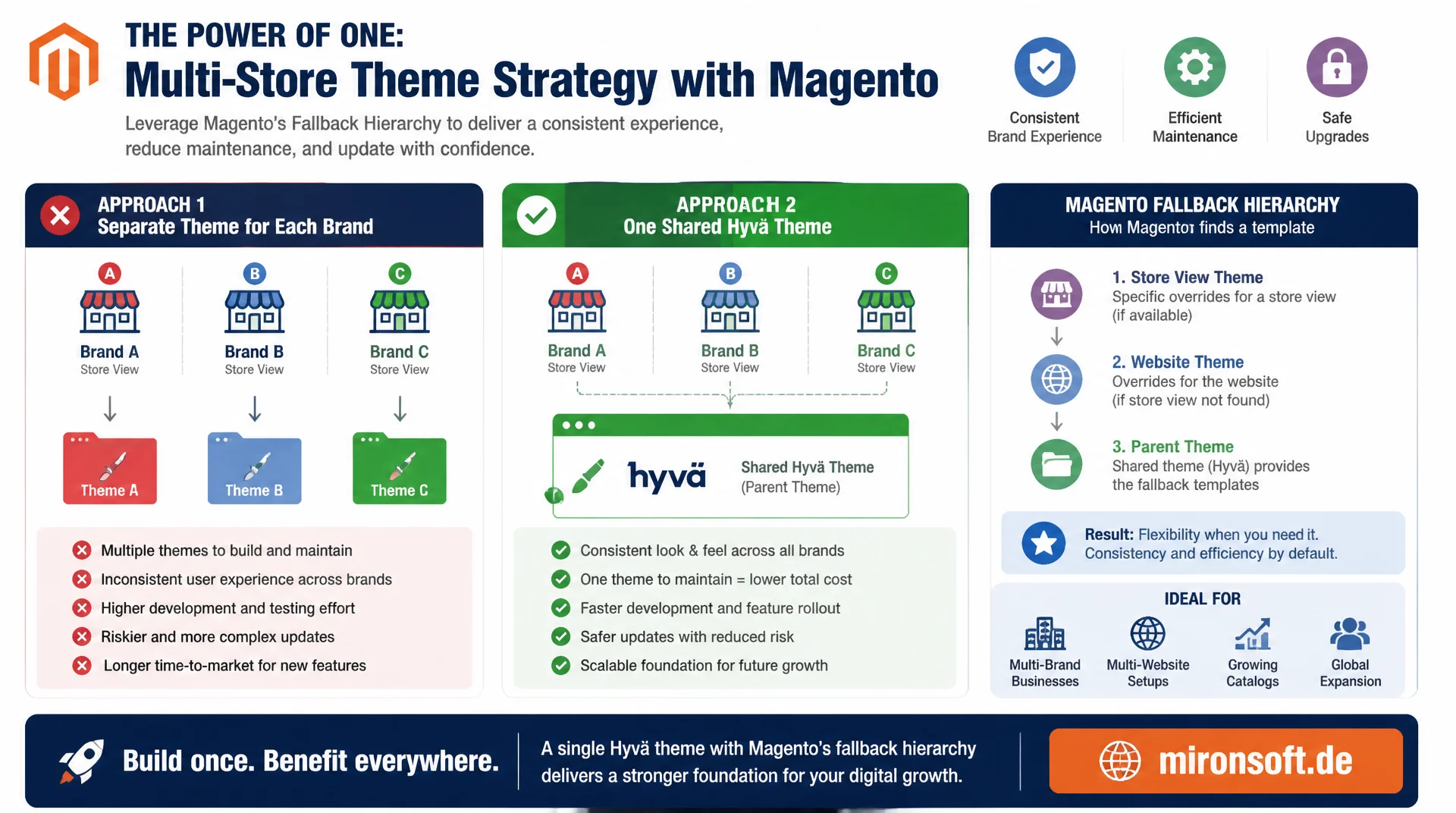
Using Fallback Levels the Right Way, Not Theme Forks
Anyone who forks a separate theme for every brand pays twice with every Hyvä update. A well thought out multi-store theme strategy instead uses Magento's fallback hierarchy of theme, website, and store view to run one shared Hyvä theme for multiple stores in a way that stays consistent, maintainable, and update-safe.
Table of Contents
- 1. The Typical Trap in Multi-Store Setups
- 2. Magento's Fallback Hierarchy in Detail
- 3. One Theme, Many Brands: CSS Custom Properties Instead of Theme Forks
- 4. ViewModel-Based Store Detection for Conditional Rendering
- 5. Translations and i18n per Store View
- 6. Layout Adjustments per Store Without Theme Duplication
- 7. Static Content Deployment for Multiple Stores and Locales
- 8. Common Pitfalls
- 9. Separate Theme vs. Fallback Levels Compared
- 10. Summary
- 11. FAQ
1. The Typical Trap in Multi-Store Setups
As soon as a Magento shop represents several brands, countries, or sales channels across websites and store views, the wish for a separate theme per store arises almost automatically. The logo is different, the color palette is different, maybe even the footer structure differs. The obvious but expensive reflex: copy the existing Hyvä theme, rename it, and maintain it separately per brand from then on. Without a deliberate multi-store theme strategy, this quickly adds up to three, four, or five parallel codebases that each need to be updated individually with every Hyvä core update, every security patch, and every Tailwind change.
The problem usually only shows up months later: a bugfix lands in the theme of brand A but not in the one for brand B, because the copies have long since drifted apart. This is exactly where a clean multi-store theme strategy comes in. Instead of duplicating the theme, a single Hyvä theme for multiple stores is operated, and the differences between stores are handled through Magento's built-in fallback hierarchy together with targeted ViewModel logic. That reduces the maintenance surface to one codebase, without giving up visual and functional differentiation between brands.
2. Magento's Fallback Hierarchy in Detail
Magento resolves templates, layout files, locale files, and static assets through a fixed fallback chain: store view overrides website, website overrides default, and default falls back to the assigned theme and its parent theme. The theme assignment itself happens in the admin under Content > Design > Configuration, where a theme, a locale, and optional design changes are stored per scope level (default, website, store view). This structure is the actual backbone of any multi-store theme strategy: a store view does not need to define anything explicitly that it can inherit from its parent scope.
In practice this means: the Hyvä theme is assigned once at the default level, and all websites and store views inherit it automatically. Only where a difference actually exists, for example a different locale or a specific CMS block, is an override set at the website or store view level. This resolution applies not only to themes but also to layout handles, translation CSVs, and configuration values. Anyone who understands the fallback hierarchy recognizes that a Hyvä theme for multiple stores is not a compromise but the standard case Magento was designed for.
<!-- theme.xml - a single Hyva theme shared across all stores/websites -->
<theme xmlns:xsi="http://www.w3.org/2001/XMLSchema-instance" xsi:noNamespaceSchemaLocation="urn:magento:framework:Config/etc/theme.xsd">
    <title>Mironsoft Multi-Store</title>
    <parent>hyva/default</parent>
    <media>
        <preview_image>media/preview.jpg</preview_image>
    </media>
</theme>

<!-- Conceptual view of the scope resolution stored in core_config_data -->
<!-- Assigned via Admin: Content > Design > Configuration, per scope level -->
<config>
    <default>
        <!-- Fallback theme for every store without an explicit override -->
        <design>
            <theme>
                <theme_id>2</theme_id> <!-- Mironsoft Multi-Store theme -->
            </theme>
        </design>
    </default>
    <websites>
        <brand_a>
            <!-- theme_id inherited from default, only locale is overridden -->
            <general>
                <locale>
                    <code>de_DE</code>
                </locale>
            </general>
        </brand_a>
        <brand_b>
            <general>
                <locale>
                    <code>en_US</code>
                </locale>
            </general>
        </brand_b>
    </websites>
    <stores>
        <brand_a_at>
            <!-- store view override: locale differs, theme stays inherited -->
            <general>
                <locale>
                    <code>de_AT</code>
                </locale>
            </general>
        </brand_a_at>
    </stores>
</config>
3. One Theme, Many Brands: CSS Custom Properties Instead of Theme Forks
In most projects, the visual difference between brands is limited to colors, corner radii, and logo variants, rarely to structurally different layouts. That is exactly what CSS custom properties combined with Tailwind CSS v4 are ideal for. Instead of a theme fork per brand, a shared CSS file defines its own set of custom properties per store code and switches between them via an attribute on the <html> tag. This is the central building block of a multi-store theme strategy that enables brand individuality without branching the template logic.
The data-store attribute is rendered server-side from the current store code, typically in the root template. Tailwind v4 allows these custom properties to be referenced directly in the CSS-first @theme block, so utility classes like bg-brand-primary automatically pick up the correct color per store. This keeps the Hyvä theme for multiple stores a single set of templates, while brand identity unfolds purely through CSS variables and attribute selectors.
/* web/tailwind/theme.css - brand tokens keyed by data-store attribute */
@import "tailwindcss";

/* Default brand tokens, used when no data-store override matches */
:root {
  --color-brand-primary: #0f172a;
  --color-brand-accent: #fb8570;
  --radius-brand-card: 0.75rem;
}

/* Brand A overrides */
[data-store="brand_a_de"],
[data-store="brand_a_at"] {
  --color-brand-primary: #5c1a2e;
  --color-brand-accent: #b3294f;
  --radius-brand-card: 1rem;
}

/* Brand B overrides */
[data-store="brand_b_en"] {
  --color-brand-primary: #1c398e;
  --color-brand-accent: #38bdf8;
  --radius-brand-card: 0.25rem;
}

/* Tailwind v4 CSS-first theme, mapped to the custom properties above */
@theme {
  --color-brand-primary: var(--color-brand-primary);
  --color-brand-accent: var(--color-brand-accent);
}
<!-- Root template renders the current store code into the html tag -->
<html lang="<?= $escaper->escapeHtmlAttr($storeLocale) ?>" data-store="<?= $escaper->escapeHtmlAttr($storeCode) ?>">
<!-- Utility classes like bg-brand-primary resolve per store automatically -->
<body class="bg-white text-brand-primary">
4. ViewModel-Based Store Detection for Conditional Rendering
CSS custom properties solve visual differentiation, but some differences are content-related: a different footer text, an extra trust badge, a store-specific note about payment methods. For such cases, a ViewModel that injects StoreManagerInterface is the cleanest approach, considerably more robust than nested layout handles per store, which quickly become hard to manage. Following the applicable coding standards, the ViewModel is implemented with constructor property promotion and complete PHPDoc.
The ViewModel encapsulates store detection in a single place. Templates only need to ask isStore('brand_b_en') instead of determining and comparing the store code themselves. This keeps the multi-store theme strategy testable: the logic lives in one PHP class, not scattered across several phtml files, and can be verified with PHPUnit against different store contexts.
<?php

declare(strict_types=1);

namespace Mironsoft\Theme\ViewModel;

use Magento\Framework\Exception\NoSuchEntityException;
use Magento\Framework\View\Element\Block\ArgumentInterface;
use Magento\Store\Model\StoreManagerInterface;

/**
 * ViewModel for store detection used in conditional template rendering
 * without duplicating the Hyva theme per brand.
 */
class StoreContext implements ArgumentInterface
{
    /**
     * @param StoreManagerInterface $storeManager Provides access to the current store scope
     */
    public function __construct(
        private readonly StoreManagerInterface $storeManager
    ) {
    }

    /**
     * Returns the store code of the currently resolved store.
     *
     * @return string
     * @throws NoSuchEntityException
     */
    public function getCurrentStoreCode(): string
    {
        return $this->storeManager->getStore()->getCode();
    }

    /**
     * Checks whether the current store code matches one of the given codes.
     *
     * @param string ...$storeCodes List of store codes to compare against
     * @return bool
     * @throws NoSuchEntityException
     */
    public function isStore(string ...$storeCodes): bool
    {
        return in_array($this->getCurrentStoreCode(), $storeCodes, true);
    }

    /**
     * Returns the CMS block identifier for the footer content of the current store.
     *
     * @return string
     * @throws NoSuchEntityException
     */
    public function getFooterBlockIdentifier(): string
    {
        return 'footer_content_' . $this->getCurrentStoreCode();
    }
}
5. Translations and i18n per Store View
In Magento, translations follow the same fallback logic as templates. Each locale gets its own CSV directory in the theme (i18n/de_DE.csv, i18n/en_US.csv), and when a store view uses a particular locale, Magento first looks in the active theme, then in the parent theme, and finally in the module translations for the matching key. If a translation is missing in the specific theme, the parent theme CSV automatically takes over, without changing a single line of code.
For a consistent multi-store theme strategy, this means store-specific text differences, for example a different brand name in the subject line of an order confirmation, are solved through additional CSV rows in the shared theme, not through separate theme copies. Locale resolution therefore falls into exactly the same fallback chain as theme assignment and layout, which makes translations predictable and testable across stores.
6. Layout Adjustments per Store Without Theme Duplication
Layout differences between stores can almost always be solved through ViewModel arguments instead of separate layout XML files per theme. A single block is given the StoreContext ViewModel as an argument, and the corresponding template decides based on isStore() which content gets rendered. This keeps the layout structure identical for all stores and avoids each brand developing its own, slightly different layout file that would then need to be maintained separately during updates.
Where store-specific layout is genuinely needed, for example an extra block only for one store, a normal <referenceContainer> in the existing layout is enough, controlled by a condition in the ViewModel or in the block itself. This approach remains a core part of any multi-store theme strategy, because it treats extensions additively rather than destructively.
<?xml version="1.0"?>
<page xmlns:xsi="http://www.w3.org/2001/XMLSchema-instance" xsi:noNamespaceSchemaLocation="urn:magento:framework:View/Layout/etc/page_configuration.xsd">
    <body>
        <referenceContainer name="footer-container">
            <!-- Single block, single theme: content branches via ViewModel, not via theme copies -->
            <block class="Magento\Framework\View\Element\Template"
                   name="footer.brand.content"
                   template="Mironsoft_Theme::footer/brand-content.phtml">
                <arguments>
                    <argument name="store_context" xsi:type="object">Mironsoft\Theme\ViewModel\StoreContext</argument>
                </arguments>
            </block>
        </referenceContainer>
    </body>
</page>
7. Static Content Deployment for Multiple Stores and Locales
As soon as several store views use different locales, setup:static-content:deploy must cover all relevant languages in a single run. If a locale is forgotten, Magento returns 404 errors in production for the CSS and JS assets of that language, simply because the compiled files are missing. The deploy sequence from the shared theme setup automatically covers all stores that point to the same Hyvä theme for multiple stores: a single deploy run is enough for all brands, as long as the locale list is complete.
For very large catalogs with many locales, running the deploy in parallel per locale is worthwhile to shorten the deploy time. What matters is the order: first clear var/view_preprocessed and pub/static, then deploy, and finally flush the cache, regardless of how many stores hang off the shared theme.
#!/usr/bin/env bash
# deploy-multi-store.sh - static content deploy for all store locales
set -euo pipefail

readonly THEME="Mironsoft/default"

# Step 1: always clear preprocessed views and compiled static files first
rm -rf var/view_preprocessed/* pub/static/frontend/*

# Step 2: deploy all locales used across stores/websites in one run
bin/magento setup:static-content:deploy -f \
  de_DE de_AT en_US en_GB \
  -t "$THEME"

# Alternative for large catalogs: parallel deploy per locale
# bin/magento setup:static-content:deploy -f de_DE -t "$THEME" &
# bin/magento setup:static-content:deploy -f en_US -t "$THEME" &
# wait

# Step 3: flush cache once all locales are deployed
bin/magento cache:flush
8. Common Pitfalls
The most common pitfall is an incorrect theme assignment in the admin: a store view accidentally gets an explicit theme assigned instead of letting inheritance from the default or website scope take effect. That locally breaks the fallback chain and means future theme updates no longer reach that one store, without this being immediately obvious in the admin. A second pitfall is cache fragmentation: adding too many ViewModel conditions to heavily used blocks unnecessarily creates many full-page-cache variants per store, which noticeably lowers the cache hit rate.
A third, often overlooked point concerns store-specific robots.txt and CSP settings. Since a shared Hyvä theme for multiple stores does not enforce automatic separation of these configuration values, they are easily forgotten when a new store is set up, with the result that a new store accidentally inherits the CSP rules or indexing settings of another store instead of getting its own values.
9. Separate Theme vs. Fallback Levels Compared
The choice between a theme fork per store and a consistent multi-store theme strategy with fallback levels has a direct impact on maintenance effort, update safety, and the time to market for new stores. The following table compares both approaches along the most important criteria.
| Aspect | Separate theme per store | One theme with fallback levels | Impact |
|---|---|---|---|
| Maintenance effort | Maintain N theme copies | 1 codebase for all stores | Bugfixes and patches needed only once |
| Update safety | Hyvä updates drift apart | One update reaches every store | No drift between theme versions |
| Consistency | Templates drift apart per brand | Same templates, controlled exceptions | Predictable behavior shop-wide |
| Time to market for new stores | Clone and adapt a new theme | Assign scope, add tokens | New store in hours instead of weeks |
| Testing effort | Test every theme copy separately | One regression test covers all stores | Fewer QA cycles per release |
In practice, a theme fork per store feels faster at the start, because no fallback logic needs to be thought through. But as soon as the third or fourth update comes around, the apparent time advantage reverses. A multi-store theme strategy established early pays off at the latest with the first major Hyvä core update.
10. Summary
A Hyvä theme for multiple stores is not a workaround, it follows exactly the design Magento intends with its fallback hierarchy of theme, website, and store view. Theme assignment in the admin determines which scope inherits which theme, which locale, and which design overrides. CSS custom properties handle the visual differentiation between brands, and a ViewModel with StoreManagerInterface handles the content-related differentiation. Translations and layout adjustments fall into the same fallback logic instead of requiring their own theme branches.
The decisive lever is modeling store differences additively rather than destructively, as early as possible: through configuration, CSS variables, and ViewModel conditions instead of copies. A consistent multi-store theme strategy not only measurably reduces maintenance effort, it also turns every new store into a matter of configuration rather than a new development task.
Multi-Store Theme Strategy with Hyvä: The Essentials at a Glance
Use the fallback hierarchy
Assign the theme at the default level, set overrides only at the website or store view level where truly needed.
CSS instead of theme forks
Control brand colors through CSS custom properties and the data-store attribute, not through copied templates.
ViewModel for content
Encapsulate StoreManagerInterface in the ViewModel: templates just ask isStore().
Keep deployment clean
Cover all store locales in one setup:static-content:deploy run, or risk 404 assets.
11. FAQ: Multi-Store Theme Strategy with Hyvä
1What does multi-store theme strategy actually mean?
2When does a separate theme still make sense?
3How does the theme fallback hierarchy work?
4How do you control brand colors without a theme fork?
5How does a ViewModel detect the store?
6How do translations work per store view?
7How do you deploy static content for multiple stores?
8What causes cache fragmentation?
9Most common admin mistake in theme assignment?
10Are robots.txt and CSP automatically separated?
Mironsoft
Hyvä theme development and multi-store architecture for Magento 2
Multiple stores, one theme, no compromises?
We analyze existing theme copies, migrate them into a clean multi-store theme strategy, and build the fallback hierarchy, ViewModel logic, and deployment pipeline so that every new store stays a matter of configuration.
Theme consolidation
Merge existing theme forks into one shared Hyvä theme
ViewModel architecture
Cleanly encapsulate store detection and conditional rendering
Deployment pipeline
Secure static content deployment for all stores and locales