from swatch filters to AJAX filtering
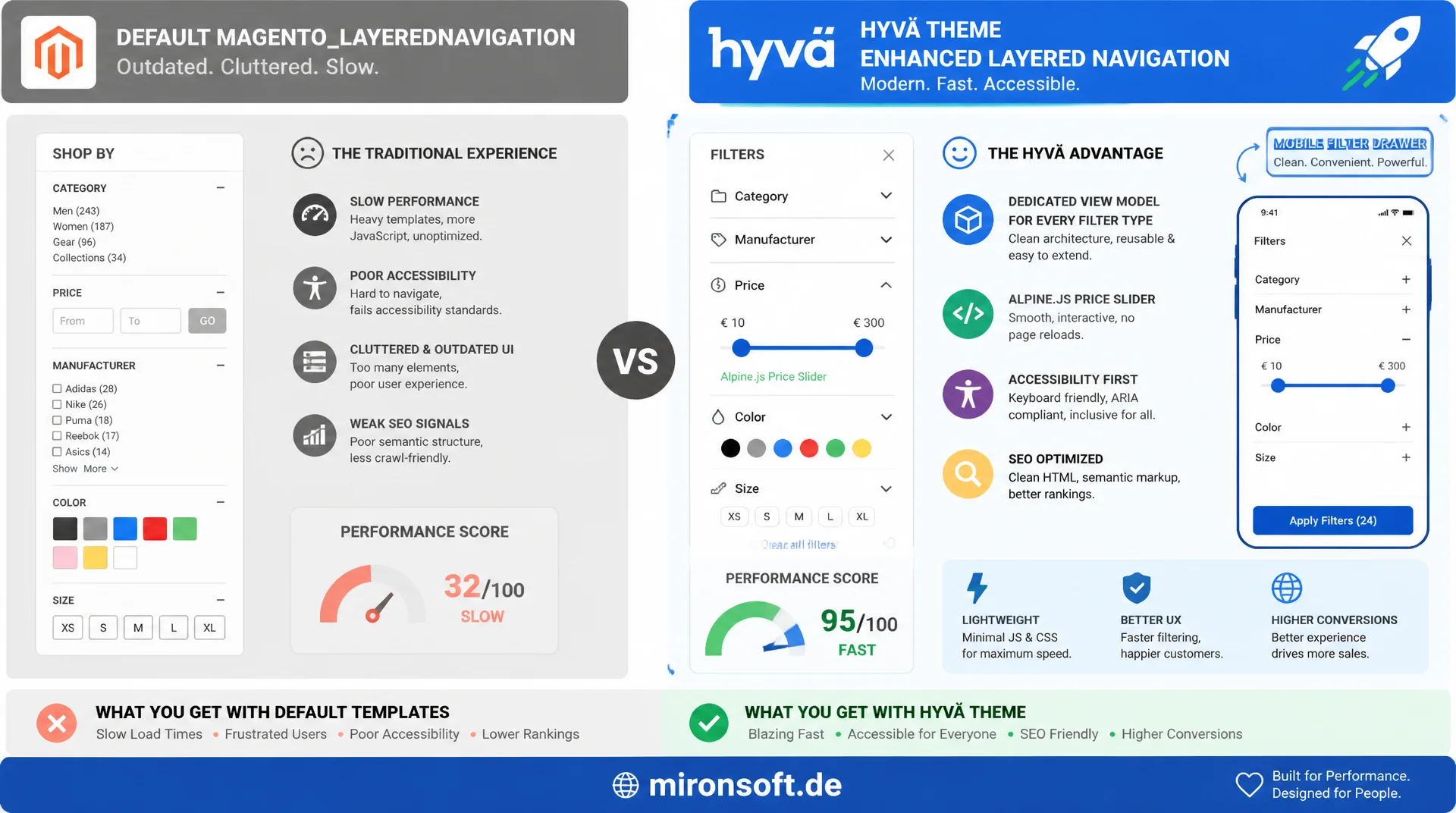
Anyone who runs layered navigation on nothing but the default Magento_LayeredNavigation templates gives up performance, accessibility, and conversion potential in the sidebar filter. A dedicated view model per filter type, an Alpine.js price slider, and a mobile filter drawer make layered navigation in the Hyvä theme fast, accessible, and SEO clean at the same time.
Table of Contents
- 1. What Layered Navigation Actually Means in a Hyvä Context
- 2. Architecture: The Block Hierarchy of Layered Navigation
- 3. Customizing Filter Types: Dropdown, Swatch, and Boolean
- 4. A Price Slider with Alpine.js
- 5. Mobile Filter Drawer
- 6. Active Filter Chips
- 7. AJAX Filtering Without a Full Page Reload
- 8. SEO for Layered Navigation
- 9. Performance: Debouncing, Caching, Facet Requests
- 10. Summary
- 11. FAQ
1. What Layered Navigation Actually Means in a Hyvä Context
Layered navigation in Magento 2 is technically driven by the Magento_LayeredNavigation module, which computes aggregated filter values from the products in a category: attributes, price ranges, categories, and boolean flags. The actual aggregation does not happen in PHP but as a facet query against Elasticsearch or OpenSearch, which return the available filter values through terms and range aggregations, including a hit count for each category request. Magento translates this raw data into Magento\Catalog\Model\Layer\Filter\FilterInterface objects, which are then rendered in the frontend as a filter list.
The decisive difference between faceted navigation in Hyvä and the classic Luma implementation is not in the backend but in the rendering and interaction layer. Luma uses Knockout.js bindings and UI Components to update filter lists, complete with asynchronous widget bootstrapping and its own JavaScript component per filter type. Hyvä replaces that with server-rendered phtml templates combined with Alpine.js for purely client-side interaction, such as opening filter groups or removing active filter chips. For any production-ready implementation of layered navigation, that means no Knockout bindings, no jQuery widget, just declarative x-data attributes directly in the template.
An important boundary: this layered navigation covers only the sidebar filters of the category page, not the toolbar with sorting and view-mode switching, and not the swatch display on the product detail page. That separation should also be visible in the view model design: a filter view model only knows filter state and facet data, not sorting logic.
2. Architecture: The Block Hierarchy of Layered Navigation
The block hierarchy of layered navigation starts with Magento\LayeredNavigation\Block\Navigation, which acts as a container and iterates over the active Magento\Catalog\Model\Layer filters via getFilters(). In the Hyvä theme, the central template Magento_LayeredNavigation/templates/layer/view.phtml renders this filter list, but delegates per filter type to a dedicated renderer template, mapped to the relevant filter field through layout XML. That mapping is the central lever for customizing layered navigation in the Hyvä theme without touching the core block.
For every filter type, attribute dropdown, swatch filter, price filter, category filter, and boolean filter, there is a dedicated renderer template with an associated view model. This separation follows the principle of preferring ArgumentInterface view models over block classes: the block stays lean and only supplies the filter collection, while the view model owns the presentation logic per filter type, such as preparing swatch hex values or computing the price bucket boundaries for the slider.
The layout XML customization happens in catalog_layer_view.xml, where a dedicated template with its view model is registered per filter field. This configuration is the entry point for replacing a standard dropdown filter with a swatch filter in the sidebar, or a price filter with an Alpine slider, without patching the core of layered navigation.
<?xml version="1.0"?>
<layout xmlns:xsi="http://www.w3.org/2001/XMLSchema-instance" xsi:noNamespaceSchemaLocation="urn:magento:framework:View/Layout/etc/page_configuration.xsd">
    <body>
        <referenceBlock name="catalog.leftnav">
            <arguments>
                <!-- Map a filter request field to a dedicated renderer template and view model -->
                <argument name="filter_renderer_map" xsi:type="array">
                    <item name="color" xsi:type="array">
                        <item name="template" xsi:type="string">Mironsoft_LayeredNav::filter/swatch.phtml</item>
                        <item name="view_model" xsi:type="object">Mironsoft\LayeredNav\ViewModel\SwatchFilterViewModel</item>
                    </item>
                    <item name="price" xsi:type="array">
                        <item name="template" xsi:type="string">Mironsoft_LayeredNav::filter/price-slider.phtml</item>
                        <item name="view_model" xsi:type="object">Mironsoft\LayeredNav\ViewModel\PriceSliderFilterViewModel</item>
                    </item>
                    <item name="in_stock" xsi:type="array">
                        <item name="template" xsi:type="string">Mironsoft_LayeredNav::filter/boolean.phtml</item>
                        <item name="view_model" xsi:type="object">Mironsoft\LayeredNav\ViewModel\BooleanFilterViewModel</item>
                    </item>
                </argument>
            </arguments>
        </referenceBlock>
    </body>
</layout>
3. Customizing Filter Types: Dropdown, Swatch, and Boolean
The default dropdown filter of Magento_LayeredNavigation renders every filter option as a plain link with a label and a hit count. For attributes with a small number of clearly distinct values, such as brand or material, that is sufficient, but for color attributes, users today expect a visual swatch filter directly in the sidebar, not just a text link. Important: this swatch filter in the sidebar is its own renderer template and is deliberately different from the PDP swatch, since it only shows hex values and hit counts and never triggers price or gallery updates.
Boolean filters, such as "sale items only" or "in stock," need a third template variant that renders a single toggle instead of a list. The same pattern applies here: a dedicated view model, a dedicated template, no mixing with the price or attribute logic of layered navigation. Every view model implements ArgumentInterface and receives the matching filter as a constructor-injected dependency, since the concrete filter is only known at runtime from the layer collection.
The following view model excerpt shows how a swatch filter renderer for layered navigation transforms the raw filter items into an array consumable by Alpine.js, including hex value escaping and the active state per option.
<?php

declare(strict_types=1);

namespace Mironsoft\LayeredNav\ViewModel;

use Magento\Catalog\Model\Layer\Filter\FilterInterface;
use Magento\Catalog\Model\Layer\Filter\Item;
use Magento\Framework\Escaper;
use Magento\Framework\View\Element\Block\ArgumentInterface;

/**
 * Prepares swatch filter items for the Alpine-based sidebar renderer.
 */
final class SwatchFilterViewModel implements ArgumentInterface
{
    /**
     * Injects the escaper used to sanitize swatch values before output.
     *
     * @param Escaper $escaper Core escaper service.
     */
    public function __construct(
        private readonly Escaper $escaper,
    ) {
    }

    /**
     * Transforms raw layer filter items into an Alpine-consumable array.
     *
     * @param FilterInterface $filter Active layer filter instance.
     * @return array<int, array<string, mixed>>
     */
    public function getSwatchItems(FilterInterface $filter): array
    {
        $items = [];

        /** @var Item $item */
        foreach ($filter->getItems() as $item) {
            $items[] = [
                'label' => $this->escaper->escapeHtml((string) $item->getLabel()),
                'value' => $this->escaper->escapeHtmlAttr((string) $item->getValue()),
                'swatchColor' => $this->escaper->escapeHtmlAttr((string) $item->getData('swatch_color')),
                'count' => (int) $item->getCount(),
                'isSelected' => (bool) $item->getData('is_selected'),
                'removeUrl' => $item->getUrl(),
            ];
        }

        return $items;
    }
}
4. A Price Slider with Alpine.js
The default price filter of Magento_LayeredNavigation renders fixed price ranges as a link list, computed through an algorithm such as manual, auto, or improved in the attribute configuration. For many stores with a wide price spread, a fixed bucket list is less user friendly than a two-thumb range slider that lets shoppers pick a minimum and maximum freely. This piece of layered navigation gets replaced entirely with a custom Alpine.js component that takes the boundaries delivered by the server from the price aggregation as its starting state.
The Alpine slider keeps its state in an x-data object with minValue, maxValue, and the bounds from the price aggregation. Changes on the slider are not sent to the server on every single input event, but delayed through a watcher with a debounce function of typically 400 to 600 milliseconds, so dragging the slider does not create a cascade of requests. Only once the debounce period has elapsed does the URL get updated with the new price bounds and the filtering get triggered.
Accessibility for this piece of layered navigation matters just as much: both thumbs must be operable via keyboard, with role="slider", aria-valuemin, aria-valuemax, and aria-valuenow, so screen readers announce the current state correctly. The formatted price range is never frozen as static text, it is always computed from the current Alpine state via x-text.
// Two-thumb price range slider replacing the default price filter links
document.addEventListener('alpine:init', () => {
  Alpine.data('priceRangeFilter', (minBound, maxBound, currentMin, currentMax) => ({
    minBound,
    maxBound,
    minValue: currentMin,
    maxValue: currentMax,
    debounceTimer: null,

    init() {
      this.$watch('minValue', () => this.scheduleUpdate());
      this.$watch('maxValue', () => this.scheduleUpdate());
    },

    scheduleUpdate() {
      clearTimeout(this.debounceTimer);
      this.debounceTimer = setTimeout(() => this.applyFilter(), 500);
    },

    applyFilter() {
      const url = new URL(window.location.href);
      url.searchParams.set('price', `${this.minValue}-${this.maxValue}`);
      window.dispatchEvent(new CustomEvent('layered-nav:filter-change', { detail: { url: url.toString() } }));
    },

    formattedRange() {
      return `${this.minValue} EUR - ${this.maxValue} EUR`;
    }
  }));
});
5. Mobile Filter Drawer
On mobile devices, a fully expanded layered navigation pushes the product content entirely out of view. The established pattern is an off-canvas filter drawer, opened through a button, animated in from the side with x-show and x-transition. The drawer reuses exactly the same renderer templates as the desktop sidebar, only the surrounding container and its visibility state change.
A sticky "Apply" button at the bottom of the drawer is mandatory for mobile layered navigation, because otherwise users would have to scroll individually after every single change just to confirm the filtering. This button collects every change made inside the drawer in local Alpine state and only triggers the actual filtering on click, instead of reacting immediately to every interaction the way the desktop version does.
For accessibility, the drawer needs a focus trap: as long as it is open, tab navigation must not let focus jump to elements behind the overlay, and Escape must close the drawer and return focus to the triggering button. That requirement applies equally to every off-canvas piece of layered navigation, not just the filter drawer.
<div
    x-data="{ drawerOpen: false, activeFilterCount: 3 }"
    x-on:keydown.escape.window="drawerOpen = false"
>
    <button
        type="button"
        class="lg:hidden inline-flex items-center gap-2 rounded-lg border border-gray-300 px-4 py-2 text-sm font-semibold"
        x-on:click="drawerOpen = true"
        aria-haspopup="dialog"
    >
        Filter
    </button>

    <div
        x-show="drawerOpen"
        x-transition:enter="transition ease-out duration-200"
        x-transition:enter-start="opacity-0"
        x-transition:enter-end="opacity-100"
        class="fixed inset-0 bg-black/50 z-40"
        x-on:click="drawerOpen = false"
    ></div>

    <div
        x-show="drawerOpen"
        x-transition:enter="transition ease-out duration-300"
        x-transition:enter-start="translate-x-full"
        x-transition:enter-end="translate-x-0"
        x-trap="drawerOpen"
        role="dialog"
        aria-modal="true"
        aria-label="Layered Navigation"
        class="fixed inset-y-0 right-0 z-50 w-full max-w-sm bg-white flex flex-col"
    >
        <div class="flex-1 overflow-y-auto p-4">
            <!-- Same renderer templates as the desktop sidebar -->
        </div>
        <div class="sticky bottom-0 border-t border-gray-200 bg-white p-4">
            <button
                type="button"
                class="w-full rounded-lg bg-orange-600 px-4 py-3 text-sm font-bold text-white"
                x-on:click="drawerOpen = false"
                x-text="`Apply filters (${activeFilterCount})`"
            ></button>
        </div>
    </div>
</div>
6. Active Filter Chips
Above the product results, an "active filters" bar shows every applied filter as a removable chip. This bar is a self-contained piece of layered navigation and is typically fed from Magento\Catalog\Model\Layer\Filter\Item objects, which already carry the URL for removing the respective filter. Every chip consists of a filter label and a close icon that calls the associated URL through an Alpine click handler.
Interaction with the chips must stay in sync with the URL query parameters, since Magento maps the entire filter state through GET parameters, for example ?color=5&price=50-100. When a user removes a chip, the corresponding parameter must be stripped from the URL without affecting the remaining filters. Under AJAX filtering, history.pushState handles this; under a classic page reload, a plain link without the removed parameter is enough.
A "clear all filters" link next to the chips is a small but effective detail: it leads to the base category URL with no filter parameters and should only be visible once at least one filter of the layered navigation is active. The view model checks this simply by counting the active layer filters.
7. AJAX Filtering Without a Full Page Reload
A full page reload on every filter change is the biggest performance and UX drawback of a naive implementation of layered navigation. The more modern approach fetches only the product grid area and the updated filter list via fetch and updates the URL with history.pushState, without the browser reloading the page. The Alpine controller for the filter area keeps a loading state for this, which displays a skeleton view or a spinner over the grid while the request is in flight.
As an alternative to an internal REST endpoint, a GraphQL products(filter:) query works well, delivering filter values and product results in a single request, particularly relevant for headless or PWA-adjacent frontends that already use GraphQL as their primary data layer. The query returns both the aggregations for layered navigation and the items of the product grid, so the filter list and the results update together from the same response.
Important with AJAX filtering: the browser back button still has to work. That is achieved by listening for popstate and re-triggering the same fetch cycle on back navigation, instead of relying on the browser cache of the previous page.
query GetFilteredProducts(
  $categoryId: String!
  $filters: ProductAttributeFilterInput!
  $pageSize: Int!
  $currentPage: Int!
) {
  products(
    filter: $filters
    pageSize: $pageSize
    currentPage: $currentPage
  ) {
    total_count
    items {
      id
      sku
      name
      url_key
      price_range {
        minimum_price {
          final_price { value currency }
        }
      }
    }
    aggregations {
      attribute_code
      label
      count
      options {
        label
        value
        count
      }
    }
    page_info {
      current_page
      page_size
      total_pages
    }
  }
}
8. SEO for Layered Navigation
Layered navigation potentially generates thousands of filter combinations per category, most of which are irrelevant to search engines and show up as duplicate content or wasted crawl budget. Magento offers the layered_navigation configuration in the admin catalog settings for this, letting you control per attribute whether a filter value even generates its own indexable URL. For most attribute combinations, noindex, follow is the right setting: search engines keep following the links but do not index the combination.
The canonical tag of every filtered category page must consistently point to the unfiltered base URL of the category once more than one filter is active. That prevents ten different filter combinations from landing in the search index as ten separate pages. Individual filters with high search volume, such as a popular brand or size filter, can deliberately be exempted from this rule and made indexable with their own canonical, provided there is genuine search demand for them.
In addition, layered navigation should never produce plain JavaScript links without an href attribute, since crawlers then have no URL to follow. Every filter link in the sidebar stays a real <a href="…"> element, whose click behavior Alpine overrides via @click.prevent only for AJAX filtering, without ever removing the href that crawlers rely on.
9. Performance: Debouncing, Caching, Facet Requests
The price slider from section four is the most obvious source of excessive facet requests when no debounce is implemented: without a delay, every pixel of slider movement would trigger its own request against Elasticsearch. A debounce of 400 to 600 milliseconds reduces that to a single request once the interaction ends, and it is mandatory for every Alpine component of layered navigation, not just the price filter.
Facet caching strategies operate on two levels: the full page cache is free to cache filtered category pages, as long as the filter state is entirely represented through the URL and no session-dependent data flows into the response. On top of that, a short-lived query result cache at the Elasticsearch aggregation level pays off for high-traffic categories, so repeated identical facet requests do not recompute the full aggregation every time.
Too many concurrent facet requests often happen when several filter groups each fire their own fetch call independently, instead of issuing a single combined request. The clean solution batches every change to layered navigation within a short time window into one single request before the filtering actually runs.
Naive Standard Approach vs. Recommended Hyvä Pattern
| Task | Naive Standard Approach | Recommended Hyvä Pattern | Benefit |
|---|---|---|---|
| Price filter | Fixed price range links | Alpine two-thumb range slider | Free price choice, fewer clicks |
| Page update on filter change | Full page reload | AJAX fetch + history.pushState | Faster filtering, preserved scroll state |
| Color filter in the sidebar | Text dropdown list | Swatch filter with hex preview | Faster visual recognition |
| Search engine indexing | No canonical for filter combinations | Canonical to base category, noindex,follow | No duplicate content, preserved crawl budget |
| Slider interaction | Request on every pixel | Debounce 400 to 600 ms | Significantly fewer facet requests |
Mironsoft
Hyvä frontend development for Magento 2
Layered navigation that converts instead of frustrates?
We build layered navigation in the Hyvä theme with dedicated filter renderers, an Alpine price slider, a mobile filter drawer, and AJAX filtering, including SEO-clean canonical and robots handling for filter combinations.
Filter Concept
View model architecture per filter type and layout XML mapping
Alpine Interaction
Price slider, filter drawer, and AJAX filtering without jQuery
SEO & Performance
Canonical strategy, facet caching, and debounce tuning
10. Summary
Layered navigation in the Hyvä theme consists of the same Magento_LayeredNavigation data model as in Luma, combined with a fully replaced rendering and interaction layer: dedicated view models per filter type, server-rendered templates, and Alpine.js instead of Knockout.js. Swatch filters in the sidebar, an Alpine price slider with debounce, a mobile filter drawer with a focus trap, and active filter chips that stay in sync with the URL together form layered navigation that feels fast and predictable to users.
AJAX filtering with history.pushState, or a GraphQL products(filter:) query, replaces the full page reload and makes layered navigation in the Hyvä theme noticeably more responsive. On the SEO side, a consistent canonical strategy with targeted noindex, follow prevents filter combinations from wasting crawl budget. Debouncing slider interactions and facet caching at the Elasticsearch level round out a production-ready implementation of layered navigation.
Layered Navigation in the Hyvä Theme: The Essentials at a Glance
Architecture
A dedicated renderer template and view model per filter type, mapped through catalog_layer_view.xml, without touching the core block.
Alpine Interaction
Swatch filters, a debounced price slider, and a filter drawer with a focus trap fully replace Knockout bindings.
AJAX & GraphQL
fetch plus history.pushState, or products(filter:), replace the full page reload on every filter change.
SEO & Performance
Canonical to the base category, noindex, follow for irrelevant combinations, debouncing and facet caching against excess requests.