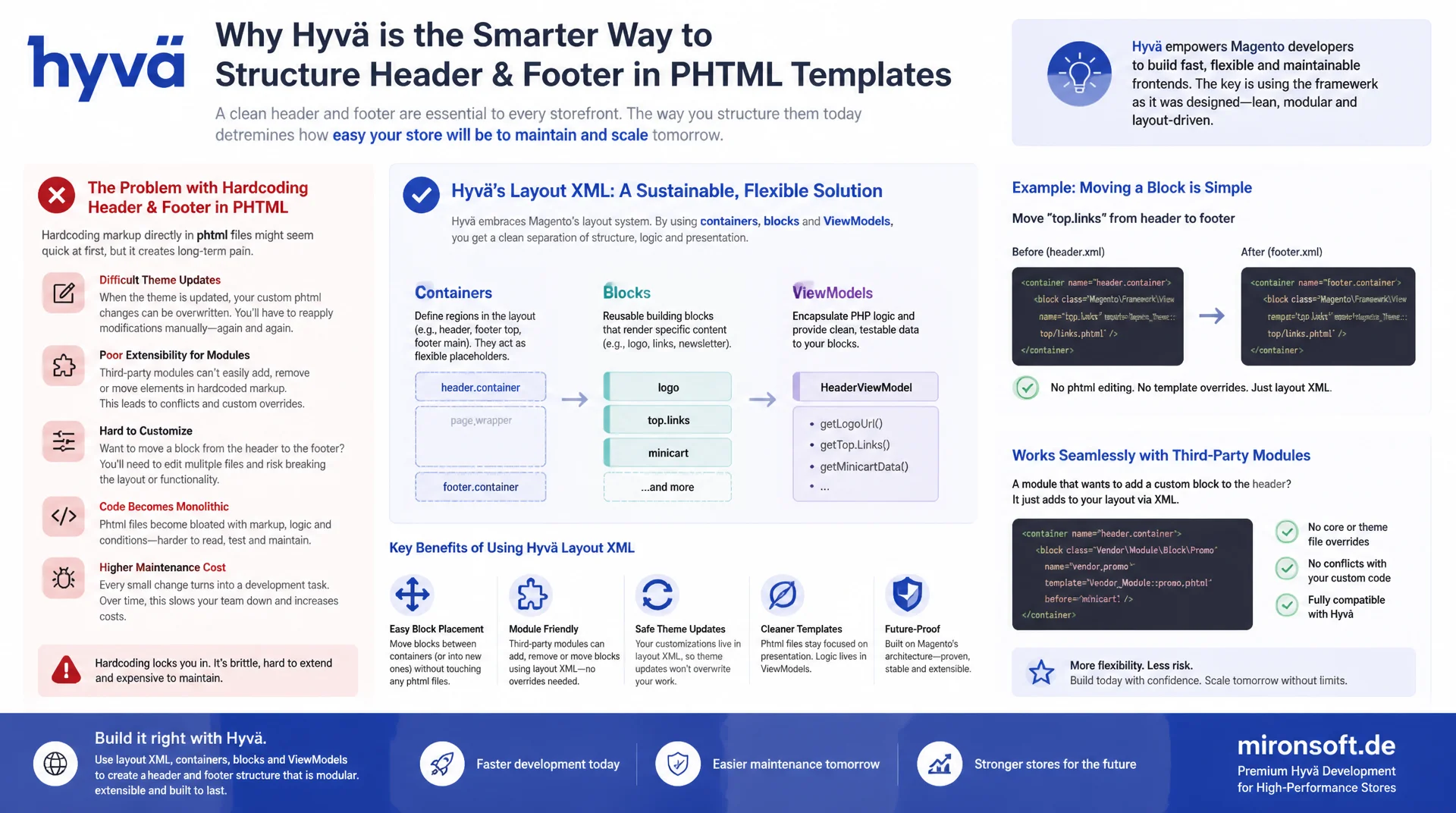
instead of wiring markup hard into phtml
Hardcoding header and footer markup directly into a phtml template costs real time on every theme update and every module extension: blocks cannot be moved cleanly, third-party modules find no entry point, and every customization ends up as a full template copy. Structuring the Hyvä header and footer layout XML solves exactly this problem, with containers, blocks and ViewModels that keep working after the next Hyvä update.
Table of contents
- 1. Why layout XML beats hardcoding markup in phtml
- 2. Understanding the Hyvä block structure: $block->getChildNames()
- 3. Adding a custom block in the header through layout XML
- 4. Controlling positioning and order
- 5. ViewModels instead of block classes for header and footer logic
- 6. Footer columns dynamically through layout XML and containers
- 7. Theme inheritance: layout XML overrides in a child theme
- 8. Registering Alpine.js components in layout-injected blocks
- 9. Testing and caching layout changes
- 10. Summary
- 11. FAQ
1. Why layout XML beats hardcoding markup in phtml
Anyone who fills a Hyvä theme's header or footer phtml template with fixed markup builds a trap for the next update: every additional section, every new menu entry and every third-party module integration forces yet another manual change to a file that actually belongs to the parent theme. Structuring the Hyvä header and footer layout XML moves exactly these decisions out of the template into a declarative configuration layer that Magento understands natively and that gets respected automatically on every merge, every update and every extension.
The benefit shows up most clearly with theme inheritance: a child theme that makes its adjustments through Hyvä header and footer layout XML never has to copy a single parent template. Container definitions, block references and sortOrder attributes can be overridden precisely, without a full phtml copy in the child theme going stale and silently diverging on the next Hyvä release. Third-party modules benefit the same way: they can hook their own blocks into header or footer without ever touching the theme's source code.
The difference between hardcoding and a clean layout XML pattern for header and footer shows up directly in typical tasks:
| Task | Hardcoding in phtml | Recommended layout XML pattern | Benefit |
|---|---|---|---|
| Add a new header block | Extend the phtml file with manual markup | <block> via referenceContainer in default.xml |
No override, update-safe |
| Change ordering | Rearrange HTML elements in the template | before / after + sortOrder |
Centrally controllable, no duplication |
| Add a footer column | Extend footer.phtml with another div | A dedicated <container> per column |
Third-party modules can hook in |
| Show login state | Business logic straight in the template | ViewModel via view_model argument |
Testable, reusable |
| Child theme customization | Copy the entire parent template | Layout XML override in the child theme | No drift across updates |
| Per-store visibility | Hard if-check inside phtml | remove via a layout handle |
Cleanly separable, no code change |
2. Understanding the Hyvä block structure: $block->getChildNames() in header.phtml and footer.phtml
In the Hyvä default theme, neither header.phtml nor footer.phtml renders a rigid HTML skeleton. Both templates instead iterate over $block->getChildNames() and call $block->getChildBlock($name)->toHtml() for every child block. This iteration is the actual mechanism that makes Hyvä header and footer layout XML configurable in the first place: every container in the layout XML becomes a named slot position that any number of blocks can be hooked into, without ever touching the template file itself.
Once this block structure is understood, it becomes obvious why hardcoding in phtml is so harmful: a hard-inserted <div> with fixed markup completely bypasses the container iteration and turns into a foreign body the next time the header gets restructured. Consistently relying on getChildNames() means the opposite: every new section, every new slot in header or footer is created exclusively through additional container and block definitions in the layout XML, never by changing the output logic itself.
This pattern also explains why the Hyvä block system should deliberately never be replaced, even when a custom iteration approach looks tempting. As soon as a theme bypasses getChildNames() and references child blocks statically instead, extensibility breaks for every third-party module that wants to hook into header or footer through layout XML in the future. The iteration remains the stable contract between template and layout layer.
3. Adding a custom block in the header through layout XML
To place a custom block in the header, a new <block> is referenced as a child of the header container in the default.xml of a custom module or theme. The header.container from the Hyvä default theme accepts any number of child blocks, as long as they are correctly addressed via referenceContainer. The following example shows how a custom store switcher block is added through layout XML in the header, without header.phtml ever changing a single line.
The naming convention matters: the block's name value must be unique, since it is later referenced for positioning instructions, ACL visibility, or targeted removal. The template attribute points to a dedicated phtml file responsible for exactly this one slot, a clear advantage over a monolithic header.phtml that keeps growing with every new requirement. The view_model argument immediately couples the block to an ArgumentInterface class, see section 5.
<!-- app/design/frontend/Mironsoft/default/Magento_Theme/layout/default.xml -->
<?xml version="1.0"?>
<page xmlns:xsi="http://www.w3.org/2001/XMLSchema-instance"
      xsi:noNamespaceSchemaLocation="urn:magento:framework:View/Layout/etc/page_configuration.xsd">
    <body>
        <referenceContainer name="header.container">
            <!-- Custom block added declaratively, no phtml override needed -->
            <block class="Magento\Framework\View\Element\Template"
                   name="mironsoft.header.store-switcher"
                   template="Mironsoft_HeaderTools::header/store-switcher.phtml"
                   after="header.panel.wrapper">
                <arguments>
                    <argument name="view_model" xsi:type="object">Mironsoft\HeaderTools\ViewModel\StoreSwitcher</argument>
                </arguments>
            </block>
        </referenceContainer>
    </body>
</page>
4. Controlling positioning and order
Once several custom blocks land in header or footer, the right combination of before, after and sortOrder decides whether the result stays predictable. before and after reference the name of an existing sibling block and place the new block relative to it, while sortOrder gives an absolute order within the same container when several blocks are added at once. These attributes are the core of any clean layout XML positioning for header and footer, because they define order declaratively instead of through the template structure itself.
Container nesting is the second tool: a dedicated <container> inside header.panel.wrapper groups several related blocks into one unit that can be moved, removed or conditionally hidden as a whole. Anyone structuring the Hyvä header and footer layout XML should prefer grouped containers over many loose, scattered blocks, because it lets an entire functional group, say "trust badges plus store switcher", be handled as a single unit.
<!-- app/design/frontend/Mironsoft/default/Magento_Theme/layout/default.xml -->
<referenceContainer name="header.container">
    <block class="Magento\Framework\View\Element\Template"
           name="mironsoft.header.trust-badges"
           template="Mironsoft_HeaderTools::header/trust-badges.phtml"
           before="header.panel.wrapper"
           sortOrder="5"/>
    <block class="Magento\Framework\View\Element\Template"
           name="mironsoft.header.store-switcher"
           template="Mironsoft_HeaderTools::header/store-switcher.phtml"
           after="mironsoft.header.trust-badges"
           sortOrder="10"/>
</referenceContainer>

<!-- Nested container groups related blocks as one movable, removable unit -->
<referenceContainer name="header.panel.wrapper">
    <container name="header.panel.custom"
               as="header_panel_custom"
               label="Custom Header Panel Group"
               htmlTag="div"
               htmlClass="header-panel-custom"/>
</referenceContainer>
5. Using ViewModels instead of block classes for header and footer logic
For header- and footer-specific logic, such as login state or store switcher data, a dedicated block class is rarely necessary. In most cases Magento\Framework\View\Element\Template is enough as a generic block class, while the business logic lives in a ViewModel that implements ArgumentInterface and gets injected through the view_model argument in layout XML. This pattern is particularly valuable for Hyvä header and footer layout XML, because a ViewModel can be instantiated and tested in unit tests without any Magento block overhead.
Constructor property promotion keeps such ViewModels compact: dependencies like CustomerSession or StoreManagerInterface are declared directly in the constructor as private readonly properties, without redundant assignments in the method body. Every public method needs a complete PHPDoc block with a description, @param and @return per project convention. The following example reads login state and the store list for the header.
<?php

declare(strict_types=1);

namespace Mironsoft\HeaderTools\ViewModel;

use Magento\Customer\Model\Session as CustomerSession;
use Magento\Framework\View\Element\Block\ArgumentInterface;
use Magento\Store\Api\Data\StoreInterface;
use Magento\Store\Model\StoreManagerInterface;

/**
 * ViewModel providing header-specific data without a dedicated block class.
 * Exposes customer login state and store switcher data to the header template.
 */
final class StoreSwitcher implements ArgumentInterface
{
    /**
     * @param CustomerSession $customerSession Reads the current customer login state.
     * @param StoreManagerInterface $storeManager Provides the list of active stores.
     */
    public function __construct(
        private readonly CustomerSession $customerSession,
        private readonly StoreManagerInterface $storeManager,
    ) {
    }

    /**
     * Checks whether a customer is currently logged in.
     *
     * @return bool True if a customer session is active.
     */
    public function isLoggedIn(): bool
    {
        return $this->customerSession->isLoggedIn();
    }

    /**
     * Returns the list of active stores for the store switcher.
     *
     * @return StoreInterface[] Active stores of the current website.
     */
    public function getStores(): array
    {
        // @phpstan-ignore-next-line StoreManagerInterface::getStores() missing in interface stub
        return $this->storeManager->getStores();
    }
}
6. Footer columns dynamically through layout XML and containers instead of hardcoding them into footer.phtml
A common mistake in grown themes: footer columns get hardcoded as a fixed number of <div> blocks directly inside footer.phtml. As soon as a third-party module needs an extra column, say for payment seals or social media links, a template change is the only option left. The cleaner path goes through a dedicated <container> per column in the footer layout XML: every column becomes a named slot that any block can hook into, without footer.phtml ever being touched again.
This container-per-column structure turns the footer into a real extension point for third-party modules: a payment extension hooks its seal into the right column via referenceContainer, a newsletter module adds its form into another. With footer customization through layout XML, even the number of columns stays flexible: a new module can even register a completely new column through its own container, without touching the existing ones.
<!-- app/design/frontend/Mironsoft/default/Magento_Theme/layout/default.xml -->
<referenceContainer name="footer.container">
    <container name="footer.column.service"
               label="Footer Service Column"
               htmlTag="div"
               htmlClass="footer-column"
               before="footer.column.social">
        <block class="Magento\Framework\View\Element\Template"
               name="footer.links.service"
               template="Mironsoft_HeaderTools::footer/service-links.phtml"/>
    </container>
    <container name="footer.column.legal"
               label="Footer Legal Column"
               htmlTag="div"
               htmlClass="footer-column"
               after="footer.column.service">
        <block class="Magento\Framework\View\Element\Template"
               name="footer.links.legal"
               template="Mironsoft_HeaderTools::footer/legal-links.phtml"/>
    </container>
</referenceContainer>
7. Theme inheritance: layout XML overrides in the child theme without duplicating the parent template
A child theme inheriting from hyva-themes/magento2-default-theme-csp never has to copy a single parent template for header or footer adjustments. It is enough to create a dedicated default.xml in the child theme that makes targeted additions through referenceContainer or referenceBlock. This is exactly where the strength of Hyvä header and footer layout XML lies: Magento's layout merge logic combines parent and child layout automatically, so only the actual deviations need to be maintained in the child theme.
A full phtml copy in a child theme is almost always a warning sign: it freezes the parent template at the moment it was copied and silently diverges on every further Hyvä update. Targeted layout XML overrides avoid this problem, because they only adjust positions, arguments or visibility of individual blocks, while the actual rendering logic stays in the parent template. This significantly reduces maintenance effort across multiple client projects, particularly in a dual-vendor workflow with several theme variants.
8. Registering Alpine.js components in layout-injected blocks correctly
A block hooked into header or footer through layout XML often brings its own Alpine.js behavior, for example a store switcher dropdown. The x-data scope is declared directly in the new block's template and stays cleanly encapsulated as long as it does not accidentally reach into variables outside its own DOM subtree. Important for Magento with CSP mode enabled: every inline <script> block in the template must be registered immediately afterwards with $hyvaCsp->registerInlineScript(), otherwise the Content Security Policy header blocks execution in the browser.
The existing mobileFooterCollpase Alpine.js component pattern stays unchanged in footer.phtml. New blocks added through Hyvä header and footer layout XML instead get their own small Alpine component in their respective template, without an extra JavaScript bundle, since Hyvä already provides the Alpine.js instance globally. State such as a status message is output through x-text, never through mustache syntax, which does not exist in Alpine.js in the first place.
<?php
/** @var \Magento\Framework\View\Element\Template $block */
/** @var \Magento\Framework\Escaper $escaper */
/** @var \Hyva\Theme\Model\ViewModelRegistry $viewModels */
/** @var \Mironsoft\HeaderTools\ViewModel\StoreSwitcher $storeSwitcherViewModel */
$storeSwitcherViewModel = $block->getData('view_model');
$hyvaCsp = $viewModels->require(\Hyva\Theme\ViewModel\HyvaCsp::class);
?>
<div x-data="{ open: false, message: '' }" class="relative">
    <button type="button"
            @click="open = !open; message = open ? 'Store list opened' : ''"
            :aria-expanded="open.toString()"
            class="flex items-center gap-1 text-sm">
        <?= $escaper->escapeHtml(__('Store')) ?>
    </button>
    <div x-show="open" @click.outside="open = false" x-cloak class="absolute right-0 mt-2 bg-white shadow-lg rounded-lg p-3 z-40">
        <p x-text="message" class="text-xs text-gray-500 mb-2"></p>
        <?php foreach ($storeSwitcherViewModel->getStores() as $store): ?>
            <a href="#" class="block py-1 text-sm"><?= $escaper->escapeHtml($store->getName()) ?></a>
        <?php endforeach; ?>
    </div>
</div>
<script>
    // Registered header component: no external JS bundle needed, Alpine handles the state
    window.addEventListener('alpine:init', () => {
        Alpine.data('storeSwitcherHint', () => ({
            hint: 'Store switcher ready'
        }));
    });
</script>
<?php $hyvaCsp->registerInlineScript(); ?>
9. Testing and caching layout changes
Changes to Hyvä header and footer layout XML do not appear in the browser immediately: Magento compiles layout handles into the layout generation cache, and rendered pages additionally sit in the full page cache. After every layout change, running bin/cache-clean layout or a full bin/cache-clean is mandatory, otherwise the browser keeps showing the old block order even though the XML file was saved correctly. The Hyvä watcher in bin/start helps with Tailwind changes, but it does not replace clearing the layout cache after XML adjustments.
When debugging block order, a direct look at the generated layout tree is more useful than guessing: the diagnostic approach of choice is temporarily dumping the block names in the template with var_dump($block->getChildNames()), or, in a separate test environment, running bin/magento setup:di:compile followed by bin/cache-clean to verify that before/after references actually point to existing block names. A typo in the referenced name does not throw an error, Magento simply appends the block to the end of the container instead, a classic silent failure with header and footer layout XML.
Mironsoft
Hyvä theme architecture, layout XML and Alpine components
Is your header and footer layout XML cleanly structured?
We audit existing header and footer templates, replace hardcoding with clean layout XML structures, and set up containers, ViewModels and theme inheritance so your next extension never needs a template copy.
Layout XML refactoring
Turn hardcoded header and footer markup into clean container and block structures
Header/footer redesign
Hook new sections, ViewModels and CSP-compliant Alpine components into existing containers
Theme inheritance audit
Review child theme overrides and replace full template copies with targeted layout XML
10. Summary
The core building blocks for structuring Hyvä header and footer layout XML instead of hardcoding phtml fit together: the block structure with $block->getChildNames() turns containers into extensible slots, custom blocks are added via referenceContainer without touching the template, before/after and sortOrder control order declaratively, and ViewModels take over the business logic instead of dedicated block classes. Footer columns as dedicated containers instead of fixed <div> blocks turn the footer into a real extension point for third-party modules.
Theme inheritance benefits the most from this approach: a child theme that uses Hyvä header and footer layout XML instead of phtml copies stays automatically current with every parent update. Alpine.js components in layout-injected blocks must be consistently registered through $hyvaCsp->registerInlineScript(), and every layout change needs a targeted cache clear before it becomes visible in the browser. Combining these building blocks consistently replaces fragile template copies with a maintainable, extensible foundation for header and footer.
Structuring Hyvä header and footer layout XML - The essentials at a glance
Block structure
$block->getChildNames() turns every container into an extensible slot, without rigid markup in the template.
Positioning
before / after and sortOrder control order declaratively, with no template change at all.
ViewModels
ArgumentInterface classes handle login state and store data instead of dedicated block classes.
Theme inheritance
Targeted layout XML overrides in the child theme instead of full phtml copies of the parent theme.