From Alpine.js State to Server Persistence
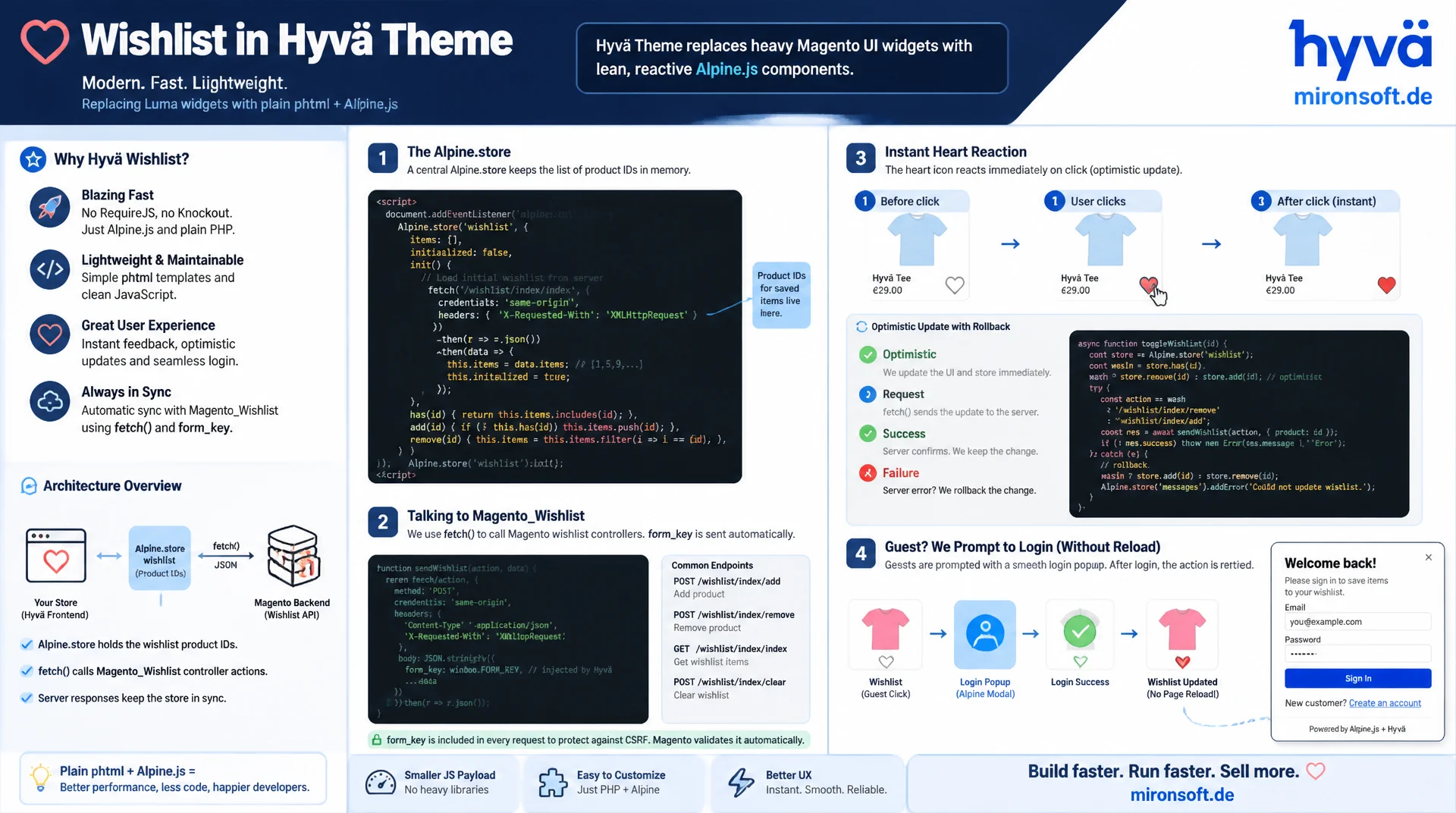
Wishlist functionality in the Hyvä Theme replaces Magento's Luma widgets with plain phtml and Alpine.js: an Alpine.store holds the product IDs of the saved list on the client, while fetch() calls against the Magento_Wishlist controller with form_key keep the server side in sync. This article shows how the heart icon reacts instantly to clicks, how optimistic updates with rollback work, and how guests are guided cleanly to login without a single page ever fully reloading.
Table of Contents
- 1. How the default wishlist in Magento_Wishlist works
- 2. Why Hyvä replaces the Luma widgets
- 3. The heart icon: add-to-wishlist component
- 4. Global state with Alpine.store
- 5. The Ajax request to the wishlist controller
- 6. Optimistic vs. pessimistic UI updates
- 7. Persistence and hydration of wishlist functionality
- 8. Guest limitation and the add-after-login flow
- 9. From wishlist to cart: approaches compared
- 10. Summary
- 11. FAQ
1. How the default wishlist in Magento_Wishlist works
Before customizing wishlist functionality in the Hyvä Theme, it is worth looking at the default behavior of Magento_Wishlist. The core module ships a complete wishlist logic: the model Magento\Wishlist\Model\Wishlist encapsulates the relationship between a customer and their saved products, the table wishlist_item stores product ID, quantity and an optional description, and the controller Magento\Wishlist\Controller\Index\Add processes adding items on the server. This layer stays untouched when customizing wishlist functionality in Hyvä: models, repositories and controllers are vendor code and are never overridden, only addressed differently from the frontend.
In the Luma theme, this server logic is wired to the frontend via Knockout.js templates and jQuery widgets. The add-to-wishlist link is an anchor tag whose click either triggers a full page navigation or, through a Knockout binding, an asynchronous request whose result is played back into the UI via an observable. For wishlist functionality this means in practice: multiple icons for the same product on one page, for example in a cross-sell slider and simultaneously in the product list, know nothing of each other and must be synchronized individually. This is exactly the problem a central client state, as used in Hyvä, solves.
2. Why Hyvä replaces the Luma widgets
Hyvä replaces every Knockout.js and jQuery widget dependency on principle with server-rendered phtml combined with Alpine.js. For wishlist functionality this means concretely: the templates under Magento_Wishlist/templates are replaced in the theme with lean phtml files that contain no UI components and no Knockout bindings anymore. Layout XML in the theme, such as catalog_product_view.xml and catalog_category_view.xml, swaps out the blocks without a single core template of Magento_Wishlist ever being overridden. Updates to the core module therefore remain fully compatible.
The central difference lies not in the backend, but in how the frontend communicates with the server. Instead of a page change, the customized wishlist functionality sends a fetch() request to the same controller Luma also uses, evaluates the JSON response, and updates only the affected part of the page. This not only reduces perceived load time, it also avoids a complete rebuild of Alpine components that were already initialized elsewhere on the page.
3. The heart icon: add-to-wishlist component
The most visible element of wishlist functionality is the heart icon on the product listing and the product detail page. In Hyvä this is not a widget instance but a plain SVG inside an x-data scope that receives the product ID and the initial wishlist status when rendered. The state "is on the wishlist" is not held locally in the icon, but read from the global Alpine store via $store.wishlist, so that every occurrence of the same product on the page shows the same state.
Clicking the icon calls a store method that internally distinguishes between adding and removing, depending on whether the product ID is already contained in the local set. Important for CSP-compliant delivery: every inline <script> block that contains Alpine definitions must be registered immediately afterwards in the phtml with $hyvaCsp->registerInlineScript(), otherwise Hyvä's Content Security Policy blocks execution.
<!-- app/design/frontend/Mironsoft/default/Magento_Wishlist/templates/button/add.phtml -->
<?php
/** @var \Magento\Catalog\Block\Product\AbstractProduct $block */
/** @var \Magento\Catalog\Model\Product $product */
$product = $block->getProduct();
?>
<div x-data="{ productId: <?= (int) $product->getId() ?> }" class="inline-flex">
    <button
        type="button"
        class="wishlist-heart p-2 rounded-full hover:bg-gray-100 transition-colors"
        x-on:click="$store.wishlist.toggle(productId)"
        x-bind:aria-pressed="$store.wishlist.has(productId).toString()"
        :aria-label="$store.wishlist.has(productId) ? 'Remove from wishlist' : 'Add to wishlist'"
    >
        <svg class="w-5 h-5" viewBox="0 0 24 24" stroke-width="2"
             :class="$store.wishlist.has(productId) ? 'fill-red-500 stroke-red-500' : 'fill-none stroke-gray-500'">
            <path stroke-linecap="round" stroke-linejoin="round"
                  d="M12 21s-7-4.35-9.5-8.5C.5 8.5 2 4 6 4c2 0 3.5 1.2 4 2.5.5-1.3 2-2.5 4-2.5 4 0 5.5 4.5 3.5 8.5C19 16.65 12 21 12 21z"/>
        </svg>
    </button>
</div>
4. Global state with Alpine.store
An x-data object per icon would be enough for a simple page, but it fails as soon as the same product appears multiple times on a page, for example in the category list and simultaneously in a "recently viewed" slider. Wishlist functionality therefore needs a single, page-wide state: an Alpine.store('wishlist', …) that is registered on the alpine:init event and can be referenced from any component via $store.wishlist.
The store holds the set of product IDs, the form_key for the Ajax requests, and a simple loading status per product so that a double click while a request is in flight does not trigger a second request. Methods such as has(id), toggle(id) and remove(id) encapsulate the entire logic of the wishlist functionality in a single place in the code, instead of spreading it across multiple templates.
// app/design/frontend/Mironsoft/default/Magento_Wishlist/web/js/wishlist-store.js
document.addEventListener('alpine:init', () => {
  Alpine.store('wishlist', {
    // Hydrated from a small JSON blob emitted by the ViewModel on page load
    ids: new Set(window.wishlistHydration?.productIds ?? []),
    formKey: window.wishlistHydration?.formKey ?? '',
    loading: {},

    has(productId) {
      return this.ids.has(productId);
    },

    toggle(productId) {
      // Guard against duplicate requests while one is already in flight
      if (this.loading[productId]) {
        return;
      }
      return this.has(productId) ? this.remove(productId) : this.add(productId);
    },

    add(productId) {
      // Implemented as a fetch() call, see the ajax example below
    },

    remove(productId) {
      // Mirrors add(), but targets the remove endpoint
    }
  });
});
5. The Ajax request to the wishlist controller
The actual network request runs over fetch() against the same controller the Luma wishlist also uses: wishlist/index/add for adding and wishlist/index/remove for removing. Magento validates the form_key as CSRF protection on both endpoints; without a valid, current value the controller rejects the request. Wishlist functionality therefore reads the form_key once during store initialization from a hidden form field or meta tag and attaches it to every request as a form field.
The header Accept: application/json or X-Requested-With: XMLHttpRequest signals to the controller that a JSON response is expected instead of a redirect. If the request fails, for example because the session has expired in the meantime, the controller returns an error status or a JSON structure with success: false, to which the wishlist functionality in the store must react with a rollback instead of leaving the incorrect state in place.
// Extends the store from the previous section with a concrete fetch() implementation
async add(productId) {
  const snapshot = new Set(this.ids); // Snapshot for rollback on failure
  this.ids.add(productId);            // Optimistic UI update, applied immediately
  this.loading[productId] = true;

  try {
    const response = await fetch('/wishlist/index/add/', {
      method: 'POST',
      headers: {
        'Content-Type': 'application/x-www-form-urlencoded',
        'Accept': 'application/json',
        'X-Requested-With': 'XMLHttpRequest'
      },
      body: new URLSearchParams({
        product: productId,
        form_key: this.formKey
      })
    });

    if (!response.ok) {
      throw new Error(`Wishlist request failed with status ${response.status}`);
    }

    const data = await response.json();
    if (!data.success) {
      throw new Error(data.message ?? 'Unknown wishlist error');
    }
  } catch (error) {
    this.ids = snapshot; // Rollback: restore the state before the optimistic update
    console.error('Wishlist add failed, rolled back', error);
  } finally {
    this.loading[productId] = false;
  }
}
6. Optimistic vs. pessimistic UI updates
There are two basic strategies for the UI reaction. With a pessimistic update, the interface waits for the server response before the heart icon fills in, safe, but noticeably sluggish on slow connections. With an optimistic update, the wishlist functionality flips the icon immediately, before the server's response has even arrived, and only reverts the change on failure. For a feature that primarily serves convenience, the optimistic variant is almost always the right choice.
The rollback mechanism needs a snapshot of the state before the mutation: before the ID is added to or removed from the set, the store method saves the previous value. If the fetch() call fails or the server returns success: false, the catch block restores exactly this snapshot, and a brief Alpine toast with x-transition informs the user of the error. This keeps wishlist functionality consistent even under network problems, without the customer seeing an incorrect state that would only be corrected after a reload.
7. Persistence and hydration of wishlist functionality
When the page first loads, the Alpine store does not yet know any product IDs; it must be filled with the actual wishlist content of the logged-in customer. For this, a ViewModel implementing ArgumentInterface supplies the current set of product IDs as compact JSON in its own <script type="application/json"> block, right before the store-init script. This hydration is the point where server-side truth and client-side state of the wishlist functionality are merged.
Important here: the server remains the source of truth. The client state is a cache for perceived performance, not an independent data store. If the wishlist changes elsewhere, for example because the customer removed a product in a second browser tab, only the next full page load shows the correct state, because wishlist functionality in Hyvä deliberately does not synchronize across tabs via websocket or polling, in order to keep complexity low.
<?php

declare(strict_types=1);

namespace Mironsoft\Wishlist\ViewModel;

use Magento\Customer\Model\Session as CustomerSession;
use Magento\Framework\Serialize\Serializer\Json;
use Magento\Framework\View\Element\Block\ArgumentInterface;
use Magento\Wishlist\Model\WishlistFactory;

/**
 * Provides the current wishlist product IDs as a JSON blob for Alpine.js hydration.
 */
class WishlistHydration implements ArgumentInterface
{
    /**
     * @param CustomerSession $customerSession Current customer session.
     * @param WishlistFactory $wishlistFactory Factory for the wishlist model.
     * @param Json $json Json serializer for the frontend payload.
     */
    public function __construct(
        private readonly CustomerSession $customerSession,
        private readonly WishlistFactory $wishlistFactory,
        private readonly Json $json
    ) {
    }

    /**
     * Builds the JSON payload with product IDs and form key for the Alpine store.
     *
     * @return string
     */
    public function getHydrationJson(): string
    {
        if (!$this->customerSession->isLoggedIn()) {
            return $this->json->serialize([
                'productIds' => [],
                'formKey' => $this->customerSession->getFormKey(),
            ]);
        }

        $wishlist = $this->wishlistFactory->create()->loadByCustomerId(
            (int) $this->customerSession->getCustomerId(),
            true
        );

        $productIds = [];
        foreach ($wishlist->getItemCollection() as $item) {
            $productIds[] = (int) $item->getProductId();
        }

        return $this->json->serialize([
            'productIds' => $productIds,
            'formKey' => $this->customerSession->getFormKey(),
        ]);
    }
}
8. Guest limitation and the add-after-login flow
Magento's wishlist module is bound to a customer session; a guest cannot save products at all, because wishlist_item strictly requires a customer_id. If a non-logged-in visitor clicks the heart icon, wishlist functionality must not simply throw an Ajax error, but must guide the visitor to login in a controlled way, without losing the actual intent.
The clean approach is an add-after-login flow: before the redirect to the login page happens, wishlist functionality writes the desired product ID together with the original URL into the browser's sessionStorage. After a successful login, a small Alpine snippet on the target page reads this entry, automatically triggers the original add request, and then removes the entry from storage so a repeated login process does not repeat the same add request.
{
  "pendingWishlistAdd": {
    "productId": 1245,
    "requestedAt": "2026-07-23T14:32:00Z",
    "redirectAfterLogin": "/catalog/product/view/id/1245/"
  }
}
9. From wishlist to cart: approaches compared
The move from server-rendered Luma widgets to Alpine-driven wishlist functionality affects several aspects at once: reload behavior, state synchronization, moving items to the cart, and CSRF handling. The following table puts the old and the recommended approach side by side.
| Task | Luma / old approach | Recommended Hyvä pattern | Benefit |
|---|---|---|---|
| Add to wishlist | Full page reload via anchor link | fetch() + Alpine.store update |
No page change, instant feedback |
| State synchronization | Knockout observable per widget instance | One shared Alpine.store | All icons show the same state consistently |
| Move to cart | Form submit on the wishlist page | fetch() against updatePost |
Optimistic removal without reload |
| Guest interaction | Referer redirect, intent often lost | sessionStorage add-after-login flow | Intent survives the login process |
| CSRF protection | Hidden input, rendered per server form | form_key loaded once, in the fetch body |
Fewer server renders, same security |
The difference is especially clear when moving an item from the wishlist to the cart: Luma classically redirects to the full wishlist page for this and processes a form with multiple checkboxes there. The Hyvä variant of wishlist functionality instead sends a single fetch() call to wishlist/index/updatePost, optimistically removes the product from the store, and updates the cart counter in the same action, all without a page change.
10. Summary
Wishlist functionality in the Hyvä Theme is at its core a frontend rebuild: the same Magento_Wishlist controllers and models remain in place, but phtml with Alpine.js fully replaces Knockout.js and jQuery widgets. A central Alpine.store holds the set of saved product IDs, fetch() requests with form_key handle communication with the server, and optimistic updates with rollback create a sense of speed without endangering consistency.
For guests, the server-side wishlist remains bound to a login; an add-after-login flow via sessionStorage catches this limitation on the UX side. Anyone customizing wishlist functionality in an existing Hyvä shop should start at the layout XML level, test the store in isolation afterwards, and only at the end verify the Ajax endpoints against real session states.
Wishlist functionality in Hyvä, the essentials at a glance
Alpine.store instead of Knockout
A central, page-wide store holds the wishlist product IDs and keeps every icon instance in sync.
Optimistic UI with rollback
Instant visual feedback, with snapshot-based rollback on a failed fetch() call.
form_key & CSP
CSRF protection via form_key in the fetch body, every inline script block cleared via registerInlineScript().
Guest handling
Add-after-login flow via sessionStorage preserves purchase intent across the login redirect.
11. FAQ: Wishlist Functionality in Hyvä
1What exactly is wishlist functionality in the Hyvä Theme?
2Why does Hyvä no longer use Knockout.js for the wishlist?
3How does the heart icon update without a page reload?
4What is an Alpine.store and why not x-data per icon?
5Why does the fetch() call need the form_key?
6Optimistic vs. pessimistic UI update?
7Can guests use a wishlist without logging in?
8How does the add-after-login flow work?
9Move wishlist items to the cart without a reload?
10Do I need to modify Magento_Wishlist controllers?
Mironsoft
Hyvä frontends, Alpine.js components and Magento 2 customization
Wishlist functionality that feels like part of the shop?
We build out wishlist functionality in your Hyvä theme: Alpine.store architecture, optimistic updates with rollback, and a clean add-after-login flow for guests, fully CSP-compliant.
Alpine components
Heart icons, listings and wishlist pages as reactive Alpine.js building blocks
Ajax integration
Fetch requests, form_key handling and error rollback following Magento standards
CSP & performance
registerInlineScript-compliant implementation without extra JavaScript