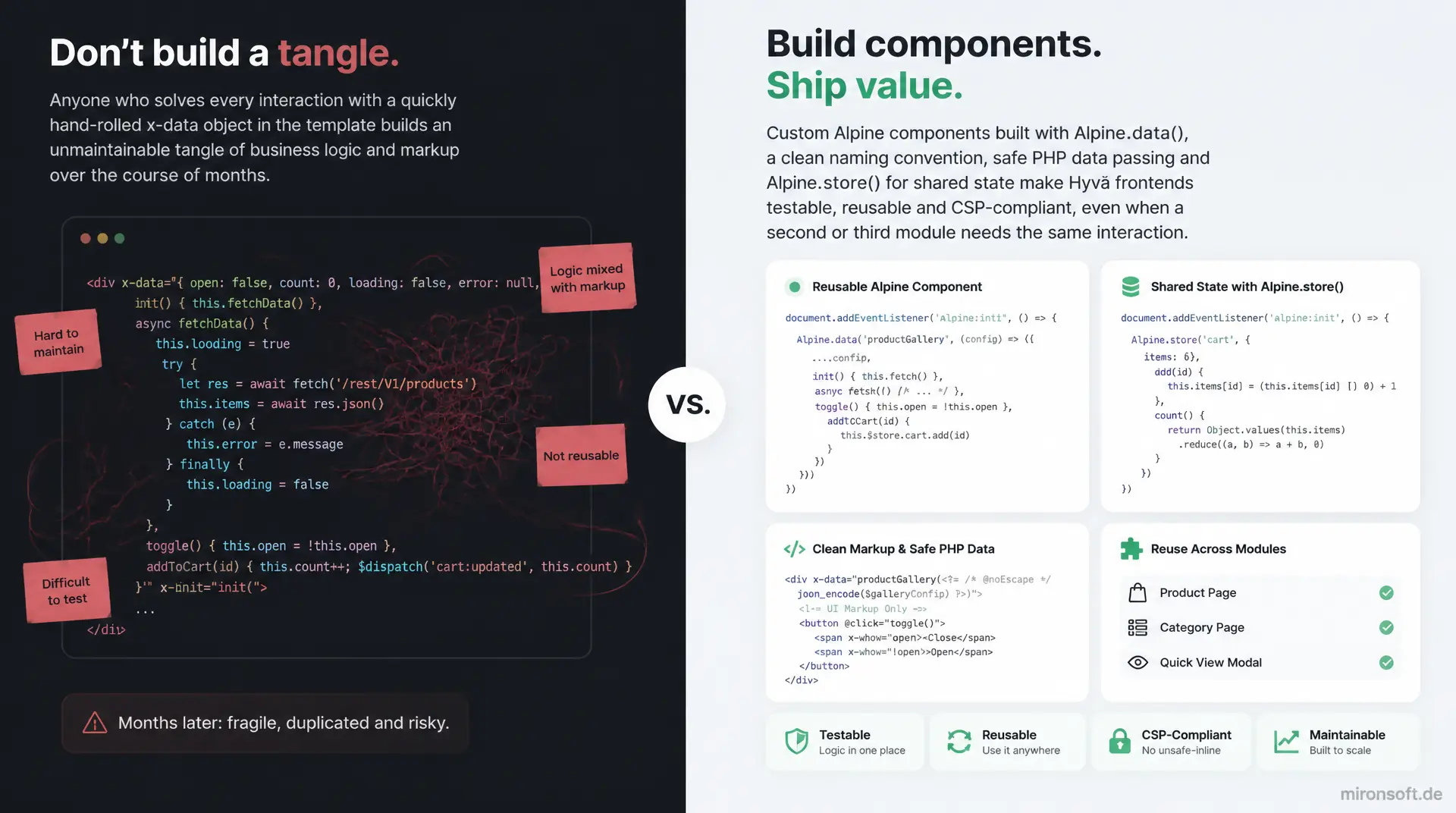
from inline x-data to reusable building blocks
Anyone who solves every interaction with a quickly hand-rolled x-data object in the template builds an unmaintainable tangle of business logic and markup over the course of months. Custom Alpine components built with Alpine.data(), a clean naming convention, safe PHP data passing and Alpine.store() for shared state make Hyvä frontends testable, reusable and CSP-compliant instead, even when a second or third module needs the same interaction.
Table of Contents
- 1. Why Custom Alpine Components Make the Difference in Hyvä Templates
- 2. Inline x-data vs. Registered Alpine.data() Components
- 3. Where to Register Custom Alpine Components
- 4. Naming Conventions to Avoid Collisions Between Modules
- 5. Passing PHP Data Safely into x-data
- 6. Structuring Component Logic: init(), Methods and Getters
- 7. Alpine.store() for Shared State
- 8. CSP, registerInlineScript and Testability
- 9. Practical Example: A Quantity Stepper Component from Scratch
- 10. Summary
- 11. FAQ
1. Why Custom Alpine Components Make the Difference in Hyvä Templates
In Hyvä themes, many phtml files follow the same pattern over time: an x-data object starts small, with two or three properties for a dropdown or a toggle, and over months grows into an unwieldy inline block that mixes business logic, DOM state and API calls. A custom Alpine component solves exactly this problem by bundling responsibilities and moving the logic out of the template into a named, reusable structure. The difference between a quickly hand-rolled x-data object and a cleanly registered Alpine component usually only becomes visible once a second template needs the same functionality - that is when the copy-pasting starts, forcing every later change to be repeated in multiple places at once and producing inconsistencies between modules that nobody can keep track of anymore.
Hyvä deliberately relies on Alpine.js instead of Knockout.js, jQuery or a UI component library, because the framework is lightweight and lives directly in the markup, with no build step for the template logic itself. But this very closeness to the template tempts developers to solve every interaction inline instead of extracting it into a dedicated Alpine component. Any agency running several Magento shops on Hyvä quickly notices that interaction patterns such as quantity steppers, gallery thumbnails or filter panels repeat across modules and projects. The following sections show how to register custom Alpine components in a structured way, pass data from PHP safely, avoid naming conflicts between modules, and model shared state with Alpine.store() without violating Hyvä's CSP requirements.
2. Inline x-data vs. Registered Alpine.data() Components
The simplest form of Alpine logic is an inline x-data with a handful of properties defined directly on the element. For a single toggle button or a simple accordion this is perfectly appropriate - any further abstraction would just be overhead without benefit. But as soon as methods, watchers, API calls or several related pieces of state are added, the inline object quickly becomes unreadable. An x-data attribute that grows past ten lines inside the HTML tag itself violates the separation of markup and logic that remains worthwhile in Hyvä templates too, even without a framework build step.
A registered Alpine.data() component solves this problem by moving the logic into a named factory function: Alpine.data() defines the component once, centrally, and the template simply calls it by name in the x-data attribute. This reduces the template to pure call syntax, makes the component reusable across multiple phtml files, and allows the same logic to be covered by unit tests without needing the DOM. This exact step, from inline x-data to a registered Alpine component, is the single most important architectural decision when building maintainable Hyvä frontends.
// Inline x-data works for a single trivial toggle, but does not scale:
// state, methods and validation all end up inside one HTML attribute.

// Registered component: reusable, testable, named for Alpine devtools
document.addEventListener('alpine:init', () => {
  Alpine.data('mironsoftQuantityStepper', (config = {}) => ({
    qty: config.qty ?? 1,
    max: config.max ?? 99,
    min: config.min ?? 1,

    increment() {
      if (this.qty < this.max) this.qty++
    },

    decrement() {
      if (this.qty > this.min) this.qty--
    }
  }))
})
| Criterion | Inline x-data | Alpine.data() Component | Benefit |
|---|---|---|---|
| Reusability | Copy-paste between templates | Register once, call anywhere | Fewer duplicates, a single fix suffices |
| Testability | Only testable in the DOM | Factory function testable in isolation | Unit tests without rendering |
| Collision risk | Low, since local to the attribute | Global, but safe with a vendor prefix | Naming convention prevents overwrites |
| Template readability | Grows inside the HTML attribute | Just a call with configuration | Separation of markup and logic |
| Alpine devtools | Anonymous, no component name | Component name visible | Easier debugging |
3. Where to Register Custom Alpine Components
Hyvä ships Alpine.js without Webpack, Babel or any other build step for JavaScript itself - the library is loaded as a ready-made bundle and initialized via the alpine:init event before Alpine.start() runs. For custom Alpine components this means they must register before that point, or Alpine will not know the component name when the template calls it in the x-data attribute. The clean place for this is a dedicated JS file in the theme, for example under web/js/components/, loaded via a script tag in the layout or through requirejs-config.js, listening for the alpine:init event.
The order matters: the registration script must be loaded before Alpine.start() fires. With Hyvä this usually happens automatically, because the alpine:init listener exists precisely for this purpose and prevents race conditions. For each module, a dedicated registration file is preferable to a single theme-wide catch-all file containing every component: this keeps responsibilities separated, makes code reviews easier, and makes it visible which module ships which Alpine component. Modules with several components bundle them in one file per module, never in a single theme-wide file that provokes merge conflicts between developers on every change.
// File: web/js/components/quantity-stepper.js
// Registered before Alpine.start() fires - alpine:init guarantees the timing

document.addEventListener('alpine:init', () => {
  Alpine.data('mironsoftQuantityStepper', (config = {}) => ({
    qty: config.qty ?? 1,
    min: config.min ?? 1,
    max: config.max ?? 99,

    init() {
      this.qty = Math.min(Math.max(this.qty, this.min), this.max)
    },

    increment() {
      if (this.qty < this.max) this.qty++
    },

    decrement() {
      if (this.qty > this.min) this.qty--
    }
  }))
})
4. Naming Conventions to Avoid Collisions Between Modules
As soon as several modules ship their own Alpine components, the global namespace of Alpine.data() becomes a collision risk: two modules that both register a component with the same short name overwrite each other, depending on which script loads last. Without a naming convention this failure is hard to debug, because no error is thrown - the wrong behavior simply becomes visible once a second module happens to pick the same name.
A reliable naming convention for custom Alpine components follows the module name: names such as mironsoftGallery, mironsoftQuantityStepper or abramsCheckoutSummary make it immediately visible which module a component comes from, and practically rule out collisions between vendor packages. camelCase for the component name fits the JavaScript convention, while the vendor prefix acts as a namespace that Alpine itself does not provide. For agencies maintaining several client projects with similar modules, this discipline pays off quickly, at the latest when a third-party module happens to register the same generic component name.
5. Passing PHP Data Safely into x-data
An Alpine component almost always needs initial values from PHP: product data, configuration values, translated strings, or price information calculated on the server. The correct route runs through json_encode() in the block or ViewModel and the Magento escaper in the template, never through inserting PHP variables directly into unescaped HTML attributes. The call x-data="mironsoftQuantityStepper(escapeHtmlAttr($block->getJsonConfig()) ?>)" passes a full configuration object to the factory function without special characters in the JSON being able to break out of the HTML attribute.
escapeHtmlAttr() correctly masks quotes and special characters for the attribute context, while json_encode() in the ViewModel ensures that prices, quantities and text arrive as valid JSON, including escaping of special characters in translated strings. Anyone who instead uses escapeHtml() in an attribute context, or skips the escaper altogether, risks XSS holes as soon as a product name or a customer input ends up unfiltered inside the JSON. This combination of json_encode() and the escaper is the only safe way to pass PHP data into an Alpine component, and it should be checked explicitly in every code review.
<?php
/** @var \Mironsoft\CatalogUx\ViewModel\QuantityStepper $quantityStepper */
$quantityStepper = $viewModels->require(\Mironsoft\CatalogUx\ViewModel\QuantityStepper::class);
?>
<div
    x-data="mironsoftQuantityStepper(<?= $escaper->escapeHtmlAttr($quantityStepper->getJsonConfig($product)) ?>)"
    class="flex items-center gap-2"
>
    <button type="button" x-on:click="decrement()" class="w-9 h-9 rounded-lg border border-gray-300">-</button>
    <input type="number" x-model.number="qty" class="w-14 text-center border rounded-lg" />
    <button type="button" x-on:click="increment()" class="w-9 h-9 rounded-lg border border-gray-300">+</button>
</div>
6. Structuring Component Logic: init(), Methods and Getters
A well-structured Alpine component clearly separates three responsibilities: init() for initialization and watchers, methods for actions triggered by events, and getters for derived values computed from internal state. init() is called automatically when the component is created and is the right place for $watch() calls, one-time computations, or reading configuration values needed once at creation time, but not for business logic that also has to run repeatedly on later interactions.
Getter syntax replaces repeated inline calculations in the template and makes derived values maintainable in a single place. Instead of repeating the same formula across several x-text attributes, the template just reads the value through an x-text attribute referencing the getter name. This structure follows the single-responsibility principle: an Alpine component should represent exactly one UI interaction, not several loosely related behaviors at once. If a component grows too large, that is a signal to split it into two smaller components that communicate with each other via $dispatch() and custom events when needed.
7. Alpine.store() for Shared State
Not every piece of state belongs inside a single Alpine component. As soon as several components that are not related in the DOM need to know the same value, for example the number of items in the mini cart while a product stepper and the header badge must stay in sync at the same time, Alpine.store() becomes the right choice. A store is registered globally once and is then reachable via $store in every component and every template without prop drilling.
The store itself should stay small and hold only state that is genuinely global, a cart item counter for instance, but not the detailed logic of a single stepper. Any component reading the store can react to changes with $watch, for example to trigger an animation as soon as the item count changes. Anyone tempted to push every piece of state into a global store quickly loses the encapsulation that an Alpine component was originally meant to provide - the store is the exception for shared state, not the default for every component.
// File: web/js/stores/cart-store.js
document.addEventListener('alpine:init', () => {
  Alpine.store('mironsoftCart', {
    itemCount: 0,

    increaseBy(amount) {
      this.itemCount += amount
    }
  })
})

// Any component can update the store without prop-drilling
document.addEventListener('alpine:init', () => {
  Alpine.data('mironsoftQuantityStepper', (config = {}) => ({
    qty: config.qty ?? 1,

    addToCart() {
      Alpine.store('mironsoftCart').increaseBy(this.qty)
      this.$dispatch('quantity-added', { qty: this.qty })
    }
  }))
})
8. CSP, registerInlineScript and Testability
In production, Hyvä shops almost always run under a strict Content Security Policy, implemented via the Hyvä CSP module. Every inline <script> block in a template needs an accompanying call to $hyvaCsp->registerInlineScript(), otherwise the browser blocks the script in live operation, even if it worked fine locally without CSP headers. For custom Alpine components this also means inline event handlers directly on HTML attributes should generally be avoided, because they are not executed under a strict CSP without unsafe-inline. x-on:click is unaffected by this, since Alpine registers the handlers not as HTML attribute events but through its own event listeners.
Testability is another reason to move logic out of the template and into a registered Alpine component: a factory function that returns a plain JavaScript object can be tested with Vitest or Jest without DOM rendering, as long as it does not access this.$el directly outside of init(). Small, focused components with clearly separated methods are easier to test than an x-data monolith that mixes DOM access, API calls and state logic. Anyone who consistently checks for single responsibility and clean CSP registration during review avoids the two most common sources of errors with Alpine components in production Hyvä shops.
9. Practical Example: A Quantity Stepper Component from Scratch
A realistic example makes the previous principles tangible: a quantity stepper Alpine component for the product detail page, with plus/minus buttons, a minimum and maximum quantity taken from the product configuration, and a custom event that informs the cart store about quantity changes. The component encapsulates validation (no quantity below 1, no quantity above stock), computes the subtotal via a getter, and dispatches an event instead of writing directly into the global store, so the component stays independently testable and reusable for other quantity fields in the shop.
The complete implementation shows all the building blocks working together: registration via Alpine.data() with a vendor prefix in the name, configuration passed via json_encode() and the escaper from the phtml template, init() for adopting the starting quantity, methods for increment() and decrement(), a getter for the computed subtotal, and $dispatch() for communicating with the cart store. This pattern can be applied unchanged to other stepper-like interactions, such as quantity fields in the cart overview or reorder flow, without reinventing the component every time.
// File: web/js/components/quantity-stepper.js
document.addEventListener('alpine:init', () => {
  Alpine.data('mironsoftQuantityStepper', (config = {}) => ({
    qty: config.qty ?? 1,
    min: config.min ?? 1,
    max: config.max ?? 99,
    price: config.price ?? 0,

    init() {
      this.qty = Math.min(Math.max(this.qty, this.min), this.max)
      this.$watch('qty', (value) => {
        if (value > this.max) this.qty = this.max
        if (value < this.min) this.qty = this.min
      })
    },

    get subtotal() {
      return (this.qty * this.price).toFixed(2)
    },

    increment() {
      if (this.qty < this.max) this.qty++
    },

    decrement() {
      if (this.qty > this.min) this.qty--
    },

    addToCart() {
      Alpine.store('mironsoftCart').increaseBy(this.qty)
      this.$dispatch('quantity-added', { qty: this.qty, subtotal: this.subtotal })
    }
  }))
})
Mironsoft
Hyvä frontend architecture, Alpine.js components and CSP-compliant theming
Custom Alpine components that still hold up in the third module?
We build Hyvä frontends with structured Alpine components, clean naming conventions and CSP-compliant registration, maintainable for your team, not just for the first prototype.
Architecture review
We check existing Alpine components for naming collisions, CSP compliance and testability
Component refactoring
Sprawling inline x-data turns into registered, reusable Alpine.data() components
CSP & performance
registerInlineScript(), Alpine.store() design and testing setup for production Hyvä shops
10. Summary
The path from unstructured inline x-data to cleanly organized custom Alpine components follows the same pattern in every Hyvä project: logic moves out of the template into a named Alpine.data() factory, naming conventions with a vendor prefix prevent collisions between modules, PHP data enters the template exclusively through json_encode() and the escaper, and shared state deliberately lives in Alpine.store() instead of inside every component individually. CSP registration via registerInlineScript() and avoiding inline event handlers keep components working even under a strict Content Security Policy.
The biggest lever is applying this structure consistently to every new interaction, rather than reserving it only for complex cases. A team that immediately builds every interaction as an Alpine component with clear registration, a naming convention and safe data passing avoids the creeping sprawl of inline x-data objects that makes Hyvä themes unmanageable after a few months, while also reducing the effort the next time a second page needs the same interaction.
Custom Alpine Components in Hyvä - The Essentials at a Glance
Registration
Register Alpine.data() before Alpine.start() via the alpine:init listener, one file per module, never a theme-wide catch-all file.
Naming convention
A vendor prefix in the component name (mironsoftQuantityStepper) prevents collisions in the global Alpine.data() namespace.
Data passing
json_encode() in the ViewModel plus escapeHtmlAttr() in the template - the only safe way to pass PHP data into x-data.
Store & CSP
Alpine.store() only for genuinely shared state. registerInlineScript() after every inline script block, no inline event handlers.