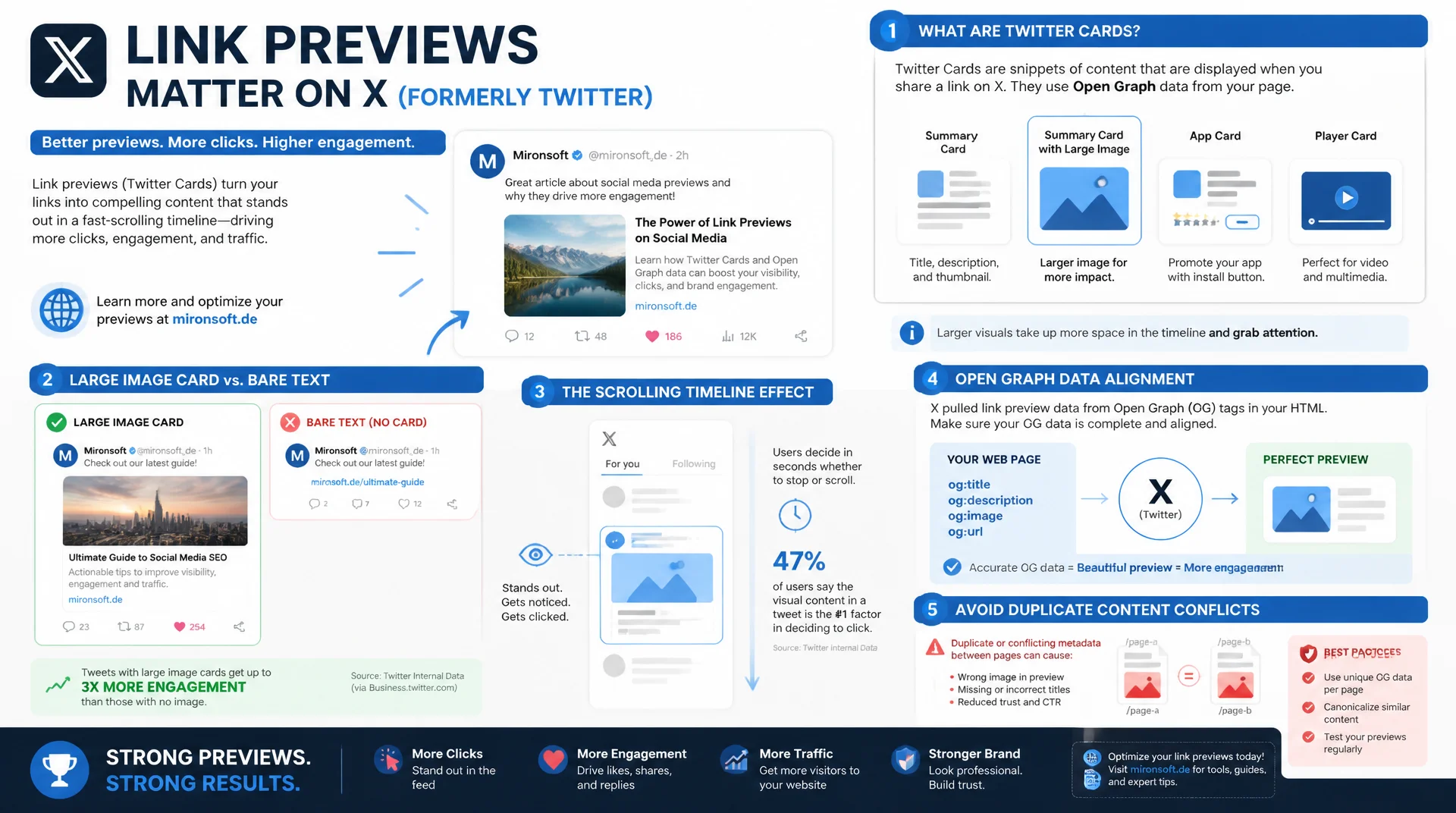
and aligning them cleanly with the page's SEO data
A link without a preview image practically disappears in the fast-scrolling X timeline. Twitter Cards, still technically maintained through the twitter:card naming scheme, decide whether a shared link appears as a large image card or as bare text. Knowing the card types and aligning them cleanly with existing Open Graph data avoids duplicate content conflicts and delivers consistent previews across every platform.
Table of Contents
- 1. What Twitter Cards still are today, technically and historically
- 2. The four card types in detail
- 3. summary vs. summary_large_image: which type when
- 4. Required and optional twitter: meta tags
- 5. Aligning with Open Graph data without conflicts
- 6. Card validation: tools and common error sources
- 7. Hyvä/Magento implementation of Twitter Cards
- 8. App tags and extended card properties for shops
- 9. Common practical mistakes and how to spot them
- 10. Summary
- 11. FAQ
1. What Twitter Cards still are today, technically and historically
Twitter Cards were introduced in 2012, long before Twitter became the platform X, and to this day are technically unchanged, implemented through the twitter: naming scheme in meta tags. Despite the platform's rename, the underlying specification has not changed: the meta tags are still called twitter:card, twitter:title, and twitter:image, and the official Card Validator still accepts exactly this naming scheme, regardless of the platform's brand name.
The purpose of Twitter Cards is the same as Open Graph tags: producing a structured preview for shared links, but with its own X-specific options such as an embedded X handle for the author or the website. If twitter: tags are missing entirely, X usually falls back on Open Graph data if available, a convenient behavior that can also lead to unexpected previews when the og: data is not optimized for the more compact X timeline.
2. The four card types in detail
The twitter:card meta tag accepts four values, of which two are relevant in practical use. summary shows a small square preview image to the left of the title and description, similar to a compact tile. summary_large_image shows a large, wide image above the text instead, noticeably more eye-catching in the timeline and with a measurably higher click-through rate in practically every comparison test. The other two types, app for App Store links and player for embedded video or audio players, are irrelevant for most content and e-commerce sites, but important for publishers with their own media players.
Choosing the right card type has a direct effect on the performance of shared links: several independent analyses from social media agencies show summary_large_image achieving a two to threefold higher click-through rate on average compared to summary, a difference caused purely by the visual prominence of the large image in the fast-scrolling X timeline. For blog posts, product pages, and practically any content page with a suitable hero image, summary_large_image is therefore the default choice.
<!-- Minimal summary card -->
<meta name="twitter:card" content="summary">
<meta name="twitter:site" content="@mironsoft">
<meta name="twitter:title" content="Short blog post title">
<meta name="twitter:description" content="Compact description, displayed next to a small image.">
<meta name="twitter:image" content="https://mironsoft.de/media/summary-square.jpg">

<!-- Large image card, recommended default for most pages -->
<meta name="twitter:card" content="summary_large_image">
<meta name="twitter:site" content="@mironsoft">
<meta name="twitter:creator" content="@mironsoft">
<meta name="twitter:title" content="Implementing X/Twitter Cards Correctly">
<meta name="twitter:description" content="twitter:card types, validation, and alignment with Open Graph data.">
<meta name="twitter:image" content="https://mironsoft.de/media/twitter-card-1200x630.jpg">
<meta name="twitter:image:alt" content="Illustration of an X card with a preview image">
3. summary vs. summary_large_image: which type when
The choice between summary and summary_large_image should be based on content type and available image material, not a blanket preference. For news articles, blog posts, category pages, and product pages with a clear visual hero image, summary_large_image is almost always the better choice, because the large image immediately catches the eye and noticeably increases click likelihood. For very text-heavy content without a meaningful image, such as pure status updates or short FAQ snippets, summary can be the more compact and appropriate option, since forcing a large but unremarkable image tends to look unprofessional.
A technical aspect that is often overlooked: summary_large_image requires a minimum image of 300 by 157 pixels, but 1200 by 630 pixels in the same aspect ratio as Open Graph images is recommended, which in practice allows a single image to be shared between og:image and twitter:image. If the delivered image is smaller than the minimum, X automatically falls back to the summary type, even if summary_large_image was explicitly specified in the code, a behavior that quietly forces many implementations into the wrong display.
4. Required and optional twitter: meta tags
Technically, only twitter:card itself is strictly required, X can theoretically pull all other values from Open Graph data. In practice, though, this leads to inconsistent results, which is why a full, dedicated set of twitter: tags is recommended: twitter:title, twitter:description, twitter:image, and optionally twitter:image:alt for accessibility. twitter:site links the website's own X account, twitter:creator the X account of a post's author, both values appear as a small attribution below the card and strengthen brand perception with every share.
One detail with real SEO relevance: twitter:title and twitter:description are allowed to differ in content from the classic meta description, but should stay thematically consistent, so users do not get the impression that different content is being promoted than what actually appears on the page. X automatically truncates long titles and descriptions with an ellipsis, which is why the most important information should be in the first 70 to 100 characters of twitter:description, noticeably shorter than the 150 to 160 characters typical for search results.
5. Aligning with Open Graph data without conflicts
The most common structural mistake when combining Twitter Cards and Open Graph tags is redundancy with conflicting values: og:title says something different from twitter:title, og:description contains different information than twitter:description, because both tag sets were maintained at different times by different people. The result is an inconsistent brand presentation depending on which platform a link is shared on, and unnecessary maintenance overhead for two parallel text sources that are supposed to carry the same message.
The robust strategy is to treat twitter:title and twitter:description deliberately as shorter, X-optimized variants of og:title and og:description, derived from the same central content source, rather than maintained completely independently. In a ViewModel or CMS field, that means: maintain one base description, expand it to full length for Open Graph, trim it to the shorter, punchier variant for Twitter, but never write a content-wise different second message. This keeps the preview consistent across platforms without maintaining two completely separate editorial processes.
<!-- Coordinated OG + Twitter tags: same source, different length -->
<meta property="og:title" content="Alpine Pro 2 Hiking Boot - waterproof, Gore-Tex, in stock">
<meta property="og:description" content="Waterproof hiking boot with Gore-Tex membrane, Vibram sole, and reinforced toe protection for alpine tours. In stock, free shipping over 50 euros.">
<meta property="og:image" content="https://mironsoft.de/media/catalog/product/alpine-pro-2-1200x630.jpg">

<meta name="twitter:card" content="summary_large_image">
<meta name="twitter:title" content="Alpine Pro 2 Hiking Boot - waterproof, Gore-Tex">
<meta name="twitter:description" content="Gore-Tex membrane, Vibram sole, reinforced toe protection. In stock.">
<meta name="twitter:image" content="https://mironsoft.de/media/catalog/product/alpine-pro-2-1200x630.jpg">
6. Card validation: tools and common error sources
X's official Card Validator shows how a card actually renders, including a live preview and error messages for missing required values. Unlike Facebook, X generally caches card data for a shorter period, often just a few hours, which means changes become visible faster than on Facebook, but manually re-validating through the Validator can speed the process up further and provides an error diagnosis at the same time when a card does not appear as expected.
Common error sources are a twitter:image blocked by robots.txt, an image below the minimum size that silently gets X to downgrade to summary, and duplicate meta tags with the same name but different values, for example when a tag management system and the source code both set twitter:title. In that case, the tag found first in the HTML usually wins, leading to unpredictable results if the order in the rendered HTML is not controlled.
{
  "url": "https://mironsoft.de/hiking-boot-alpine-pro-2",
  "card_type_detected": "summary_large_image",
  "warnings": [],
  "resolved_tags": {
    "twitter:card": "summary_large_image",
    "twitter:site": "@mironsoft",
    "twitter:title": "Alpine Pro 2 Hiking Boot - waterproof, Gore-Tex",
    "twitter:description": "Gore-Tex membrane, Vibram sole, reinforced toe protection.",
    "twitter:image": "https://mironsoft.de/media/catalog/product/alpine-pro-2-1200x630.jpg"
  },
  "image_check": { "width": 1200, "height": 630, "meets_minimum": true }
}
Example Card Validator output. The card_type_detected field shows the actually rendered type, not necessarily the value specified in the code, an important distinction when troubleshooting.
| Card type | Image requirement | Use case | Click-through rate |
|---|---|---|---|
| summary | Square, small, optional | Text-heavy content without a hero image | Lower, compact presentation |
| summary_large_image | Min. 300x157, rec. 1200x630 | Blog posts, product pages, news | Two to three times higher than summary |
| app | Not required | App Store deep links for your own apps | High with an app-affine audience |
| player | Thumbnail plus player URL | Embedded video or audio content | High with media publishers |
Mironsoft
Social meta tag strategy for consistent previews across every platform
Inconsistent link previews between X and Facebook?
We set up twitter:card and Open Graph tags from a shared content source, validate them across every relevant platform, and ensure consistent, high-quality previews for every share.
Card audit
Review existing twitter: tags with the Card Validator
Central content source
Derive og and twitter tags consistently from one source
Image pipeline
A single 1200x630 image shared between og:image and twitter:image
7. Hyvä/Magento implementation of Twitter Cards
In Hyvä themes, Twitter Cards can be elegantly modeled in the same ViewModel that already outputs the Open Graph tags, since both tag sets need the same base data. A clean interface provides methods such as getTwitterCardType(), getTwitterTitle(), and getTwitterDescription() that internally access the same raw data as their og counterparts, but with adjusted character limits. The twitter:card type decision, summary or summary_large_image, can be automated based on the available image material: if an image of at least 300 by 157 pixels exists, summary_large_image is set, otherwise summary as a safe fallback.
For Magento shops with their own X business account, it is recommended to maintain twitter:site globally through Store Configuration and never hard-code it in the template, so a handle change happens in one central place. twitter:creator is not relevant for most e-commerce pages without individual authors and should only be set for editorial blog content, where individual authors actually have their own X profiles.
<!--
  app/design/frontend/Mironsoft/default/Magento_Theme/templates/html/head/twitter-tags.phtml
  ViewModel: Mironsoft\SeoSuite\ViewModel\TwitterCard (ArgumentInterface)
-->
<?php /** @var \Mironsoft\SeoSuite\ViewModel\TwitterCard $twitterCard */ ?>
<meta name="twitter:card" content="<?= $escaper->escapeHtmlAttr($twitterCard->getCardType()) ?>">
<meta name="twitter:site" content="<?= $escaper->escapeHtmlAttr($twitterCard->getSiteHandle()) ?>">
<meta name="twitter:title" content="<?= $escaper->escapeHtmlAttr($twitterCard->getTitle()) ?>">
<meta name="twitter:description" content="<?= $escaper->escapeHtmlAttr($twitterCard->getDescription()) ?>">
<?php if ($twitterCard->hasImage()): ?>
  <meta name="twitter:image" content="<?= $escaper->escapeUrl($twitterCard->getImageUrl()) ?>">
  <meta name="twitter:image:alt" content="<?= $escaper->escapeHtmlAttr($twitterCard->getImageAlt()) ?>">
<?php endif; ?>
8. App tags and extended card properties for shops
For shops with their own mobile app, the twitter:app:* properties are relevant, storing App Store IDs for iPhone, iPad, and Google Play directly in the card and enabling a deep link into the app. This card variant uses the app type instead of summary_large_image and shows a direct "Open in app" button instead of text and image, which can noticeably increase conversion for app users, but only makes sense if a properly maintained, working app with corresponding deep linking actually exists.
<!-- App card: deep link into the native shopping app -->
<meta name="twitter:card" content="app">
<meta name="twitter:site" content="@mironsoft">
<meta name="twitter:description" content="View the Alpine Pro 2 hiking boot directly in the app.">
<meta name="twitter:app:id:iphone" content="123456789">
<meta name="twitter:app:id:ipad" content="123456789">
<meta name="twitter:app:id:googleplay" content="de.mironsoft.shop">
<meta name="twitter:app:url:iphone" content="mironsoft://product/alpine-pro-2">
<meta name="twitter:app:url:googleplay" content="mironsoft://product/alpine-pro-2">
For product pages, it is also worth combining this with structured price data, even though Twitter Cards themselves have no native price properties like Open Graph's product:price:amount. In practice, the price is then embedded directly in the twitter:description text, such as "from 149.90 euros, in stock," since X does not offer a separate card variant for product data with structured fields, unlike Pinterest with its Rich Pins.
9. Common practical mistakes and how to spot them
A recurring mistake in codebases that have grown over time is a twitter:card tag set to summary_large_image while twitter:image is entirely missing, because a later change accidentally removed the image tag. In that state, X typically renders no card at all, not even a minimal text preview, making the link noticeably less attractive in the timeline than even a simple summary card. An automated test that checks the most important pages against the Card Validator on every deployment reliably catches such regressions before they become visible in production.
A second common mistake concerns character length: a twitter:title exceeding 70 characters is often truncated by X in the card with an ugly ellipsis mid-word, instead of trimming at a word boundary. Controlling the truncation yourself in the backend, rather than leaving it to X, gives full control over the final text and avoids choppy, unprofessional-looking titles in the preview.
Implementing X/Twitter Cards Correctly: The Key Points at a Glance
Card type choice
summary_large_image for content with a hero image, summary for text-heavy content without a meaningful image.
Minimum image size
300x157 pixels minimum, 1200x630 recommended, otherwise X automatically falls back to summary.
OG alignment
Derive twitter: tags from the same content source as og: tags, do not maintain them independently.
Validation
Use the Card Validator after every change, shorter cache time than Facebook, but catch errors early.
10. Summary
Twitter Cards remain technically implemented through the twitter: meta tag scheme despite the rename to X, and they largely determine whether a shared link stands out in the timeline or gets lost. summary_large_image is the right choice for most content and product pages, but requires an image of at least 300 by 157 pixels, 1200 by 630 recommended, otherwise a silent fallback to the more compact summary card kicks in.
The most important structural point is alignment with Open Graph data: twitter:title and twitter:description should come from the same content source as og:title and og:description, just shorter and formatted for X, rather than being maintained as a completely independent, often conflicting second text source. Modeling this structure cleanly once in the ViewModel and checking it regularly through the Card Validator delivers consistent, professional previews across X, Facebook, and LinkedIn, without duplicated maintenance effort.