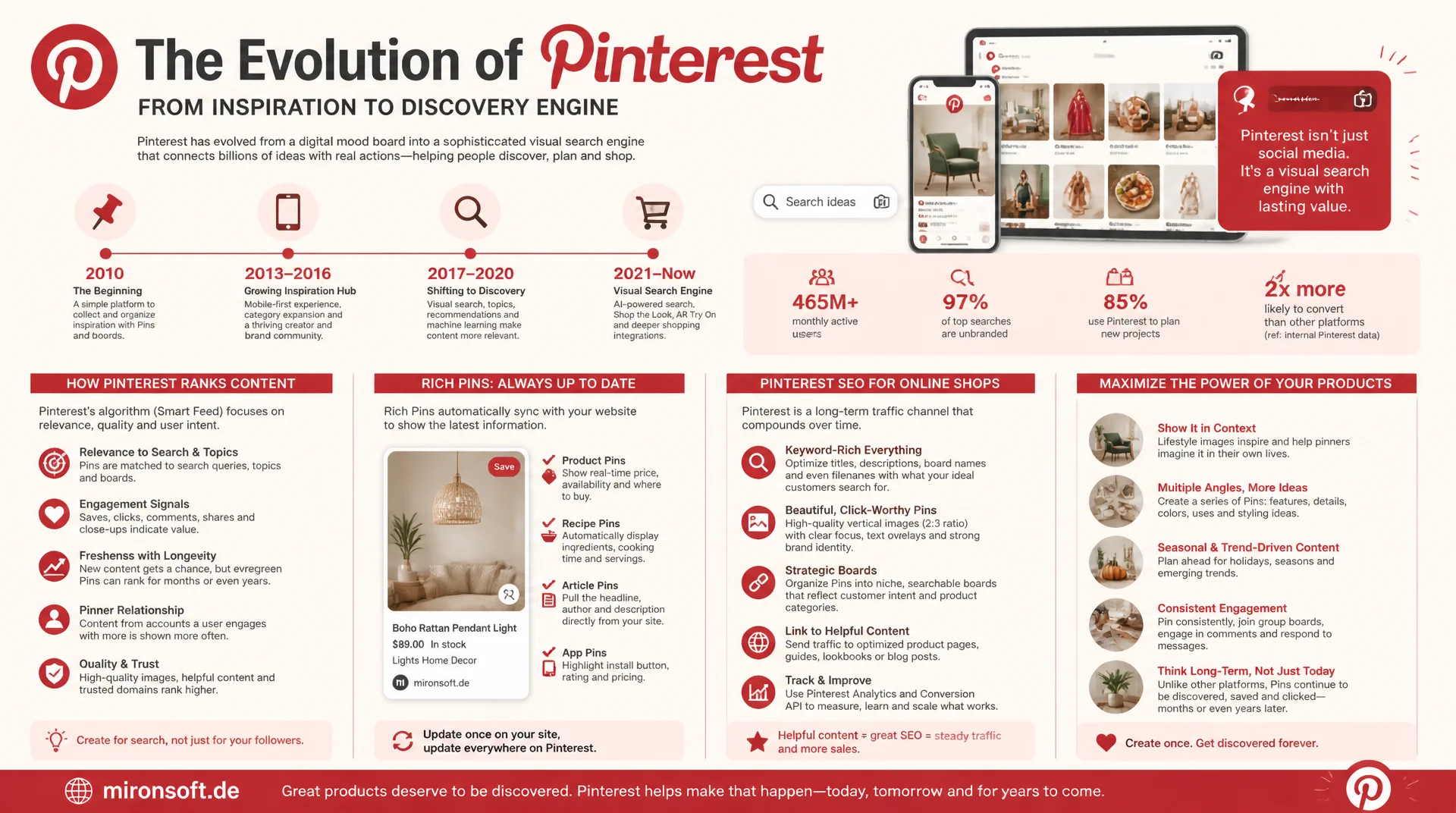
visual search as an underrated traffic channel
Pinterest is often dismissed as a pure inspiration network, but technically it works like a visual search engine with its own ranking algorithm and long-lived content. Rich Pins automatically pull price, availability, and product data straight from the website instead of being maintained by hand. For online shops with visually strong products, Pinterest SEO is therefore an independent, plannable traffic channel that reaches far beyond the lifespan of a single social media post.
Table of Contents
- 1. Understanding Pinterest as a visual search engine
- 2. What sets Rich Pins apart from regular pins
- 3. The four Rich Pin types at a glance
- 4. Schema requirements for Product Rich Pins
- 5. Setting up Rich Pins and checking them with the validator
- 6. Building product catalog feeds for Pinterest
- 7. Hyvä/Magento implementation for Pinterest schema
- 8. Pin optimization: image format, title, and description
- 9. Measuring traffic and steering Pinterest SEO long term
- 10. Summary
- 11. FAQ
1. Understanding Pinterest as a visual search engine
Pinterest SEO is fundamentally different from classic social media marketing, because Pinterest technically works as a visual search engine, not a chronological feed. Users type in search terms, and Pinterest searches pin titles, descriptions, board names, and recognized image content to rank relevant results, much like Google does for standard search queries. That explains why a good pin can still drive traffic months or years after publication, while an Instagram or X post disappears from the timeline within hours.
This longevity makes Pinterest SEO a strategically different investment than classic social media posting: instead of short-term reach, what counts here is continuous, plannable search traffic that can be steered through keyword research, a clean board structure, and correctly implemented Rich Pins. For online shops with visually appealing products, such as fashion, home decor, DIY supplies, or outdoor gear, Pinterest is therefore often an underrated channel with above-average purchase intent, since many users explicitly use Pinterest for purchase decisions and product research.
2. What sets Rich Pins apart from regular pins
Rich Pins are pins that pull additional, structured metadata directly from the linked website instead of just showing an image and manually entered text. The decisive difference: this metadata syncs automatically as soon as price, availability, or product description changes on the source page, without anyone having to manually update the pin. A regular pin shows a static snapshot from the moment it was pinned, while a Rich Pin stays in sync with the website as long as the underlying schema data is correctly maintained.
For e-commerce catalogs, this brings a significant practical advantage: if a product's price drops during a sale, the already-pinned Rich Pin updates automatically, with no manual intervention in the Pinterest interface. Conversely, Pinterest automatically shows a "no longer available" notice for sold-out products, reducing clicks on dead links and improving the user experience, an effect completely missing from regular, static pins.
3. The four Rich Pin types at a glance
Pinterest distinguishes four Rich Pin types, of which the Product type is primarily relevant for online shops. Product Rich Pins show real-time price, availability status, and a direct "Visit site" button, ideal for product detail pages. Article Rich Pins are suited for blog posts and guide content, with author, title, and description pulled straight from the article's metadata. Recipe Rich Pins are specialized for cooking recipes, with ingredient list, cook time, and serving size, relevant for food-related online shops. App Rich Pins link directly to app stores and are irrelevant for most e-commerce providers, except those with their own shopping app.
For most online shops, a combination of Product Rich Pins for product pages and Article Rich Pins for blog and guide content pays off, since both content types serve different search intents. A user looking for inspiration is more likely to click an Article Rich Pin with a guide character, while a user with concrete purchase intent responds directly to a Product Rich Pin showing a visible price. This differentiation in content strategy increases the relevance of your pins for different search intents on Pinterest.
| Rich Pin type | Displayed data | Ideal for | Schema basis |
|---|---|---|---|
| Product | Price, availability, shop link | Product detail pages | Product / Offer (Schema.org) |
| Article | Title, author, description | Blog and guide content | Article (Schema.org) |
| Recipe | Ingredients, cook time, servings | Food and recipe pages | Recipe (Schema.org) |
| App | App Store link, rating | Your own shopping app | Meta tags (app ID) |
4. Schema requirements for Product Rich Pins
Pinterest reads Product Rich Pin data primarily from Schema.org structured data in JSON-LD format, alternatively also from Open Graph meta tags with the product namespace. Required are the product name, an image at sufficient resolution, the price with currency, and the availability status. For a complete product schema, it is also recommended to add the brand, the SKU, and, if available, rating data via aggregateRating, since Pinterest uses these additional fields for a richer display of the pin.
A common implementation mistake is a Product schema without an offers object, or with an availability value that does not match the Schema.org specification: Pinterest expects exactly the values https://schema.org/InStock, https://schema.org/OutOfStock, or https://schema.org/PreOrder, not freely worded text like "available" or "in stock." If this value is set incorrectly or not at all, Pinterest often shows no availability status at all, making the Rich Pin look less convincing than one with correctly marked-up data.
{
  "@context": "https://schema.org",
  "@type": "Product",
  "name": "Alpine Pro 2 Hiking Boot",
  "image": [
    "https://mironsoft.de/media/catalog/product/alpine-pro-2-1200x1200.jpg"
  ],
  "description": "Waterproof hiking boot with Gore-Tex membrane and Vibram sole.",
  "sku": "APR2-BLK-42",
  "brand": { "@type": "Brand", "name": "Alpine Pro" },
  "offers": {
    "@type": "Offer",
    "url": "https://mironsoft.de/hiking-boot-alpine-pro-2",
    "priceCurrency": "EUR",
    "price": "149.90",
    "availability": "https://schema.org/InStock",
    "itemCondition": "https://schema.org/NewCondition"
  },
  "aggregateRating": {
    "@type": "AggregateRating",
    "ratingValue": "4.7",
    "reviewCount": "138"
  }
}
5. Setting up Rich Pins and checking them with the validator
Activating Rich Pins runs through the Pinterest Rich Pin Validator, an official tool where you enter the URL of a product or article page. The validator reads the existing schema data, shows a preview of the resulting Rich Pin, and flags missing or faulty fields. After successfully validating a single URL, you apply for activation across the entire domain, after which every future pinned URL from that domain is automatically treated as a Rich Pin, provided it has valid schema data.
An important practical point: activation applies domain-wide, but every single URL still has to deliver its own correct schema data. A product page without a Product schema will still be shown as a regular pin even after domain-wide activation, not as a Rich Pin. That is why it is worth spot-checking across several product categories, especially individually maintained special pages or landing pages that may not run through the same central schema logic as regular product pages.
Leaving visual search as a traffic channel untapped?
We implement complete product schema for Rich Pins, build a valid Pinterest catalog feed from your product inventory, and set up Rich Pin activation cleanly on the technical side.
Schema audit
Check product schema against Pinterest requirements
Catalog feed
Automated product feed for the Pinterest Catalogs Manager
Rich Pin activation
Domain validation and spot-checking across every category
6. Building product catalog feeds for Pinterest
Beyond Rich Pins, Pinterest offers the Catalogs Manager, a way to upload the entire product inventory as a structured feed, similar to the Google Merchant Center feed for shopping ads. This feed, in XML or CSV format, contains product ID, title, description, image URL, price, availability, category, and a link to the product page, and lets Pinterest automatically generate Product Pins for the entire catalog without every product having to be pinned manually.
The decisive advantage of a catalog feed over individual Rich Pins lies in scalability: a shop with several thousand items can make its entire inventory visible for Pinterest Shopping this way, including the ability to have products shown directly in "Shop the Look" boards or automatically generated product groups. The feed should be updated daily to keep price changes and stock levels in sync, which in Magento can be realized through a scheduled cron job that regenerates the feed regularly and writes it to the configured storage location.
{
  "catalog_feed_entry": {
    "id": "APR2-BLK-42",
    "title": "Alpine Pro 2 Hiking Boot",
    "description": "Waterproof hiking boot with Gore-Tex membrane and Vibram sole.",
    "link": "https://mironsoft.de/hiking-boot-alpine-pro-2",
    "image_link": "https://mironsoft.de/media/catalog/product/alpine-pro-2-1200x1200.jpg",
    "additional_image_link": "https://mironsoft.de/media/catalog/product/alpine-pro-2-alt.jpg",
    "availability": "in stock",
    "price": "149.90 EUR",
    "brand": "Alpine Pro",
    "condition": "new",
    "product_type": "Shoes > Hiking Boots > Men",
    "google_product_category": "187"
  }
}
A single entry from the Pinterest catalog feed. The field names largely match the Google Merchant format, with product_type as a Pinterest-specific category hierarchy for internal board and search mapping.
<!-- Pinterest domain verification meta tag (placed in <head>) -->
<meta name="p:domain_verify" content="a1b2c3d4e5f6789012345678901234ab">

<!-- Product pin board / save button integration -->
<a data-pin-do="buttonPin"
   data-pin-custom="true"
   href="https://www.pinterest.com/pin/create/button/?url=https%3A%2F%2Fmironsoft.de%2Fhiking-boot-alpine-pro-2&media=https%3A%2F%2Fmironsoft.de%2Fmedia%2Fcatalog%2Fproduct%2Falpine-pro-2-1200x1200.jpg&description=Alpine%20Pro%202%20Hiking%20Boot%20-%20waterproof%2C%20Gore-Tex">
  Save on Pinterest
</a>
7. Hyvä/Magento implementation for Pinterest schema
In Hyvä themes, the product schema needed for Pinterest can usually be reused from what is already output for Google Rich Results, since both platforms use the same Schema.org specification. It is important to map the availability value exactly according to the Schema.org specification, not according to your own freely chosen naming, since Pinterest validates this field more strictly than Google. A central ViewModel that maps Magento product status, stock level, and price to the correct schema values prevents inconsistencies between your Google schema output and what Pinterest actually expects.
For the Pinterest catalog feed, a separate, dedicated feed export is recommended, distinct from the Google Merchant feed, since Pinterest partly has different required fields and format requirements, for example in the category structure or additional fields such as additional_image_link. A command-line interface command, run daily via a Magento cron job, can read the product catalog from the database, transform it into the Pinterest XML format, and hand it off to the Catalogs Manager via FTP or a direct API upload.
<!--
  app/design/frontend/Mironsoft/default/Magento_Theme/templates/html/head/pinterest-schema.phtml
  ViewModel: Mironsoft\SeoSuite\ViewModel\PinterestProduct (ArgumentInterface)
-->
<?php /** @var \Mironsoft\SeoSuite\ViewModel\PinterestProduct $pinterest */ ?>
<script type="application/ld+json">
{
  "@context": "https://schema.org",
  "@type": "Product",
  "name": "<?= $escaper->escapeJs($pinterest->getName()) ?>",
  "image": ["<?= $escaper->escapeJs($pinterest->getImageUrl()) ?>"],
  "sku": "<?= $escaper->escapeJs($pinterest->getSku()) ?>",
  "offers": {
    "@type": "Offer",
    "price": "<?= $escaper->escapeJs($pinterest->getPrice()) ?>",
    "priceCurrency": "<?= $escaper->escapeJs($pinterest->getCurrency()) ?>",
    "availability": "<?= $escaper->escapeJs($pinterest->getAvailabilitySchemaUrl()) ?>"
  }
}
</script>
The getAvailabilitySchemaUrl() method centrally maps the internal Magento stock status to the three allowed Schema.org values, instead of scattering this logic across multiple templates.
8. Pin optimization: image format, title, and description
The ideal pin image format is vertical with a 2:3 aspect ratio, 1000 by 1500 pixels recommended, since Pinterest favors vertical pins in the mobile app and displays them with more screen area than square or horizontal images. For product images that primarily exist in the classic 1:1 format, it is therefore worth creating an additional, dedicated pin image in 2:3 format that shows the product in a usage context rather than as an isolated cutout photo, since contextual images demonstrably achieve higher engagement rates on Pinterest.
Pin title and pin description should, similar to classic on-page SEO, contain keywords that users actually search for on Pinterest, researched via Pinterest's own search suggestion feature or Pinterest Trends. A pure product name without context, such as just "Alpine Pro 2 Hiking Boot," performs worse than a descriptive variant like "Waterproof hiking boot for alpine tours, Gore-Tex membrane," since Pinterest factors the description into ranking for topic-related searches, not just the product name itself.
9. Measuring traffic and steering Pinterest SEO long term
Pinterest traffic can be tracked in Google Analytics 4 via standard referral detection, or more precisely via UTM parameters on every pin link, supplemented by Pinterest's own analytics in the business account, which show impressions, saves, and outbound clicks per pin. Important for long-term steering is looking at the save rate relative to impressions, since a high save rate is a strong signal for Pinterest to show the pin to other users with similar search behavior too, an internal ranking mechanism not unlike link building in classic SEO.
Since Pinterest pins can drive traffic for months and years, it is worth reviewing top-performing pins quarterly to transfer their patterns, such as image style, title phrasing, or board assignment, to new products. This iterative optimization distinguishes sustainable Pinterest SEO strategies from one-off pin campaigns that lose visibility after the initial publication because they are not regularly adjusted based on real performance data.
<!-- UTM-tagged product URL for clean Pinterest attribution in GA4 -->
https://mironsoft.de/hiking-boot-alpine-pro-2?utm_source=pinterest&utm_medium=social&utm_campaign=product_catalog&utm_content=apr2-blk-42
Pinterest SEO and Rich Pins: The Key Points at a Glance
Pinterest as a search engine
Keyword-based ranking instead of a chronological feed, pins stay relevant for months to years.
Rich Pin schema
Product schema with a correct availability value per Schema.org spec, price, brand, and rating.
Catalog feed
Daily updated XML/CSV feed for the entire product inventory via the Catalogs Manager.
Pin format
Vertical 2:3, 1000x1500 pixels, contextual product images instead of pure cutout photos.
10. Summary
Pinterest SEO differs fundamentally from other social media channels because Pinterest technically works as a visual search engine with long-lived content instead of a short-lived feed. Rich Pins, especially Product Rich Pins, make the decisive difference here: they show automatically synced price and availability data straight from the website's existing Schema.org markup, with no manual maintenance effort in the Pinterest interface.
For e-commerce catalogs, the combination of correct product schema, a daily updated catalog feed, and optimized, vertical pin images is the path to plannable, long-term traffic. Treating Pinterest SEO as an independent channel with its own keyword strategy, rather than viewing Pinterest as just another share button next to Facebook and X, unlocks a traffic channel with above-average purchase intent and a reach that extends far beyond the usual lifespan of a social media post.