Combining rel=canonical, 301 redirects, and noindex correctly
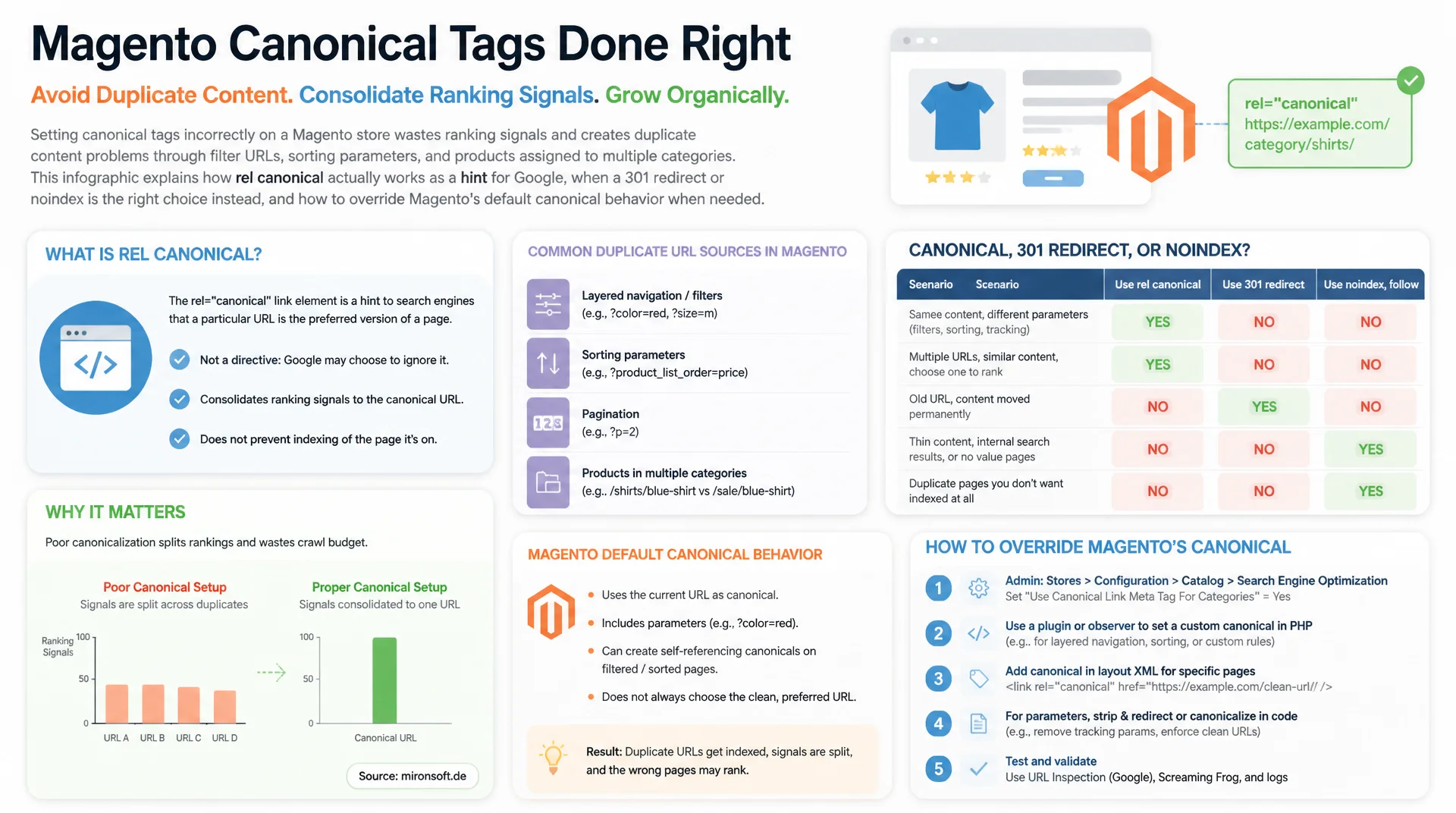
Setting canonical tags incorrectly on a Magento store wastes ranking signals and creates duplicate content problems through filter URLs, sorting parameters, and products assigned to multiple categories. This article explains how rel canonical actually works as a hint for Google, when a 301 redirect or noindex is the right choice instead, and how to override Magento's default canonical behavior when needed.
Table of Contents
- 1. How rel=canonical really works: a hint, not a directive
- 2. Self-referencing canonicals as the baseline for every page
- 3. Canonical vs. 301 redirect vs. noindex: three tools for three situations
- 4. Common canonical mistakes in practice
- 5. Canonical chains: why A to B to C breaks the signal
- 6. Magento's default canonical behavior
- 7. Layered navigation: canonical for filtered category URLs
- 8. Multi-store and multi-website setups with a shared catalog
- 9. Canonical, redirect, and noindex compared side by side
- 10. Summary
- 11. FAQ
1. How rel=canonical really works: a hint, not a directive
The most important difference between rel=canonical and directives like noindex or a 301 redirect: canonical is only a hint for Google, not a binding directive. Google evaluates the declaration together with other signals, such as internal linking, sitemap entries, redirect chains, HTTPS preference, and the perceived authority of each URL. If those signals diverge strongly from the declared canonical URL, Google picks its own so-called Google-selected canonical, which can differ from the declared one.
This becomes visible in the URL Inspection tool in Google Search Console: it shows "User-declared canonical" and "Google-selected canonical" side by side. When the two values diverge, that is a clear signal that the declaration is being undermined by conflicting internal links, inconsistent sitemap entries, or a weak URL structure. This is exactly why combining a robots.txt block with a canonical tag is a mistake: if a URL is blocked via robots.txt, Google can never crawl it and therefore never reads the canonical tag at all.
2. Self-referencing canonicals as the baseline for every page
Every indexable page should carry a canonical tag pointing to itself by default, regardless of whether a concrete duplicate content risk is currently visible. The reason is structural: tracking parameters like utm_source or gclid, session identifiers, and sorting or filter parameters technically create new URLs that, without a self-referencing canonical, get crawled as separate pages and, in the worst case, indexed separately.
A self-referencing canonical consistently consolidates the ranking signals of all these variants onto the clean base URL, even when a variant is discovered first through an external link or a campaign URL. This behavior is the default in Magento and most modern systems, but it should still be verified manually on custom landing pages, custom CMS blocks, and content built through page builders, since the tag is often simply missing there.
<!-- Self-referencing canonical on a Magento product page -->
<link rel="canonical" href="https://mironsoft.de/women/sneaker-classic-white.html">

<!-- Wrong: the URL variant with a tracking parameter does NOT point to itself,
     it correctly points to the clean base URL without parameters -->
<!-- Requested URL: https://mironsoft.de/women/sneaker-classic-white.html?utm_source=newsletter -->
<link rel="canonical" href="https://mironsoft.de/women/sneaker-classic-white.html">
3. Canonical vs. 301 redirect vs. noindex: three tools for three situations
Canonical belongs wherever duplicate or near-duplicate content should intentionally remain reachable, while the ranking signal still needs to be consolidated onto a single URL. Typical example: a category page sorted by price ascending stays clickable and reachable for users, but points via canonical to the unsorted base URL.
301 redirect belongs wherever content has permanently moved or a URL should stop existing. Examples include a changed URL key after a category rename, a domain migration, or a product now living entirely under a new path. Unlike a canonical, a redirect sends both users and link equity to the new location, the old URL is no longer reachable, and it returns a 3xx status code.
Noindex belongs wherever content should never appear in search results at all, regardless of any duplicate content question. Internal search result pages, the cart, checkout steps, and the customer account are the classic Magento examples. Noindex and canonical can be combined on the same page as long as the canonical points to itself, but noindex should never appear on a page whose canonical points to a different, indexable target URL.
4. Common canonical mistakes in practice
The most underestimated mistake is a misused cross-domain canonical: two separate client stores accidentally point to each other via canonical, usually because a configuration was copy-pasted between installations without adjusting the target domain. The result: Google consolidates ranking signals onto a foreign domain, and the own page loses visibility even though the content is not actually duplicated.
Equally common is the wrong combination of canonical and pagination: page 2 of a category points via canonical to page 1, based on the mistaken assumption that this reduces duplicate content. In reality, this prevents Google from ever crawling and evaluating the products listed on page 2 as their own entities. Every pagination page needs a self-referencing canonical.
A third classic: filtered or sorted category URLs get blanket-canonicalized to the base category, even when a filter combination such as "color=red&size=m" would have enough search volume to justify its own landing page. This deserves a differentiated review rather than a blanket rule applied to every filter combination.
5. Canonical chains: why A to B to C breaks the signal
A canonical chain forms when URL A points via canonical to URL B, but B itself does not carry a self-referencing canonical and instead points on to URL C. Google usually follows such chains to the final URL, but it burns extra crawl budget along the way, and every intermediate hop makes the signal more fragile: if the canonical target of B ever changes, the entire chain breaks silently.
In Magento, this pattern typically appears with multi-category assignments: a product in category A gets a canonical pointing to category B, because B is configured as the "primary" category. But category B is itself a filtered landing page with its own canonical pointing to the real base category C. The rule against this is simple: a canonical must always point directly to the final target URL, never through an intermediate hop that is itself already canonicalized.
<!-- WRONG: canonical chain across three URLs -->
<!-- URL A: /women/shoes/sneaker-classic.html -->
<link rel="canonical" href="https://mironsoft.de/women/sneaker-classic.html">

<!-- URL B: /women/sneaker-classic.html (itself not self-referencing) -->
<link rel="canonical" href="https://mironsoft.de/sneaker-classic.html">

<!-- URL C: /sneaker-classic.html (the actual final target URL) -->
<link rel="canonical" href="https://mironsoft.de/sneaker-classic.html">

<!-- RIGHT: every URL points directly to the final target URL, no intermediate hop -->
<!-- URL A: /women/shoes/sneaker-classic.html -->
<link rel="canonical" href="https://mironsoft.de/sneaker-classic.html">

<!-- URL B: /women/sneaker-classic.html -->
<link rel="canonical" href="https://mironsoft.de/sneaker-classic.html">

<!-- URL C: /sneaker-classic.html -->
<link rel="canonical" href="https://mironsoft.de/sneaker-classic.html">
6. Magento's default canonical behavior
Magento 2 automatically generates self-referencing canonical tags for products and categories, controlled by two separate toggles under Stores > Configuration > Catalog > Catalog > Search Engine Optimization: "Use Canonical Link Meta Tag For Products" and "Use Canonical Link Meta Tag For Categories". Both options default to "Yes" and should generally stay that way unless there is a specific reason to disable them.
When the option is active, Magento automatically renders the canonical tag in the head of every product and category page, targeting the regular URL of the product or category without store-specific filter parameters. For products assigned to multiple categories, Magento by default uses the currently viewed category URL as the canonical target, not necessarily a category marked as "primary". That is exactly what can produce inconsistent signals under multi-category assignment, when the same product page is reachable through different category paths with different canonical targets.
// Example: core_config_data entries for canonical settings
// configured differently per website (store_id 0 = default)
[
  {
    "path": "catalog/seo/product_canonical_tag",
    "scope": "websites",
    "scope_id": 1,
    "value": "1"
  },
  {
    "path": "catalog/seo/category_canonical_tag",
    "scope": "websites",
    "scope_id": 1,
    "value": "1"
  },
  {
    "path": "catalog/seo/product_canonical_tag",
    "scope": "websites",
    "scope_id": 2,
    "value": "0"
  }
]
7. Layered navigation: canonical for filtered category URLs
Layered navigation creates URLs with query parameters like ?color=red&size=m, whose content is almost always a subset of the base category, technically making it near-duplicate content. Magento's automatic canonical handling covers regular category pages, but it does not automatically cover every single filter combination. Depending on the layered navigation module in use, the canonical for filter URLs often has to be explicitly set to the base category URL, otherwise potentially thousands of separately indexable filter URLs can appear per category.
A layout XML override or a plugin on the canonical URL provider allows for differentiated control: for most filter combinations, canonicalizing to the base category remains the right choice, but for individual combinations with demonstrable search volume, such as "women's white sneakers", a self-referencing canonical can be the better option, because that combination has its own ranking potential.
<!-- Layout XML: override the canonical block for a layered navigation page -->
<page xmlns:xsi="http://www.w3.org/2001/XMLSchema-instance"
      xsi:noNamespaceSchemaLocation="urn:magento:framework:View/Layout/etc/page_configuration.xsd">
    <body>
        <referenceBlock name="category.canonical.link">
            <arguments>
                <!-- Custom block replaces the default canonical provider -->
                <argument name="canonical_url" xsi:type="string">
                    https://mironsoft.de/women/sneaker.html
                </argument>
            </arguments>
        </referenceBlock>
    </body>
</page>
8. Multi-store and multi-website setups with a shared catalog
In multi-store or multi-website setups with a shared product catalog, for example the same products across multiple stores with different languages or domains, Magento's default canonical behavior can cause problems if store-specific base URLs are not cleanly separated. Without adjustment, Magento can end up generating canonical tags that accidentally point across store boundaries to a different store view.
For internationally oriented setups, every store view should get its own self-referencing canonical, combined with correctly maintained hreflang tags, instead of a shared canonical across language boundaries. A cross-domain canonical between two stores only makes sense when the content genuinely remains identical and no hreflang differentiation is required, for example between a .de and a .com domain serving the same German-language content to different countries.
<?php
declare(strict_types=1);

namespace Mironsoft\SeoSuite\ViewModel;

use Magento\Framework\View\Element\Block\ArgumentInterface;
use Magento\Store\Model\StoreManagerInterface;
use Magento\Catalog\Model\Product;

/**
 * Provides a store-view-correct canonical URL for shared product catalogs
 * in multi-website setups, instead of relying on Magento's default behavior.
 */
final class CanonicalUrlProvider implements ArgumentInterface
{
    /**
     * @param StoreManagerInterface $storeManager Access to the current store view.
     */
    public function __construct(
        private readonly StoreManagerInterface $storeManager
    ) {
    }

    /**
     * Builds the canonical URL for a product based on the current store view,
     * instead of using a cross-store URL.
     *
     * @param Product $product The currently displayed product.
     * @return string Store-view-specific, absolute canonical URL.
     * @throws \Magento\Framework\Exception\NoSuchEntityException
     */
    public function getCanonicalUrl(Product $product): string
    {
        $store = $this->storeManager->getStore();
        $baseUrl = rtrim($store->getBaseUrl(), '/');

        return $baseUrl . '/' . ltrim($product->getUrlKey() . '.html', '/');
    }
}
9. Canonical, redirect, and noindex compared side by side
All three tools solve different problems and are not interchangeable. The table below summarizes when each tool is correct and which combinations are common sources of mistakes.
| Tool | Correct use case | URL stays reachable? | Assessment |
|---|---|---|---|
| rel=canonical | Consolidate duplicate/near-duplicate content | Yes | Correct tool |
| 301 redirect | Content permanently moved or removed | No | Correct tool |
| Meta noindex | Content should never appear in search | Yes | Correct tool |
| Canonical to a noindex page | Contradictory signal to Google | Yes, but inconsistent | Common mistake |
| Canonical chain (A to B to C) | Signal diluted through an intermediate hop | Yes, but fragile | Common mistake |
In practice, a simple check before implementation pays off: if the URL should stay reachable for users but the ranking signal should land elsewhere, canonical is right. If the URL should disappear completely, a 301 redirect is right. If the URL should stay reachable but never appear in search, noindex is right. Answering these three questions consistently avoids most of the mistakes described above before they happen.
Mironsoft
Canonical audits, duplicate content cleanup, and Magento SEO configuration
Ready to set up canonical tags properly in your store?
We analyze your Magento store's canonical structure, uncover chains, misassignments, and duplicate content risks, and implement a clean, sustainably maintainable configuration.
Canonical audit
Full review of all product, category, and filter URLs
Duplicate content cleanup
Resolving canonical chains, configuring layered navigation correctly
Multi-store SEO
Canonical and hreflang strategy for shared catalogs
10. Summary
Canonical tags against duplicate content solve a simple but easily misunderstood problem: rel=canonical is a hint, not a directive, and must therefore stay consistent with internal linking and sitemap entries to be reliably honored by Google. Self-referencing canonicals belong on every indexable page as a baseline, regardless of the current duplicate content risk. Canonical, 301 redirect, and noindex solve three different problems and must not be swapped for one another.
The most common mistakes appear at the same recurring spots: canonical chains through multiple intermediate hops, misconfigured pagination, cross-domain references left unadjusted, and blanket-canonicalized filter URLs in layered navigation. Magento's default behavior for products and categories reliably covers the normal case, but it should be specifically reviewed, and overridden via layout XML or custom canonical logic when needed, for multi-category assignments, individual filter landing pages, and multi-store setups with a shared catalog.
Canonical Tags Against Duplicate Content, the Essentials at a Glance
Self-referencing as the default
Every indexable page needs a canonical pointing to itself, regardless of current duplicate content risk.
Three tools, three purposes
Canonical consolidates, 301 permanently moves, noindex fully prevents visibility in search.
Avoid chains
A canonical must always point directly to the final target URL, never through an intermediate hop.
Check the Magento configuration
Stores > Catalog > Search Engine Optimization for the normal case, custom logic for layered navigation and multi-store.