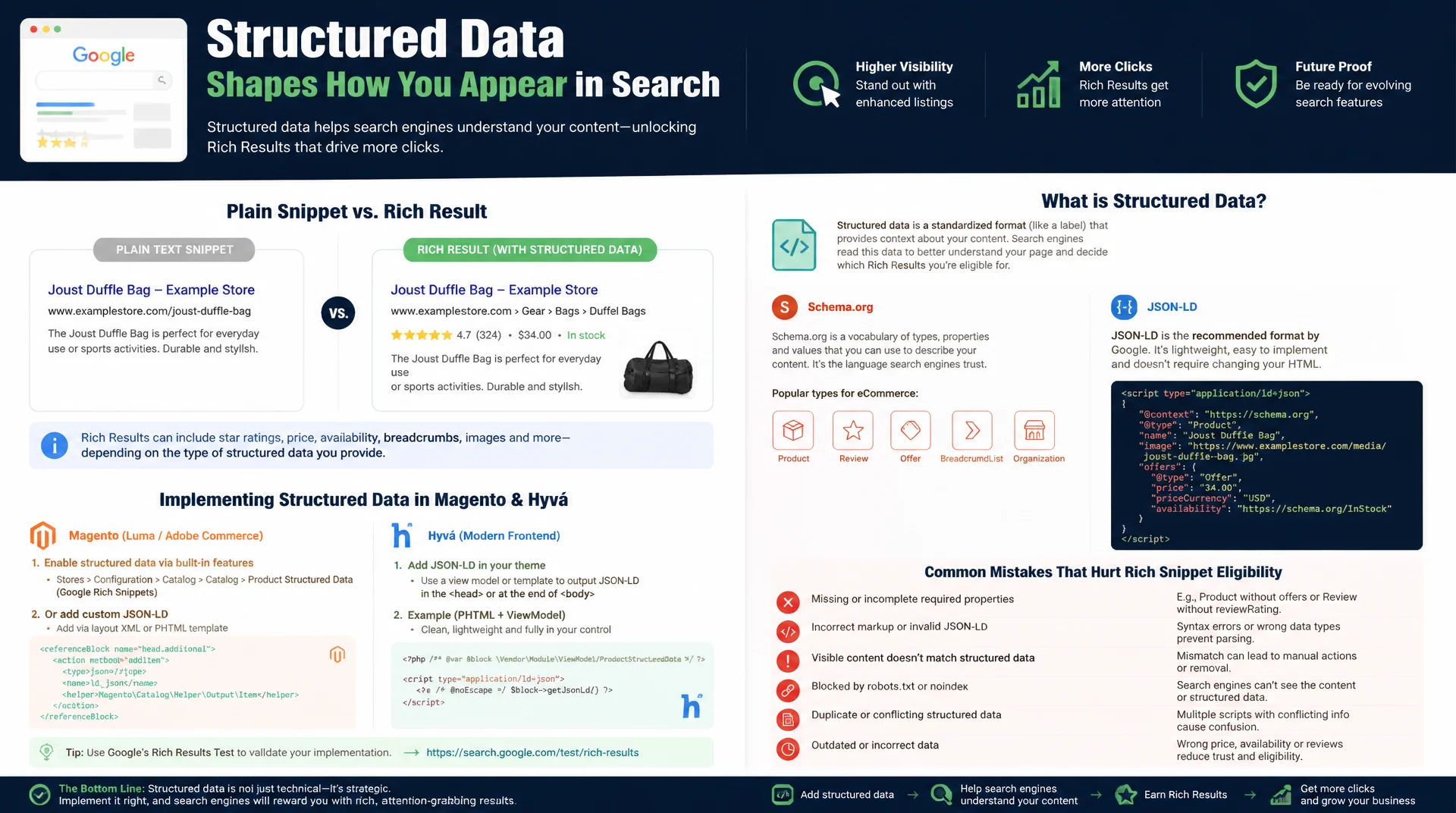
Vocabulary, JSON-LD, and Rich Results explained in practice
Structured data decides whether a search result shows up as a plain text snippet or as a Rich Result with star ratings, price, and breadcrumbs. This guide explains Schema.org and JSON-LD from the ground up, shows the correct implementation in Magento and Hyvä, and covers the most common beginner mistakes before they cost you Rich Snippet eligibility.
Table of Contents
- 1. What Schema.org is and why structured data matters for Rich Results
- 2. Vocabulary basics: types, properties, and the Schema.org hierarchy
- 3. JSON-LD vs. Microdata vs. RDFa: why JSON-LD is the de facto standard
- 4. Implementing JSON-LD in Magento/Hyvä
- 5. From structured data to Rich Results: which types deliver what
- 6. Validation: Rich Results Test, Search Console, Schema Markup Validator
- 7. Common beginner mistakes with structured data
- 8. Magento-specific schema types
- 9. JSON-LD types compared side by side
- 10. Summary
- 11. FAQ
1. What Schema.org is and why structured data matters for Rich Results
Schema.org is a shared vocabulary maintained jointly by Google, Microsoft, Yahoo, and Yandex that gives web content a machine-readable meaning. Instead of just crawling plain text, a search engine with structured data can precisely recognize: this is a product, it costs 49.90 euros, it's in stock, and it has 128 reviews averaging 4.7 stars. That precision is the foundation for Rich Results, the enhanced search listings with stars, prices, breadcrumbs, or expandable FAQs shown directly in the SERP.
The effect is measurable: Rich Results claim more space in the search result, build trust through visible ratings, and noticeably improve click-through rate compared to a plain text snippet. One distinction matters: structured data itself is not a direct ranking factor, Google states this explicitly. But it is the prerequisite for Google to even consider a result as a candidate for a Rich Result. Without correct markup, even the best product page stays a plain blue link.
2. Vocabulary basics: types, properties, and the Schema.org hierarchy
Schema.org is organized into types (entity types like Product, Article, or Organization) and properties (attributes of those types like name, price, or author). Types are arranged hierarchically as a tree: Product inherits from Thing, just as LocalBusiness inherits from Organization, which itself inherits from Thing. In practice, this inheritance means every type automatically carries all properties of its parent types, such as name, description, and image, which are defined at the base level Thing.
Some properties expect simple values like text or numbers, others expect a nested object of another type, called nested types. A Product, for example, has an offers property that itself expects an Offer object with its own properties like price and availability. This nesting mirrors real data structures, but it also demands precision: a misplaced field, such as price sitting directly on Product instead of inside the nested Offer, gets flagged as an error by validators even if the value itself looks correct.
3. JSON-LD vs. Microdata vs. RDFa: why JSON-LD is the de facto standard
Schema.org can be embedded using three syntaxes: JSON-LD, Microdata, and RDFa. Microdata and RDFa weave structured data directly into the visible HTML as attributes, using itemscope, itemprop, and itemtype. That works, but it tightly couples markup and layout: every change to the HTML template risks accidentally breaking the structured data model, because attributes are attached to specific DOM nodes.
JSON-LD solves this by embedding structured data as a standalone <script type="application/ld+json"> block, independent of the visible HTML. That lets you maintain markup centrally in a single block without touching the template, and makes it easy to cleanly format complex nested structures. Google officially recommends JSON-LD as the preferred method, and in practice it has become the de facto standard: it can be generated dynamically via JavaScript, injected server-side into phtml templates with ease, and validated independently of the rest of the markup, without CSS changes to the frontend ever affecting the data model.
{
  // JSON-LD: standalone block, independent of the visible HTML
  "@context": "https://schema.org",
  "@type": "Product",
  "name": "Example Product",
  "sku": "MS-1234",
  "offers": {
    "@type": "Offer",
    "priceCurrency": "EUR",
    "price": "49.90",
    "availability": "https://schema.org/InStock"
  }
}
4. Implementing JSON-LD in Magento/Hyvä
In a Hyvä theme, JSON-LD is cleanest when delivered through its own phtml template with an associated ViewModel, wired in via layout XML into page.head.additional or right before the closing </body> tag. The ViewModel supplies the raw data (product name, price, availability), while the template handles only JSON serialization via json_encode() and proper output escaping. It's critical to never interpolate raw data into the JSON-LD block unchecked, since faulty escaping both breaks the JSON and opens an XSS risk.
Because Hyvä relies consistently on Content Security Policy (CSP), every inline script block, including JSON-LD, must be registered via the hyvaCsp ViewModel helper so the browser doesn't block it as a CSP violation. For Organization and WebSite schema, which are identical on every page, a global block in the default layout is worthwhile, while product-related Product schema should only render on the product detail page to avoid shipping incorrect data on category or CMS pages.
<?php
/**
 * @var \Magento\Framework\View\Element\Template $block
 * @var \Mironsoft\SeoSuite\ViewModel\SchemaOrganization $viewModel
 * @var \Hyva\Theme\ViewModel\HyvaCsp $hyvaCsp
 */
$viewModel = $block->getViewModel();
$hyvaCsp = $viewModel->getHyvaCsp();
?>
<script type="application/ld+json">
<?= /* @noEscape */ json_encode([
    '@context' => 'https://schema.org',
    '@type' => 'Organization',
    'name' => $viewModel->getOrganizationName(),
    'url' => $viewModel->getBaseUrl(),
    'logo' => $viewModel->getLogoUrl(),
], JSON_UNESCAPED_SLASHES | JSON_UNESCAPED_UNICODE) ?>
</script>
<?php $hyvaCsp->registerInlineScript() ?>
5. From structured data to Rich Results: which types deliver what
Not every schema type leads to a visible Rich Result, Google maintains a limited, documented list of supported types. Product schema enables price, availability, and star ratings directly in the search result. BreadcrumbList replaces the plain URL display with a readable navigation path. FAQPage shows expandable question-and-answer pairs directly under the snippet, claiming considerably more vertical space in the SERP.
Review and AggregateRating generate the familiar yellow stars, but only if the ratings genuinely come from real users and are publicly visible; self-generated or incomplete rating data is treated by Google as spam and can trigger manual actions. Organization and WebSite schema less often affect classic rich snippets, but they lay the groundwork for the Knowledge Panel and the sitelinks search box on brand-name searches.
{
  // FAQPage: acceptedAnswer.text must match the answer visible on the page
  "@context": "https://schema.org",
  "@type": "FAQPage",
  "mainEntity": [
    {
      "@type": "Question",
      "name": "How much does shipping cost?",
      "acceptedAnswer": {
        "@type": "Answer",
        "text": "Shipping within Germany is free starting at an order value of 50 euros."
      }
    }
  ]
}
6. Validation: Rich Results Test, Search Console, Schema Markup Validator
The Google Rich Results Test is the most important validation tool, because it doesn't just catch syntax errors in the JSON-LD, it shows concretely whether the submitted code qualifies for a Rich Result type that Google actually supports. It clearly distinguishes between errors that prevent a display and warnings about optional fields that would improve the presentation but aren't strictly required. For ongoing monitoring after launch, the Google Search Console under "Enhancements" is essential, since it shows how many indexed pages with a given schema type are actually being parsed error-free.
The Schema Markup Validator from Schema.org itself, by contrast, checks only syntactic correctness against the official vocabulary specification, regardless of whether Google supports that type for Rich Results at all. The two tools complement each other: the Schema Markup Validator confirms the markup conforms to the standard, the Rich Results Test confirms Google actually turns it into something visible. For Magento stores, it's worth building validation into every staging deployment pipeline instead of running it manually only after go-live.
7. Common beginner mistakes with structured data
The most common mistake is a mismatch between markup and visible content: a price in the JSON-LD that doesn't match the actually displayed price, or a rating in the schema that appears nowhere on the page. Google treats this as misleading and can revoke Rich Snippet eligibility for the entire domain, not just the affected page. A second common mistake is using invented or outdated types that no longer exist in the official vocabulary, usually copied from stale tutorials.
Also widespread: missing required properties. Every Google-supported type has a list of mandatory fields, without which no Rich Result gets generated, such as image and author for Article. Many stores also copy a single generic JSON-LD template across all pages instead of dynamically populating it with real product data, resulting in identical, obviously wrong values across hundreds of pages. Lastly: duplicate markup, when both a module and a third-party plugin independently output Product schema, which validators reject as contradictory.
// WRONG: price in the markup doesn't match the visible price, required property missing
{
  "@context": "https://schema.org",
  "@type": "Product",
  "name": "Example Product",
  "offers": {
    "@type": "Offer",
    "price": "39.90"
  }
}

// CORRECT: price matches the page, priceCurrency added as required field
{
  "@context": "https://schema.org",
  "@type": "Product",
  "name": "Example Product",
  "image": "https://mironsoft.de/media/catalog/product/example.jpg",
  "offers": {
    "@type": "Offer",
    "price": "49.90",
    "priceCurrency": "EUR",
    "availability": "https://schema.org/InStock"
  }
}
8. Magento-specific schema types
Four schema types offer the greatest practical value for Magento stores. Product carries name, image, SKU, brand, price, and availability straight from the product catalog and should update automatically on every price or stock change, ideally through the same indexer mechanism that also invalidates the Full Page Cache. BreadcrumbList can be derived from the existing category path logic that Magento already computes internally for the visible breadcrumb navigation, so no duplicate data handling is needed.
Organization belongs on every page and supplies company name, logo, and contact details for the Google Knowledge Panel. FAQPage works great on CMS landing pages and advisory-style category pages, for example where an FAQ accordion built with Alpine.js already renders there, whose content can be mirrored directly from the same data source into the JSON-LD without doubling editorial effort.
{
  // BreadcrumbList: positions are 1-based, item as an absolute URL
  "@context": "https://schema.org",
  "@type": "BreadcrumbList",
  "itemListElement": [
    { "@type": "ListItem", "position": 1, "name": "Home", "item": "https://mironsoft.de/" },
    { "@type": "ListItem", "position": 2, "name": "Category", "item": "https://mironsoft.de/category" },
    { "@type": "ListItem", "position": 3, "name": "Example Product", "item": "https://mironsoft.de/example-product" }
  ]
}
9. JSON-LD types compared side by side
Every schema type has its own required fields, typical error sources, and clear SERP effect. The table below summarizes the most important types for Magento stores.
| Schema type | Required fields | Typical mistake | SERP effect |
|---|---|---|---|
| Product | name, image, offers | Price differs from the visible price | Price and rating stars |
| BreadcrumbList | itemListElement, position | Position not 1-based | Readable navigation path |
| FAQPage | mainEntity, acceptedAnswer | Answer not visible on the page | Expandable Q&A in the snippet |
| Organization | name, url, logo | Logo not in the required format | Knowledge Panel, sitelinks |
| AggregateRating | ratingValue, reviewCount | Fabricated or incomplete ratings | Risk: manual action |
In practice, it's worth starting with Product, BreadcrumbList, and Organization, since they deliver the biggest SERP effect at the lowest implementation risk. AggregateRating should only follow once real, verifiable review data exists, since faulty rating data carries the highest penalty risk of any schema type.
Mironsoft
Structured data, JSON-LD, and Rich Results optimization for Magento stores
Want Schema.org implemented correctly?
We build JSON-LD markup for Product, BreadcrumbList, Organization, and FAQPage cleanly into your Magento/Hyvä theme, validate it against the Rich Results Test, and set up continuous monitoring through Search Console.
Schema audit
Review existing markup, identify gaps and misconfigurations
JSON-LD implementation
CSP-compliant ViewModels and templates for Hyvä themes
Rich Results monitoring
Search Console tracking for impressions and click-through rate by schema type
10. Summary
Schema.org and JSON-LD solve a clear problem: search engines need unambiguous, machine-readable signals to mark a search result as a Rich Result. JSON-LD has become the de facto standard over Microdata and RDFa because it decouples markup from the HTML template and can be maintained centrally via ViewModels and phtml templates. In Magento and Hyvä stores, Product, BreadcrumbList, Organization, and FAQPage are the types with the biggest effect for manageable implementation effort.
The decisive success factor is consistency between markup and visible content: any mismatch, whether a wrong price or an invisible rating, risks losing Rich Snippet eligibility for the entire domain. Regular validation with the Rich Results Test and ongoing monitoring in Search Console ensure that structured data stays correct not just at launch, but through future theme or catalog changes as well.
Schema.org Fundamentals, the key takeaways
JSON-LD over Microdata
Standalone <script> block instead of attributes in the HTML, officially recommended by Google.
Markup must match the content
Prices, ratings, and availability in the schema must exactly match the visible page.
Always validate
Rich Results Test before launch, Search Console for ongoing monitoring after go-live.
Watch CSP in Hyvä
Every JSON-LD block must be registered via hyvaCsp->registerInlineScript().