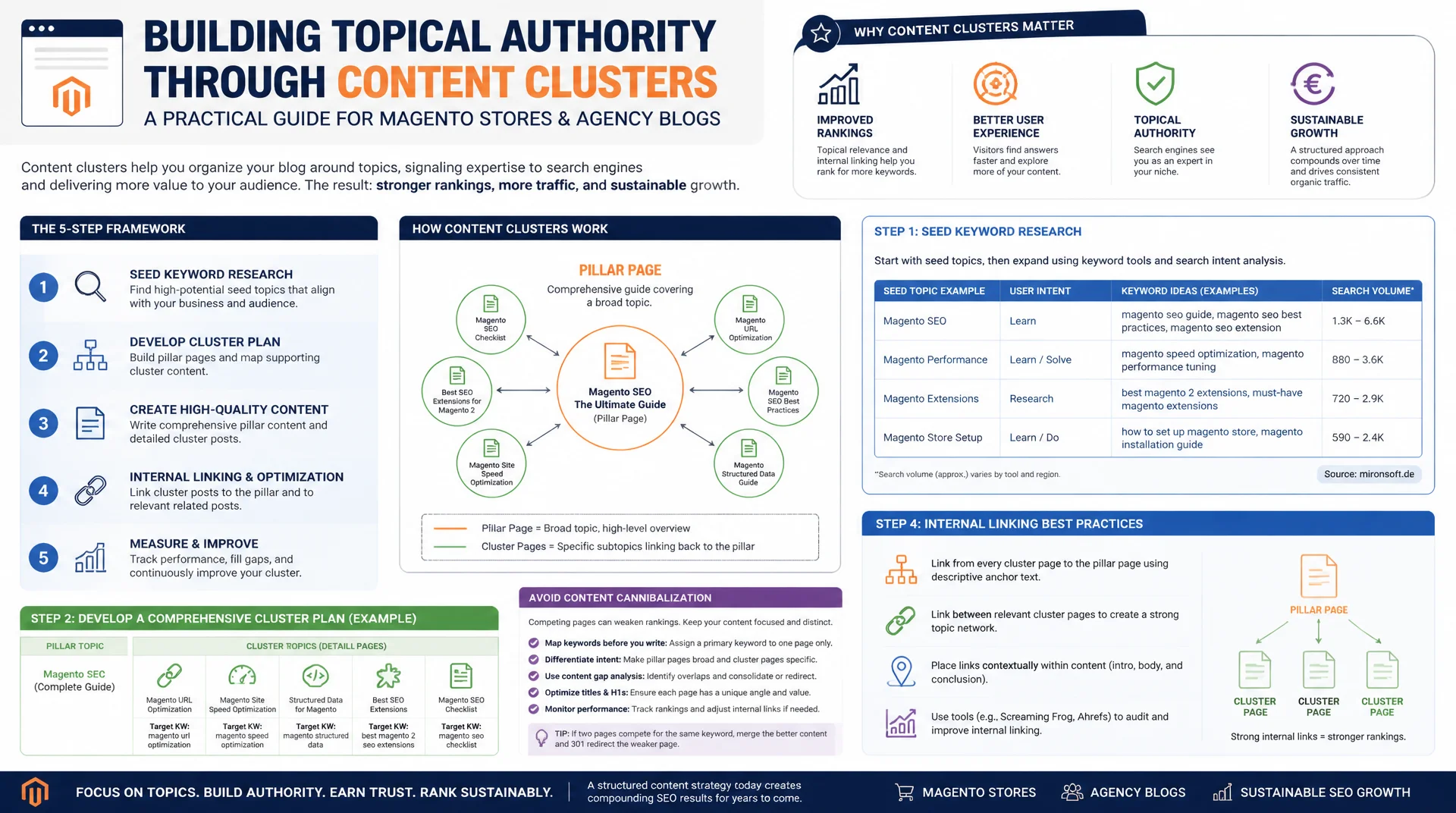
From seed keyword to complete topic coverage
Publishing individual blog posts without a recognizable structure builds no real topical authority with Google. Content clusters connect a central pillar page with topically related detail pages through deliberate internal linking, creating a clearly recognizable topic network. This guide shows how to go from seed keyword research to a complete cluster plan, avoid cannibalization, and achieve sustainable rankings for Magento stores and agency blogs.
Table of Contents
- 1. Why content clusters and pillar pages build topical authority
- 2. Hub and spoke architecture: the core principle of content clusters
- 3. The pillar page: structure, scope, and topic coverage
- 4. Cluster content: detail pages with a clear focus
- 5. Interlinking strategy: connecting pillar and cluster pages sensibly
- 6. From seed keyword to a complete cluster plan
- 7. Avoiding cannibalization: clear boundaries between cluster pages
- 8. Topical authority as a ranking factor: what Google actually evaluates
- 9. Content clusters compared side by side
- 10. Summary
- 11. FAQ
1. Why content clusters and pillar pages build topical authority
Topical authority is not built by individual articles, but by a recognizable network of connected content. Google has long stopped evaluating just individual keywords; it assesses whether a domain covers a topic in both breadth and depth. An isolated blog post about "Magento migration" with no connection to related detail questions like cost, process, or data migration remains, in Google's eyes, a single isolated signal instead of part of a resilient topic cluster.
For Magento agencies and merchants with large catalogs, this matters twice over: category pages, guide content, and the agency blog all compete for the same search intents. Without a deliberate cluster structure, dozens of individual pages emerge that fight each other for visibility instead of reinforcing one another. A systematically built content cluster with a clear pillar page solves exactly this problem, concentrating link equity, relevance signals, and user trust around one central topic.
2. Hub and spoke architecture: the core principle of content clusters
Hub and spoke architecture is the structural core principle of every content cluster: a central pillar page (the hub) covers a broad topic at an overview level, while several cluster pages (the spokes) cover individual subtopics in depth. Each spoke page links back to the hub, and the hub in turn links to all relevant spokes. This reciprocal linking makes the topical relationship machine readable for Google, instead of leaving it to be inferred only implicitly from similar terms.
A practical example from an agency context: the pillar page "Magento Migration" links to cluster articles such as "Magento 1 to 2 Migration Checklist," "Cost of a Magento Migration," and "Data Migration Without Downtime." Each of these articles answers one concrete question completely while linking back to the pillar page as the central hub. The result is a closed topic network instead of a collection of loose individual articles.
3. The pillar page: structure, scope, and topic coverage
A pillar page covers a topic broadly, typically running 2,000 to 3,000 words, organized into clear H2 sections for each subtopic. It doesn't exhaustively answer every detail question; instead it provides a well grounded overview and consistently links out to the matching cluster pages for depth. In a Magento store, a well developed category page can also serve as a pillar page if it bundles buying guidance, size charts, and care instructions alongside the products.
Structural consistency matters: every pillar page needs a table of contents, descriptive anchor links, and clearly visible navigation to its associated cluster pages. Structured data such as a CollectionPage or ItemList schema additionally signals, in a machine readable way, that the page is part of a larger topic cluster and which subpages belong to it.
{
  "@context": "https://schema.org",
  "@type": "CollectionPage",
  "name": "Magento Migration: The Complete Guide",
  "description": "Pillar page listing all cluster articles about Magento migrations.",
  "url": "https://mironsoft.de/blog/magento-migration",
  "mainEntity": {
    "@type": "ItemList",
    "itemListElement": [
      { "@type": "ListItem", "position": 1, "url": "https://mironsoft.de/blog/magento-migration-checklist", "name": "Magento 1 to 2 Migration Checklist" },
      { "@type": "ListItem", "position": 2, "url": "https://mironsoft.de/blog/magento-migration-cost", "name": "Cost of a Magento Migration" },
      { "@type": "ListItem", "position": 3, "url": "https://mironsoft.de/blog/magento-data-migration-downtime", "name": "Data Migration Without Downtime" }
    ]
  }
}
4. Cluster content: detail pages with a clear focus
Cluster pages are the counterpart to the pillar page: narrowly focused on exactly one search intent, but taken to maximum depth. A cluster article on "Cost of a Magento Migration" covers pricing models, cost drivers, and calculation examples only, not the entire migration process. This narrow focus significantly increases relevance for the specific long tail keyword, because the page doesn't dilute itself with a competing side topic.
Every cluster page must consistently link back to its associated pillar page, ideally with anchor text that includes the pillar keyword, as well as to topically neighboring cluster pages where a genuine content relationship exists. A reusable layout module for "related cluster articles" reduces editorial effort here and ensures new cluster pages are automatically wired into the existing structure.
<!-- Layout XML: reusable block for related cluster articles -->
<page xmlns:xsi="http://www.w3.org/2001/XMLSchema-instance"
      xsi:noNamespaceSchemaLocation="urn:magento:framework:View/Layout/etc/page_configuration.xsd">
    <body>
        <referenceContainer name="content">
            <block class="Mironsoft\ContentCluster\Block\RelatedClusterArticles"
                   name="related.cluster.articles"
                   template="Mironsoft_ContentCluster::related-cluster-articles.phtml"
                   after="category.description">
                <arguments>
                    <!-- Cluster identifier determines which articles are shown -->
                    <argument name="cluster_key" xsi:type="string">magento-migration</argument>
                    <argument name="max_items" xsi:type="number">4</argument>
                </arguments>
            </block>
        </referenceContainer>
    </body>
</page>
5. Interlinking strategy: connecting pillar and cluster pages sensibly
The interlinking strategy determines whether a content cluster is recognized as a coherent topic or reads as a loose collection of pages. The basic rule: every cluster page links prominently to the pillar page exactly once, and the pillar page links to every active cluster page on the topic. Cluster pages should only link to each other when a genuine content transition exists, for example from "Cost of a Magento Migration" to "Migration Checklist," not indiscriminately to every available article.
Anchor text should consistently include the target keyword of the linked page, rather than generic phrases like "click here." A dedicated cluster navigation, grouped by subtopic, additionally makes the structure visible to users and crawlers alike and keeps click depth to any cluster page at a maximum of two clicks from the pillar page.
<!-- Cluster navigation on the pillar page, grouped by subtopic -->
<nav class="cluster-nav" aria-label="Topic cluster: Magento migration">
  <div class="cluster-nav__group">
    <p class="cluster-nav__heading">Planning & Cost</p>
    <ul>
      <li><a href="/blog/magento-migration-checklist">Magento 1 to 2 Migration Checklist</a></li>
      <li><a href="/blog/magento-migration-cost">Cost of a Magento Migration</a></li>
    </ul>
  </div>
  <div class="cluster-nav__group">
    <p class="cluster-nav__heading">Technical Implementation</p>
    <ul>
      <li><a href="/blog/magento-data-migration-downtime">Data Migration Without Downtime</a></li>
      <li><a href="/blog/hyva-theme-migration">Switching From Luma to Hyvä Theme</a></li>
    </ul>
  </div>
</nav>
6. From seed keyword to a complete cluster plan
Every content cluster starts with seed keyword research: a broad, high volume core keyword such as "Magento migration" or "Hyvä Theme" defines the pillar topic. From there, keyword tools, "people also ask" boxes, and SERP analysis surface related long tail keywords, which get grouped by search intent, such as informational, commercial, or transactional.
Each keyword group is then assigned to exactly one cluster page, never to several at once. A simple content inventory that records existing URLs, titles, and target keywords reliably reveals, before planning even starts, which topics are already covered and where genuine content gaps exist for new cluster pages. Only after that do content briefs follow, each with a clearly scoped boundary.
# Build a content inventory for a cluster: collect URLs and titles
sitemap_url="https://mironsoft.de/sitemap.xml"

curl -s "$sitemap_url" \
  | grep -oE '<loc>[^<]+</loc>' \
  | sed -E 's/<\/?loc>//g' \
  | grep '/blog/magento-migration' > cluster-urls.txt

while read -r url; do
  title=$(curl -s "$url" | grep -oE '<title>[^<]+</title>' | sed -E 's/<\/?title>//g')
  echo "$url;$title"
done < cluster-urls.txt > cluster-inventory.csv

echo "Content inventory saved to cluster-inventory.csv"
7. Avoiding cannibalization: clear boundaries between cluster pages
Cannibalization happens when two or more pages on the same domain are optimized for the same search intent and end up competing with each other for ranking signals. Google then has to decide on its own which page is more relevant, which often leads to fluctuating positions and, overall, weaker rankings than a single, clearly focused page would achieve. In agency blogs that have grown over time, this is a common problem when several articles on similar Magento topics were created independently of each other.
The fix lies in unambiguous keyword assignment per URL, documented in a central keyword mapping table, along with regular overlap checks between the target keywords of existing pages. When two pages overlap heavily, either differentiate them by search intent or consolidate both pieces of content with a 301 redirect to the stronger page.
// Simple calculation of keyword overlap risk between two pages
function calculateOverlapRisk(keywordsPageA, keywordsPageB) {
  const setA = new Set(keywordsPageA.map(k => k.toLowerCase()));
  const setB = new Set(keywordsPageB.map(k => k.toLowerCase()));

  const intersection = [...setA].filter(keyword => setB.has(keyword));
  const union = new Set([...setA, ...setB]);

  const overlapScore = intersection.length / union.size;

  return {
    overlapScore: Number(overlapScore.toFixed(2)),
    sharedKeywords: intersection,
    risk: overlapScore > 0.4 ? 'high' : overlapScore > 0.15 ? 'medium' : 'low'
  };
}

const pillarKeywords = ['magento migration', 'magento 2 migration', 'store migration'];
const clusterKeywords = ['magento migration cost', 'migration checklist', 'store migration'];

const result = calculateOverlapRisk(pillarKeywords, clusterKeywords);
console.log(result);
8. Topical authority as a ranking factor: what Google actually evaluates
Topical authority describes how comprehensively and competently a domain covers a given subject area from Google's perspective, not just how many backlinks a single page has. Modern language models within Google Search evaluate semantic relationships between pages on a domain and recognize whether a cluster actually covers a topic completely or merely serves keywords on the surface.
A dense, consistent content cluster with clean internal linking is therefore a direct signal of topical competence, and it also feeds into E-E-A-T, since users and Google alike perceive the same domain as a reliable destination for an entire subject area rather than for a single search term. For Magento agencies, that means a consistently built out cluster around "Hyvä Theme" carries more weight than ten disconnected individual articles of the same total length.
9. Content clusters compared side by side
The difference between an unstructured blog and a cleanly planned content cluster with a pillar page shows up consistently across the same five criteria. The table below summarizes exactly what matters.
| Criterion | Unstructured Blog | Content Cluster With Pillar Page | Advantage |
|---|---|---|---|
| Internal linking | Random, no system | Consistent hub and spoke linking | Clear consolidation of link equity |
| Topic coverage | Isolated articles with no relationship | Complete coverage of main and subtopics | Higher topical authority |
| Cannibalization risk | High, multiple pages per keyword | Low through clear keyword assignment | More stable rankings |
| Crawlability | Deep click paths, weak structure | Max two clicks from the pillar page | Efficient crawl budget |
| Short tail ranking potential | Low, signals spread thin | High through consolidated relevance signals | Better positions for core terms |
In practice, these five criteria reinforce each other: consistently building internal linking around a hub and spoke model automatically reduces cannibalization risk while also improving crawlability. A content cluster is therefore not a one time project but a structure that has to be actively maintained with every new cluster article.
Mironsoft
SEO content strategy, content clusters, and topical authority for Magento stores and agency blogs
Ready to build professional content clusters and pillar pages?
We build your content clusters from seed keyword research through to the finished pillar page, plan the interlinking structure, and prevent cannibalization across your Magento and Hyvä content from day one.
Cluster planning
Seed keyword research, keyword mapping, and complete topic coverage
Pillar page design
Structure, scope, and interlinking for maximum topical authority
Cannibalization audit
Identifying overlapping keywords and clearly scoping cluster pages
10. Summary
Content clusters and pillar pages solve a core problem of scattered blog content: individual articles without structure remain isolated signals to Google instead of part of a resilient topical authority. Hub and spoke architecture, with a broad pillar page and focused cluster pages, creates a clearly recognizable topic network that reinforces itself through consistent interlinking instead of competing against itself.
Planning always starts with clean seed keyword research and an unambiguous keyword assignment per page, to avoid cannibalization from the outset. Anyone who maintains this system consistently, correctly wires in every new cluster page, and regularly checks for overlap builds topical authority that individual articles alone could never achieve, especially in a competitive field like Magento and Hyvä topics.
Content Clusters and Pillar Pages - The Essentials at a Glance
Hub and spoke principle
Pillar page as the hub, cluster pages as the spokes, reciprocal linking as the basic rule.
Pillar page structure
2,000 to 3,000 word overview, clear H2 structure, linking to depth via each cluster page.
Avoiding cannibalization
Unambiguous keyword mapping per URL, regular overlap checks, 301 consolidation where needed.
Topical authority
A dense, consistent cluster signals genuine topical competence to Google, not just individual keywords.