Identifying Underperforming Pages
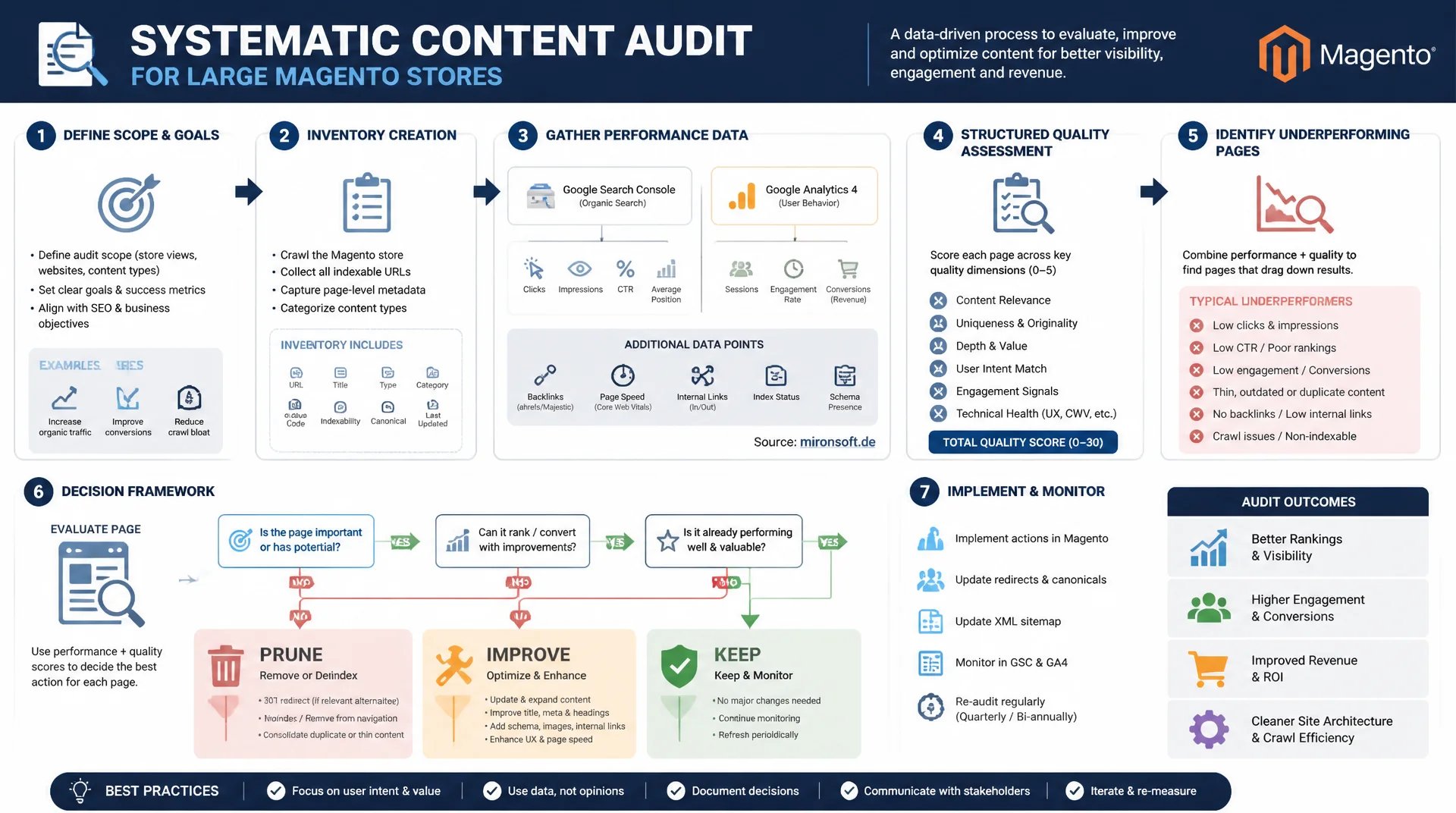
Large Magento stores accumulate thousands of category, product, and blog pages over the years, many of which quietly lose relevance and visibility without anyone noticing. A systematic content audit combines an inventory, performance data from Search Console and Analytics, and a structured quality assessment to reliably identify underperforming pages and act on them with a clear prune, improve, keep decision framework.
Table of Contents
- 1. Why content audits are essential for large catalogs
- 2. Audit methodology: inventory, performance data, quality assessment
- 3. Search Console and Analytics as data sources for content decay
- 4. Thin and outdated content: identifying the signals
- 5. The prune-improve-keep framework
- 6. Prioritization: which pages to tackle first
- 7. From analysis to execution: redirects, consolidation, refresh
- 8. Audit workflow for a large product catalog
- 9. Content audit decisions compared side by side
- 10. Summary
- 11. FAQ
1. Why content audits are essential for large catalogs
Large Magento stores with several thousand products, hundreds of categories, and years of blog content inevitably accumulate a lot of pages that no longer contribute to visibility or revenue. Auto-generated layered navigation pages, blog posts from 2019 referencing outdated Magento 1 commands, or near-identical category variants add up to digital dead weight that both Google and users notice. Without a systematic content audit, that dead weight stays invisible until it shows up as declining rankings and shrinking organic traffic.
Google's helpful content system no longer evaluates individual pages in isolation, but draws conclusions from a domain's overall quality. A high proportion of thin or outdated content can therefore drag down even strong, well-maintained pages. On top of that, crawl budget is finite: for a catalog with 50,000 URLs, Googlebot wastes resources on worthless filter combinations instead of promptly picking up new products or updated category pages. A recurring content audit is therefore not a one-off cleanup project, but a permanent part of a sustainable SEO strategy for large catalogs.
2. Audit methodology: inventory, performance data, quality assessment
A solid content audit runs in three clearly separated phases: inventory, performance data, and quality assessment. In the inventory phase, the entire domain is crawled - for example with Screaming Frog or Sitebulb - and every URL is captured with page type, indexability, canonical target, and HTTP status. Only this complete inventory reveals how many category, product, and CMS pages actually exist before any assessment even begins.
In the second phase, the inventory URLs are enriched with performance data from Search Console and Analytics: impressions, clicks, average position, sessions, and engagement rate per URL. The third phase, the quality assessment, combines quantitative signals like word count and duplicate content share with a spot-check manual review of whether a page is still factually correct and genuinely helpful to users. The result is a central spreadsheet or database that serves as the foundation for every subsequent decision.
{
  "url": "https://mironsoft.de/womens/jackets/winter-jackets.html",
  "pageType": "category",
  "pageviews": 42,
  "impressions": 1180,
  "clicks": 9,
  "avgPosition": 34.6,
  "wordCount": 187,
  "lastModified": "2023-11-02",
  "backlinks": 0,
  "decision": "improve",
  "notes": "Auto-generated filter combination, no unique intro copy"
}
3. Search Console and Analytics as data sources for content decay
Content decay describes the gradual decline of organic traffic and rankings for a page that used to perform well. Search Console's performance reports are the most reliable data source for this, since they provide impressions and clicks per URL over long time spans. Comparing the trailing twelve months against the twelve months before, filtered to pages with declining clicks and flat or rising impressions, surfaces decay before it shows up in the revenue numbers.
Google Analytics 4 adds engagement metrics to this picture: average engagement time, engaged sessions, and conversion rate per landing page reveal whether a page is losing relevance for users despite stable rankings. For large catalogs, exporting via the Search Console API or a BigQuery connection pays off, because the UI hits its limits quickly with tens of thousands of URLs and doesn't allow bulk exports with custom dimensions.
#!/usr/bin/env bash
# Export URL inventory plus Search Console clicks/impressions into one CSV

# 1. Crawl inventory export from Screaming Frog (headless mode)
screamingfrog --crawl "https://mironsoft.de" \
  --headless --save-crawl \
  --output-folder ./audit --export-tabs "Internal:HTML"

# 2. Pull Search Console performance data via the API (last 12 months)
gsc-cli query \
  --site-url "https://mironsoft.de" \
  --start-date "$(date -d '12 months ago' +%F)" \
  --end-date "$(date +%F)" \
  --dimensions page \
  --metrics clicks,impressions,ctr,position \
  --output ./audit/gsc-performance.json

# 3. Join crawl inventory with GSC data on the URL column and write one CSV
jq -s '
  .[0].rows as $gsc |
  .[1] | map(. as $row |
    ($gsc[] | select(.keys[0] == $row.url)) as $metrics |
    { url: $row.url, wordCount: $row.wordCount,
      clicks: $metrics.clicks, impressions: $metrics.impressions }
  )
' ./audit/gsc-performance.json ./audit/internal_html.json \
  | jq -r '(.[0] | keys_unsorted), (.[] | [.[]]) | @csv' \
  > ./audit/content-audit-inventory.csv

echo "Inventory with GSC metrics written to content-audit-inventory.csv"
4. Thin and outdated content: identifying the signals
Thin content shows up in Magento stores in recurring patterns: auto-generated layered navigation pages with interchangeable text, product pages that consist purely of manufacturer copy with no editorial addition, and category pages that are nothing more than a product grid with no intro text. A reliable quantitative signal is a word count under 300 words combined with zero impressions over the trailing twelve months - that combination almost always points to a page that offers no independent value to either Google or users.
Outdated content shows up differently: blog posts that still reference Magento 1 commands or long-discontinued extensions, screenshots of an old admin interface, or pricing information that hasn't been updated in years. Until it can be reworked, an identified thin-content page can be temporarily defused with a canonical tag pointing to a stronger, topically related page plus a noindex meta tag, so it stops consuming crawl budget without having to be deleted right away.
<!-- Temporary tag pattern for a thin category page pending improvement -->
<head>
  <!-- Points crawlers and users to the stronger, related page -->
  <link rel="canonical" href="https://mironsoft.de/womens/jackets/winter-jackets.html">

  <!-- Keeps this specific thin variant out of the index while it is queued for a refresh -->
  <meta name="robots" content="noindex, follow">
</head>
5. The prune-improve-keep framework
The prune-improve-keep framework translates the collected data into three clear courses of action. Prune means consolidating a page via a 301 redirect, removing it with a 410, or permanently setting it to noindex - appropriate for pages with no traffic, no backlinks, and no strategic value. Improve applies to pages with existing but declining potential: they get updated content, additional depth, or an internal linking update. Keep marks pages that already perform well and stay unchanged, apart from routine technical maintenance.
The decision isn't a gut call, but a combination of traffic trend, business value, and effort. A category page with declining traffic but a high revenue contribution almost always belongs in improve, while a blog page with no traffic, no backlinks, and no topical relevance to the current assortment is a clear prune candidate. A simple, reproducible score built from these factors makes classification manageable across hundreds of pages at once, instead of discussing every page individually.
// Compute a simple decay score and a prune/improve/keep recommendation
function classifyPage(page) {
  const monthsSinceUpdate = monthsBetween(page.lastModified, new Date());
  const trafficTrend = page.clicksLast12m > 0
    ? (page.clicksLast12m - page.clicksPrev12m) / page.clicksPrev12m
    : -1;

  // Weighted decay score: negative traffic trend and content age both increase decay
  const decayScore = (trafficTrend * -50) + (monthsSinceUpdate * 1.5)
    - (page.wordCount < 300 ? 20 : 0)
    + (page.backlinks > 0 ? -15 : 0);

  if (page.impressions === 0 && page.wordCount < 300) {
    return { decision: 'prune', decayScore };
  }
  if (decayScore > 40) {
    return { decision: 'improve', decayScore };
  }
  return { decision: 'keep', decayScore };
}

function monthsBetween(fromDate, toDate) {
  const from = new Date(fromDate);
  const diff = (toDate.getFullYear() - from.getFullYear()) * 12
    + (toDate.getMonth() - from.getMonth());
  return diff;
}
6. Prioritization: which pages to tackle first
Not every identified problem page can be worked on at once, so the audit needs a clear prioritization by effort and potential impact. The fastest wins come from pages sitting in positions 8 through 20 that once ranked higher and can realistically return to the first results page with moderate rework. These quick wins should be prioritized ahead of expensive rebuilds, because they deliver the biggest effect per hour invested.
Category pages with commercial intent generally take precedence over informational blog posts, because they contribute more directly to revenue. Within category pages, experienced teams additionally prioritize by assortment size and the margin contribution of the respective product group. A simple effort-impact matrix, in which every page is ranked by estimated time investment and expected traffic or revenue gain, makes the order transparent for the whole team and keeps resources from flowing into low-leverage pages.
7. From analysis to execution: redirects, consolidation, refresh
Once a decision is made, technical execution follows, and it looks different depending on the category. For prune decisions that consolidate two topically overlapping pages, the weaker URL gets 301-redirected to the stronger one, its internal links are updated, and the target page absorbs the most valuable content pieces from the removed page. This preserves existing link equity instead of losing it on deletion.
For improve decisions, execution means concretely: adding missing aspects to the content, replacing outdated facts and screenshots, visibly updating the publish date, and adding internal links from stronger, topically related pages. It's important to document every execution in the ticketing system and re-check Search Console after four to eight weeks to see whether impressions and clicks recover as expected - that's the only way to objectively measure the audit's success.
<!-- Magento url_rewrite entry: 301 redirect a thin category page onto the consolidated target -->
<config>
    <!-- Equivalent to an INSERT into the core_url_rewrite / url_rewrite table -->
    <!--
        request_path:   womens/jackets/winter-jackets-slim.html
        target_path:    womens/jackets/winter-jackets.html
        redirect_type:  301
        entity_type:    custom
        store_id:       1
    -->
</config>

<!-- Layout XML fallback: redirect handled in a controller plugin when url_rewrite rows are managed via Composer/CI -->
<page xmlns:xsi="http://www.w3.org/2001/XMLSchema-instance"
      xsi:noNamespaceSchemaLocation="urn:magento:framework:View/Layout/etc/page_configuration.xsd">
    <body>
        <!-- Consolidated target page keeps the merged content block from the pruned page -->
        <referenceContainer name="content">
            <block class="Mironsoft\ContentAudit\Block\ConsolidatedIntro"
                   name="content_audit.consolidated_intro"
                   template="Mironsoft_ContentAudit::consolidated-intro.phtml"/>
        </referenceContainer>
    </body>
</page>
8. Audit workflow for a large product catalog
For a Magento catalog with several tens of thousands of product and category pages, the audit needs a repeatable workflow instead of a manual case-by-case review. The process starts with a full crawl via Screaming Frog, combined with an export of the url_rewrite table straight from the Magento database, to also capture URLs that are indexed but not internally linked. Crawl data, Search Console export, and Analytics export are then merged on the URL as the key, either in a BigQuery table or a spreadsheet.
Segmenting by attribute set, category level, and page type surfaces patterns that would get lost when looking at pages individually, such as an entire family of auto-generated filter pages for a specific attribute combination being systematically thin. A quarterly audit cycle with clearly assigned ownership per category cluster prevents the backlog from building up again, and makes progress measurable through Search Console trends and traceable for the team.
9. Content audit decisions compared side by side
Every audit signal has its own threshold, a clear decision direction, and a concrete action. The table below summarizes how the most important signals translate into a prune, improve, or keep decision.
| Signal | Threshold | Decision | Action |
|---|---|---|---|
| Organic traffic trend | -50% or more over 12 months | Prune | 301 redirect to a related page |
| Word count / content depth | < 300 words, no unique value | Prune | Consolidate with a related page |
| Backlinks | At least 1 external backlink present | Keep / Improve | Update the content instead of removing it |
| Last update | > 24 months, outdated details | Improve | Refresh with current data and examples |
| Conversion contribution | Demonstrable contribution to sales/leads | Keep | Leave unchanged, maintain technically |
In practice, these signals frequently overlap: a page with declining traffic but existing backlinks and a conversion contribution almost always lands in improve rather than prune. Applying the table as a consistent decision grid for every single page avoids subjective one-off calls and keeps the audit consistent across hundreds of pages.
Mironsoft
Content audits, prune-improve-keep, and SEO content strategy for Magento stores
Need a content audit for your Magento store?
We build a complete content inventory of your catalog, enrich it with Search Console and Analytics data, and deliver clear prune-improve-keep decisions for every page.
Content inventory
Full crawl, url_rewrite export, segmentation by page type
Decay analysis
Search Console and GA4 analysis, prioritized by business impact
Execution
Redirects, consolidation, and content refresh directly in the Magento backend
10. Summary
A systematic content audit solves a core problem of large Magento catalogs: content that has grown over years can no longer be assessed by gut feeling. Inventory, performance data from Search Console and Analytics, and a structured quality assessment provide the foundation for reliably identifying thin and outdated content. The prune-improve-keep framework translates that data into clear, reproducible decisions instead of case-by-case discussions for every one of the thousands of pages.
The decisive lever lies in prioritizing by effort and impact, and in consistent technical execution through 301 redirects, consolidation, and targeted refreshes. For large catalogs, a recurring, quarterly audit workflow with clear ownership pays off, so content decay is caught early instead of only becoming visible after noticeable traffic losses.
Conducting Content Audits - The Essentials at a Glance
Inventory & data
Merge crawl, Search Console, and Analytics data; export url_rewrite for full catalog coverage.
Thin-content signals
< 300 words, zero impressions, auto-generated filter pages with no unique text.
Prune-improve-keep
Clear decision rules instead of case-by-case discussion, a decay score for prioritization.
Execution & monitoring
301 redirects, consolidation, refresh; check success in Search Console after 4-8 weeks.