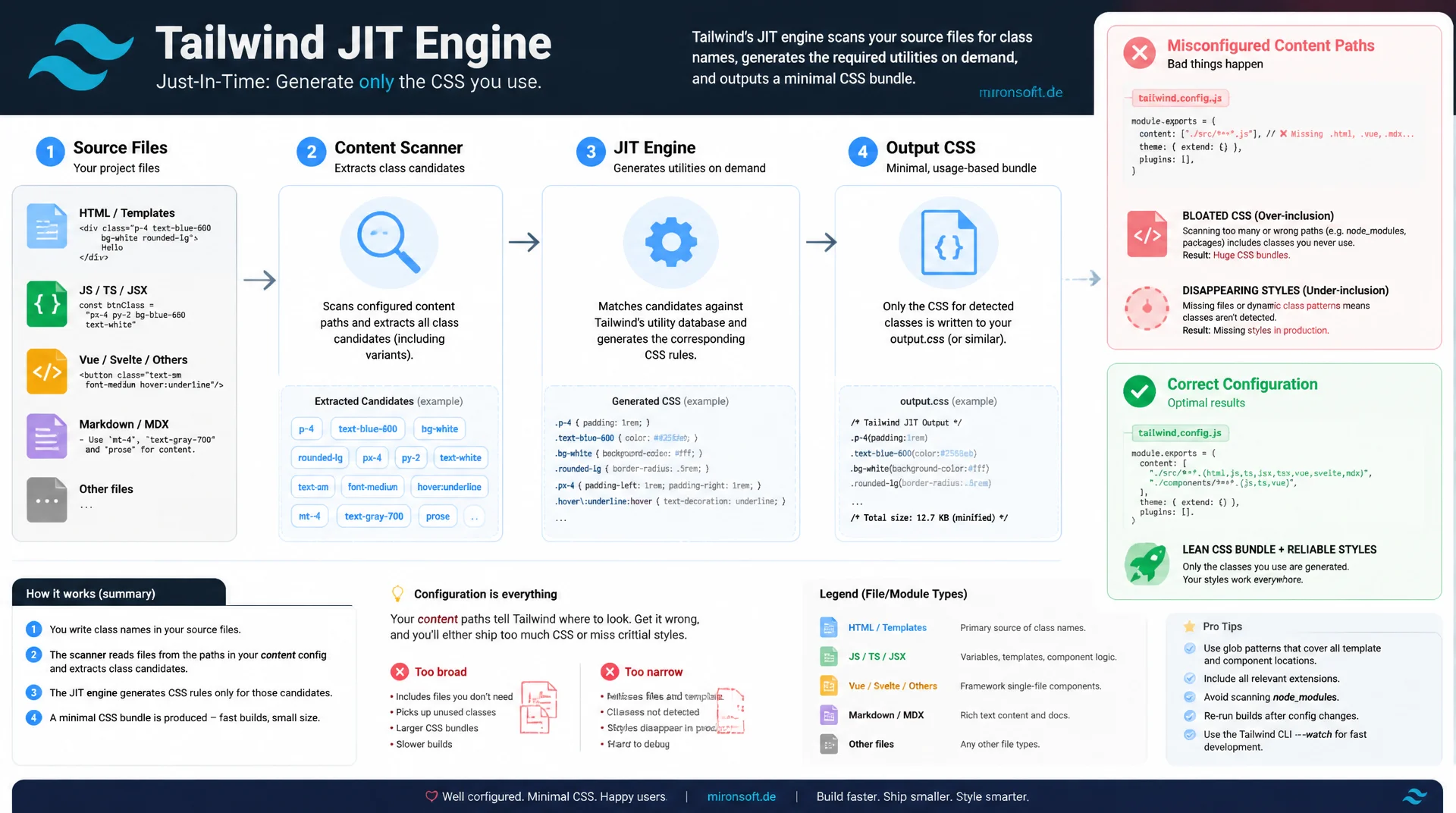
Why content configuration decides your CSS bundle size
Tailwind's JIT engine generates only the utility classes that actually appear in your source code, yet misconfigured content paths regularly cause CSS bundles to bloat unnecessarily or styles to vanish in production, because the scanner simply overlooks templates, modules, or dynamically assembled class names.
Table of Contents
- 1. What Tailwind Purge and JIT actually solve
- 2. The JIT engine: on-demand generation of utility classes
- 3. Content configuration: setting globs for accurate purging
- 4. Tailwind v4 CSS-first: the @source directive instead of the content array
- 5. Common misconfiguration: missing styles vs. bloated CSS
- 6. Safelist: preserving dynamically generated class names
- 7. Measuring CSS file size: before and after with real numbers
- 8. Hyva's Tailwind build pipeline: specifics and pitfalls
- 9. Purge/JIT configuration compared side by side
- 10. Summary
- 11. FAQ
1. What Tailwind Purge and JIT actually solve
Before the JIT engine, Tailwind CSS first generated the entire utility library for every color, spacing value, breakpoint, and state variant at build time, which meant development CSS files in the tens of megabytes. A downstream step called purge, usually via PurgeCSS, then scanned the compiled output and removed every selector that didn't appear in the source code. This model was error-prone: PurgeCSS operated on the finished stylesheet level and had to guess which classes were actually used, which regularly produced both false positives and false negatives. Tailwind 2.1 introduced the JIT engine, and since version 3 it has been the only compilation mode. Instead of generating everything and removing afterward, JIT generates only the classes that are actually referenced, right from the start.
For Magento and Hyva projects, this distinction is not an academic nuance, it has a direct impact on every single page delivery. A misconfigured content path can, in the worst case, pull templates from irrelevant modules or even from node_modules into the scan, which unnecessarily inflates the shipped CSS bundle, blocks the parser longer, and delays time to interactive. This article covers the engineering mechanics behind it: how the JIT engine detects classes, how content configuration and the new @source directive in Tailwind v4 should be set up correctly, and how to concretely measure actual CSS size before and after.
2. The JIT engine: on-demand generation of utility classes
The JIT engine works in two phases. In the first phase, a rule-based scanner searches every file covered by the content configuration for strings that look like utility classes. Crucially, the scanner doesn't parse HTML, PHP, or JavaScript in any real sense, instead it treats every file as plain text and extracts tokens via a regex that roughly matches the shape of valid class names, including colon notation for variants like hover: or lg: and square brackets for arbitrary values like [mask-type:luminance]. This deliberately naive approach is exactly why Tailwind works with practically any template language, from phtml to Twig to JSX, without needing a dedicated parser per framework.
In the second phase, the engine tries to resolve every candidate it found against its internal utility grammar. If a token matches, the corresponding CSS rule is generated just in time and added to the output, otherwise the candidate is discarded. This architecture is also incremental: in watch mode, as it runs during bin/start for the Hyva Tailwind watcher, the engine keeps the previous candidate cache in memory and only processes the delta on a file change. As a result, rebuilds during development typically take a few milliseconds, whereas the old PurgeCSS approach had to re-analyze the entire generated stylesheet on every change.
3. Content configuration: setting globs for accurate purging
Content configuration defines which files the JIT engine scans in the first place, making it the single most important lever for correct behavior. In Tailwind v3 this is an array of glob patterns in tailwind.config.js, for example content: ['./app/design/frontend/**/*.phtml']. Every file matching one of these patterns gets read and scanned on every build, which means the scope and number of matched files directly affects build time. An overly broad glob like ./**/*.phtml at the project root accidentally sweeps in vendor/ directories with templates from third-party modules that never render in your own theme, costing build time and, in some cases, generating additional unused utility classes.
The opposite problem is subtler and harder to debug: a glob that's too narrow and excludes legitimate template directories. In a Magento/Hyva structure, that typically includes the parent theme under vendor/hyva-themes/magento2-default-theme-csp, custom modules under app/code/*/*/view/frontend/templates, and possibly layout XML files if class names get passed there as arguments. If one of these paths is missing from the glob, the JIT engine simply generates no rule for classes used there, the class sits in the HTML, but no matching CSS rule exists. The result is an unstyled element with no error message whatsoever, a bug class that's especially easy to miss in code review because the code itself looks syntactically correct.
4. Tailwind v4 CSS-first: the @source directive instead of the content array
Tailwind v4 replaces the JavaScript configuration file with a CSS-first approach. Instead of tailwind.config.js with a content array, the entire configuration lives directly in the stylesheet, introduced with @import "tailwindcss";. For content detection, v4 ships an automatic heuristic that scans project directories based on .gitignore rules and skips typical exclusion directories like node_modules automatically. In a grown Magento structure with symlinked vendor modules and multiple theme layers, though, this automatic detection is rarely sufficient on its own, which is why explicit @source directives are still needed.
One important, frequently overlooked change when moving from v3 to v4: paths in @source resolve relative to the CSS file itself, not relative to the project root like the old content array did. A glob that worked correctly under v3 can silently resolve to nothing after migration because the reference point shifted, without the build throwing any error, it simply generates too little CSS. With @source not "path"; you can additionally exclude specific directories from an otherwise automatically detected scope, for example test fixtures or Storybook demos that contain Tailwind classes but are never shipped to production.
/* web/tailwind/tailwind-source.css - Tailwind v4 CSS-first configuration */
@import "tailwindcss";

/* Explicit source paths, resolved relative to THIS file, not the project root */
@source "../../../../app/design/frontend/Mironsoft/default/**/*.phtml";
@source "../../../../vendor/hyva-themes/magento2-default-theme-csp/**/*.phtml";
@source "../../../../app/code/*/*/view/frontend/templates/**/*.phtml";
@source "../../../../app/code/*/*/view/frontend/layout/**/*.xml";

/* Exclude paths that would otherwise match via auto-detection */
@source not "../../../../app/code/*/*/Test/**/*";
@source not "../../../../vendor/hyva-themes/*/src/**/demo/**/*";

@theme {
  --color-brand-500: #dc2626;
}
5. Common misconfiguration: missing styles vs. bloated CSS
In practice, misconfiguration shows up as two opposite symptoms. The first is a missing style rule caused by dynamically assembled class names, for example class="text-<?= $color ?>-600" in a phtml template or an Alpine expression like :class="`bg-${status}-100`". In both cases the JIT engine never sees the complete, literal token text-red-600, only fragments from which no valid utility can be derived. The result is especially tricky because no error gets thrown: the element carries the class in the DOM, DevTools shows it in the elements panel, but under "Computed" no matching rule shows up, because none was ever generated.
The second symptom is bloated CSS caused by content globs that are too broad and sweep in example directories, documentation, or unused legacy templates. A simple two-step diagnosis helps here: if an expected rule is missing from the generated output, first check whether the complete class name appears as a literal in the source code, not as a composed string. If the output is unexpectedly large, selectively disabling individual content globs followed by a rebuild and size comparison helps narrow down the culprit, instead of guessing at the entire configuration.
/* Generated output excerpt - BEFORE: content glob accidentally included
   vendor/*/Magento_Backend admin templates in the scan */
.grid-cols-12 { grid-template-columns: repeat(12, minmax(0, 1fr)); }
.bg-admin-panel-950 { background-color: #030712; } /* admin-only, never rendered in storefront */
.text-\[13\.5px\] { font-size: 13.5px; } /* arbitrary value from a backend-only grid template */
/* ...several hundred more admin-only utilities generated unnecessarily... */

/* Generated output excerpt - AFTER: content glob scoped to storefront templates only */
.grid-cols-12 { grid-template-columns: repeat(12, minmax(0, 1fr)); }
/* admin-only utilities are no longer generated, output shrinks accordingly */

/* Dynamic class construction: JIT never sees the complete literal token */
/* class="text-<?= $color ?>-600" in phtml produces no rule at all,
   because "text-" and "-600" are separate string fragments at scan time */
6. Safelist: preserving dynamically generated class names
Some dynamic class names can't be avoided architecturally, for example when editors in the Magento admin configure a badge color from a dropdown and that value flows into a class name as a database value. Tailwind v3 has a dedicated safelist option in tailwind.config.js for exactly this case, accepting both exact class names and regex patterns, and always generating them regardless of the JIT scan. For example: safelist: [{ pattern: /bg-(red|green|blue)-(100|500|700)/ }] forces generation of all nine combinations, even if not a single complete token appears anywhere in the source code.
In Tailwind v4, @source inline("...") takes over this role directly in CSS, including support for brace expansion, which internally expands to the cartesian product of all combinations. Safelisting is deliberately meant as a fallback, not a primary mechanism: if the patterns are cast too widely, say the entire color scale instead of the values actually available in the admin, it defeats the very advantage the JIT engine provides and produces unused rules all over again. The rule of thumb is to bind safelist patterns as tightly as possible to the actual value range of the dynamic source.
/* Tailwind v4: force generation of dynamically composed admin badge colors
   that the JIT scanner can never find as literal tokens in the source */
@source inline("bg-{red,green,blue,amber}-{100,500,700}");
@source inline("text-{red,green,blue,amber}-{700,800}");

/* Narrow the pattern to the actual admin value domain instead of the full scale */
/* WRONG - too broad, regenerates dozens of unused shades */
@source inline("bg-{red,orange,amber,yellow,lime,green,emerald,teal,cyan,blue}-{50,100,200,300,400,500,600,700,800,900}");

/* RIGHT - limited to the four badge colors and two shades actually used in the admin grid */
@source inline("bg-{red,green,blue,amber}-{100,700}");
7. Measuring CSS file size: before and after with real numbers
The raw size of a generated CSS file is not very meaningful on its own, since utility CSS compresses extremely well thanks to the massive repetition of short selectors and declarations. What's meaningful is the actual transfer size after gzip or brotli compression, since that's exactly what arrives over the network at the customer's browser. A quick check without a server round trip: gzip -9 -c dist/css/styles.css | wc -c gives you the compressed byte count directly in the terminal. For a properly configured Hyva storefront theme, this value typically falls between 40 and 70 kilobytes gzip-compressed, regardless of the uncompressed raw size, which can easily be 400 to 700 kilobytes.
A simple but effective workflow: note the raw size and gzip size before changing content configuration, then rebuild and measure again. If the gzip size jumps by more than 20 to 30 percent, that almost always points to an overly broad content glob, not genuinely new utilities being needed. For lasting protection, a CI step with a size budget is recommended, for example via the size-limit package, which fails the build as soon as the generated CSS exceeds a defined threshold, instead of discovering the regression later in a Lighthouse audit or through user feedback.
# Build production CSS bundle and inspect raw + gzip size
bin/npm --prefix app/design/frontend/Mironsoft/default/web/tailwind run build

du -h dist/css/styles.css
# 612K  dist/css/styles.css

gzip -9 -c dist/css/styles.css | wc -c
# 58382   (~57 KB gzip-compressed, healthy range)

# After a content glob regression accidentally pulling in vendor/ admin templates
du -h dist/css/styles.css
# 4.2M  dist/css/styles.css

gzip -9 -c dist/css/styles.css | wc -c
# 312044  (~305 KB gzip-compressed, regression confirmed)
8. Hyva's Tailwind build pipeline: specifics and pitfalls
Hyva ships its own tailwind.config.js per theme, typically importing require('tailwindcss/defaultTheme') and building content globs so they cover both the theme itself and the parent theme under vendor/hyva-themes/magento2-default-theme-csp. For custom modules with frontend templates in app/code/*/*/view/frontend/templates, this path has to be added explicitly, otherwise utility classes used there never get generated. A common pitfall: after creating a new module template directory, the associated styles only show up after an explicit Tailwind rebuild, because content detection runs at build time, not during setup:static-content:deploy.
The correct deploy order is therefore critical: first bin/npm --prefix app/design/frontend/[Vendor]/[Theme]/web/tailwind run build, only then clear var/view_preprocessed and pub/static/frontend and redeploy. Skipping this step or running it in the wrong order can ship a stale, already-purged CSS file to production while new templates already reference new classes. The Hyva watcher, running in the background during bin/start, reliably covers this case during local development, but it doesn't replace an explicit production build before deployment.
{
  "size-limit": [
    {
      "name": "Storefront CSS bundle (gzip)",
      "path": "pub/static/frontend/Mironsoft/default/en_US/css/styles.css",
      "limit": "80 KB",
      "gzip": true
    }
  ],
  "scripts": {
    "build:tailwind": "tailwindcss -i ./web/tailwind/tailwind-source.css -o ./web/css/styles.css --minify",
    "size-check": "size-limit"
  }
}
9. Purge/JIT configuration compared side by side
The following overview summarizes the most common configuration scenarios and shows the concrete effect of misconfiguration versus correct configuration on CSS size and build behavior.
| Scenario | Misconfiguration | Recommended configuration | Effect |
|---|---|---|---|
| Content glob scope | content: ['./**/*.phtml'] |
content: ['./app/design/frontend/**/*.phtml'] |
~1.8 MB → ~52 KB (gzip) |
| Dynamic classes | class="text-${color}-600" |
class="text-red-600" |
Style missing vs. style present |
| v4 @source path | @source "../../**/*"; |
@source "../../../../app/code/**/*.phtml"; |
Rebuild 4.1 s → 210 ms |
| Safelist usage | No safelist, DB color values missing | Tightly scoped safelist pattern | Admin badge unstyled vs. correct |
| Compression check | Only raw size checked | gzip -9 before every release |
Realistic vs. underestimated transfer size |
In practice, content glob errors and dynamic class names frequently occur together, because both stem from the same root problem: the JIT engine only ever knows what it finds as complete text in a scanned file. Systematically checking both causes finds most CSS bloat and missing-style bugs within a few minutes, instead of debugging in the dark for days.
Mironsoft
Tailwind build pipeline, JIT configuration, and CSS performance for Magento and Hyva stores
Ready to get your bloated CSS bundle under control?
We analyze your content configuration, identify missing and unnecessary utility classes, and measurably shrink the shipped CSS bundle, without losing a single style in production.
Build pipeline audit
Full review of your Tailwind configuration, content globs, and JIT setup
Content configuration tuning
Fix missing and excessive globs, tightly scope safelist patterns
CSS bundle size reduction
Measure gzip size, set up a CI budget, and prevent regressions for good
10. Summary
Tailwind CSS Purge and JIT address the same root problem from two directions: instead of generating a complete utility library and cleaning it up afterward, the JIT engine has, since Tailwind 3, generated only classes that appear as a complete, literal token in the source code. Content configuration, whether as a classic content array or as @source directives in Tailwind v4, decides between two opposite failure modes: globs that are too broad needlessly bloat the CSS bundle, globs that are too narrow leave elements unstyled with no error message at all.
Dynamically assembled class names are the most common cause of missing styles, because the JIT engine only recognizes complete literals, not string interpolation. Safelist, or @source inline(), solve this special case in a targeted way, but should stay tightly bound to the actual value range. Regularly measuring the gzip size of the generated CSS and backing it with a CI budget catches regressions before they reach production, instead of discovering them in a later performance audit.
Tailwind CSS Purge and JIT - The Essentials at a Glance
JIT instead of purge
Since Tailwind v3, the JIT engine generates only referenced utility classes, instead of generating a full library and cleaning it up afterward.
Set content globs correctly
Neither too broad (vendor directories, build time) nor too narrow (missing modules, missing styles). Every template path needs explicit coverage.
Avoid dynamic classes
Keep complete class names as literals in the source code. Use safelist or @source inline() only for genuinely unavoidable cases.
Measure, don't guess
Compare gzip size before and after every config change, back it with a CI size budget via size-limit against regressions.