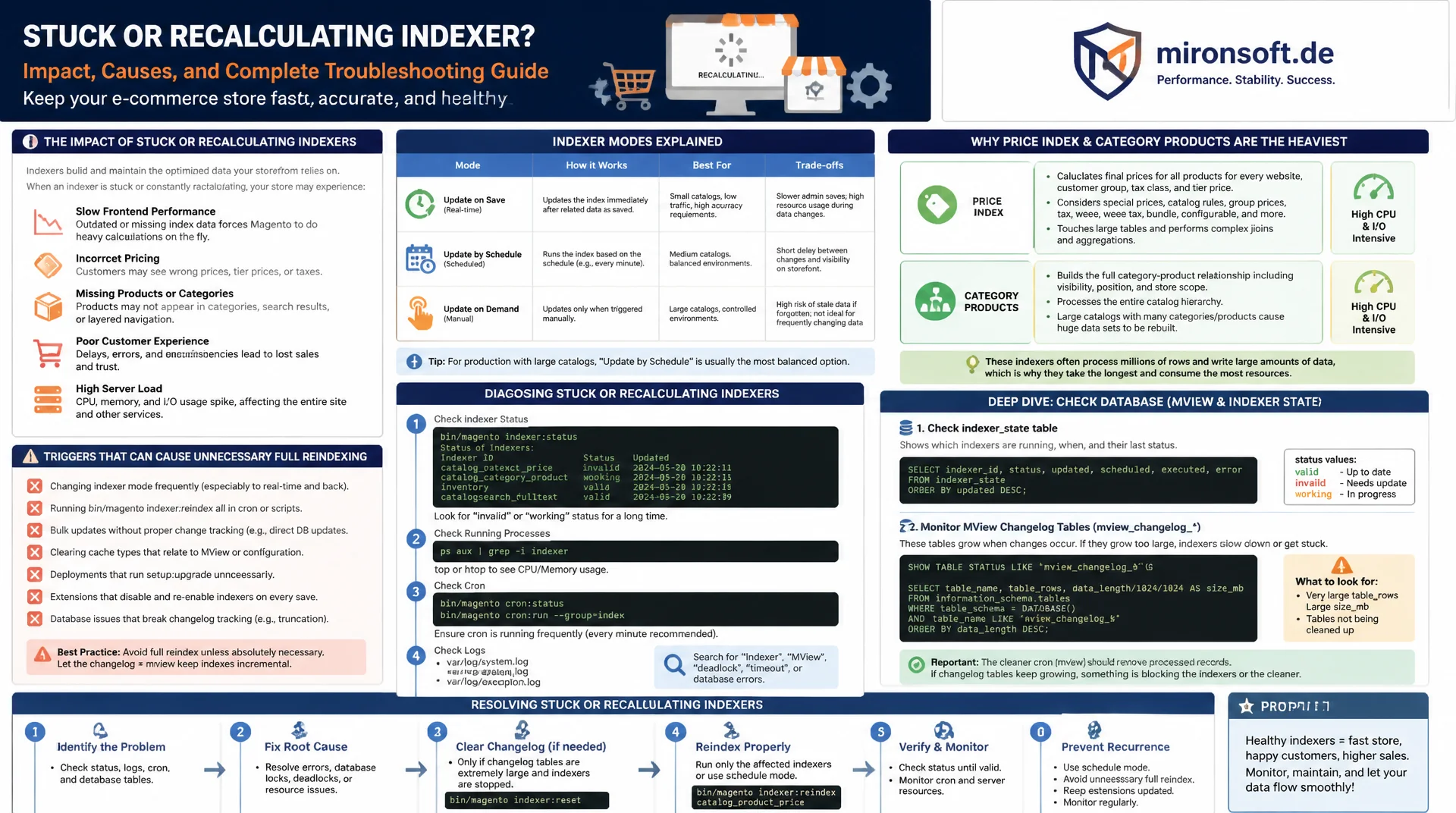
Spot expensive indexers, avoid full reindex, tune cron precisely
A stuck or constantly recalculating indexer slows down the entire store, from stale prices to empty search results. This article explains the available indexer modes, why the Price Index and Category Products are the most expensive, which changes trigger an unwanted full reindex, and how to reliably diagnose and fix stuck indexers using indexer:status, the indexer_state table, and growing mview changelog tables.
Table of Contents
- 1. How Magento's indexer architecture works at a fundamental level
- 2. Update on Save vs. Update by Schedule: the core decision
- 3. Which indexers are the most expensive and why
- 4. Partial vs. full reindex: what triggers a complete rebuild
- 5. Reading indexer:status and interpreting the indexer_state correctly
- 6. Mview changelog tables: spotting and controlling growth
- 7. Tuning cron-based scheduled indexing
- 8. Setting up custom indexers and mview declarations correctly
- 9. Standard indexers compared side by side
- 10. Summary
- 11. FAQ
1. How Magento's indexer architecture works at a fundamental level
Magento's indexers translate normalized, transactional data (products, categories, prices, attributes) into denormalized, read-optimized tables the storefront can serve without expensive joins at runtime. Each indexer is declared in indexer.xml and implements Magento\Framework\Indexer\ActionInterface with four methods, executeFull(), executeList(), executeRow(), and executePartial(), which Magento calls selectively depending on mode and scope of the change. This separation is why a single price update in the admin panel doesn't necessarily trigger a complete recalculation of every product's price.
By default, Magento ships nine indexers: catalog_product_attribute, catalog_category_product, catalog_product_category, catalog_product_price, cataloginventory_stock, catalog_product_flat (only with Flat Catalog enabled), catalogrule_rule, catalogrule_product, catalogsearch_fulltext, and customer_grid. Each of these writes to its own target table with a _cl suffix for the changelog, or _idx/_replica for the actual index tables in live operation, which enables atomic table swaps without downtime.
2. Update on Save vs. Update by Schedule: the core decision
In Update on Save mode, Magento reindexes synchronously within the HTTP request as soon as a product, category, or price rule is saved. This is workable for small catalogs with a few thousand SKUs, since changes are visible in the storefront immediately without waiting for a cron run. On larger catalogs or with frequent bulk imports, the same mechanism causes admin timeouts, since a single save suddenly takes seconds or minutes while thousands of dependent records are recalculated in the background.
Update by Schedule decouples this: save operations merely write an entry into the associated _cl changelog table via a MySQL trigger, and a cron job processes those changes asynchronously in configurable batches. The admin stays responsive, at the cost of a delay between saving and the change becoming visible on the storefront, typically a few minutes depending on the cron interval. For production systems with more than roughly 10,000 products, or with regular bulk imports, Update by Schedule for catalog_product_price, catalog_category_product, and catalogsearch_fulltext is practically mandatory.
# Show current mode of all indexers
bin/magento indexer:status

# Switch a single indexer to schedule mode
bin/magento indexer:set-mode schedule catalog_product_price

# Switch all expensive indexers to schedule mode at once
bin/magento indexer:set-mode schedule \
    catalog_product_price \
    catalog_category_product \
    catalogsearch_fulltext \
    catalogrule_rule

# Check mode and last-update timestamp
bin/magento indexer:show-mode
3. Which indexers are the most expensive and why
The Price Index (catalog_product_price) is the most expensive indexer in almost every real store, because it doesn't just compute one price per product but fully evaluates the combinatorics of customer group, website, and active price rules. With five customer groups and three websites, up to 15 rows per product land in catalog_product_index_price, multiplied by catalog size. Configurable and bundle products make this worse still, since their price depends on all child products and must be re-aggregated on every child price change.
catalog_category_product and catalogsearch_fulltext are expensive for a different reason: both need multiple EAV attribute joins per product across catalog_product_entity_varchar, _int, _decimal, and _text, since product attributes in Magento's EAV model don't live in a single table. With Elasticsearch as the search engine, there's additional overhead from serialization and the network round trip during bulk indexing. A practical lever is consistently excluding non-searchable and non-filterable attributes from the search index, since every extra indexable attribute linearly increases the joins per product.
4. Partial vs. full reindex: what triggers a complete rebuild
A partial reindex only processes the actually changed IDs from the changelog table via executeList() and is typically orders of magnitude faster than a complete rebuild. A full reindex via executeFull(), by contrast, recalculates the entire dataset and is typically triggered by bin/magento indexer:reindex without arguments, by changes to global attribute settings (e.g. "Use in Layered Navigation" or "Searchable"), by creating or deleting a website or customer group, and by system upgrades that change the schema of index tables.
A commonly overlooked trigger is switching the indexer mode itself: running indexer:set-mode schedule marks the indexer as invalid until the next cron run rebuilds it fully, since the previous changelog carries no historical changes. Likewise, bin/magento indexer:reset explicitly marks an indexer invalid and forces a full reindex on the next run, which is sensible in CI/CD pipelines after a deployment involving attribute changes, but an expensive mistake during regular daytime operation.
-- Check the size of the mview changelog table for the price index
SELECT COUNT(*) AS pending_rows
FROM catalog_product_price_cl;

-- Manually clean up already-processed changelog entries
-- (only run once the associated indexer is confirmed 'valid')
DELETE FROM catalog_product_price_cl
WHERE version_id <= (
    SELECT MIN(version_id) FROM catalog_product_price_cl
) + 0
LIMIT 50000;

-- Check the current change-data-capture version per view
SELECT * FROM mview_state WHERE view_id = 'catalog_product_price_cl';
5. Reading indexer:status and interpreting the indexer_state correctly
bin/magento indexer:status shows, per indexer, the status Ready, Processing, or Invalid, along with the mode and the timestamp of the last update. An indexer permanently stuck on Processing usually points to a cron process that was aborted, for example by a PHP memory limit, a deployment restart mid-run, or a database lock caused by a concurrent import operation. The underlying indexer_state table stores this status persistently; a quick SELECT * FROM indexer_state shows exactly which indexer_id is stuck on which status, even if the CLI output looks stale due to a cache issue.
A stuck indexer can usually be kicked off explicitly with bin/magento indexer:reindex <indexer_id>, which resets its status and forces a fresh full reindex. If the reindex aborts again, check var/log/system.log and var/log/exception.log, and try php -d memory_limit=-1 bin/magento indexer:reindex to rule out memory limits as the cause. For MySQL locks, SHOW ENGINE INNODB STATUS helps identify competing transactions holding the target table during the reindex.
# Show status of all indexers with mode and last update
bin/magento indexer:status

# Example output:
# Title                     Status    Update Mode   Schedule Update
# Product Price             Invalid   Schedule      2026-07-11 08:12:03
# Category Products         Ready     Schedule      2026-07-11 09:00:11
# Catalog Search             Processing Schedule     2026-07-11 09:14:55

# Rebuild only a single stuck indexer
bin/magento indexer:reindex catalog_product_price

# Reindex with an increased memory limit on large catalogs
php -d memory_limit=-1 bin/magento indexer:reindex catalogsearch_fulltext
6. Mview changelog tables: spotting and controlling growth
Every indexer in schedule mode has an mview changelog table (e.g. catalog_product_price_cl) that receives a new row with the affected entity ID via a database trigger on every relevant change. If the associated cron job runs less frequently than new changes occur, for example because the cron process is disabled or blocked, this table grows without bound and can, at millions of rows, slow down even simple read queries on the base table, since the trigger has to write on every insert/update.
After every successful run, Magento normally deletes the processed entries automatically based on the version_id stored in mview_state. If this cleanup doesn't happen, for example after a manually aborted cron job, a controlled manual cleanup of the _cl tables followed by an indexer:reindex resynchronizes the mview state. A regular monitoring check via cron that compares the row count of all %_cl tables against a threshold like 500,000 prevents this problem from silently escalating.
<?php
declare(strict_types=1);

namespace Mironsoft\IndexerMonitor\Console\Command;

use Magento\Framework\App\ResourceConnection;
use Symfony\Component\Console\Command\Command;
use Symfony\Component\Console\Input\InputInterface;
use Symfony\Component\Console\Output\OutputInterface;

/**
 * Checks all Mview changelog (_cl) tables for unbounded growth
 * and warns when a table exceeds the configured row threshold.
 */
class CheckChangelogSizeCommand extends Command
{
    private const int ROW_THRESHOLD = 500000;

    /**
     * @param ResourceConnection $resourceConnection Database resource connection.
     */
    public function __construct(
        private readonly ResourceConnection $resourceConnection
    ) {
        parent::__construct('mironsoft:indexer:check-changelog-size');
    }

    /**
     * Iterates all *_cl tables and reports row counts above the threshold.
     *
     * @param InputInterface $input CLI input.
     * @param OutputInterface $output CLI output.
     * @return int Exit code.
     */
    protected function execute(InputInterface $input, OutputInterface $output): int
    {
        $connection = $this->resourceConnection->getConnection();
        $tables = $connection->fetchCol("SHOW TABLES LIKE '%\_cl'");

        foreach ($tables as $table) {
            $count = (int) $connection->fetchOne("SELECT COUNT(*) FROM `{$table}`");
            if ($count > self::ROW_THRESHOLD) {
                $output->writeln("<error>{$table}: {$count} rows pending, cron may be stalled</error>");
            }
        }

        return Command::SUCCESS;
    }
}
7. Tuning cron-based scheduled indexing
Scheduled indexing runs via the index cron group, declared in Magento_Indexer/etc/crontab.xml with a default interval of one minute. Each run processes pending changelog entries in batches, whose size is controlled by Magento\Indexer\Model\ProcessManager and the indexer/batch_size setting per indexer in indexer.xml. A batch that's too small, around 100 rows, generates a lot of overhead from repeated query execution, while a batch that's too large, several tens of thousands of rows, blocks individual cron runs long enough that parallel cron groups like default fall behind.
In practice, raising batch_size for catalog_product_price to 5,000 to 10,000 on mid-sized catalogs (50,000 to 200,000 SKUs) works well, combined with regularly checking cron_schedule for orphaned entries, since jobs stuck in running status whose process has long since died block subsequent runs of the same group. A dedicated cron pool for the index group via cron/index/use_separate_process additionally decouples indexer runs from standard cron jobs like email dispatch or sitemap generation, so a slow reindex doesn't stall the entire cron system.
<!-- app/code/Mironsoft/IndexerMonitor/etc/indexer.xml -->
<?xml version="1.0"?>
<config xmlns:xsi="http://www.w3.org/2001/XMLSchema-instance"
        xsi:noNamespaceSchemaLocation="urn:magento:framework:Indexer/etc/indexer.xsd">
    <indexer id="catalog_product_price" class="Magento\Catalog\Model\Indexer\Product\Price">
        <title translate="true">Product Price</title>
        <description translate="true">Product Price index</description>
        <!-- Larger batches reduce per-run overhead on medium catalogs -->
        <saveHandler batchSize="7500"/>
        <fieldset name="catalog_product">
            <field name="price" xsi:type="string" origin="price"/>
        </fieldset>
    </indexer>
</config>
8. Setting up custom indexers and mview declarations correctly
A custom indexer needs, besides the ActionInterface implementation, an mview.xml declaration that specifies which tables and columns the indexer reacts to via triggers. If this declaration is missing or incomplete, the indexer stays permanently Invalid in schedule mode, since no changelog entry is ever created for the cron job to process. A common mistake is monitoring only the main table while forgetting linked tables, such as a custom price or attribute-assignment table, so that changes to those secondary tables never invalidate the index.
For custom indexers, there's an additional rule: executeRow() and executeList() should never simply call executeFull() internally, even though that's the fastest way to get something working, since doing so effectively turns every partial reindex into a full reindex and defeats the entire purpose of Update by Schedule. Instead, the update logic should recalculate only the given IDs, for example via a WHERE entity_id IN (...) in the underlying query.
<!-- app/code/Mironsoft/IndexerMonitor/etc/mview.xml -->
<?xml version="1.0"?>
<config xmlns:xsi="http://www.w3.org/2001/XMLSchema-instance"
        xsi:noNamespaceSchemaLocation="urn:magento:framework:Mview/etc/mview.xsd">
    <view id="mironsoft_custom_price_rule_cl" class="Mironsoft\IndexerMonitor\Model\Indexer\CustomPriceRule"
          group="indexer">
        <subscriptions>
            <!-- Trigger on the main entity table -->
            <table name="mironsoft_custom_price_rule" entity_column="rule_id"/>
            <!-- Also trigger on the linked product assignment table -->
            <table name="mironsoft_custom_price_rule_product" entity_column="rule_id"/>
        </subscriptions>
    </view>
</config>
9. Standard indexers compared side by side
The six most important standard indexers differ substantially in relative cost, recommended mode, and the typical trigger for a full reindex. The table below summarizes the practically relevant differences.
| Indexer | Relative cost | Recommended mode | Typical full-reindex trigger |
|---|---|---|---|
| Product Price | Very high | Schedule | New customer group/website, bulk price change |
| Category Products | High | Schedule | Attribute configuration changed (e.g. visibility) |
| Catalog Search / Elasticsearch | High | Schedule | Searchable attribute added/removed |
| Product EAV | Medium | Schedule | Attribute set change, store view creation |
| Catalog Rule | Medium | Save (small) / Schedule (large) | Rule validity period changed manually |
| Customer Grid | Low | Save or Schedule | New customer attribute in grid filter |
In practice, Product Price, Category Products, and Catalog Search dominate cron runtime in almost every larger store, while Customer Grid is barely noticeable even in Update-on-Save mode. Consistently switching the three expensive indexers to schedule mode, sizing batches to catalog size, and knowing full-reindex triggers often cuts average cron runtime by 60-80% compared to an unconfigured default installation.
Mironsoft
Indexer performance, cron tuning, and backend optimization for Magento stores
Ready to fix stuck indexers and long reindex runs?
We analyze your indexer configuration, identify the most expensive runs, and implement targeted optimizations, from cron tuning to the development of your own efficient indexers.
Indexer audit
Analysis of all indexer runtimes, modes, and mview changelogs
Cron tuning
Optimal configuration of batch sizes, cron groups, and process separation
Custom indexer development
Custom indexers and mview declarations following Magento best practices
10. Summary
Magento indexer performance directly determines how current prices, categories, and search results are on the storefront, and how heavily cron runs load the server. Update by Schedule decouples admin save operations from the actual recalculation and is practically indispensable for catalogs above roughly 10,000 products, especially for the three most expensive indexers: Product Price, Category Products, and Catalog Search. A full reindex should be triggered deliberately, not accidentally through global attribute changes or poorly built custom indexers that internally always call executeFull().
Monitoring via indexer:status, the indexer_state table, and regular checks of the mview changelog tables prevents stuck indexers or unboundedly growing _cl tables from becoming a silent problem. Adjusting batch sizes to catalog size and decoupling the index cron group from other cron jobs additionally reduces runtimes noticeably and keeps the store performant even under frequent data changes.
Magento Indexer Performance - The Essentials at a Glance
Update on Save vs. Schedule
Schedule decouples admin saves from recalculation. Mandatory above roughly 10,000 products for Price, Category Products, and Search.
Most expensive indexers
Product Price due to customer group/website combinatorics, Category Products and Search due to EAV attribute joins.
Avoiding full-reindex triggers
Global attribute changes, new websites/customer groups, and poorly built custom indexers unintentionally trigger a full reindex.
Monitoring & cron tuning
Regularly check indexer:status, indexer_state, and _cl table size, adjust batch size and cron groups.