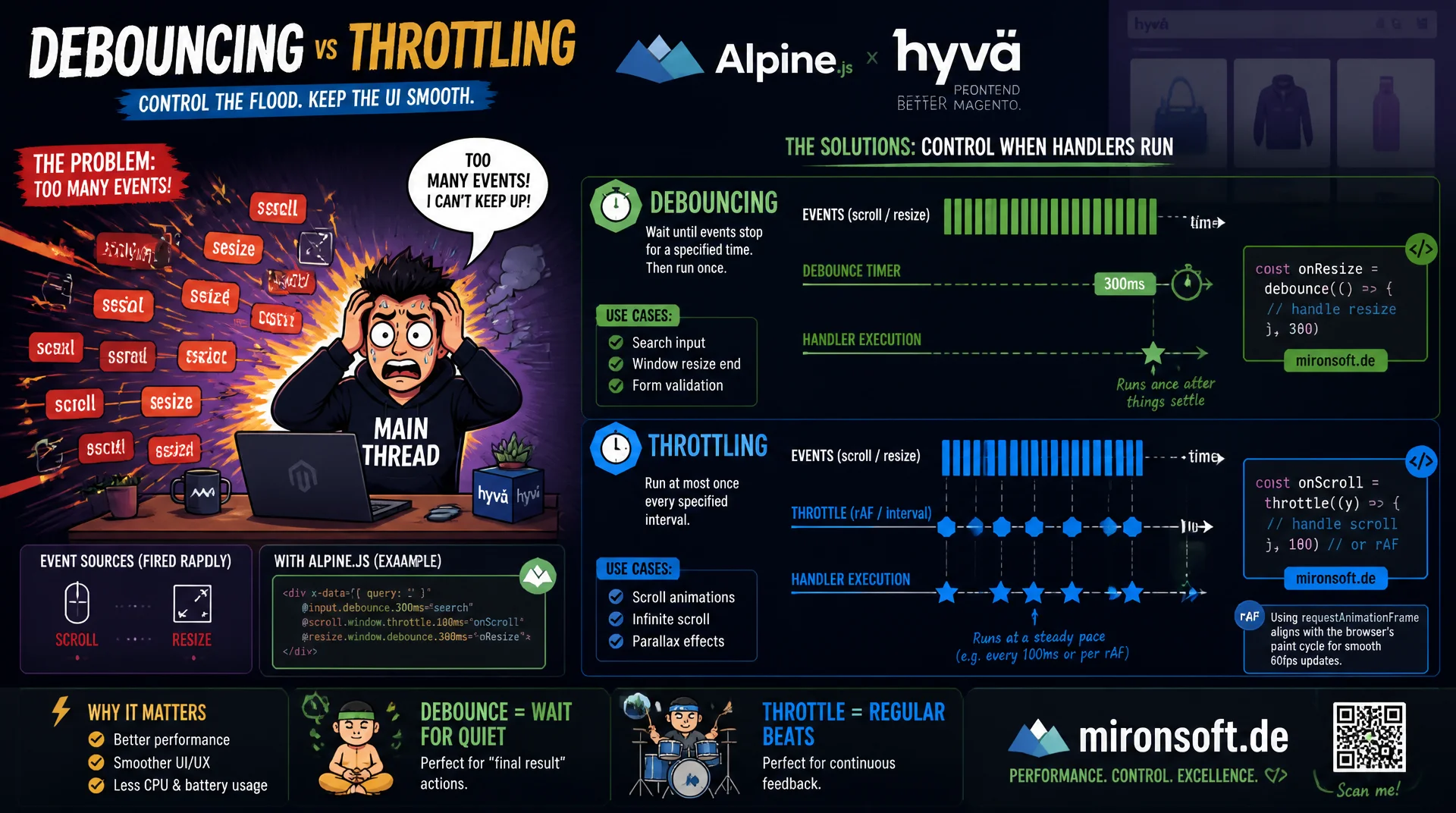
Keeping scroll, resize, and input smooth
Scroll, resize, and input events fire hundreds of times per second and can bring the main thread to a crawl if every call triggers an expensive function unchecked. Debouncing and throttling tame this flood deliberately, with clear timer mechanics, rAF-based patterns for visual updates, and ready-made Alpine.js modifiers for Hyva themes.
Table of Contents
- 1. Why high-frequency events become a performance problem
- 2. Debounce vs. throttle: the mechanical distinction
- 3. Implementing debounce from scratch in vanilla JavaScript
- 4. Implementing throttle from scratch in vanilla JavaScript
- 5. Which events actually need throttling
- 6. requestAnimationFrame throttling for visual updates
- 7. Alpine.js: .debounce and .throttle in Hyva themes
- 8. Common pitfalls: leading edge, cancel, and cleanup
- 9. Debounce, throttle, or rAF: the right choice per event
- 10. Summary
- 11. FAQ
1. Why high-frequency events become a performance problem
The browser doesn't fire events like scroll, resize, and input once per user action, it fires them continuously for as long as the action lasts. A single scroll through the viewport can easily trigger 50 to 100 scroll events, and dragging the browser window produces a comparable flood of resize events. If every one of these events is wired unchecked to an expensive function, such as a DOM measurement, an API call, or a layout recalculation, it blocks the main thread and the page becomes noticeably sluggish.
It gets especially critical when the event handler itself triggers layout reflows, for example by reading offsetHeight or getBoundingClientRect() after a DOM change. At 60 frames per second, only about 16 milliseconds remain per frame to fit in both interaction and rendering. A scroll handler that takes 5 milliseconds per call and fires 80 times a second blows through this budget by a wide margin and produces visible jank instead of a smooth 60fps experience.
2. Debounce vs. throttle: the mechanical distinction
Debounce delays execution of a function until a certain amount of time has passed since the last call without another call occurring. Every new call resets the internal timer, so the function only fires once the event chain actually comes to rest. This is the classic trailing-edge behavior: execution happens after the last event, not during the sequence of events. For search-as-you-type this is ideal, because the API request is only made once the user has genuinely stopped typing.
Throttle, on the other hand, guarantees a maximum execution frequency regardless of how often the event fires. Within a fixed time window, say 100 milliseconds, the function runs at most once, and further calls within the same window are either ignored or scheduled for the end of the window. Throttle comes in two variants: leading edge executes the function immediately on the first call and then locks, trailing edge waits until the end of the time window. The choice between the two patterns depends critically on whether anything needs to happen at all at the end of the event chain (debounce) or whether something should happen regularly throughout the entire chain (throttle).
3. Implementing debounce from scratch in vanilla JavaScript
A robust debounce implementation needs three parts: a timer handle in closure scope, a clearTimeout on every new call, and a setTimeout that executes the actual function once the wait time has elapsed. It's important to correctly forward this and the arguments of the original call, so the debounce wrapper behaves transparently like the original function. For most UI scenarios, a trailing-edge variant is entirely sufficient.
In practice it's worth building the debounce function so it attaches a cancel() method to the returned wrapper. This makes it possible to explicitly discard a pending call, for example when a component unmounts or a new search term makes the old API call obsolete. Without this option, stale callbacks can still fire after the DOM has been cleaned up and cause errors that are hard to reproduce.
// Debounce: fires only after the calls have paused for `wait` ms
function debounce(fn, wait = 300) {
  let timeoutId = null;

  function debounced(...args) {
    clearTimeout(timeoutId);
    timeoutId = setTimeout(() => {
      timeoutId = null;
      fn.apply(this, args);
    }, wait);
  }

  // Allow callers to cancel a pending invocation explicitly
  debounced.cancel = () => {
    clearTimeout(timeoutId);
    timeoutId = null;
  };

  return debounced;
}

// Usage: search-as-you-type without hammering the API on every keystroke
const searchInput = document.querySelector('#product-search');
const runSearch = debounce((term) => {
  fetch(`/search/suggest?q=${encodeURIComponent(term)}`)
    .then((res) => res.json())
    .then(renderSuggestions);
}, 350);

searchInput.addEventListener('input', (event) => runSearch(event.target.value));
4. Implementing throttle from scratch in vanilla JavaScript
A simple throttle implementation remembers the timestamp of the last execution and compares it against the current time on every call. If the difference exceeds the configured wait time, the function runs immediately and the timestamp is updated, which corresponds to leading-edge behavior. For cases where the last call within the time window must not be lost either, leading edge is combined with a follow-up setTimeout that catches the last discarded call at the end of the window.
This combined variant is almost always the better choice in practice, because pure leading-edge throttling can ignore the final state of a fast burst of events, for example the final scroll position after the user stops. Just like with debounce, a cancel() method is recommended to cleanly discard pending trailing calls when leaving a page or unmounting a component and to avoid memory leaks from lingering timers.
// Throttle: guarantees at most one call per `wait` ms, leading + trailing edge
function throttle(fn, wait = 100) {
  let lastCallTime = 0;
  let trailingTimeoutId = null;

  function throttled(...args) {
    const now = Date.now();
    const remaining = wait - (now - lastCallTime);

    if (remaining <= 0) {
      clearTimeout(trailingTimeoutId);
      lastCallTime = now;
      fn.apply(this, args);
    } else {
      // Ensure the final call in a burst is not lost
      clearTimeout(trailingTimeoutId);
      trailingTimeoutId = setTimeout(() => {
        lastCallTime = Date.now();
        fn.apply(this, args);
      }, remaining);
    }
  }

  throttled.cancel = () => {
    clearTimeout(trailingTimeoutId);
    trailingTimeoutId = null;
  };

  return throttled;
}

// Usage: track scroll position without flooding the main thread
const onScroll = throttle(() => {
  document.documentElement.style.setProperty('--scroll-y', String(window.scrollY));
}, 100);

window.addEventListener('scroll', onScroll, { passive: true });
5. Which events actually need throttling
Not every high-frequency event necessarily needs to be throttled, but three categories are affected almost every time. scroll events typically drive sticky header logic, scroll-to-top buttons, or lazy-loading triggers, and should be handled with throttle or, even better, with requestAnimationFrame, because they trigger visual updates. resize events fire continuously while the window is being dragged and are usually a good fit for debounce, because only the final window size matters, for example to recalculate a grid layout.
input events on search fields or live filters are the classic debounce case, because every intermediate keystroke would trigger an unnecessary API request. One important exception: mousemove for drag-and-drop interactions or custom cursor effects generally needs throttle with a very short window, or direct rAF throttling, because responsiveness throughout the entire movement matters here, not just at the end. keydown events for auto-save functionality in forms are again a debounce candidate, with a longer wait of one to two seconds.
6. requestAnimationFrame throttling for visual updates
For anything that feeds directly into rendering, such as parallax effects, sticky header state, or scroll progress bars, requestAnimationFrame is preferable to time-based throttle. Instead of guessing a fixed millisecond value, rAF synchronizes execution exactly with the next browser repaint, so no more work is ever done than the browser was already planning for the next frame. The pattern for this is a simple flag: on every event only the most recent state is stored, and an rAF callback processes it on the next frame, unless one is already pending.
The difference from classic throttle shows up most clearly on devices with a variable refresh rate. A hardcoded 16-millisecond interval implicitly assumes 60fps, which works suboptimally on a 120Hz display and is even counterproductive on a throttled mobile device running at 30fps, because unnecessary work gets done. rAF automatically adapts to the device's actual refresh rate and also pauses automatically when the tab is in the background, which additionally saves battery.
// rAF-throttled scroll handler: at most one update per rendered frame
function rafThrottle(fn) {
  let scheduled = false;
  let lastArgs = null;

  return function throttled(...args) {
    lastArgs = args;
    if (scheduled) return;

    scheduled = true;
    requestAnimationFrame(() => {
      scheduled = false;
      fn.apply(this, lastArgs);
    });
  };
}

// Usage: toggle a sticky header class based on scroll position
const header = document.querySelector('#site-header');
const updateHeaderState = rafThrottle(() => {
  header.classList.toggle('is-sticky', window.scrollY > 80);
});

window.addEventListener('scroll', updateHeaderState, { passive: true });
7. Alpine.js: .debounce and .throttle in Hyva themes
Hyva themes deliberately drop jQuery and rely consistently on Alpine.js for interactivity, which ships with built-in modifiers for exactly this problem. x-on:input.debounce.350ms, or the shorthand @input.debounce.350ms, delays execution of the attached expression exactly according to the debounce pattern, with no custom helper function needed. The default value without an explicit time is 250 milliseconds, which is a sensible starting point for most search and filter interactions.
For throttle behavior, Alpine.js 3 provides the .throttle modifier, for example @scroll.window.throttle.100ms, to throttle a scroll handler on the window object. In a Hyva phtml template this makes it possible, for example, to build a live filter in the product catalog without an additional JavaScript bundle, all the logic stays declarative in the markup while also respecting Hyva's Content Security Policy, since no inline handler code outside the registered Alpine data context is needed.
<!-- Hyva phtml: live filter input with Alpine's built-in debounce modifier -->
<div x-data="{ query: '', results: [] }">
    <input
        type="search"
        x-model="query"
        x-on:input.debounce.400ms="
            results = await (await fetch(`/catalogsearch/ajax?q=${query}`)).json()
        "
        placeholder="{{ __('Search products...') }}"
        class="w-full rounded-lg border border-gray-300 px-4 py-2"
    >

    <!-- Sticky filter bar: throttled scroll listener, no custom JS file needed -->
    <div
        x-data="{ collapsed: false }"
        x-on:scroll.window.throttle.150ms="collapsed = window.scrollY > 120"
        x-bind:class="collapsed ? 'py-2 shadow-md' : 'py-4'"
        class="sticky top-0 z-20 bg-white transition-all"
    >
        <template x-for="item in results" x-bind:key="item.sku">
            <div x-text="item.name"></div>
        </template>
    </div>
</div>
8. Common pitfalls: leading edge, cancel, and cleanup
A common mistake is assuming debounce and throttle are interchangeable because both "reduce" the number of calls. If a search field is implemented with throttle instead of debounce, the API request fires multiple times while the user is still typing, even though only the final result matters, which wastes requests and produces a flickering result list. Conversely, debounce on a scroll handler means no visual update happens at all while the user is scrolling, the update only arrives once they've already stopped, which feels like a frozen page.
A second pitfall involves this binding and event-object reuse: with some older APIs the browser recycles the event object between calls, so when execution is delayed, only the needed values should be extracted from the event rather than storing the reference itself. Third, timers and listeners are often forgotten during cleanup when leaving a page or unmounting a component, both debounced.cancel() and removeEventListener must be part of the corresponding cleanup logic, otherwise callbacks run against DOM elements that have already been removed and throw errors in the console.
9. Debounce, throttle, or rAF: the right choice per event
The table below maps the most common high-frequency browser events to the appropriate pattern and briefly explains the reasoning.
| Event / use case | Wrong pattern | Recommended pattern | Reasoning |
|---|---|---|---|
| Search-as-you-type | Throttle | Debounce, 300-400ms | Only the final input value matters |
| Sticky header on scroll | Debounce | requestAnimationFrame | Visual update, must run while scrolling |
| Grid layout on resize | No throttling | Debounce, 200ms | Only the final window size matters |
| Drag-and-drop / mousemove | Debounce | rAF throttle | Continuous feedback needed during movement |
| Form auto-save | Throttle | Debounce, 1000-2000ms | Saving only makes sense after a typing pause |
The basic rule is easy to remember: if only the result at the end of the event chain matters, debounce is correct. If something needs to happen regularly throughout the entire event chain, throttle is correct. If the result feeds directly into visual rendering, requestAnimationFrame is preferable to any time-based throttle.
Mironsoft
Web performance, event handling, and Alpine.js optimization for Magento stores
Ready to smooth out janky interactions?
We identify expensive event handlers in your Magento or Hyva store, implement tailored debounce, throttle, and rAF patterns, and deliver noticeably smoother scroll, resize, and search interactions.
Event handler audit
Main thread analysis and prioritization of the most expensive handlers
Alpine.js optimization
Debounce and throttle modifiers directly in the Hyva template
rAF pipelines
Scroll and layout updates synchronized to the browser repaint
10. Summary
Debouncing and throttling address a fundamental mechanical problem: browser events fire far faster than expensive functions can safely be executed. Debounce delays execution until an event chain has genuinely come to rest, and suits search-as-you-type, auto-save, and resize reactions where only the final result matters. Throttle instead guarantees a fixed maximum execution frequency throughout the entire event chain, and fits scroll tracking, drag interactions, and anything that needs continuous feedback.
For visual updates that feed directly into rendering, requestAnimationFrame is the more precise alternative to time-based throttle, because it automatically adapts to the device's actual refresh rate. In Hyva themes, all three patterns can be implemented declaratively right in the template thanks to Alpine.js's built-in .debounce and .throttle modifiers, with no additional JavaScript bundle and no compromises to the Content Security Policy.
Debouncing and Throttling - The Essentials at a Glance
Debounce = trailing edge
Fires only once the event chain comes to rest. Ideal for search-as-you-type and auto-save.
Throttle = fixed frequency
At most one execution per time window, even while the events keep firing.
rAF for visuals
requestAnimationFrame synchronizes updates exactly with the next repaint.
Alpine.js in Hyva
@input.debounce.300ms and @scroll.window.throttle.100ms with no custom JS.