Shipping less JavaScript on first load
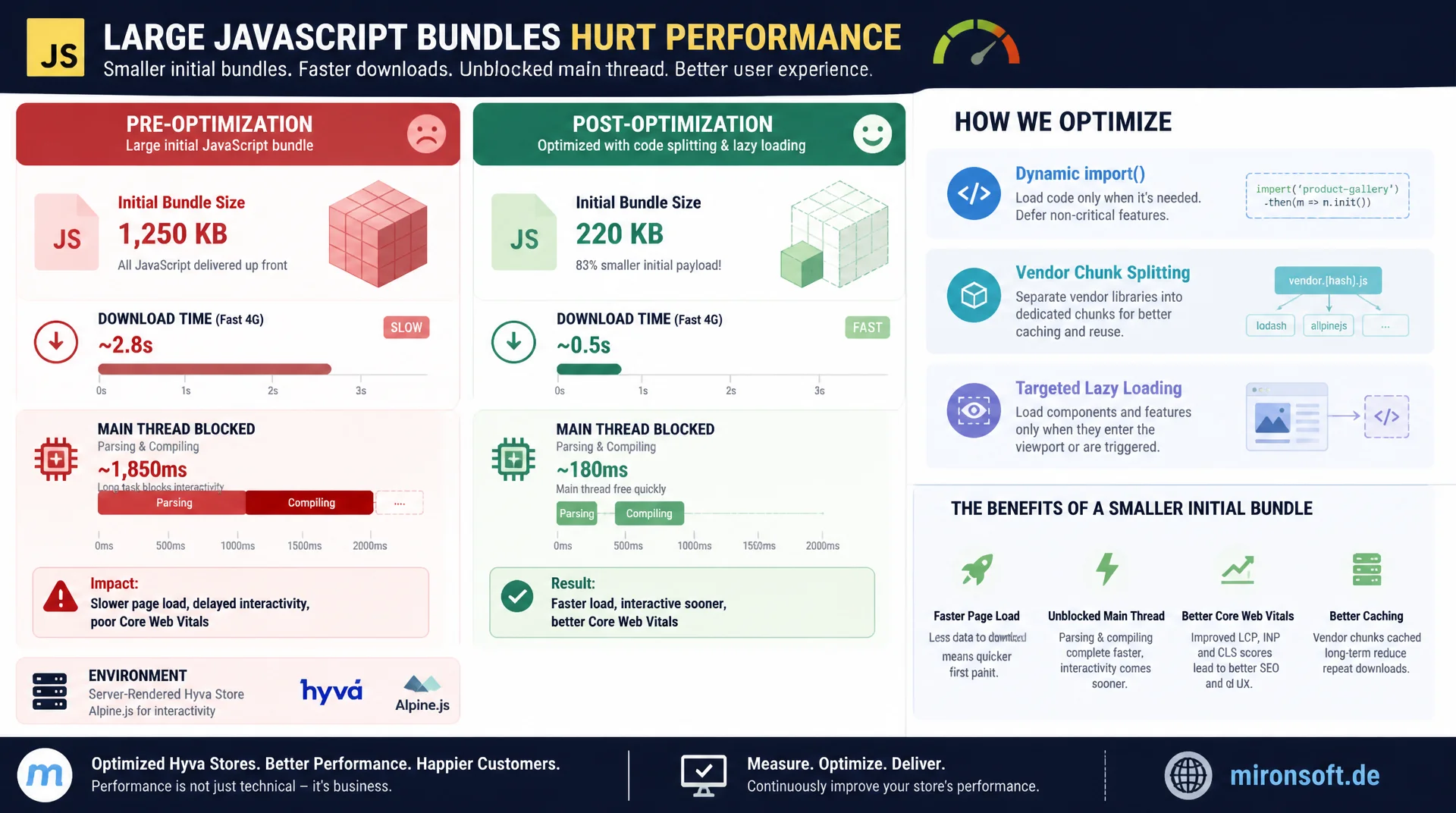
A large JavaScript bundle costs more than download time, it blocks the main thread while parsing and compiling. With dynamic import(), vendor chunk splitting, and targeted lazy loading of heavy below-the-fold widgets, initial bundle size drops noticeably without losing functionality, even in server-rendered Hyva stores built on Alpine.js.
Table of Contents
- 1. Why bundle size is a problem in the first place
- 2. The dynamic import() syntax in detail
- 3. Route-based vs component-based splitting
- 4. Vendor chunk splitting
- 5. Lazy loading below-the-fold JavaScript: a reviews widget example
- 6. Tradeoffs: more requests vs a smaller initial bundle
- 7. Code splitting in an Alpine.js/Hyva context
- 8. Using preloading and prefetching deliberately
- 9. Measuring and validating
- 10. Summary
- 11. FAQ
1. Why bundle size is a problem in the first place
A large JavaScript bundle is not just a download problem. Once the file arrives in the browser, it still has to be parsed, compiled, and executed, and most of that happens on the main thread, the same thread responsible for rendering and handling user interaction. On a fast desktop machine with a modern CPU, this parse and compile cost barely registers. On a mid-range smartphone with a much weaker CPU, the exact same code can add several hundred milliseconds of extra blocking time, even if the file itself downloaded in milliseconds over a fast connection.
This gap between network time and CPU time is the real reason bundle size is treated as its own metric. Total Blocking Time (TBT) and Interaction to Next Paint (INP) respond directly to unused code that still gets executed anyway: every line not needed for the first render burns CPU cycles that are then missing elsewhere for responsiveness. Code splitting attacks exactly this problem by moving code that isn't immediately needed into separate files, which are only loaded and executed once they're actually required. The goal isn't less code overall, it's less code in the critical path of the first render.
2. The dynamic import() syntax in detail
The dynamic import() function is fundamentally different from a static import statement at the top of a file. Static imports are resolved at build time and typically end up in the same bundle as the calling code. A dynamic import('./module.js') call, on the other hand, returns a Promise that only resolves at runtime, and bundlers like Webpack, Rollup, and Vite recognize this behavior automatically: they statically analyze the code, find every import() call, and emit a dedicated chunk file for it, which gets fetched via a script tag or fetch request as soon as the call is actually reached at runtime.
Because import() returns a normal Promise, it can be used with await, .then(), and even conditionally inside if blocks, none of which is possible with static imports. That makes dynamic imports the technical foundation for any form of lazy loading, whether route-based or component-based. One practical caveat: the import path needs to be statically analyzable by the bundler, a fully dynamically constructed string as the path often prevents correct chunk generation.
// Static import: always part of the initial bundle graph
// import { ReviewsWidget } from './widgets/reviews.js';

// Dynamic import: returns a Promise, bundler creates a separate chunk
async function loadReviewsWidget() {
  // Webpack/Rollup/Vite detect this call at build time
  // and emit a standalone chunk file for it
  const module = await import('./widgets/reviews.js');
  return module.ReviewsWidget;
}

// Usage: only fetched and executed when actually called
document.getElementById('load-reviews-btn').addEventListener('click', async () => {
  const ReviewsWidget = await loadReviewsWidget();
  ReviewsWidget.mount(document.getElementById('reviews-container'));
});
3. Route-based vs component-based splitting
In classic single-page applications with a client-side router, like React Router or Vue Router, route-based splitting is the obvious strategy: every route gets its own chunk, loaded only when navigating to that route. On first page load, the user only downloads code for the landing page, not the code for checkout, account, or search. This strategy works so well because the router acts as a natural boundary for chunk splitting, each route is a clearly scoped piece of application logic.
Component-based splitting takes a different approach: instead of the route, a single heavy component is defined as the chunk boundary, regardless of which page it appears on. An image gallery widget, a chart, a rich text editor, or a video player gets extracted into its own chunk because it's rarely needed immediately and often carries significant weight. For server-rendered systems without client-side routing, which is exactly the case with Magento and Hyva, the route disappears entirely as a splitting boundary. There, component-based splitting is the only strategy that makes sense, applied to individual interactive widgets rather than to whole pages.
4. Vendor chunk splitting
Alongside your own application code, almost every bundle also contains third-party libraries from node_modules. These dependencies change far less often than your own code, usually only during a deliberate dependency update. Vendor chunk splitting separates exactly this code into its own file, which can then be shipped with long cache headers independently of the application code. When only your own application logic changes, the browser keeps serving the already-cached vendor chunk from cache and only needs to re-download the smaller app chunk.
Technically this is controlled through the bundler configuration, via splitChunks.cacheGroups in Webpack or rollupOptions.output.manualChunks in Vite. Both let you assign path patterns like node_modules to a dedicated chunk group, sometimes even granularly per library, for example bundling Alpine.js separately from smaller helper libraries. The effect is especially noticeable with frequent deployments: without vendor splitting, every user re-downloads the entire bundle after every release; with vendor splitting, the large, stable portion stays in the browser cache.
// vite.config.js - separate stable vendor code from frequently changing app code
export default {
  build: {
    rollupOptions: {
      output: {
        manualChunks: {
          // Alpine.js changes rarely, cache it separately with a long max-age
          'vendor-alpine': ['alpinejs'],
          // Group other third-party dependencies together
          'vendor-libs': ['swiper', 'photoswipe'],
        },
      },
    },
  },
};

// webpack.config.js equivalent
module.exports = {
  optimization: {
    splitChunks: {
      cacheGroups: {
        vendorAlpine: {
          test: /[\\/]node_modules[\\/]alpinejs[\\/]/,
          name: 'vendor-alpine',
          chunks: 'all',
        },
      },
    },
  },
};
5. Lazy loading below-the-fold JavaScript: a reviews widget example
A reviews widget at the bottom of a product page is a textbook example of code that's almost never visible on first render. Yet in many stores its JavaScript still ships in the initial bundle, including sort logic, pagination, and sometimes a star-rating renderer with its own charting library. The IntersectionObserver interface avoids this deliberately: the observer watches the widget's container and only fires a callback once the element actually enters the viewport, or approaches it.
The rootMargin option is what makes this feel smooth to the user: a value like "200px" starts loading before the user actually sees the element, so the chunk is ideally already fully loaded by the time the widget scrolls into view. Without this lead time, the user would briefly see an empty placeholder or a loading spinner, which can hurt perceived performance despite a smaller initial bundle.
// Lazy-load the reviews widget only when it approaches the viewport
const reviewsContainer = document.getElementById('reviews-container');

const observer = new IntersectionObserver(
  async (entries) => {
    for (const entry of entries) {
      if (entry.isIntersecting) {
        // Stop observing immediately to avoid duplicate imports
        observer.unobserve(entry.target);

        const { ReviewsWidget } = await import('./widgets/reviews.js');
        ReviewsWidget.mount(entry.target, {
          productId: entry.target.dataset.productId,
        });
      }
    }
  },
  {
    // Start loading 200px before the widget enters the viewport
    rootMargin: '200px 0px',
    threshold: 0,
  }
);

observer.observe(reviewsContainer);
6. Tradeoffs: more requests vs a smaller initial bundle
Code splitting is not a free optimization. Every extracted chunk means an additional network request, and in many cases that request follows a waterfall pattern: first the trigger has to fire, a scroll event or a click, then the request starts, then the response has to be parsed and executed before the widget is actually usable. With HTTP/2 and HTTP/3, the core problem of many small requests, the limited number of parallel connections from the HTTP/1.1 era, is largely solved, since multiplexing handles many requests over a single connection simultaneously.
Even so, there's a point where overly granular splitting hurts: every additional file brings its own HTTP overhead through headers, its own compression dictionary for Gzip or Brotli, which performs worse across many small files than across one larger file, and in the case of chained dependencies, multiple sequential round trips instead of parallel ones. The practical rule: logically related code belongs in the same chunk, not every single function deserves its own file. One chunk per self-contained feature or widget is usually the right granularity, not one chunk per module.
7. Code splitting in an Alpine.js/Hyva context
Hyva themes are built on server-rendered HTML from phtml templates, enriched with Alpine.js for interactivity directly in the markup through x-data, x-show, and similar directives. There is no client-side router, and therefore no routes along which to split code. Route-based splitting, standard practice in SPA frameworks, simply doesn't apply to this architecture, because every page already arrives as a complete HTML document from the server.
What remains, and what actually pays off, is narrowly scoped, component-based splitting for specific heavy interactive widgets: an image zoom feature in the product gallery, a size guide modal, a live chat entry point. These widgets are extracted into a self-contained Alpine component module and only loaded via import() on x-init or on the first user interaction, before Alpine.data() registers the component. The rest of the page stays server-rendered HTML with a minimal Alpine core, which is already significantly smaller than a typical SPA framework bundle.
<!-- phtml template: size guide modal loaded only on first open -->
<div x-data="sizeGuideModal()" x-init="init()">
    <button
        type="button"
        @click="open()"
        class="text-sm underline"
    >
        Show size guide
    </button>

    <template x-if="loaded && isOpen">
        <div class="fixed inset-0 z-50" x-html="modalContent"></div>
    </template>
</div>

<script>
function sizeGuideModal() {
    return {
        isOpen: false,
        loaded: false,
        modalContent: '',
        init() {
            // No import here yet - wait for the actual interaction
        },
        async open() {
            if (!this.loaded) {
                // Dynamically import the heavy modal module on first click
                const { renderSizeGuide } = await import('./components/size-guide.js');
                this.modalContent = await renderSizeGuide();
                this.loaded = true;
            }
            this.isOpen = true;
        },
    };
}
</script>
8. Using preloading and prefetching deliberately
Code splitting only answers the question of when code runs, not when it downloads. Without additional control, the download happens exactly at the moment of need, which the user perceives as a noticeable delay. rel="modulepreload" in the head tells the browser to fetch and parse a module along with its dependencies early, but not execute it yet, so that it's immediately available on actual demand instead of requiring a full network round trip.
For widgets that are likely, but not guaranteed, to be needed, requestIdleCallback is a good fit: once the main thread is free after the initial render, likely-needed chunks can be prefetched in the background without disrupting the critical loading phase. Another battle-tested technique is hover prefetch: on mouseenter over a button that opens a modal, the corresponding chunk is fetched before the actual click even happens. The human reaction time between hover and click, typically 100 to 300 milliseconds, is often enough to complete the network request invisibly in the background.
<!-- Preload a module chunk that will very likely run soon -->
<link rel="modulepreload" href="/static/js/chunks/size-guide.a1b2c3.js">

<script>
// Prefetch on hover, before the actual click happens
const trigger = document.getElementById('size-guide-trigger');
let prefetched = false;

trigger.addEventListener('mouseenter', () => {
    if (!prefetched) {
        prefetched = true;
        // Human reaction time between hover and click hides this request
        import('./components/size-guide.js');
    }
}, { once: true });

// Idle-time prefetch for widgets likely needed soon after initial render
if ('requestIdleCallback' in window) {
    requestIdleCallback(() => {
        import('./widgets/reviews.js');
    }, { timeout: 2000 });
}
</script>
9. Measuring and validating
Introducing code splitting without measuring its effect regularly leads to wrong assumptions. A bundle analyzer like webpack-bundle-analyzer or Vite's built-in visualization tool shows a treemap of which modules end up in which chunk, and it commonly surfaces a specific problem: the same library gets accidentally duplicated across multiple chunks instead of correctly moving into a shared vendor chunk. Without this visualization, that kind of duplication bug often goes unnoticed for months.
The second essential check runs in Chrome DevTools under the Coverage tab. It shows, per loaded file, the share of code that was actually executed during the current page load, highlighted in red for unused code. If this tab confirms that an extracted chunk isn't even requested during the initial load, the split is working correctly. It's also worth checking the Network panel: the timing of the chunk request should clearly correlate with the triggering event, a scroll or a click, rather than happening right at initial page load.
| Approach | Initial bundle | Additional requests | Best suited for |
|---|---|---|---|
| No splitting | Everything in one bundle | None | Very small pages with little JS |
| Route-based | Medium, active route only | 1 per navigation | SPA frameworks with client routing |
| Component-based | Small, core UI only | 1 per widget used | Server-rendered pages like Hyva |
| Vendor chunk | Medium, but better cached | 1 extra, usually cached | Apps with stable dependencies |
| On-interaction lazy load | Minimal | 1 per interaction, delayed | Heavy below-the-fold widgets |
Mironsoft
Bundle analysis, code splitting, and frontend performance for Magento and Hyva
Ready to trim down heavy JavaScript bundles?
We analyze your bundle structure, identify widgets that load unnecessarily early, and implement dynamic import(), vendor chunk splitting, and IntersectionObserver-based lazy loading, tailored to Hyva and Alpine.js.
Bundle audit
Bundle analyzer and coverage review to prioritize by impact
Widget splitting
Extracting Alpine components for modals, galleries, and reviews
Build configuration
Vendor chunks, preload hints, and prefetch strategies in the build setup
10. Summary
Code splitting and lazy loading solve a concrete problem: JavaScript that isn't needed immediately shouldn't be loaded and executed immediately either. Dynamic import() is the technical foundation that bundlers automatically translate into separate chunks. Vendor chunk splitting separates stable third-party code from frequently changing application code, improving cache efficiency across deployments. IntersectionObserver-based lazy loading defers heavy widgets like reviews or gallery components until the moment they actually become visible.
In server-rendered Hyva stores, route-based splitting simply doesn't apply, since there are no client routes. What works here is exclusively component-based splitting for specific heavy interactive widgets like modals, image zoom, or live chat, combined with targeted preloading and hover prefetch to hide the delay of the loading process. Measurability through a bundle analyzer and the DevTools coverage view ensures that every splitting decision actually results in less code in the critical path, rather than just increasing the chunk count.
Code Splitting and Lazy Loading - The Essentials at a Glance
dynamic import()
Returns a Promise, bundlers automatically create a separate chunk for each call.
Vendor chunks
Cache stable third-party libraries separately, update app code independently.
Below-the-fold lazy load
IntersectionObserver with rootMargin loads widgets shortly before they become visible.
Hyva/Alpine.js
No route splitting possible, only targeted splitting of specific heavy widgets.