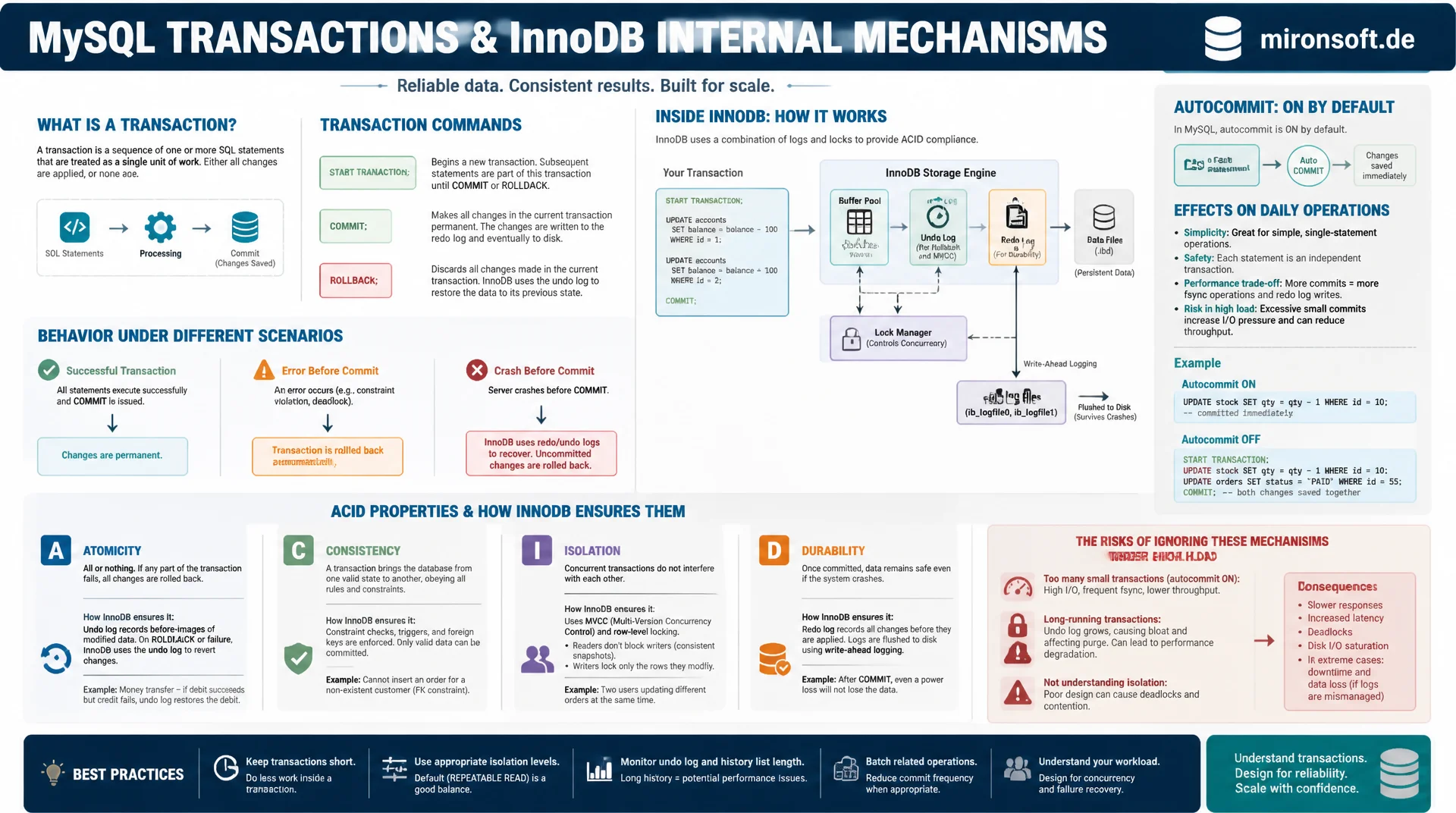
from START TRANSACTION to the redo log
Anyone who treats transactions in MySQL as mere syntax without knowing what InnoDB does behind the scenes risks inconsistent data under load. This article shows how START TRANSACTION, COMMIT and ROLLBACK actually behave, how autocommit affects everyday work, and how InnoDB technically guarantees each single ACID property, from the undo log to the redo log.
Table of contents
- 1. What ACID actually means in MySQL
- 2. START TRANSACTION, COMMIT and ROLLBACK in detail
- 3. Understanding and controlling autocommit
- 4. Atomicity: the undo log as a safety net
- 5. Consistency: constraints inside a transaction
- 6. Isolation: what one transaction sees of another
- 7. Durability: redo log and doublewrite buffer
- 8. Savepoints for partial rollback
- 9. Common mistakes in transaction practice
- 10. Summary
- 11. FAQ
1. What ACID actually means in MySQL
A transaction in MySQL is a group of SQL statements treated as a single logical unit. Either every statement in the transaction becomes permanently visible in the database, or none of them do. This all-or-nothing principle is not an academic formality, it is the only way to correctly model money transfers, stock level changes or order processes, without a server crash mid-processing leaving the data in a half-finished state.
The acronym ACID stands for atomicity, consistency, isolation and durability. In pure theory these four terms sound abstract, but in MySQL they are tied to concrete mechanisms of the InnoDB storage engine. Important to know: only InnoDB supports full transactions with all four ACID properties. The older MyISAM engine has no real transaction support, which is why production MySQL installations today rely almost exclusively on InnoDB.
This article walks step by step through the practical side of the transaction in MySQL: from the basic commands, through the often misunderstood autocommit mode, to the internal log structures with which InnoDB actually upholds each of the four ACID guarantees.
2. START TRANSACTION, COMMIT and ROLLBACK in detail
Entering an explicit transaction starts with START TRANSACTION (alternatively BEGIN). From that point on, every subsequent change is not written permanently right away, but held in a transaction-internal state visible only to the current session. Only COMMIT makes those changes visible to all other connections and permanent. ROLLBACK instead discards every change made since START TRANSACTION completely, as if it never happened.
In practice these commands are almost always combined with application-level error handling: the application opens a transaction, runs several related statements, and commits only if all of them succeeded. If a statement fails, for example due to a constraint violation, the application calls ROLLBACK. Without this pattern, partially executed changes remain in the database, which leads to inconsistent states once several related tables are involved.
-- Classic order-processing transaction
START TRANSACTION;

UPDATE inventory
SET quantity = quantity - 2
WHERE product_id = 4711;

INSERT INTO orders (customer_id, product_id, quantity, status)
VALUES (91, 4711, 2, 'pending');

-- Check stock did not go negative before committing
SELECT quantity FROM inventory WHERE product_id = 4711;

-- If quantity is still valid, persist everything at once
COMMIT;

-- If the stock check failed, undo both statements
-- ROLLBACK;
3. Understanding and controlling autocommit
MySQL runs with autocommit=1 by default. In this mode every single SQL statement is automatically treated as its own, self-contained transaction, without an explicit START TRANSACTION being required. A single UPDATE is committed immediately after execution. That is convenient for simple scripts, but becomes dangerous as soon as several statements logically belong together: without an explicit transaction, an error can occur between two autocommit statements, leaving the database in an inconsistent intermediate state.
Autocommit can be disabled for the whole session with SET autocommit = 0. MySQL then implicitly starts a new transaction at the first statement, and every further statement stays part of that transaction until an explicit COMMIT or ROLLBACK occurs. Important: once START TRANSACTION is called explicitly, the current autocommit value is irrelevant for the rest of the transaction, MySQL only commits at the explicit COMMIT.
A commonly overlooked effect: certain DDL statements such as CREATE TABLE, ALTER TABLE or DROP TABLE trigger an implicit COMMIT in MySQL, even inside a running transaction. Anyone who mixes DDL and DML in the same transaction unknowingly loses the ability to undo the DML changes with a ROLLBACK.
-- Check and control autocommit for the current session
SELECT @@autocommit;

-- Disable autocommit: subsequent statements form one implicit transaction
SET autocommit = 0;

UPDATE accounts SET balance = balance - 100 WHERE id = 1;
UPDATE accounts SET balance = balance + 100 WHERE id = 2;

-- Nothing is durable yet, both rows are only visible in this session
COMMIT;

-- Re-enable autocommit for subsequent single-statement transactions
SET autocommit = 1;
4. Atomicity: the undo log as a safety net
Atomicity guarantees that a transaction is executed either completely or not at all. InnoDB implements this through the undo log, an internal buffer that stores the previous state of a row for every change. Before InnoDB physically changes a row, the old value is written to the undo log. When a ROLLBACK occurs, InnoDB reads the undo log backwards and restores every row to exactly its original state.
The undo log serves a second purpose closely tied to both atomicity and isolation: it provides the data basis for consistent reads under MVCC, InnoDB's multi-version concurrency control. Other transactions reading a row while it is being changed see the old, consistent version through the undo log, instead of accessing partially modified data. Only after the COMMIT and once all older active transactions have finished does the purge thread finally remove the undo log entry.
This principle also applies during a server crash in the middle of a transaction: at the next start, InnoDB reads both the redo log and the undo log as part of crash recovery, reverts any changes that were not yet committed, and thereby ensures that no incomplete transaction survives.
5. Consistency: constraints inside a transaction
Consistency means that a transaction moves the database from one valid state to another valid state, defined through constraints such as primary keys, foreign keys, unique indexes and check constraints. If a statement inside the transaction violates one of these rules, exactly that statement fails. The transaction itself stays open, it is up to the application to either continue with a corrected statement or trigger a ROLLBACK.
Foreign key constraints are a particularly relevant case because they act across tables. If a transaction inserts a record referencing a non-existent foreign key, InnoDB prevents the insert immediately, regardless of the isolation level. That protects against orphaned records, but has an important side effect: InnoDB must internally acquire a lock on the referenced row while checking the foreign key, which can cause lock conflicts under heavily parallel workloads.
-- Consistency enforced through constraints inside a transaction
START TRANSACTION;

-- Fails immediately if customer_id 99999 does not exist
-- in the referenced customers table
INSERT INTO orders (customer_id, total_amount)
VALUES (99999, 149.90);

-- If the foreign key check fails, the statement is rejected,
-- the transaction stays open for the application to decide
ROLLBACK;
6. Isolation: what one transaction sees of another
Isolation determines how much parallel running transactions are allowed to affect one another. MySQL offers four isolation levels, READ UNCOMMITTED, READ COMMITTED, REPEATABLE READ and SERIALIZABLE, with InnoDB defaulting to REPEATABLE READ. This article deliberately focuses on the other three ACID properties, a separate article in this series is dedicated exclusively to isolation levels and their practical differences in detail.
For understanding transactions, the core idea is enough at this point: InnoDB uses a consistent snapshot for REPEATABLE READ, created at the first read operation of the transaction. All subsequent reads within the same transaction see the data as it looked at that point in time, even if parallel transactions commit changes in the meantime. Write operations, in contrast, always see the latest committed state, which in practice causes confusion when read and write behaviour inside the same transaction do not appear consistent.
7. Durability: redo log and doublewrite buffer
Durability guarantees that a once committed transaction survives even a server crash right afterwards. InnoDB achieves this through the redo log, a sequentially written log file into which every change is written before it is applied to the actual data pages in the buffer pool. This principle is called write-ahead logging: the log is persisted first, the actual data pages can be written later and more efficiently in the background.
How strict this behaviour is gets controlled by the parameter innodb_flush_log_at_trx_commit. The value 1, the default, writes the redo log to disk immediately on every COMMIT and thereby guarantees full durability, though with noticeable I/O overhead. The value 2 writes the log to the operating system, but flushes it only once per second, which can lose data on an operating system crash, though not on a pure MySQL crash. The value 0 also flushes only once per second and thereby risks losing the last second of transactions even on a MySQL crash.
The doublewrite buffer complements the redo log with an additional protection mechanism: before InnoDB writes a data page to its final location, it first writes it completely into a contiguous buffer area. If the write operation is interrupted in the middle of a page, for example due to a power outage, InnoDB can use the intact copy from the doublewrite buffer instead of risking a corrupt, half-written data page.
-- Inspect and tune durability behaviour
SHOW VARIABLES LIKE 'innodb_flush_log_at_trx_commit';
SHOW VARIABLES LIKE 'innodb_doublewrite';

-- Full durability (default): fsync on every commit
SET GLOBAL innodb_flush_log_at_trx_commit = 1;

-- Relaxed durability for bulk-load jobs, restore after the job
-- SET GLOBAL innodb_flush_log_at_trx_commit = 2;
8. Savepoints for partial rollback
Not every failed statement inside a transaction should necessarily discard the entire transaction. With SAVEPOINT name you mark a point inside the running transaction to which you can later jump back specifically, without losing the whole transaction. ROLLBACK TO SAVEPOINT name only undoes the changes made since that savepoint, all changes made earlier in the transaction remain intact and can be committed at the end.
Savepoints are especially useful in complex batch processing, for example when importing several records within one transaction: if importing a single record fails due to a constraint violation, you can jump back specifically to a savepoint placed before that record, skip the faulty record, and continue with the next one, without losing records that were already processed successfully.
START TRANSACTION;

INSERT INTO import_log (batch_id, item) VALUES (1, 'item-a');
SAVEPOINT before_item_b;

INSERT INTO import_log (batch_id, item) VALUES (1, 'item-b-invalid');
-- This insert violates a constraint, roll back only this part
ROLLBACK TO SAVEPOINT before_item_b;

INSERT INTO import_log (batch_id, item) VALUES (1, 'item-c');

-- item-a and item-c persist, item-b was discarded
COMMIT;
9. Common mistakes in transaction practice
The most common mistake in practice is the long running transaction. A transaction that stays open for a while, for example because a slow API call to an external service happens between two statements, keeps its associated undo log snapshot alive and prevents InnoDB from cleaning up old row versions. Under heavy write load, the undo tablespace grows uncontrollably as a result, and the database slows down noticeably for all sessions, not only the one responsible.
A second common mistake is forgetting error handling: a developer opens a transaction, a statement fails, the application catches the exception but calls neither COMMIT nor ROLLBACK. The transaction stays hanging in the database, holding locks and snapshots until the connection is eventually closed. In connection pool environments, such an orphaned transaction can permanently block a pooled connection.
A third mistake concerns implicit commits caused by DDL: anyone who tries to both alter table structure and manipulate data within one transaction, relying on a full ROLLBACK in case of an error, gets a surprise: the DDL statement already committed before the error even occurred. DDL and DML should therefore always run in separate transactions.
| innodb_flush_log_at_trx_commit | Behaviour | Risk on crash | Use case |
|---|---|---|---|
| 1 (default) | fsync on every COMMIT | no data loss | production systems, financial data |
| 2 | log to OS, fsync once per second | loss on OS crash | high throughput, MySQL crash tolerable |
| 0 | fsync once per second, no write on COMMIT | up to 1s loss even on MySQL crash | bulk loads, non-critical data |
| 1 with binlog sync=1 | fsync redo log and binlog | no data loss, even with replication | primary with replicas |
The choice of innodb_flush_log_at_trx_commit is a direct trade-off between durability and throughput. For every transaction involving money, orders or legally relevant data, the default value of 1 is the only defensible choice. For pure bulk imports whose data source would be reloaded anyway in case of a failure, a temporary relaxation can noticeably increase throughput.
Mironsoft
MySQL performance, data modelling and InnoDB tuning
Transactions that stay consistent under load?
We review existing transaction logic, uncover long running transactions and missing error handling, and configure InnoDB parameters to match your consistency and throughput needs.
Transaction audit
Identify long running transactions and missing ROLLBACK paths
InnoDB tuning
Tune redo log, buffer pool and flush behaviour for your workload
Consulting
Define clean transaction boundaries in your application code
10. Summary
A transaction in MySQL is more than START TRANSACTION and COMMIT. Atomicity is guaranteed by the undo log, which keeps the original state of every row available for a possible rollback. Consistency is enforced by InnoDB through constraints such as foreign keys, which immediately reject any violating statement. Isolation is determined by the REPEATABLE READ snapshot, which decides what a transaction sees of parallel changes. Durability is secured by the redo log together with the doublewrite buffer, controlled through innodb_flush_log_at_trx_commit.
Anyone who understands and deliberately uses autocommit, who uses savepoints for complex batch processing, and who avoids long running transactions as well as implicit commits caused by DDL, runs transactions in MySQL the way InnoDB was designed for: robust, traceable and without hidden side effects on parallel sessions.
Transactions and ACID in MySQL: the essentials at a glance
Basic commands
START TRANSACTION, COMMIT, ROLLBACK define the boundaries of a transaction, independent of the autocommit status.
Autocommit
Enabled by default, every statement is its own transaction. Disable explicitly for related changes.
Undo & redo log
The undo log secures atomicity and MVCC. The redo log with innodb_flush_log_at_trx_commit=1 secures durability.
Practical pitfalls
Avoid long running transactions, forgotten ROLLBACK calls and implicit commits caused by DDL.