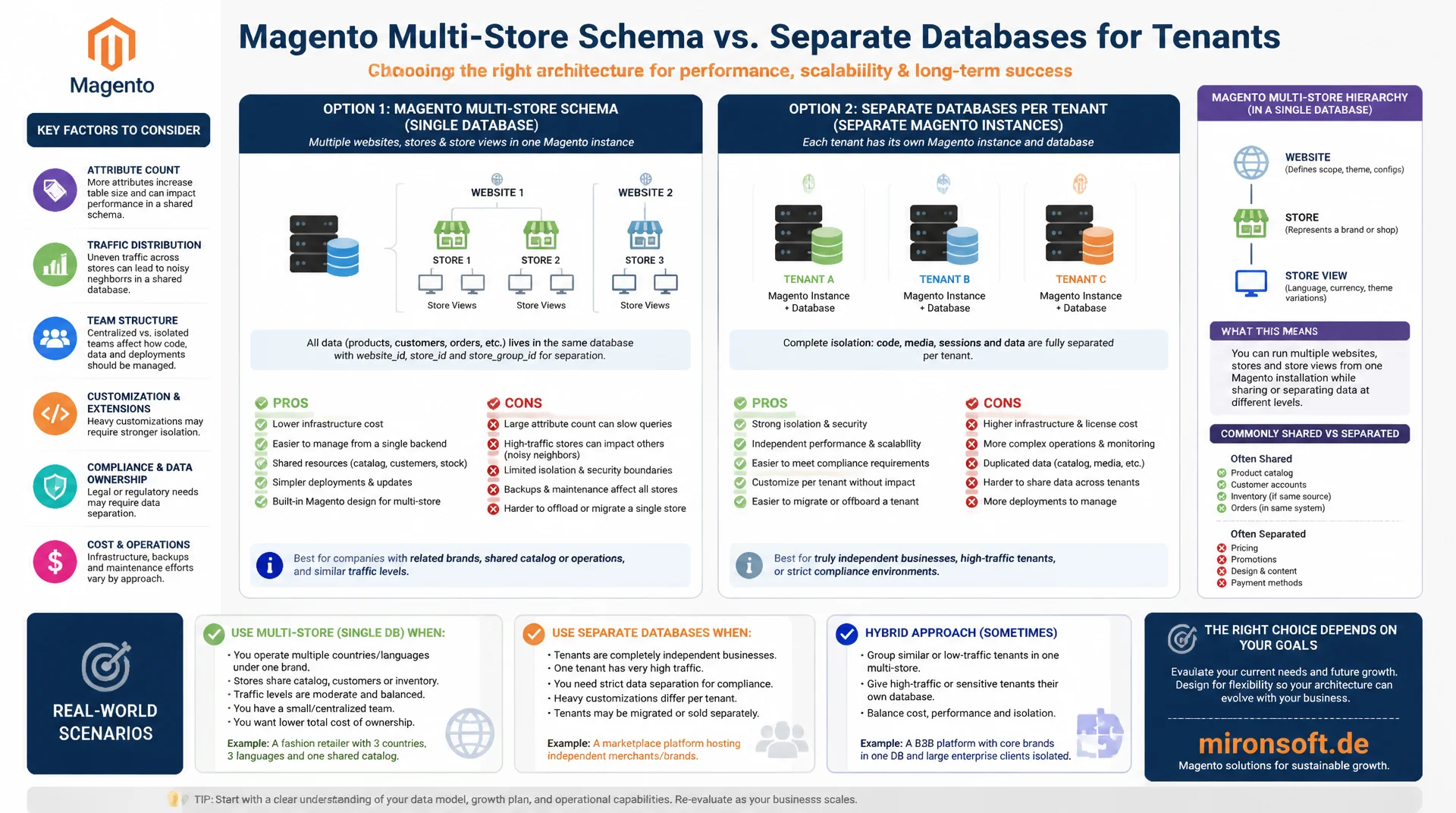
one database for many websites, or several separate ones?
Magento supports multiple websites, stores, and store views in a single database, but as the number of tenants grows, the question arises whether this multi-store schema still holds up or whether separate databases per tenant make a better architecture. The answer depends on attribute count, traffic distribution, and team structure, not on a blanket best practice.
Table of Contents
- 1. Single database, multiple websites: Magento's default model
- 2. Store scope in EAV: how store_id drives attribute values
- 3. Separate databases per tenant: when the effort pays off
- 4. Table growth with many stores in a multi-store schema
- 5. Indexer strategies for multi-store: partial vs. full
- 6. Connection pooling and read replicas for load distribution
- 7. Pre-sharding steps: split databases for checkout and catalog
- 8. Migration paths: from single-DB to multi-DB architecture
- 9. Monitoring per store: which metrics matter
- 10. Summary
- 11. FAQ
1. Single database, multiple websites: Magento's default model
Magento is built from the ground up for a multi-store schema with a single database. The website, store, and store view hierarchy is represented through the store_website, store_group, and store tables, while product data, categories, and customers live in shared tables and are differentiated through scope-specific values. For most multi-brand or multi-country setups with up to twenty or thirty stores, this model performs well enough and is far simpler to operate than separate databases.
The big advantage of the default model lies in the shared codebase and shared catalog data: a product exists once in catalog_product_entity and is only given different prices, descriptions, or visibility per store. A multi-store schema on this foundation drastically reduces data redundancy, because master data like weight, manufacturer, or SKU stays identical across stores, and only attributes that actually differ per store get stored separately.
The downside only shows up at scale: all stores share the same connection pool, the same buffer pool, and the same locks. A compute-heavy reindex run for store A can cause noticeable latency for store B if both use the same MySQL instance. This mutual interference is the central trade-off every multi-store schema with a shared database accepts.
2. Store scope in EAV: how store_id drives attribute values
Magento's EAV model (Entity-Attribute-Value) stores store-specific attribute values in separate rows with a store_id column. An attribute with "Store View" scope creates its own row for each store view in tables like catalog_product_entity_varchar or catalog_product_entity_int, while store_id = 0 represents the default value that applies when no store-specific override exists. This behavior is the technical core of every multi-store schema in Magento.
-- Resolve a store-specific attribute value with fallback to default
-- Classic pattern for EAV lookups in a multi-store schema
SELECT
    COALESCE(store_value.value, default_value.value) AS resolved_value,
    p.entity_id,
    p.sku
FROM catalog_product_entity p
LEFT JOIN catalog_product_entity_varchar default_value
    ON default_value.entity_id = p.entity_id
    AND default_value.attribute_id = 73  -- e.g. meta_description
    AND default_value.store_id = 0
LEFT JOIN catalog_product_entity_varchar store_value
    ON store_value.entity_id = p.entity_id
    AND store_value.attribute_id = 73
    AND store_value.store_id = 5         -- specific store view
WHERE p.entity_id IN (1024, 1025, 1026);

-- Count store-specific overrides per attribute, an indicator of data growth
SELECT attribute_id, COUNT(*) AS overrides
FROM catalog_product_entity_varchar
WHERE store_id != 0
GROUP BY attribute_id
ORDER BY overrides DESC
LIMIT 10;
The more store views a multi-store schema runs, and the more attributes are set to store-view scope instead of website or global scope, the more the EAV value tables grow linearly with the number of stores. An attribute with store-view scope on fifty store views generates up to fifty times as many rows as an attribute with global scope. This is why deliberately choosing the right scope when creating attributes is one of the most important architectural decisions in any multi-store schema.
3. Separate databases per tenant: when the effort pays off
A shared multi-store schema reaches its limits once tenants need completely different catalogs, independent scaling requirements, or strict data separation for legal reasons. In such cases, a dedicated Magento instance with its own database per tenant is often the more robust choice, even though it multiplies operational effort, since every instance needs its own deployments, backups, and monitoring.
A typical decision criterion: once a single tenant accounts for roughly thirty to forty percent or more of total traffic or catalog depth, that often justifies a dedicated database, because resource conflicts with other tenants otherwise become disproportionately noticeable. For B2B marketplaces with strictly separated tenants, for example different legal entities with separate accounting, a separate database is often mandated by compliance regardless of the pure performance argument.
4. Table growth with many stores in a multi-store schema
Beyond the EAV value tables, index tables like catalog_product_index_price and catalog_product_index_eav also grow proportionally to the number of store-website combinations in a multi-store schema, because Magento keeps separate price index rows for every combination of customer group, website, and product. With twenty stores and five customer groups, this multiplication can quickly turn a catalog table with one million products into an index table with a hundred million rows.
-- Estimate row growth of the price index table per website
SELECT
    website_id,
    customer_group_id,
    COUNT(*) AS index_rows
FROM catalog_product_index_price
GROUP BY website_id, customer_group_id
ORDER BY index_rows DESC;

-- Keep an eye on table sizes in a multi-store schema
SELECT
    table_name,
    ROUND(data_length / 1024 / 1024, 1) AS data_mb,
    ROUND(index_length / 1024 / 1024, 1) AS index_mb,
    table_rows
FROM information_schema.tables
WHERE table_schema = 'magento_prod'
  AND table_name LIKE 'catalog_product_index%'
ORDER BY data_length DESC;
This observation is an important input for the architecture decision: a multi-store schema with many customer groups and many websites amplifies index table growth disproportionately. Teams that recognize this combinatorics early can push back through consolidating unused customer groups or through targeted partitioning of the index tables by website_id, before the tables become unwieldy.
5. Indexer strategies for multi-store: partial vs. full
In the default mode, Magento often reindexes all affected store-website combinations together on a change, which leads to long runtimes in a large multi-store schema, even when only a single store is affected. The "Update on Schedule" mode spreads reindexing across cron jobs and reduces load spikes, but does not change the fundamental need to recompute every store combination.
For very large multi-store schemas, it is worth checking whether a custom indexer trigger can be implemented that only recomputes the actually affected store-website combination instead of all of them by default. That reduces reindex load significantly, but requires careful testing, since side effects on shared attributes are easy to miss. In practice, this optimization tends to show a measurable effect on total reindex time only from around fifteen to twenty active stores onward.
# Observe indexer runtime per store-website combination
bin/magento indexer:status

# Reindex a single indexer in schedule mode with timing
time bin/magento indexer:reindex catalog_product_price

# Run the indexer cron group isolated from other maintenance jobs
bin/magento cron:run --group="index"
6. Connection pooling and read replicas for load distribution
A proven pattern for relieving a growing multi-store schema is setting up read replicas for read-heavy catalog and search queries, while write operations continue to go to the primary server. Magento has supported separate connection strings for checkout, sales, and default connections in env.php since version 2.3, which can be combined with a read replica configuration.
-- env.php (excerpt): separate connection for read-only catalog queries
'db' => [
    'connection' => [
        'default' => [
            'host' => 'db-primary.mironsoft-shop.internal',
            'dbname' => 'magento_prod',
            'username' => 'magento_rw',
            'password' => '***',
        ],
        'catalog_read' => [
            'host' => 'db-replica-01.mironsoft-shop.internal',
            'dbname' => 'magento_prod',
            'username' => 'magento_ro',
            'password' => '***',
        ],
    ],
],

-- Check replication lag for a store-relevant replica
SHOW REPLICA STATUS\G
For a multi-store schema with a heavily uneven traffic distribution between stores, a dedicated replica per traffic cluster also pays off, for instance one replica for all European stores and one for all US stores, reducing latency through geographic proximity to the respective data center. This split stays architecturally within the single-database model, but distributes read load intelligently.
7. Pre-sharding steps: split databases for checkout and catalog
Before a team takes the big step to fully separate databases per tenant, Magento offers an intermediate stage with the "Split Database" feature: checkout data (quote tables), sales data (sales_order tables), and the rest of the core catalog can be split across separate database connections, while everything remains under one logical Magento instance. This pattern specifically relieves the most write-heavy areas of a multi-store schema, without taking on the full complexity of a multi-tenant architecture.
The split mainly reduces lock contention: a high-traffic checkout with many concurrent quote updates no longer blocks the same resources as a compute-heavy catalog reindex. For multi-store schemas with very high checkout load, for example during sale events, this split is often the most effective first step, before separate databases per tenant even need to be considered.
8. Migration paths: from single-DB to multi-DB architecture
The switch from a shared multi-store schema to separate databases rarely happens as a single big-bang cut in practice, it happens step by step: first, one tenant is exported to its own database on a trial basis and its access layer is switched via a feature flag, while all other tenants remain unchanged in the multi-store schema. Only after successful validation do further tenants follow in controlled waves.
For the actual data export, mysqldump with filtered WHERE clauses on website_id or store_id works for smaller data volumes, while a machine-generated ETL script with batch processing is more robust for very large catalogs. In every case, referential integrity between catalog, customer, and order data must be explicitly verified during migration, because a multi-store schema is often more tightly interwoven than it appears at first glance, due to shared references such as shared customer accounts across multiple websites.
# Filter store-specific order data for exporting a single tenant
mysqldump --single-transaction --no-create-info \
  --where="store_id=5" \
  magento_prod sales_order sales_order_item \
  > tenant-05-sales-export.sql

# Import catalog data for the target tenant into the new database
mysql -h db-tenant-05.mironsoft-shop.internal magento_tenant_05 < tenant-05-sales-export.sql

# After import: verify row count against the source
mysql -e "SELECT COUNT(*) FROM sales_order WHERE store_id=5" magento_prod
mysql -h db-tenant-05.mironsoft-shop.internal -e "SELECT COUNT(*) FROM sales_order" magento_tenant_05
9. Monitoring per store: which metrics matter
A mature monitoring setup for a multi-store schema breaks down classic MySQL metrics such as query latency and lock wait time by store or website, instead of only looking at them globally. Without this breakdown, it stays invisible that one particularly active store is dragging up the average response time for every other store.
In practice, this can be implemented via query tagging: every query issued by Magento is tagged with a SQL comment containing the calling store ID, so tools like pt-query-digest can filter slow query analysis by store. In a growing multi-store schema, this granularity is the decisive difference between reactive debugging after an incident and proactive capacity management that catches bottlenecks before customers feel them.
| Criterion | Single Database Multi-Website | Separate Databases per Tenant |
|---|---|---|
| Operational effort | Low, one instance | High, own deployment per tenant |
| Data redundancy | Low, shared master data | Higher, no shared catalog data |
| Isolation under load spikes | Mutual interference possible | Fully isolated |
| Compliance / data separation | Only via ACL, not physically separated | Physically separated, auditable |
| Recommendation | Up to ~20-30 stores, similar catalogs | Large tenants, legal separation |
10. Summary
A well planned multi-store schema with a shared database is the right choice for most Magento installations with up to twenty or thirty stores, because it minimizes data redundancy and keeps operational effort low. The critical levers are deliberate handling of attribute scopes in the EAV model, targeted read replicas for read load, and an indexer strategy that does not blindly recompute every store combination.
Once a single tenant claims disproportionate traffic or catalog depth, or legal data separation is required, a dedicated database per tenant becomes the better architecture, even though it raises operational effort. Magento's split database feature offers a pragmatic middle ground here, relieving write-heavy areas like checkout and sales without taking on the full complexity of a multi-tenant architecture with fully separate databases.
Multi-Store Schema Strategies for Magento, the essentials at a glance
Choose EAV scope deliberately
Store-view scope multiplies rows with the number of stores, global scope for master data saves massive storage.
Use read replicas
Separate connections for read-only catalog queries relieve the multi-store schema without duplicating the architecture.
Split database as a middle ground
Move checkout and sales to their own connection before considering fully separate databases.
Monitoring per store
Query tagging with store ID reveals which tenant dominates resources in the multi-store schema.