from report_event to your own cleanup script
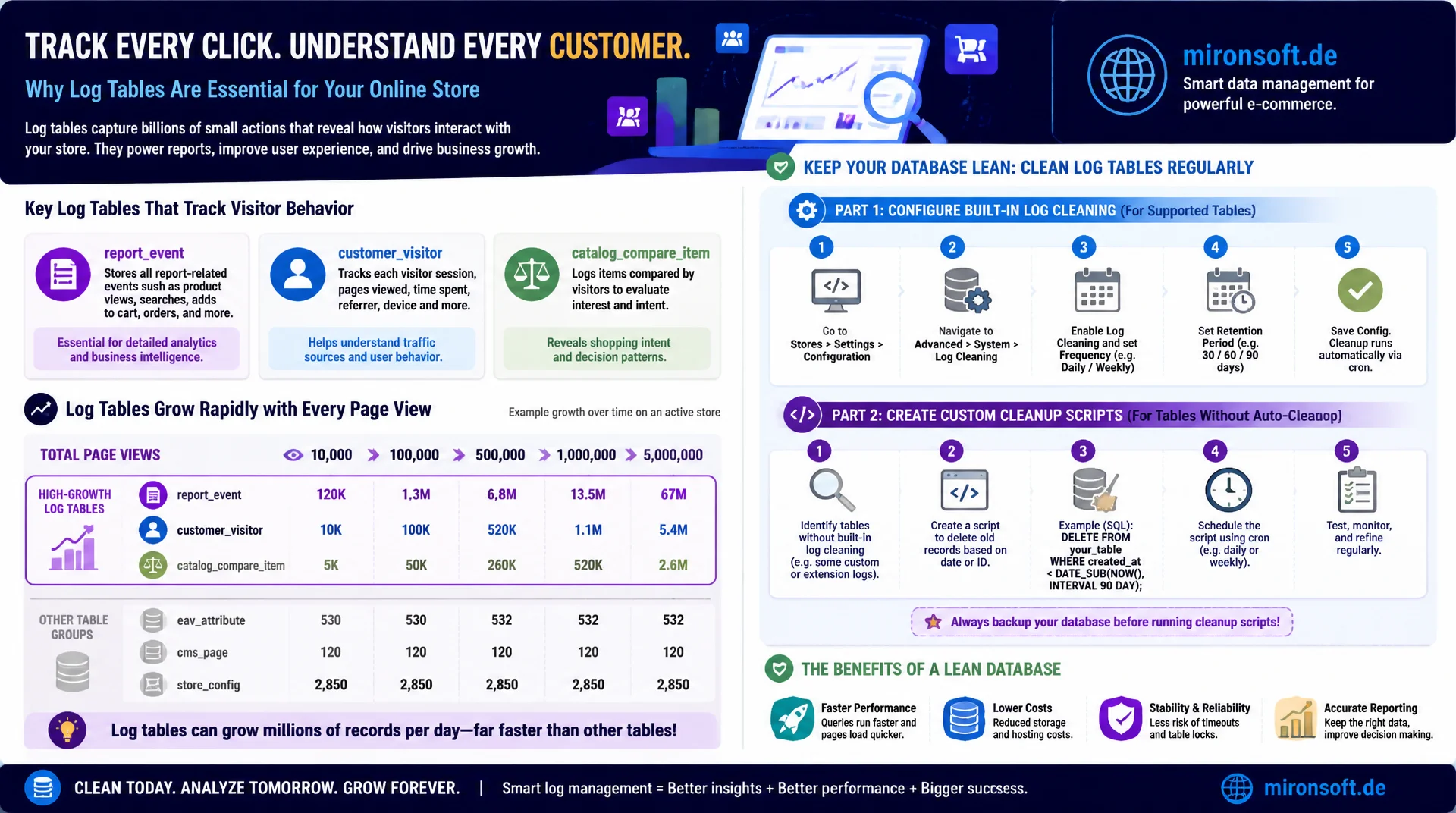
Log tables like report_event, customer_visitor, and catalog_compare_item log visitor behavior and grow with every page view, often faster than any other table group in the store. Once you configure built-in log cleaning correctly and build custom scripts for tables without automatic cleanup, you keep the database lean without giving up important reporting data.
Table of Contents
- 1. Overview: which tables count as log tables
- 2. report_event in detail
- 3. customer_visitor and customer_log
- 4. catalog_compare_item: orphaned comparison lists
- 5. Magento's built-in log cleaning
- 6. bin/magento CLI commands for log cleaning
- 7. Custom cleanup scripts for unprotected tables
- 8. Performance impact on reports and backups
- 9. Automation: cron setup and monitoring
- 10. Summary
- 11. FAQ
1. Overview: which tables count as log tables
In Magento, several log tables belong to the group of logging, behavior related tables that write rows on every page view or customer interaction. These include report_event for general events like product views and category visits, report_viewed_product_index and report_compared_product_index for aggregated product interactions, customer_visitor and customer_log for session tracking, and catalog_compare_item and historically catalog_compare_item_index for comparison lists.
These log tables differ fundamentally from transactional tables like sales_order, because their content is rarely needed directly for daily business operations, but can be valuable for reporting, analytics, and marketing evaluations. This dual role is exactly what makes cleanup tricky: deleting too aggressively destroys reporting foundations, deleting too conservatively leads to uncontrolled database growth. Magento provides built-in cleanup for some of these log tables, but not for others, which requires a differentiated strategy.
Important for context: not every log table grows at the same rate. report_event can generate hundreds of thousands of rows daily on a high traffic store, while catalog_compare_item grows noticeably slower but still reaches relevant sizes over years due to missing cleanup. This differing growth dynamic determines which table should be addressed first.
-- Overview of common Magento log tables and their current size
SELECT table_name,
       table_rows,
       ROUND((data_length + index_length) / 1024 / 1024, 1) AS size_mb
FROM information_schema.TABLES
WHERE table_schema = 'magento'
  AND table_name IN (
    'report_event', 'report_viewed_product_index', 'report_compared_product_index',
    'customer_visitor', 'customer_log', 'catalog_compare_item'
  )
ORDER BY size_mb DESC;
2. report_event in detail
The report_event table is the central log table for behavioral data in Magento. It logs events like product views, cart actions, and comparison list interactions with the columns event_type_id, object_id, subject_id, subtype, and logged_at. This raw data serves as the basis for the aggregated reports "Most Viewed Products" and "Most Compared Products" in the admin area under Reports > Products.
The decisive point: once the aggregation into report_viewed_product_index and report_compared_product_index has run, the raw data in report_event is no longer needed for the pure reporting function. This is exactly why Magento offers built-in cleanup for report_event, which deletes the raw data after a configurable retention period without affecting the aggregated evaluations. On a store with several tens of thousands of page views per day, report_event can reach several million rows within a few months without active cleanup.
DESCRIBE report_event;
-- +---------------+------------------+------+-----+---------+----------------+
-- | Field         | Type             | Null | Key | Default | Extra          |
-- +---------------+------------------+------+-----+---------+----------------+
-- | event_id      | int(10) unsigned | NO   | PRI | NULL    | auto_increment |
-- | logged_at     | timestamp        | NO   | MUL | CURRENT |                |
-- | event_type_id | smallint unsigned| NO   | MUL | 0       |                |
-- | object_id     | int(10) unsigned | NO   |     | 0       |                |
-- | subject_id    | int(10) unsigned | NO   |     | 0       |                |
-- | subtype       | smallint unsigned| NO   |     | 0       |                |
-- | store_id      | smallint unsigned| NO   |     | 0       |                |
-- +---------------+------------------+------+-----+---------+----------------+

-- Row count growth rate estimate over the last 7 days
SELECT DATE(logged_at) AS log_date, COUNT(*) AS events
FROM report_event
WHERE logged_at > DATE_SUB(NOW(), INTERVAL 7 DAY)
GROUP BY DATE(logged_at);
3. customer_visitor and customer_log
The customer_visitor table logs every visitor session, regardless of whether the visitor is logged in or browsing as a guest. On modern stores with high bot activity and recurring crawler access, this log table often grows faster than the actual human visitor count would suggest. Every session creates a row with visitor_id, session_id, last_visit_at, and other session metadata, which has no operational value once the session expires.
customer_log adds login related data such as last login time and logout timestamp for registered customers. Unlike customer_visitor, customer_log has a lower growth rate because only logged in customers create entries, but it can still grow meaningfully on a store with a high returning visitor rate. Both tables are good candidates for aggressive cleanup, because their value drops to practically zero after a few days, unless a custom reporting feature explicitly relies on historical session data.
4. catalog_compare_item: orphaned comparison lists
The catalog_compare_item table stores which products a visitor has added to the comparison list, linked via visitor_id for guests and customer_id for logged in customers. Unlike report_event or customer_visitor, this log table has no built-in automatic cleanup in Magento by default, which makes it a classic candidate for orphaned growth.
A guest visitor who compares three products and then leaves the site leaves three rows in catalog_compare_item that persist forever, unless explicitly cleaned up via the associated visitor_id and its session expiry in customer_visitor. Over the years, this accumulates millions of orphaned comparison list entries that have no discernible value for reporting or operations, but still get scanned on every query for a visitor's current comparison list.
-- Find catalog_compare_item rows tied to visitor sessions that no longer exist
SELECT COUNT(*) AS orphaned_compare_items
FROM catalog_compare_item cci
LEFT JOIN customer_visitor cv ON cv.visitor_id = cci.visitor_id
WHERE cci.customer_id IS NULL
  AND cv.visitor_id IS NULL;
5. Magento's built-in log cleaning
Magento offers a central configuration under Stores > Configuration > Advanced > System > Log Cleaning that controls the retention period in days (default 180) as well as the execution time (default 2 a.m.) for report_event, report_viewed_product_index, report_compared_product_index, and related tables. If this feature is enabled, a cron job (catalog_product_view_cleanup and related) runs regularly and deletes entries older than the configured period.
The most common mistake in practice is that this built-in feature is simply disabled in the admin configuration, often because it was never explicitly enabled during initial store setup, checked for example with bin/magento config:show system/log/enabled. A second common mistake is an overly long retention period, such as 365 days, even though the aggregated reports would be sufficiently meaningful based on 90 days. Enabling and correctly configuring this built-in log cleaning is the most effective first step against growing log tables in Magento.
6. bin/magento CLI commands for log cleaning
Besides the cron driven automatic cleanup, Magento offers the CLI command bin/magento log:clean, which triggers the configured log cleanup manually and immediately, independent of the nightly cron schedule. This is especially useful right after enabling log cleaning for the first time, when months of unclean data already sit in report_event and you do not want to wait for the next nightly run.
The command accepts an optional number of days as a parameter to override the retention period for that single invocation, without changing the permanent configuration. This is practical for a one time, more aggressive cleanup on an already heavily bloated log table, followed by a more moderate permanent setting for regular operation.
# Enable log cleaning and set retention to 90 days
bin/magento config:set system/log/enabled 1
bin/magento config:set system/log/save_days 90

# Trigger log cleanup immediately using the configured retention period
bin/magento log:clean

# Override retention for this single run (e.g. aggressive one-time cleanup)
bin/magento log:clean --days 30

# Verify the effect afterwards
bin/magento cache:flush
7. Custom cleanup scripts for unprotected tables
For log tables without built-in cleanup, like catalog_compare_item and partly customer_visitor in older Magento versions, a dedicated cleanup script is necessary. Such a script should work in clearly separated, batched steps: first identify expired customer_visitor sessions, then remove orphaned catalog_compare_item rows based on that, each with an upper limit per run to avoid long locks.
What matters with custom scripts is formulating the deletion condition precisely, so that no active comparison lists of logged in customers get accidentally deleted. A filter on customer_id IS NULL ensures only guest comparison lists are affected, while logged in customers keep their comparison list across sessions.
-- Custom cleanup for catalog_compare_item without built-in Magento support
-- Step 1: remove compare items tied to expired guest visitor sessions
DELETE cci FROM catalog_compare_item cci
LEFT JOIN customer_visitor cv ON cv.visitor_id = cci.visitor_id
WHERE cci.customer_id IS NULL
  AND cv.visitor_id IS NULL
LIMIT 5000;

-- Step 2: remove stale customer_visitor rows older than 30 days
DELETE FROM customer_visitor
WHERE last_visit_at < DATE_SUB(NOW(), INTERVAL 30 DAY)
LIMIT 5000;
8. Performance impact on reports and backups
Bloated log tables have a measurable effect on performance in several areas. In the admin area, the "Most Viewed Products" and "Most Compared Products" reports slow down, because the underlying aggregation runs over a larger raw data set in report_event. For backups, mysqldump time extends proportionally to total size, and heavily grown log tables can make up a disproportionate share of total database size on a store without consistent cleanup.
A less obvious effect concerns daily admin usage: queries that join customer_visitor or catalog_compare_item, for example to display a visitor's current comparison list, become slower with millions of orphaned rows, even when the relevant result set is small, because MySQL has to scan more index entries. Regular cleanup of these log tables is therefore not just tidying up, it is a direct performance measure.
9. Automation: cron setup and monitoring
The most sustainable solution against growing log tables is the combination of enabled built-in log cleaning for the tables designed for it, and a dedicated cron job for tables without built-in support. This custom cron job can be registered via a crontab.xml in a custom module or set up as a system cron entry outside Magento, what matters is that it runs regularly and outside peak hours.
In addition, monitoring should verify the effectiveness of the cleanup by logging the size of the most important log tables weekly and alerting on unexpected growth. This uncovers when built-in log cleaning got silently disabled after an update or a configuration change, before the table starts growing uncontrolled again.
Comparison: log tables and their cleanup options
| Table | Growth rate | Built-in cleanup | Recommended action |
|---|---|---|---|
| report_event | Very high | Yes, log cleaning | Enable, 90 day retention |
| customer_visitor | High | Partial | Custom script, 30 days |
| catalog_compare_item | Medium | No | Custom script required |
| customer_log | Low | Partial | Custom script if needed |
Mironsoft
Magento log cleanup and database maintenance
Log tables grown out of control?
We configure built-in log cleaning correctly, build custom scripts for unprotected tables like catalog_compare_item, and set up monitoring against renewed uncontrolled growth.
Log audit
Check report_event, customer_visitor, and catalog_compare_item
Cleanup configuration
Enable log cleaning and set sensible retention periods
Custom scripts
Batched cleanup for tables without built-in support
10. Summary
Log tables like report_event, customer_visitor, and catalog_compare_item log visitor behavior and grow with every page view, often faster than any other table group in a Magento store. Magento provides built-in log cleaning for some of these tables via Stores > Configuration > Advanced > System, which is often not enabled or configured with an overly long retention period.
For log tables without built-in support, like catalog_compare_item, a dedicated, batched cleanup script is necessary that precisely identifies orphaned entries without endangering active customer data. The combination of enabled log cleaning, bin/magento log:clean for immediate cleanup, and custom scripts for unprotected tables keeps the database lean and measurably improves the performance of reports, backups, and everyday admin queries.
Cleaning Up Log and Report Tables: The Essentials at a Glance
Built-in cleaning
Enable Stores > Configuration > Advanced > System > Log Cleaning for report_event and related tables.
CLI command
bin/magento log:clean triggers the configured cleanup immediately, with an optional --days override.
Unprotected tables
catalog_compare_item needs its own cleanup script, precisely filtered on guest sessions.
Monitoring
Weekly size logging catches disabled cleaning after updates early.